ignition Seat Ibiza ST 2014 Workshop Manual
[x] Cancel search | Manufacturer: SEAT, Model Year: 2014, Model line: Ibiza ST, Model: Seat Ibiza ST 2014Pages: 240, PDF Size: 4.89 MB
Page 132 of 240
Operation
Driving a car with an automatic
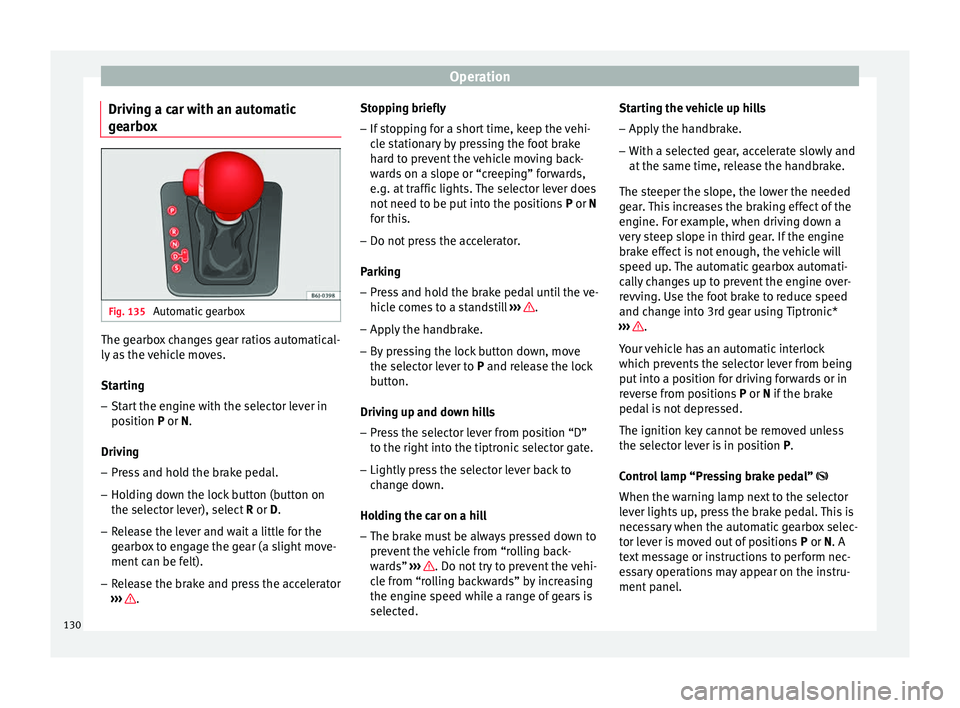
gearbox Fig. 135
Automatic gearbox The gearbox changes gear ratios automatical-
ly as the vehicle moves.
Starting
– Start the engine with the selector lever in
position P
or N.
Driving – Press and hold the brake pedal.
– Holding down the lock button (button on
the selector lever), select R or D
.
– Release the lever and wait a little for the
gearbox to engage the gear (a slight move-
ment can be felt).
– Release the brake and press the accelerator
››› . Stopping briefly
– If stopping for a short time, keep the vehi-
cle stationary by pressing the foot brake
hard to prevent the vehicle moving back-
wards on a slope or “creeping” forwards,
e.g. at traffic lights. The selector lever does
not need to be put into the positions P or N
f or thi
s.
– Do not press the accelerator.
Parking
– Press and hold the brake pedal until the ve-
hicle comes to a standstill ››› .
– Apply the handbrake.
– By pressing the lock button down, move
the selector lever to P
and release the lock
b
utton.
Driving up and down hills
– Press the selector lever from position “D”
to the right into the tiptronic selector gate.
– Lightly press the selector lever back to
change down.
Holding the car on a hill – The brake must be always pressed down to
prevent the vehicle from “rolling back-
wards” ››› . Do not try to prevent the vehi-
cle from “rolling backwards” by increasing
the engine speed while a range of gears is
selected. Starting the vehicle up hills
– Apply the handbrake.
– With a selected gear, accelerate slowly and
at the same time, release the handbrake.
The steeper the slope, the lower the needed
gear. This increases the braking effect of the
engine. For example, when driving down a
very steep slope in third gear. If the engine
brake effect is not enough, the vehicle will
speed up. The automatic gearbox automati-
cally changes up to prevent the engine over-
revving. Use the foot brake to reduce speed
and change into 3rd gear using Tiptronic*
››› .
Your vehicle has an automatic interlock
which prevents the selector lever from being
put into a position for driving forwards or in
reverse from positions P or N
if the brake
ped
al is not depressed.
The ignition key cannot be removed unless
the selector lever is in position P
.
Control lamp “Pressing brake pedal”
When the warning lamp next to the selector
lever lights up, press the brake pedal. This is
necessary when the automatic gearbox selec-
tor lever is moved out of positions P
or N. A
text message or instructions to perform nec-
essary operations may appear on the instru-
ment panel.
130
Page 134 of 240
Operation
– Press the left paddle lever - towards the
steering wheel to change down ››› Fig. 137.
Using the paddle levers on the steering
wheel, you can access manual driving mode
regardless of the pre-selected driving mode.
General information about driving in
tiptronic mode
When accelerating, the automatic gearbox /
DSG automatic gearbox goes into a higher
gear a little before the engine reaches its
maximum permitted revolutions.
If a lower gear is selected, the automatic
gearbox / DSG automatic gearbox will only
change down when the engine cannot go
over its maximum permitted revolutions.
If “tiptronic” is selected whilst the vehicle is
in motion and the automatic gearbox / DSG
automatic gearbox is in third gear and selec-
tor lever position D
, “tiptronic” mode will
then al
so be in third gear.
Changing gears in the normal or sport
programme using the steering wheel paddle
levers
If the paddle levers ››› Fig. 137 are used in
the normal
or sport programme, the system
switches temporarily to “tiptronic” mode. To
exit “Tiptronic” mode again, press the right
paddle lever + towards the steering wheel
for approximately one second. You will also leave “tiptronic” mode if the paddle levers
are not moved for a certain time. Note
● The gear paddle levers on the steering
wheel can be operated with the selector lever
in any position and with the vehicle in mo-
tion. Selector lever positions
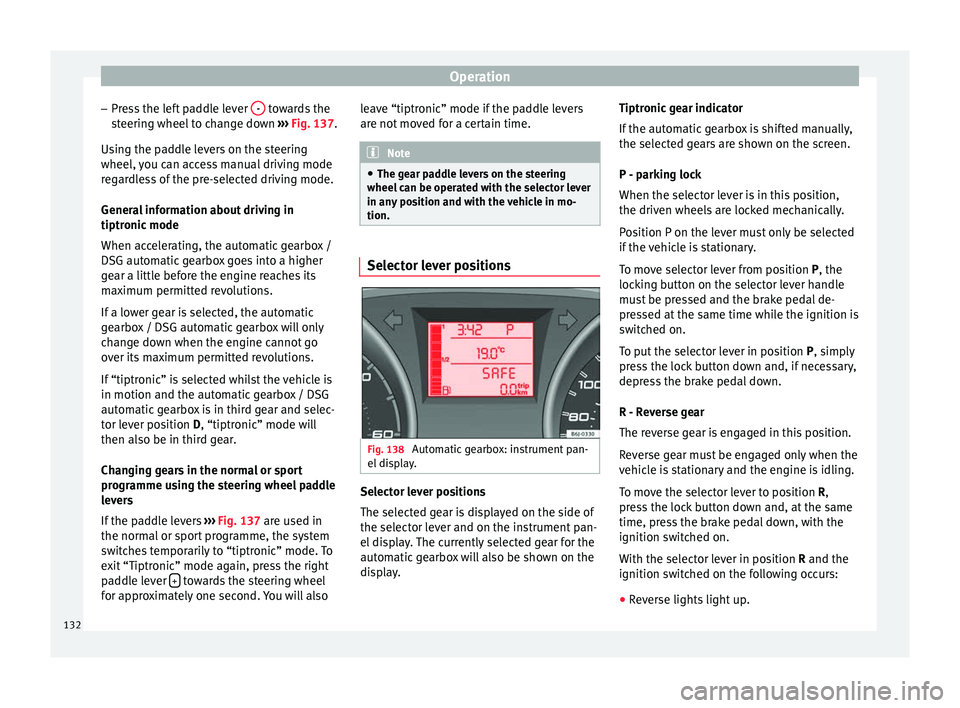
Fig. 138
Automatic gearbox: instrument pan-
el display. Selector lever positions
The selected gear is displayed on the side of
the selector lever and on the instrument pan-
el display. The currently selected gear for the
automatic gearbox will also be shown on the
display.Tiptronic gear indicator
If the automatic gearbox is shifted manually,
the selected gears are shown on the screen.
P - parking lock
When the selector lever is in this position,
the driven wheels are locked mechanically.
Position P on the lever must only be selected
if the vehicle is stationary.
To move selector lever from position P, the
locking button on the selector lever handle
must be pressed and the brake pedal de-
pressed at the same time while the ignition is
switched on.
To put the selector lever in position
P, simply
pr e
ss the lock button down and, if necessary,
depress the brake pedal down.
R - Reverse gear
The reverse gear is engaged in this position.
Reverse gear must be engaged only when the
vehicle is stationary and the engine is idling.
To move the selector lever to position R,
press the lock button down and, at the same
time, press the brake pedal down, with the
ignition switched on.
With the selector lever in position R and the
ignition sw
itched on the following occurs:
● Reverse lights light up.
132
Page 135 of 240
Driving
● The air conditioner automatically changes
the air recirculation mode.
● The wiper starts if the windscreen washer is
on.
● The parking distance warning system*
switches on.
N - Neutral (idling)
If this position is selected, the gearbox is in
neutral. Power is not transmitted to the
wheels and the engine does not have a brak-
ing function.
Never use the N
position to drive down a long
hi
ll. There is no engine braking and the
brakes are subjected to excessive stain.
You could damage the automatic gearbox if
you drive down hills with the gearbox lever in
position
N and the engine switched off.
D - Drive (forward)
In this position the gearbox automatically
changes to a lower or higher gear, according
to the engine's requirements, the driving
style and speed. The braking effect of the en-
gine when driving downhill is very limited
when the selector is in this position. The in-
strument panel display shows the selected
gear as well as the selector lever in position
D.
When trav
elling at speeds lower than 5 km/h
(3 mph) or when the vehicle is stationary, press the brake pedal to change the selector
lever from position N to position D.
S
- Standard driving position (Sport
programme)
When the selector lever is in position S
, it will
automatically change up into a higher gear
later, and change down into a low gear, if
compared with position D. This way, it is pos-
sible to take full advantage of the engine re-
serve power, depending on the engine de-
mand, driving style and speed. The braking
effect of the engine when driving downhill is
very limited. On the instrument panel display
the selected gear is shown as well as the se-
lector lever to position
S.
To select gear range S
, press the lock button
on the selector lever. WARNING
Observe the safety warnings ››› in Driving a
car with an automatic gearbox on page 131.
● If the
vehicle moves with no control, an ac-
cident and serious injury may occur. WARNING
Never switch the engine off until the vehicle
is stationary. You could lose control of your
vehicle. This could cause an accident and se-
rious injury.
● The airbags and belt tensioners do not
work when the ignition is switched off. ●
The brake servo does not work with the en-
gine off. You need more force to stop the vehi-
cle.
● Power steering does not work when the en-
gine is not running. That is why it is much
more difficult to turn the steering wheel.
● Never remove the key from the ignition if
the vehicle is in motion. The steering lock
could suddenly engage, and you would not be
able to steer the vehicle. CAUTION
If you allow the vehicle to move when the en-
gine is switched off or with the selector lever
in position “N”, take your foot off the acceler-
ator and wait until the engine starts idling
before returning to position “D”. Kick-down feature
This feature allows maximum acceleration.
If you press the accelerator down thoroughly,
the gearbox automatically changes down, de-
pending on speed and engine speed, into a
lower gear to take full advantage of give the
vehicle maximum acceleration.
The gearbox does not change gear until the
engine reaches the maximum determined en-
gine speed for the gear.
»
133
Technical specifications
Advice
Operation
Safety
The essentials
Page 138 of 240
Operation
●
Do not apply additional underseal or anti-
corrosion coatings to the exhaust pipes, cata-
lytic converter or the heat shields on the ex-
haust system. These materials could catch
fire when the vehicle is being driven. CAUTION
Never run the fuel tank completely dry be-
cause the irregularity of the fuel supply may
cause ignition problems. This allows unburnt
fuel to enter the exhaust system, which could
cause overheating and damage the catalytic
converter. For the sake of the environment
Even when the emission control system is
working perfectly, there may be a smell of
sulphur from the exhaust gas under some
conditions. This depends on the sulphur con-
tent of the fuel used. Quite often the problem
can be solved by changing to another brand
of fuel. Diesel engine particulate filter*
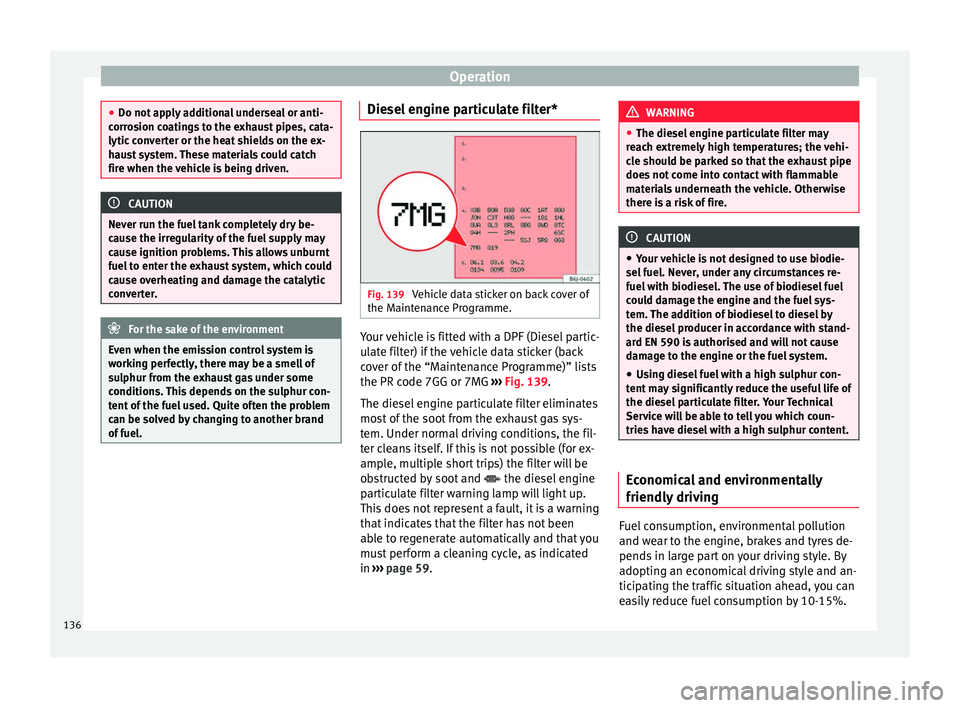
Fig. 139
Vehicle data sticker on back cover of
the Maintenance Programme. Your vehicle is fitted with a DPF (Diesel partic-
ulate filter) if the vehicle data sticker (back
cover of the “Maintenance Programme)” lists
the PR code 7GG or 7MG
››› Fig. 139 .
The die sel
engine particulate filter eliminates
most of the soot from the exhaust gas sys-
tem. Under normal driving conditions, the fil-
ter cleans itself. If this is not possible (for ex-
ample, multiple short trips) the filter will be
obstructed by soot and the diesel engine
particulate filter warning lamp will light up.
This does not represent a fault, it is a warning
that indicates that the filter has not been
able to regenerate automatically and that you
must perform a cleaning cycle, as indicated
in ››› page 59
. WARNING
● The diesel engine particulate filter may
reach extremely high temperatures; the vehi-
cle should be parked so that the exhaust pipe
does not come into contact with flammable
materials underneath the vehicle. Otherwise
there is a risk of fire. CAUTION
● Your vehicle is not designed to use biodie-
sel fuel. Never, under any circumstances re-
fuel with biodiesel. The use of biodiesel fuel
could damage the engine and the fuel sys-
tem. The addition of biodiesel to diesel by
the diesel producer in accordance with stand-
ard EN 590 is authorised and will not cause
damage to the engine or the fuel system.
● Using diesel fuel with a high sulphur con-
tent may significantly reduce the useful life of
the diesel particulate filter. Your Technical
Service will be able to tell you which coun-
tries have diesel with a high sulphur content. Economical and environmentally
friendly driving
Fuel consumption, environmental pollution
and wear to the engine, brakes and tyres de-
pends in large part on your driving style. By
adopting an economical driving style and an-
ticipating the traffic situation ahead, you can
easily reduce fuel consumption by 10-15%.
136
Page 145 of 240
Driver assistance systems
Start-Stop function interruption
In the following situations, the Start-Stop
function will be interrupted and the engine
will automatically start:
● The vehicle starts moving.
● The brake pedal is pressed several times in
a row.
● The battery has been discharged excessive-
ly.
● The Start-Stop System is manually deacti-
vated.
● The windscreen de-mist function is turned
on.
● The temperature of the interior exceeds the
comfort limits ( A/C button).
● If the airflow is increased by more than 3
presses.
● Temperature setting HI or LO is selected.
● The engine coolant temperature is insuffi-
cient.
● The alternator is faulty, for example the V-
belt has ruptured.
● If any of the conditions described in the
previous section are not fulfilled. WARNING
Never allow the vehicle to move with the en-
gine off for any reason. You could lose control
of your vehicle. This could cause an accident
and serious injury. ●
The brake servo does not work with the en-
gine off. You need more force to stop the vehi-
cle.
● Power steering does not work when the en-
gine is not running. That is why it is much
more difficult to turn the steering wheel.
● Turn off the Start-Stop system when driving
through water (fording streams, etc.). Note
● For vehicles with the Start-Stop function
and a manual gearbox, when the engine is
started, the clutch must be pressed.
● When the conditions for the Start-Stop
function are not fulfilled, the instrument pan-
el displays the Start-Stop indicator dimmed.
● If the steering wheel is turned more than
270°, it will not be possible to start the vehi-
cle again. To start the vehicle, straighten the
steering wheel so that it is turned less than
270°. Activating and deactivating the Start-
Stop function
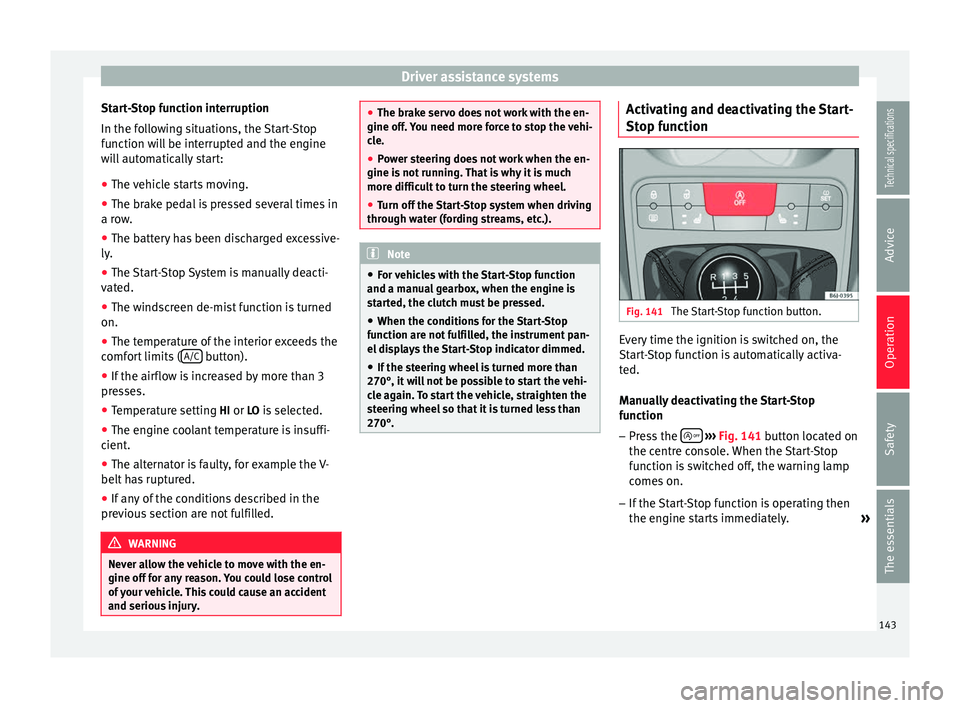
Fig. 141
The Start-Stop function button. Every time the ignition is switched on, the
Start-Stop function is automatically activa-
ted.
Manually deactivating the Start-Stop
function
– Press the
››› Fig. 141 button located on
the c entr
e console. When the Start-Stop
function is switched off, the warning lamp
comes on.
– If the Start-Stop function is operating then
the engine starts immediately.
»
143
Technical specifications
Advice
Operation
Safety
The essentials
Page 150 of 240
Operation
●
Periodic cleaning of the sensors, take care
not to damage or scratch them. When clean-
ing with high pressure washers or steam
cleaners, the sensors should be sprayed for
only a very short period and from a distance
of more than 10 cm.
● If the licence plate (especially the front
one) is bent in such a way that it noticeably
juts out from the bumper, false alarms may
sound for the area in front of the vehicle. Rear parking aid with navigator view
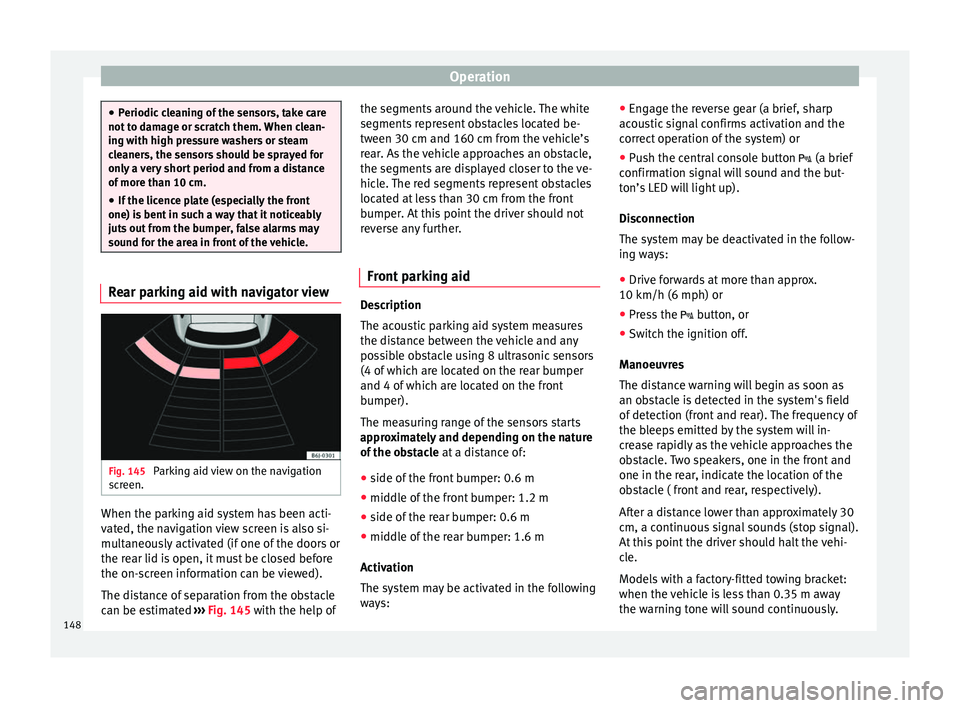
Fig. 145
Parking aid view on the navigation
screen. When the parking aid system has been acti-
vated, the navigation view screen is also si-
multaneously activated (if one of the doors or
the rear lid is open, it must be closed before
the on-screen information can be viewed).
The distance of separation from the obstacle
can be estimated
››› Fig. 145 with the help of the segments around the vehicle. The white
segments represent obstacles located be-
tween 30 cm and 160 cm from the vehicle’s
rear. As the vehicle approaches an obstacle,
the segments are displayed closer to the ve-
hicle. The red segments represent obstacles
located at less than 30 cm from the front
bumper. At this point the driver should not
reverse any further.
Front parking aid Description
The acoustic parking aid system measures
the distance between the vehicle and any
possible obstacle using 8 ultrasonic sensors
(4 of which are located on the rear bumper
and 4 of which are located on the front
bumper).
The measuring range of the sensors starts
approximately and depending on the nature
of the obstacle
at a distance of:
● side of the front bumper: 0.6 m
● middle of the front bumper: 1.2 m
● side of the rear bumper: 0.6 m
● middle of the rear bumper: 1.6 m
Activation
The system may be activated in the following
ways: ●
Engage the reverse gear (a brief, sharp
acoustic signal confirms activation and the
correct operation of the system) or
● Push the central console button (a brief
confirmation signal will sound and the but-
ton’s LED will light up).
Disconnection
The system may be deactivated in the follow-
ing ways:
● Drive forwards at more than approx.
10 km/h (6 mph) or
● Press the button, or
● Switch the ignition off.
Manoeuvres
The distance warning will begin as soon as
an obstacle is detected in the system's field
of detection (front and rear). The frequency of
the bleeps emitted by the system will in-
crease rapidly as the vehicle approaches the
obstacle. Two speakers, one in the front and
one in the rear, indicate the location of the
obstacle ( front and rear, respectively).
After a distance lower than approximately 30
cm, a continuous signal sounds (stop signal).
At this point the driver should halt the vehi-
cle.
Models with a factory-fitted towing bracket:
when the vehicle is less than 0.35 m away
the warning tone will sound continuously.
148
Page 151 of 240
Driver assistance systems
The driver should then not reverse any fur-
ther.
The warning tone volume decreases by 30%
3 seconds after it is triggered if the detected
obstacle stays at a constant distance from
the vehicle.
Provided that it is not in continuous mode,
the tone on the parking aid system stops
when it detects a wall parallel to the vehicle.
Trailer towing
For vehicles factory-fitted with a towing bar,
the parking aid system will not be activated
by the engagement of the reverse gear when
pulling a trailer, as the trailer's electric con-
nector will be plugged into the vehicle.
Possible faults
If a continuous, sharp beep sounds for a few
seconds, there is a fault in the parking aid
system.
If the fault continues until the ignition is
turned off, the audible warning of the fault
will not be emitted every time the system is
reactivated (by engaging the reverse gear or
pressing the button). Thus, the system
ready indication will not sound either. Have
the fault repaired by technical services as
soon as possible.
If there is no ready signal or no acoustic
warning signal, then the parking aid loud- speaker is faulty and may not warn of obsta-
cles. To ensure that the system works proper-
ly, the sensors must be kept clean and free of
ice and snow.
CAUTION
● Please note that low obstacles detected by
the system may no longer be registered by
the sensors as the car moves closer, so the
system will not give any further warning. Cer-
tain kinds of obstacles, such as wire fences,
chains, thin posts or trailer draw bars, high
kerbs or painted railings, etc., may not al-
ways be detected by the system, so there is a
risk of damaging the vehicle in such cases.
● In some cases, obstacles with uniform
edges and bumps may not be detected imme-
diately by the system due to their geometry.
Take special care with this type of obstacle
(corners, rectangular objects, etc.), as they
can cause damage to the vehicle.
● Be especially careful when manoeuvring in-
to a corner between two perpendicular walls.
Pay special attention to the side distance
from the wall using the mirrors.
● The parking aid system does not replace
use of the mirrors for manoeuvres.
● External ultra-sonic sources (e.g. pneumat-
ic drills, construction machinery or other ve-
hicles equipped with PND) may interfere with
the operation of the system.
● Periodic cleaning of the sensors, take care
not to damage or scratch them. When clean-
ing with high pressure washers or steam cleaners, the sensors should be sprayed for
only a very short period and from a distance
of more than 10 cm.
●
If the licence plate (especially the front
one) is bent in such a way that it noticeably
juts out from the bumper, false alarms may
sound for the area in front of the vehicle. Front parking aid with navigator view
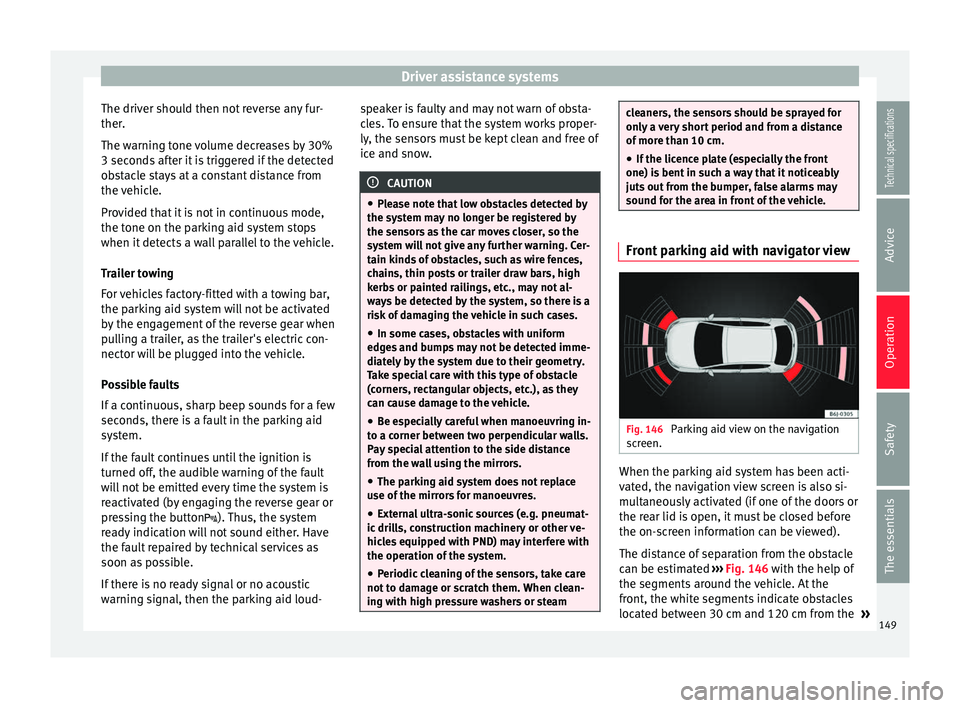
Fig. 146
Parking aid view on the navigation
screen. When the parking aid system has been acti-
vated, the navigation view screen is also si-
multaneously activated (if one of the doors or
the rear lid is open, it must be closed before
the on-screen information can be viewed).
The distance of separation from the obstacle
can be estimated
››› Fig. 146 with the help of
the segments around the vehicle. At the
front, the white segments indicate obstacles
located between 30 cm and 120 cm from the »
149Technical specifications
Advice
Operation
Safety
The essentials
Page 152 of 240
Operation
front of the vehicle. At the rear, these indi-
cate obstacles located between 30 cm and
160 cm from the vehicle’s rear. As the vehicle
approaches an obstacle, the segments are
displayed closer to the vehicle. The red seg-
ments represent obstacles located at less
than 30 cm from the bumper. At this point
the driver should not move forward/reverse
any further.
Cruise speed* (cruise control
system - CCS)
Description The CCS is able to maintain the set speed in
the range from approx. 30 km/h (19 mph) to
180 km/h (112 mph).
Once the speed setting has been saved, you
may take your foot off the accelerator.
WARNING
It could be dangerous to use the cruise con-
trol system if it is not possible to drive at con-
stant speed.
● Do not use the cruise control system when
driving in dense traffic, on roads with lots of
bends or on roads with poor conditions (with
ice, slippery surfaces, loose grit or gravel), as
this could cause an accident. ●
Always switch the cruise control system off
after using it in order to avoid involuntary
use.
● It is dangerous to use a set speed which is
too high for the current road, traffic or weath-
er conditions. Risk of accident. Note
The cruise control cannot maintain a constant
speed when descending downhill. It will in-
crease due to its own weight. Use the foot
brake to slow the vehicle. Switching the cruise control system
on and off
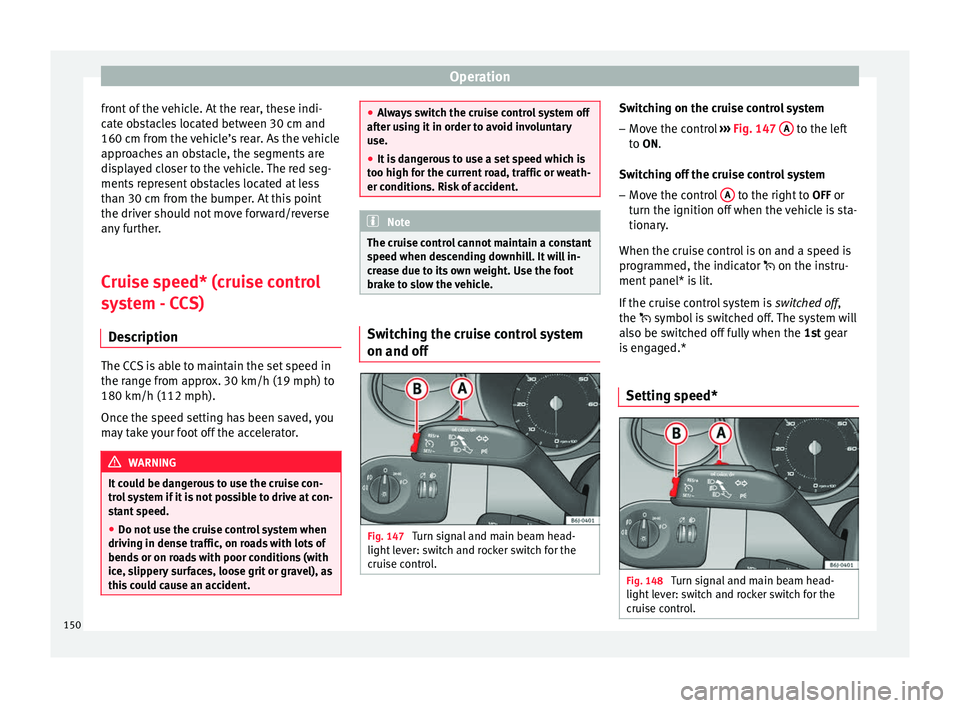
Fig. 147
Turn signal and main beam head-
light lever: switch and rocker switch for the
cruise control. Switching on the cruise control system
– Move the control ››› Fig. 147 A to the left
to ON.
Sw it
ching off the cruise control system
– Move the control A to the right to
OFF or
turn the ignition off when the vehicle is sta-
tionary.
When the cruise control is on and a speed is
programmed, the indicator
on the instru-
ment
panel* is lit.
If the cruise control system is switched off
,
the symbol is switched off. The system will
also be switched off fully when the 1st
gear
is engaged.*
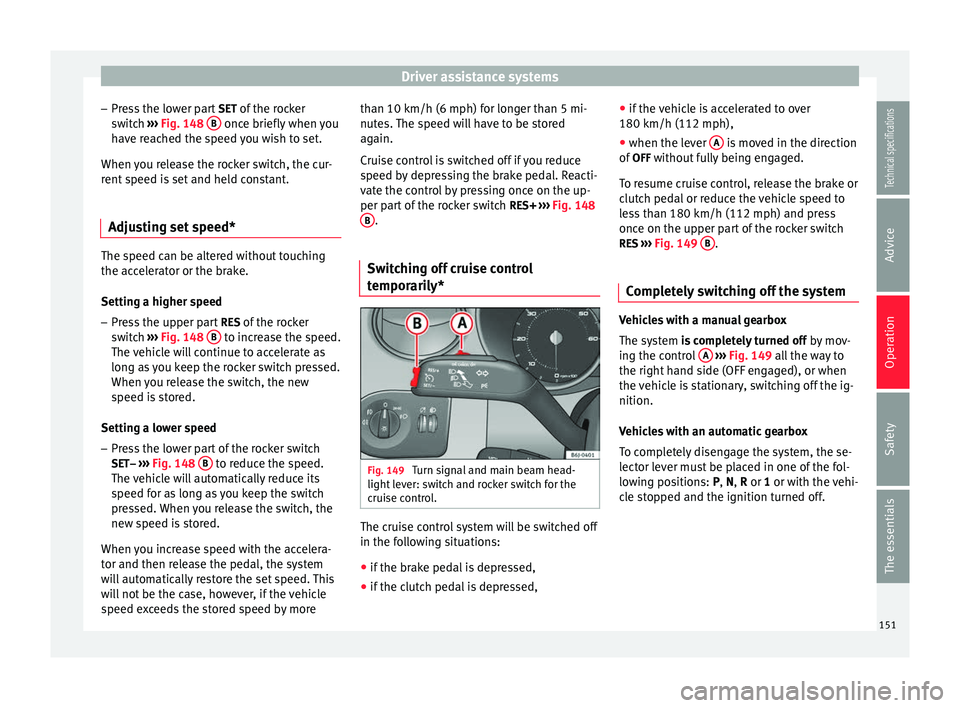
Setting speed* Fig. 148
Turn signal and main beam head-
light lever: switch and rocker switch for the
cruise control. 150
Page 153 of 240
Driver assistance systems
– Press the lower part SET of the rocker
switch ››› Fig. 148 B once briefly when you
have reached the speed you wish to set.
When you release the rocker switch, the cur-
rent speed is set and held constant.
Adjusting set speed* The speed can be altered without touching
the accelerator or the brake.
Setting a higher speed
– Press the upper part RES of the rocker
switch ››› Fig. 148
B to increase the speed.
The vehicle will continue to accelerate as
long as you keep the rocker switch pressed.
When you release the switch, the new
speed is stored.
Setting a lower speed – Press the lower part of the rocker switch
SET– ›››
Fig. 148 B to reduce the speed.
The vehicle will automatically reduce its
speed for as long as you keep the switch
pressed. When you release the switch, the
new speed is stored.
When you increase speed with the accelera-
tor and then release the pedal, the system
will automatically restore the set speed. This
will not be the case, however, if the vehicle
speed exceeds the stored speed by more than 10 km/h (6 mph) for longer than 5 mi-
nutes. The speed will have to be stored
again.
Cruise control is switched off if you reduce
speed by depressing the brake pedal. Reacti-
vate the control by pressing once on the up-
per part of the rocker switch
RES+ ››› Fig. 148
B .
Switching off cruise control
temporarily* Fig. 149
Turn signal and main beam head-
light lever: switch and rocker switch for the
cruise control. The cruise control system will be switched off
in the following situations:
● if the brake pedal is depressed,
● if the clutch pedal is depressed, ●
if the vehicle is accelerated to over
180 km/h (112 mph),
● when the lever A is moved in the direction
of OFF without fully being engaged.
To resume cruise control, release the brake or
clutch pedal or reduce the vehicle speed to
less than 180 km/h (112 mph) and press
once on the upper part of the rocker switch RES ››› Fig. 149 B .
Completely switching off the system Vehicles with a manual gearbox
The system
is completely turned off
b
y mov-
ing the control A
››› Fig. 149 all the way to
the right h
and side (OFF engaged), or when
the vehicle is stationary, switching off the ig-
nition.
Vehicles with an automatic gearbox
To completely disengage the system, the se-
lector lever must be placed in one of the fol-
lowing positions:
P, N, R or 1 or with the vehi-
cle stopped and the ignition turned off. 151
Technical specifications
Advice
Operation
Safety
The essentials
Page 159 of 240
Care and maintenance
Products for vehicle maintenance
Car-care products are available in your Tech-
nical Services. Keep the product instructions
until you have used them up. WARNING
● Car-care products can be toxic. Because of
this, they must always be kept closed in their
original container. Keep them out of the reach
of children. Failure to comply could result in
poisoning.
● Always read and observe the instructions
and warnings on the package before using
car-care products. Improper use could cause
health problems or damage the vehicle. The
use of certain products may produce noxious
vapours; they should be used in well ventila-
ted areas.
● Never use fuel, turpentine, engine oil, nail
varnish remover or other volatile fluids.
These are toxic and highly flammable. Risk of
fire and explosion.
● Before washing your vehicle, or carrying
out any maintenance, switch the engine off,
apply the handbrake firmly and remove the
key from the ignition. CAUTION
Never attempt to remove dirt, mud or dust if
the surface of the vehicle is dry. Never use a
dry cloth or sponge for cleaning purposes.
This could damage the paintwork or the win-
dows of your vehicle. Soak dirt, mud or dust
with plenty of water. For the sake of the environment
● When purchasing products for your vehicle
maintenance, select the ones which are not
harmful to the environment.
● The waste from car-care products should
not be disposed of with ordinary household
waste. Observe the disposal information on
the package. Care of the vehicle exterior
Automatic car washing tunnel The vehicle paintwork is so durable that the
vehicle can normally be washed without
problems in an automatic car wash tunnel.
However, the paintwork wear depends to a
large extent on the kind of the car wash tun-
nel, the brushes used, its water filtering and
the type of cleaning and preservative prod-
ucts.
Before going through a car wash, be sure to
take the usual precautions such as closing
the windows and sunroof. There is nothing to
note apart from that.
If the vehicle has special accessories such as
spoilers or a roof rack or two-way radio aerial,
etc., it is advisable to consult the car wash
tunnel operator first.After washing, the brakes could take some
time to respond as the brake discs and pads
could be wet, or even frozen in winter. “Dry”
the brakes by braking several times. WARNING
Water, ice and salt on the brake system can
reduce braking effectiveness. Risk of acci-
dent. CAUTION
Before putting the vehicle through the car
wash, do not tighten the aerial if it is folded
because it can be damaged. Washing by hand
Vehicle washing
– First soften the dirt and rinse it off with wa-
ter.
– Clean your vehicle from top to bottom with
a soft sponge, a glove or a brush. Use very
light pressure.
– Rinse the sponge or glove often with clean
water.
– Special car shampoo should only be used
for very stubborn dirt.
– Leave the wheels, sill panels etc. until last,
using a different sponge or glove.
»
157Technical specifications
Advice
Operation
Safety
The essentials