ignition Seat Ibiza ST 2014 Owner's Guide
[x] Cancel search | Manufacturer: SEAT, Model Year: 2014, Model line: Ibiza ST, Model: Seat Ibiza ST 2014Pages: 240, PDF Size: 4.89 MB
Page 75 of 240
Communications and multimedia
Some Bluetooth mobile phones are detected
and connected automatically when the igni-
tion is switched on. For this to take place the
telephone must be switched on and its Blue-
tooth function activated, and there must be
no active Bluetooth connection from other
devices.
Bluetooth connections are free.
Bluetooth ®
is a registered trademark of Blue-
tooth ®
SIG, Inc.
Declaration of conformity
S1nn GmbH & Co. KG certifies that the UHV
High unit complies with the basic require-
ments and the r
est of the relevant provisions
of the Directive 1999/5/CE. A copy of the
declaration of conformity can be found at
http://www.s1nn.de/certifications/uhv-high-
manual
.
Exchange of information between the mobile
phone and the Bluetooth system
The mobile phone system sends the data and
the requests via Bluetooth to the mobile
phone that is connected. If the connected
mobile phone is temporarily “overloaded”, it
may not respond to the requests from the
Bluetooth system.
In this case, wait for the mobile phone to re-
act or make a new call. WARNING
● Before starting the trip, you should famili-
arise yourself with the different functions of
the Bluetooth system. Bluetooth system set-
tings should adjusted when the car is stop-
ped or by a passenger.
● Please concentrate on driving. As the driv-
er, you are also responsible for road safety.
For this reason, you should only use the func-
tions when the traffic situation allows so and
in a manner that allows you to maintain con-
trol of the vehicle. Otherwise, you run the risk
of causing an accident.
● The speech system must not be used in ca-
ses of emergency, since the voice changes in
stressful situations. This could result in a
failed or delayed telephone connection. Al-
ways dial emergency numbers manually!
● Always observe applicable legislation.
● Adjust the volume so that external warning
sounds (e.g. emergency vehicles, etc.) are al-
ways audible. Note
● The voice control system is only available
in the following languages: Spanish, Mexican
Spanish, German, English, French, Canadian
French, Italian, Portuguese, Czech, Russian
and Dutch. For other languages, the prede-
fined language for the voice instructions is
English. Please take the vehicle to technical
services if you wish to change the language. ●
There may be restrictions on the use of
Bluetooth devices in some countries. Infor-
mation is available from the local authorities.
● If you connect the mobile phone Bluetooth
system to a Bluetooth device, consult the
safety warnings in its instruction manual. Use
compatible Bluetooth products only.
● If a call is received or made using the Blue-
tooth system when the radio is switched off,
this will always automatically turn on provid-
ing that the ignition is switched on. The mes-
sage Phone will appear on the radio display
when a c a
ll is received.
● If a call is received or made, the sound of
the radio programme or other audio source
that is currently being listened to will be mut-
ed in order for the telephone conversation to
be carried out without unpleasant back-
ground noise.
● Adjust the volume of the conversation on
the mobile phone to “maximum” and modify
the volume on the radio volume control. Compatibility with mobile phones
New models of mobile phones are being re-
leased constantly by the different brands,
with different operating systems and differ-
ent ways of operating. For this reason there
are some mobile phones that do not perform
some of the functions correctly or are even
totally incompatible. To help you when
»
73
Technical specifications
Advice
Operation
Safety
The essentials
Page 76 of 240
Operation
choosing a mobile phone, SEAT offers the re-
sults of the compatibility tests on different
mobile phones. Visit the SEAT website or ask
at your dealer.
Depending on your mobile phone model, cer-
tain functions may not be available or it may
be necessary to change the configuration. Fa-
miliarise yourself with your phone and read
the instruction manual to learn the possibili-
ties it offers.
Even when the mobile phone appears as
compatible in our list, we have noticed that
occasionally it is possible that the phone
presents an abnormal behaviour with the
system due to software errors. In this case,
we recommend you update the telephone
software. Mobile phone manufacturers usual-
ly make updates available on Internet for
their customers in order to improve the work-
ing of the phone.
In the event that you have various applica-
tions to make calls, such as internet calling,
the mobile will ask you from which applica-
tion you wish to make the call. Until confir-
mation is given you will not be able to make
the call.
If you try to make a call and it is not pro-
cessed, check your mobile phone as it is pos-
sible that a pop-up window on your tele-
phone is requesting you to select the pro-
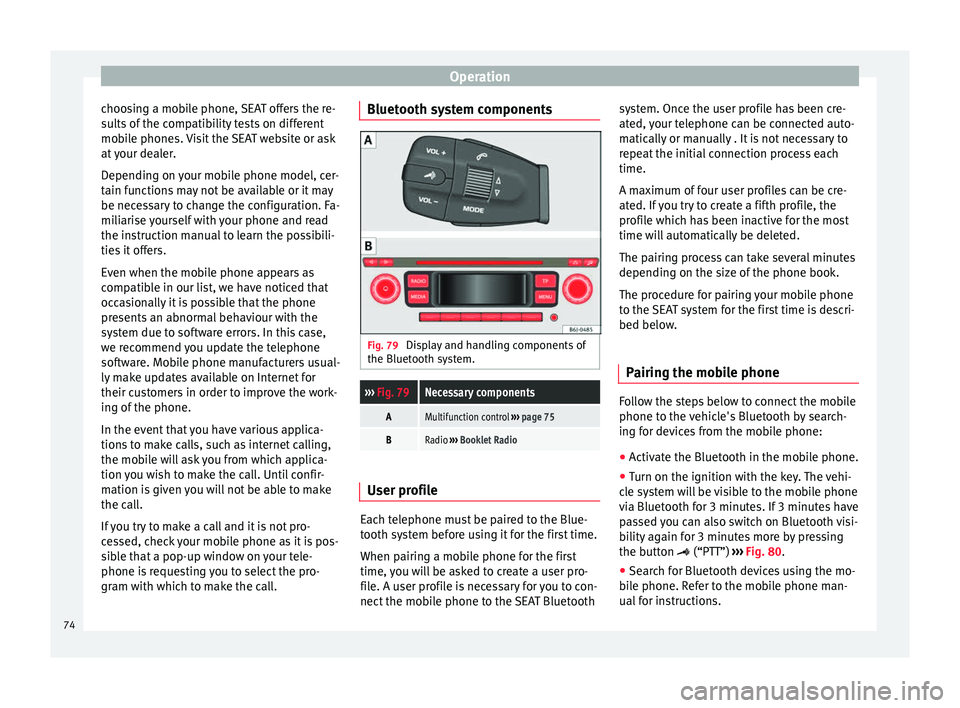
gram with which to make the call. Bluetooth system components
Fig. 79
Display and handling components of
the Bluetooth system.››› Fig. 79Necessary components
AMultifunction control ››› page 75
BRadio ››› Booklet Radio User profile
Each telephone must be paired to the Blue-
tooth system before using it for the first time.
When pairing a mobile phone for the first
time, you will be asked to create a user pro-
file. A user profile is necessary for you to con-
nect the mobile phone to the SEAT Bluetoothsystem. Once the user profile has been cre-
ated, your telephone can be connected auto-
matically or manually . It is not necessary to
repeat the initial connection process each
time.
A maximum of four user profiles can be cre-
ated. If you try to create a fifth profile, the
profile which has been inactive for the most
time will automatically be deleted.
The pairing process can take several minutes
depending on the size of the phone book.
The procedure for pairing your mobile phone
to the SEAT system for the first time is descri-
bed below.
Pairing the mobile phone Follow the steps below to connect the mobile
phone to the vehicle's Bluetooth by search-
ing for devices from the mobile phone:
●
Activate the Bluetooth in the mobile phone.
● Turn on the ignition with the key. The vehi-
cle system will be visible to the mobile phone
via Bluetooth for 3 minutes. If 3 minutes have
passed you can also switch on Bluetooth visi-
bility again for 3 minutes more by pressing
the button (“PTT”) ›››
Fig. 80 .
● Se ar
ch for Bluetooth devices using the mo-
bile phone. Refer to the mobile phone man-
ual for instructions.
74
Page 77 of 240
Communications and multimedia
● A list of devices found is displayed on the
mobile phone. From this list, select the de-
vice SEAT_BT
.
● Ne
xt, accept the connection instructions on
the mobile phone.
● When requested, follow the steps to con-
firm/enter the PIN. If the mobile requests a
PIN to be entered this is 1234, which is the
factory setting and can only be changed at
the workshop. Depending on the technology
supported by your mobile the process can
vary given that some mobiles only request
confirmation of a request to link to SEAT_BT,
while others require the PIN 1234 to be en-
tered.
● The contacts from the mobile phone's
memory and/or SIM card are transferred to
the vehicle system 1)
. Some mobile phones
may display a message asking for confirma-
tion of access to the phone book or other op-
tions, these messages should be accepted in
order for the hands free system to access the
information contained on the mobile and in
order to carry out the complete functions of
the system.
● The pairing is complete.
Automatic pairing
When the telephone has been connected and
the corresponding user profile created, your telephone will automatically link up with the
SEAT telephone system under the following
conditions:
●
The mobile phone is switched on with the
Bluetooth function activated and the visibility
activated. The mobile phone must be close to
the vehicle.
● The vehicle system has switched on Blue-
tooth visibility (it will be on for 3 minutes fol-
lowing activation of the contact or after
pressing the button “PTT”).
● The aut
omatic connection was accepted
during the questions of the first connection.
● The connection to the system has not been
deleted in the mobile.
With the ignition switched on, the system
searches in the memorised Bluetooth devices
(user profiles), and if one of these devices is
found a connection attempt is made to con-
nect to the last linked profile that meets the
previously mentioned requirements. The sys-
tem will continue connection attempts while
there is no connected device.
When a Bluetooth device is connected or
when the automatic connection conditions
are met, in order to connect another Blue-
tooth device, an existing connection or one
that is in the process being connected must
be deactivated in advance. In order to do this, deactivate the Bluetooth on the unwan-
ted device. Note
● The visibility of the vehicle's Bluetooth sys-
tem is switched on for three minutes when
the ignition is switched on with the key. After
3 minutes, if you need to activate the visibili-
ty again, you can do so with the voice control
››› page 76 or turning the ignition off and on
ag ain.
● If
for any reason you take more than 3 mi-
nutes to perform these steps or more than 30
seconds to enter the PIN, you will have to
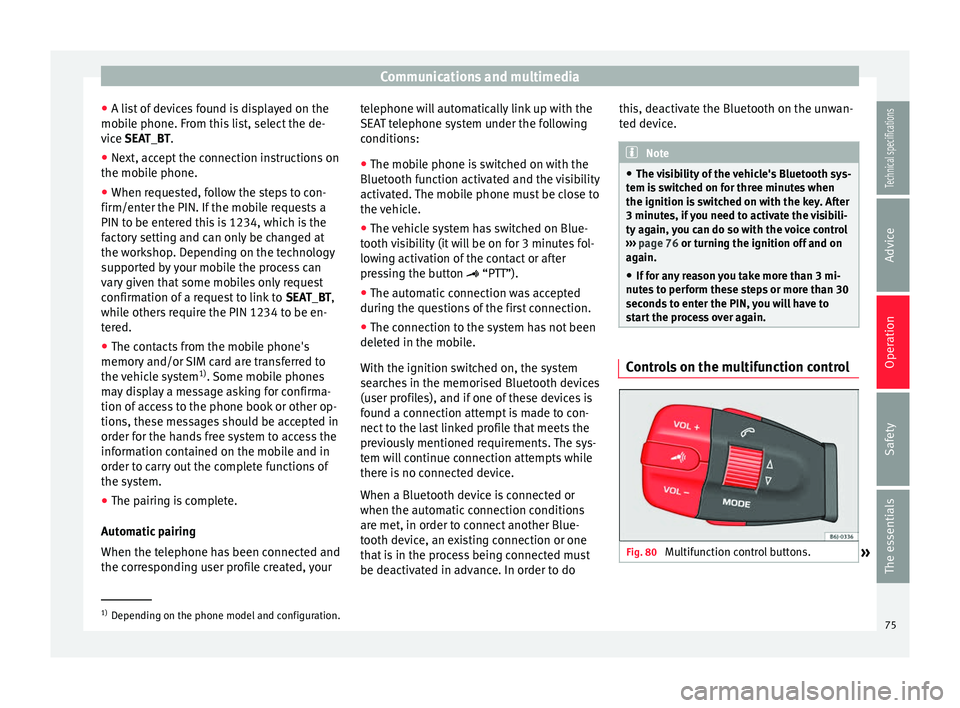
start the process over again. Controls on the multifunction control
Fig. 80
Multifunction control buttons.
»1)
Depending on the phone model and configuration.
75
Technical specifications
Advice
Operation
Safety
The essentials
Page 81 of 240
Opening and closing
● the key , by inserting it into the driver door
cylinder and r ot
ating it in the opening direc-
tion. Depending on the vehicle version, ei-
ther all doors will be unlocked or only the
driver door will be unlocked. All doors will be
locked on locking the vehicle using the key.
● the interior central lock button
››› page 81
.
● the radio frequency remote control , using
the buttons on the key ››› page 83.
Various functions are available to improve
the vehicle safety: Locking system “Safe*”
Selective* unlocking system
Self-locking system to prevent involunta-
ry unlocking
Automatic speed dependent locking and
unlocking system*
Emergency unlocking system
Unlocking the vehicle* Press button
››› Fig. 84 on remote
c ontr
ol to unlock all the doors and rear
lid.
Locking the vehicle* Press button
››› Fig. 84
on the remote
c ontr
ol to lock all doors and the rear lid
or turn the key in the door to lock all
doors and the rear lid.
–
–
–
–
–
–
– WARNING
● Locking from the outside carelessly or with-
out good visibility may lead to bruising, par-
ticularly in the case of children.
● When locking a vehicle, never leave chil-
dren unaccompanied inside, as from the out-
side it will be difficult to provide assistance if
required.
● Having the doors locked prevents intruders
from getting in, for example when stopped at
a traffic light. Note
For anti-theft security, only the driver door is
fitted with a lock cylinder. “Safe” security system**
This is an anti-theft device which consists of
a double lock for the door locks and a deacti-
vation function for the boot in order to pre-
vent forced entry.
Activation
The “safe” system is activated when the vehi-
cle is locked using the key or the remote con-
trol.
To activate it with the key, rotate once it is in-
serted in the door lock cylinder in the locking
direction.To activate the system using the remote con-
trol, press the lock button once
on the re-
mote.
Once this system is activated, opening doors
from the outside and the inside is not possi-
ble. The rear lid can not be opened. The cen-
tral lock button does not work.
When the ignition is switched off, the instru-
ment panel display indicates that the “Safe”
system is on.
Deactivation
Rotate the key inserted in the lock cylinder
twice towards the locking direction.
To activate the system using the remote con-
trol, press the lock button on the remote
twice in less than five seconds.
On deactivating the “Safe” system, the alarm
volumetric sensor is also deactivated.
With the “Safe” switched off, doors can be
opened from the interior but not from the ex-
terior.
See “Selective unlocking system*”
“Safe” status
On the driver door, there is warning lamp visi-
ble from outside the vehicle through the win-
dow which shows the “Safe” system status.
We will know that “Safe” system is activated
by the flashing warning lamp. The indicator »
79
Technical specifications
Advice
Operation
Safety
The essentials
Page 82 of 240
Operation
will flash on all vehicles, fitted and nor fitted
with an alarm, until they unlock.
Remember:
Safe activated with or without an alarm:
warning lamp flashes continuously.
Safe deactivated without an alarm: the warn-
ing lamp stays off.
Safe deactivated with an alarm: the warning
l amp s
tays off. WARNING
No one should remain inside the vehicle if the
“Safe” system is activated because opening
the doors will not be possible in the event of
an emergency neither from the inside nor the
outside and help from the outside is made
difficult. Danger of death. Passengers could
become trapped inside in case of emergency. Selective unlocking system**
This system allows to unlock either just the
driver door or all the vehicle.
Driver door unlock button
Unlock once. Use either the key or the remote
control.
Once the key
is inserted in the lock cylinder,
r ot
ate once in the unlock direction. The driver
door will remain without “Safe” and un- locked. In vehicles fitted with an alarm, see
the Anti-theft Alarm section
››› page 84.
Using the remote control, press the unlock
butt
on on the remote once. The “Safe”
system for all the vehicle is deactivated, only
the driver door is unlocked and both the
alarm and the warning lamp are also turned
off.
Unlocking all doors and the luggage
compartment
The unlock button on the remote control
must be pressed twice so that all doors
and the luggage compartment can be
opened.
Press twice within 5 seconds to deactivate
the “Safe” system for all vehicle, to unlock all
doors and to use the luggage compartment.
The warning lamp and the alarm (only vehi-
cles fitted with one) are turned off.
Unlocking the luggage compartment
See ››› page 86 .
A ctiv
ating the selective unlocking system*
With the door open, insert a key into the start
cylinder and start the ignition. Insert the oth-
er key into the driver door lock and turn in the
opening direction for at least 3 seconds. The
turn signals will flash twice. Deactivating the selective unlocking system*
With the door open, insert a key into the start
cylinder and start the ignition. Insert the oth-
er key into the driver door lock and turn in the
locking direction for at least 3 seconds. The
turn signals will flash once.
Self-locking system to prevent
involuntary unlocking It is an anti-theft system and prevents the un-
intentional unlocking of the vehicle.
If the vehicle is unlocked and none of the
doors (including the boot) are opened within
30 seconds, it re-locks automatically.
Automatic speed-dependent locking
and unlocking system* This is a safety system which prevents access
to the vehicle from the outside when it is run-
ning (e.g. when stopped at a traffic light).
Locking
The doors will lock automatically if the speed
of 15 km/h (9 mph) is exceeded. The rear lid
will lock automatically if the speed of 6 km/h
(4 mph) is exceeded.
80
Page 83 of 240
Opening and closing
If the vehicle is stopped and any of its doors
open, when starting again and exceeding the
mentioned speed, all doors will lock again.
Unlocking
On withdrawing the ignition key, the vehicle
will returns to its status prior to self-locking.
Each door can be unlocked and opened inde-
pendently from the inside (for example, when
a passenger gets out). To do it, simply oper-
ate the lever inside the door.
Activating the system*
With the ignition on, press the locking key on
the central locking system within 3 to 10 sec-
onds.
Deactivating the system*
With the ignition on, press the unlocking key
on the central locking system within 3 to 10
seconds.
In both cases, if the operation has been car-
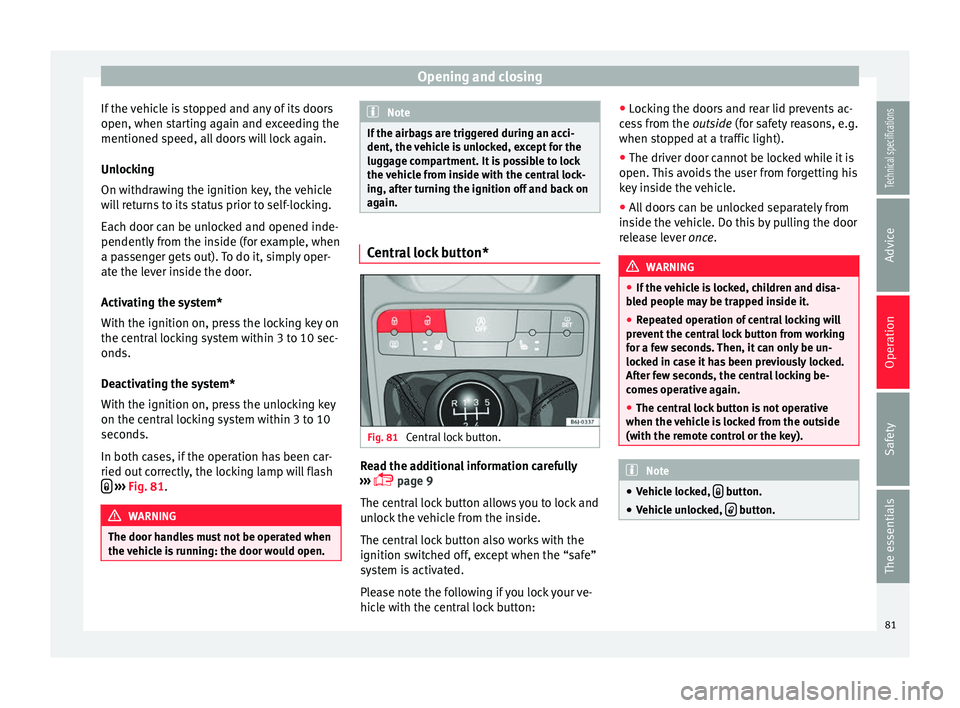
ried out correctly, the locking lamp will flash
››› Fig. 81 . WARNING
The door handles must not be operated when
the vehicle is running: the door would open. Note
If the airbags are triggered during an acci-
dent, the vehicle is unlocked, except for the
luggage compartment. It is possible to lock
the vehicle from inside with the central lock-
ing, after turning the ignition off and back on
again. Central lock button*
Fig. 81
Central lock button. Read the additional information carefully
››› page 9
The central lock button allows you to lock and
unlock the vehicle from the inside.
The central lock button also works with the
ignition switched off, except when the “safe”
system is activated.
Please note the following if you lock your ve-
hicle with the central lock button: ●
Locking the doors and rear lid prevents ac-
cess from the outside (for safety reasons, e.g.
when s t
opped at a traffic light).
● The driver door cannot be locked while it is
open. This avoids the user from forgetting his
key inside the vehicle.
● All doors can be unlocked separately from
inside the vehicle. Do this by pulling the door
release lever once. WARNING
● If the vehicle is locked, children and disa-
bled people may be trapped inside it.
● Repeated operation of central locking will
prevent the central lock button from working
for a few seconds. Then, it can only be un-
locked in case it has been previously locked.
After few seconds, the central locking be-
comes operative again.
● The central lock button is not operative
when the vehicle is locked from the outside
(with the remote control or the key). Note
● Vehicle locked, button.
● Vehicle unlocked, button.
81
Technical specifications
Advice
Operation
Safety
The essentials
Page 84 of 240
Operation
Childproof lock 3 Valid for vehicles: 5-door versions
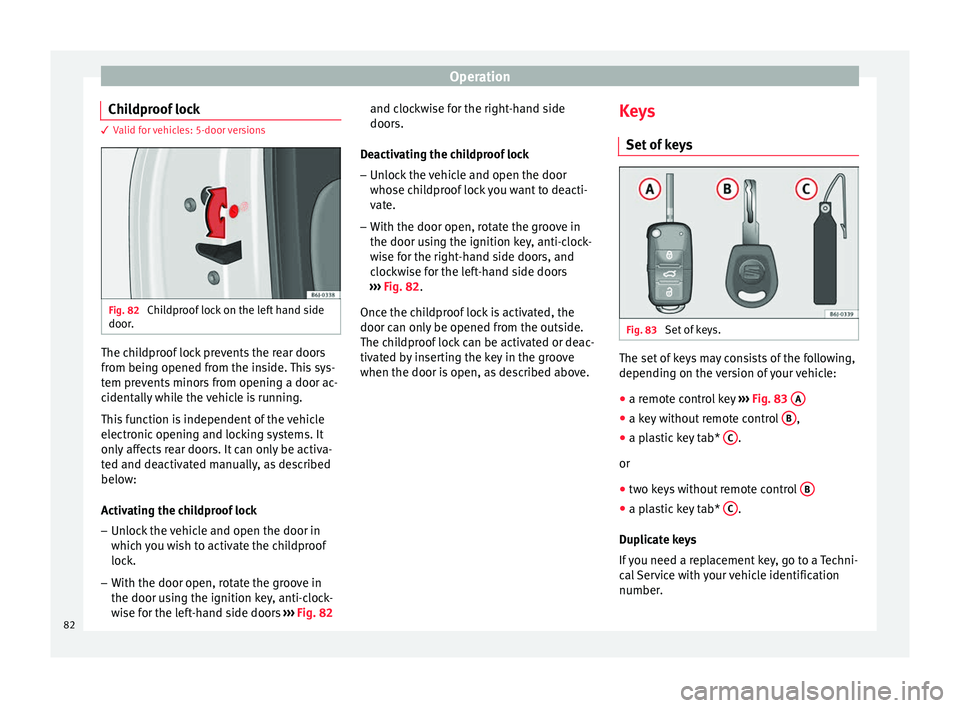
Fig. 82
Childproof lock on the left hand side
door. The childproof lock prevents the rear doors
from being opened from the inside. This sys-
tem prevents minors from opening a door ac-
cidentally while the vehicle is running.
This function is independent of the vehicle
electronic opening and locking systems. It
only affects rear doors. It can only be activa-
ted and deactivated manually, as described
below:
Activating the childproof lock
– Unlock the vehicle and open the door in
which you wish to activate the childproof
lock.
– With the door open, rotate the groove in
the door using the ignition key, anti-clock-
wise for the left-hand side doors ››› Fig. 82 and clockwise for the right-hand side
doors.
Deactivating the childproof lock – Unlock the vehicle and open the door
whose childproof lock you want to deacti-
vate.
– With the door open, rotate the groove in
the door using the ignition key, anti-clock-
wise for the right-hand side doors, and
clockwise for the left-hand side doors
››› Fig. 82 .
Onc e the c
hildproof lock is activated, the
door can only be opened from the outside.
The childproof lock can be activated or deac-
tivated by inserting the key in the groove
when the door is open, as described above. Keys
Set of keys Fig. 83
Set of keys. The set of keys may consists of the following,
depending on the version of your vehicle:
● a remote control key ››› Fig. 83 A ●
a key without remote control B ,
● a plastic key tab* C .
or
● two keys without remote control B ●
a plastic key tab* C .
Duplicate keys
If you need a replacement key, go to a Techni-
cal Service with your vehicle identification
number.
82
Page 85 of 240
Opening and closing
WARNING
● An incorrect use of the keys can cause seri-
ous injuries.
● Never leave children or disabled persons in
the vehicle. In case of emergency, they may
not be able to leave the vehicle or manage on
their own.
● An uncontrolled use of the key could start
the engine or activate any electric equipment
(e.g. electric windows), causing risk of acci-
dent. The doors can be locked using the re-
mote control key. This could become an ob-
stacle for assistance in an emergency situa-
tion.
● Never forget the keys inside the vehicle. An
unauthorised use of your vehicle could result
in injury, damage or theft. Always take the
key with you when you leave the vehicle.
● Never remove the key from the ignition if
the vehicle is in motion. Otherwise, the steer-
ing could suddenly block and it would be im-
possible to steer the vehicle. CAUTION
There are electronic components in the re-
mote control key. Avoid wetting and hitting
the keys. Radio frequency remote
control*
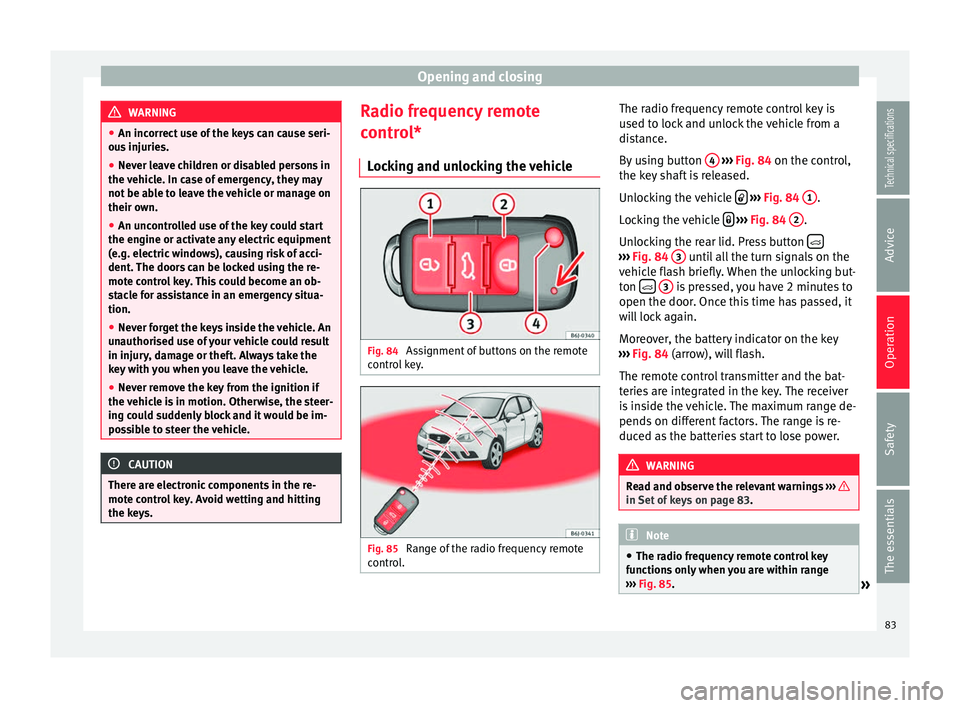
Locking and unlocking the vehicle Fig. 84
Assignment of buttons on the remote
control key. Fig. 85
Range of the radio frequency remote
control. The radio frequency remote control key is
used to lock and unlock the vehicle from a
distance.
By using button
4
››› Fig. 84 on the control,
the k ey
shaft is released.
Unlocking the vehicle
››› Fig. 84 1 .
Locking the vehicle
››› Fig. 84 2 .
Unlocking the rear lid. Press button ›››
Fig. 84 3 until all the turn signals on the
vehicle flash briefly. When the unlocking but-
ton
3 is pressed, you have 2 minutes to
open the door. Once this time has passed, it
will lock again.
Moreover, the battery indicator on the key
››› Fig. 84 (arrow), will flash.
The r emot
e control transmitter and the bat-
teries are integrated in the key. The receiver
is inside the vehicle. The maximum range de-
pends on different factors. The range is re-
duced as the batteries start to lose power. WARNING
Read and observe the relevant warnings ››› in Set of keys on page 83.
Note
● The radio frequency remote control key
functions only when you are within range
››› Fig. 85.
» 83
Technical specifications
Advice
Operation
Safety
The essentials
Page 86 of 240
Operation
●
If the vehicle cannot be unlocked or locked
by using the radio frequency remote control,
the remote control key will have to be re-
synchronised. For this, go to your technical
services. Changing the battery
If the battery indicator does not flash when
the buttons are pushed, the battery must be
replaced.
CAUTION
The use of inappropriate batteries may dam-
age the radio frequency remote control. For
this reason, always replace the dead battery
with another of the same size and power. For the sake of the environment
Used batteries must be disposed of at an ap-
propriate waste facility or through an author-
ised service, given that their components can
affect the environment. Synchronising the remote control key
If it is not possible to unlock or lock the door
with the remote control, it should be re-
synchronised. While the vehicle is open:
– Press the button
2
››› Fig. 84 on the re-
mot e c
ontrol.
– Then close the vehicle using the key shaft
within one minute.
Whil
e the vehicle is closed:
– Press the button
1
››› Fig. 84 on the re-
mot e c
ontrol.
– Then close the vehicle using the key shaft
within one minute.
It i
s possible that the vehicle could no longer
be opened and closed with the remote con-
trol if the button is repeatedly pressed
outside of the effective range of the radio fre-
quency remote control. The remote control
key will have to be resynchronised.
Spare remote control keys are available at
your Technical Service, where they must be
matched to the locking system.
Up to five remote control keys can be used.
Anti-theft alarm system* Description of anti-theft alarm
system* The anti-theft alarm makes it more difficult to
break into the vehicle or steal it. The systemwill initiate acoustic and optical warning sig-
nals when your vehicle is tried to be forced.
The anti-theft alarm system is automatically
switched on when locking the vehicle. The
system is immediately activated and the turn
signal light located on the driver door will
flash along with the turn signals, indicating
that the alarm and the locking security sys-
tem (double lock) have been turned on.
If any of the doors or the bonnet are open,
they will not be included in the protection
zones of the vehicle when the alarm is con-
nected. If the door or the bonnet are subse-
quently closed, they will be automatically in-
cluded in the protection areas of the vehicle
and the turn signals will flash accordingly
when the doors close.
● The turn signal light will flash twice on
opening and deactivating the alarm.
● The turn signal light will flash once on clos-
ing and activating the alarm.
When does the system trigger an alarm?
The system triggers an alarm, if the following
unauthorised actions are carried out when
the vehicle is locked:
● Mechanical opening of the vehicle with the
vehicle key without switching on the ignition
in the next 15 seconds (in certain markets,
such as the Netherlands, the alarm is activa-
ted immediately).
84
Page 87 of 240
Opening and closing
● A door is opened.
● Opening the bonnet.
● The rear lid is opened.
● Ignition switched on with a non-validated
key.
● Movements in the driving compartment
(vehicles with a volume sensor).
● Towing of the vehicle 1)
.
● Vehicle tilt angle 1)
.
● Undue manipulation of the alarm.
● Battery handling.
In this case, the acoustic signals will go off
and the turn signal will flash for approximate-
ly 30 seconds. This cycle may be repeated up
to 10 times depending on the country.
Opening all the doors in manual mode
In vehicles without an alarm, when opening
the driver door manually, all doors are
opened.
How to switch the alarm off
To deactivate the anti-theft alarm, turn the
key in the opening direction, open the door
and switch the ignition on, or press the un-
lock button on the remote control. In vehicles equipped with an anti-theft alarm
system, you have 15 seconds to insert the
key in the ignition lock and activate the igni-
tion if the vehicle is opened using the driver
door key.
Otherwise, the alarm will trigger for 30 sec.
and the ignition will be blocked.
Note
● After 28 days, the indicator light will be
switched off to prevent the battery from
draining if the vehicle has been left parked
for a long period of time. The alarm system
remains activated.
● The alarm will trigger again if attempts are
made to open another protection zone.
● The alarm system can be activated or deac-
tivated using the radio frequency remote con-
trol ››› page 83.
● The anti-thef t
alarm is not activated when
the vehicle is locked from within using the
central locking button .
● If the vehicle battery is run down or flat
then the anti-theft alarm will not operate cor-
rectly.
● Vehicle monitoring remains active even if
the battery is disconnected or not working for
any reason. ●
The alarm is triggered immediately if one of
the battery cables is disconnected while the
alarm system is active. Vehicle interior monitoring and anti-
tow system*
Monitoring or control function incorporated
in the anti-theft alarm* which detects unau-
thorized vehicle entry by means of ultra-
sound.
Activation
– It is automatically switched on when the
anti-theft alarm is activated.
Deactivation – Open the vehicle with the key, either me-
chanically or by pressing the button on
the remote control. The time period from
when the door is opened until the key is in-
serted into the contact should not exceed
15 seconds, otherwise the alarm will be
triggered.
– Press the button on the remote control
twice. The volumetric sensor and tilt sen-
sors will be deactivated. The alarm system
remains activated. »1)
With vehicles fitted with a tow-away protection
85
Technical specifications
Advice
Operation
Safety
The essentials