radio Seat Ibiza ST 2016 User Guide
[x] Cancel search | Manufacturer: SEAT, Model Year: 2016, Model line: Ibiza ST, Model: Seat Ibiza ST 2016Pages: 252, PDF Size: 5.56 MB
Page 106 of 252
Operation
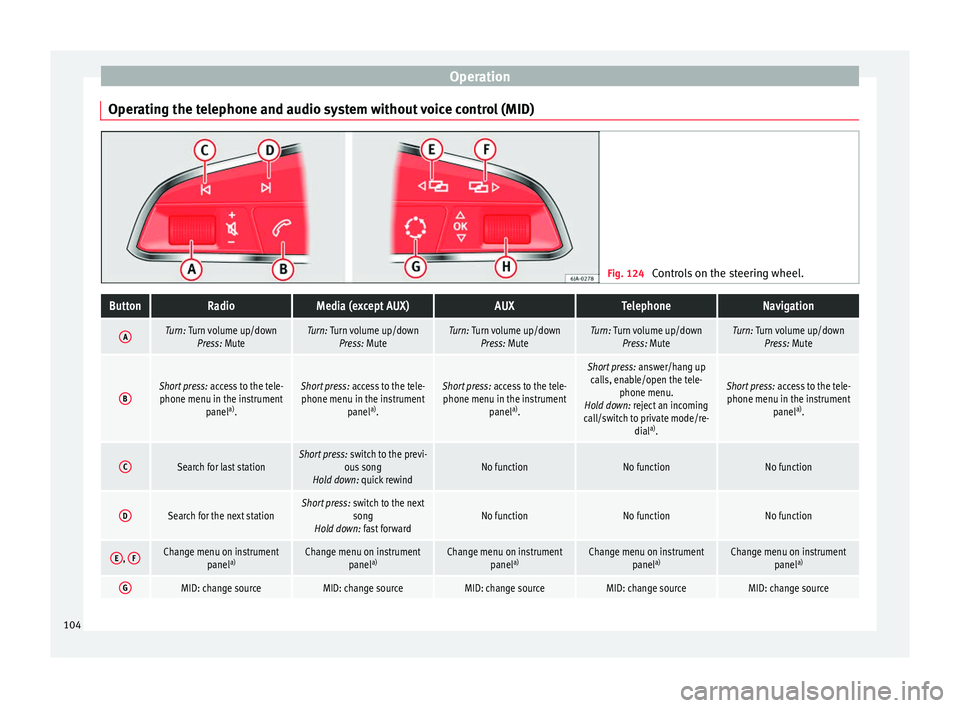
Operating the telephone and audio system without voice control (MID) Fig. 124
Controls on the steering wheel.ButtonRadioMedia (except AUX)AUXTelephoneNavigation
ATurn: Turn volume up/down
Press: MuteTurn: Turn volume up/downPress: MuteTurn: Turn volume up/downPress: MuteTurn: Turn volume up/downPress: MuteTurn: Turn volume up/downPress: Mute
BShort press: access to the tele-
phone menu in the instrument panela)
.Short press: access to the tele-
phone menu in the instrument panela)
.Short press: access to the tele-
phone menu in the instrument panela)
.
Short press: answer/hang up
calls, enable/open the tele- phone menu.
Hold down: reject an incoming
call/switch to private mode/re- diala)
.
Short press: access to the tele-
phone menu in the instrument panela)
.
CSearch for last stationShort press: switch to the previ-
ous song
Hold down: quick rewindNo functionNo functionNo function
DSearch for the next stationShort press: switch to the next
song
Hold down: fast forwardNo functionNo functionNo function
E, FChange menu on instrument
panela)Change menu on instrument
panela)Change menu on instrument
panela)Change menu on instrument
panela)Change menu on instrument
panela)
GMID: change sourceMID: change sourceMID: change sourceMID: change sourceMID: change source104
Page 107 of 252
Communications and multimediaButtonRadioMedia (except AUX)AUXTelephoneNavigation
HTurn: Next/previous preset
b)
Press: Acts on the MFDTurn: Next/previous song b)
Press: Acts on the MFDTurn: No function
Press: Acts on the MFDTurn: Acts on the MFD Press: ConfirmTurn: Changes menu or memory on instrument panel
Press: Operates on instrument panel
a)According to the vehicle's equipment package.
b) Only if the dash panel is in audio menu.
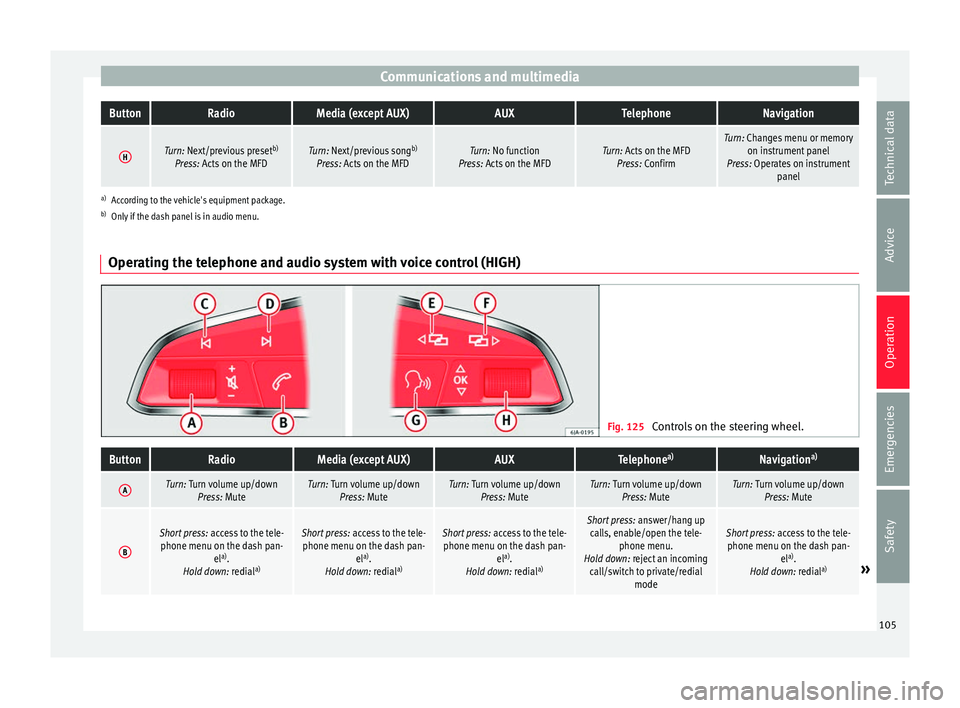
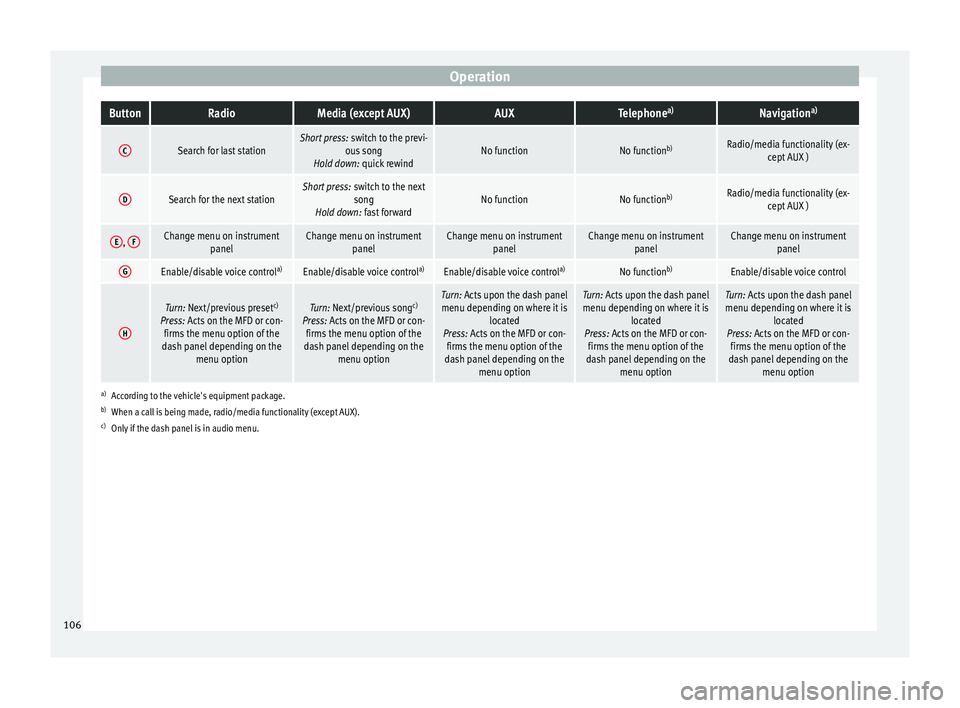
Operating the telephone and audio system with voice control (HIGH) Fig. 125
Controls on the steering wheel.
ButtonRadioMedia (except AUX)AUXTelephone a)Navigation a)
ATurn: Turn volume up/down
Press: MuteTurn: Turn volume up/downPress: MuteTurn: Turn volume up/downPress: MuteTurn: Turn volume up/downPress: MuteTurn: Turn volume up/downPress: Mute
B
Short press: access to the tele-
phone menu on the dash pan- ela)
.
Hold down: redial a)Short press:
access to the tele-
phone menu on the dash pan- ela)
.
Hold down: redial a)Short press:
access to the tele-
phone menu on the dash pan- ela)
.
Hold down: redial a)Short press:
answer/hang up
calls, enable/open the tele- phone menu.
Hold down: reject an incoming call/switch to private/redial modeShort press: access to the tele-
phone menu on the dash pan- ela)
.
Hold down: redial a)
» 105
Technical data
Advice
Operation
Emergencies
Safety
Page 108 of 252
OperationButtonRadioMedia (except AUX)AUXTelephone
a)Navigation a)
CSearch for last stationShort press:
switch to the previ-
ous song
Hold down: quick rewindNo functionNo function b)Radio/media functionality (ex-
cept AUX )
DSearch for the next stationShort press: switch to the next
song
Hold down: fast forwardNo functionNo function b)Radio/media functionality (ex-
cept AUX )
E, FChange menu on instrument
panelChange menu on instrumentpanelChange menu on instrumentpanelChange menu on instrumentpanelChange menu on instrumentpanel
GEnable/disable voice control a)Enable/disable voice controla)Enable/disable voice controla)No functionb)Enable/disable voice control
H
Turn: Next/previous preset c)
Press: Acts on the MFD or con- firms the menu option of the
dash panel depending on the menu optionTurn: Next/previous song c)
Press: Acts on the MFD or con- firms the menu option of the
dash panel depending on the menu optionTurn: Acts upon the dash panelmenu depending on where it is located
Press: Acts on the MFD or con- firms the menu option of the
dash panel depending on the menu optionTurn: Acts upon the dash panelmenu depending on where it is located
Press: Acts on the MFD or con- firms the menu option of the
dash panel depending on the menu optionTurn: Acts upon the dash panelmenu depending on where it is located
Press: Acts on the MFD or con- firms the menu option of the
dash panel depending on the menu option
a)According to the vehicle's equipment package.
b) When a call is being made, radio/media functionality (except AUX).
c) Only if the dash panel is in audio menu.
106
Page 109 of 252
Opening and closing
Multimedia USB/A UX
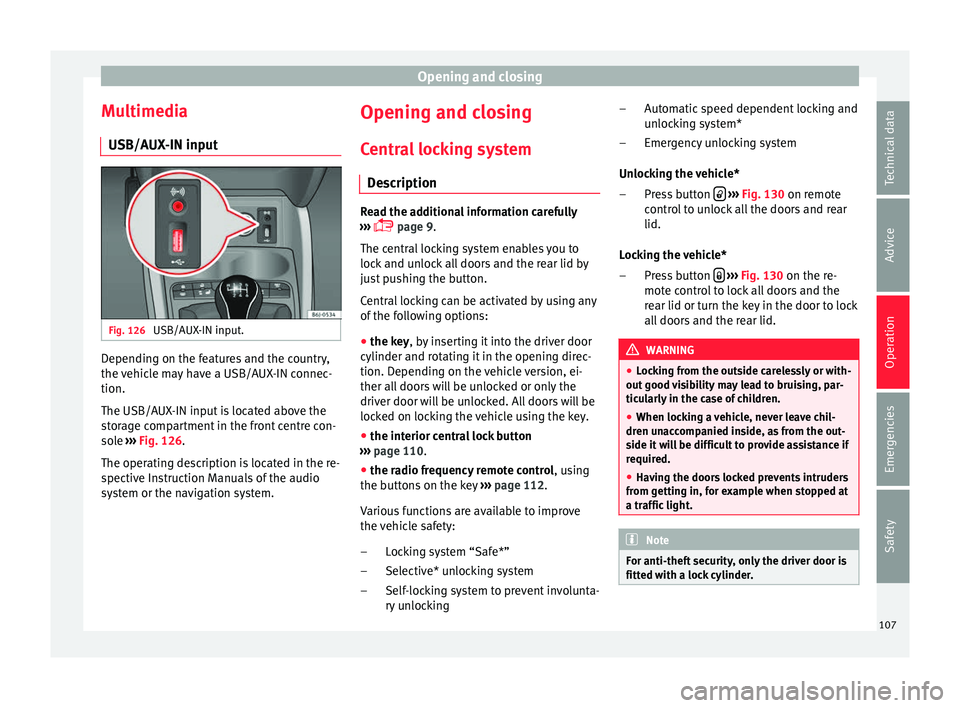
-IN inp ut Fig. 126
USB/AUX-IN input. Depending on the features and the country,
the
v
ehic l
e may have a USB/AUX-IN connec-
tion.
The USB/AUX-IN input is located above the
storage compartment in the front centre con-
sole ››› Fig. 126.
The operating description is located in the re-
spective Instruction Manuals of the audio
system or the navigation system. Opening and closing
C entr
al
locking system
Description Read the additional information carefully
›››
p
age 9.
The central locking system enables you to
lock and unlock all doors and the rear lid by
just pushing the button.
Central locking can be activated by using any
of the following options:
● the key, by inserting it into the driver door
cylinder and rot atin
g it in the opening direc-
tion. Depending on the vehicle version, ei-
ther all doors will be unlocked or only the
driver door will be unlocked. All doors will be
locked on locking the vehicle using the key.
● the interior central lock button
››› p
age 110.
● the radio frequency remote control , using
the b
uttons on the key ›››
page 112.
Various functions are available to improve
the vehicle safety: Locking system “Safe*”
Selective* unlocking system
Self-locking system to prevent involunta-
ry unlocking
–
–
– Automatic speed dependent locking and
unlock
ing system*
Emergency unlocking system
Unlocking the vehicle* Press button
› ››
Fig. 130
on remot
e
control to unlock all the doors and rear
lid.
Locking the vehicle* Press button
› ››
Fig. 130
on the r e-
mot
e control to lock all doors and the
rear lid or turn the key in the door to lock
all doors and the rear lid. WARNING
● Lock in
g from the outside carelessly or with-
out good visibility may lead to bruising, par-
ticularly in the case of children.
● When locking a vehicle, never leave chil-
dren unac
companied inside, as from the out-
side it will be difficult to provide assistance if
required.
● Having the doors locked prevents intruders
from getting in, f
or example when stopped at
a traffic light. Note
For anti-theft security, only the driver door is
fitted with a loc k
cylinder. –
–
–
–
107
Technical data
Advice
Operation
Emergencies
Safety
Page 114 of 252
Operation
Radio frequency remote con-
tr o
l*
Un loc
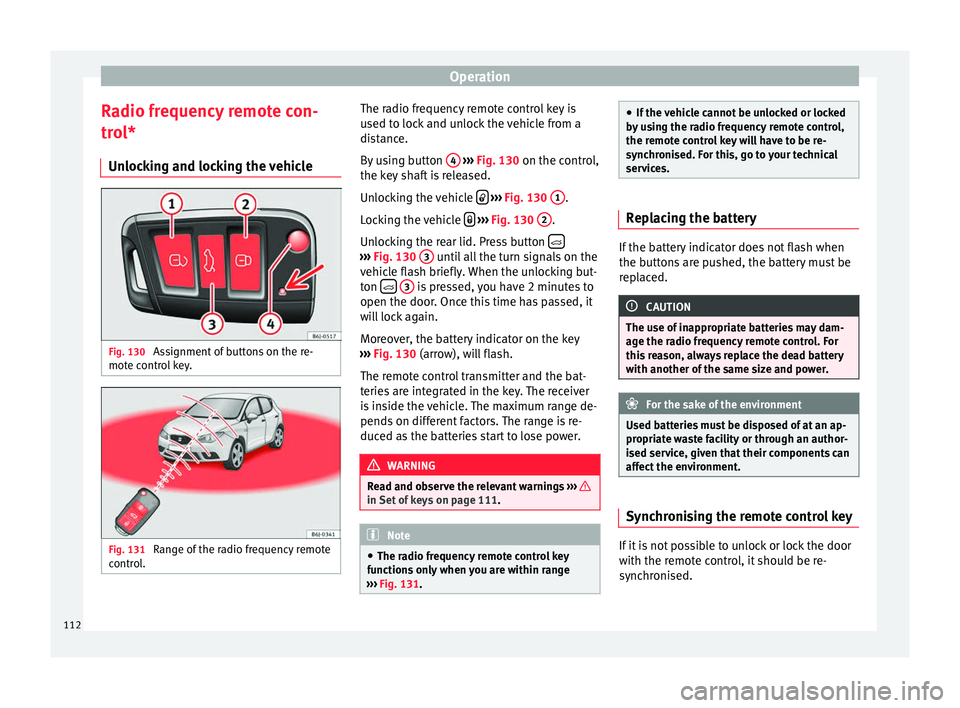
king and locking the vehicle Fig. 130
Assignment of buttons on the re-
mot e c
ontr o
l key. Fig. 131
Range of the radio frequency remote
c ontr
ol
. The radio frequency remote control key is
u
sed t
o lock
and unlock the vehicle from a
distance.
By using button 4
› ››
Fig. 130
on the c ontr
ol,
the key shaft is released.
Unlocking the vehicle
› ››
Fig. 130
1 .
L oc
kin
g the vehicle
› ››
Fig. 130
2 .
Un loc
kin
g the rear lid. Press button ›››
Fig. 130 3 until all the turn signals on the
v ehic
le fl
ash briefly. When the unlocking but-
ton
3 is pressed, you have 2 minutes to
open the door . Onc
e this
time has passed, it
will lock again.
Moreover, the battery indicator on the key
››› Fig. 130 (arrow), will flash.
The remote control transmitter and the bat-
teries are integrated in the key. The receiver
is inside the vehicle. The maximum range de-
pends on different factors. The range is re-
duced as the batteries start to lose power. WARNING
Read and observe the relevant warnings ››› in Set of keys on page 111.
Note
● The radio fr equency
remote control key
functions only when you are within range
››› Fig. 131. ●
If the v ehic
le cannot be unlocked or locked
by using the radio frequency remote control,
the remote control key will have to be re-
synchronised. For this, go to your technical
services. Replacing the battery
If the battery indicator does not flash when
the button
s
are pushed, the battery must be
replaced. CAUTION
The use of inappropriate batteries may dam-
age the ra dio fr
equency remote control. For
this reason, always replace the dead battery
with another of the same size and power. For the sake of the environment
Used batteries must be disposed of at an ap-
propriat e w
aste facility or through an author-
ised service, given that their components can
affect the environment. Synchronising the remote control key
If it is not possible to unlock or lock the door
w
ith the r
emote c
ontrol, it should be re-
synchronised.
112
Page 115 of 252
Opening and closing
While the vehicle is open:
– Press the button
2
› ››
Fig. 130
on the
r emot
e control.
– Then close the vehicle using the key shaft
within one minute.
Whil
e the vehicle is closed:
– Press the button
1
› ››
Fig. 130
on the
r emot
e control.
– Then close the vehicle using the key shaft
within one minute.
It i
s possible that the vehicle could no longer
be opened and closed with the remote con-
trol if the button is repeatedly pressed
outs ide of
the eff ectiv
e range of the radio fre-
quency remote control. The remote control
key will have to be resynchronised.
Spare remote control keys are available at
your Technical Service, where they must be
matched to the locking system.
Up to five remote control keys can be used. Anti-theft alarm*
Desc
ription of anti-theft alarm sys-
tem* The anti-theft alarm makes it more difficult to
break
int
o the vehicle or steal it. The system
will initiate acoustic and optical warning sig-
nals when your vehicle is tried to be forced.
The anti-theft alarm system is automatically
switched on when locking the vehicle. The
system is immediately activated and the turn
signal light located on the driver door will
flash along with the turn signals, indicating
that the alarm and the locking security sys-
tem (double lock) have been turned on.
If any of the doors or the bonnet are open,
they will not be included in the protection
zones of the vehicle when the alarm is con-
nected. If the door or the bonnet are subse-
quently closed, they will be automatically in-
cluded in the protection areas of the vehicle
and the turn signals will flash accordingly
when the doors close.
● The turn signal light will flash twice on
opening and deactiv atin
g the alarm.
● The turn signal light will flash once on clos-
ing and activating the al
arm. When does the system trigger an alarm?
The system trig
gers an alarm, if the following
unauthorised actions are carried out when
the vehicle is locked:
● Mechanical opening of the vehicle with the
vehicle k
ey without switching on the ignition
in the next 15 seconds (in certain markets,
such as the Netherlands, the alarm is activa-
ted immediately).
● A door is opened.
● Opening the bonnet.
● The rear lid is opened.
● Ignition switched on with a non-validated
key.
● Mov
ements in the driving compartment
(vehicle
s with a volume sensor).
● Towing of the vehicle 1)
.
● Vehicle tilt angle 1)
.
● Undue manipulation of the alarm.
● Battery handling.
In this ca
se, the acoustic signals will go off
and the turn signal will flash for approximate-
ly 30 seconds. This cycle may be repeated up
to 10 times depending on the country. »1)
With vehicles fitted with a tow-away protection
113
Technical data
Advice
Operation
Emergencies
Safety
Page 116 of 252
Operation
Opening all the doors in manual mode
In v
ehic l
es without an alarm, when opening
the driver door manually, all doors are
opened.
How to switch the alarm off
To deactivate the anti-theft alarm, turn the
key in the opening direction, open the door
and switch the ignition on, or press the un-
lock button on the remote control.
In v
ehic l
es equipped with an anti-theft alarm
system, you have 15 seconds to insert the
key in the ignition lock and activate the igni-
tion if the vehicle is opened using the driver
door key.
Otherwise, the alarm will trigger for 30 sec.
and the ignition will be blocked. Note
● After 28 d a
ys, the indicator light will be
switched off to prevent the battery from
draining if the vehicle has been left parked
for a long period of time. The alarm system
remains activated.
● The alarm will trigger again if attempts are
made to open another pr
otection zone.
● The alarm system can be activated or deac-
tivated us
ing the radio frequency remote con-
trol ››› page 112.
● The anti-theft alarm is not activated when
the vehicl
e is locked from within using the
central locking button . ●
If the v ehic
le battery is run down or flat
then the anti-theft alarm will not operate cor-
rectly.
● Vehicle monitoring remains active even if
the battery
is disconnected or not working for
any reason.
● The alarm is triggered immediately if one of
the battery
cables is disconnected while the
alarm system is active. Vehicle interior monitoring and anti-
tow sy
s
tem* Monitoring or control function incorporated
in the anti-thef
t
al arm* whic
h detects unau-
thorised vehicle entry by means of ultra-
sound.
Activation
– It is automatically switched on when the
anti-theft alarm i
s activated.
Deactivation – Open the vehicle with the key, either me-
chanical
ly or by pressing the button on
the r emot
e contr
ol. The time period from
when the door is opened until the key is in-
serted into the contact should not exceed
15 seconds, otherwise the alarm will be
triggered. –
Press
the button on the remote control
tw ic
e. The
volumetric sensor and tilt sen-
sors will be deactivated. The alarm system
remains activated.
The vehicle interior monitoring and the anti-
tow system are automatically switched on
again next time the vehicle is locked.
The vehicle interior monitoring and anti-tow
sensor (tilt sensor) are automatically switch-
ed on when the anti-theft alarm is switched
on. In order to activate it, all the doors and
the rear lid must be closed.
If you wish to switch off the vehicle interior
monitoring and the anti-tow system, it must
be done each time that the vehicle is locked;
if not, they will be automatically switched on.
The vehicle interior monitoring and the anti-
tow system should be switched off if animals
are left inside the locked vehicle (otherwise,
their movements will trigger the alarm) or
when, for example, the vehicle is transported
or has to be towed with only one axle on the
ground.
False alarms
Interior monitoring will only operate correctly
if the vehicle is completely closed. Please ob-
serve related legal requirements.
The following cases may cause a false alarm: ● Open windows (partially or fully),
114
Page 181 of 252
Driver assistance systems
If the system has been activated automatical-
ly , an audib
le sou
nd warning will only be giv-
en when obstacles in front are at a distance
of less than 50 cm. CAUTION
The automatic connection of the Parking Aid
only w ork
s when you are driving slowly. If
driving style is not adapted to the circum-
stances, an accident and serious injury or
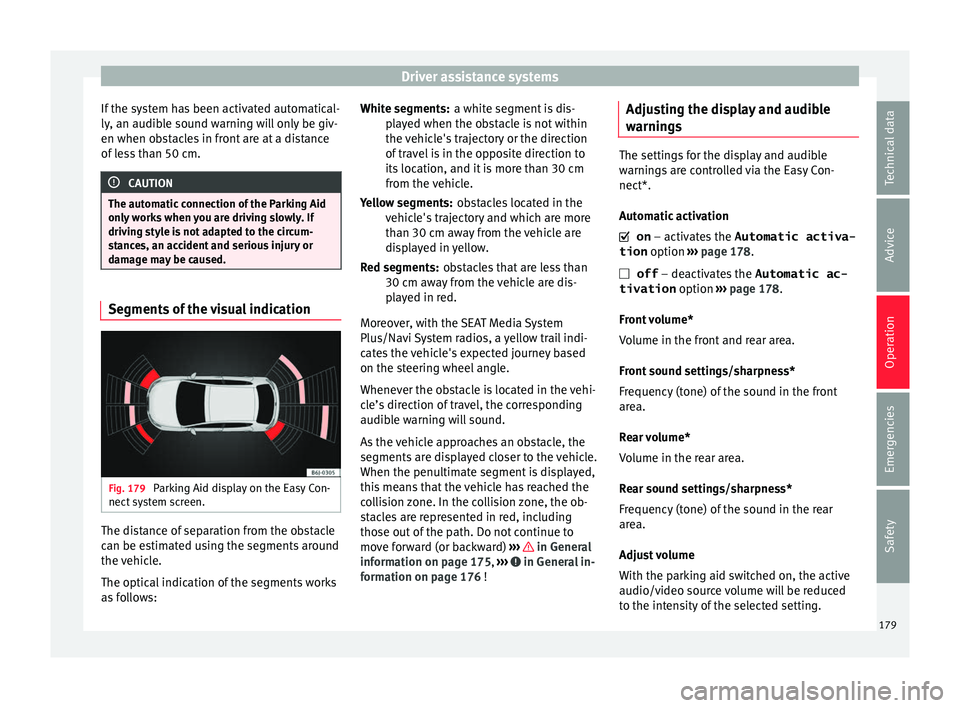
damage may be caused. Segments of the visual indication
Fig. 179
Parking Aid display on the Easy Con-
nect sy
st
em screen. The distance of separation from the obstacle
c
an be e
stim
ated using the segments around
the vehicle.
The optical indication of the segments works
as follows: a white segment is dis-
play
ed when the obstacle is not within
the vehicle's trajectory or the direction
of travel is in the opposite direction to
its location, and it is more than 30 cm
from the vehicle.
obstacles located in the
vehicle's trajectory and which are more
than 30 cm away from the vehicle are
displayed in yellow.
obstacles that are less than
30 cm away from the vehicle are dis-
played in red.
Moreover, with the SEAT Media System
Plus/Navi System radios, a yellow trail indi-
cates the vehicle's expected journey based
on the steering wheel angle.
Whenever the obstacle is located in the vehi-
cle’s direction of travel, the corresponding
audible warning will sound.
As the vehicle approaches an obstacle, the
segments are displayed closer to the vehicle.
When the penultimate segment is displayed,
this means that the vehicle has reached the
collision zone. In the collision zone, the ob-
stacles are represented in red, including
those out of the path. Do not continue to
move forward (or backward) ››› in General
inf orm
ation on p ag
e 175, ››› in General in-
f orm
ation on p ag
e 176 !
White segments:
Yellow segments:
Red segments:
Adjusting the display and audible
warnings The settings for the display and audible
warning
s
are controlled via the Easy Con-
nect*.
Automatic activation
on – activates the Automatic activa-
tion option ››› page 178.
off – deactivates the Automatic ac-
tivation option ››› page 178.
Front volume*
Volume in the front and rear area.
Front sound settings/sharpness*
Frequency (tone) of the sound in the front
area.
Rear volume*
Volume in the rear area.
Rear sound settings/sharpness*
Frequency (tone) of the sound in the rear
area.
Adjust volume
With the parking aid switched on, the active
audio/video source volume will be reduced
to the intensity of the selected setting. 179
Technical data
Advice
Operation
Emergencies
Safety
Page 193 of 252
Care and maintenance
To fold
Un s
cr
ew the aerial rod, tilting it backwards
into a horizontal position and then screw in
again.
To return to working position
Continue in the reverse order to the previous
instruction. CAUTION
If an automatic car wash tunnel is used, be-
fore ent erin
g the tunnel, put the aerial down
parallel to the roof and do not tighten to
avoid damage. Mobile phones and two-way radios
SEAT has approved for your vehicle the use of
mo
b
il
e telephones and two-way radios pro-
viding under the following conditions:
● The external aerial should be correctly in-
stall
ed.
● The transmitting power should be a maxi-
mum 10 watts.
The optimal r
each of the equipment is only
achieved with an external aerial.
First consult your Technical Service if you
wish to use a mobile telephone or a two-way
radio with a transmitting power output in ex-
cess of 10 watts. Here you will receive infor- mation concerning the technical possibilities
for retrofittin
g this equipment.
Mobile telephones and two-way radios
should be only fitted by a specialised work-
shop, for example a SEAT dealership. WARNING
● Alwa y
s concentrate primarily on driving. If
you are distracted while driving you could
have an accident.
● Never attach the telephone mountings to
the surfac
es covering the airbag units or
within the range of the airbags. There is a
high danger of injury if the airbag is trig-
gered.
● Using your mobile telephones or two-way
radios
in the vehicle without an external aer-
ial, electromagnetic radiation in the vehicle
could exceed authorised limits. This also may
occur to external aerials that have not been
correctly installed. CAUTION
Failure to consider the above-mentioned con-
ditions c ou
ld cause the electronics to mal-
function. The most common causes of faults
are:
● no external aerial,
● external aerial incorrectly installed,
● transmitting power output in excess of 10
watts. Note
Please observe the operating instructions of
your mob i
le telephone/two-way radio. Care and cleaning
General not
es Vehicle maintenance
Regu
l
ar care and washing help to maintain
the value of the vehicle. This may also be one
of the requirements for acknowledging war-
ranty claims in the event of bodywork corro-
sion or paint defects.
The best way to protect your vehicle against
the harmful effects of the environment is
through correct maintenance and frequent
washing. The longer substances such as in-
sect remains, bird droppings, resinous tree
sap, road dirt, industrial deposits, tar, soot or
road salt and other aggressive materials re-
main on the vehicle, the more damage they
do to the paintwork. High temperatures, for
instance in strong sunlight, further intensify
the corrosive effect.
After winter, a period when salt is put on the
roads, it is important to have the underside
of the vehicle washed thoroughly. »
191
Technical data
Advice
Operation
Emergencies
Safety
Page 194 of 252
Advice
Products for vehicle maintenance
C ar
-car
e products are available in your Tech-
nical Services. Keep the product instructions
until you have used them up. WARNING
● Car-c ar
e products can be toxic. Because of
this, they must always be kept closed in their
original container. Keep them out of the reach
of children. Failure to comply could result in
poisoning.
● Always read and observe the instructions
and warnings
on the package before using
car-care products. Improper use could cause
health problems or damage the vehicle. The
use of certain products may produce noxious
vapours; they should be used in well ventila-
ted areas.
● Never use fuel, turpentine, engine oil, nail
varnish remo
ver or other volatile fluids.
These are toxic and highly flammable. Risk of
fire and explosion.
● Before washing your vehicle, or carrying
out any m
aintenance, switch the engine off,
apply the handbrake firmly and remove the
key from the ignition. CAUTION
Never attempt to remove dirt, mud or dust if
the surf ac
e of the vehicle is dry. Never use a
dry cloth or sponge for cleaning purposes.
This could damage the paintwork or the win-
dows of your vehicle. Soak dirt, mud or dust
with plenty of water. For the sake of the environment
● When purc h
asing car care products, try to
select ones that are not harmful to the envi-
ronment.
● The waste from car-care products should
not be dispo
sed of with ordinary household
waste. Observe the disposal information on
the package. Care of the vehicle exterior
Automatic c
ar wash tunnel The vehicle paintwork is so durable that the
v
ehic
le c
an normally be washed without
problems in an automatic car wash tunnel.
However, the paintwork wear depends to a
large extent on the kind of the car wash tun-
nel, the brushes used, its water filtering and
the type of cleaning and preservative prod-
ucts.
Before going through a car wash, be sure to
take the usual precautions such as closing
the windows and sunroof. There is nothing to
note apart from that.
If the vehicle has special accessories such as
spoilers or a roof rack or two-way radio aerial,
etc., it is advisable to consult the car wash
tunnel operator first. After washing, the brakes
could take some
time to respond as the brake discs and pads
could be wet, or even frozen in winter. “Dry”
the brakes by braking several times. WARNING
Water, ice and salt on the brake system can
reduce br ak
ing effectiveness. Risk of acci-
dent. CAUTION
Before putting the vehicle through the car
wash, do not tight
en the aerial if it is folded
because it can be damaged. Hand-washing
Vehicle washing
– First soften the dirt and rinse it off with wa-
ter
.
– Cl
ean your vehicle from top to bottom with
a soft spon
ge, a glove or a brush. Use very
light pressure.
– Rinse the sponge or glove often with clean
water.
– S
pecial car shampoo should only be used
for ver
y stubborn dirt.
– Leave the wheels, sill panels etc. until last,
using a diff
erent sponge or glove.
192