ESP Seat Ibiza ST 2016 Owner's Guide
[x] Cancel search | Manufacturer: SEAT, Model Year: 2016, Model line: Ibiza ST, Model: Seat Ibiza ST 2016Pages: 252, PDF Size: 5.56 MB
Page 102 of 252
Operation
●
Additiona l
lights and other accessories in
front of the air inlet reduce the cooling effect
of the coolant. At high outside temperatures
and high engine loads, there is a risk of the
engine overheating.
● The front spoiler also ensures proper distri-
bution of the coo
ling air when the vehicle is
moving. If the spoiler is damaged this can re-
duce the cooling effect, which could cause
the engine to overheat. Seek specialist assis-
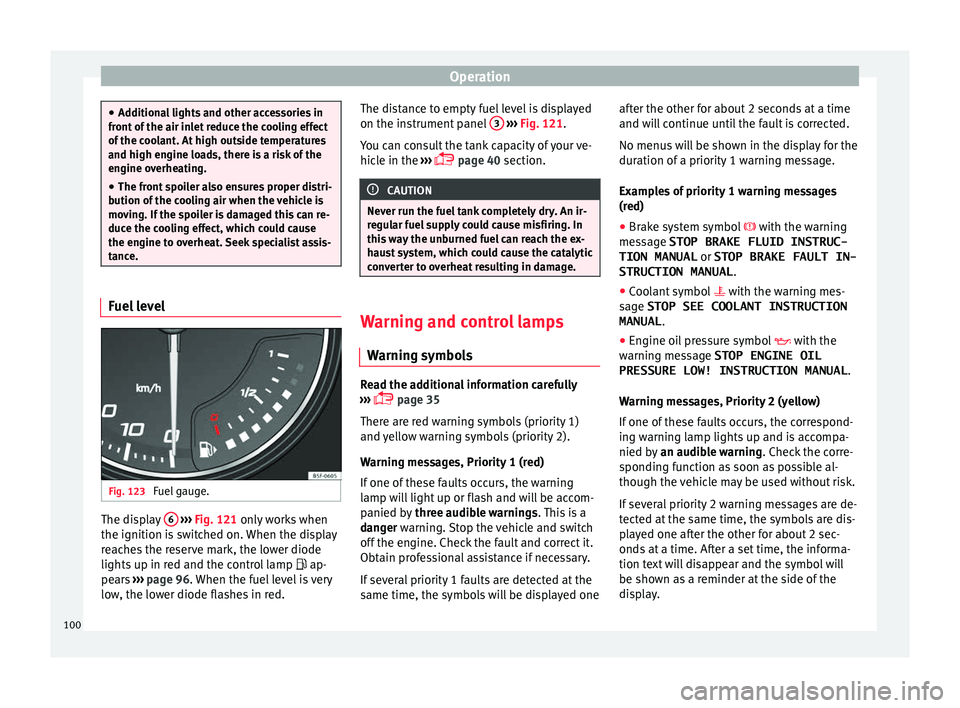
tance. Fuel level
Fig. 123
Fuel gauge. The display
6
› ›
› Fig. 121 on
ly works when
the ignition is switched on. When the display
reaches the reserve mark, the lower diode
lights up in red and the control lamp ap-
pears ››› page 96. When the fuel level is very
low, the lower diode flashes in red. The distance to empty fuel level is displayed
on the instrument p
anel 3
› ››
Fig. 121
.
Y ou c
an consult the tank capacity of your ve-
hicle in the ›››
page 40 section. CAUTION
Never run the fuel tank completely dry. An ir-
regu l
ar fuel supply could cause misfiring. In
this way the unburned fuel can reach the ex-
haust system, which could cause the catalytic
converter to overheat resulting in damage. Warning and control lamps
W arnin
g symbo l
s Read the additional information carefully
› ›
›
p
age 35
There are red warning symbols (priority 1)
and yellow warning symbols (priority 2).
Warning messages, Priority 1 (red)
If one of these faults occurs, the warning
lamp will light up or flash and will be accom-
panied by three audible warnings. This is a
danger warning. Stop the vehicle and switch
off the engine. Check the fault and correct it.
Obtain professional assistance if necessary.
If several priority 1 faults are detected at the
same time, the symbols will be displayed one after the other for about 2 seconds at a time
and will
continue until the fault is corrected.
No menus will be shown in the display for the
duration of a priority 1 warning message.
Examples of priority 1 warning messages
(red)
● Brake system symbol with the warning
me
ssage STOP BRAKE FLUID INSTRUC-
TION MANUAL or STOP BRAKE FAULT IN-
STRUCTION MANUAL .
● Coolant symbol with the warning me
s-
sage STOP SEE COOLANT INSTRUCTION
MANUAL .
● Engine oil pressure symbol with the
warning me
ssage STOP ENGINE OIL
PRESSURE LOW! INSTRUCTION MANUAL .
Warning messages, Priority 2 (yellow)
If one of these faults occurs, the correspond-
ing warning lamp lights up and is accompa-
nied by an audible warning. Check the corre-
sponding function as soon as possible al-
though the vehicle may be used without risk.
If several priority 2 warning messages are de-
tected at the same time, the symbols are dis-
played one after the other for about 2 sec-
onds at a time. After a set time, the informa-
tion text will disappear and the symbol will
be shown as a reminder at the side of the
display.
100
Page 121 of 252
Lights and visibility
Switching lights on and off Read the additional information carefully
›››
p
age 21
The legal requirements regarding the use of
vehicle lights in each country must be ob-
served.
The driver is personally responsible for the
correct use and adjustment of the lights in all
situations. WARNING
Never drive with just the side lights on, there
is a ri sk
of accident. The side lights are not
bright enough to illuminate the road ahead
and to ensure that other road users are able
to see you. Always use your dipped beam
headlights if it is dark or if visibility is poor. Note
● The dipped beam he a
dlights will only work
with the ignition on. The side lights come on
automatically when the ignition is turned off.
● If the lights are left on after the key has
been taken out of
the ignition lock, an audi-
ble warning sounds while the driver door re-
mains open. This is a reminder to switch the
lights off.
● The rear fog light is so bright that it can
dazzle driv
ers behind you. You should use
the rear fog light only when visibility is very
poor. ●
The use of the lightin g de
scribed here is
subject to the relevant statutory require-
ments. Automatic lighting*
Activation
– Rotate the switch to the po s
ition, this
indication will light up.
Deactivation
– Turn the light switch to .
Automatic lightin
g
If automatic headlight control is switched on,
dipped beam headlights are automatically
switched on by a photosensor if you drive in-
to a tunnel, for example. WARNING
● Even if the aut
omatic headlight control is
switched on, the dipped beam headlights will
not be switched on with fog. Therefore, the
dipped beam must be switched on manually. Note
● For those v
ehicles with the automatic head-
light system, when the key is removed from
the ignition, the audible warning will only
sound if the light knob is in position or . ●
If the da ylight
driving automatic light func-
tion is switched on, the front fog lights or
rear fog light cannot be switched on in addi-
tion.
● The use of the lighting described here is
subject
to the relevant statutory require-
ments.
● Do not put stickers on the windscreen in
front of the sen
sor. This may cause disrup-
tions or faults in the automatic lighting sys-
tem.
● The rain sensor switches on the dipped
beam headlight
s when the windscreen wipers
have been operating continuously for a few
seconds and it switches the lights off when
the continuous or interval wipe is switched
off for some minutes. Daytime running lights
››› t
able on page 2
The daytime running lights are enabled auto-
matically when the ignition is switched on.
Daytime running lights are signalling devices
for improving road safety. The lights are built
into the headlights and come on each time
the ignition is turned on if the light switch is
in position 0 or . It is automatically
switched off when the dipped beam lights
are turned on. »
119
Technical data
Advice
Operation
Emergencies
Safety
Page 122 of 252
Operation
WARNING
The side lights or daytime driving lights are
not bright enough t o i
lluminate the road
ahead and to ensure that other road users are
able to see you.
● Always use your dipped beam head lights if
it is r
aining or if visibility is poor.
● The rear lights do not come on with the
daytime drivin
g light. A vehicle which does
not have the rear lights on may not be visible
to other drivers in the darkness, if it is rain-
ing or in conditions of poor visibility. Note
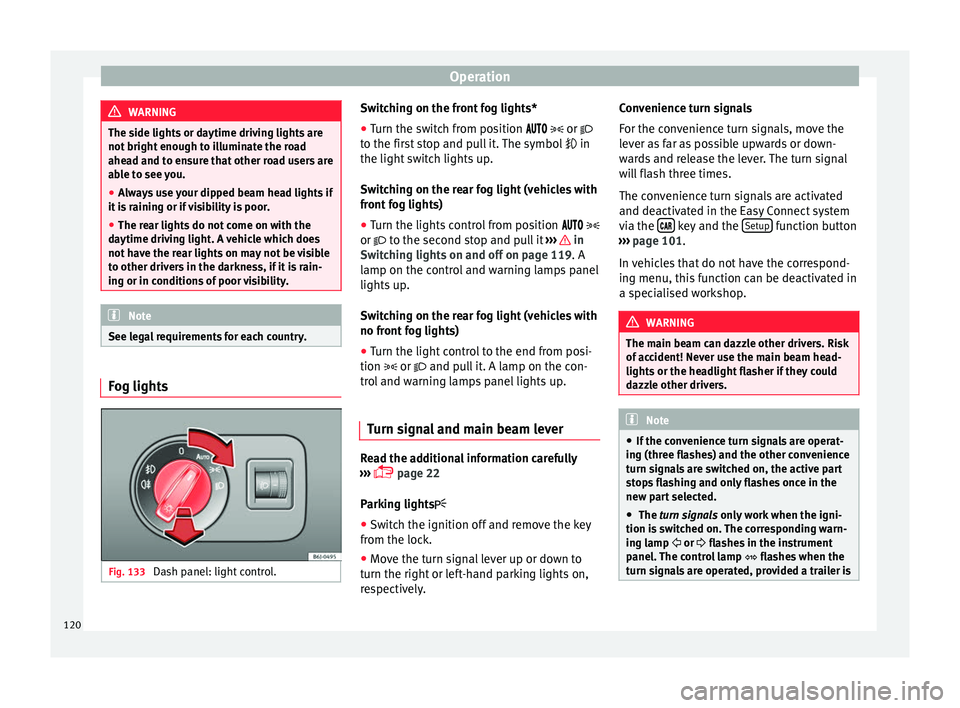
See legal requirements for each country. Fog lights
Fig. 133
Dash panel: light control. Switching on the front fog lights*
● Turn the switch from position
or
to the first stop and pull it. The symbol in
the light switch lights up.
Switching on the rear fog light (vehicles with
front fog lights)
● Turn the lights control from position
or
to the second stop and pull it ››› in
Sw it
chin
g lights on and off on page 119. A
lamp on the control and warning lamps panel
lights up.
Switching on the rear fog light (vehicles with
no front fog lights)
● Turn the light control to the end from posi-
tion or and pull
it. A lamp on the con-
trol and warning lamps panel lights up.
Turn signal and main beam lever Read the additional information carefully
› ›
›
p
age 22
Parking lights ● Switch the ignition off and remove the key
from the lock.
● Mov
e the turn signal lever up or down to
turn the right or lef
t-hand parking lights on,
respectively. Convenience turn signals
For the conv
enience turn signals, move the
lever as far as possible upwards or down-
wards and release the lever. The turn signal
will flash three times.
The convenience turn signals are activated
and deactivated in the Easy Connect system
via the key and the
Set
up function button
› ›
›
p
age 101.
In vehicles that do not have the correspond-
ing menu, this function can be deactivated in
a specialised workshop. WARNING
The main beam can dazzle other drivers. Risk
of acc ident! Nev
er use the main beam head-
lights or the headlight flasher if they could
dazzle other drivers. Note
● If the con v
enience turn signals are operat-
ing (three flashes) and the other convenience
turn signals are switched on, the active part
stops flashing and only flashes once in the
new part selected.
● The turn signals only w
ork when the igni-
tion is switched on. The corresponding warn-
ing lamp or flashes in the instrument
panel. The control lamp flashes when the
turn signals are operated, provided a trailer is 120
Page 127 of 252
Lights and visibility
Windscreen wiper and rear win-
do w w
iper sy s
tems
Control lamp*
It lights up
Windscreen wiper fluid level too low
This serves as a reminder to fill up the reser-
voir at the e
arlie
st opportunity ››› page 210.
Windscreen wipers Read the additional information carefully
› ›
›
p
age 23 WARNING
● Worn and dirty w
iper blades reduce visibili-
ty and safety levels while driving.
● In cold conditions you should not use the
wash/wipe sy
stem unless you have warmed
the windscreen with the heating and ventila-
tion system. The windscreen washer fluid
could otherwise freeze on the windscreen and
obscure your view of the road.
● Always note the corresponding warnings
››› p
age 54. WARNING
The rain sensor* may not detect enough rain
to swit c
h on the wipers.
● If necessary, switch on the wipers manually
when water on the wind
screen obstructs visi-
bility. CAUTION
In icy conditions, always check that the wiper
bla de
s are not frozen to the glass before us-
ing the wipers for the first time. If you switch
on the windscreen wipers when the wiper
blades are frozen to the windscreen, you
could damage both the wiper blades and the
wiper motor. Note
● The winds c
reen wipers will only work when
the ignition is switched on.
● The heat output of the heated jets* is con-
troll
ed automatically when the ignition is
switched on, depending upon the outside
temperature.
● In certain versions of vehicles with alarms,
the windsc
reen wiper will only work in inter-
val/rain sensor mode when the ignition is on
and the bonnet closed.
● When the interval wipe function is on, the
interva
ls are directly proportional to the
speed. This way, the higher the vehicle speed
the shorter the intervals. ●
If y ou s
top the vehicle with the windscreen
wiper in position 1 or 2, it will automatically
change to a lower position speed. The set
speed will be resumed when the vehicle pulls
away.
● The windscreen will be wiped again after
approx
imately five seconds once the “auto-
matic wash/wipe system” has been activa-
ted, provided the vehicle is moving (drip func-
tion). If you activate the wipers less than 3
seconds after the drip function, a new wash
sequence will begin without performing the
last wipe. For the “drip” function to work
again, you have to turn the ignition off and
then on again.
● Do not put stickers on the windscreen in
front of the
rain sensor*. This may cause sen-
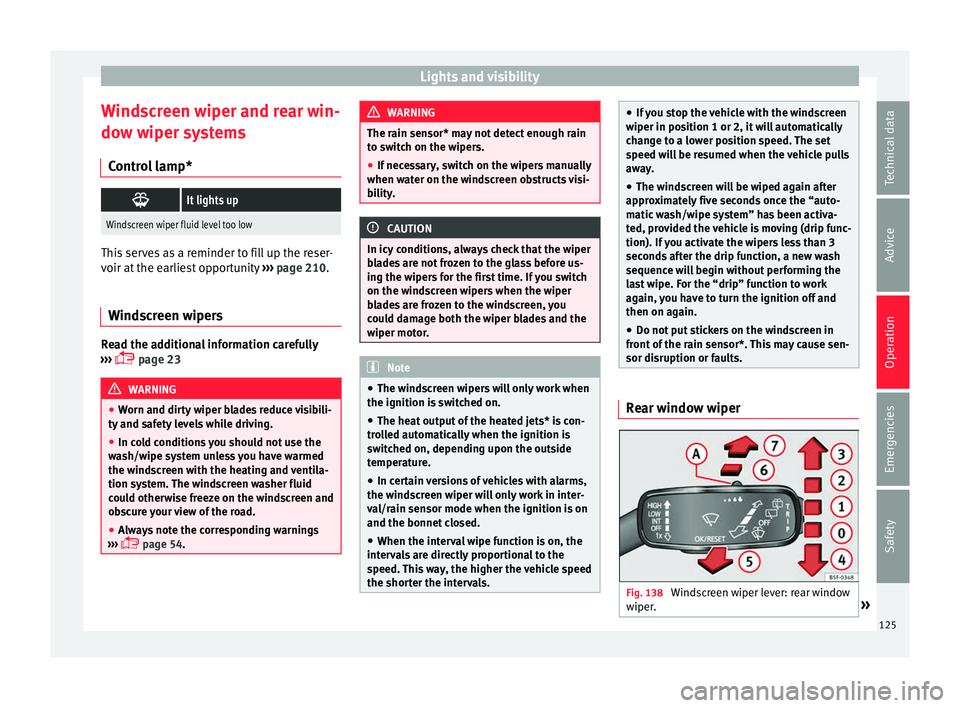
sor disruption or faults. Rear window wiper
Fig. 138
Windscreen wiper lever: rear window
w iper
. » 125
Technical data
Advice
Operation
Emergencies
Safety
Page 128 of 252
Operation
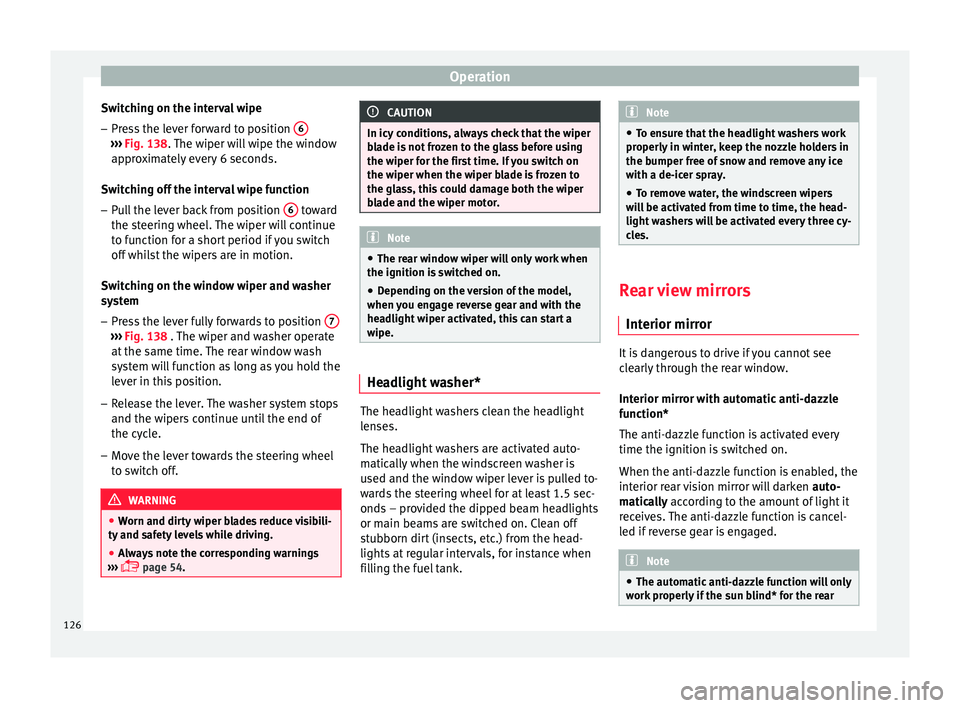
Switching on the interval wipe – Press the lever forward to position 6›››
Fig. 138. The w
iper w i
ll wipe the window
approximately every 6 seconds.
Switching off the interval wipe function
– Pull the lever back from position 6 toward
the s t
eerin g wheel
. The wiper will continue
to function for a short period if you switch
off whilst the wipers are in motion.
Switching on the window wiper and washer
system – Press the lever fully forwards to position 7›››
Fig. 138 . The wiper and w a
sher operate
at the same time. The rear window wash
system will function as long as you hold the
lever in this position.
– Release the lever. The washer system stops
and the wipers c
ontinue until the end of
the cycle.
– Move the lever towards the steering wheel
to switc
h off. WARNING
● Worn and dirty w
iper blades reduce visibili-
ty and safety levels while driving.
● Always note the corresponding warnings
››› p
age 54. CAUTION
In icy conditions, always check that the wiper
bla de i
s not frozen to the glass before using
the wiper for the first time. If you switch on
the wiper when the wiper blade is frozen to
the glass, this could damage both the wiper
blade and the wiper motor. Note
● The rear w indo
w wiper will only work when
the ignition is switched on.
● Depending on the version of the model,
when you eng
age reverse gear and with the
headlight wiper activated, this can start a
wipe. Headlight washer*
The headlight washers clean the headlight
l
en
ses.
The he
adlight washers are activated auto-
matically when the windscreen washer is
used and the window wiper lever is pulled to-
wards the steering wheel for at least 1.5 sec-
onds – provided the dipped beam headlights
or main beams are switched on. Clean off
stubborn dirt (insects, etc.) from the head-
lights at regular intervals, for instance when
filling the fuel tank. Note
● To ens ur
e that the headlight washers work
properly in winter, keep the nozzle holders in
the bumper free of snow and remove any ice
with a de-icer spray.
● To remove water, the windscreen wipers
will
be activated from time to time, the head-
light washers will be activated every three cy-
cles. Rear view mirrors
Int erior mirr
or It is dangerous to drive if you cannot see
c
l
e arly
through the rear window.
Interior mirror with automatic anti-dazzle
function*
The anti-dazzle function is activated every
time the ignition is switched on.
When the anti-dazzle function is enabled, the
interior rear vision mirror will darken auto-
matically according to the amount of light it
receives. The anti-dazzle function is cancel-
led if reverse gear is engaged. Note
● The automatic anti-d
azzle function will only
work properly if the sun blind* for the rear 126
Page 132 of 252
Operation
Note
● To fit and r emo
ve the rear head restraints,
gently tilt the seat backrest forwards.
● When fitting the head restraints again, in-
sert the tube
s as far as possible into the
guides without pressing the button. Seat functions
Heated se at
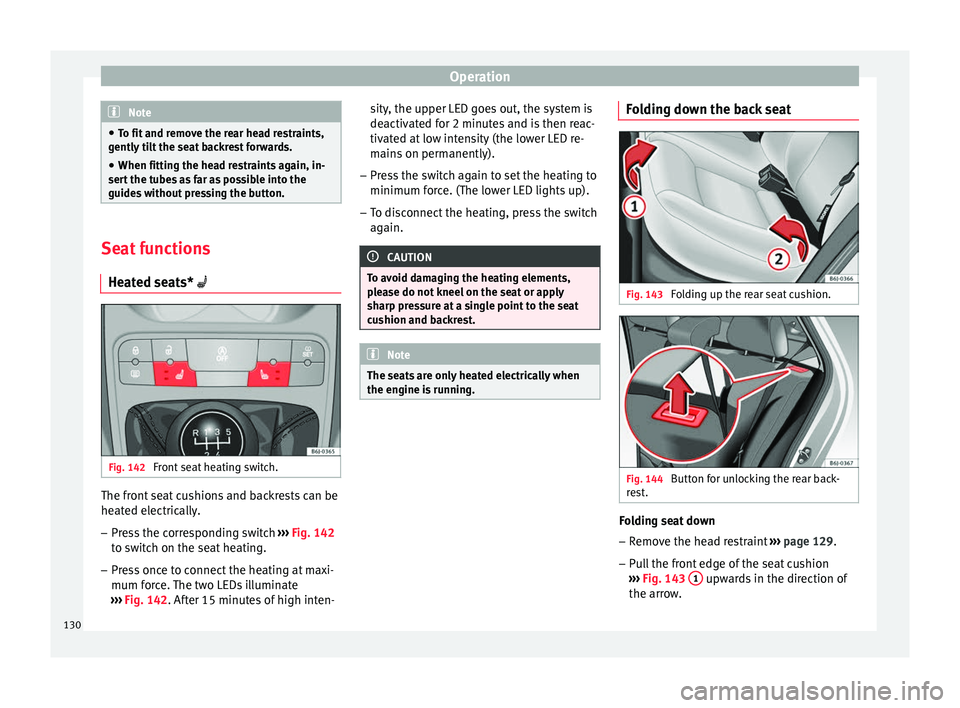
s* Fig. 142
Front seat heating switch. The front seat cushions and backrests can be
he
at
ed el ectric
ally.
– Press the corresponding switch ››› Fig. 142
t
o switch on the seat heating.
– Press once to connect the heating at maxi-
mum force.
The two LEDs illuminate
››› Fig. 142. After 15 minutes of high inten- sity, the upper LED goes out, the system is
deactivated f
or 2 minutes and is then reac-
tivated at low intensity (the lower LED re-
mains on permanently).
– Press the switch again to set the heating to
minimum force. (The lo
wer LED lights up).
– To disconnect the heating, press the switch
again. CAUTION
To avoid damaging the heating elements,
ple a
se do not kneel on the seat or apply
sharp pressure at a single point to the seat
cushion and backrest. Note
The seats are only heated electrically when
the engine is ru
nning. Folding down the back seat
Fig. 143
Folding up the rear seat cushion. Fig. 144
Button for unlocking the rear back-
r e
st
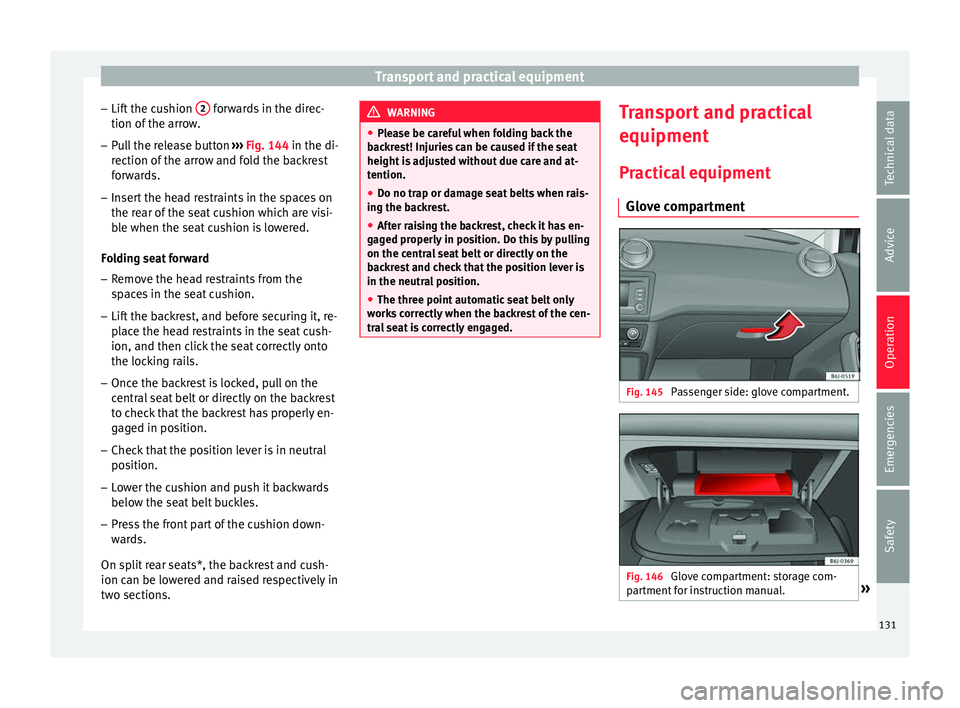
. Folding seat down
– Remove the head restraint ››
›
p
age 129.
– Pull the front edge of the seat cushion
››› Fig. 143
1 upwards in the direction of
the arr o
w .
130
Page 133 of 252
Transport and practical equipment
– Lif t
the c u
shion 2 forwards in the direc-
tion of the arr
ow
.
– Pull the release button ››› Fig. 144 in the di-
r
ection of the arrow and fold the backrest
forwards.
– Insert the head restraints in the spaces on
the rear of the se
at cushion which are visi-
ble when the seat cushion is lowered.
Folding seat forward
– Remove the head restraints from the
space
s in the seat cushion.
– Lift the backrest, and before securing it, re-
place the he
ad restraints in the seat cush-
ion, and then click the seat correctly onto
the locking rails.
– Once the backrest is locked, pull on the
central se
at belt or directly on the backrest
to check that the backrest has properly en-
gaged in position.
– Check that the position lever is in neutral
position.
– Lo
wer the cushion and push it backwards
below the seat belt
buckles.
– Press the front part of the cushion down-
wards.
On s
plit rear seats*, the backrest and cush-
ion can be lowered and raised respectively in
two sections. WARNING
● Plea se be c
areful when folding back the
backrest! Injuries can be caused if the seat
height is adjusted without due care and at-
tention.
● Do no trap or damage seat belts when rais-
ing the back
rest.
● After raising the backrest, check it has en-
gaged properly
in position. Do this by pulling
on the central seat belt or directly on the
backrest and check that the position lever is
in the neutral position.
● The three point automatic seat belt only
works c
orrectly when the backrest of the cen-
tral seat is correctly engaged. Transport and practical
equipment
Pr actic
al
equipment
Glove compartment Fig. 145
Passenger side: glove compartment. Fig. 146
Glove compartment: storage com-
p ar tment
f
or instruction manual. » 131
Technical data
Advice
Operation
Emergencies
Safety
Page 134 of 252
Operation
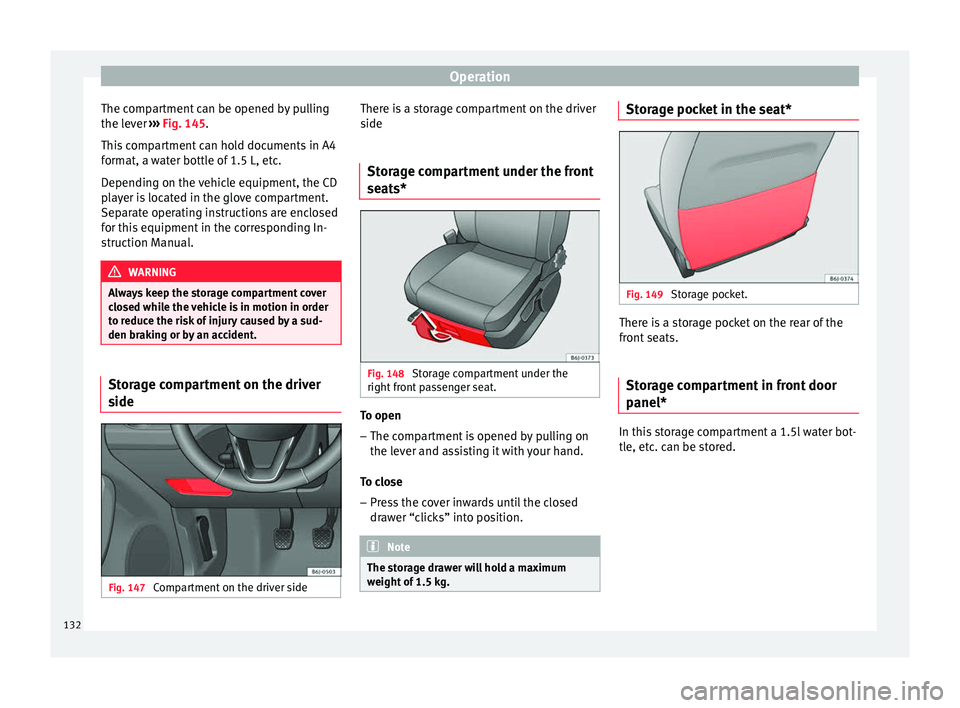
The compartment can be opened by pulling
the l ev
er ››
› Fig. 145.
This compartment can hold documents in A4
format, a water bottle of 1.5 L, etc.
Depending on the vehicle equipment, the CD
player is located in the glove compartment.
Separate operating instructions are enclosed
for this equipment in the corresponding In-
struction Manual. WARNING
Always keep the storage compartment cover
closed whi l
e the vehicle is in motion in order
to reduce the risk of injury caused by a sud-
den braking or by an accident. Storage compartment on the driver
s
ide Fig. 147
Compartment on the driver side There is a storage compartment on the driver
s
ide
St orag
e compartment under the front
seats* Fig. 148
Storage compartment under the
right fr
ont p
assenger seat. To open
– The compartment is opened by pulling on
the l ev
er and a s
sisting it with your hand.
To close – Press the cover inwards until the closed
drawer “c
licks” into position. Note
The storage drawer will hold a maximum
weight of 1.5 k
g. Storage pocket in the seat*
Fig. 149
Storage pocket. There is a storage pocket on the rear of the
fr
ont
seats.
St
orage compartment in front door
panel* In this storage compartment a 1.5l water bot-
tl
e, et
c. c
an be stored.
132
Page 137 of 252
Transport and practical equipment
CAUTION
Always use the correct type of plugs to avoid
damagin g the soc
kets.Note
● The power soc k
ets will only work with the
ignition on.
● The use of electrical appliances with the
engine switc
hed off will cause a battery dis-
charge. Luggage compartment
Lo
adin
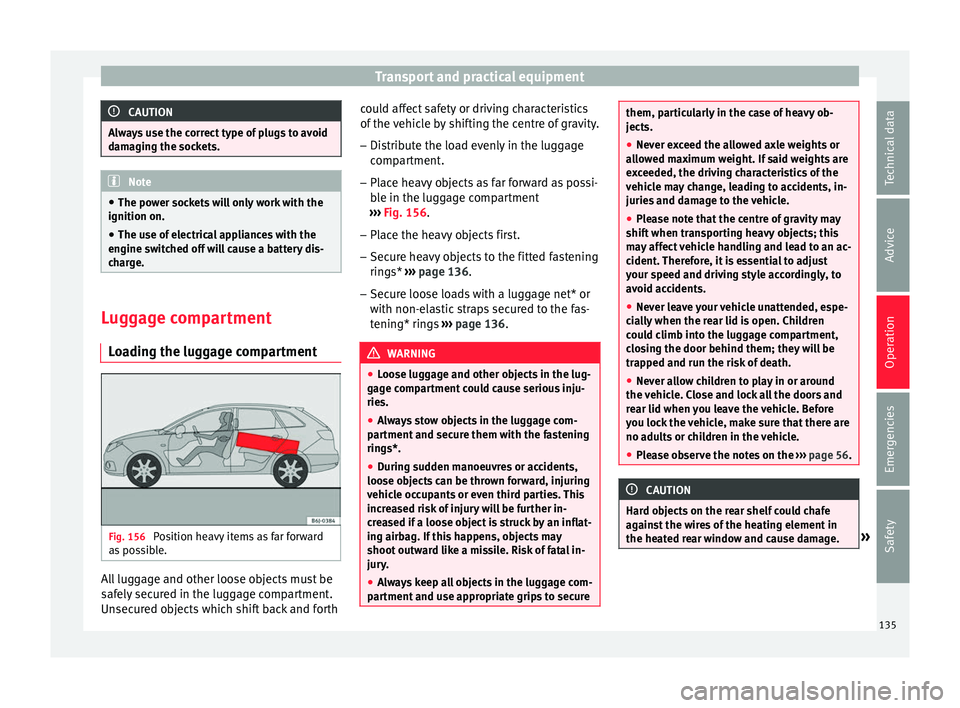
g the luggage compartment Fig. 156
Position heavy items as far forward
a s
po s
sible. All luggage and other loose objects must be
s
af
ely sec
ured in the luggage compartment.
Unsecured objects which shift back and forth could affect safety or driving characteristics
of the vehic
le by shifting the centre of gravity.
– Distribute the load evenly in the luggage
compartment
.
– Place heavy objects as far forward as possi-
ble in the lugg
age compartment
››› Fig. 156.
– Place the heavy objects first.
– Secure heavy objects to the fitted fastening
rings* ››
› page 136.
– Secure loose loads with a luggage net* or
with non-elas
tic straps secured to the fas-
tening* rings ››› page 136. WARNING
● Loose lug g
age and other objects in the lug-
gage compartment could cause serious inju-
ries.
● Always stow objects in the luggage com-
partment and sec
ure them with the fastening
rings*.
● During sudden manoeuvres or accidents,
loose obj
ects can be thrown forward, injuring
vehicle occupants or even third parties. This
increased risk of injury will be further in-
creased if a loose object is struck by an inflat-
ing airbag. If this happens, objects may
shoot outward like a missile. Risk of fatal in-
jury.
● Always keep all objects in the luggage com-
partment and u
se appropriate grips to secure them, particularly in the case of heavy ob-
jects.
●
Nev er e
xceed the allowed axle weights or
allow
ed maximum weight. If said weights are
exceeded, the driving characteristics of the
vehicle may change, leading to accidents, in-
juries and damage to the vehicle.
● Please note that the centre of gravity may
shift when tran
sporting heavy objects; this
may affect vehicle handling and lead to an ac-
cident. Therefore, it is essential to adjust
your speed and driving style accordingly, to
avoid accidents.
● Never leave your vehicle unattended, espe-
cial
ly when the rear lid is open. Children
could climb into the luggage compartment,
closing the door behind them; they will be
trapped and run the risk of death.
● Never allow children to play in or around
the vehicl
e. Close and lock all the doors and
rear lid when you leave the vehicle. Before
you lock the vehicle, make sure that there are
no adults or children in the vehicle.
● Please observe the notes on the ››› p
age 56. CAUTION
Hard objects on the rear shelf could chafe
agains t
the wires of the heating element in
the heated rear window and cause damage. » 135
Technical data
Advice
Operation
Emergencies
Safety
Page 138 of 252
Operation
Note
● The tyre pr e
ssure must be adjusted accord-
ing to the load. When necessary check the
tyre pressures on the label located on the in-
side fuel tank flap ››› page 213.
● Air circulation in the vehicle helps reduce
fogging of
the windows. Used air escapes
through ventilation slits in the side trim of
the luggage compartment. Ensure that the
ventilation slots are never covered.
● Straps for securing the load to the fasten-
ing rings* ar
e commercially available from ac-
cessory shops. Fastening rings*
3 Applies to the model: IBIZA ST
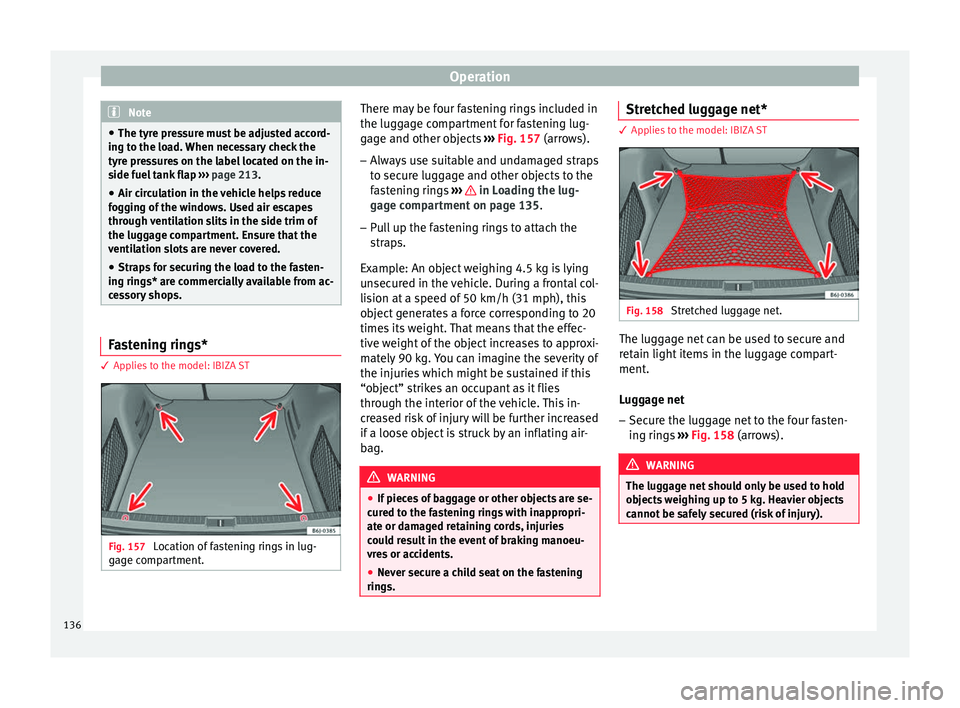
Fig. 157
Location of fastening rings in lug-
g ag
e c omp
artment. There may be four fastening rings included in
the lug
g
ag e c
ompartment for fastening lug-
gage and other objects ››› Fig. 157 (arrows).
– Always use suitable and undamaged straps
to secure lug
gage and other objects to the
fastening rings ››› in Loading the lug-
g ag
e c omp
artment on page 135.
– Pull up the fastening rings to attach the
straps.
Ex
ample: An object weighing 4.5 kg is lying
unsecured in the vehicle. During a frontal col-
lision at a speed of 50 km/h (31 mph), this
object generates a force corresponding to 20
times its weight. That means that the effec-
tive weight of the object increases to approxi-
mately 90 kg. You can imagine the severity of
the injuries which might be sustained if this
“object” strikes an occupant as it flies
through the interior of the vehicle. This in-
creased risk of injury will be further increased
if a loose object is struck by an inflating air-
bag. WARNING
● If piece s
of baggage or other objects are se-
cured to the fastening rings with inappropri-
ate or damaged retaining cords, injuries
could result in the event of braking manoeu-
vres or accidents.
● Never secure a child seat on the fastening
rings. Stretched luggage net*
3 Applies to the model: IBIZA ST
Fig. 158
Stretched luggage net. The luggage net can be used to secure and
r
et
ain light it
ems in the luggage compart-
ment.
Luggage net
– Secure the luggage net to the four fasten-
ing rings
››› Fig. 158 (arrows). WARNING
The luggage net should only be used to hold
obj ect
s weighing up to 5 kg. Heavier objects
cannot be safely secured (risk of injury). 136