technical data Seat Ibiza ST 2016 Owner's Guide
[x] Cancel search | Manufacturer: SEAT, Model Year: 2016, Model line: Ibiza ST, Model: Seat Ibiza ST 2016Pages: 252, PDF Size: 5.56 MB
Page 95 of 252
Fuses and bulbs
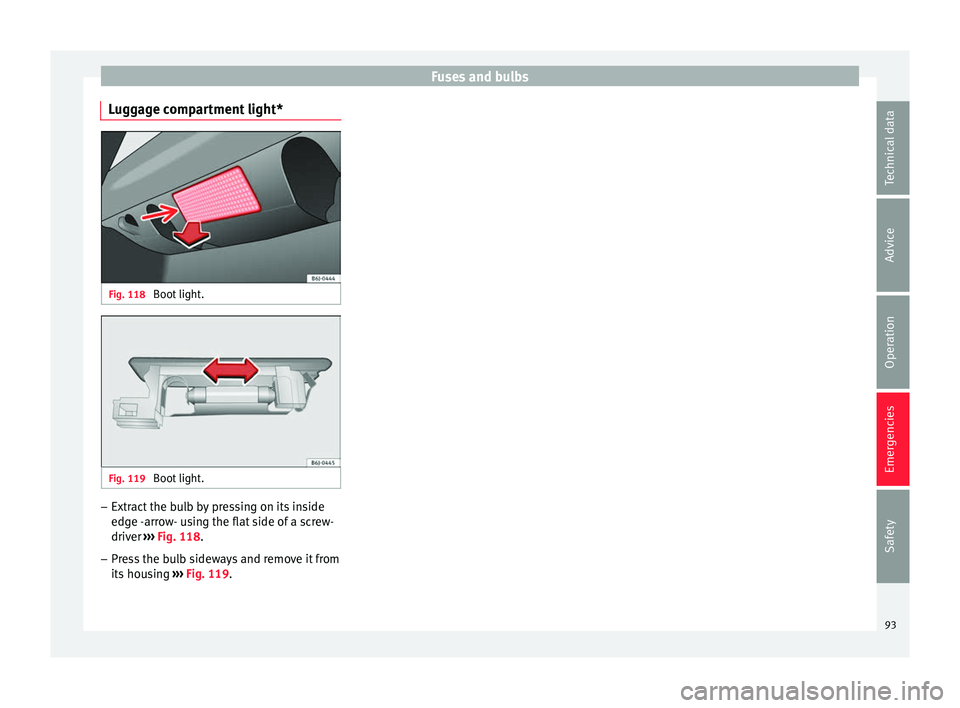
Luggage compartment light* Fig. 118
Boot light. Fig. 119
Boot light. –
Extract the bulb by pressing on its inside
edg e -
arr o
w- using the flat side of a screw-
driver ››› Fig. 118.
– Press the bulb sideways and remove it from
its housin
g ››› Fig. 119.
93
Technical data
Advice
Operation
Emergencies
Safety
Page 97 of 252
Controls and displays
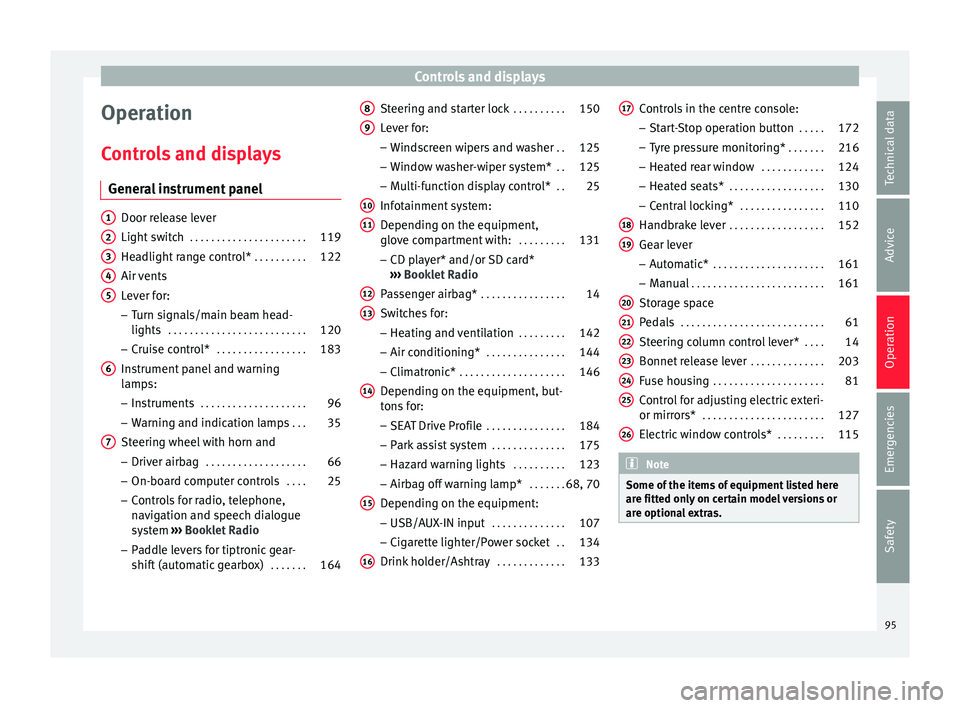
Operation
C ontr
ol
s and displays
General instrument panel Door release lever
Light swit
c
h . . . . . . . . . . . . . . . . . . . . . . 119
Headlight range control* . . . . . . . . . .122
Air vents
Lever for:
– T
urn signals/main beam head-
lights . . . . . . . . . . . . . . . . . . . . . . . . . . 120
– Cruise c ontr
ol* . . . . . . . . . . . . . . . . . 183
Instrument panel and warning
lamps:
– Ins
truments . . . . . . . . . . . . . . . . . . . . 96
– Warning and indic ation l
amps . . . 35
Steering wheel with horn and – Driver airbag . . . . . . . . . . . . . . . . . . . 66
– On-board comp
uter controls . . . .25
– Control
s for radio, telephone,
navigation and speech dialogue
system ›››
Booklet Radio
– Paddle levers for tiptronic gear-
shift (automatic gearbox) . . . . . . .164
1 2
3
4
5
6
7 Steering and starter lock
. . . . . . . . . .150
Lever for: – Wind
sc
reen wipers and washer . .125
– Window wa
sher-wiper system* . .125
– Multi-fu
nction display control* . .25
Infotainment system:
Depending on the equipment,
glov
e compartment with: . . . . . . . . .131
– CD play
er* and/or SD card*
››› Booklet Radio
Passenger airbag* . . . . . . . . . . . . . . . . 14
Switches for:
– Heating and v
entilation . . . . . . . . . 142
– Air conditioning* . . . . . . . . . . . . . . . 144
– Clim
atronic* . . . . . . . . . . . . . . . . . . . . 146
D
epending on the equipment, but-
tons f
or:
– SEAT Drive Profile . . . . . . . . . . . . . . . 184
– Park a s
sist system . . . . . . . . . . . . . . 175
– Hazard warnin
g lights . . . . . . . . . . 123
– Airbag off warnin
g lamp* . . . . . . .68, 70
Depending on the equipment:
– USB/AUX-IN inp ut . . . . . . . . . . . . . . 107
– C
igar ett
e lighter/Power socket . .134
Drink holder/Ashtray . . . . . . . . . . . . .133
8 9
10
11
12
13
14
15
16 Controls in the centre console:
– St ar
t-
Stop operation button . . . . .172
– Tyre pr
essure monitoring* . . . . . . .216
– Heated re
ar window . . . . . . . . . . . . 124
– Heated seats* . . . . . . . . . . . . . . . . . . 130
– C
entral loc
king* . . . . . . . . . . . . . . . . 110
Handbrake lever . . . . . . . . . . . . . . . . . . 152
Gear lever – Automatic* . . . . . . . . . . . . . . . . . . . . . 161
– Manual . . . . . . . . . . . . . . . . . . . . . . . . . 161
St
orag
e space
Pedals . . . . . . . . . . . . . . . . . . . . . . . . . . . 61
St
eering column control lever* . . . .14
Bonnet release lever . . . . . . . . . . . . . .203
Fuse housing . . . . . . . . . . . . . . . . . . . . . 81
Control for adjusting electric exteri-
or mirrors* . . . . . . . . . . . . . . . . . . . . . . . 127
Electric
window controls* . . . . . . . . .115 Note
Some of the items of equipment listed here
are fitted on ly
on certain model versions or
are optional extras. 17
18
19
20
21
22
23
24
25
26
95
Technical data
Advice
Operation
Emergencies
Safety
Page 99 of 252
Instruments and warning/control lamps
CAUTION
● To prev ent
damage to the engine, the rev
counter needle should only remain in the red
zone for a short period of time.
● When the engine is cold, avoid high revs
and heavy acc
eleration and do not make the
engine work hard. For the sake of the environment
Changing up a gear in time reduces fuel con-
sumption and noise. Rev counter
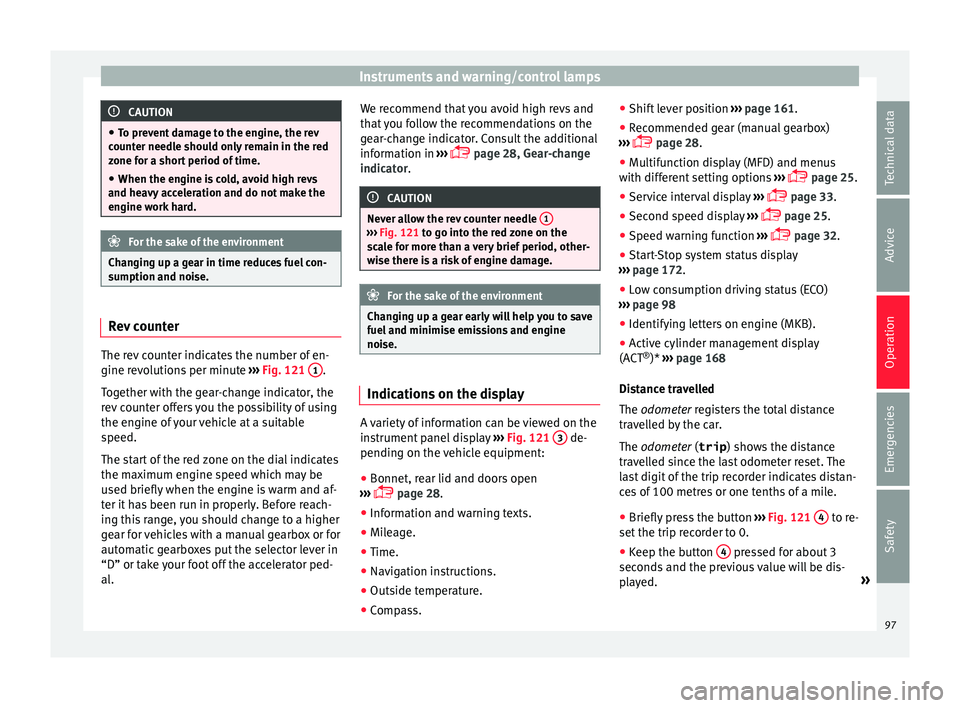
The rev counter indicates the number of en-
gine r
ev
olution
s per minute ›››
Fig. 121 1 .
T og
ether w ith the g
ear-change indicator, the
rev counter offers you the possibility of using
the engine of your vehicle at a suitable
speed.
The start of the red zone on the dial indicates
the maximum engine speed which may be
used briefly when the engine is warm and af-
ter it has been run in properly. Before reach-
ing this range, you should change to a higher
gear for vehicles with a manual gearbox or for
automatic gearboxes put the selector lever in
“D” or take your foot off the accelerator ped-
al. We recommend that you avoid high revs and
that y
ou follow the recommendations on the
gear-change indicator. Consult the additional
information in ›››
page 28, Gear-change
indicator. CAUTION
Never allow the rev counter needle 1 ›››
Fig. 121 to go int o the r
ed zone on the
scale for more than a very brief period, other-
wise there is a risk of engine damage. For the sake of the environment
Changing up a gear early will help you to save
fuel and minimi se emi
ssions and engine
noise. Indications on the display
A variety of information can be viewed on the
in
s
trument p
anel display ›››
Fig. 121 3 de-
pendin g on the
vehic
le equipment:
● Bonnet, rear lid and doors open
››› p
age 28.
● Information and warning texts.
● Mileage.
● Time.
● Navigation instructions.
● Outside temperature.
● Compass. ●
Shift lev
er position ››› page 161.
● Recommended gear (manual gearbox)
››› p
age 28.
● Multifunction display (MFD) and menus
with different
setting options ›››
page 25.
● Service interval display ›››
p
age 33.
● Second speed display ›››
p
age 25.
● Speed warning function ›››
p
age 32.
● Start-Stop system status display
››› p
age 172.
● Low consumption driving status (ECO)
››› p
age 98
● Identifying letters on engine (MKB).
● Active cylinder management display
(ACT ®
)* ›››
page 168
Distance travelled
The odometer registers the total distance
travelled by the car.
The odometer (trip ) shows the distance
travelled since the last odometer reset. The
last digit of the trip recorder indicates distan-
ces of 100 metres or one tenths of a mile.
● Briefly press the button ››› Fig. 121
4 to re-
set the trip r
ecor
der to 0.
● Keep the button 4 pressed for about 3
sec ond
s and the pr
evious value will be dis-
played. »
97
Technical data
Advice
Operation
Emergencies
Safety
Page 101 of 252
Instruments and warning/control lamps
●
Depending on the equipment, some set -
tin
gs and instructions can also be carried out
in the Easy Connect system.
● When several warnings are active at the
same time, the symbols
are shown succes-
sively for a few seconds and will stay on until
the fault is rectified. Odometer
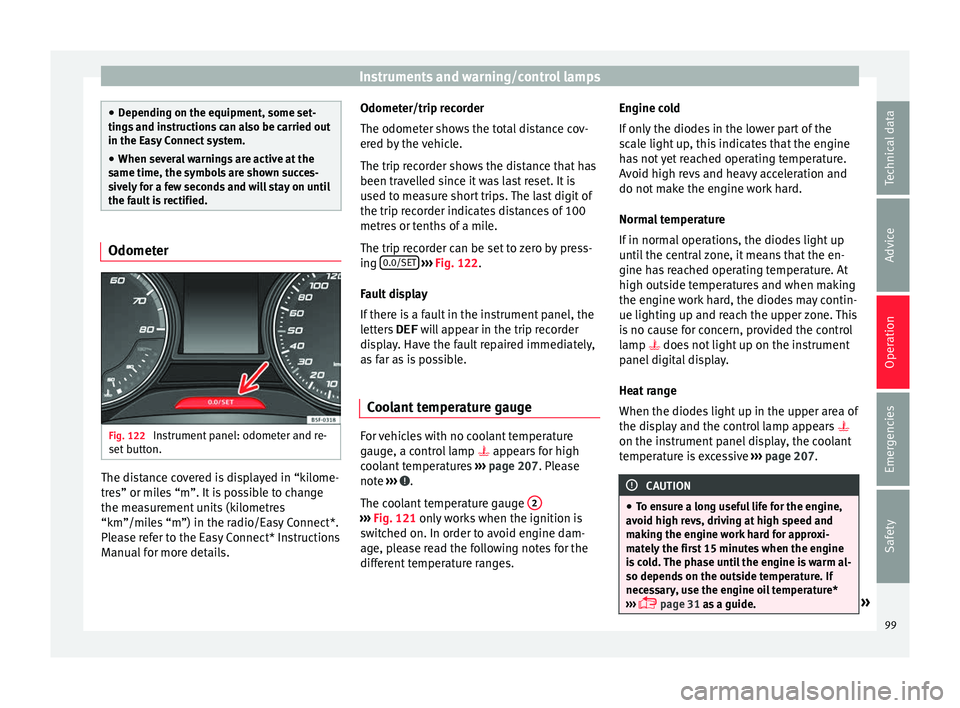
Fig. 122
Instrument panel: odometer and re-
set b
utt on. The distance covered is displayed in “kilome-
tr
e
s” or mi l
es “m”. It is possible to change
the measurement units (kilometres
“km”/miles “m”) in the radio/Easy Connect*.
Please refer to the Easy Connect* Instructions
Manual for more details. Odometer/trip recorder
The odometer shows
the total distance cov-
ered by the vehicle.
The trip recorder shows the distance that has
been travelled since it was last reset. It is
used to measure short trips. The last digit of
the trip recorder indicates distances of 100
metres or tenths of a mile.
The trip recorder can be set to zero by press-
ing 0.0/SET
› ››
Fig. 122
.
F au
lt display
If there is a fault in the instrument panel, the
letters DEF will appear in the trip recorder
display. Have the fault repaired immediately,
as far as is possible.
Coolant temperature gauge For vehicles with no coolant temperature
g
aug
e, a c ontr
ol lamp appears for high
coolant temperatures ›››
page 207. Please
note ››› .
The c oo
lant
temperature gauge 2 ›››
Fig. 121 only w ork
s when the ignition is
switched on. In order to avoid engine dam-
age, please read the following notes for the
different temperature ranges. Engine cold
If only
the diode
s in the lower part of the
scale light up, this indicates that the engine
has not yet reached operating temperature.
Avoid high revs and heavy acceleration and
do not make the engine work hard.
Normal temperature
If in normal operations, the diodes light up
until the central zone, it means that the en-
gine has reached operating temperature. At
high outside temperatures and when making
the engine work hard, the diodes may contin-
ue lighting up and reach the upper zone. This
is no cause for concern, provided the control
lamp does not light up on the instrument
panel digital display.
Heat range
When the diodes light up in the upper area of
the display and the control lamp appears
on the instrument panel display, the coolant
temperature is excessive ››› page 207. CAUTION
● To ens ur
e a long useful life for the engine,
avoid high revs, driving at high speed and
making the engine work hard for approxi-
mately the first 15 minutes when the engine
is cold. The phase until the engine is warm al-
so depends on the outside temperature. If
necessary, use the engine oil temperature*
››› page 31 as a guide. » 99
Technical data
Advice
Operation
Emergencies
Safety
Page 103 of 252
Introduction to the Easy Connect system*
Priority 2 warning messages will not be
sho wn u nti
l all Priority 1 warning messages
have been dealt with!
Examples of priority 2 warning reports (yel-
low):*
● Fuel warning light with the information text
PLEASE REFUEL .WARNING
If the warning lamps and messages are ignor-
ed, the vehic l
e may stall in traffic, or may
cause accidents and severe injuries.
● Never ignore the warning lamps or text
messag
es.
● Stop the vehicle safely as soon as possible.
● Park the vehicle away from traffic and en-
sure that
there are no highly flammable ma-
terials under the vehicle that could come into
contact with the exhaust system (e.g. dry
grass, fuel).
● A faulty vehicle represents a risk of acci-
dent for the driver and f
or other road users. If
necessary, switch on the hazard warning
lamps and put out the warning triangle to ad-
vise other drivers.
● Before opening the bonnet, switch off the
engine and allo
w it to cool.
● In any vehicle, the engine compartment is a
hazardou
s area and could cause severe inju-
ries ››› page 201. CAUTION
Failure to heed the control lamps and text
mess ag
es when they appear may result in
faults in the vehicle. Introduction to the Easy
C
onnect
sys
tem*
System settings (CAR)* CAR menu (Setup) Read the additional information carefully
›››
p
age 24
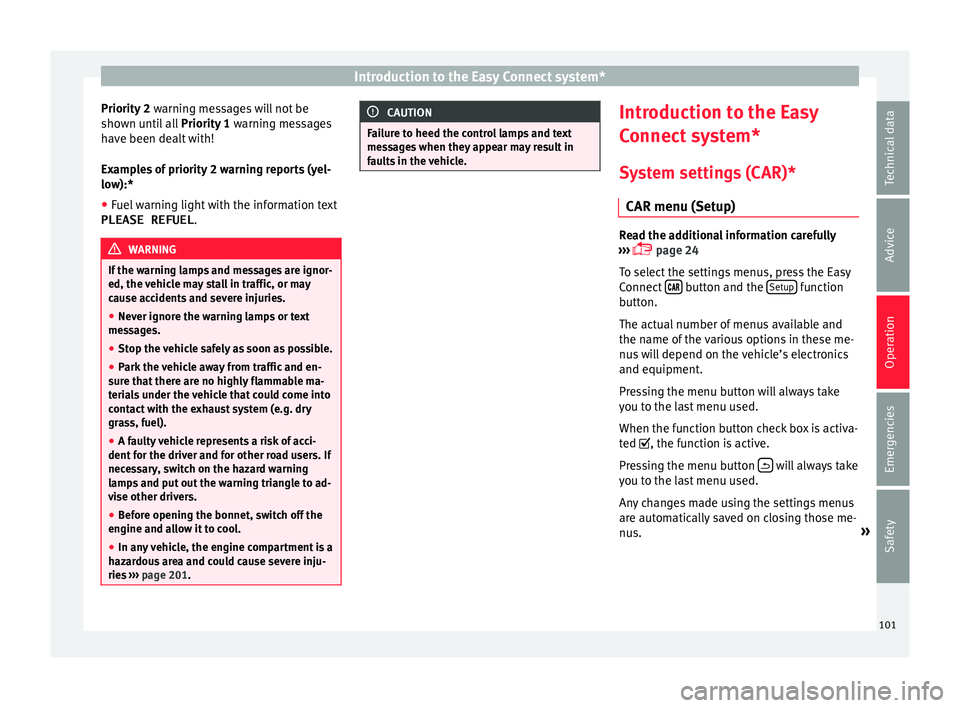
To select the settings menus, press the Easy
Connect button and the
Set
up function
b utt
on.
The act ual
number of menus available and
the name of the various options in these me-
nus will depend on the vehicle’s electronics
and equipment.
Pressing the menu button will always take
you to the last menu used.
When the function button check box is activa-
ted , the function is active.
Pressing the menu button will always take
y ou t
o the l a
st menu used.
Any changes made using the settings menus
are automatically saved on closing those me-
nus. »
101
Technical data
Advice
Operation
Emergencies
Safety
Page 105 of 252
Communications and multimedia
Communications and multi-
medi a
St eerin g wheel
controls*
General information The steering wheel includes a multifunction
module fr
om wher
e it is possible to control
the audio, telephone and radio/navigation
functions without needing to distract the
driver.
There are two versions of the multifunction
module:
● Audio system + telephone without voice
contro l
version (MID) : for controlling the au-
dio functions available (radio, audio CD,
MP3, iPod ®1)
, USB 1)
, SD 1)
) and Bluetooth sys-
tem from the steering wheel.
● Audio system + telephone with voice con-
trol
version (HIGH) : for controlling the audio
functions available (radio, audio CD, MP3,
iPod ®1)
, USB 1)
, SD 1)
) and Bluetooth system
from the steering wheel. 1)
Depending on the vehicle equipment.
103
Technical data
Advice
Operation
Emergencies
Safety
Page 107 of 252
Communications and multimediaButtonRadioMedia (except AUX)AUXTelephoneNavigation
HTurn: Next/previous preset
b)
Press: Acts on the MFDTurn: Next/previous song b)
Press: Acts on the MFDTurn: No function
Press: Acts on the MFDTurn: Acts on the MFD Press: ConfirmTurn: Changes menu or memory on instrument panel
Press: Operates on instrument panel
a)According to the vehicle's equipment package.
b) Only if the dash panel is in audio menu.
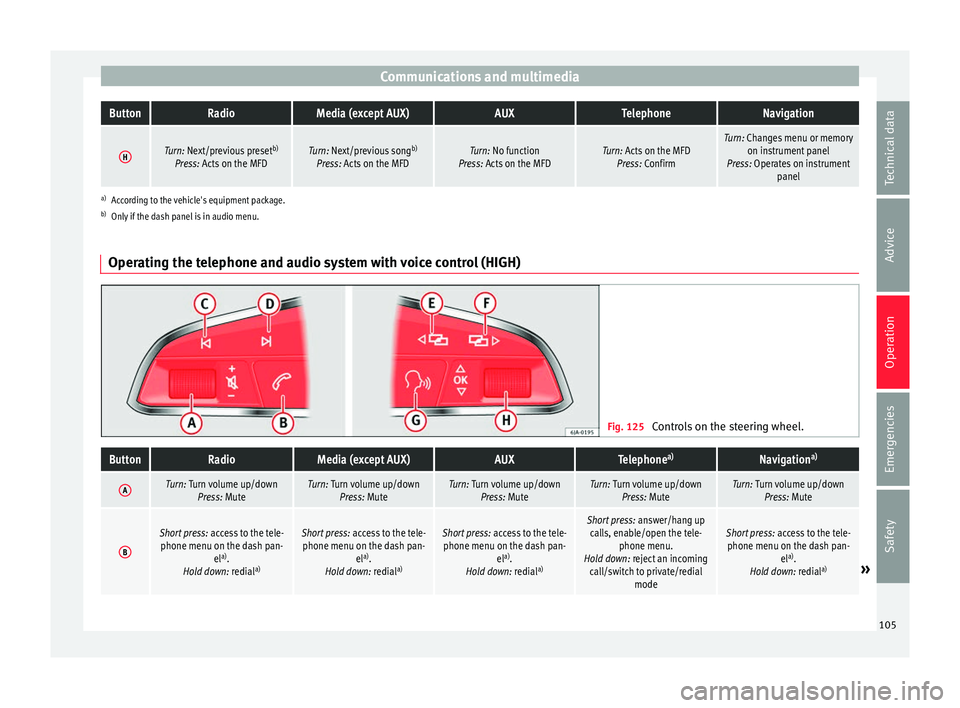
Operating the telephone and audio system with voice control (HIGH) Fig. 125
Controls on the steering wheel.
ButtonRadioMedia (except AUX)AUXTelephone a)Navigation a)
ATurn: Turn volume up/down
Press: MuteTurn: Turn volume up/downPress: MuteTurn: Turn volume up/downPress: MuteTurn: Turn volume up/downPress: MuteTurn: Turn volume up/downPress: Mute
B
Short press: access to the tele-
phone menu on the dash pan- ela)
.
Hold down: redial a)Short press:
access to the tele-
phone menu on the dash pan- ela)
.
Hold down: redial a)Short press:
access to the tele-
phone menu on the dash pan- ela)
.
Hold down: redial a)Short press:
answer/hang up
calls, enable/open the tele- phone menu.
Hold down: reject an incoming call/switch to private/redial modeShort press: access to the tele-
phone menu on the dash pan- ela)
.
Hold down: redial a)
» 105
Technical data
Advice
Operation
Emergencies
Safety
Page 109 of 252
Opening and closing
Multimedia USB/A UX
-IN inp ut Fig. 126
USB/AUX-IN input. Depending on the features and the country,
the
v
ehic l
e may have a USB/AUX-IN connec-
tion.
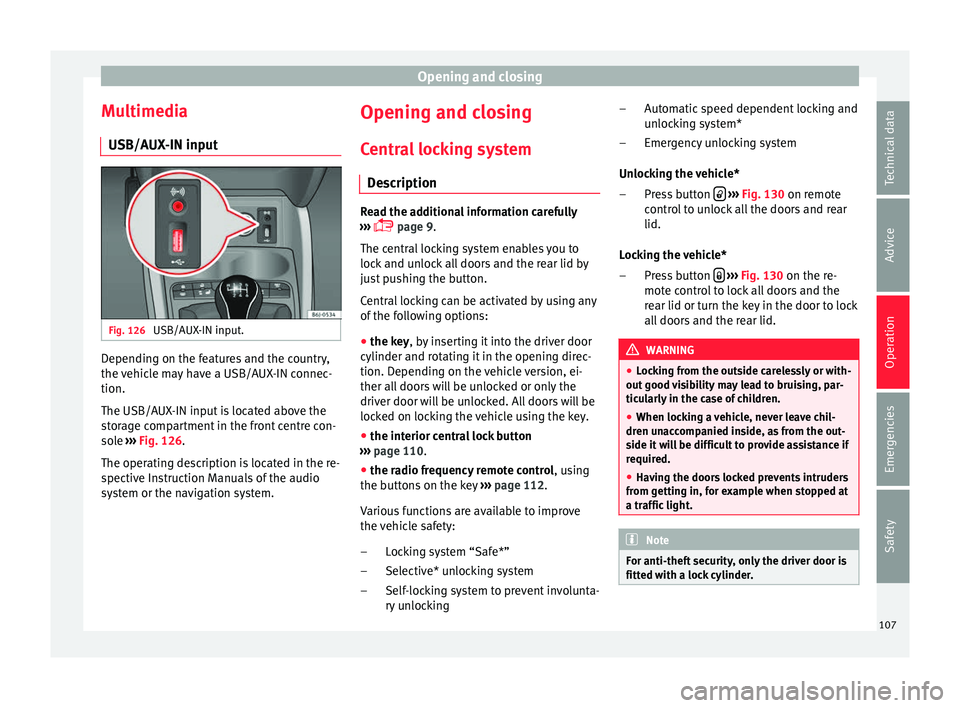
The USB/AUX-IN input is located above the
storage compartment in the front centre con-
sole ››› Fig. 126.
The operating description is located in the re-
spective Instruction Manuals of the audio
system or the navigation system. Opening and closing
C entr
al
locking system
Description Read the additional information carefully
›››
p
age 9.
The central locking system enables you to
lock and unlock all doors and the rear lid by
just pushing the button.
Central locking can be activated by using any
of the following options:
● the key, by inserting it into the driver door
cylinder and rot atin
g it in the opening direc-
tion. Depending on the vehicle version, ei-
ther all doors will be unlocked or only the
driver door will be unlocked. All doors will be
locked on locking the vehicle using the key.
● the interior central lock button
››› p
age 110.
● the radio frequency remote control , using
the b
uttons on the key ›››
page 112.
Various functions are available to improve
the vehicle safety: Locking system “Safe*”
Selective* unlocking system
Self-locking system to prevent involunta-
ry unlocking
–
–
– Automatic speed dependent locking and
unlock
ing system*
Emergency unlocking system
Unlocking the vehicle* Press button
› ››
Fig. 130
on remot
e
control to unlock all the doors and rear
lid.
Locking the vehicle* Press button
› ››
Fig. 130
on the r e-
mot
e control to lock all doors and the
rear lid or turn the key in the door to lock
all doors and the rear lid. WARNING
● Lock in
g from the outside carelessly or with-
out good visibility may lead to bruising, par-
ticularly in the case of children.
● When locking a vehicle, never leave chil-
dren unac
companied inside, as from the out-
side it will be difficult to provide assistance if
required.
● Having the doors locked prevents intruders
from getting in, f
or example when stopped at
a traffic light. Note
For anti-theft security, only the driver door is
fitted with a loc k
cylinder. –
–
–
–
107
Technical data
Advice
Operation
Emergencies
Safety
Page 111 of 252
Opening and closing
doors and to use the luggage compartment.
The w arnin
g lamp and the al
arm (only vehi-
cles fitted with one) are turned off.
Unlocking the luggage compartment
See ›››
page 9.
Activating the selective unlocking system*
With the door open, insert a key into the start
cylinder and start the ignition. Insert the oth-
er key into the driver door lock and turn in the
opening direction for at least 3 seconds. The
turn signals will flash twice.
Deactivating the selective unlocking system*
With the door open, insert a key into the start
cylinder and start the ignition. Insert the oth-
er key into the driver door lock and turn in the
locking direction for at least 3 seconds. The
turn signals will flash once.
Self-locking system to prevent invol-
untary
unlocking It is an anti-theft system and prevents the un-
int
ention
al u
nlocking of the vehicle.
If the vehicle is unlocked and none of the
doors (including the boot) are opened within
30 seconds, it re-locks automatically. Automatic speed-dependent locking
and unlock
ing system* This is a safety system which prevents access
to the v
ehic
le from the outside when it is run-
ning (e.g. when stopped at a traffic light).
Locking
The doors will lock automatically if the speed
of 15 km/h (9 mph) is exceeded. The rear lid
will lock automatically if the speed of 6 km/h
(4 mph) is exceeded.
If the vehicle is stopped and any of its doors
open, when starting again and exceeding the
mentioned speed, all doors will lock again.
Unlocking
On withdrawing the ignition key, the vehicle
will returns to its status prior to self-locking.
Each door can be unlocked and opened inde-
pendently from the inside (for example, when
a passenger gets out). To do it, simply oper-
ate the lever inside the door.
Activating the system*
With the ignition on, press the locking key on
the central locking system within 3 to 10 sec-
onds. Deactivating the system*
With the ignition on, pre
s
s the unlocking key
on the central locking system within 3 to 10
seconds.
In both cases, if the operation has been car-
ried out correctly, the locking lamp will flash
› ››
Fig. 127
. WARNING
The door handles must not be operated when
the vehic l
e is running: the door would open. Note
If the airbags are triggered during an acci-
dent, the vehic l
e is unlocked, except for the
luggage compartment. It is possible to lock
the vehicle from inside with the central lock-
ing, after turning the ignition off and back on
again. 109
Technical data
Advice
Operation
Emergencies
Safety
Page 113 of 252
Opening and closing
and clockwise for the right-hand side
door s.
D eactiv
ating the childproof lock
– Unlock the vehicle and open the door
whose chil
dproof lock you want to deacti-
vate.
– With the door open, rotate the groove in
the door using the ignition k
ey, anti-clock-
wise for the right-hand side doors, and
clockwise for the left-hand side doors
››› Fig. 128.
Once the childproof lock is activated, the
door can only be opened from the outside.
The childproof lock can be activated or deac-
tivated by inserting the key in the groove
when the door is open, as described above. Keys
Set of key
s Fig. 129
Set of keys. The set of keys may consists of the following,
dependin
g on the
ver
sion of your vehicle:
● a remote control key ››› Fig. 129
A ●
a key without remote control B ,
● a plastic key tab* C .
or
● two keys without remote control B ●
a plastic key tab* C .
D up
licat
e keys
If you need a replacement key, go to a Techni-
cal Service with your vehicle identification
number. WARNING
● An incorrect u
se of the keys can cause seri-
ous injuries.
● Never leave children or disabled persons in
the vehicl
e. In case of emergency, they may
not be able to leave the vehicle or manage on
their own.
● An uncontrolled use of the key could start
the engine or activate an
y electric equipment
(e.g. electric windows), causing risk of acci-
dent. The doors can be locked using the re-
mote control key. This could become an ob-
stacle for assistance in an emergency situa-
tion.
● Never forget the keys inside the vehicle. An
unauthorised u
se of your vehicle could result
in injury, damage or theft. Therefore always
take the key with you when you leave the ve-
hicle.
● Never remove the key from the ignition if
the vehicl
e is in motion. Otherwise, the steer-
ing could suddenly block and it would be im-
possible to steer the vehicle. CAUTION
There are electronic components in the re-
mote contr o
l key. Avoid wetting and hitting
the keys. 111
Technical data
Advice
Operation
Emergencies
Safety