esp Seat Ibiza ST 2016 Owner's Guide
[x] Cancel search | Manufacturer: SEAT, Model Year: 2016, Model line: Ibiza ST, Model: Seat Ibiza ST 2016Pages: 252, PDF Size: 5.56 MB
Page 140 of 252
Operation
●
If the lugg ag
e compartment is overloaded,
remove the tray.
● The load in the storage compartment
should not e
xceed 3 kg. Note
● En sur e th
at, when placing items of clothing
on the luggage compartment cover, rear visi-
bility is not reduced.
● If your vehicle has a storage compartment*,
only pl
ace light objects inside. Roof rack/roof luggage rack*
Intr oduction Please observe the following points if you in-
t
end t
o carr
y loads on the roof:
● For safety reasons, only luggage racks and
acces
sories supplied by SEAT Official Serv-
ices are recommended.
● It is essential that you follow the assembly
instructions
included with the bars exactly,
being especially careful to position front and
rear luggage compartment cover bars on the
special housings in the longitudinal bars.
You must also respect their position accord-
ing to the direction of travel indicated in the
assembly manual. Not following these in-
structions may damage the bodywork. ●
Pay s
pecial attention to the tightening tor-
que of the attachment bolts and check them
following a short journey. If necessary, re-
tighten the bolts and check them at regular
intervals.
● Distribute the load evenly. A maximum load
of 40 kg i
s permitted for each roof rack sys-
tem support bar, the load must be distrib-
uted evenly along the entire length. However,
the maximum load permitted for the entire
roof (including the support system) of 75 kg
must not be exceeded nor the total weight
recommended for the entire vehicle. See the
“Technical Data” section.
● When transporting heavy or large objects
on the roof, any
change in the normal vehicle
behaviour due to a change in the centre of
gravity or an increased wind resistance must
be taken into account. For this reason, a suit-
able speed and driving style must be used.
● On vehicles fitted with a sliding/tilting sun-
roof*, make s
ure it does not hit the load on
the roof upon opening. Attach the cross bars of the roof carri-
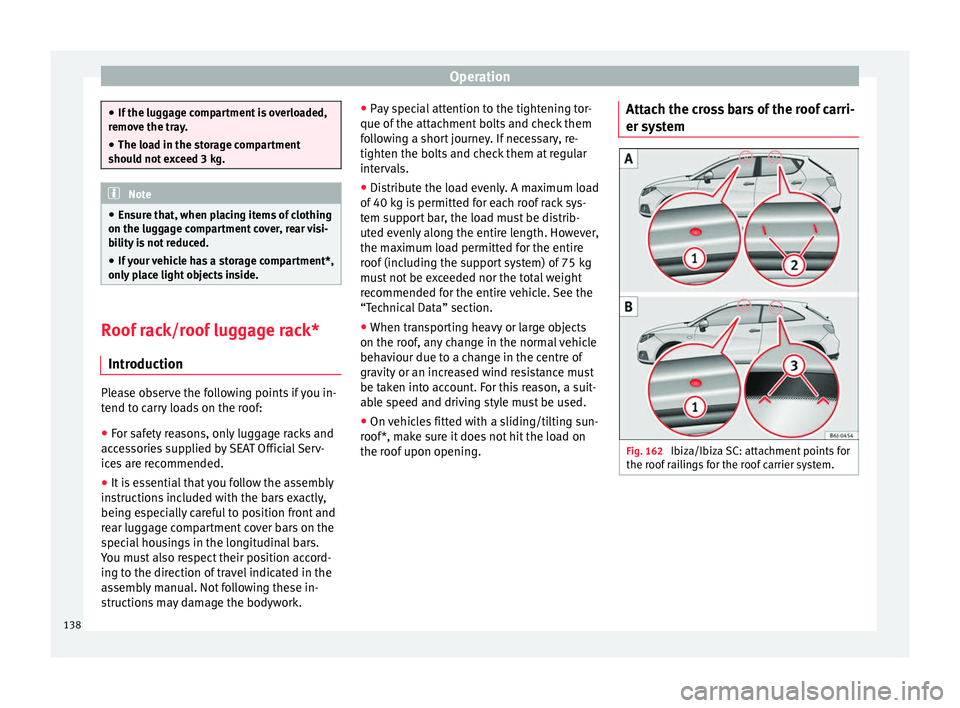
er system
Fig. 162
Ibiza/Ibiza SC: attachment points for
the r oof
rai
lings for the roof carrier system. 138
Page 148 of 252
Operation
Climatronic* Gener a
l not
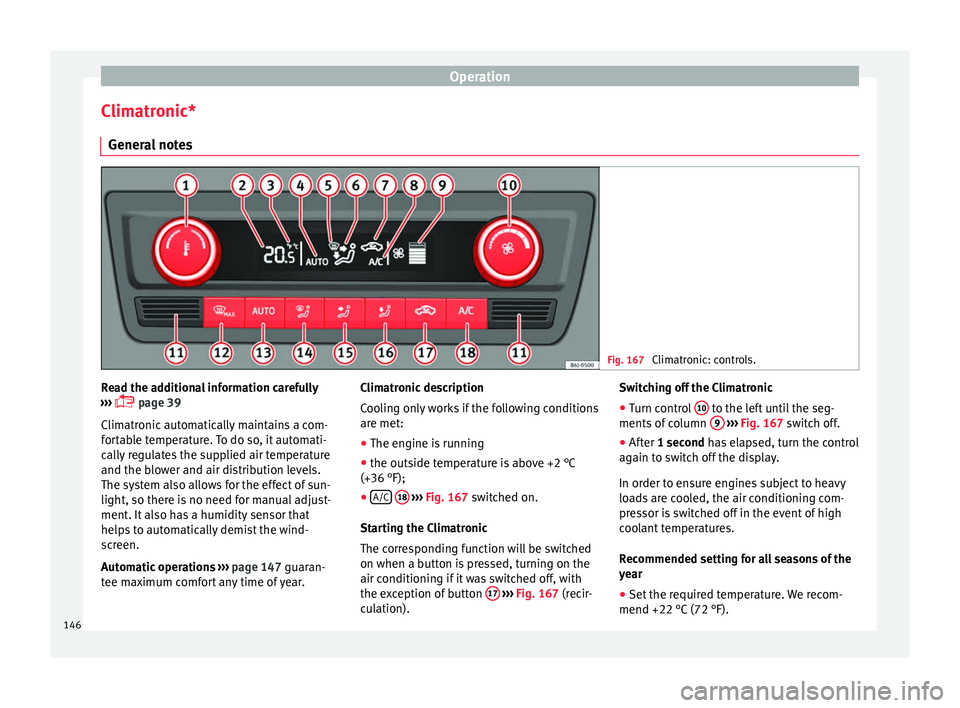
es Fig. 167
Climatronic: controls. Read the additional information carefully
› ›
›
p
age 39
Climatronic automatically maintains a com-
fortable temperature. To do so, it automati-
cally regulates the supplied air temperature
and the blower and air distribution levels.
The system also allows for the effect of sun-
light, so there is no need for manual adjust-
ment. It also has a humidity sensor that
helps to automatically demist the wind-
screen.
Automatic operations ››› page 147 guaran-
tee maximum comfort any time of year. Climatronic description
Cooling on
ly works if the following conditions
are met:
● The engine is running
● the outside temperature is above +2 °C
(+36 °F);
● A/C
18
› ››
Fig. 167
swit
ched on.
Starting the Climatronic
The corresponding function will be switched
on when a button is pressed, turning on the
air conditioning if it was switched off, with
the exception of button 17
›
› ›
Fig. 167
(r
ecir-
culation). Switching off the Climatronic
●
Turn control 10 to the left until the seg-
ments of
co
lumn 9
› ››
Fig. 167
swit
ch off.
● After 1 second has elapsed, turn the control
again to sw
itch off the display.
In order to ensure engines subject to heavy
loads are cooled, the air conditioning com-
pressor is switched off in the event of high
coolant temperatures.
Recommended setting for all seasons of the
year
● Set the required temperature. We recom-
mend +22 °C (72 °F).
146
Page 151 of 252
Driving
It lights up yellow
The 12-volt battery
was disconnected
and has been recon-
nected.Take the vehicle for a short run
at 15-20 km/h (9-12 mph).
It flashes yellow
The steering column
is tight.Turn the wheel a little to both
sides.
The steering column
does not unlock or
lock.Remove the key from the ignition
and switch the ignition back on.
If necessary, check the messag-
es displayed on the instrument
panel display.
Do not drive on if
the steering
column remains locked after the
ignition has been switched on.
Seek specialist assistance. WARNING
If the warning lamps and the corresponding
mess ag
es are ignored when they light up, the
vehicle may stall in traffic and cause acci-
dents and severe injuries.
● Never ignore the warning lamps or messag-
es.
● Stop the v
ehicle at the next opportunity
and in a safe pl
ace. Note
Failure to heed the control lamps and corre-
sponding t e
xt messages when they light up
may result in damage to the vehicle. Information relating to different vehi-
cle pr
oc
esses. In order to make the vehicle more difficult to
ste
al,
you should always lock the steering be-
fore leaving the vehicle.
Mechanical steering lock
The steering column is locked when the key
is removed from the ignition lock and the ve-
hicle is stationary.
Activating the steering lock
● Park the vehicle ›››
p
age 152.
● Remove the ignition key.
● Turn the steering wheel slightly until the
steering loc
k has engaged.
Deactivating the steering lock
● Turn the steering wheel slightly to release
the lock.
● Insert
the key in the ignition lock.
● Hold the steering wheel in this position
and switch on the ignition. El
ectromechanical steering
In vehicl
es with electromechanical steering,
the assisted steering function automatically
adjusts according to vehicle speed, steering
wheel torque and wheel orientation. The
power steering only works when the engine
is running.
You should take into account that you will
need considerably more power than normal
to steer the vehicle if the power steering is
not working correctly or at all.
Power-assisted steering
Power-assisted steering helps the driver in
critical situations. In counter-steering, it as-
sists by applying additional torque ››› .
WARNING
Power-assisted steering, together with the
ESC, helps the driv
er to control vehicle steer-
ing in critical situations. However, the driver
is ultimately responsible for steering the ve-
hicle at all times. Power-assisted steering
does not remove this responsibility. 149
Technical data
Advice
Operation
Emergencies
Safety
Page 152 of 252
Operation
Starting and stopping the en-
gine Ignition k ey
po s
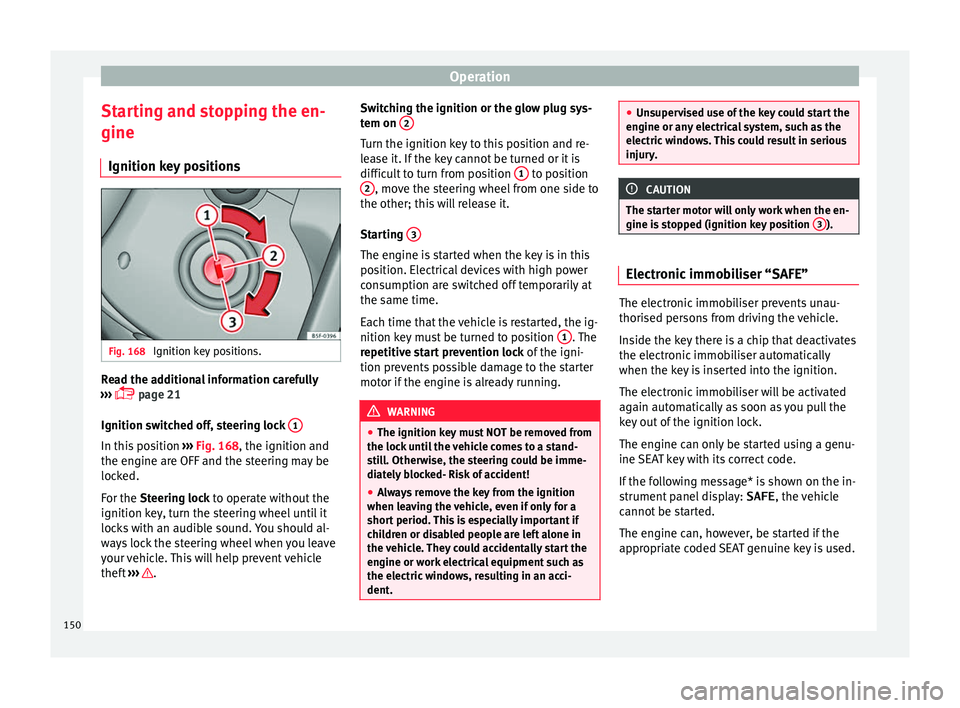
itionsFig. 168
Ignition key positions. Read the additional information carefully
› ›
›
p
age 21
Ignition switched off, steering lock 1In this position
››
›
Fig. 168
, the ignition and
the engine are OFF and the steering may be
locked.
For the Steering lock to operate without the
ignition key, turn the steering wheel until it
locks with an audible sound. You should al-
ways lock the steering wheel when you leave
your vehicle. This will help prevent vehicle
theft ››› . Switching the ignition or the glow plug sys-
t
em on 2 Turn the ignition key to this position and re-
l
e
a se it
. If the key cannot be turned or it is
difficult to turn from position 1 to position
2 , move the steering wheel from one side to
the other; thi s
w i
ll release it.
Starting 3 The engine is started when the key is in this
po
s
ition. El ectric
al devices with high power
consumption are switched off temporarily at
the same time.
Each time that the vehicle is restarted, the ig-
nition key must be turned to position 1 . The
r epetitiv
e st
art prevention lock of the igni-
tion prevents possible damage to the starter
motor if the engine is already running. WARNING
● The ignition key mu s
t NOT be removed from
the lock until the vehicle comes to a stand-
still. Otherwise, the steering could be imme-
diately blocked- Risk of accident!
● Always remove the key from the ignition
when leavin
g the vehicle, even if only for a
short period. This is especially important if
children or disabled people are left alone in
the vehicle. They could accidentally start the
engine or work electrical equipment such as
the electric windows, resulting in an acci-
dent. ●
Unsuper v
ised use of the key could start the
engine or any electrical system, such as the
electric windows. This could result in serious
injury. CAUTION
The starter motor will only work when the en-
gine i s st
opped (ignition key position 3 ).
Electronic immobiliser “SAFE”
The electronic immobiliser prevents unau-
thori
sed per
sons
from driving the vehicle.
Inside the key there is a chip that deactivates
the electronic immobiliser automatically
when the key is inserted into the ignition.
The electronic immobiliser will be activated
again automatically as soon as you pull the
key out of the ignition lock.
The engine can only be started using a genu-
ine SEAT key with its correct code.
If the following message* is shown on the in-
strument panel display: SAFE, the vehicle
cannot be started.
The engine can, however, be started if the
appropriate coded SEAT genuine key is used.
150
Page 160 of 252
Operation
At speeds of up to approximately 80 km/h
(50 mph), it i
s ab
le to balance out differences
in the speed of the driven wheels of approxi-
mately 100 rpm/min caused by a partially
slippery road surface. It does this by braking
the wheel which has lost traction and distrib-
uting more driving force to the other driven
wheel via the differential.
To prevent the disc brake of the braking
wheel from overheating, the EDL cuts out au-
tomatically if subjected to excessive loads.
The vehicle will continue to function normally
without EDL. For this reason, the driver is not
informed that the EDL has been switched off.
The EDL will switch on again automatically
when the brake has cooled down.
Control lamp
A malfunction in the EDL is indicated by the
ABS control lamp ››› page 158. Take the
vehicle to a specialised workshop as soon as
possible. WARNING
● When accel er
ating on a slippery surface,
for example on ice and snow, press the accel-
erator carefully. Despite EDL, the driven
wheels may start to spin. This could impair
the vehicle's stability.
● Always adapt your driving style to suit road
conditions and the tr
affic situation. Do not let
the extra safety afforded by EDL tempt you in- to taking any risks when driving, this can
cause ac
c
idents. CAUTION
Modifications to the vehicle (e.g. to the en-
gine, the br ake sys
tem, running gear or any
components affecting the wheels and tyres)
could affect the efficiency of the EDL
››› page 190. Hydraulic Brake Assist (HBA)*
The function (Hydraulic Brake Assist HBA) is
on
ly
inc luded in
vehicles with ESC.
In an emergency, most drivers brake in time,
but not with maximum force. This results in
unnecessarily long braking distances.
This is when the brake assist system comes
into action. When pressing the brake pedal
rapidly, the assistant interprets it as an emer-
gency. It very quickly builds up the full brake
pressure so that the ABS can be activated
more quickly and efficiently, thus reducing
braking distance.
Do not reduce the pressure on the brake ped-
al, since the brake assist system switches off
automatically as soon as you release the
brake. Automatic hazard warning lights activation
The brake lights fl
ash automatically to indi-
cate that the vehicle is braking suddenly or in
an emergency situation. If the emergency
braking continues until the vehicle comes to
a standstill, the hazard warning lights will
then come on and the brake lights will re-
main on permanently from that moment. The
warning lights will automatically switch off
when the vehicle begins to move again or
when the "warning" light button is pressed. WARNING
● The risk of ac
cident is higher if you drive
too fast, if you do not keep your distance from
the vehicle in front, and when the road sur-
face is slippery or wet. The increased acci-
dent risk cannot be reduced by the brake as-
sist system.
● The brake assist system cannot defy the
laws
of physics. Slippery and wet roads are
dangerous even with the brake assist system!
Therefore, it is essential that you adjust your
speed to suit the road and traffic conditions.
Do not let the extra safety features tempt you
into taking any risks when driving. Anti-lock brake system (ABS)
The anti-lock brake (ABS) system prevents
the wheel
s
fr om loc
king during braking and
is an important part of the vehicle's active
safety system.
158
Page 163 of 252
Driving
Manual gearbox Driv in
g w ith m
anual gearboxRead the additional information carefully
›››
p
age 37
Certain versions of the model may include a
6-speed manual gearbox, and its diagram is
shown on the gearbox lever.
The reverse gear can only be engaged when
the car is stationary. When the engine is run-
ning and before engaging this gear, wait
about 6 seconds with the clutch pressed
down thoroughly in order to protect the gear-
box.
The reverse lights switch on when the reverse
gear is selected and the ignition is on. WARNING
● When the engine is ru
nning, the vehicle
will start to move as soon as a gear is engag-
ed and the clutch released.
● Never select the reverse gear when the ve-
hicle is
in motion. Risk of accident. Note
● Do not re s
t your hand on the gear lever
while driving. The pressure of your hand
could cause premature wear on the selector
forks in the gearbox. ●
When chan gin
g gear, you should always
depress the clutch fully to avoid unnecessary
wear and damage.
● Do not “slip” the clutch to hold the vehicle
on a hill.
This causes premature wear and
damage to the clutch.
● Do not leave your foot on the clutch pedal;
although the pres
sure may seem insignifi-
cant, it can cause the premature wear of the
clutch plate. Use the foot rest when you do
not need to change gear. Gear-change indicator
3 Valid for vehicles: with a manual gearbox
The r ec
ommended gear for saving fuel is in-
dicated on the dash screen of certain vehi-
cles during driving.
DisplayMeaning
The optimal gear is selected.
Changing to a higher gear is recommended.
Changing to a lower gear is recommended.
Information regarding the “cleanliness” of
the die
sel
par
ticulate filter
The exhaust system manager detects that the
diesel particulate filter is nearly saturated
and contributes to self-cleaning by recom-
mending the optimal gear. For this purpose, it might be necessary to drive momentarily
with a high rpm
›››
page 170. WARNING
The gear change indicator is only an auxiliary
function and in no c a
se should be a substi-
tute for careful driving.
● The responsibility of choosing the correct
gear depending on the s
ituation (e.g. over-
taking, driving up or down a slope or towing a
trailer) lies with the driver. For the sake of the environment
Selecting the correct gear can help to save
fuel. Note
The recommended gear display is switched
off when the clut c
h pedal is pressed. Automatic gearbox*
Driv ing pr
ogr
ammes Read the additional information carefully
› ›
›
p
age 38
The automatic gearbox has got two gearbox
programmes. »
161
Technical data
Advice
Operation
Emergencies
Safety
Page 170 of 252
Operation
● Use of
solv
ent-free adhesives.
● Use of CFC-free coolants in cooling sys-
tems.
● Recyc
ling and energy recovery from resi-
dues (RDF).
● Impro
vement in the quality of waste water.
● Use of systems for the recovery of residual
heat (thermal
recovery, enthalpy wheels,
etc.).
● The use of water-soluble paints.
Economical and environmentally-
friendly driving Fuel consumption, environmental pollution
and w
e
ar t o the en
gine, brakes and tyres de-
pends in large part on your driving style. By
adopting an economical driving style and an-
ticipating the traffic situation ahead, you can
easily reduce fuel consumption by 10-15%.
Some tips on how to help you reduce pollu-
tion while saving money are listed below.
Active cylinder management (ACT ®
)
Depending on the equipment, the vehicle
may have active cylinder management
(ACT ®
).
The active cylinder management (ACT ®
) may
automatically deactivate some of the engine
cylinders if the driving situation does not re-
quire too much power. When it is switched off, no fuel is injected into these cylinders,
hence total
fuel consumption may be re-
duced. The number of active cylinders can be
seen on the instrument panel display
››› page 30.
Drive anticipating the traffic situation
A vehicle uses most fuel when accelerating.
When you anticipate situations, you have to
brake less often and, thus, accelerate less. If
it is possible, let the vehicle roll with a gear
engaged, for example, if you see a red light
ahead. The braking effect achieved in this
way helps to reduce the wear of brakes and
tyres; emissions and fuel consumption are
reduced to zero (disconnection due to iner-
tia).
Change gear early to save energy
An effective way of saving fuel is to change
up quickly through the gears. Running the
engine at high rpm in the lower gears uses
an unnecessary amount of fuel.
Manual gearbox: shift up from first to second
gear as soon as possible. We recommend
that, whenever possible, you change to a
higher gear upon reaching 2000 rpm. Follow
the “recommended gear” indication that ap-
pears on the instrument panel ››› page 161. Avoid driving at high speed
We advi
se you not to drive at the top speed
permitted by the vehicle. Fuel consumption,
exhaust emissions and noise levels all in-
crease very rapidly at higher speeds. Driving
at moderate speeds will help to save fuel.
Avoid idling
It is worthwhile switching off the engine
when waiting in a traffic jam, at level cross-
ings or at traffic lights with a long red phase.
The fuel saved after only 30 - 40 seconds is
greater than the amount of fuel needed to re-
start the engine.
The engine takes a long time to warm up
when it is idling. Mechanical wear and pollu-
tant emissions are also especially high dur-
ing this initial warm-up phase. It is therefore
best to drive off immediately after starting
the engine. Avoid running the engine at high
speed.
Periodic maintenance
Periodic maintenance work guarantees that,
before beginning a journey, you will not con-
sume more than the required amount of fuel.
A well-serviced engine gives you the benefit
of improved fuel efficiency as well as maxi-
mum reliability and an enhanced resale val-
ue.
A badly serviced engine can consume up to
10% more fuel than necessary.
168
Page 176 of 252
Operation
Activating and deactivating the Start-
St op f
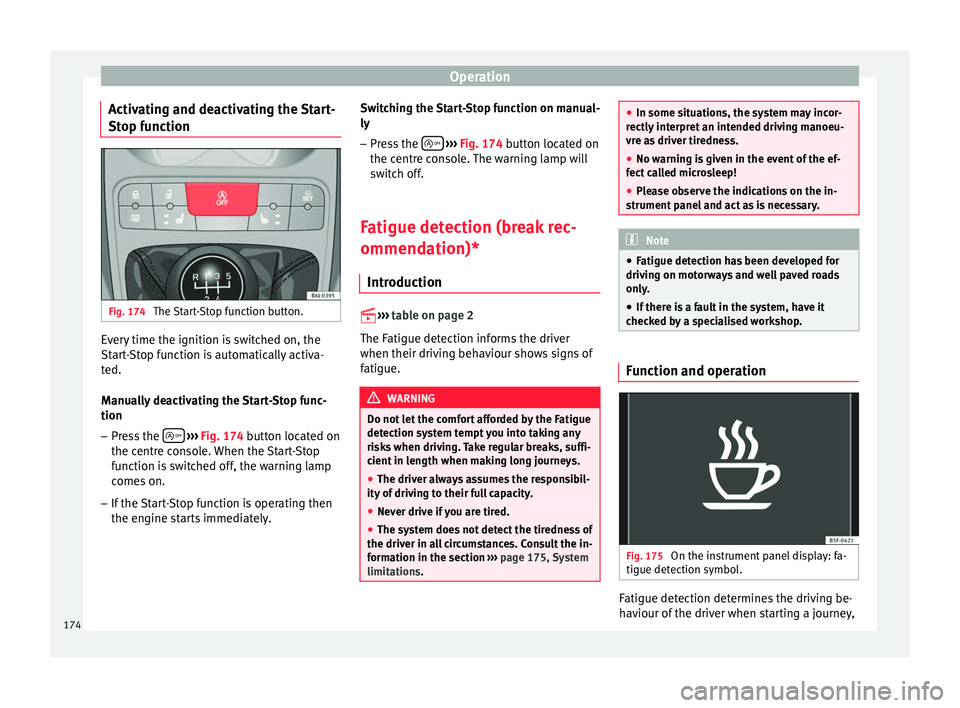
unction Fig. 174
The Start-Stop function button. Every time the ignition is switched on, the
St
ar
t-
Stop function is automatically activa-
ted.
Manually deactivating the Start-Stop func-
tion
– Press the
› ›
› Fig. 174 b
utton located on
the centre console. When the Start-Stop
function is switched off, the warning lamp
comes on.
– If the Start-Stop function is operating then
the engine star
ts immediately. Switching the Start-Stop function on manual-
ly
– Press the
› ››
Fig. 174
butt
on located on
the centre console. The warning lamp will
switch off.
Fatigue detection (break rec-
ommendation)* Introduction
››› t
able on page 2
The Fatigue detection informs the driver
when their driving behaviour shows signs of
fatigue. WARNING
Do not let the comfort afforded by the Fatigue
detection sys t
em tempt you into taking any
risks when driving. Take regular breaks, suffi-
cient in length when making long journeys.
● The driver always assumes the responsibil-
ity of drivin
g to their full capacity.
● Never drive if you are tired.
● The system does not detect the tiredness of
the driver in all
circumstances. Consult the in-
formation in the section ››› page 175, System
limitations. ●
In some situation s, the sy
stem may incor-
rectly interpret an intended driving manoeu-
vre as driver tiredness.
● No warning is given in the event of the ef-
fect ca
lled microsleep!
● Please observe the indications on the in-
strument panel
and act as is necessary. Note
● Fatigue detection h a
s been developed for
driving on motorways and well paved roads
only.
● If there is a fault in the system, have it
checked b
y a specialised workshop. Function and operation
Fig. 175
On the instrument panel display: fa-
tigue det ection symbo
l. Fatigue detection determines the driving be-
h
av
iour of the driv
er when starting a journey,
174
Page 181 of 252
Driver assistance systems
If the system has been activated automatical-
ly , an audib
le sou
nd warning will only be giv-
en when obstacles in front are at a distance
of less than 50 cm. CAUTION
The automatic connection of the Parking Aid
only w ork
s when you are driving slowly. If
driving style is not adapted to the circum-
stances, an accident and serious injury or
damage may be caused. Segments of the visual indication
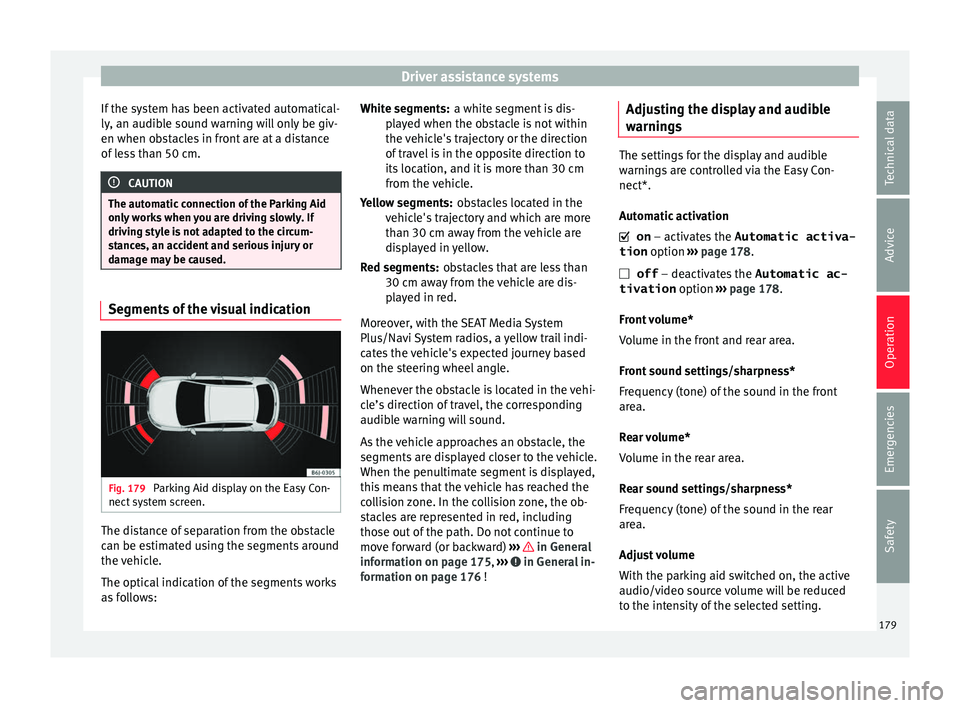
Fig. 179
Parking Aid display on the Easy Con-
nect sy
st
em screen. The distance of separation from the obstacle
c
an be e
stim
ated using the segments around
the vehicle.
The optical indication of the segments works
as follows: a white segment is dis-
play
ed when the obstacle is not within
the vehicle's trajectory or the direction
of travel is in the opposite direction to
its location, and it is more than 30 cm
from the vehicle.
obstacles located in the
vehicle's trajectory and which are more
than 30 cm away from the vehicle are
displayed in yellow.
obstacles that are less than
30 cm away from the vehicle are dis-
played in red.
Moreover, with the SEAT Media System
Plus/Navi System radios, a yellow trail indi-
cates the vehicle's expected journey based
on the steering wheel angle.
Whenever the obstacle is located in the vehi-
cle’s direction of travel, the corresponding
audible warning will sound.
As the vehicle approaches an obstacle, the
segments are displayed closer to the vehicle.
When the penultimate segment is displayed,
this means that the vehicle has reached the
collision zone. In the collision zone, the ob-
stacles are represented in red, including
those out of the path. Do not continue to
move forward (or backward) ››› in General
inf orm
ation on p ag
e 175, ››› in General in-
f orm
ation on p ag
e 176 !
White segments:
Yellow segments:
Red segments:
Adjusting the display and audible
warnings The settings for the display and audible
warning
s
are controlled via the Easy Con-
nect*.
Automatic activation
on – activates the Automatic activa-
tion option ››› page 178.
off – deactivates the Automatic ac-
tivation option ››› page 178.
Front volume*
Volume in the front and rear area.
Front sound settings/sharpness*
Frequency (tone) of the sound in the front
area.
Rear volume*
Volume in the rear area.
Rear sound settings/sharpness*
Frequency (tone) of the sound in the rear
area.
Adjust volume
With the parking aid switched on, the active
audio/video source volume will be reduced
to the intensity of the selected setting. 179
Technical data
Advice
Operation
Emergencies
Safety
Page 183 of 252
Driver assistance systems
vehicle of the luggage compartment is carry-
ing a heavy
lo
ad.
● In the following situations, the objects or
other vehicl
es shown in the navigation sys-
tem display appear to be further away or
closer than they really are: Pay special atten-
tion:
– On moving from a horizontal plane to a
slope.
– On moving from a slope to a horizontal
plane.
– If the vehicle is heavily loaded at the
rear.
– When the vehicle approaches objects
that are not on the ground surface or are
jutting out from it. These objects may al-
so be outside the camera's angle of vi-
sion when reversing. Note
● It is impor
tant to take great care and pay
special attention if you are not yet familiar
with the system.
● Rear assist will not be available if the vehi-
cle's r
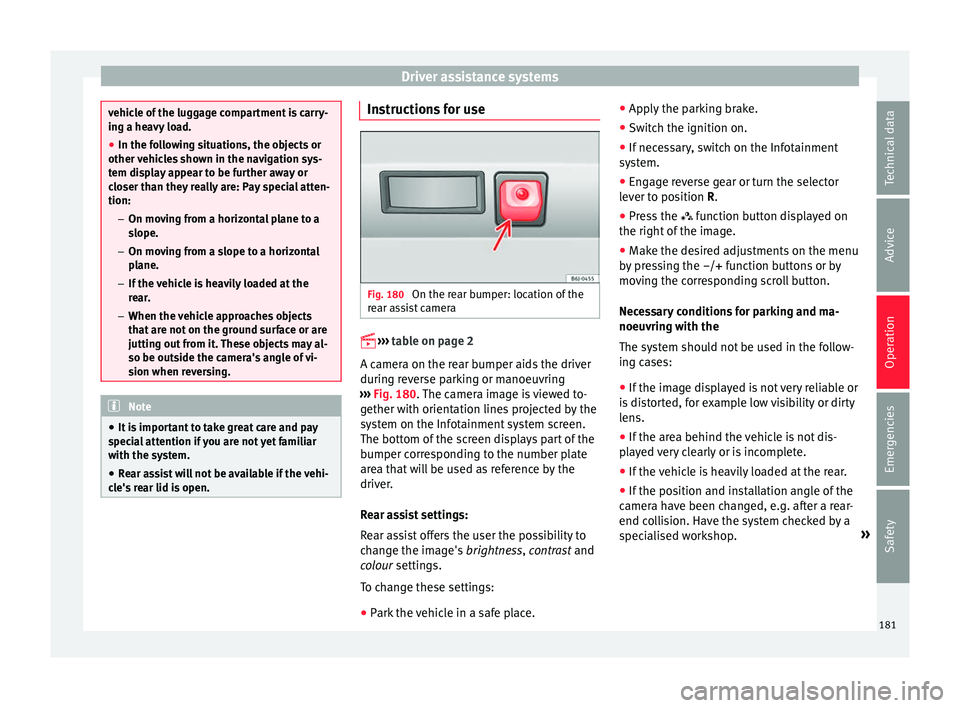
ear lid is open. Instructions for use
Fig. 180
On the rear bumper: location of the
r e
ar a s
sist camera
››› t
able on page 2
A camera on the rear bumper aids the driver
during reverse parking or manoeuvring
››› Fig. 180. The camera image is viewed to-
gether with orientation lines projected by the
system on the Infotainment system screen.
The bottom of the screen displays part of the
bumper corresponding to the number plate
area that will be used as reference by the
driver.
Rear assist settings:
Rear assist offers the user the possibility to
change the image's brightness, contrast and
colour settings.
To change these settings:
● Park the vehicle in a safe place. ●
Apply the p
arking brake.
● Switch the ignition on.
● If necessary, switch on the Infotainment
system.
● En
gage reverse gear or turn the selector
lever to po
sition R.
● Press the function butt
on displayed on
the right of the image.
● Make the desired adjustments on the menu
by pre
ssing the –/+ function buttons or by
moving the corresponding scroll button.
Necessary conditions for parking and ma-
noeuvring with the
The system should not be used in the follow-
ing cases:
● If the image displayed is not very reliable or
is dis
torted, for example low visibility or dirty
lens.
● If the area behind the vehicle is not dis-
play
ed very clearly or is incomplete.
● If the vehicle is heavily loaded at the rear.
● If the position and installation angle of the
camera hav
e been changed, e.g. after a rear-
end collision. Have the system checked by a
specialised workshop. »
181
Technical data
Advice
Operation
Emergencies
Safety