ESP Seat Ibiza ST 2016 Owner's manual
[x] Cancel search | Manufacturer: SEAT, Model Year: 2016, Model line: Ibiza ST, Model: Seat Ibiza ST 2016Pages: 252, PDF Size: 5.56 MB
Page 3 of 252
Foreword
This Instruction Manual and its correspond-
in
g s
upp
lements should be read carefully to
familiarise yourself with your vehicle.
Besides the regular care and maintenance of
the vehicle, its correct handling will help pre-
serve its value.
For safety reasons, always note the informa-
tion concerning accessories, modifications
and part replacements.
If selling the vehicle, give all of the on-board
documentation to the new owner, as it
should be kept with the vehicle. You can access the information in this man-
ual usin
g:
● Thematic table of contents that follows the
manual’s gener
al chapter structure.
● Visual table of contents that uses graphics
to indicate the p
ages containing “essential”
information, which is detailed in the corre-
sponding chapters.
● Alphabetical index with many terms and
synonyms t
o help you find information. WARNING
Read and always observe safety informa-
tion concernin g the p
assenger's front air-
bag ››› page 72, Important information
regarding the front passenger's airbag .»
Page 16 of 252
The essentials
side (L, left) and the passenger side (R,
right) t o the dir
ection de s
ired.
Folding in mirrors.
››› in Electric exterior mirrors* on
page 127
››› page 127 Adjusting the steering wheel
Fig. 16
Lever in the lower left side of the
s t
eerin g c
olumn. ●
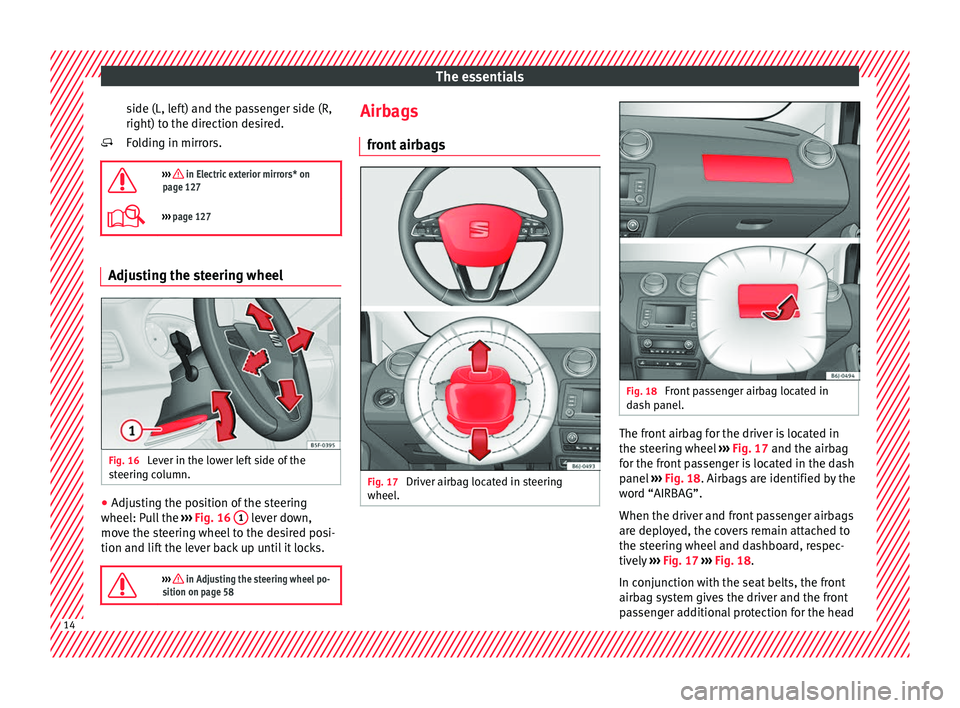
Adjusting the position of the steering
wheel: P ul
l
the ››› Fig. 16 1 lever down,
mo v
e the s t
eering wheel to the desired posi-
tion and lift the lever back up until it locks.
››› in Adjusting the steering wheel po-
sition on page 58
Airbags
fr ont
airb ag
s Fig. 17
Driver airbag located in steering
wheel . Fig. 18
Front passenger airbag located in
d ash p
anel
. The front airbag for the driver is located in
the s
t
eerin g wheel
››› Fig. 17 and the airbag
for the front passenger is located in the dash
panel ››› Fig. 18. Airbags are identified by the
word “AIRBAG”.
When the driver and front passenger airbags
are deployed, the covers remain attached to
the steering wheel and dashboard, respec-
tively ››› Fig. 17 ››› Fig. 18.
In conjunction with the seat belts, the front
airbag system gives the driver and the front
passenger additional protection for the head 14
Page 19 of 252
The essentials
Ways to secure a child seat Fig. 25
On the rear seats: Possible installations
for the chi l
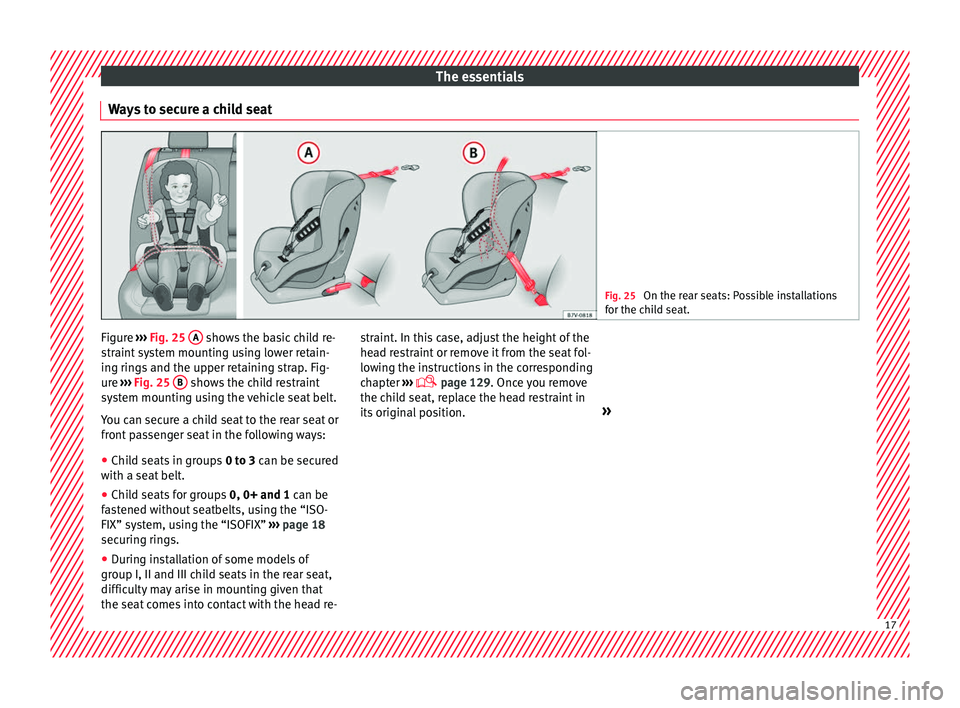
d seat. Figure
›››
Fig. 25
A shows the basic child re-
s tr
aint sy
stem mounting using lower retain-
ing rings and the upper retaining strap. Fig-
ure ››› Fig. 25 B shows the child restraint
sy s
tem mou
nting using the vehicle seat belt.
You can secure a child seat to the rear seat or
front passenger seat in the following ways:
● Child seats in groups 0 to 3 can be sec
ured
with a seat belt.
● Child seats for groups 0, 0+ and 1 can be
fas
tened without seatbelts, using the “ISO-
FIX” system, using the “ISOFIX” ››› page 18
securing rings.
● During installation of some models of
group I, II and III chil
d seats in the rear seat,
difficulty may arise in mounting given that
the seat comes into contact with the head re- straint. In this case, adjust the height of the
head re
straint or remove it from the seat fol-
lowing the instructions in the corresponding
chapter ›››
page 129. Once you remove
the child seat, replace the head restraint in
its original position. » 17
Page 35 of 252
The essentials
on the instrument panel, as well as a mes-
s ag
e for the driv
er: speed warning ex-
ceeded! The warning lamp switches off
when reducing speed below the stored maxi-
mum limit.
Speed warning programming is recommen-
ded if you wish to be reminded of a maxi-
mum speed, such as when travelling in a
country with different speed limits or for a
maximum speed for winter tyres.
Setting speed limit warning
You can use the radio or the Easy Connect* to
set, alter or cancel the speed limit warning.
● Vehicles with radio : press
the button SETUP> control button Driver Assistant
>
Speed warning .
● Vehicles with Easy Connect : pre
ss
the but-
ton Systems or else Vehicle systems >
Driver assistant > Speed warning.
The warning limit can be set from 30 to
240 km/h (20 to 150 mph). The adjustment
is done in 10 km/h intervals. Note
● Plea se be
ar in mind that, even with the
speed warning function, it is still important
to keep an eye on the vehicle speed with the
speedometer and to observe the legal speed
limits. ●
The speed limit w arnin
g function in the ver-
sion for several countries warns you at a
speed of 120 km/h (80 mph). This is a facto-
ry-set speed limit. Service intervals
The service interval indication appears on the
instrument
p
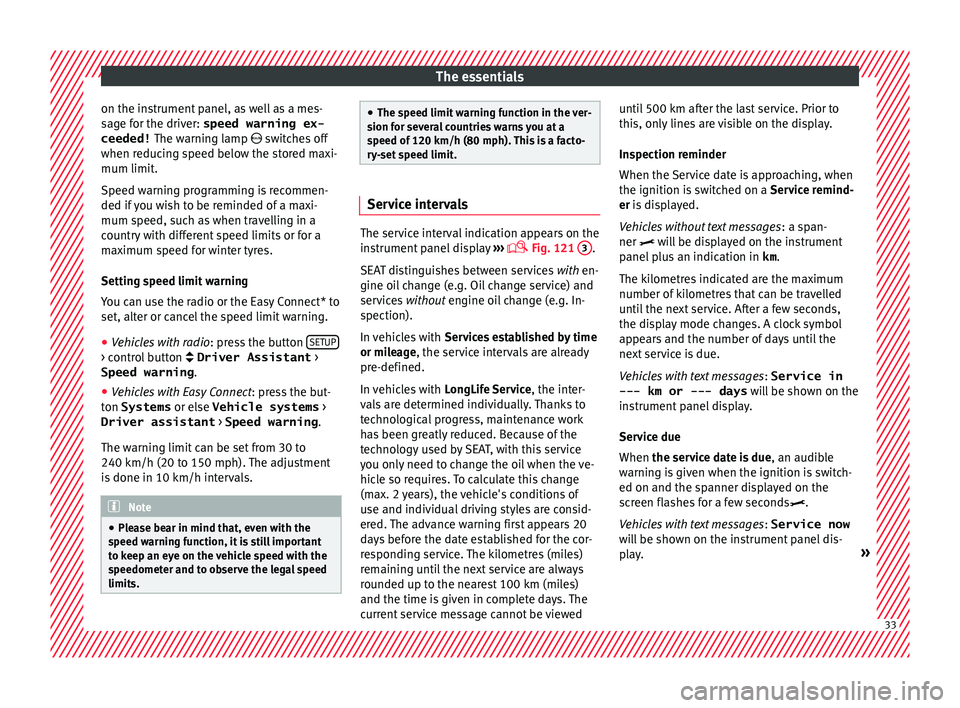
anel display ›››
Fig. 121
3 .
SEAT di s
tinguishes between services with en-
gine oil change (e.g. Oil change service) and
services without engine oil change (e.g. In-
spection).
In vehicles with Services established by time
or mileage, the service intervals are already
pre-defined.
In vehicles with LongLife Service , the inter-
vals are determined individually. Thanks to
technological progress, maintenance work
has been greatly reduced. Because of the
technology used by SEAT, with this service
you only need to change the oil when the ve-
hicle so requires. To calculate this change
(max. 2 years), the vehicle's conditions of
use and individual driving styles are consid-
ered. The advance warning first appears 20
days before the date established for the cor-
responding service. The kilometres (miles)
remaining until the next service are always
rounded up to the nearest 100 km (miles)
and the time is given in complete days. The
current service message cannot be viewed until 500 km after the last service. Prior to
this, only
line
s are visible on the display.
Inspection reminder
When the Service date is approaching, when
the ignition is switched on a Service remind-
er is displayed.
Vehicles without text messages : a span-
ner will be displayed on the instrument
panel plus an indication in km.
The kilometres indicated are the maximum
number of kilometres that can be travelled
until the next service. After a few seconds,
the display mode changes. A clock symbol
appears and the number of days until the
next service is due.
Vehicles with text messages : Service in
--- km or --- days will be shown on the
instrument panel display.
Service due
When the service date is due , an audible
warning is given when the ignition is switch-
ed on and the spanner displayed on the
screen flashes for a few seconds .
Vehicles with text messages : Service now
will be shown on the instrument panel dis-
play. » 33
Page 38 of 252
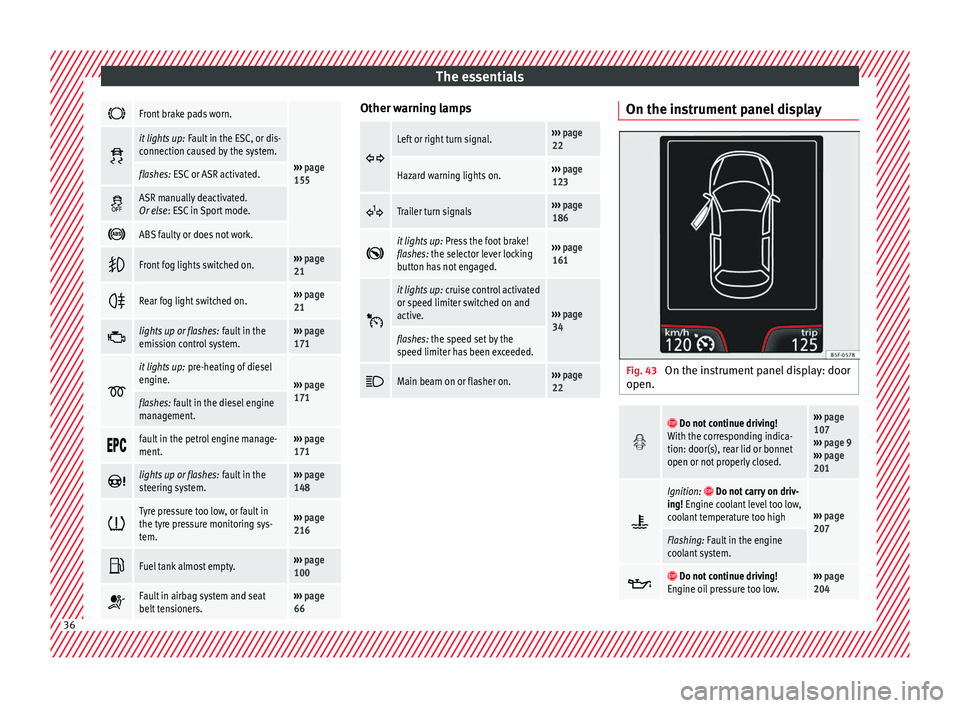
The essentials
Front brake pads worn.
›››
page
155
it lights up:
Fault in the ESC, or dis-
connection caused by the system.
flashes: ESC or ASR activated.
ASR manually deactivated.
Or else
: ESC in Sport mode.
ABS faulty or does not work.
Front fog lights switched on.›››
page
21
Rear fog light switched on.›››
page
21
lights up or flashes:
fault in the
emission control system.››› page
171
it lights up:
pre-heating of diesel
engine.
››› page
171
flashes: fault in the diesel engine
management.
fault in the petrol engine manage-
ment.›››
page
171
lights up or flashes:
fault in the
steering system.››› page
148
Tyre pressure too low, or fault in
the tyre pressure monitoring sys-
tem.›››
page
216
Fuel tank almost empty.›››
page
100
Fault in airbag system and seat
belt tensioners.›››
page
66 Other warning lamps
Left or right turn signal.›››
page
22
Hazard warning lights on.››› page
123
Trailer turn signals›››
page
186
it lights up:
Press the foot brake!
flashes: the selector lever locking
button has not engaged.››› page
161
it lights up:
cruise control activated
or speed limiter switched on and
active.
››› page
34
flashes: the speed set by the
speed limiter has been exceeded.
Main beam on or flasher on.›››
page
22 On the instrument panel display
Fig. 43
On the instrument panel display: door
open.
Do not continue driving!
With the corresponding indica-
tion: door(s), rear lid or bonnet
open or not properly closed.››› page
107
››› page 9
››› page
201
Ignition: Do not carry on driv-
ing! Engine coolant level too low,
coolant temperature too high
››› page
207
Flashing: Fault in the engine
coolant system.
Do not continue driving!
Engine oil pressure too low.››› page
204 36
Page 43 of 252
The essentials
Fuel Fig. 51
Fuel tank flap with tank cap attached. The flap that covers the tank cap is unlocked
and loc
k
ed aut om
atically using the central
locking.
Opening the fuel tank cap
● Open the flap.
● Unscrew the cap by turning it to the left.
● Rest it on the upper part of the fuel tank
flap ›››
Fig. 51.
Closing the fuel tank cap
● Unscrew the cap by turning it to the right as
far as it
will go.
● Close the lid.
››› in Refuelling on page 199
›››
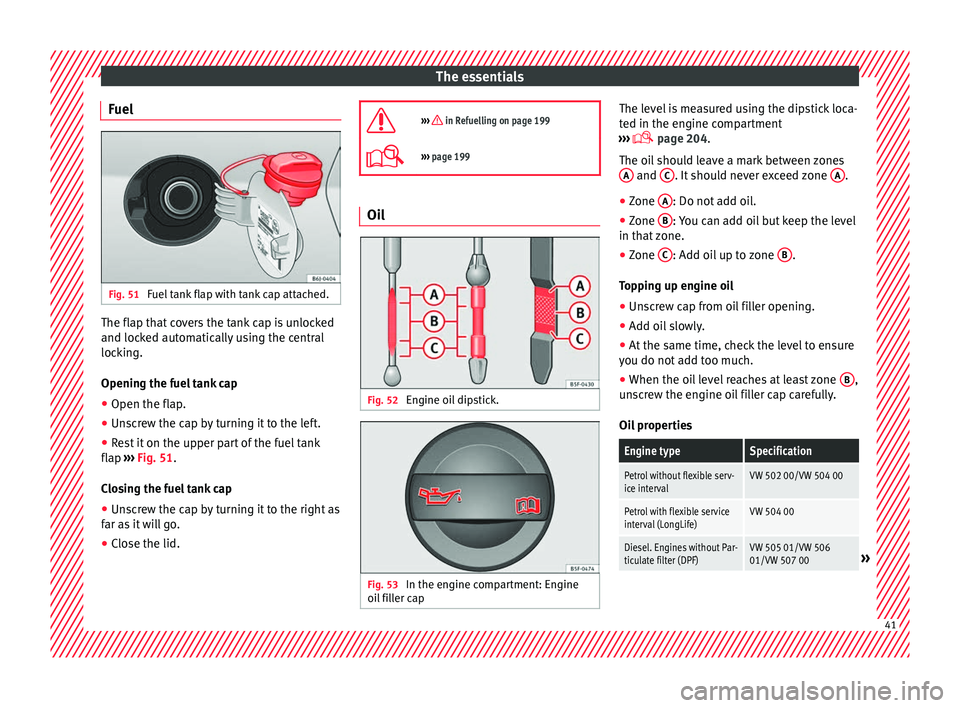
page 199 Oil
Fig. 52
Engine oil dipstick. Fig. 53
In the engine compartment: Engine
oi l
fi l
ler cap The level is measured using the dipstick loca-
t
ed in the en
gine comp
artment
››› page 204.
The oil should leave a mark between zones A and
C . It should never exceed zone
A .
● Zone A : Do not add oil.
● Zone B : You can add oil but keep the level
in th at
z
one.
● Zone C : Add oil up to zone
B .
T op
pin g up en
gine oil
● Unscrew cap from oil filler opening.
● Add oil slowly.
● At the same time, check the level to ensure
you do not ad
d too much.
● When the oil level reaches at least zone B ,
u n
sc
rew the engine oil filler cap carefully.
Oil properties
Engine typeSpecification
Petrol without flexible serv-
ice intervalVW 502 00/VW 504 00
Petrol with flexible service
interval (LongLife)VW 504 00
Diesel. Engines without Par-
ticulate filter (DPF)VW 505 01/VW 506
01/VW 507 00» 41
Page 44 of 252
The essentialsEngine typeSpecification
Diesel. Particulate Filter En-
gines (DPF).
With or without flexible
service interval (with and
without LongLife)
a)VW 507 00
a)
Only use recommended oils, otherwise you may damage the
engine.
Engine oil additives
No type of additive should be mixed with the
engine oil. The deterioration caused by these
additives is not covered by the warranty.
››› in Changing engine oil on page 207
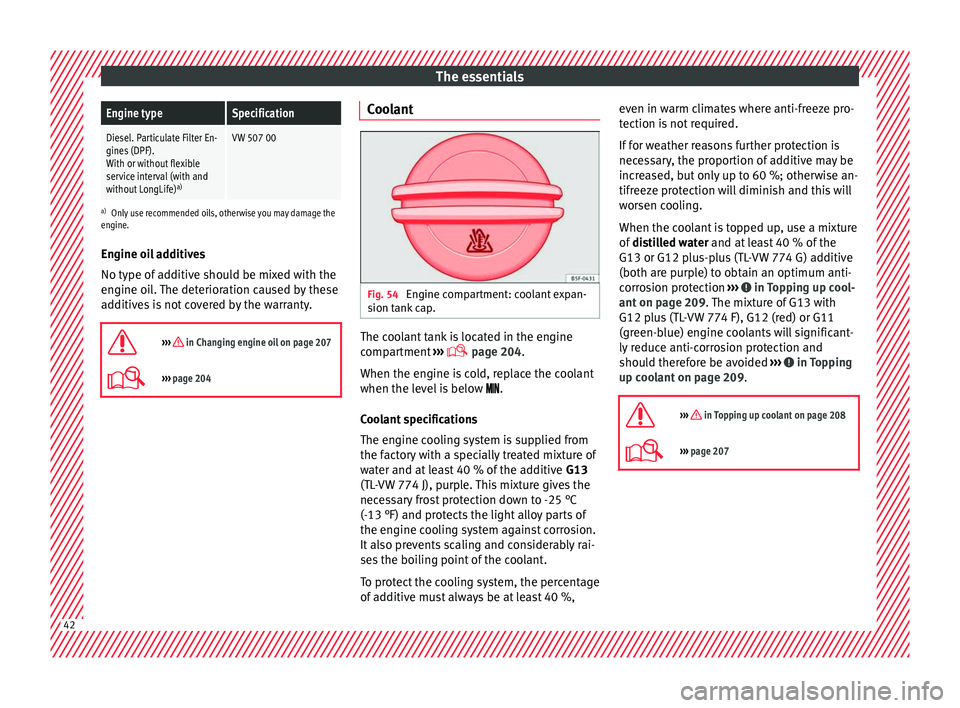
››› page 204 Coolant
Fig. 54
Engine compartment: coolant expan-
s ion t
ank c
ap. The coolant tank is located in the engine
c
omp
artment
›››
page 204.
When the engine is cold, replace the coolant
when the level is below .
Coolant specifications
The engine cooling system is supplied from
the factory with a specially treated mixture of
water and at least 40 % of the additive G13
(TL-VW 774 J), purple. This mixture gives the
necessary frost protection down to -25 °C
(-13 °F) and protects the light alloy parts of
the engine cooling system against corrosion.
It also prevents scaling and considerably rai-
ses the boiling point of the coolant.
To protect the cooling system, the percentage
of additive must always be at least 40 %, even in warm climates where anti-freeze pro-
tection is not
required.
If for weather reasons further protection is
necessary, the proportion of additive may be
increased, but only up to 60 %; otherwise an-
tifreeze protection will diminish and this will
worsen cooling.
When the coolant is topped up, use a mixture
of distilled water and at least 40 % of the
G13 or G12 plus-plus (TL-VW 774 G) additive
(both are purple) to obtain an optimum anti-
corrosion protection ››› in Topping up cool-
ant on p ag
e 209 .
The mixture of G13 with
G12 plus (TL-VW 774 F), G12 (red) or G11
(green-blue) engine coolants will significant-
ly reduce anti-corrosion protection and
should therefore be avoided ››› in Topping
up c oo
lant on p
age 209.
››› in Topping up coolant on page 208
››› page 207 42
Page 46 of 252
The essentials
Emergencies F u
se s
F
use location Fig. 57
On the driver-side dash panel: fuse
bo x
c o
ver Fig. 58
In the engine compartment: fuse box
c o
ver Opening and closing the fuse box situated
belo
w the d a
sh p
anel
● Opening: remove the fuse box cover
››› Fig. 57
.
● Closing: click the cover back into place.
To open the engine comp
artment fuse box
● Raise the bonnet.
● Press the locking tabs to release the fuse
box co
ver ››› Fig. 58
● Then lift the cover out.
● To fit the cover, place it on the fuse box.
Push the loc
king tabs down until they click
audibly into place.
Identifying fuses situated below the dash
panel by colours
ColourAmp rating
Black1
Purple3
Light brown5
Brown7.5
Red10
Blue15
Yellow20
White or transparent25
ColourAmp rating
Green30
Orange40
››› in Introduction on page 81
›››
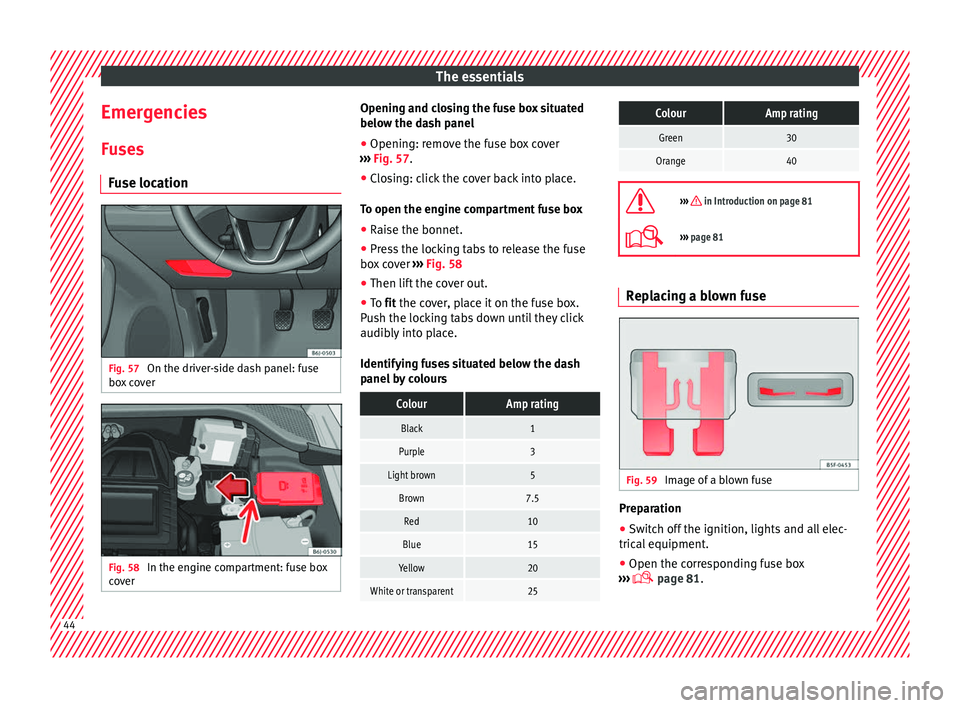
page 81 Replacing a blown fuse
Fig. 59
Image of a blown fuse Preparation
● Switch off the ignition, lights and all elec-
tric al
equipment .
● Open the c
orresponding fuse box
››› p
age 81.44
Page 51 of 252
The essentials
● Find the s up
por t
point on the strut (sunken
area) closest to the wheel to be changed
››› Fig. 66.
● Place the jack under the jacking point and
turn the crank
until the arm of the jack is di-
rectly below the vertical rib under the door
sill.
● Align the jack so that the arm of the jack
fits around the rib u
nder the door sill and the
movable base plate of the jack is flat on the
ground ››› Fig. 67.
● Continue turning the jack* until the wheel
is slightly
lifted off the ground. WARNING
● Make s ur
e that the jack* remains stable. If
the surface is slippery or soft, the jack* could
slip or sink, respectively, with the resultant
risk of injury.
● Only raise the vehicle with the jack* sup-
plied by the m
anufacturer. Other vehicles
could slip, with the consequent risk of injury.
● Only mount the jack* on the support points
designed for thi
s purpose on the strut, and
always align the jack correctly. If you do not,
the jack* could slip as it does not have an ad-
equate grip on the vehicle: risk of injury!
● The height of the parked vehicle can
chang
e as a result of variations in tempera-
ture and loading. CAUTION
The vehicle must not be raised on the cross-
bar. On ly
place the jack* on the points de-
signed for this purpose on the strut. Other-
wise, the vehicle may be damaged. Removing and fitting the wheel
Change the wheel after loosening the wheel
bolts and r
ai
sing the vehicle with the jack.
Taking off the wheel
● Unscrew the wheel bolts using the box
spanner and p l
ace them on a clean surface.
● Take off the wheel ››› .
P uttin
g on the s p
are wheel
When fitting tyres with a compulsory rotation
direction, observe the instructions in
››› page 49.
● Mount the wheel.
● Screw on the wheel bolts in position and
tighten them loosely w
ith a box spanner.
● Carefully lower the vehicle using the jack*.
● Tighten the wheel bolts in diagonal pairs
using the wheel
brace.
The wheel bolts should be clean and turn
easily. Before fitting the spare wheel, inspect
the wheel condition and hub mounting surfa- ces. These surfaces must be clean before fit-
ting the wheel. CAUTION
When removing/fitting the wheel, the rim
may hit
and damage the brake disc. For this
reason, please take care and get a second
person to assist you. Tyres with compulsory rotation direc-
tion
A directional tread pattern can be identified
b
y
the arr o
ws on the sidewall that point in
the direction of rotation. Always observe the
direction of rotation indicated when fitting
the wheel to guarantee optimum properties
of this type of tyres with regard to grip,
noises, wear and aquaplaning.
If it is absolutely necessary to fit the spare
tyre* against the direction of rotation, drive
with care as this means the tyre does not of-
fer optimum driving properties. This is of par-
ticular importance when the road surface is
wet.
To return to directional tread tires, replace
the punctured tyre as soon as possible and
restore the obligatory direction of rotation of
all tyres. 49
Page 53 of 252
The essentials
Emergency towing of the vehi-
c l
e
T o
wing Fig. 68
Right side of the front bumper: Tow-
in g rin
g. Fig. 69
Right side of the rear bumper: Towing
rin g. Towline anchorages
Att
ac
h the b ar or r
ope to the towline ancho-
rages.
The towline anchorages are located under
the floor panel in the luggage compartment,
next to the vehicle tools ››› page 47.
Screw the front towline anchorage into the
screw connection ››› Fig. 68 and tighten it
with the wheel brace. The rear towline an-
chorage is under the rear bumper, on the
right.
Tow rope or tow bar
It is easier and safer for the vehicle to be tow-
ed using a tow bar. You should only use a
tow-rope if you do not have a tow-bar.
A tow rope should be slightly elastic to re-
duce the loading on both vehicles. It is advis-
able to use a tow rope made of synthetic fi-
bre or similarly elastic material.
Attach the tow rope or the tow bar only to the
towline anchorages provided or a towing
bracket.
Notes for the driver of the towing vehicle
● The tow rope must be taut before you drive
off.
● Rele
ase the clutch very carefully when start-
ing the vehic
le (manual gearbox), or acceler-
ate gently (automatic gearbox). Driving style
Towin
g requires some experience, especially
when using a tow rope. Both drivers should
realise how difficult it is to tow a vehicle. In-
experienced drivers should not attempt to
tow.
Do not pull too hard with the towing vehicle
and take care to avoid jerking the tow rope.
When towing on an unpaved road, there is al-
ways a risk of overloading and damaging the
anchorage points.
The ignition of the vehicle being towed must
be switched on to prevent the steering wheel
from locking and also to allow the use of the
turn signals, horn, windscreen wipers and
washers.
Place the gear lever in neutral on vehicles
with a manual gearbox. With an automatic
gearbox, place the lever in N.
The brake servo only works when the engine
is running. When not running, you must ap-
ply considerably more pressure to the brake
pedal.
As the power assisted steering does not work
if the engine is not running, you will need
more strength to steer than you normally
would. » 51