wheel Seat Leon 5D 2005 Owner's Guide
[x] Cancel search | Manufacturer: SEAT, Model Year: 2005, Model line: Leon 5D, Model: Seat Leon 5D 2005Pages: 280, PDF Size: 8.46 MB
Page 88 of 280
Steering wheel controls
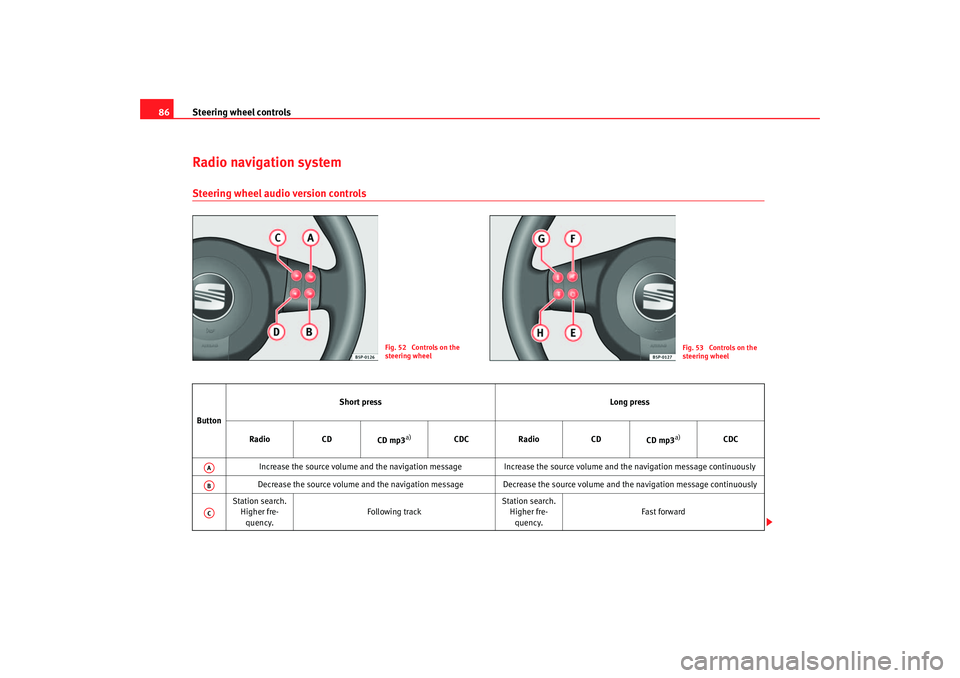
86Radio navigation systemSteering wheel audio version controls
Fig. 52 Controls on the
steering wheel
Fig. 53 Controls on the
steering wheel
Button Short press
Long press
Radio CD
CD mp3
a)
CDC Radio CD
CD mp3
a)
CDC
Increase the source volume and the navigation message Increa se the source volume and the navigation message continuously
Decrease the source volume and the navigation message Decrease the source volume and the navigation message continuously
Station search. Higher fre-quency. Following track Station search.
Higher fre-quency. Fast forward
AAABAC
leon_ingles Seite 86 Donner
stag, 20. Oktober 2005 12:14 12
Page 89 of 280

Steering wheel controls87
Safety First
Operating instructions
Tips and Maintenance
Te c h n i c a l D a t a
Station search.
Lower
frequency Previous track
Station search.
Lower
frequency Rewind
Cyclic change of source
Radio - CD / CDC - Radio - ...
When in Navigation mode the system leaves the navigation screen. Repeat the last Navigation instruction
Only if the Navigation function is activated.
Silence Pause No specified function
Next preset No function Change folder
(forward) Change CD
(forward) No specified function
Previous preset No function Change folder
(back) Change CD
(Back) No specified function
a)Only for those Radio-Navigation Systems compatible with the MP3 formatADAEAFAGAH
leon_ingles Seite 87 Donner
stag, 20. Oktober 2005 12:14 12
Page 90 of 280

Steering wheel controls
88Steering wheel Audio + Telephone controls
Fig. 54 Controls on the
steering wheel
Fig. 55 Steering wheel
Audio + Telephone
controls
Button Short press
Long press
Radio CD
CD mp3
a)
CDC Radio CD
CD mp3
a)
CDC
Increase the source volume and the navigation message Increa se the source volume and the navigation message continuously
Decrease the source volume and the navigation message Decrease the source volume and the navigation message continuously
Station search. Higher fre-quency. Following track Station search.
Higher fre-quency. Fast forward
Change folder
(forward) Fast forward
Station search. Lower
frequency Previous track Station search.
Lower
frequency Rewind
Change folder
(Back) Rewind
AAABACAD
leon_ingles Seite 88 Donner
stag, 20. Oktober 2005 12:14 12
Page 91 of 280

Steering wheel controls89
Safety First
Operating instructions
Tips and Maintenance
Te c h n i c a l D a t a
Cyclic change of source
Radio - CD / CDC - Radio - ...
When in Navigation mode the system leaves the navigation screen. Repeat the last Navigation instruction
Only if the Navigation function is activated.
Voice recognition activation Press to speak No specified function
Make a call or
Direct access to the phone book or
Accept a call No specified function
Terminate call or
Refuse call or
Quite telephone menu No specified function
a)Only for those Radio-Navigation Systems compatible with the MP3 formatAEAFAGAH
leon_ingles Seite 89 Donner
stag, 20. Oktober 2005 12:14 12
Page 92 of 280
Steering wheel controls
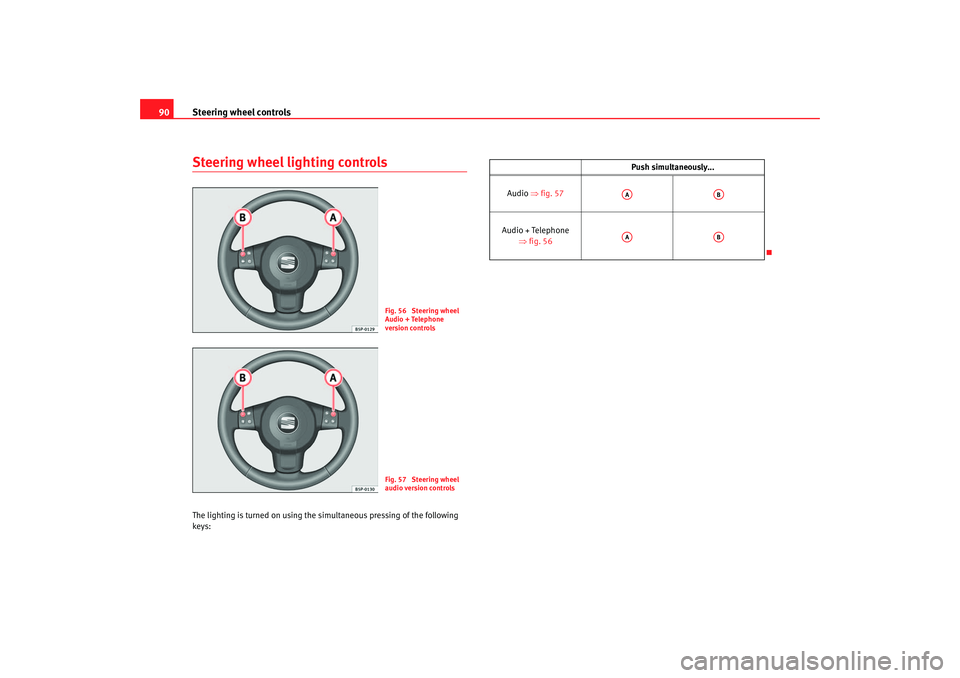
90Steering wheel lighting controlsThe lighting is turned on using the simultaneous pressing of the following
keys:
Fig. 56 Steering wheel
Audio + Telephone
version controlsFig. 57 Steering wheel
audio version controls
Push simultaneously...
Audio ⇒fig. 57
Audio + Telephone ⇒fig. 56AA
AB
AA
AB
leon_ingles Seite 90 Donner stag, 20. Oktober 2005 12:14 12
Page 113 of 280

Lights and visibility111
Safety First
Operating instructions
Tips and Maintenance
Te c h n i c a l D a t a
Coming home / leaving home function*
After dark the area around the car is lit up with the aid of the
coming home / leaving home function.Coming home function*
To activate the function
– Put the light switch into the position
or in the “Auto” position
for those vehicles fitted with the automatic lighting function.
– Remove key from ignition switch.
To deactivate the function
– Turn light swit ch to position 0.
When the system is activated and it is dark, the coming home function will
illuminate the vehicle and its surroundings by switching on the dipped head-
lights, rear lights and nu mber plate lights when the driver's door is opened.
While one of the doors or the tailgate are open, the dipped headlights, the
rear lights and the registration plate lighting remain on for about 90 seconds.
If, before this time is up, all of the doors and the tailgate are closed, another
40 seconds of lighting is given. However, if all of the doors and the tailgate
are closed after the 90 seconds have passed, the system will be deactivated
and the lights will not come on.
If you wish to reactivate the system, you must start from the beginning.
The lighting time is defined at the time of manufacture.
Leaving home function*
The function is activated when the vehicle is unlocked using the remote
control. In the dark, the leaving home function will light the dipped beam
lights, the rear lights and the registration plate lighting for about 40 seconds.
Note
•
If the vehicle is used often during the night for short trips using the
coming home function, this will place a heavy demand on the battery. To
avoid this, make longer journeys whenever possible.
•
Observe all relevant statutory requirements when using the lighting
systems described here.
•
For those vehicles fitted with the “Dot Matrix” display, the delay in turning
off the headlights (about 40 seconds) can be adjusted using the “Configura-
tion, lights and visibility” menu.
Instrument and switch lighting / Headlight range controlInstrument and switch lighting
When the headlights are switched on, the brightness of the instruments and
switch lighting can be regulated to su it your requirements by turning the
thumb wheel ⇒fig. 74 .
Fig. 74 Detail of the dash
panel: Regulation for
instrument and switch
illumination and head-
light range control
A1
A1
leon_ingles Seite 111 Donnerstag, 20. Oktober 2005 12:14 12
Page 114 of 280

Lights and visibility
112Headlight range control
Using the electrical headlight range control, you can adjust the headlight
range to the load level that is being carried in the vehicle. In this way it is
possible to avoid dazzling oncoming traffic more than necessary. At the same
time, the driver has the best possible lighting for the road ahead using the
correct headlight settings.
The headlights can only be adjusted when the dipped beam is switched on.
To lower the beam, turn the thumb wheel down from the basic setting 0.
Those vehicles fitted with xenon gas discharge headlights are fitted with an
automatic headlight range system.Hazard warning lights
The hazard warning lights are used to draw the attention of
other road users to your vehicle in emergencies.
If your vehicle breaks down: 1. Park your vehicle at a safe distance from moving traffic.
2. Press the button to switch on the hazard warning lights ⇒
.
3. Switch the engine off.
4. Apply the handbrake.
5. On a manual gearbox engage 1st gear, and for an automatic move the selector lever to P.
6. Use the warning triangle to draw the attention of other road users
to your vehicle.
7. Always take the vehicle key with you when you leave the vehicle.
You should switch on the hazard warning lights to warn other road users, for
instance when:•
Reaching the tail end of a traffic jam
•
There is an emergency
•
Your vehicle breaks down due to a technical defect
•
You are towing another vehicle or your vehicle is being towed.
All turn signals flash simultaneously when the hazard warning lights are
switched on. That is that the two turn signal indicator lamps
and the
indicator lamp in the switch
will flash at the same time. The hazard
warning lights also work when the ignition is switched off.
WARNING
•
The risk of an accident increases if your vehicle breaks down. Always
use the hazard warning lights and a warning triangle to draw the attention
of other road users to your stationary vehicle.
A2
A2A2
Fig. 75 Detail of the dash
panel: Hazard warning
light switch
leon_ingles Seite 112 Donnerstag, 20. Oktober 2005 12:14 12
Page 115 of 280

Lights and visibility113
Safety First
Operating instructions
Tips and Maintenance
Te c h n i c a l D a t a
•
Never park where the catalytic converter could come into contact with
inflammable materials under the vehicle, for example dry grass or spilt
petrol. This could start a fire!Note
•
The battery will run down if the hazard warning lights are left on for a long
time, even if the ignition is switched off.
•
The use of the hazard warning lights d escribed here is subject to the rele-
vant statutory requirements.
Indicator and main beam headlight lever
The turn signal and main beam lever also operates the
parking lights and the headlight flasher.
The turn signal and main beam headlight lever has the following
functions:
Switching on the turn signals
– Move the lever all the way up ⇒fig. 76 to indicate right, and
all the way down to indicate left.
Signalling a lane change
– Push the lever up or down to the point where you incur resistance and then release the lever. The turn signal will flash
three times. The corresponding warning lamp will also flash.
Switching main beam on and off
– Turn the light switch to position
.
– Press the lever forward ⇒fig. 76 to switch on the main
beams.
– Pull the lever back towards you to switch the main beam head- lights off again.
Headlight flasher
– Pull the lever towards the steering wheel to operate the flasher.
Switching on parking lights
– Switch off the ignition and remove the key from the lock.
– Move the lever up or down to turn on the right or left-hand parking lights respectively.
WARNING (continued)
Fig. 76 Turn signal and
main beam headlight
lever
A1
A2A1
A2A3
A4
leon_ingles Seite 113 Donnerstag, 20. Oktober 2005 12:14 12
Page 119 of 280
Lights and visibility117
Safety First
Operating instructions
Tips and Maintenance
Te c h n i c a l D a t a
The windscreen wiper lever ⇒page 116, fig. 81 has the following
positions:
Switching off the wipers
– Move the lever to position .
Intermittent wipe
– Move the lever up to position .
– Move the control to the left or right to set the length of the intervals. Control to the left - longer wipe pause, control to the
right - shorter wipe pauses. Four wiper interval stages can be set
using switch .
Slow wipe
– Move the lever up to position .
Continuous wipe
– Move the lever up to position .
Brief wipe
– Move the lever down to position to give the windscreen a brief
wipe. The wiper will start to move faster if you keep the lever
pressed down for longer than 2 seconds.
Wash and wipe automatic system
– Pull the lever towards the steering wheel - Position . The wash function will start immediately and the wipers will start with a
slight delay. The wash and wipe r systems will function at the
same time at speeds of over 120 km/h. – Then release the lever. The wipers will keep running for approxi-
mately four seconds.
Optional heated windscreen in the wiper blade* area
In some countries and with some versions, there is the possibility of heating
the windscreen in the area of the windscreen wiper blades in order to aid de-
icing in the zone.
This function is activated by turning the exterior heated rearview mirror*
control forwards ⇒page 122.
WARNING
•
Worn and dirty wiper blades obstruct visibility and reduce safety levels.
•
In cold conditions, you should not use the wash / wipe system unless
you have warmed the windscreen with the heating and ventilation system.
The washer fluid could otherwise freeze on the windscreen and obscure
your view of the road.
•
Always note the corresponding warnings on ⇒page 204.Caution
In icy conditions, always check that the wiper blades are not frozen to the
glass before using the wipers for the fi rst time. If you switch on the wipers
when the wiper blades are frozen to the windscreen, you could damage both
the wiper blades and the wiper motor.
Note
•
The windscreen wipers will only function when the ignition is switched on
and the bonnet is closed.
•
When in use, the wipers do not go as far as the rest position. When the
lever is moved to the 0 position, they move to the rest position.
A0A1
AA
AA
A2A3A4
A5
leon_ingles Seite 117 Donnerstag, 20. Oktober 2005 12:14 12
Page 121 of 280

Lights and visibility119
Safety First
Operating instructions
Tips and Maintenance
Te c h n i c a l D a t a
Switching on the rain sensor
– Move the windscreen wiper lever into position ⇒page 118,
fig. 83
– Move the control to the left or right to set the sensitivity of the rain sensor. Switch to the right - high sensitivity. Switch to the
right - low sensitivityThe rain sensor is part of the interval wipe function. You will have to switch
the rain sensor back on if you switch off the ignition. This is done by switching
the wiper intermittent function off and back on.
Note
•
Do not put stickers on the windscreen in front of the sensor. This may
cause sensor disruption or faults.
Rear window wiper
The windscreen wiper lever operates the windscreen wiper
and the wash and wipe system for the rear window.Switching on the interval wipe
– Press the lever forwards to position ⇒fig. 84 . The wiper will
wipe the window approximately every 6 seconds.
Switching off the interval wipe function
– Pull the lever back from position towards the steering wheel. T h e wi p e r will co n t i n u e to fun c t i o n fo r a s h o r t p e r i o d i f yo u s wi tch
off whilst the wipers are in motion.
A1
AA
Fig. 84 Window wash and
wipe lever: Rear window
wiper
A6
A6
leon_ingles Seite 119 Donnerstag, 20. Oktober 2005 12:14 12