back light Seat Leon 5D 2006 Owner's manual
[x] Cancel search | Manufacturer: SEAT, Model Year: 2006, Model line: Leon 5D, Model: Seat Leon 5D 2006Pages: 292, PDF Size: 8.86 MB
Page 12 of 292
Safe driving
10Proper sitting position for occupantsProper sitting position for driver
The proper sitting position for the driver is important for safe
and relaxed driving.
For your own safety and to reduce the risk of injur y in the event of an
accident, we recommend the following adjustments for the driver:
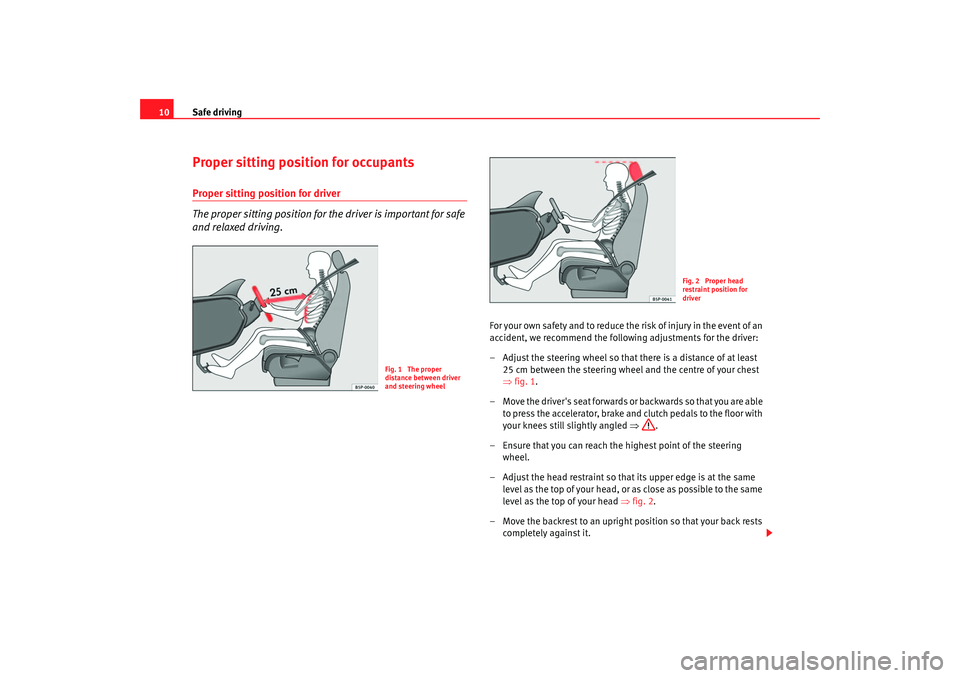
– Adjust the steering wheel so that there is a distance of at least
25 cm between the steering wheel and the centre of your chest
⇒fig. 1.
– Move the driver's seat forwards or backwards so that you are able to press the accelerator, brake and clutch pedals to the floor with
your knees still slightly angled ⇒.
– Ensure that you can reach the highest point of the steering wheel.
– Adjust the head restraint so that its upper edge is at the same level as the top of your head, or as close as possible to the same
level as the top of your head ⇒fig. 2.
– Move the backrest to an upright position so that your back rests completely against it.
Fig. 1 The proper
distance between driver
and steering wheel
Fig. 2 Proper head
restraint position for
driver
leon_ingles Seite 10 Donner stag, 24. August 2006 1:56 13
Page 40 of 292

Airbag system
38hold the passengers on the front seats and the outer rear seats in a position
where the side airbags can provide maximum protection.
The airbag system is not a substitute for seat belts, but is an integral part of
the vehicle's overall passive safety system. Please bear in mind that the
airbag system can only work effectively when the occupants are wearing their
seat belts. For this reason, it is most important to wear the seat belts at all
times - not only because this is required by law in most countries, but also for
your safety ⇒page 19, “Introduction”.
The side airbag system will not be triggered•
if the ignition is switched off,
•
during a minor side collision,
•
during a minor frontal collision,
•
during a minor rear-end collision,
•
or if the vehicle rolls.
The main parts of the airbag system are
•
an electronic control and monitoring system (control unit),
•
the side airbags in the sides of the backrests of the front and rear seats,
•
a warning lamp
in the dash panel insert ⇒page 31.
The functionality of the airbag system is monitored electronically. The airbag
warning lamp will light up for approx. 4 seconds every time the ignition is
switched on (self-diagnosis).
WARNING
•
In a side-on collision, the side airb ags will not work, if the sensors do
not correctly measure the pressure increase on the interior of the doors,
due to air escaping through the areas with holes or openings in the door
panel.
•
Never drive the vehicle if the interior panels have been removed.
•
Never drive if the interior door panels have been removed or if the
panels have not been correctly fitted.
•
Never drive the vehicle if the loudspeakers in the door panels have
been removed, unless the holes left by the loudspeakers have been
correctly closed.
•
Always check that the openings are closed or covered if loudspeakers
or other equipment are fitted in the interior door panels.
•
Any work carried out to the doors sh ould be made in a qualified author-
ised workshop.
•
The seat belts and airbags can only provide maximum protection if the
occupants are seated correctly ⇒page 10, “Proper sitting position for
occupants”.
•
If a fault should occur in the airbag system, have the system checked
immediately by a qualified workshop. Otherwise there is a danger that
during a side collision, the system may fail to trigger, or not trigger
correctly.WARNING (continued)
leon_ingles Seite 38 Donner stag, 24. August 2006 1:56 13
Page 42 of 292

Airbag system
40Safety notes on the operation of the side airbag system
If airbags are used correctly, they can considerably reduce the
risk of injury in side impact collisions.
WARNING
•
If you do not wear a seat belt, if you lean forward, or are not seated
correctly while the vehicle is in motion, you are at grea ter risk of injury,
should the side airbag system be triggered in an accident.
•
In order for the side airbags to provide their maximum protection, the
prescribed sitting position must always be maintained with seat belts
fastened while travelling.
•
Occupants of the outer seats must never carry any objects or pets in the
deployment space between them and th e airbags, or allow children or
other passengers to travel in this position. It is also important not to attach
any accessories (such as cup holders) to the doors. This would impair the
protection offered by the side airbags.
•
The built-in coat hooks should be used only for lightweight clothing. Do
not leave any heavy or sharp-edged objects in the pockets.
•
Great forces, such as hard blows or kicks, must not be exerted upon the
backrest bolster because the system may be damaged. In this case the side
airbags would not be triggered.
•
Under no circumstances should protective covers be fitted over the
driver seat or front passenger seat unless the covers have been expressly
approved for use in your vehicle. Because the airbag deploys from the side
of the backrest, the use of non-approved seat covers would obstruct the
side airbag seriously reducing the airbag's effectiveness ⇒page 191,
“Accessories, parts replacement and modifications”.
•
Any damage to the original seat upho lstery or around the seams of the
side airbag units must be repaired immediately by a qualified workshop.
•
The airbags provide protection for one accident only, if they have been
deployed they must be replaced.
•
When children assume an incorrect si tting position, they expose them-
selves to an increased risk of injury in the event of an accident. This is
particularly the case if the child is travelling on the front passenger seat
and the airbag system is triggered in an accident; this could have critical
consequences including serious injury or death ⇒page 46, “Child safety”.
•
Any work on the side airbag system or removal and installation of the
airbag components for other repairs (such as removal of the front seat)
should only be performed by a qualified workshop. Otherwise, a fault may
be introduced into the operation of the airbag system.
•
Do not attempt to modify components of the airbag system in any way.
•
The side and head airbags are managed through sensors located in the
interior of the front doors. To ensure the correct functioning of the side and
head airbags neither the doors nor the door panels should be modified in
any way (e.g. fitting loudspeakers). If the front door is damaged in any way,
this may affect the correct working of the system. All work carried out on
the front door must be made in a qualified workshop.WARNING (continued)
leon_ingles Seite 40 Donner stag, 24. August 2006 1:56 13
Page 47 of 292

Airbag system45
Safety First
Operating instructions
Tips and Maintenance
Te c h n i c a l D a t a
– Check that the warning lamp in the dash panel does ⇒page 44,
fig. 26 not light up when the ignition is switched on ⇒.
WARNING
•
The driver is responsible for the proper position of the key-operated
switch.
•
You should deactivate the front passenger airbag only if you have to use
a rear-facing child seat in exceptional cases. ⇒ page 46, “Child safety”.
•
For those vehicles that do not include a key lock switch to turn the
airbag off, an Authorised Service Centre must be consulted.
•
Never install a child seat facing backwards (or rear-facing) on the front
passenger seat unless the front passenger airbag has been disabled. This
represents a risk of fatal injuries to th e child! However, if it is necessary in
exceptional circumstances to transport a child in a rear-facing child seat on
the front passenger seat, you must always disable the front passenger
airbag.
•
As soon as the child seat is no longer needed on the front passenger
seat, enable the front passenger airbag again.
•
Only deactivate the passenger airbag when the ignition is off, other-
wise a fault may occur in the airbag system, this will create a danger that
in case of an accident, the airbag do es not deploy properly or does not
deploy at all.
•
When the passenger airbag is deactivated, if the warning lamp is not
continuously lit up when the front passenger airbag is disabled, there may
be a fault in the airbag system:
−Have the airbag system inspected immediately by a qualified work-
shop.
− Do not use a child seat on the front passenger seat! The front
passenger airbag could be triggered despite the fact that there is a fault
in the system and, as a result, a child could sustain serious or fatal inju-
ries. −
It is not certain whether the fron t passenger airbag will deploy
during an accident! Inform your passengers of this.
•
When using the ignition key to activate / deactivate the passenger front
airbag, only the passenger front airbag will be activated / deactivated. The
side airbag and head airbag on the passenger side will remain active.WARNING (continued)
leon_ingles Seite 45 Donner stag, 24. August 2006 1:56 13
Page 61 of 292
Cockpit59
Safety First
Operating instructions
Tips and Maintenance
Te c h n i c a l D a t a
Digital display in the instrument panelDisplay (without warning or information texts)
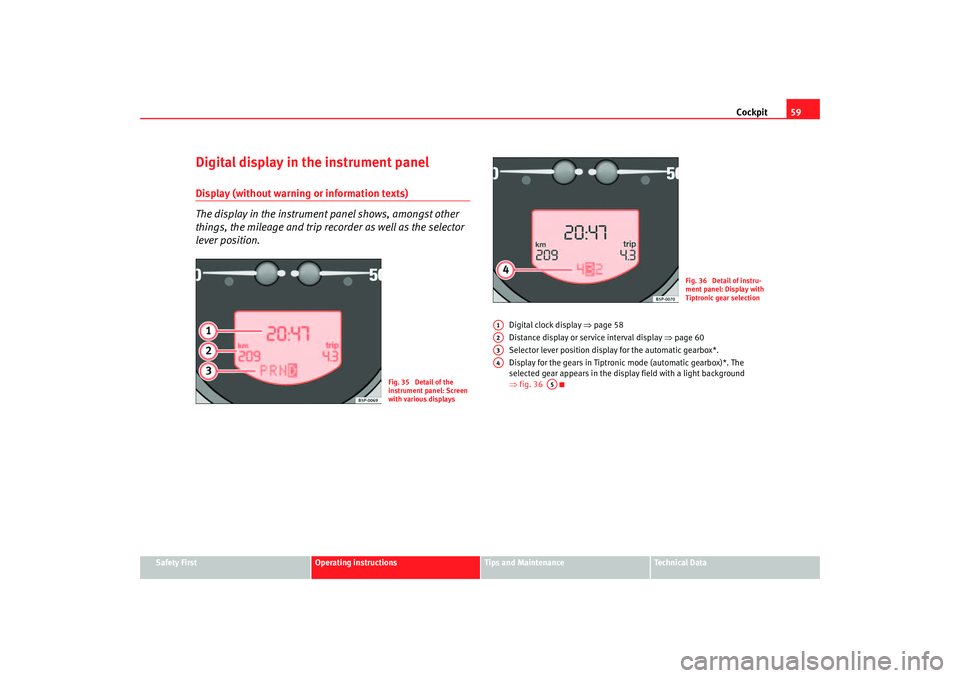
The display in the instrument panel shows, amongst other
things, the mileage and trip recorder as well as the selector
lever position.
Digital clock display ⇒page 58
Distance display or service interval display ⇒page 60
Selector lever position display for the automatic gearbox*.
Display for the gears in Tiptronic mode (automatic gearbox)*. The
selected gear appears in the display field with a light background
⇒ fig. 36
Fig. 35 Detail of the
instrument panel: Screen
with various displays
Fig. 36 Detail of instru-
ment panel: Display with
Tiptronic gear selection
A1A2A3A4
A5
leon_ingles Seite 59 Donner stag, 24. August 2006 1:56 13
Page 72 of 292

Cockpit
70
NoteFor electronic and vehicle equipment on e or more of these menus will be
displayed.Comfort menu
From this menu it is possible to alter the different Comfort function settings.To open the Comfort and Convenience menu
– Choose the option Configuration from main menu and press the
button on the windscreen wiper lever. – Choose the option Comfor t
from main menu and press the button
on the windscreen wiper lever.
Example of menu use: “Example of menu use”
Lights & visibility
From this menu it is possible to alter the vehicle lighting settings: “Lights and visibility menu”
Display off Only emergency messages appear
Back This returns to the main menu
AA
AA
Convenience Function
Door opening Selective opening/ Total opening
Auto-lock
Auto-unlock
Audible warning function Activate/deactivate(acoustic signal for central locking)
Comfort opening Deactivate
All
1 door
Synchronised control of wing mirrors Synchronised/individual
Back This returns to the Configuration menu
leon_ingles Seite 70 Donnerstag, 24. August 2006 1:56 13
Page 73 of 292

Cockpit71
Safety First
Operating instructions
Tips and Maintenance
Te c h n i c a l D a t a
Note
For electronic and vehicle equipment on e or more of these menus will be
displayed.Lights and visibility menu
From this menu it is possible to alter the vehicle lighting settings.Open Lights and visibility Menu
– Choose the option Configuration from main menu: “Main menu”
and press the button on the windscreen wiper lever. – Select the option
Lights & visibility from the menu and press
button on the windscreen wiper lever.
Example of menu use: “Example of menu use”
Note
For electronic and vehicle equipment on e or more of these menus will be
displayed.
AA
AA
Lights & visibility Function
Coming Home/
Leaving Home The lighting dura
tion may be modified, in steps of 10 seconds, from a minimum of 10 seconds to a maxi-
mum of 90 seconds
The function may also be deactivated.
Indicator conf. With the convenience mode activated, the indicator will blink at least three times when turned on.
Manufacturer's settings The manufacturer's predefined values for the functions of this menu are restored.
Back This returns to the Configuration menu
leon_ingles Seite 71 Donner stag, 24. August 2006 1:56 13
Page 97 of 292

Unlocking and locking95
Safety First
Operating instructions
Tips and Maintenance
Te c h n i c a l D a t a
will be activated. The indicator will be
turned off as will be the alarm for those
vehicles fitted with one.
Unlocking the boot
See ⇒page 100 and ⇒page 104.
Locking system for involuntary unlocking
This is an anti-theft system and will avoid situations where
the vehicle is opened unintentionally.The vehicle will be re-locked automatically, if it is unlocked and neither the
boot nor any of the doors are opened within 30 seconds. This function
prevents the vehicle from remaining unlocked if the unlocking button is
pressed by mistake.Automatic speed dependent locking and unlocking system*
This is a safety system to prevent access to the vehicle from
the exterior when the vehicle is in transit (for example, when
stopped at a traffic light).Locking
The doors and the boot are automatically locked when vehicle speed exceeds
15 km/h.
If the vehicle is stopped and one of the doors is opened, when the vehicle
moves off again and exceeds a speed of 15 km/h the unlocked door(s) will be
locked once more. Unlocking
The driver's door automatically unlocks when the key is removed from the
ignition.
Each door may be unlocked and opened
from the interior (for example when
a passenger gets out). For this, simply operate the lever on the inside of the
door.
WARNING
When the vehicle is in motion, the inte rnal door release levers should not
be operated, this could cause a door to open.Emergency unlocking systemThe entire vehicle is unlocked if the airbags are triggered during an accident,
except for the boot. It is possible to lock the vehicle from inside using the
central locking, after turning the ignition of f and back on again.
If the doors must be locked from the outside, see “Manually locking the
doors”.
leon_ingles Seite 95 Donner stag, 24. August 2006 1:56 13
Page 118 of 292

Lights and visibility
116
Signalling a lane change
– Push the lever up or down to the point where you incur resistance and then release the lever. The turn signal will flash
several times. The corresponding warning lamp will also flash.
Switching main beam on and off
– Turn the light switch to position
.
– Press the lever forward ⇒page 115, fig. 76 to switch on the
main beams.
– Pull the lever back towards you to switch the main beam head- lights off again.
Headlight flasher
– Pull the lever towards the steering wheel to operate the flasher.
Switching on parking lights
– Switch off the ignition and remove the key from the lock.
– Move the lever up or down to turn on the right or left-hand parking lights respectively.
WARNING
The main beam can dazzle other drivers. Risk of accident! Never use the
main beam headlights or the headlight flasher if they could dazzle other
drivers.
Note
•
The turn signals only work when the ignition is switched on. The corre-
sponding warning lamp
or flashes in the combi-instrument. The
warning lamp
flashes when the turn signals are operated, provided a
trailer is correctly attached and connected to the vehicle. If a turn signal bulb
is defective, the warning lamp flashes at double speed. If the trailer turn
signal bulbs are damaged, warning lamp
does not light up. You should
have the bulb replaced.
•
The main beam headlights can only be switched on if the dipped beam
headlights are already on. The warning lamp
then comes on in the combi-
instrument.
•
The headlight flasher comes on for as long as you pull the lever – even if
no other lights are switch ed on. The warning lamp
then comes on in the
combi-instrument.
•
When the parking lights are switched on, the headlight and the rear light
on the corresponding side of the vehicle light up. The parking lights will only
work if the key is removed from the igni tion. If the lights are switched on, a
buzzer gives an audible warning while the driver door is open.
•
If the turn signal lever is left on after the key has been taken out of the
ignition lock, an acoustic signal sounds when the driver door is opened. This
is a reminder to switch off the turn signal, unless of course you wish to leave
the parking light on.
A1
A2
A3
A4
leon_ingles Seite 116 Donnerstag, 24. August 2006 1:56 13
Page 121 of 292

Lights and visibility119
Safety First
Operating instructions
Tips and Maintenance
Te c h n i c a l D a t a
The make-up mirrors in the sun visors have covers. When you open the cover
a light* in the roof turns on.
The lamp* in the roof lining will go out when the vanity mirror cover is pushed
back or the sun visor is pushed back up.
Note
The roof lamp* will turn off about 10 mi nutes following the removal of the
ignition key. This prevents the battery discharging.Windscreen wipersFront windscreen wipers
The windscreen wiper lever controls the windscreen wipers
and the automatic wash and wipe.
The windscreen wiper lever ⇒fig. 81 has the following positions:
Switching off the wipers
– Move the lever to position .
Intermittent wipe
– Move the lever up to position .
– Move the control to the left or right to set the length of the intervals. Control to the left - longer wipe pause, control to the
right - shorter wipe pauses. Four wiper interval stages can be set
using switch .
Slow wipe
– Move the lever up to position .
Continuous wipe
– Move the lever up to position .
Brief wipe
– Move the lever down to position to give the windscreen a brief
wipe. The wiper will start to move faster if you keep the lever
pressed down for longer than 2 seconds.
Wash and wipe automatic system
– Pull the lever towards the steering wheel - Position . The wash function will start immediately and the wipers will start with a
slight delay. The wash and wiper systems will function at the
same time at speeds of over 120 km/h.
– Return the lever back to the rest position. The wipers will keep running for approximately four seconds.
A2
Fig. 81 Windscreen wiper
and windscreen wash
lever
A0A1
AA
AA
A2A3A4
A5
leon_ingles Seite 119 Donnerstag, 24. August 2006 1:56 13