ECO mode Seat Leon 5D 2011 User Guide
[x] Cancel search | Manufacturer: SEAT, Model Year: 2011, Model line: Leon 5D, Model: Seat Leon 5D 2011Pages: 302, PDF Size: 4.17 MB
Page 119 of 302
117
Lights and visibility
Daytime lights*
The daytime light reduces the risk of accidents by increasing
the visibility of the vehicle. The daytime running lights are
enabled automatically when the ignition is switched on. It is
automatically switched off when the side lights are turned
on.
Daytime lights (halogen lamps) 1)
The daytime lights increase road safety in vehicles fitted with halogen
lamps. These include the dipped, side and number plate lights.
The daytime lights are switched on each time the ignition is turned on if the
light setting is in position 0 or . Depending upon the model, a control
lamp on the light control switch or the lighting up of the instrument pan-
el will indicate that the daytime lighting is on.
It is not possible to switch the daytime lights on or off. Please contact a spe-
cialised workshop if you wish to deactivate the lights.
Daytime lights (bi-xenon lamps)
The daytime lights increase road safety in vehicles fitted with bi-xenon
lamps. The lights are built-in separately to the headlights and are switched
on each time the ignition is turned on if the light setting is in position 0 or
.
Automatic control of the dipped beam in combination with the daytime
lights (bi-xenon headlights)
If the dipped light control and the daytime lighting are activated at the
same time, the dipped lights and the instrument panel lighting will auto-
matically come on as required (e.g. on entering a tunnel) and the daytime
lights will go off. When the automatic dipped light control switches off the dipped lights (e.g. on coming out of the tunnel), the daytime lights come
back on.
Activating the daytime lights
With the ignition switched off, move the turn signal and main beam lever
upwards and back (right turn signal and headlight flash).
Switch on the ignition for 3 seconds while holding this position. The day-
time lights are activated and can be switched on.
Deactivating the daytime lights
With the ignition switched off, move the turn signal and main beam lever
upwards and back (left turn signal and headlight flash) and hold in this po-
sition.
Switch on the ignition for 3 seconds while holding this position. The day-
time lights are deactivated and cannot be switched on.
Activating daytime lights (bi-xenon lamps)
Remove the key from the ignition, move the turn signal lever upwards (right
turn signal) and press it backwards to flash position and hold it in this posi-
tion.
Insert the key and switch the ignition on, holding it in this position for 3
seconds. Then, switch off the ignition. The daytime lights are activated and
can be switched on.
Deactivating daytime lights (bi-xenon lamps)
Remove the key from the ignition, move the turn signal lever upwards (left
turn signal) and press it backwards to flash position and hold it in this posi-
tion.
Insert the key and switch the ignition on, holding it in this position for 3
seconds. Then, switch off the ignition. The daytime lights are deactivated
and cannot be switched on.
1)
It is only available in some countries or as an optional extra
Safety FirstOperating InstructionsPractical TipsTechnical Specifications
Page 155 of 302
153
Air conditioning
The LEDs on the Climatronic controls indicate that the selected function has
been activated.
In addition, the radio or radio and navigation displays mounted at factory
briefly display the current settings of the Climatronic if any are modified.
The symbols used on the radio or radio and navigation displays are the
same as the symbols used for the Climatronic controls.
Automatic mode
In automatic mode air temperature, air flow and distribution
are automatically regulated so that a specified temperature
is attained as quickly as possible and then maintained. The temperature can be adjusted separately for the left and right
sides of the vehicle interior.
Switching on automatic mode
– Press the AUTO
⇒
fig. 110 button. “AUTO High” is shown on the
radio display (high fan speed).
– Press the AUTO
button again ⇒ fig. 110. “AUTO Low” is shown
on the radio display (low fan speed).
Depending upon the version and finish, the vehicle may include: When a temperature of 22°C (72°F) is set in automatic mode a comfortable
interior climate is quickly reached. Therefore, we recommend you not to
change this adjustment, except as necessary to suit individual preferences
or particular circumstances. The inside temperature can be set between
+18°C (64°F) and +26°C (80°F). These are approximate temperatures and
the actual temperature may be slightly higher or lower depending on the
ambient conditions.
Climatronic maintains a constant temperature. The temperature of the air
supplied to the interior, the blower speed and the air distribution are regu-
lated automatically. The system also considers the sunlight radiation, so
there is no need for manual readjustment. Therefore,
automatic mode al-
most always provides the best comfort for the vehicle occupants throughout
the year.
Automatic mode is switched off whenever an adjustment is made using the
buttons for the air distribution, air flow or
or the air recirculation button
. The temperature will continue to be regulated within the parameters
manually selected by the user.
Note
There are two automatic modes:
● Automatic mode LO: This calculates the air flow for two people.
● Automatic mode HI: This calculates the air flow for more than two peo-
ple.
Safety FirstOperating InstructionsPractical TipsTechnical Specifications
Page 158 of 302
156Air conditioning
Air conditioner
When the air conditioning system is switched on, not only the temperature,
but also the air humidity in the vehicle interior is reduced. This improves
comfort for the vehicle occupants and prevents misting of the windows
when the ambient air humidity is high.
If the air conditioning system cannot be switched on this may be caused by
the following reasons:
● The engine is not running.
● The AC
button is disconnected.
● The outside temperature is below +3°C.
● The air conditioning system compressor has been temporarily switched
off because the engine coolant temperature is too high.
● The air conditioner fuse is faulty.
● Another fault in the vehicle. Have the air conditioner checked by a speci-
alised workshop.
CAUTION
● If you suspect that the air conditioner is damaged, switch it off with but-
ton AC
to prevent further damage and have it checked by a specialised
workshop.
● Repairs to the air conditioner require specialist knowledge and special
tools. Therefore, we recommend you to take the vehicle to a specialised
workshop.
Note
● If the humidity and temperature outside the vehicle are high, condensa-
tion can drip off the evaporator in the cooling system and so forming a pud-
dle underneath the vehicle. This is completely normal and there is no need
to suspect a leak.
● Keep the air intake slots in front of the windscreen free of snow, ice and
leaves to ensure heating and cooling are not impaired, and to prevent the
windows from misting over. ●
The air from the vents flows through the vehicle interior and is extracted
by slots designed for this purpose. Therefore, do not cover these slots with
items of clothing or other objects.
● The air conditioner operates most effectively with the windows and the
sliding/tilting sunroof* closed. However, if the temperature inside the vehi-
cle is excessive because of the sun, the air inside can be cooled faster by
opening the windows for a short time.
● Do not smoke while air recirculation mode is on, as smoke drawn into
the air conditioning system leaves a residue on the evaporator, producing a
permanent unpleasant odour.
● It is advisable to connect the air conditioning at least once a month, to
lubricate the system gaskets and prevent leaks. If a decrease in the cooling
capacity is detected, an Authorised Service Centre should be consulted to
check the system.
Page 170 of 302

168Driving
Automatic gearbox* / DSG automatic
gearbox*
Selector lever positions
Fig. 123 Centre console:
Selector lever for auto-
matic gearbox / DSG au-
tomatic gearbox
Selector lever positions indicated on the cover Parking position (lever locked).
Reverse position.
Neutral position (lever locked). This position is similar to the neutral po-
sition for manual gearboxes).
Drive position (economic driving programme).
Sports driving position.Tiptronic driving position (this programme is similar to the operation of
a manual gearbox).
P
R
N
D
S
+/- Driving programmes
The automatic gearbox / DSG automatic gearbox has three
programmes.
Fig. 124 Programme se-
lection
Selecting the economy programme
– This programme selects a higher gear earlier rather than remain
in a lower gear.
– Put the selector lever into position D to drive forwards.
– Put the selector lever into position R to reverse. This position is
shared by all programmes for reversing.
Selecting the sport programme
– Move the lever to position S.
If you select the sport programme, S, the programme is designed for a
sports mode, that is, a programme which changes up at higher engine
Page 172 of 302
170Driving
–Press the button on the selector lever knob (on the left)
⇒ fig. 126.
– Select a gear for driving ( R, D or S).
– Release the button and wait a few seconds for the gear to en-
gage, a light jerk will be felt.
– Release the brake and accelerate.
Short stop
– Hold the vehicle stationary with the brake pressed down (for ex-
ample at traffic lights). The selector lever does not need to be
put into the positions P or N for this.
– Do not press the accelerator.
Parking the vehicle
– Press the brake pedal and hold to bring the vehicle to a stop.
– Apply the handbrake firmly.
– Press in the button on the selector lever knob, move the lever to
the position P and release the button.
Driving slowly
– Move the selector lever to position D and press to the right to
put the lever into tiptronic mode.
– Press the gear lever towards (-) to select a lower gear.
Hill stop
– Hold the vehicle, in all cases, using the brake pedal to prevent
rolling back. –
Do not try to slow the vehicle using another forward gear (en-
gine braking).
Descending gradients
– With the gear engaged, release the brake and accelerate.
The steeper the gradient the lower the gear must be for effective engine
braking. For example, if 3rd gear is used on a very steep gradient, the en-
gine braking is insufficient and vehicle accelerates. So that the engine
speed does not become excessive, the gearbox changes to the next highest
gear. Depress the brake pedal and move the selector lever to the tiptronic
gate to return to 3rd gear.
WARNING
● The driver should never leave the vehicle while the engine is running
or with any gear selected. If for any reason you must leave the vehicle
with the engine running, apply the handbrake and move the selector lev-
er to position P.
● When the engine is running and the positions D, S or R are selected,
it is necessary to hold the vehicle with the brake pedal because the vehi-
cle will creep at a low speed.
● Never accelerate while changing the position of the gear lever (risk of
an accident).
● The gear lever must never be moved into the positions R or P while
moving (risk of an accident).
● Before descending a steep gradient, reduce speed and use the tip-
tronic programme to select a lower gear.
● If you must stop on a hill, always hold the vehicle using the footbrake
to avoid rolling back.
Page 173 of 302
171
Driving
WARNING (Continued)
● The footbrake must not be held for a long period of time, not even
lightly; continuous braking will cause overheating of the brakes and a re-
duction or even a loss of braking power and a significant increase in
braking distances.
● Never allow the vehicle to coast down a gradient with the selector lev-
er in positions N or D, even when the engine is not running. For descents,
the use of the tiptronic programme is recommended to keep the speed
reduced.
CAUTION
● Never use the automatic gearbox to hold the vehicle stationary on a hill,
even for short periods, as this may overheat the gearbox and cause dam-
age. Apply the handbrake or depress the foot brake to hold the vehicle in
position.
● If the vehicle is allowed to roll with the engine stopped but the selector
in position N then the gearbox may be damaged because it will not be lubri-
cated. Changing gear in tiptronic mode*
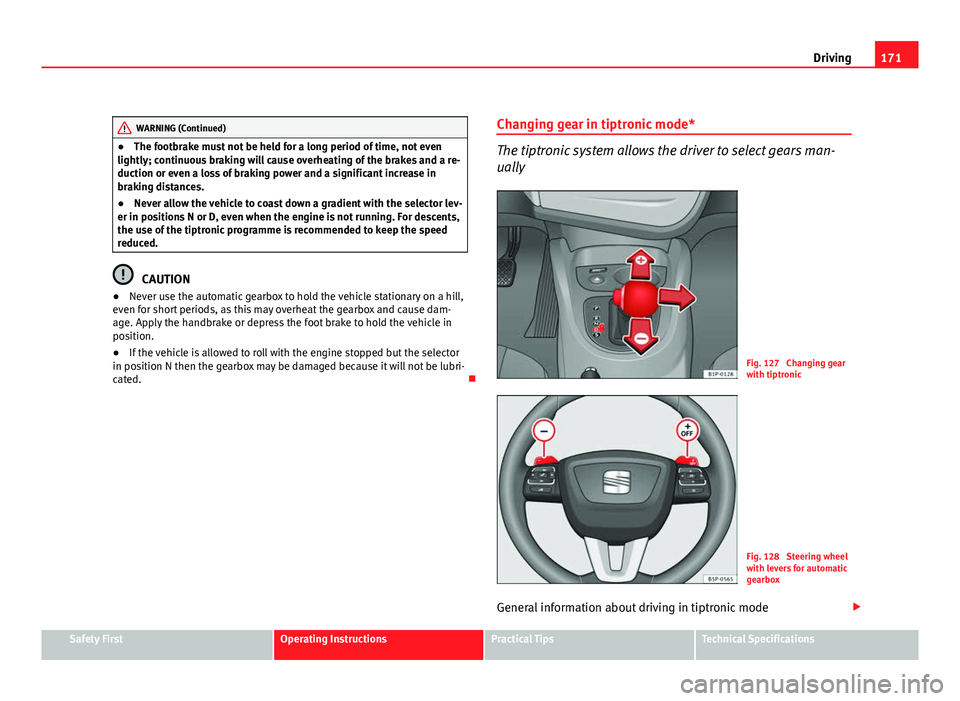
The tiptronic system allows the driver to select gears man-
ually
Fig. 127 Changing gear
with tiptronic
Fig. 128 Steering wheel
with levers for automatic
gearbox
General information about driving in tiptronic mode
Safety FirstOperating InstructionsPractical TipsTechnical Specifications
Page 174 of 302
172Driving
Changing gear with the selector lever
–Put the lever in position D and press towards the right to enter
the tiptronic gate ⇒ fig. 127.
– Press the gear lever forwards +
⇒ fig. 127 to select a higher
gear.
– Press the gear lever back –
⇒ fig. 127 to select a lower gear.
Changing gear with the steering wheel levers
– Press the right paddle lever +
(+OFF) towards the steering
wheel to change up ⇒ fig. 128.
– Press the left paddle –
towards the steering wheel to change
down ⇒ fig. 128.
Using the paddle levers on the steering wheel, you can access manual driv-
ing mode regardless of the pre-selected driving mode.
General information about driving in tiptronic mode
When accelerating, the automatic gearbox / DSG automatic gearbox goes
into a higher gear a little before the engine reaches its maximum permitted
revolutions.
If a lower gear is selected, the automatic gearbox / DSG automatic gearbox
will only change down when the engine cannot go over its maximum permit-
ted revolutions.
If tiptronic is selected whilst the vehicle is in motion and the automatic
gearbox / DSG automatic gearbox is in third gear and selector lever position
D, tiptronic mode will then also be in third gear.
Changing gears in the normal or sport programme using the steering wheel
paddle levers
If the paddle levers ⇒ fig. 128 are used in the normal or sport programme,
the system switches temporarily to tiptronic mode. To exit tiptronic mode again, press the right paddle lever
+ OFF
towards the steering wheel for ap-
proximately one second. You will also leave tiptronic mode if the paddle lev-
ers are not moved for a certain time.
Note
● The gearbox controls on the steering wheel can operate with the selector
lever in any position and with the vehicle in motion.
Kickdown feature
This feature allows maximum acceleration. If you press the accelerator down thoroughly, the gearbox automatically
changes down, depending on speed and engine speed, into a lower gear to
take full advantage of give the vehicle maximum acceleration.
The gearbox does not change gear until the engine reaches the maximum
determined engine speed for the gear.
WARNING
You could lose control of the vehicle if you accelerate on slippery road
surfaces. Risk of serious injury.
● Be particularly careful when using the kickdown features on slippery
road surfaces. With a fast acceleration, the vehicle could lose traction
and skid.
● You should use the kickdown feature only when traffic and weather
conditions allow it to be used safely.
Page 179 of 302
177
Driving
an obstacle. As the vehicle gets closer to the obstacle, the colour of the seg-
ment changes to red and the acoustic signal beeps continuously. When the
penultimate segment is displayed, this means that the vehicle has reached
the collision zone. Stop moving immediately! ⇒
.
WARNING
● The parking aid is not a replacement for driver awareness. The driver
is personally responsible for safe parking and other manoeuvres.
● The sensors have blind spots in which obstacles are not registered.
Always look out for small children and animals because the system will
not always detect them. Always pay attention when reversing to avoid ac-
cidents.
● Always keep a close eye on the area around the vehicle and make full
use of the rear view mirrors.
CAUTION
Please note that low obstacles detected by the system may no longer be
registered by the sensors as the vehicle moves closer, so the system will not
give any further warning. Certain kinds of obstacles (such as wire fences,
chains, thin painted posts or trailer draw bars, etc) may not always be de-
tected by the system, so take care not to damage the vehicle in such cases.
Note
● Please refer to the notes on towing ⇒ page 177.
● There is a slight delay in the picture display.
Towing bracket
In towing mode, the rear parking aid sensors are not enabled when you se-
lect reverse gear or press the switch . This function may not be guaran- teed on towing brackets that are not factory fitted. This results in the follow-
ing restrictions:
SEAT Parking System*
No warning is given.
SEAT Parking System Plus*
There is no rear distance warning. The system will still give a warning when
obstacles are detected while driving forward. The optical display changes to
towing mode.
Fault messages
If you hear a long beep for a few seconds and the LED on the switch *
starts flashing when you switch on the parking aid, a system fault has oc-
curred. Please refer the problem to an Authorised SEAT dealer or specialised
workshop.
Note
If the fault is not corrected before you switch off the ignition, it will only be
indicated by the flashing LED on the switch the next time you switch on
the parking aid.
Safety FirstOperating InstructionsPractical TipsTechnical Specifications
Page 194 of 302
192Driving and the environment
Drive anticipating the traffic situation
A vehicle uses most fuel when accelerating. When you anticipate the situa-
tion, you have to brake less often and, thus, accelerate less. If it is possible,
let the vehicle roll with a gear engaged, for example, if you see a red light
ahead. The braking effect achieved in this way helps to reduce the wear of
brakes and tyres; emissions and fuel consumption are reduced to zero (dis-
connection due to inertia).
Change gear early to save energy
An effective way of saving fuel is to change up quickly through the gears.
Running the engine at high rpm in the lower gears uses an unnecessary
amount of fuel.
Manual gearbox: Change from first to second gear as quickly as possible.
We recommend that, whenever possible, you change to a higher gear upon
reaching 2000 rpm. Follow the “recommended gear” indication that ap-
pears on the instrument panel ⇒ page 62.
Avoid driving at high speed
We advise you not to drive at the top speed permitted by the vehicle. Fuel
consumption, exhaust emissions and noise levels all increase very rapidly
at higher speeds. Driving at moderate speeds will help to save fuel.
Avoid idling
It is worthwhile switching off the engine when waiting in a traffic jam, at lev-
el crossings or at traffic lights with a long red phase. The fuel saved after
only 30 - 40 seconds is greater than the amount of fuel needed to restart
the engine.
The engine takes a long time to warm up when it is idling. Mechanical wear
and pollutant emissions are also especially high during this initial warm-up
phase. It is therefore best to drive off immediately after starting the engine.
Avoid running the engine at high speed.
Periodic maintenance
Periodic maintenance work guarantees that, before beginning a journey,
you will not consume more than the required amount of fuel. A well-serviced engine gives you the benefit of
improved fuel efficiency as well as maxi-
mum reliability and an enhanced resale value.
A badly serviced engine can consume up to 10% more fuel than necessary.
Avoid short journeys
To reduce the consumption and emission of polluting gases, the engine and
the exhaust filtration systems should reach the optimum service tempera-
ture.
With the engine cold, fuel consumption is proportionally higher. The engine
does not warm up and fuel consumption does not normalise until having
driven approximately four kilometres. This is why we recommend avoiding
short trips whenever possible.
Maintain the correct tyre pressures
Bear in mind that keeping the tyres at an adequate pressure saves fuel. If
the tyre pressure is just one bar too low, fuel consumption can increase by
as much as 5%. Due to the greater rolling resistance, under-inflation also
increases tyre wear and impairs handling.
The tyre pressures should always be checked when the tyres are cold.
Do not use winter tyres all year round as they increase fuel consumption by
up to 10%.
Avoid unnecessary weight
Every kilo of extra weight will put up the fuel consumption, so it is worth
checking the luggage compartment occasionally to make sure that no un-
necessary loads are being transported.
A roof rack is often left in place for the sake of convenience, even when it is
no longer needed. At a speed of 100-120 km/h your vehicle will use about
12% more fuel as a result of the extra wind resistance caused by the roof
rack even when it is not in use.
Page 197 of 302

195
Trailer towing
Trailer towing Instructions to follow
Your vehicle may be used to tow a trailer when fitted with the correct equip-
ment.
If the car is supplied with a factory-fitted towing bracket it will already have
the necessary technical modifications and meet the statutory requirements
for towing a trailer. If you wish to retrofit a towing bracket, consult
⇒ page 196.
Connectors
Your vehicle is fitted with a 12-pin connector for the electrical connection
between the trailer and the vehicle.
If the trailer has a 7-pin plug you will need to use an adapter cable. This is
available in any SEAT dealer.
Trailer weight / drawbar load
Never exceed the authorised trailer weight. If you do not load the trailer up
to the maximum permitted trailer weight, you can then climb correspond-
ingly steeper slopes.
The maximum trailer weights listed are only applicable for altitudes up to
1000 m above sea level. With increasing altitude the engine power and
therefore the vehicle's climbing ability are impaired because of the reduced
air density. The maximum trailer weight has to be reduced accordingly. The
weight of the vehicle and trailer combination must be reduced by 10% for
every further 1000 m (or part thereof). The gross combination weight is the
actual weight of the laden vehicle plus the actual weight of the laden trailer.
When possible, operate the trailer with the maximum permitted drawbar
load on the ball joint of the towing bracket, but do not exceed the specified
limit. The figures for
trailer weights and drawbar loads that are given on the data
plate of the towing bracket are for certification purposes only. The correct
figures for your specific model, which may be lower than these figures for
the towing bracket, are given in the vehicle documents or in ⇒ chapter Tech-
nical Data.
Distributing the load
Distribute loads in the trailer so that heavy objects are as near to the axle as
possible. Loads carried in the trailer must be secured to prevent them mov-
ing.
Tyre pressure
Set tyre pressure to the maximum permissible pressure shown on the stick-
er on the inside of the fuel tank flap. Set the tyre pressure of the trailer tyres
in accordance with the trailer manufacturer's recommendations.
Exterior mirrors
Check whether you can see enough of the road behind the trailer with the
standard mirrors. If this is not the case, you should have additional mirrors
fitted. Both exterior mirrors should be mounted on hinged extension brack-
ets. Adjust the mirrors to give sufficient vision to the rear.
WARNING
Never transport people in a trailer. This could result in fatal accidents.
Note
● Towing a trailer places additional demands on the vehicle. We recom-
mend additional services between the normal inspection intervals if the ve-
hicle is used frequently for towing a trailer.
● Find out whether special regulations apply to towing a trailer in your
country.
Safety FirstOperating InstructionsPractical TipsTechnical Specifications