seat adjustment Seat Leon 5D 2012 User Guide
[x] Cancel search | Manufacturer: SEAT, Model Year: 2012, Model line: Leon 5D, Model: Seat Leon 5D 2012Pages: 289, PDF Size: 3.81 MB
Page 57 of 289
56Child safety
Child seats with the Top Tether system come with a strap for securing the
seat to the vehicle anchor point, located at the back of the rear seat back-
rest.
The objective of the retainer strap is to reduce forward movements of the
child seat in a crash, helping reduce the risk of injuries to the head from hit-
ting the inside of the vehicle.
Using the Top Tether in rear-facing mounted seats
Currently, there are very few rear-facing child safety seats that have Top
Tether. Please carefully read and follow the seat manufacturer instructions
to learn the proper way to install the Top Tether strap.
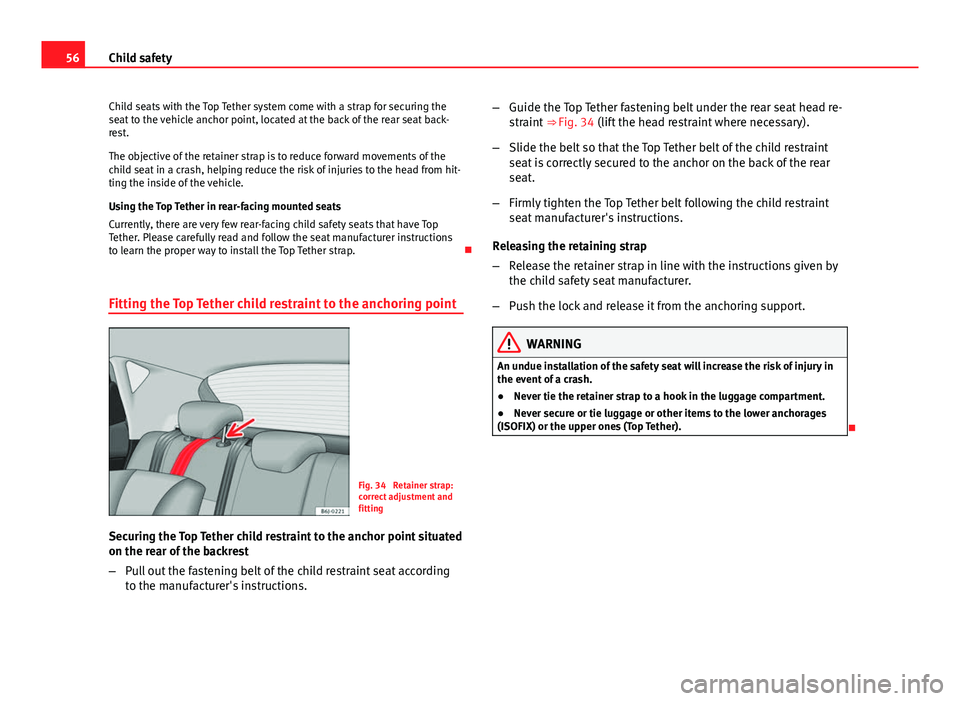
Fitting the Top Tether child restraint to the anchoring point
Fig. 34 Retainer strap:
correct adjustment and
fitting
Securing the Top Tether child restraint to the anchor point situated
on the rear of the backrest
– Pull out the fastening belt of the child restraint seat according
to the manufacturer's instructions. –
Guide the Top Tether fastening belt under the rear seat head re-
straint ⇒ Fig. 34 (lift the head restraint where necessary).
– Slide the belt so that the Top Tether belt of the child restraint
seat is correctly secured to the anchor on the back of the rear
seat.
– Firmly tighten the Top Tether belt following the child restraint
seat manufacturer's instructions.
Releasing the retaining strap
– Release the retainer strap in line with the instructions given by
the child safety seat manufacturer.
– Push the lock and release it from the anchoring support.
WARNING
An undue installation of the safety seat will increase the risk of injury in
the event of a crash.
● Never tie the retainer strap to a hook in the luggage compartment.
● Never secure or tie luggage or other items to the lower anchorages
(ISOFIX) or the upper ones (Top Tether).
Page 78 of 289
77
Driver information system
DisplaysMenuFunctionOil temperatureUpdated engine oil temperature digital displayCoolant tempera-
ture gaugeDigital display of the current temperature of the liquid
coolant.
Storing a speed for the speed warning
● Select the display Speed warning at --- km/h (--- mph)
● Press the button
on the windscreen wiper lever or the button on the multifunction steering wheel to store the current speed and activate
the warning.
●
If necessary, adjust the desired speed within 5 seconds using the rocker
switch
on the windscreen wiper lever or by turning the thumbwheel on
the multifunction steering wheel. Next, press the button or again
or wait several seconds. The speed is stored and the warning activated.
● To deactivate it press the button
or the button . The stored
speed is deleted.
Assist systems submenu
Assist systems
menuFunction
Lane Assist*Switching the Lane Assist system on or off ⇒ page 170.Tiredness detec-
tion*Switching the tiredness detection on or off (pause recom-
mendation) ⇒ page 173.
Personal convenience settings
When two people use a vehicle, SEAT recommends that each person always
uses their own remote control key. When the ignition is switched off, or the vehicle is locked, the convenience settings are stored and allocated to the
vehicle key
⇒ page 73.
The values of the personalised convenience settings are allocated to the ve-
hicle key in the Easy Connect system via the button
and the function
button Setup ⇒ page 79:
Vehicle settings menu
■ Time
■ Language
■ Units
Convenience settings menu ■ Door unlock (individual opening, Auto Lock)
■ Convenience handling of windows
■ Rear vision mirror adjustment
Light settings menu
■ Coming home and leaving home
■ Footwell light
■ Convenience turn signals
The stored settings are automatically activated, at the latest when the igni-
tion is switched on.
Engine oil temperature display
Vehicles without multifunction steering wheel
– To display the temperature of the engine oil, press the rocker
switch ⇒ Fig. 40 2
until the main menu appears. Enter into
Journey data . With the button 2 move to the oil temperature
gauge.
Safety FirstOperating instructionsPractical TipsTechnical specifications
Page 114 of 289

113
Lights and visibility
When a car that is manufactured in a country that drives on the right travels
to a country that drives on the left (or vice versa), it is normally necessary to
cover part of the headlight bulbs with stickers or to change the adjustment
of the headlights to avoid dazzling other drivers.
In such cases, the regulations specify certain light values that must be com-
plied with for designated points of the light distribution. This is known as
“Tourist light”.
The light distribution that the halogen and full-LED headlights of the SEAT
Leon range have, allows the specific “tourist light” values to be met without
the need for stickers or changes in the settings.
Note
“Tourist light” is only allowed temporarily. If you are planning a long stay in
a country that drives on the other side, you should take the vehicle to an
Authorised Technical Service to change the headlights.
“Coming home” and “Leaving home” function (guidance
lights)*
The “Coming home” function should be switched on manually. However the
“Leaving home” function is automatically controlled by a photo sensor.
“Coming home”Necessary operations
To switch sys-
tem on:
– Switch off the ignition.
– Briefly flash the headlights for approximately one sec-
ond ⇒ page 107.
The “Coming home” lighting comes on when the driver
door is opened. The delay in switching off the headlights
is counted from when the last door or rear lid is closed.
The system
switches off:
– Automatically at the end of the delay period.
– Automatically, if 30 seconds after coming on, a vehicle
door or the rear lid remains open.
– If the light switch is turned to position .
– If the ignition is switched on.
“Leaving home”Necessary operationsTo switch sys-
tem on:– Unlock the vehicle when the light switch is in position
and the photo sensor detects darkness.
The system
switches off:– Automatically, at the end of the delay period.
– When the vehicle is locked.
– When the light switch is turned to position .
– When the ignition is switched on.
Note
● In the Easy Connect system, the duration of the lighting can be adjus-
ted, and the function activated and deactivated ⇒ page 79 using the button
and the function button Setup.
● When the “Coming home” function is activated, a tone can be heard
when the driver door is opened to warn that the light remains switched on.
Safety FirstOperating instructionsPractical TipsTechnical specifications
Page 126 of 289

125
Seats and storage
Seats and storage General notes
WARNING
The Safe driving chapter contains important information, tips, sugges-
tions and warnings that you should read and observe for your own safety
and the safety of your passengers ⇒ page 7.
Front seats Manual seat adjustment
Fig. 71 Front seats:
manual seat adjustment Adjusting the seat forward/backward: pull the lever and move the seat
forwards or backwards.
Adjusting the lumbar support* : press the button in the corresponding
position.
Backrest lower/raise: turn the hand wheel.
Raise/lower the seat: Pull/push the lever.
WARNING
● Adjust the front seats only when the vehicle is stationary. Failure to
do so could result in an accident.
● Be careful when adjusting the seat height. Careless or uncontrolled
adjustment can cause injuries.
● The front seat backrests must not be reclined for driving. Otherwise,
seat belts and the airbag system might not protect as they should, with
the subsequent danger of injury.
Front centre armrest
The centre armrest can be adjusted to various levels. Adjusting the centre armrest
– To adjust the tilt, lift the armrest from the starting position so
that it is engaged.
– To return the armrest to the starting position, remove the arm-
rest from the upper fixed position and lower it.
The armrest can be moved backwards and forwards.
1
2
34
Safety FirstOperating instructionsPractical TipsTechnical specifications
Page 127 of 289

126Seats and storage
Seat functions
Introduction
Additional information and warnings
● Adjusting the position of the seats ⇒ page 10
● Seat belts ⇒ page 19
● Airbag system ⇒ page 30
● Child seats (accessories) ⇒ page 47
WARNING
Inappropriate use of the seat functions can cause severe injuries.
● Assume the proper sitting position before your trip and remain in it
throughout. This also applies to the other occupants.
● Always keep hands, fingers, feet and other parts of the body away
from the operating radius and the adjustment of seats.
Seat heating
Fig. 72 In the centre
console: front seats heat-
ing switch The seat cushions can be heated electrically when the ignition is switched
on. The backrest is also heated in some versions.
The seat heating should not be engaged in any of the following conditions:
●
The seat is unoccupied.
● The seat has a covering.
● There is a child seat installed in the seat.
● The seat cushion is wet or damp.
● The indoor or outdoor temperature is greater than 25 °C (77 °F).
FunctionUsing seat heatingTo switch sys-
tem on:Press the button or . Seat heating is switched on fully.
Adjusting the
heating out-
put:Press the button or repeatedly until the desired inten-
sity level is reached.
To switch sys-
tem off:Press the button or until all warning lamps switch off.
WARNING
People who, because of medications, paralysis or chronic diseases (e.g.
diabetes) cannot perceive pain or temperature, or have a limited percep-
tion thereof, may suffer burns to the back, buttocks or legs when using
seat heating, an occurrence that may entail a very lengthy recovery peri-
od or from which it may not be possible to recover fully. Seek medical ad-
vice if you have doubts regarding your health.
● People with a limit pain and temperature threshold must never use
seat heating.
Page 137 of 289

136Air conditioning
Control but-
tonAdditional information. Climatronic.
4Indications on the temperature display screen selected for
the right and left sides.
Defrost function. The air drawn in from outside the vehicle is
directed at the windscreen and air recirculation is automati-
cally switched off. To defrost the windscreen more quickly,
the air is dehumidified at temperatures over approximately
+3 °C (+38 °F) and the fan runs at maximum output.
The air is directed at the chest of driver and passengers by
the dash panel air vents.
Air distribution towards the footwell.
Upward air distribution.
Heated rear window: this only works when the engine is run-
ning and switches off automatically after a maximum of 10
minutes.
Air recirculation ⇒ page 141.
Buttons for seat heating ⇒ page 126.
Press the button to switch on or off the cooling system.
Press the button to make maximum cooling capacity availa-
ble. The recirculation of air and the cooling system turn on
automatically and air distribution adjusts automatically to
the position .
Transfer the driver side temperature settings to the passen-
ger side: when the button lamp is lit , the temperature
settings on the driver side also apply to the passenger side.
Press the button or the temperature control on the passenger
side in order to change the temperature on that side. The
button lamp is lit.
Control but- tonAdditional information. Climatronic.
Automatic adjustment of temperature, fan, and air distribu-
tion. Press the button to switch on the function. The button
will light up
.
When the configuration button is pressed the air condi-
tioner management menu will be shown on the Easy Connect
system screen.
Switching offTurn the fan control to the 0 position or press the button .
WARNING
Stuffy or used air will increase fatigue and reduce driver concentration
possibly resulting in a serious accident.
● Never leave the fresh air fan turned off or use the air recirculation for
long periods of time; the air in the vehicle interior will not be refreshed.
Operating by using the Easy Connect* system (valid for
Radio Entry)
In the Easy Connect system it is also possible to perform various adjust-
ments to the Climatronic.
Open the air conditioner menu
● Press the Setup
button
● ALTERNATIVELY: press the MENU button in Easy Connect. With the rotat-
ing switch select the air conditioner menu and open it.
On the screen you can see and change the current settings, for example, the
temperature set for the driver side and for that of the passenger.
Page 174 of 289

173
Driver assistance systems
Driving pro-
fileCharacteristics
EcoPlaces the vehicle in a particularly low state of consumption,
facilitating a fuel-saving driving style that is respectful to the
environment.
IndividualEnables some configurations to be modified by pressing the
Profile settings button. The functions that can be adjusted
depend on the equipment fitted in the vehicle.
WARNING
When operating SEAT Drive Mode, pay attention to all traffic. Doing oth-
erwise could cause an accident.
Note
● The vehicle will start in the mode that was selected at the moment it was
switched off.
● Changing modes can alter vehicle handling. The SEAT Drive Mode func-
tion does not allow configurations that compromise safety under any cir-
cumstances.
● Your speed and driving style must always be adjusted to visibility,
weather, and traffic conditions.
● The eco mode is not available when towing a trailer. Tiredness detection (break
recommendation)*
Introduction
The Tiredness detection informs the driver when their driving behaviour
shows signs of fatigue.
Additional information and warnings:
● Easy Connect system ⇒ page 79
● Accessories, change a part, repairs and adjustments (information stored
in the control units) ⇒ page 230
WARNING
Do not let the comfort afforded by the Tiredness detection system tempt
you into taking any risks when driving. Take regular breaks, sufficient in
length when making long journeys.
● The driver always assumes the responsibility of driving to their full
capacity.
● Never drive if you are tired.
● The system does not detect the tiredness of the driver in all circum-
stances. Consult the information in the section ⇒ page 174, System limi-
tations.
● In some situations the system may incorrectly interpret an intended
driving manoeuvre as driver tiredness.
● No warning is given in the event of the effect called microsleep!
● Please observe the indications on the instrument panel and act as is
necessary.
Safety FirstOperating instructionsPractical TipsTechnical specifications
Page 175 of 289

174Driver assistance systems
Note
● Tiredness detection has been developed for driving on motorways and
well paved roads only.
● If there is a fault in the system, have it checked by a specialised work-
shop.
Function and operation
Fig. 101 On the instru-
ment panel display:
Tiredness detection sym-
bol
Tiredness detection determines the driving behaviour of the driver when
starting a journey, making a calculation of tiredness. This is constantly com-
pared with the current driving behaviour. If the system detects that the driv-
er is tired, an audible warning is given with a sound and an optic warning is
shown with a symbol and complementary message on the instrument panel
display ⇒ Fig. 101. The message on the instrument panel display is shown
for about 5 seconds, and depending on the case, is repeated. The system
stores the last message displayed.
The message on the instrument panel display can be switched off by press-
ing the
button on the windscreen wiper lever or the button on the
multi function steering wheel ⇒ page 73. The message can be recalled to the instrument panel display using the mul-
tifunction display
⇒ page 73.
Conditions of operation
Driving behaviour is only calculated on speeds above about 65 km/h (40
mph) up to around 200 km/h (125 mph).
Switching on and off
Tiredness detection can be activated or deactivated in the Easy Connect
system with the button
and the function button ⇒
page 79. A mark
indicates that the adjustment has been activated.
System limitations
The Tiredness detection has certain limitations inherent to the system. The
following conditions can limit the Tiredness detection or prevent it from
functioning.
● At speeds below 65 km/h (40 mph)
● At speeds above 200 km/h (125 mph)
● When cornering
● On roads in poor condition
● In unfavourable weather conditions
● When a sporty driving style is employed
● In the event of a serious distraction to the driver
Tiredness detection will be restored when the vehicle is stopped for more
than 15 minutes, when the ignition is switched off or when the driver has
unbuckled their seat belt and opened the door.
In the event of slow driving during a long period of time (below 65 km/h (40
mph) the system automatically re-establishes the tiredness calculation.
When driving at a faster speed the driving behaviour will be recalculated.
Page 280 of 289

Controls and displays (overview) . . . . . . . . . . . 59
Control Units . . . . . . . . . . . . . . . . . . . . . . . . . . . 189
Convenience closingPanoramic sliding sunroof . . . . . . . . . . . . . 104
Convenience opening Panoramic sliding sunroof . . . . . . . . . . . . . 104
Convenience opening/closing . . . . . . . . . . . . 101
Cooling system Checking the coolant . . . . . . . . . . . . . . . . . 216
Coolant temperature gauge . . . . . . . . . . . . . 67
Topping up coolant . . . . . . . . . . . . . . . . . . 216
Cornering lights . . . . . . . . . . . . . . . . . . . . . . . . 109
Correct adjustment of front seat head re- straints . . . . . . . . . . . . . . . . . . . . . . . . . . . . . . . 14
Correct adjustment of rear seat head restraints In-use and non-use positions . . . . . . . . . . . 15
Correct sitting position front passenger . . . . . . . . . . . . . . . . . . . . . . 12
Incorrect sitting position . . . . . . . . . . . . . . . 15
passenger . . . . . . . . . . . . . . . . . . . . . . . . . . . 13
Cruise control . . . . . . . . . . . . . . . . . . . . . . . . . . 164 Control lamp . . . . . . . . . . . . . . . . . . . . . . . . 164
Operation . . . . . . . . . . . . . . . . . . . . . . . . . . 166
Warning lamp . . . . . . . . . . . . . . . . . . . . . . . 164
Cruise control system . . . . . . . . . . . . . . . . . . . . 164
Curtain airbags . . . . . . . . . . . . . . . . . . . . . . . . . . 42 Description . . . . . . . . . . . . . . . . . . . . . . . . . . 42
Operation . . . . . . . . . . . . . . . . . . . . . . . . . . . 42
Safety notes . . . . . . . . . . . . . . . . . . . . . . . . . 43 D
Danger of fitting a child seat on the front pas- senger seat . . . . . . . . . . . . . . . . . . . . . . . . . . . 31
Data recorder . . . . . . . . . . . . . . . . . . . . . . . . . . 189
Daytime driving light . . . . . . . . . . . . . . . . . . . . 109
DEF (instrument panel) . . . . . . . . . . . . . . . . . . . 67
Depth of tread . . . . . . . . . . . . . . . . . . . . . . . . . . 225
Diagnostic connection . . . . . . . . . . . . . . . . . . . 189
Diesel Engine oil . . . . . . . . . . . . . . . . . . . . . . . . . . 211
Particulate filter Diesel . . . . . . . . . . . . . . . . 190
Preheating . . . . . . . . . . . . . . . . . . . . . . . . . 144
Digital clock . . . . . . . . . . . . . . . . . . . . . . . . . . . . 61
Dipped beam headlight . . . . . . . . . . . . . . . . . . 108
Direction of rotation (tyres) . . . . . . . . . . . . . . . 239
Disabling the airbag . . . . . . . . . . . . . . . . . . . . . . 44
Display . . . . . . . . . . . . . . . . . . . . . . . . . . . . . 61, 62
Display/Easy Connect control panel: Cleaning . .202
Disposal Airbags . . . . . . . . . . . . . . . . . . . . . . . . . . . . . 34
Seat belt tensioners . . . . . . . . . . . . . . . . . . . 29
Door/rear lid warning . . . . . . . . . . . . . . . . . . . . . 73
Downhill speed control . . . . . . . . . . . . . . . . . . 158
Drink holders . . . . . . . . . . . . . . . . . . . . . . . . . . 129
Driver see Correct sitting position . . . . . . . 11, 12, 13
Driver information system CD/radio display . . . . . . . . . . . . . . . . . . . . . 73
Door/rear lid warning . . . . . . . . . . . . . . . . . . 73
Engine oil temperature display . . . . . . . . . . 77 Operation via the windscreen wiper lever . 73
Outside temperature display . . . . . . . . . . . . 73
Driving With a trailer . . . . . . . . . . . . . . . . . . . . 194, 195
Driving abroad Headlights . . . . . . . . . . . . . . . . . . . . . . . . . 112
Driving safety . . . . . . . . . . . . . . . . . . . . . . . . . . . . 8
Driving through water . . . . . . . . . . . . . . . . . . . 190
Dynamic headlight range control . . . . . . . . . . 114
E
E10 see Ethanol (fuel) . . . . . . . . . . . . . . . . . . . . 206
Easy Connect . . . . . . . . . . . . . . . . . . . . . . . . . . . 79
Economic driving . . . . . . . . . . . . . . . . . . . . . . . 191
Efficiency programme Additional electrical appliances . . . . . . . . . 78
Saving tips . . . . . . . . . . . . . . . . . . . . . . . . . . 78
Electrical accessories see Power socket . . . . . . . . . . . . . . . . . . . . 129
Electric windows . . . . . . . . . . . . . . . . . . . . . . . . 100 Convenience opening/closing . . . . . . . . . 101
Electro-mechanical steering . . . . . . . . . . . . . . 186 Warning lamp . . . . . . . . . . . . . . . . . . . . . . . 186
Electronic differential lock . . . . . . . . . . . . . . . . 183
Electronic Self-locking . . . . . . . . . . . . . . . . . . . 183
Electronic Stability Control (ESC) . . . . . . . . . . 183
Emergencies . . . . . . . . . . . . . . . . . . . . . . . . . . . 232 Automatic gearbox Backup programme . . 162
Replacing the battery . . . . . . . . . . . . . . . . . 219
Emergency braking warning . . . . . . . . . . . . . . 111
279
Index
Page 285 of 289

Safety . . . . . . . . . . . . . . . . . . . . . . . . . . . . . . . . . . 8child safety . . . . . . . . . . . . . . . . . . . . . . . . . . 47
child seats . . . . . . . . . . . . . . . . . . . . . . . . . . 47
Safety equipment . . . . . . . . . . . . . . . . . . . . . . . . . 7
Safety first . . . . . . . . . . . . . . . . . . . . . . . . . . . . . . . 7
Safety interlock for ignition key . . . . . . . . . . . . 144
Safety notes Airbags . . . . . . . . . . . . . . . . . . . . . . . . . . . . . 34
Curtain airbags . . . . . . . . . . . . . . . . . . . . . . . 43
Front airbags . . . . . . . . . . . . . . . . . . . . . . . . 37
Seat belt tensioners . . . . . . . . . . . . . . . . . . . 29
Side airbags . . . . . . . . . . . . . . . . . . . . . . . . . 41
Using child seats . . . . . . . . . . . . . . . . . . . . . 47
Using seat belts . . . . . . . . . . . . . . . . . . . . . . 23
Saving fuel Conscientious driving . . . . . . . . . . . . . . . . 191
Inertia mode . . . . . . . . . . . . . . . . . . . . . . . . 161
Saving tips (efficiency programme) . . . . . . . . . 78
Seat adjustment . . . . . . . . . . . . . . . . . . . . . . . . . 125
Seat adjuster . . . . . . . . . . . . . . . . . . . . . . . . . . . 10
Seat belt control lamp . . . . . . . . . . . . . . . . . . . . 19
Seat belt position Pregnant women . . . . . . . . . . . . . . . . . . . . . 27
Seat belts . . . . . . . . . . . . . . . . . . . . . . . . . . . 26
Seat belt protection . . . . . . . . . . . . . . . . . . . . . . 23
Seat belt release . . . . . . . . . . . . . . . . . . . . . . . . 27
Seat belts . . . . . . . . . . . . . . . . . . . . . . . . . . . . . . 19 Adjustment . . . . . . . . . . . . . . . . . . . . . . . . . . 25
Cleaning . . . . . . . . . . . . . . . . . . . . . . . . . . . 205
control lamp . . . . . . . . . . . . . . . . . . . . . . . . . 19
Incorrectly fastened . . . . . . . . . . . . . . . . . . . 28 Not worn . . . . . . . . . . . . . . . . . . . . . . . . . . . . 22
Safety notes . . . . . . . . . . . . . . . . . . . . . . . . . 23
Seat belt tensioners . . . . . . . . . . . . . . . . . . . . . . 28
SEAT Drive Mode . . . . . . . . . . . . . . . . . . . . . . . 171
Selective unlocking system . . . . . . . . . . . . . . . . 91
Selector lever Automatic gearbox . . . . . . . . . . . . . . . . . . . 154
Function fault . . . . . . . . . . . . . . . . . . . . . . . 155
Selector lever (automatic gearbox) Manual release . . . . . . . . . . . . . . . . . . . . . . 163
Service interval display . . . . . . . . . . . . . . . . . . . 65
Service intervals . . . . . . . . . . . . . . . . . . . . . . . . 211
Service notification: read . . . . . . . . . . . . . . . . . . 66
Setting Headlight range . . . . . . . . . . . . . . . . . . . . . 114
Side airbags . . . . . . . . . . . . . . . . . . . . . . . . . . . . 39 Description . . . . . . . . . . . . . . . . . . . . . . . . . . 39
Operation . . . . . . . . . . . . . . . . . . . . . . . . . . . 40
Safety notes . . . . . . . . . . . . . . . . . . . . . . . . . 41
side assist Cleaning the sensors . . . . . . . . . . . . . . . . . 199
Side light . . . . . . . . . . . . . . . . . . . . . . . . . . . . . 108
Sitting position driver . . . . . . . . . . . . . . . . . . . . . . . . . . . . . . . 11
Sitting position for vehicle occupants . . . . . . . 10
Sliding/tilting sunroof Convenience opening/closing . . . . . . . . . 101
Snow chains . . . . . . . . . . . . . . . . . . . . . . . 229, 266
Spanner symbol . . . . . . . . . . . . . . . . . . . . . . . . . 65
Special features Windscreen wipers . . . . . . . . . . . . . . . . . . . 118
Speedometer . . . . . . . . . . . . . . . . . . . . . . . . . . . 73 Speed warning function . . . . . . . . . . . . . . . . . . 149
Start-Stop system . . . . . . . . . . . . . . . . . . . . . . . 149
Driver messages . . . . . . . . . . . . . . . . . . . . . 152
Stop/Start the engine . . . . . . . . . . . . . . . . 150
Switching on/off . . . . . . . . . . . . . . . . . . . . . 152
The engine does not switch off . . . . . . . . . 151
The engine starts by itself . . . . . . . . . . . . . 151
Warning lamps . . . . . . . . . . . . . . . . . . . . . . 150
Starting up (engine) . . . . . . . . . . . . . . . . . . . . . 144
Steering Electro-mechanical steering . . . . . . . . . . . 186
Engage the steering lock (ignitionkey) . . . . . . . . . . . . . . . . . . . . . . . . . . 144, 146
Steering wheel Gearshift paddles (automatic gearbox) . . 159
Setting . . . . . . . . . . . . . . . . . . . . . . . . . . . . 143
Storage compartment . . . . . . . . . . . . . . . . . . . 130
Storage compartments Glove compartment lighting . . . . . . . . . . . 115
Sun visor . . . . . . . . . . . . . . . . . . . . . . . . . . . . . . 116
Switch Hazard warning lights . . . . . . . . . . . . . . . . 110
Switching ignition on/off . . . . . . . . . . . . . . . . . 144
Switching off using inertia . . . . . . . . . . . . . . . . 191
Switching off (engine) With the key . . . . . . . . . . . . . . . . . . . . . . . . 146
Symbols See "Lamps" . . . . . . . . . . . . . . . . . . . . . . . . . 69
System Automatic dipped beam control . . . . . . . . 109
System Easy Connect . . . . . . . . . . . . . . . . . . . . . 79
284 Index