ignition Seat Leon 5D 2012 Workshop Manual
[x] Cancel search | Manufacturer: SEAT, Model Year: 2012, Model line: Leon 5D, Model: Seat Leon 5D 2012Pages: 289, PDF Size: 3.81 MB
Page 119 of 289

118Lights and visibility
Window wiper lever
Fig. 64 Operating the
windscreen wiper and
rear wiper
Move the lever to the required position ⇒ :0OFFWindscreen wiper off.
1INTWindscreen wipers interval wipe.
Using the control ⇒ Fig. 64 A adjust the interval (vehicles
without the rain sensor), or the sensitivity of the rain sensor.
2LOWSlow wipe.3HIGHContinuous wipe.
41xBrief press, short clean. Hold the lever down for more time to
increase the wipe frequency.
5
The windscreen washer function is activated by pushing the
lever forwards, and simultaneously the windscreen wipers
start.
6Interval wipe for rear window. The rear wiper will wipe the win-
dow approximately every six seconds.
7The windscreen washer function is activated by pressing the
lever, and the rear wiper starts simultaneously.
CAUTION
If the ignition is switched off with the windscreen wipers active, they com-
plete their wipe before returning to the rest position. Ice, snow and other
obstacles on the windscreen may damage the wiper and the windscreen
wiper motor.
● If necessary, remove snow and ice from the windscreen wipers before
starting your journey.
● Carefully lift the frozen windscreen wipers from the glass. SEAT recom-
mends a de-icer spray for this operation.
CAUTION
Do not switch on the windscreen wipers if the windscreen is dry. Cleaning
with the windscreen wipers while dry can cause damage.
Note
● The windscreen wipers will only function when the ignition is switched
on and the respective bonnet or rear lid are closed.
● The interval wipe speed varies according to the vehicle speed. The faster
the vehicle is moving, the more often the windscreen is cleaned.
● The rear wiper is automatically switched on when the windscreen wiper
is on and the car is in reverse gear.
Page 120 of 289

119
Lights and visibility
Windscreen wiper functions
Windscreen wiper performance in different situations:If the vehicle is at a stand-
still:The activated position provisionally changes
to the previous position.
During the automatic wipe:
The air conditioner comes on for approxi-
mately 30 seconds in air recirculation mode
to prevent the smell of the windscreen wash-
er fluid entering the inside the vehicle.
For the interval wipe:The intervals between wipes vary according
to the speed of the vehicle. The higher the
vehicle speed the shorter the intervals.
Heated windscreen washer jets
The heating only thaws the frozen jets, it does not thaw the water in the
washer hoses. The heated windscreen washer jets automatically adjust the
heat depending on the ambient temperature, when the ignition is switched
on.
Headlight wash/wipe system
The headlight washers/wipers clean the headlight lenses.
After the ignition is switched on, the first and every fifth time the wind-
screen washer is switched on, the headlights are also washed. Therefore,
the windscreen wiper lever should be pulled towards the steering wheel
when the dipped beam or main beam are on. Any incrusted dirt (such as in-
sects) should be cleaned regularly (e.g. when refuelling).
To ensure the headlight washers work correctly in winter, any snow which
has got into the bumper jet supports should be cleaned away. If necessary,
remove snow with an anti-icing spray.
Note
The wiper will try to wipe away any obstacles that are on the windscreen.
The wiper will stop moving if the obstacle blocks its path. Remove the ob-
stacle and switch the wiper back on again.
Windscreen wipers service position
Fig. 65 Wipers in service
position
The wiper arms can be raised when the wipers are in service position
⇒ Fig. 65. To place the windscreen wipers in the service position, proceed
as follows:
● The bonnet must be closed ⇒ page 209.
● Switch the ignition on and off.
● Press the windscreen wiper lever downwards briefly ⇒ Fig. 64 4
.
Before driving, always lower the wiper arms. Using the windscreen wiper
lever, the windscreen wiper arms return to their initial position.
Safety FirstOperating instructionsPractical TipsTechnical specifications
Page 121 of 289

120Lights and visibility
Lifting and returning windscreen wiper arms
● Place the wiper arms in the service position ⇒
.
● Only hold the wiper arms at the point where the blade is fixed.
CAUTION
● To prevent damage to the bonnet and the wiper arms, only leave them in
the service position.
● Before driving, always lower the wiper arms.
Rain sensor*
Fig. 66 Windscreen wip-
er lever: adjusting the
rain sensor A
Fig. 67 Rain sensor sen-
sitive surface
The rain sensor controls the frequency of the windscreen wiper intervals,
depending on the amount of rain ⇒
. The sensitivity of the rain sensor can
be adjusted manually. Manual wipe ⇒ page 118
Move the lever to the required position ⇒ Fig. 66:
Rain sensor off.
Rain sensor on; automatic wipe if necessary.
Setting sensitivity level of rain sensor
– Set control to the right: highly sensitive.
– Set control to the left: less sensitive.
When the ignition is switched off and then back on, the rain sensor stays on
and starts operating again when the windscreen wipers are in position 1
and the vehicle is travelling at more than 16 km/h (10 mph).
Rain sensor modified behaviour
Possible causes of faults and mistaken readings
on the sensitive surface
⇒ Fig. 67 of the rain sensor include:
0
1A
Page 124 of 289

123
Lights and visibility
● If necessary the right exterior mirror adjustment may need correcting.
Turn the knob to position R.
● In the Easy Connect system the exterior mirrors can be adjusted using
the CAR
button and the function button SETUP.
Tilt function for front passenger exterior mirror*
The mirror can automatically tilt slightly to provide a better view of the kerb
when parking backwards. The control must be in the position R for this fea-
ture to be operational.
The mirror returns to its original position as soon as you drive forwards at
over 15 km/h (10 mph) or switch off the ignition. It also returns to its origi-
nal position if the position of the control is adjusted.
WARNING
Convex or wide-angle* exterior mirrors give a larger field of vision. How-
ever, they make objects look smaller and further away than they really
are. If you use these mirrors to estimate the distance to vehicles behind
you when changing lane, you could misjudge the distance. Risk of acci-
dent!
CAUTION
● If one of the mirror housings is knocked out of position (e.g. when park-
ing), the mirrors must first be fully retracted with the electric control. Do not
readjust the mirror housing by hand, as this will interfere with the mirror ad-
juster function.
● Before washing the vehicle in an automatic car wash, please make sure
to retract the exterior mirrors to prevent them from being damaged. Electri-
cally retractable exterior mirrors must NOT be folded in or out by hand. Al-
ways use the electrical power control.
Note
If the electrical adjustment should fail to operate, both of the mirrors can be
adjusted by hand by lightly pressing the edge of the mirror glass. Anti-dazzle rear vision mirrors
Your vehicle is fitted with an interior rear vision mirror with a
manual or automatic control for anti-dazzle position.
Fig. 70 Interior rear vi-
sion mirror with automat-
ic setting for anti-dazzle
position
Interior rear vision mirror with manual setting for anti-dazzle
position
– Position the small lever of the lower edge of the mirror to face
towards the rear.
Anti-dazzle rear vision mirror with automatic setting*
– Press the button A
. Warning lamp B will light up. Depending
on the amount of light incidence, the interior rear vision mirror
and the exterior* mirrors darken (e.g. headlight shining from
behind).
Safety FirstOperating instructionsPractical TipsTechnical specifications
Page 127 of 289

126Seats and storage
Seat functions
Introduction
Additional information and warnings
● Adjusting the position of the seats ⇒ page 10
● Seat belts ⇒ page 19
● Airbag system ⇒ page 30
● Child seats (accessories) ⇒ page 47
WARNING
Inappropriate use of the seat functions can cause severe injuries.
● Assume the proper sitting position before your trip and remain in it
throughout. This also applies to the other occupants.
● Always keep hands, fingers, feet and other parts of the body away
from the operating radius and the adjustment of seats.
Seat heating
Fig. 72 In the centre
console: front seats heat-
ing switch The seat cushions can be heated electrically when the ignition is switched
on. The backrest is also heated in some versions.
The seat heating should not be engaged in any of the following conditions:
●
The seat is unoccupied.
● The seat has a covering.
● There is a child seat installed in the seat.
● The seat cushion is wet or damp.
● The indoor or outdoor temperature is greater than 25 °C (77 °F).
FunctionUsing seat heatingTo switch sys-
tem on:Press the button or . Seat heating is switched on fully.
Adjusting the
heating out-
put:Press the button or repeatedly until the desired inten-
sity level is reached.
To switch sys-
tem off:Press the button or until all warning lamps switch off.
WARNING
People who, because of medications, paralysis or chronic diseases (e.g.
diabetes) cannot perceive pain or temperature, or have a limited percep-
tion thereof, may suffer burns to the back, buttocks or legs when using
seat heating, an occurrence that may entail a very lengthy recovery peri-
od or from which it may not be possible to recover fully. Seek medical ad-
vice if you have doubts regarding your health.
● People with a limit pain and temperature threshold must never use
seat heating.
Page 130 of 289
129
Seats and storage
Power socket
Electrical equipment can be connected to the 12 volt power
socket.
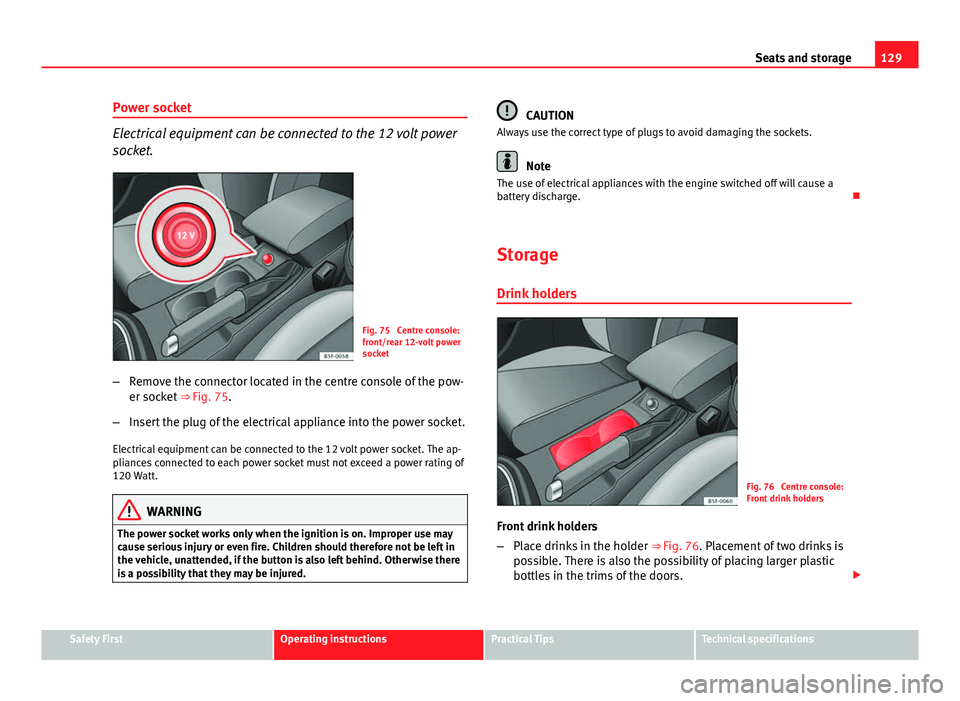
Fig. 75 Centre console:
front/rear 12-volt power
socket
– Remove the connector located in the centre console of the pow-
er socket ⇒ Fig. 75.
– Insert the plug of the electrical appliance into the power socket.
Electrical equipment can be connected to the 12 volt power socket. The ap-
pliances connected to each power socket must not exceed a power rating of
120 Watt.
WARNING
The power socket works only when the ignition is on. Improper use may
cause serious injury or even fire. Children should therefore not be left in
the vehicle, unattended, if the button is also left behind. Otherwise there
is a possibility that they may be injured.
CAUTION
Always use the correct type of plugs to avoid damaging the sockets.
Note
The use of electrical appliances with the engine switched off will cause a
battery discharge.
Storage
Drink holders
Fig. 76 Centre console:
Front drink holders
Front drink holders
– Place drinks in the holder ⇒ Fig. 76. Placement of two drinks is
possible. There is also the possibility of placing larger plastic
bottles in the trims of the doors.
Safety FirstOperating instructionsPractical TipsTechnical specifications
Page 145 of 289

144Driving
Ignition lock
Starting the engine with the ignition key
Switch on the ignition with the key in the ignition and start
the engine.
Fig. 86 Ignition key po-
sitions
Steering wheel lock
– To lock the steering wheel, remove the key from the ignition and
turn the wheel until it locks. In vehicles with the automatic gear-
box*, the selector lever must be in the position P in order to re-
move the key.
– To unlock the steering wheel, insert the key into the ignition
and simultaneously turn the key (in the direction of the arrow)
and the steering wheel.
Warning: If the steering wheel cannot be turned, this is because
the steering wheel lock is activated. Switching the ignition on/off, preheating
–
Turn the ignition key to position 2
to switch on the ignition.
– Turn the ignition key to position 1
to switch off the ignition.
Preheating is produced in Diesel vehicles when the ignition is
switched on.
Starting up the engine
– Manual gearbox: Press the clutch pedal all the way down and
move the gearbox lever into neutral.
– Automatic gearbox : Press the brake pedal and move the selec-
tor lever to position P or N.
– Turn the ignition key to position 3
. The key returns to position
2 automatically. Do not press the accelerator.
Diesel engines can take a few seconds longer than usual to start
on cold days. Therefore the clutch pedal (manual gearbox) or the
brake pedal (automatic gearbox) must remain pressed until the en-
gine starts up. During preheating, the warning lamp remains lit.
The preheating time depends on the coolant and exterior tempera-
tures. When the engine is at operating temperature or at outside
temperatures above +8 °C (46 °F) the warning lamp will only
light up for about one second. This means that the engine starts
immediately.
If the engine does not immediately start up, interrupt the starting process
and try again after 30 seconds. To start the engine again, return the key to
position 1
.
Page 146 of 289

145
Driving
Start-Stop System*
If the vehicle is stopped and the Start-Stop system* switches off the engine,
the ignition remains switched on.
Automatic gearbox: Before leaving the vehicle, make sure that the ignition
is switched off and the selector lever is in position P.
Driver messages on the instrument panel display
Press the clutch This message appears on vehicles with a manual gearbox if the driver tries
to start the engine without having the clutch pedal pressed. The engine will
only start if you press the clutch pedal.
Press the brake
This message appears on vehicles with an automatic gearbox if the driver
tries to start the engine without having the brake pedal pressed.
Select N or P
This message appears if you try to start or stop the engine when the selec-
tor lever of the automatic gearbox is not in position P or N. The engine can
only start or stop in these positions.
Engage position P; the vehicle can move; doors can only close in position P. For safety reasons, this driver message appears and an audible warning
sounds if the selector lever of the automatic gearbox is not in position P af-
ter you switch off the ignition. Otherwise the vehicle could move.
Gear change: selector lever in the drive position! This driver message is displayed and a buzzer is sounded when the selector
lever is not in the position P when the driver door is opened. Put the selec-
tor lever in position P; otherwise the vehicle can roll away.
Ignition is switched onThis driver message is displayed and a buzzer is sounded when the driver
door is opened with the ignition switched on.
WARNING
● Never run the engine in confined spaces, as the exhaust gases are
poisonous.
● Never remove the key from the ignition if the vehicle is in motion.
Otherwise, the steering could suddenly lock, making it impossible to
steer the vehicle: risk of accident!
● Always take the key with you when you leave the vehicle. This is par-
ticularly important if there are children in the vehicle, as they might oth-
erwise be able to start the engine or use power-operated equipment (e.g.
the electric windows), which could cause injuries.
CAUTION
Avoid high engine speeds, full throttle and extreme load conditions until
the engine has reached its normal operating temperature, otherwise this
can damage the engine.
For the sake of the environment
Do not warm up the engine by running it with the car stationary. You should
drive off as soon as you start the engine. This will help avoid unnecessary
exhaust emissions.
Note
● If it is difficult to turn the ignition key to the position 1, turn the steer-
ing wheel to both sides to release the steering lock.
● When starting from cold, the engine may be a little noisy for the first few
seconds until oil pressure has built up in the hydraulic valve lifters. This is
quite normal, and no cause for concern.
● If the vehicle battery is disconnected and reconnected, the key must re-
main in the position 1
for around 5 seconds before starting up.
● Vehicles with automatic gearbox: After switching off the ignition, you
can only remove the ignition key if the selector lever is in position “P” (park-
ing lock). Next, the selector lever is locked.
Safety FirstOperating instructionsPractical TipsTechnical specifications
Page 147 of 289

146Driving
Switching off the engine with the key
Switching off the engine
–Stop the vehicle.
– Turn the ignition key to position 0
.
Engaging the steering wheel lock
Important: selector lever (automatic gearbox*) must be in position
P.
– Remove the key from the ignition in position 1
⇒ Fig. 86 ⇒ .
– Turn the steering wheel until you hear it engage.
Possible vehicle theft is prevented with the steering lock engaged.
WARNING
● Never switch the engine off until the vehicle is stationary. The brake
servo and power steering functions will not be completely covered under
warranty. More force may also be needed to turn the steering wheel or to
brake. As you cannot steer and brake in the normal manner, there is a
greater risk of accidents and serious injury.
● Never remove the key from the ignition if the vehicle is in motion.
Otherwise, the steering could lock making it impossible to steer the vehi-
cle.
● Always take the ignition key with you whenever you leave the vehicle,
even temporarily. This is particularly important if there are children in
the vehicle, as they might otherwise be able to start the engine or use
power-operated equipment (e.g. the electric windows), which could
cause injuries.
CAUTION
If the engine has been running under high load for a long time, there is a
risk of heat building up in the engine compartment after the engine has
been switched off; this could cause engine damage. For this reason, you
should idle the engine for approx. 2 minutes before you switch it off.
Note
● After the engine is switched off the radiator fan may run on for up to 10
minutes, even if the ignition is switched off. It is also possible that the fan
turns itself on once more if the coolant temperature increases due to the
heat accumulated in the engine compartment or due to its prolonged expo-
sure to solar radiation.
● If the vehicle is stopped and the Start-Stop system* switches off the en-
gine, the ignition remains switched on. Make sure that the ignition is
switched off before leaving the vehicle, otherwise the battery could dis-
charge.
Kick-down
The kick-down feature allows maximum acceleration to be
reached. If the eco*
⇒ page 172 mode has been selected in SEAT Drive Mode*, and
the accelerator is pressed beyond a hard point, the engine power is auto-
matically controlled to give your vehicle maximum acceleration.
WARNING
Please note that if the road surface is slippery or wet, the kick-down fea-
ture could cause the driving wheels to spin, which could result in skid-
ding.
Page 148 of 289
147
Driving
Handbrake Using the handbrake
The handbrake should be applied firmly to prevent the vehi-
cle from accidentally rolling away.
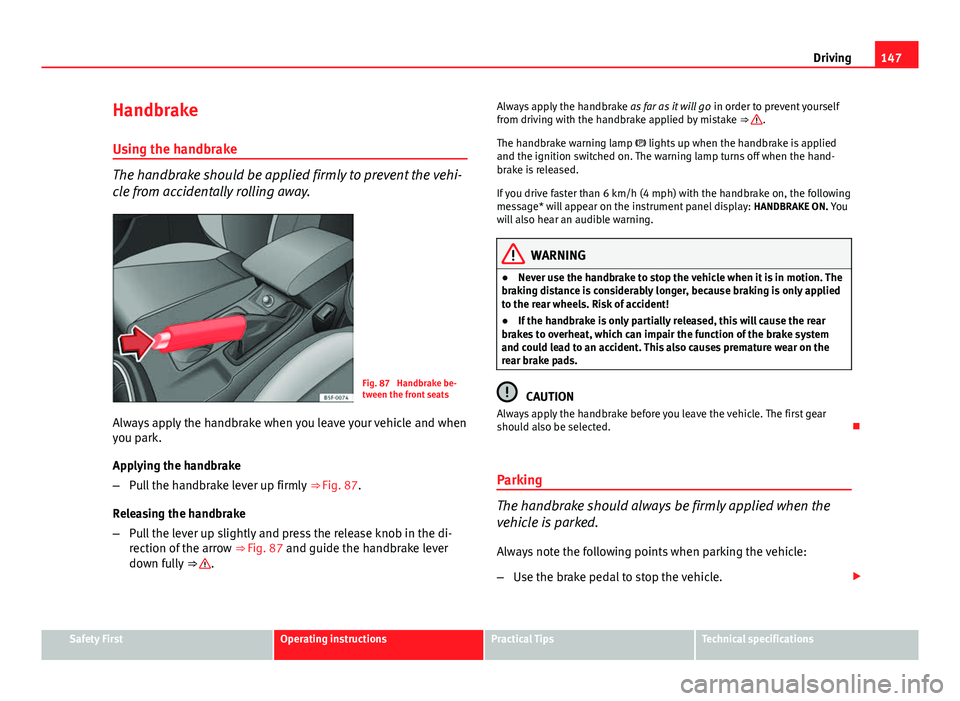
Fig. 87 Handbrake be-
tween the front seats
Always apply the handbrake when you leave your vehicle and when
you park.
Applying the handbrake
– Pull the handbrake lever up firmly ⇒ Fig. 87.
Releasing the handbrake
– Pull the lever up slightly and press the release knob in the di-
rection of the arrow ⇒ Fig. 87 and guide the handbrake lever
down fully ⇒
. Always apply the handbrake
as far as it will go in order to prevent yourself
from driving with the handbrake applied by mistake ⇒
.
The handbrake warning lamp lights up when the handbrake is applied
and the ignition switched on. The warning lamp turns off when the hand-
brake is released.
If you drive faster than 6 km/h (4 mph) with the handbrake on, the following
message* will appear on the instrument panel display: HANDBRAKE ON. You
will also hear an audible warning.
WARNING
● Never use the handbrake to stop the vehicle when it is in motion. The
braking distance is considerably longer, because braking is only applied
to the rear wheels. Risk of accident!
● If the handbrake is only partially released, this will cause the rear
brakes to overheat, which can impair the function of the brake system
and could lead to an accident. This also causes premature wear on the
rear brake pads.
CAUTION
Always apply the handbrake before you leave the vehicle. The first gear
should also be selected.
Parking
The handbrake should always be firmly applied when the
vehicle is parked.
Always note the following points when parking the vehicle:
– Use the brake pedal to stop the vehicle.
Safety FirstOperating instructionsPractical TipsTechnical specifications