heating Seat Leon 5D 2012 Owner's manual
[x] Cancel search | Manufacturer: SEAT, Model Year: 2012, Model line: Leon 5D, Model: Seat Leon 5D 2012Pages: 289, PDF Size: 3.81 MB
Page 4 of 289
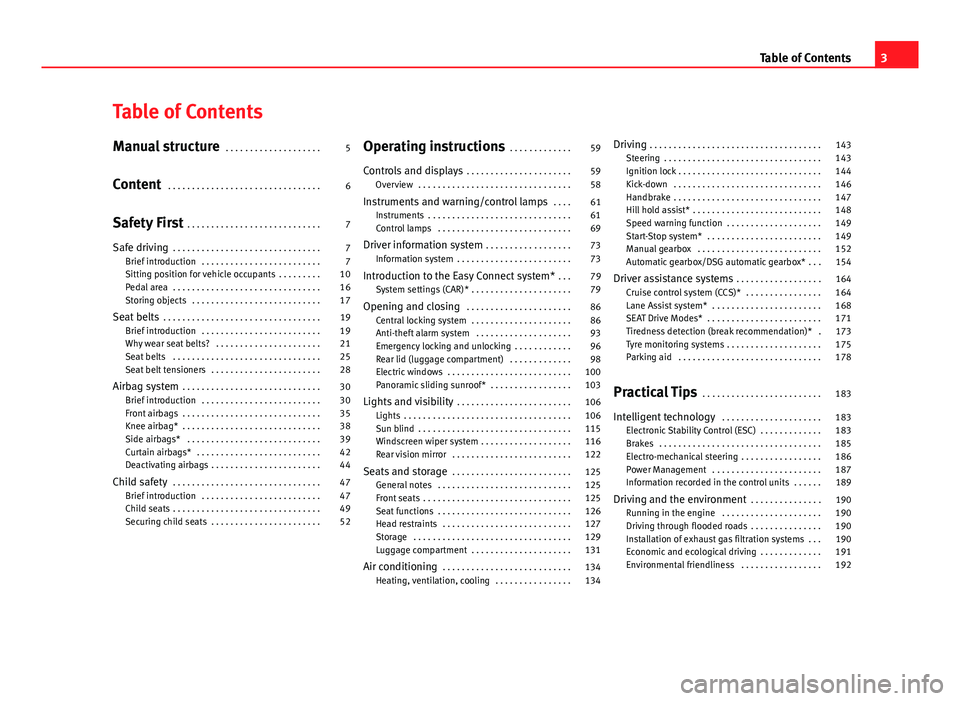
Table of Contents
Manual structure . . . . . . . . . . . . . . . . . . . . 5
Content . . . . . . . . . . . . . . . . . . . . . . . . . . . . . . . . 6
Safety First . . . . . . . . . . . . . . . . . . . . . . . . . . . . 7
Safe driving . . . . . . . . . . . . . . . . . . . . . . . . . . . . . . . 7
Brief introduction . . . . . . . . . . . . . . . . . . . . . . . . . 7
Sitting position for vehicle occupants . . . . . . . . . 10
Pedal area . . . . . . . . . . . . . . . . . . . . . . . . . . . . . . . 16
Storing objects . . . . . . . . . . . . . . . . . . . . . . . . . . . 17
Seat belts . . . . . . . . . . . . . . . . . . . . . . . . . . . . . . . . . 19
Brief introduction . . . . . . . . . . . . . . . . . . . . . . . . . 19
Why wear seat belts? . . . . . . . . . . . . . . . . . . . . . . 21
Seat belts . . . . . . . . . . . . . . . . . . . . . . . . . . . . . . . 25
Seat belt tensioners . . . . . . . . . . . . . . . . . . . . . . . 28
Airbag system . . . . . . . . . . . . . . . . . . . . . . . . . . . . . 30
Brief introduction . . . . . . . . . . . . . . . . . . . . . . . . . 30
Front airbags . . . . . . . . . . . . . . . . . . . . . . . . . . . . . 35
Knee airbag* . . . . . . . . . . . . . . . . . . . . . . . . . . . . . 38
Side airbags* . . . . . . . . . . . . . . . . . . . . . . . . . . . . 39
Curtain airbags* . . . . . . . . . . . . . . . . . . . . . . . . . . 42
Deactivating airbags . . . . . . . . . . . . . . . . . . . . . . . 44
Child safety . . . . . . . . . . . . . . . . . . . . . . . . . . . . . . . 47
Brief introduction . . . . . . . . . . . . . . . . . . . . . . . . . 47
Child seats . . . . . . . . . . . . . . . . . . . . . . . . . . . . . . . 49
Securing child seats . . . . . . . . . . . . . . . . . . . . . . . 52 Operating instructions
. . . . . . . . . . . . . 59
Controls and displays . . . . . . . . . . . . . . . . . . . . . . 59
Overview . . . . . . . . . . . . . . . . . . . . . . . . . . . . . . . . 58
Instruments and warning/control lamps . . . . 61
Instruments . . . . . . . . . . . . . . . . . . . . . . . . . . . . . . 61
Control lamps . . . . . . . . . . . . . . . . . . . . . . . . . . . . 69
Driver information system . . . . . . . . . . . . . . . . . . 73
Information system . . . . . . . . . . . . . . . . . . . . . . . . 73
Introduction to the Easy Connect system* . . . 79
System settings (CAR)* . . . . . . . . . . . . . . . . . . . . . 79
Opening and closing . . . . . . . . . . . . . . . . . . . . . . 86
Central locking system . . . . . . . . . . . . . . . . . . . . . 86
Anti-theft alarm system . . . . . . . . . . . . . . . . . . . . 93
Emergency locking and unlocking . . . . . . . . . . . . 96
Rear lid (luggage compartment) . . . . . . . . . . . . . 98
Electric windows . . . . . . . . . . . . . . . . . . . . . . . . . . 100
Panoramic sliding sunroof* . . . . . . . . . . . . . . . . . 103
Lights and visibility . . . . . . . . . . . . . . . . . . . . . . . . 106
Lights . . . . . . . . . . . . . . . . . . . . . . . . . . . . . . . . . . . 106
Sun blind . . . . . . . . . . . . . . . . . . . . . . . . . . . . . . . . 115
Windscreen wiper system . . . . . . . . . . . . . . . . . . . 116
Rear vision mirror . . . . . . . . . . . . . . . . . . . . . . . . . 122
Seats and storage . . . . . . . . . . . . . . . . . . . . . . . . . 125
General notes . . . . . . . . . . . . . . . . . . . . . . . . . . . . 125
Front seats . . . . . . . . . . . . . . . . . . . . . . . . . . . . . . . 125
Seat functions . . . . . . . . . . . . . . . . . . . . . . . . . . . . 126
Head restraints . . . . . . . . . . . . . . . . . . . . . . . . . . . 127
Storage . . . . . . . . . . . . . . . . . . . . . . . . . . . . . . . . . 129
Luggage compartment . . . . . . . . . . . . . . . . . . . . . 131
Air conditioning . . . . . . . . . . . . . . . . . . . . . . . . . . . 134
Heating, ventilation, cooling . . . . . . . . . . . . . . . . 134 Driving
. . . . . . . . . . . . . . . . . . . . . . . . . . . . . . . . . . . . 143
Steering . . . . . . . . . . . . . . . . . . . . . . . . . . . . . . . . . 143
Ignition lock . . . . . . . . . . . . . . . . . . . . . . . . . . . . . . 144
Kick-down . . . . . . . . . . . . . . . . . . . . . . . . . . . . . . . 146
Handbrake . . . . . . . . . . . . . . . . . . . . . . . . . . . . . . . 147
Hill hold assist* . . . . . . . . . . . . . . . . . . . . . . . . . . . 148
Speed warning function . . . . . . . . . . . . . . . . . . . . 149
Start-Stop system* . . . . . . . . . . . . . . . . . . . . . . . . 149
Manual gearbox . . . . . . . . . . . . . . . . . . . . . . . . . . 152
Automatic gearbox/DSG automatic gearbox* . . . 154
Driver assistance systems . . . . . . . . . . . . . . . . . . 164
Cruise control system (CCS)* . . . . . . . . . . . . . . . . 164
Lane Assist system* . . . . . . . . . . . . . . . . . . . . . . . 168
SEAT Drive Modes* . . . . . . . . . . . . . . . . . . . . . . . . 171
Tiredness detection (break recommendation)* . 173
Tyre monitoring systems . . . . . . . . . . . . . . . . . . . . 175
Parking aid . . . . . . . . . . . . . . . . . . . . . . . . . . . . . . 178
Practical Tips . . . . . . . . . . . . . . . . . . . . . . . . . 183
Intelligent technology . . . . . . . . . . . . . . . . . . . . . 183
Electronic Stability Control (ESC) . . . . . . . . . . . . . 183
Brakes . . . . . . . . . . . . . . . . . . . . . . . . . . . . . . . . . . 185
Electro-mechanical steering . . . . . . . . . . . . . . . . . 186
Power Management . . . . . . . . . . . . . . . . . . . . . . . 187
Information recorded in the control units . . . . . . 189
Driving and the environment . . . . . . . . . . . . . . . 190
Running in the engine . . . . . . . . . . . . . . . . . . . . . 190
Driving through flooded roads . . . . . . . . . . . . . . . 190
Installation of exhaust gas filtration systems . . . 190
Economic and ecological driving . . . . . . . . . . . . . 191
Environmental friendliness . . . . . . . . . . . . . . . . . 192
3
Table of Contents
Page 60 of 289
59
Controls and displays
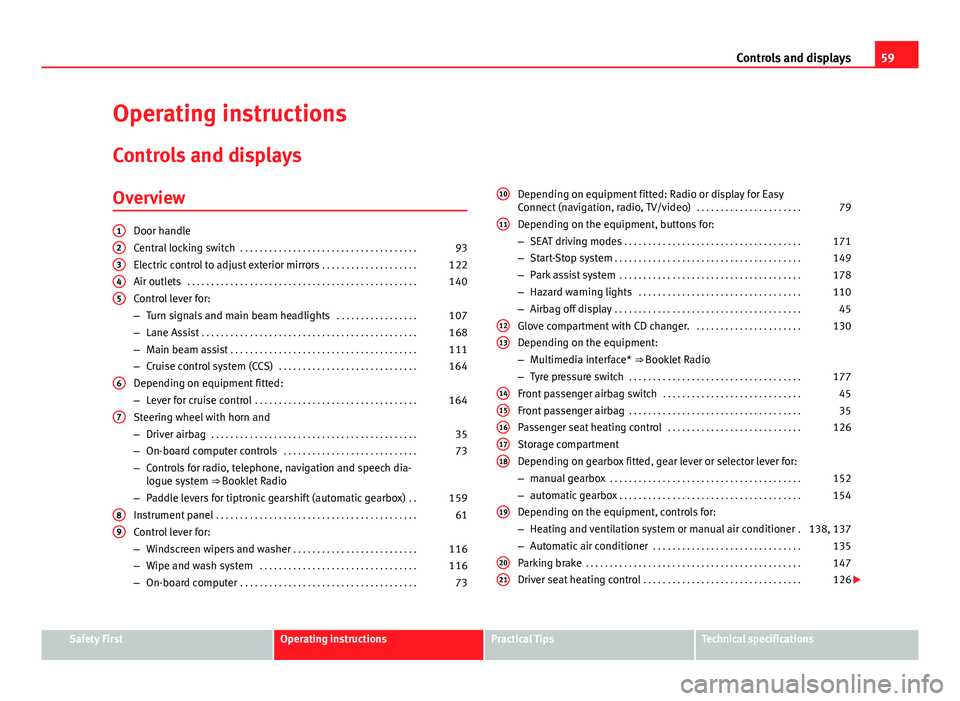
Operating instructions Controls and displays
Overview
Door handle
Central locking switch . . . . . . . . . . . . . . . . . . . . . . . . . . . . . . . . . . . . . 93
Electric control to adjust exterior mirrors . . . . . . . . . . . . . . . . . . . .122
Air outlets . . . . . . . . . . . . . . . . . . . . . . . . . . . . . . . . . . . . . . . . . . . . . . . . 140
Control lever for:
– Turn signals and main beam headlights . . . . . . . . . . . . . . . . .107
– Lane Assist . . . . . . . . . . . . . . . . . . . . . . . . . . . . . . . . . . . . . . . . . . . . . 168
– Main beam assist . . . . . . . . . . . . . . . . . . . . . . . . . . . . . . . . . . . . . . . 111
– Cruise control system (CCS) . . . . . . . . . . . . . . . . . . . . . . . . . . . . . 164
Depending on equipment fitted:
– Lever for cruise control . . . . . . . . . . . . . . . . . . . . . . . . . . . . . . . . . . 164
Steering wheel with horn and
– Driver airbag . . . . . . . . . . . . . . . . . . . . . . . . . . . . . . . . . . . . . . . . . . . 35
– On-board computer controls . . . . . . . . . . . . . . . . . . . . . . . . . . . . 73
– Controls for radio, telephone, navigation and speech dia-
logue system ⇒ Booklet Radio
– Paddle levers for tiptronic gearshift (automatic gearbox) . .159
Instrument panel . . . . . . . . . . . . . . . . . . . . . . . . . . . . . . . . . . . . . . . . . . 61
Control lever for:
– Windscreen wipers and washer . . . . . . . . . . . . . . . . . . . . . . . . . . 116
– Wipe and wash system . . . . . . . . . . . . . . . . . . . . . . . . . . . . . . . . . 116
– On-board computer . . . . . . . . . . . . . . . . . . . . . . . . . . . . . . . . . . . . . 73
12345
6
7
89
Depending on equipment fitted: Radio or display for Easy
Connect (navigation, radio, TV/video)
. . . . . . . . . . . . . . . . . . . . . .79
Depending on the equipment, buttons for:
– SEAT driving modes . . . . . . . . . . . . . . . . . . . . . . . . . . . . . . . . . . . . . 171
– Start-Stop system . . . . . . . . . . . . . . . . . . . . . . . . . . . . . . . . . . . . . . . 149
– Park assist system . . . . . . . . . . . . . . . . . . . . . . . . . . . . . . . . . . . . . . 178
– Hazard warning lights . . . . . . . . . . . . . . . . . . . . . . . . . . . . . . . . . . 110
– Airbag off display . . . . . . . . . . . . . . . . . . . . . . . . . . . . . . . . . . . . . . . 45
Glove compartment with CD changer. . . . . . . . . . . . . . . . . . . . . . .130
Depending on the equipment:
– Multimedia interface* ⇒ Booklet Radio
– Tyre pressure switch . . . . . . . . . . . . . . . . . . . . . . . . . . . . . . . . . . . . 177
Front passenger airbag switch . . . . . . . . . . . . . . . . . . . . . . . . . . . . . 45
Front passenger airbag . . . . . . . . . . . . . . . . . . . . . . . . . . . . . . . . . . . . 35
Passenger seat heating control . . . . . . . . . . . . . . . . . . . . . . . . . . . . 126
Storage compartment
Depending on gearbox fitted, gear lever or selector lever for:
– manual gearbox . . . . . . . . . . . . . . . . . . . . . . . . . . . . . . . . . . . . . . . . 152
– automatic gearbox . . . . . . . . . . . . . . . . . . . . . . . . . . . . . . . . . . . . . . 154
Depending on the equipment, controls for:
– Heating and ventilation system or manual air conditioner .138, 137
– Automatic air conditioner . . . . . . . . . . . . . . . . . . . . . . . . . . . . . . . 135
Parking brake . . . . . . . . . . . . . . . . . . . . . . . . . . . . . . . . . . . . . . . . . . . . . 147
Driver seat heating control . . . . . . . . . . . . . . . . . . . . . . . . . . . . . . . . . 126
10
11
1213
1415161718
19
2021
Safety FirstOperating instructionsPractical TipsTechnical specifications
Page 69 of 289

68Instruments and warning/control lamps
Normal temperature
If in normal operations, the diodes light up until the central zone, it means
that the engine has reached operating temperature. At high outside temper-
atures and when making the engine work hard, the diodes may continue
lighting up and reach the upper zone. This is no cause for concern, provided
the control lamp does not light up on the instrument panel digital dis-
play.
Heat range
When the diodes light up in the upper area of the display and the control
lamp appears on the instrument panel display, the coolant temperature
is excessive ⇒ page 215.
CAUTION
● To ensure a long useful life for the engine, avoid high revs, driving at
high speed and making the engine work hard for approx. the first 15 mi-
nutes when the engine is cold. The phase until the engine is warm also de-
pends on the outside temperature. If necessary, use the engine oil tempera-
ture* as a guide ⇒ page 77
● Additional lights and other accessories in front of the air inlet reduce the
cooling effect of the coolant. At high outside temperatures and high engine
loads, there is a risk of the engine overheating.
● The front spoiler also ensures proper distribution of the cooling air when
the vehicle is moving. If the spoiler is damaged this can reduce the cooling
effect, which could cause the engine to overheat. Seek specialist assis-
tance. Gear-change indicator
This additional indicator function can help to save fuel.
Fig. 39 Instrument pan-
el: Gear-change indicator
(manual gearbox)
To familiarise yourself with the gear-change indicator, we recommend driv-
ing in the normal way to start with. A gear change will be recommended if
the gear you are in is not the most economical choice.
If no gear-change is recommended, you are already in the most economical
gear.
Vehicles with a manual gearbox
The following display symbols ⇒ Fig. 39 mean:
● Change to a higher gear: The suggested gear appears to the right of
the current gear when a higher gear is recommended.
● Change to a lower gear: The suggested gear appears to the left of the
current gear when a lower gear is recommended.
The gear recommendation may occasionally skip a gear (2nd 4th).
Page 117 of 289

116Lights and visibility
Sun visors
Fig. 63 Sun visor
Options for adjusting driver and front passenger sun visors:
● Lower by unfolding towards the windscreen.
● The sun visor can be pulled out of its mounting and turned towards the
door ⇒ Fig. 63 1
.
● Swing the sun visor towards the door, longitudinally backwards.
Vanity mirror light
There may be a vanity mirror, with a cover, on the rear of the sun visor. When
the cover is opened 2
a light comes on.
The lamp goes out when the vanity mirror cover is closed or the sun visor is
pushed back up.
Note
The light above the sun visor automatically switches off after a few minutes
in certain conditions. This prevents the battery from discharging. Windscreen wiper system
Introduction
Additional information and warnings:
● Changing wheels round
● Heating, ventilation, cooling
● Caring for and cleaning the vehicle exterior
WARNING
If the water from the windscreen washer does not contain enough anti-
freeze, it may freeze on the windscreen, reducing forward visibility.
● In winter, ensure the windscreen washer contains enough anti-freeze.
● In cold conditions, you should not use the wash/wipe system unless
you have warmed the windscreen with the ventilation system. The anti-
freeze could freeze on the windscreen and reduce visibility.
WARNING
Worn or dirty wiper blades reduce visibility and increase the risk of acci-
dent and serious injury.
● Always replace damaged or worn blades or blades which do not clean
the windscreen correctly.
CAUTION
In icy conditions, always check that the wiper blades are not frozen to the
glass before using the wipers. In cold weather, it may help to leave the vehi-
cle parked with the wipers in service position ⇒ page 119.
Page 120 of 289

119
Lights and visibility
Windscreen wiper functions
Windscreen wiper performance in different situations:If the vehicle is at a stand-
still:The activated position provisionally changes
to the previous position.
During the automatic wipe:
The air conditioner comes on for approxi-
mately 30 seconds in air recirculation mode
to prevent the smell of the windscreen wash-
er fluid entering the inside the vehicle.
For the interval wipe:The intervals between wipes vary according
to the speed of the vehicle. The higher the
vehicle speed the shorter the intervals.
Heated windscreen washer jets
The heating only thaws the frozen jets, it does not thaw the water in the
washer hoses. The heated windscreen washer jets automatically adjust the
heat depending on the ambient temperature, when the ignition is switched
on.
Headlight wash/wipe system
The headlight washers/wipers clean the headlight lenses.
After the ignition is switched on, the first and every fifth time the wind-
screen washer is switched on, the headlights are also washed. Therefore,
the windscreen wiper lever should be pulled towards the steering wheel
when the dipped beam or main beam are on. Any incrusted dirt (such as in-
sects) should be cleaned regularly (e.g. when refuelling).
To ensure the headlight washers work correctly in winter, any snow which
has got into the bumper jet supports should be cleaned away. If necessary,
remove snow with an anti-icing spray.
Note
The wiper will try to wipe away any obstacles that are on the windscreen.
The wiper will stop moving if the obstacle blocks its path. Remove the ob-
stacle and switch the wiper back on again.
Windscreen wipers service position
Fig. 65 Wipers in service
position
The wiper arms can be raised when the wipers are in service position
⇒ Fig. 65. To place the windscreen wipers in the service position, proceed
as follows:
● The bonnet must be closed ⇒ page 209.
● Switch the ignition on and off.
● Press the windscreen wiper lever downwards briefly ⇒ Fig. 64 4
.
Before driving, always lower the wiper arms. Using the windscreen wiper
lever, the windscreen wiper arms return to their initial position.
Safety FirstOperating instructionsPractical TipsTechnical specifications
Page 127 of 289

126Seats and storage
Seat functions
Introduction
Additional information and warnings
● Adjusting the position of the seats ⇒ page 10
● Seat belts ⇒ page 19
● Airbag system ⇒ page 30
● Child seats (accessories) ⇒ page 47
WARNING
Inappropriate use of the seat functions can cause severe injuries.
● Assume the proper sitting position before your trip and remain in it
throughout. This also applies to the other occupants.
● Always keep hands, fingers, feet and other parts of the body away
from the operating radius and the adjustment of seats.
Seat heating
Fig. 72 In the centre
console: front seats heat-
ing switch The seat cushions can be heated electrically when the ignition is switched
on. The backrest is also heated in some versions.
The seat heating should not be engaged in any of the following conditions:
●
The seat is unoccupied.
● The seat has a covering.
● There is a child seat installed in the seat.
● The seat cushion is wet or damp.
● The indoor or outdoor temperature is greater than 25 °C (77 °F).
FunctionUsing seat heatingTo switch sys-
tem on:Press the button or . Seat heating is switched on fully.
Adjusting the
heating out-
put:Press the button or repeatedly until the desired inten-
sity level is reached.
To switch sys-
tem off:Press the button or until all warning lamps switch off.
WARNING
People who, because of medications, paralysis or chronic diseases (e.g.
diabetes) cannot perceive pain or temperature, or have a limited percep-
tion thereof, may suffer burns to the back, buttocks or legs when using
seat heating, an occurrence that may entail a very lengthy recovery peri-
od or from which it may not be possible to recover fully. Seek medical ad-
vice if you have doubts regarding your health.
● People with a limit pain and temperature threshold must never use
seat heating.
Page 128 of 289

127
Seats and storage
WARNING
If the fabric of the cushion is wet, this can adversely affect the operation
of the seat heating, increasing the risk of burns.
● Make sure the seat cushion is dry prior to using the seat heater.
● Do not sit on the seat with clothing that is wet or damp.
● Do not leave clothing that is wet or damp on the seat.
● Do not spill liquid on the seat.
CAUTION
● To avoid damaging the heating elements of the seat heating, please do
not kneel on the seat or apply sharp pressure at a single point to the seat
cushion and backrest.
● Liquids, sharps objects and insulating materials (e.g., covers or child
seats) can damage the seat heating.
● In the event of odours, switch off the seat heating immediately and have
the unit inspected by a specialised workshop.
For the sake of the environment
The seat heating should remain on only when needed. Otherwise, it is an
unnecessary fuel waste. Head restraints
Fig. 73 Front seat: ad-
justment of the head re-
straint
Adjust the head restraint so that the top of the head restraint is lev-
el with the top of your head. When this is not possible, try to get as
close as possible to this position.
– Grasp the sides of the head restraint with both hands and move
it up/down (to lower you must press button 1
) until you see it
engage.
Safety FirstOperating instructionsPractical TipsTechnical specifications
Page 135 of 289

134Air conditioning
Air conditioning
Heating, ventilation, cooling
Introduction
Viewing Climatronic information
On the screen of Climatronic control unit and on the screen of the factory-
fitted Easy Connect system, the theoretical values of the temperature zones
are shown.
The unit of temperature measurement can be changed in the Easy Connect
system.
Dust and pollen filter
The dust and pollen filter with its activated charcoal cartridge serves as a
barrier against impurities in the air taken into the vehicle interior.
The dust and pollen filter must be changed regularly so that air conditioner
performance is not adversely affected.
If the filter loses efficiency prematurely due to use in areas with very high
levels of air pollution, the filter must be changed more frequently than sta-
ted in the Service Schedule.
Additional information and warnings:
● Easy Connect system
● Seat functions
● Windscreen wipers and washers
● Caring for and cleaning the vehicle exterior
WARNING
Reduced visibility through the windows increases the risk of serious acci-
dents.
● Always ensure that all windows are free of ice and snow, and that
they are not fogged, so as to maintain good visibility of everything out-
side.
● The maximum heat output required to defrost windows as quickly as
possible is only available when the engine has reached its normal run-
ning temperature. Only drive when you have good visibility.
● Always ensure that you use the heating system, fresh air system, air
conditioner and the heated rear window to maintain good visibility to the
outside.
● Never leave the air recirculation on for a long period of time. If the
cooling system is switched off and air recirculation mode switched on,
the windows can mist over very quickly, considerably limiting visibility.
● Switch air recirculation mode off when it is not required.
WARNING
Stuffy or used air will increase fatigue and reduce driver concentration
possibly resulting in a serious accident.
● Never leave the fresh air fan turned off or use the air recirculation for
long periods of time; the air in the vehicle interior will not be refreshed.
Page 136 of 289

135
Air conditioning
CAUTION
● Switch the air conditioner off if you think it may be broken. This will
avoid additional damage. Have the air conditioner checked by a specialised
workshop.
● Repairs to the air conditioner require specialist knowledge and special
tools. SEAT recommends visiting a SEAT Official Service.
Note
● When the cooling system is turned off, air coming from the outside will
not be dried. To prevent fogging of the windows, SEAT recommends leaving
the cooling system (compressor) turned on. To do this, press the button
.
The button lamp should light up.
● The maximum heat output required to defrost windows as quickly as
possible is only available when the engine has reached its normal running
temperature.
● Keep the air intake slots in front of the windscreen free of snow, ice and
leaves to ensure heating and cooling are not impaired, and to prevent the
windows from misting over. Air conditioner controls
Fig. 81 In the centre console: Climatronic controls
To switch a function on or off, press the appropriate button. Press the but-
ton again to switch off the function.
The LED on each control lights up to indicate that the respective function of
a control has been switched on.
Control but- tonAdditional information. Climatronic.
1 Temper-
ature
... The left and right sides can be adjusted separately. Rotate
the control to adjust the temperature accordingly.
2 Fan
The power of the fan is automatically adjusted. The fan is al-
so adjusted manually by turning the control.
3 Air dis-
tributionThe airflow adjusts automatically for comfort. You can also
switch it on manually using the buttons 3.
Safety FirstOperating instructionsPractical TipsTechnical specifications
Page 137 of 289

136Air conditioning
Control but-
tonAdditional information. Climatronic.
4Indications on the temperature display screen selected for
the right and left sides.
Defrost function. The air drawn in from outside the vehicle is
directed at the windscreen and air recirculation is automati-
cally switched off. To defrost the windscreen more quickly,
the air is dehumidified at temperatures over approximately
+3 °C (+38 °F) and the fan runs at maximum output.
The air is directed at the chest of driver and passengers by
the dash panel air vents.
Air distribution towards the footwell.
Upward air distribution.
Heated rear window: this only works when the engine is run-
ning and switches off automatically after a maximum of 10
minutes.
Air recirculation ⇒ page 141.
Buttons for seat heating ⇒ page 126.
Press the button to switch on or off the cooling system.
Press the button to make maximum cooling capacity availa-
ble. The recirculation of air and the cooling system turn on
automatically and air distribution adjusts automatically to
the position .
Transfer the driver side temperature settings to the passen-
ger side: when the button lamp is lit , the temperature
settings on the driver side also apply to the passenger side.
Press the button or the temperature control on the passenger
side in order to change the temperature on that side. The
button lamp is lit.
Control but- tonAdditional information. Climatronic.
Automatic adjustment of temperature, fan, and air distribu-
tion. Press the button to switch on the function. The button
will light up
.
When the configuration button is pressed the air condi-
tioner management menu will be shown on the Easy Connect
system screen.
Switching offTurn the fan control to the 0 position or press the button .
WARNING
Stuffy or used air will increase fatigue and reduce driver concentration
possibly resulting in a serious accident.
● Never leave the fresh air fan turned off or use the air recirculation for
long periods of time; the air in the vehicle interior will not be refreshed.
Operating by using the Easy Connect* system (valid for
Radio Entry)
In the Easy Connect system it is also possible to perform various adjust-
ments to the Climatronic.
Open the air conditioner menu
● Press the Setup
button
● ALTERNATIVELY: press the MENU button in Easy Connect. With the rotat-
ing switch select the air conditioner menu and open it.
On the screen you can see and change the current settings, for example, the
temperature set for the driver side and for that of the passenger.