bonnet Seat Leon 5D 2012 Owner's manual
[x] Cancel search | Manufacturer: SEAT, Model Year: 2012, Model line: Leon 5D, Model: Seat Leon 5D 2012Pages: 289, PDF Size: 3.81 MB
Page 5 of 289
Trailer . . . . . . . . . . . . . . . . . . . . . . . . . . . . . . . . . . . . . 194
Trailer towing . . . . . . . . . . . . . . . . . . . . . . . . . . . . . 194
Retrofitting a towing bracket* . . . . . . . . . . . . . . . 196
Care and cleaning . . . . . . . . . . . . . . . . . . . . . . . . . 198
General information . . . . . . . . . . . . . . . . . . . . . . . 198
Care of vehicle exterior . . . . . . . . . . . . . . . . . . . . . 198
Care of the vehicle interior . . . . . . . . . . . . . . . . . . 202
Checking and refilling levels . . . . . . . . . . . . . . . 206
Fuel . . . . . . . . . . . . . . . . . . . . . . . . . . . . . . . . . . . . 206
Filling the tank . . . . . . . . . . . . . . . . . . . . . . . . . . . . 207
Bonnet . . . . . . . . . . . . . . . . . . . . . . . . . . . . . . . . . . 209
Engine oil . . . . . . . . . . . . . . . . . . . . . . . . . . . . . . . . 211
Cooling system . . . . . . . . . . . . . . . . . . . . . . . . . . . 215
Brake fluid . . . . . . . . . . . . . . . . . . . . . . . . . . . . . . . 217
Battery . . . . . . . . . . . . . . . . . . . . . . . . . . . . . . . . . . 217
Windscreen washer reservoir and wiper blades . 220
Wheels and tyres . . . . . . . . . . . . . . . . . . . . . . . . . . 223
Wheels . . . . . . . . . . . . . . . . . . . . . . . . . . . . . . . . . . 223
Accessories and modifications to the vehicle 230
Accessories, replacement parts and repairs . . . . 230
Technical modifications . . . . . . . . . . . . . . . . . . . . 230
Radio transmitters and business equipment . . . 230
Emergencies . . . . . . . . . . . . . . . . . . . . . . . . . . . . . . 232
General information . . . . . . . . . . . . . . . . . . . . . . . 232
Equipment . . . . . . . . . . . . . . . . . . . . . . . . . . . . . . . 232
Tyre repair kit . . . . . . . . . . . . . . . . . . . . . . . . . . . . . 233
Changing a wheel . . . . . . . . . . . . . . . . . . . . . . . . . 235
Spare wheel . . . . . . . . . . . . . . . . . . . . . . . . . . . . . . 240
Jump starting . . . . . . . . . . . . . . . . . . . . . . . . . . . . . 241
Towing and tow-starting the vehicle . . . . . . . . . . 244
Fuses and bulbs . . . . . . . . . . . . . . . . . . . . . . . . . . . 249
Electrical fuses . . . . . . . . . . . . . . . . . . . . . . . . . . . 249
Bulbs . . . . . . . . . . . . . . . . . . . . . . . . . . . . . . . . . . . 252
Changing bulbs in headlight unit . . . . . . . . . . . . 254
Changing bulb for front fog light . . . . . . . . . . . . . 256
Changing tail light bulbs (on side panel) . . . . . . 257 Changing tail light bulbs (on rear lid) . . . . . . . . . 259
Changing number plate light bulbs . . . . . . . . . . . 261
Technical specifications . . . . . . . . . . . . 263
Technical specifications . . . . . . . . . . . . . . . . . . . . 263
Important . . . . . . . . . . . . . . . . . . . . . . . . . . . . . . . . 263
Vehicle identification data . . . . . . . . . . . . . . . . . . 264
Information on fuel consumption . . . . . . . . . . . . 265
Towing a trailer . . . . . . . . . . . . . . . . . . . . . . . . . . . 265
Wheels . . . . . . . . . . . . . . . . . . . . . . . . . . . . . . . . . . 266
Engine specifications . . . . . . . . . . . . . . . . . . . . . . 267
Dimensions and capacities . . . . . . . . . . . . . . . . . 276
Index . . . . . . . . . . . . . . . . . . . . . . . . . . . . . . . . . . . 277
4Table of Contents
Page 61 of 289

60Controls and displays
Ignition lock . . . . . . . . . . . . . . . . . . . . . . . . . . . . . . . . . . . . . . . . . . . . . . 144
Knee airbag . . . . . . . . . . . . . . . . . . . . . . . . . . . . . . . . . . . . . . . . . . . . . . . 38
Adjustable steering column . . . . . . . . . . . . . . . . . . . . . . . . . . . . . . . . 143
Storage compartment
Bonnet lock release . . . . . . . . . . . . . . . . . . . . . . . . . . . . . . . . . . . . . . . 210
Headlight range control . . . . . . . . . . . . . . . . . . . . . . . . . . . . . . . . . . . 114
Light switch . . . . . . . . . . . . . . . . . . . . . . . . . . . . . . . . . . . . . . . . . . . . . . . 106
Electric windows . . . . . . . . . . . . . . . . . . . . . . . . . . . . . . . . . . . . . . . . . . 100
Note
● Some of the equipment listed in this section is only fitted on certain
models or are optional extras.
● A separate instruction manual is enclosed if the vehicle is equipped
with a factory-fitted sound system, CD changer, AUX IN connection, or navi-
gation system.
● The arrangement of switches and controls on right-hand drive models*
may be slightly different from the layout shown in ⇒ page 58. However, the
symbols used to identify the controls are the same.
2223242526272829
Page 63 of 289

62Instruments and warning/control lamps
CAUTION
● To prevent damage to the engine, the rev counter needle should only re-
main in the red zone for a short period of time.
● When the engine is cold, avoid high revs and heavy acceleration and do
not make the engine work hard.
For the sake of the environment
Changing up a gear in time reduces fuel consumption and noise.
Displays on screen
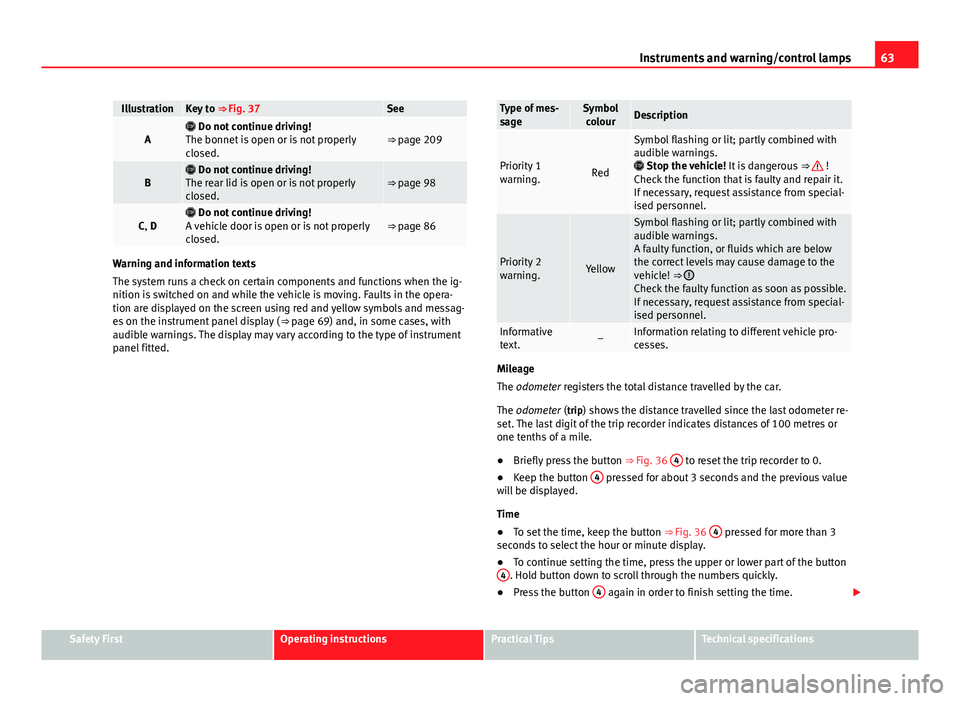
Fig. 37 A: bonnet open; B: rear lid open; C: front left door open; D: rear right door
open (4-door vehicles only)
A variety of information can be viewed on the instrument panel display
⇒ Fig. 36 3
, depending on the vehicle equipment: ●
Bonnet, rear lid and doors open ⇒ Fig. 37.
● Information and warning texts
● Mileage
● Time
● Navigation instructions
● Outside temperature
● Compass
● Selector lever position ⇒ page 154
● Recommended gear (manual gearbox) ⇒ page 68
● Multifunction display (MFD) and menus with different setting options
⇒ page 73.
● Service interval display ⇒ page 65
● Second speed display ⇒ page 73
● Speed warning function ⇒ page 149
● Start-Stop system status display ⇒ page 149
● Identifying letters on engine (MKB)
Bonnet, rear lid and doors open
When the ignition is switched on or when driving, the bonnet, rear lid or
doors that are open will be indicated on the instrument panel display, and if
it should be the case, this will also be indicated audibly. The display may
vary according to the type of instrument panel fitted.
Page 64 of 289
63
Instruments and warning/control lamps
IllustrationKey to ⇒ Fig. 37See
A Do not continue driving!
The bonnet is open or is not properly
closed.⇒ page 209
B Do not continue driving!
The rear lid is open or is not properly
closed.⇒ page 98
C, D Do not continue driving!
A vehicle door is open or is not properly
closed.⇒ page 86
Warning and information texts
The system runs a check on certain components and functions when the ig-
nition is switched on and while the vehicle is moving. Faults in the opera-
tion are displayed on the screen using red and yellow symbols and messag-
es on the instrument panel display ( ⇒ page 69) and, in some cases, with
audible warnings. The display may vary according to the type of instrument
panel fitted.
Type of mes-
sageSymbol colourDescription
Priority 1
warning.Red
Symbol flashing or lit; partly combined with
audible warnings.
Stop the vehicle! It is dangerous ⇒
!
Check the function that is faulty and repair it.
If necessary, request assistance from special-
ised personnel.
Priority 2
warning.Yellow
Symbol flashing or lit; partly combined with
audible warnings.
A faulty function, or fluids which are below
the correct levels may cause damage to the
vehicle! ⇒
Check the faulty function as soon as possible.
If necessary, request assistance from special-
ised personnel.
Informative
text.–Information relating to different vehicle pro-
cesses.
Mileage
The odometer registers the total distance travelled by the car.
The odometer (trip) shows the distance travelled since the last odometer re- set. The last digit of the trip recorder indicates distances of 100 metres or
one tenths of a mile.
● Briefly press the button ⇒ Fig. 36 4
to reset the trip recorder to 0.
● Keep the button 4 pressed for about 3 seconds and the previous value
will be displayed.
Time
● To set the time, keep the button ⇒ Fig. 36 4
pressed for more than 3
seconds to select the hour or minute display.
● To continue setting the time, press the upper or lower part of the button
4
. Hold button down to scroll through the numbers quickly.
● Press the button 4 again in order to finish setting the time.
Safety FirstOperating instructionsPractical TipsTechnical specifications
Page 70 of 289
69
Instruments and warning/control lamps
Vehicles with an automatic gearbox*
The display is only visible in tiptronic mode ⇒ page 159
The following display symbols mean:
● Shifting up a gear
● Shifting down a gear
CAUTION
The gear-change indicator is intended to help save fuel. It is not intended to
recommend the right gear for all driving situations. In certain situations, on-
ly the driver can choose the correct gear (for instance when overtaking, driv-
ing up a steep gradient or towing a trailer).
Note
The display disappears from the instrument panel when you press the
clutch pedal.
Control lamps Control and warning lamps
The control and warning lamps are indicators of warnings, ⇒ , faults ⇒ or certain functions. Some control and warning lamps come on when the ig-
nition is switched on, and switch off when the engine starts running, or
while driving.
Depending on the model, additional text messages may be viewed on the
instrument panel display. These may be purely informative or they may be
advising of the need for action ⇒ page 61, Instruments. Depending upon the equipment fitted in the vehicle, instead of a warning
lamp, sometimes a symbol may be displayed on the instrument panel.
When certain control and warning lamps are lit, an audible warning is also
heard.
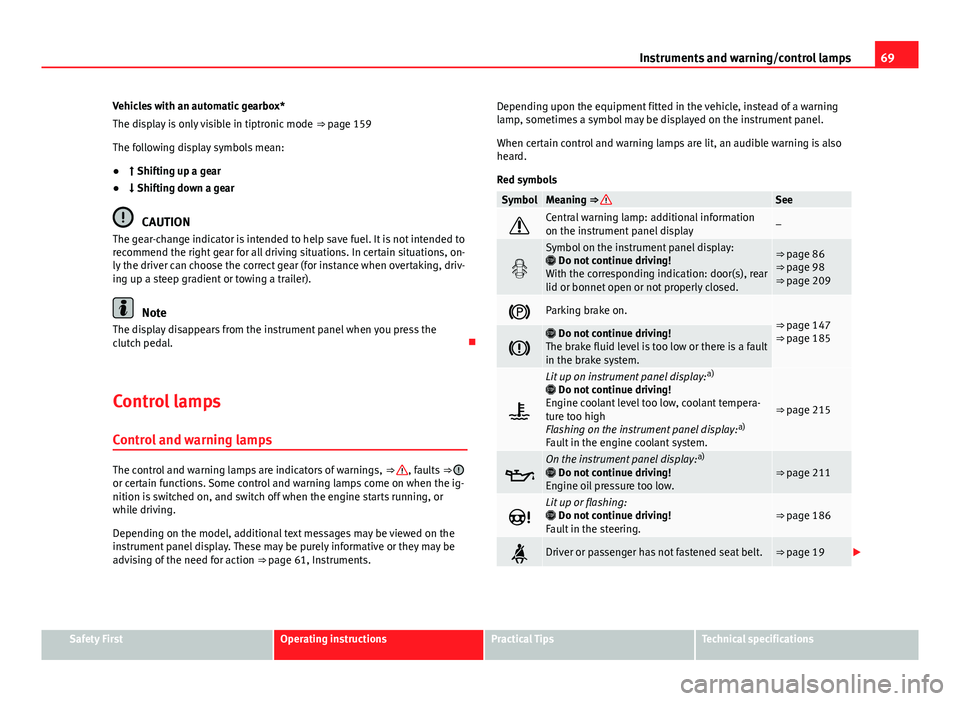
Red symbols
SymbolMeaning ⇒ See
Central warning lamp: additional information
on the instrument panel display–
Symbol on the instrument panel display:
Do not continue driving!
With the corresponding indication: door(s), rear
lid or bonnet open or not properly closed.⇒ page 86
⇒ page 98
⇒ page 209
Parking brake on.⇒ page 147
⇒ page 185
Do not continue driving!
The brake fluid level is too low or there is a fault
in the brake system.
Lit up on instrument panel display: a)
Do not continue driving!
Engine coolant level too low, coolant tempera-
ture too high
Flashing on the instrument panel display: a)
Fault in the engine coolant system.
⇒ page 215
On the instrument panel display: a)
Do not continue driving!
Engine oil pressure too low.⇒ page 211
Lit up or flashing:
Do not continue driving!
Fault in the steering.⇒ page 186
Driver or passenger has not fastened seat belt.⇒ page 19
Safety FirstOperating instructionsPractical TipsTechnical specifications
Page 73 of 289
72Instruments and warning/control lamps
WARNING (Continued)
● Before opening the bonnet, switch off the engine and allow it to cool.
● In any vehicle, the engine compartment is a hazardous area and could
cause severe injuries ⇒ page 209.
CAUTION
Failure to heed the control lamps and text messages when they appear may
result in faults in the vehicle.
Page 88 of 289
87
Opening and closing
To deactivate the alarm, press the button
on the remote control key, or
switch on the ignition. After a certain time, the alarm will automatically
switch off.
Switch off the vehicle interior monitoring and tow-away protection if you
wish to prevent the alarm from being triggered accidentally ⇒ page 95.
Turn signals
The turn signals will flash twice when the vehicle is unlocked and once
when the vehicle is locked.
If the signals do not flash, this indicates that one of the doors, the rear lid or
the bonnet is not closed correctly.
Accidental lock-out
The central locking system prevents you from being locked out of the vehi-
cle in the following situations:
● If the driver door is open, the vehicle cannot be locked with the central
locking switch ⇒ page 93.
Lock the vehicle with the remote control key, when all the doors and the rear
lid have been closed. This prevents the accidental locking of the vehicle.
WARNING
Do not leave anyone (especially children) in the vehicle if it is locked from
the outside and the anti-theft security system* is enabled, as the doors
and windows cannot then be opened from the inside. Locked doors could
delay assistance in an emergency, potentially putting lives at risk.
Note
● Never leave any valuable items in the vehicle unattended. Even a locked
vehicle is not a safe.
● If the diode on the driver door sill lights up for about 30 seconds when
the vehicle is locked, the central locking system or anti-theft alarm* is not
working properly. You should have the fault repaired at a SEAT Official Serv-
ice or specialised workshop.
● The vehicle interior monitoring of the anti-theft alarm* system will only
function as intended if the windows and the sunroof* are closed.
Safety FirstOperating instructionsPractical TipsTechnical specifications
Page 95 of 289
94Opening and closing
● When the door is mechanically unlocked using the vehicle key without
turning the ignition within the following 15 seconds.
● A door is opened.
● The bonnet is opened.
● The rear lid is opened.
● When the ignition is switched on with a non-authorised key.
● When the vehicle battery is disconnected.
● Movement inside the vehicle (in vehicles with interior monitoring
⇒ page 95).
● When the vehicle is towed (in vehicles with anti-tow system
⇒ page 95).
● When the vehicle is raised (in vehicles with anti-tow system
⇒ page 95).
● When the vehicle is transported on a ferry or by rail (vehicles with an an-
ti-tow system or vehicle interior monitoring ⇒ page 95).
● When a trailer connected to the anti-theft alarm system is disconnected.
How to turn OFF the alarm
Unlock the vehicle with the unlocking button on the key or turn on the igni-
tion with a valid key.
Note
● The alarm will be triggered once more when anybody enters the same
zone of surveillance or any other zone. If, for example, after opening a door,
the rear lid is also opened.
● The anti-theft alarm
is not activated when the vehicle is locked from
the inside using the central locking button. ●
If the driver door is unlocked mechanically with the key, only the driver
door is unlocked, the rest of the doors remain locked. Only when the igni-
tion has been turned on will the other doors be available - but not unlocked
- and the central lock button activated.
● If the vehicle battery is run down or flat then the anti-theft alarm will not
operate correctly.
Vehicle interior monitoring and anti-tow system*
Monitoring or control function incorporated in the anti-theft
alarm* which detects unauthorized vehicle entry by means
of ultrasound.
Activation
– It is automatically switched on when the anti-theft alarm is acti-
vated.
Deactivation
– Open the vehicle with the key, either mechanically 1)
or by press-
ing the
button on the remote control.
– Press the button
on the remote control twice. The volumetric
sensor and tilt sensors will be deactivated. The alarm system re-
mains activated.
The vehicle interior monitoring and the anti-tow system are automatically
switched on again next time the vehicle is locked.
1)
The time period from when the door is opened until the key is inserted in the contact
should not exceed 15 sec., otherwise the alarm will be triggered.
Page 119 of 289

118Lights and visibility
Window wiper lever
Fig. 64 Operating the
windscreen wiper and
rear wiper
Move the lever to the required position ⇒ :0OFFWindscreen wiper off.
1INTWindscreen wipers interval wipe.
Using the control ⇒ Fig. 64 A adjust the interval (vehicles
without the rain sensor), or the sensitivity of the rain sensor.
2LOWSlow wipe.3HIGHContinuous wipe.
41xBrief press, short clean. Hold the lever down for more time to
increase the wipe frequency.
5
The windscreen washer function is activated by pushing the
lever forwards, and simultaneously the windscreen wipers
start.
6Interval wipe for rear window. The rear wiper will wipe the win-
dow approximately every six seconds.
7The windscreen washer function is activated by pressing the
lever, and the rear wiper starts simultaneously.
CAUTION
If the ignition is switched off with the windscreen wipers active, they com-
plete their wipe before returning to the rest position. Ice, snow and other
obstacles on the windscreen may damage the wiper and the windscreen
wiper motor.
● If necessary, remove snow and ice from the windscreen wipers before
starting your journey.
● Carefully lift the frozen windscreen wipers from the glass. SEAT recom-
mends a de-icer spray for this operation.
CAUTION
Do not switch on the windscreen wipers if the windscreen is dry. Cleaning
with the windscreen wipers while dry can cause damage.
Note
● The windscreen wipers will only function when the ignition is switched
on and the respective bonnet or rear lid are closed.
● The interval wipe speed varies according to the vehicle speed. The faster
the vehicle is moving, the more often the windscreen is cleaned.
● The rear wiper is automatically switched on when the windscreen wiper
is on and the car is in reverse gear.
Page 120 of 289

119
Lights and visibility
Windscreen wiper functions
Windscreen wiper performance in different situations:If the vehicle is at a stand-
still:The activated position provisionally changes
to the previous position.
During the automatic wipe:
The air conditioner comes on for approxi-
mately 30 seconds in air recirculation mode
to prevent the smell of the windscreen wash-
er fluid entering the inside the vehicle.
For the interval wipe:The intervals between wipes vary according
to the speed of the vehicle. The higher the
vehicle speed the shorter the intervals.
Heated windscreen washer jets
The heating only thaws the frozen jets, it does not thaw the water in the
washer hoses. The heated windscreen washer jets automatically adjust the
heat depending on the ambient temperature, when the ignition is switched
on.
Headlight wash/wipe system
The headlight washers/wipers clean the headlight lenses.
After the ignition is switched on, the first and every fifth time the wind-
screen washer is switched on, the headlights are also washed. Therefore,
the windscreen wiper lever should be pulled towards the steering wheel
when the dipped beam or main beam are on. Any incrusted dirt (such as in-
sects) should be cleaned regularly (e.g. when refuelling).
To ensure the headlight washers work correctly in winter, any snow which
has got into the bumper jet supports should be cleaned away. If necessary,
remove snow with an anti-icing spray.
Note
The wiper will try to wipe away any obstacles that are on the windscreen.
The wiper will stop moving if the obstacle blocks its path. Remove the ob-
stacle and switch the wiper back on again.
Windscreen wipers service position
Fig. 65 Wipers in service
position
The wiper arms can be raised when the wipers are in service position
⇒ Fig. 65. To place the windscreen wipers in the service position, proceed
as follows:
● The bonnet must be closed ⇒ page 209.
● Switch the ignition on and off.
● Press the windscreen wiper lever downwards briefly ⇒ Fig. 64 4
.
Before driving, always lower the wiper arms. Using the windscreen wiper
lever, the windscreen wiper arms return to their initial position.
Safety FirstOperating instructionsPractical TipsTechnical specifications