clutch Seat Leon 5D 2012 Owner's manual
[x] Cancel search | Manufacturer: SEAT, Model Year: 2012, Model line: Leon 5D, Model: Seat Leon 5D 2012Pages: 289, PDF Size: 3.81 MB
Page 11 of 289

10Safe driving
Sitting position for vehicle occupants
Introduction
WARNING
● The front seats, head restraints and seat belts must always be adjus-
ted to the size of the vehicle occupant to provide you and your passen-
gers with the greatest possible protection.
● Ensure your correct sitting position before setting off, and do not
change this during the journey. Also advise your passengers to ensure
their correct sitting positions not to be changed.
● A vehicle occupant sitting in an incorrect position is at risk of serious
injury in the event that an airbag is activated.
● If the passengers in the rear seats are not sitting in an upright posi-
tion, they are more likely to be injured due to the incorrect position of the
seat belts.
● It is important that the driver keeps at a minimum of 25 cm from the
steering wheel. It is important that the passenger keeps at a minimum of
25 cm from the dash panel. The airbag system will not be able to give the
required protection if the minimum distance is not observed. This can
cause a risk of fatal injury!
● When driving, always hold the steering wheel with both hands on the
outside part at the 9 o'clock and 3 o'clock positions. Never hold the
steering wheel at the 12 o'clock position, or in any other manner (e.g. in
the centre of the steering wheel or along its interior edge). In such cases,
if the airbag is triggered, you may sustain injuries to the arms, hands
and head.
● The backrests must not be reclined too far back while driving. This
could limit the effect of the seat belts and the airbag system. Risk of in-
jury!
WARNING (Continued)
● Objects must not be placed in the footwell, as they could move to the
area of the pedals in the event of a braking manoeuvre or change of direc-
tion. This would prevent the clutch, brake or accelerator from being
pressed.
● Always keep your feet on the footwell when the vehicle is moving;
never rest them on the dash panel, on the window or on the seat! An in-
correct sitting position exposes you to an increased risk of injury in case
of a sudden braking or an accident. If the airbag is triggered, you could
sustain severe injuries due to an incorrect sitting position!
Page 12 of 289

11
Safe driving
Correct sitting position for driver
The correct sitting position for the driver is important for
safe and relaxed driving.
Fig. 1 The correct dis-
tance between driver and
steering wheel
Fig. 2 Correct head re-
straint position for driver For your own safety and to reduce the risk of injury in the event of
an accident, we recommend the following adjustments for the driv-
er:
–
Adjust the steering wheel so that there is a distance of at least
25 cm between the steering wheel and the centre of your chest
⇒ Fig. 1.
– Move the driver seat forwards or backwards so that you are able
to press the accelerator, brake and clutch pedals to the floor
with your knees still slightly angled ⇒
.
– Ensure that you can reach the highest point of the steering
wheel.
– Adjust the head restraint so that its upper edge is at the same
level as the top of your head, or as close as possible to the
same level as the top of your head ⇒ Fig. 2.
– Move the seat backrest to an upright position so that your back
rests completely against it.
– Fasten your seat belt securely ⇒ page 19.
– Keep both feet in the footwell so that you have the vehicle un-
der control at all times.
Adjustment of the driver seat ⇒ page 125.
Safety FirstOperating instructionsPractical TipsTechnical specifications
Page 17 of 289

16Safe driving
● Never kneel on the seats.
● Never tilt your seat backrest far to the rear.
● Never lean against the dash panel.
● Never lie on the rear bench.
● Never sit on the front edge of a seat.
● Never sit sideways.
● Never lean out of a window.
● Never put your feet out of a window.
● Never put your feet on the dash panel.
● Never put your feet on the surface of a seat.
● Do not allow anyone to travel in the footwell.
● Never travel without wearing the seat belt.
● Do not allow anyone to travel in the luggage compartment.
WARNING
● Any incorrect sitting position increases the risk of severe injuries.
● Sitting in an incorrect position exposes the vehicle occupants to se-
vere injuries if airbags are triggered, by striking a vehicle occupant who
has assumed an incorrect sitting position.
● Before the vehicle moves, assume the proper sitting position and
maintain it throughout the trip. Before every trip, instruct your passen-
gers to sit properly and to stay in this position during the trip ⇒ page 10,
Sitting position for vehicle occupants.
Pedal area
Pedals
The operation of all pedals must never be impaired by ob-
jects or floor mats.
– Ensure that you can always press the accelerator, brake and
clutch pedals unimpaired to the floor.
– Ensure that the pedals can return unimpaired to their initial po-
sitions.
Use only floor mats which leave the pedal area free and can be securely fas-
tened on the footwell.
If a brake circuit fails, the brake pedal must be pressed down thoroughly in
order to stop the vehicle.
Wearing suitable shoes
Always wear shoes which support your feet properly and give you a good
feeling for the pedals.
WARNING
● Restricting pedal operation can lead to critical situations while driv-
ing.
● Never place objects on the driver footwell. An object could move into
the pedal area and impair pedal operation. In the event of a sudden driv-
ing or braking manoeuvre, you will not be able to operate the brake,
clutch or accelerator pedal. Risk of accident!
Page 70 of 289
69
Instruments and warning/control lamps
Vehicles with an automatic gearbox*
The display is only visible in tiptronic mode ⇒ page 159
The following display symbols mean:
● Shifting up a gear
● Shifting down a gear
CAUTION
The gear-change indicator is intended to help save fuel. It is not intended to
recommend the right gear for all driving situations. In certain situations, on-
ly the driver can choose the correct gear (for instance when overtaking, driv-
ing up a steep gradient or towing a trailer).
Note
The display disappears from the instrument panel when you press the
clutch pedal.
Control lamps Control and warning lamps
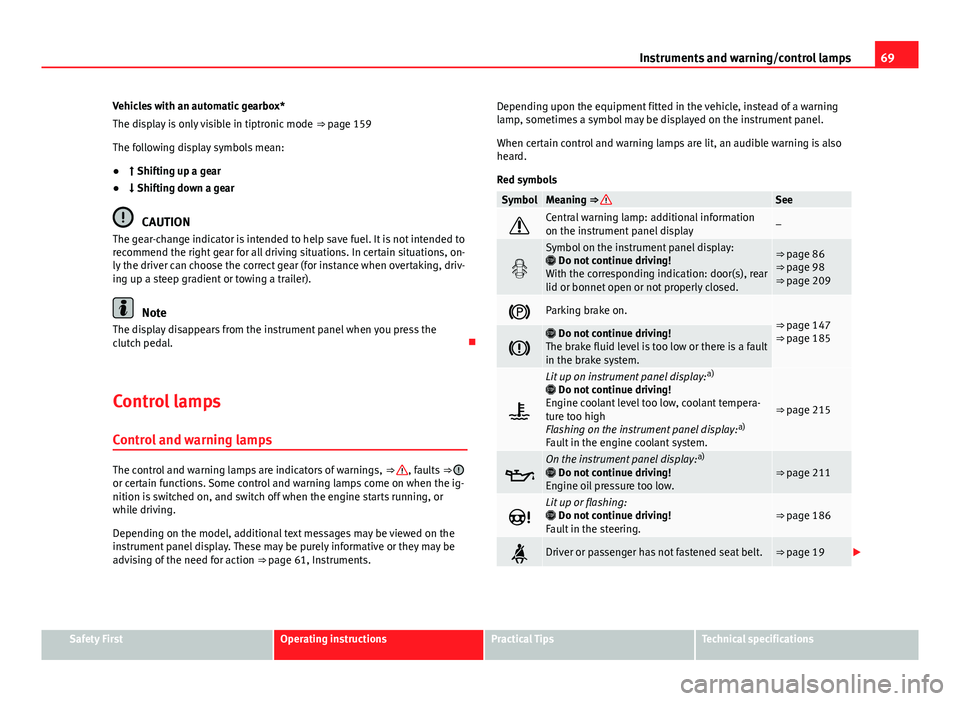
The control and warning lamps are indicators of warnings, ⇒ , faults ⇒ or certain functions. Some control and warning lamps come on when the ig-
nition is switched on, and switch off when the engine starts running, or
while driving.
Depending on the model, additional text messages may be viewed on the
instrument panel display. These may be purely informative or they may be
advising of the need for action ⇒ page 61, Instruments. Depending upon the equipment fitted in the vehicle, instead of a warning
lamp, sometimes a symbol may be displayed on the instrument panel.
When certain control and warning lamps are lit, an audible warning is also
heard.
Red symbols
SymbolMeaning ⇒ See
Central warning lamp: additional information
on the instrument panel display–
Symbol on the instrument panel display:
Do not continue driving!
With the corresponding indication: door(s), rear
lid or bonnet open or not properly closed.⇒ page 86
⇒ page 98
⇒ page 209
Parking brake on.⇒ page 147
⇒ page 185
Do not continue driving!
The brake fluid level is too low or there is a fault
in the brake system.
Lit up on instrument panel display: a)
Do not continue driving!
Engine coolant level too low, coolant tempera-
ture too high
Flashing on the instrument panel display: a)
Fault in the engine coolant system.
⇒ page 215
On the instrument panel display: a)
Do not continue driving!
Engine oil pressure too low.⇒ page 211
Lit up or flashing:
Do not continue driving!
Fault in the steering.⇒ page 186
Driver or passenger has not fastened seat belt.⇒ page 19
Safety FirstOperating instructionsPractical TipsTechnical specifications
Page 145 of 289

144Driving
Ignition lock
Starting the engine with the ignition key
Switch on the ignition with the key in the ignition and start
the engine.
Fig. 86 Ignition key po-
sitions
Steering wheel lock
– To lock the steering wheel, remove the key from the ignition and
turn the wheel until it locks. In vehicles with the automatic gear-
box*, the selector lever must be in the position P in order to re-
move the key.
– To unlock the steering wheel, insert the key into the ignition
and simultaneously turn the key (in the direction of the arrow)
and the steering wheel.
Warning: If the steering wheel cannot be turned, this is because
the steering wheel lock is activated. Switching the ignition on/off, preheating
–
Turn the ignition key to position 2
to switch on the ignition.
– Turn the ignition key to position 1
to switch off the ignition.
Preheating is produced in Diesel vehicles when the ignition is
switched on.
Starting up the engine
– Manual gearbox: Press the clutch pedal all the way down and
move the gearbox lever into neutral.
– Automatic gearbox : Press the brake pedal and move the selec-
tor lever to position P or N.
– Turn the ignition key to position 3
. The key returns to position
2 automatically. Do not press the accelerator.
Diesel engines can take a few seconds longer than usual to start
on cold days. Therefore the clutch pedal (manual gearbox) or the
brake pedal (automatic gearbox) must remain pressed until the en-
gine starts up. During preheating, the warning lamp remains lit.
The preheating time depends on the coolant and exterior tempera-
tures. When the engine is at operating temperature or at outside
temperatures above +8 °C (46 °F) the warning lamp will only
light up for about one second. This means that the engine starts
immediately.
If the engine does not immediately start up, interrupt the starting process
and try again after 30 seconds. To start the engine again, return the key to
position 1
.
Page 146 of 289

145
Driving
Start-Stop System*
If the vehicle is stopped and the Start-Stop system* switches off the engine,
the ignition remains switched on.
Automatic gearbox: Before leaving the vehicle, make sure that the ignition
is switched off and the selector lever is in position P.
Driver messages on the instrument panel display
Press the clutch This message appears on vehicles with a manual gearbox if the driver tries
to start the engine without having the clutch pedal pressed. The engine will
only start if you press the clutch pedal.
Press the brake
This message appears on vehicles with an automatic gearbox if the driver
tries to start the engine without having the brake pedal pressed.
Select N or P
This message appears if you try to start or stop the engine when the selec-
tor lever of the automatic gearbox is not in position P or N. The engine can
only start or stop in these positions.
Engage position P; the vehicle can move; doors can only close in position P. For safety reasons, this driver message appears and an audible warning
sounds if the selector lever of the automatic gearbox is not in position P af-
ter you switch off the ignition. Otherwise the vehicle could move.
Gear change: selector lever in the drive position! This driver message is displayed and a buzzer is sounded when the selector
lever is not in the position P when the driver door is opened. Put the selec-
tor lever in position P; otherwise the vehicle can roll away.
Ignition is switched onThis driver message is displayed and a buzzer is sounded when the driver
door is opened with the ignition switched on.
WARNING
● Never run the engine in confined spaces, as the exhaust gases are
poisonous.
● Never remove the key from the ignition if the vehicle is in motion.
Otherwise, the steering could suddenly lock, making it impossible to
steer the vehicle: risk of accident!
● Always take the key with you when you leave the vehicle. This is par-
ticularly important if there are children in the vehicle, as they might oth-
erwise be able to start the engine or use power-operated equipment (e.g.
the electric windows), which could cause injuries.
CAUTION
Avoid high engine speeds, full throttle and extreme load conditions until
the engine has reached its normal operating temperature, otherwise this
can damage the engine.
For the sake of the environment
Do not warm up the engine by running it with the car stationary. You should
drive off as soon as you start the engine. This will help avoid unnecessary
exhaust emissions.
Note
● If it is difficult to turn the ignition key to the position 1, turn the steer-
ing wheel to both sides to release the steering lock.
● When starting from cold, the engine may be a little noisy for the first few
seconds until oil pressure has built up in the hydraulic valve lifters. This is
quite normal, and no cause for concern.
● If the vehicle battery is disconnected and reconnected, the key must re-
main in the position 1
for around 5 seconds before starting up.
● Vehicles with automatic gearbox: After switching off the ignition, you
can only remove the ignition key if the selector lever is in position “P” (park-
ing lock). Next, the selector lever is locked.
Safety FirstOperating instructionsPractical TipsTechnical specifications
Page 151 of 289

150Driving
Basic requirements for the Start-Stop mode
● The driver door must be closed.
● The driver must have their seat belt fastened.
● The bonnet must be closed.
● The vehicle must have travelled at more than 4 km/h (2 mph) since the
last stop.
● The vehicle cannot be towing a trailer.
WARNING
● Never switch the engine off until the vehicle is stationary. The brake
servo and power steering functions will not be completely covered under
warranty. More force may also be needed to turn the steering wheel or to
brake. As you cannot steer and brake in the normal manner, there is a
greater risk of accidents and serious injury.
● Never remove the key from the ignition if the vehicle is in motion.
Otherwise, the steering could lock making it impossible to steer the vehi-
cle.
● Always take the ignition key with you whenever you leave the vehicle,
even temporarily. This is particularly important if there are children in
the vehicle, as they might otherwise be able to start the engine or use
power-operated equipment (e.g. the electric windows), which could
cause injuries.
● To avoid injury, make sure that the Start-Stop system is switched off
when working in the engine compartment ⇒ page 152.
CAUTION
The Start-Stop system must always be switched off when driving through
flooded areas ⇒ page 152. Stop/Start the engine
Vehicles with a manual gearbox
–
When the vehicle is stopped, put it into neutral and release the
clutch pedal. The engine will switch off. The warning lamp
will appear on the instrument panel display.
– When the clutch pedal is pressed the engine will start up again.
The warning lamp will switch off.
Vehicles with an automatic gearbox
– Use the foot brake to bring the vehicle to a stop and keep the
brake pedal pressed down with your foot. The engine will switch
off. The warning lamp will appear in the display.
– When you take your foot off the brake pedal the engine will start
up again. The warning lamp will switch off.
Additional information related to the automatic gearbox
The engine stops when the selector lever is in the positions P, D, N and S, in
addition to when in manual mode. With the selector lever in position P, the
engine will also remain switched off when you take your foot off the brake
pedal. In order to start the engine up again the accelerator must be press-
ed, or another gear engaged or the brake released.
If the selector lever is placed in position R during the stopping phase, the
engine will start up again.
Change from position D to P to prevent the engine from accidentally starting
when changing and passing by position R.
Page 152 of 289

151
Driving
Note
● You can control whether the engine should switch off or not by reducing
or increasing the brake force applied. While the vehicle remains stopped,
the engine will not stop if the brake pedal is slightly pressed, in traffic jams
with frequent stopping and starting for example. As soon as strong pressure
is applied to the brake pedal, the engine will stop.
● In vehicles with manual gearbox, during the stopping phases the brake
pedal must remain depressed to prevent the vehicle from moving.
● If the engine stalls in vehicles with manual gearbox, it can be directly
started up again by immediately pressing the clutch pedal.
General notes
The system can interrupt the Start-Stop mode frequently for
different reasons.
The engine does not switch off
Before the stopping phase, the system verifies whether certain conditions
are met. The engine does not switch off, in the following situations for ex-
ample:
● The engine has not yet reached the minimum required temperature for
the Start-Stop mode.
● The interior temperature selected for the air conditioner has not yet
been reached.
● The interior temperature is very high/low.
● Defrost function button activated ⇒ page 135.
● The parking aid* is switched on.
● The battery is very low.
● The steering wheel is overly turned or is being turned.
● If there is a danger of misting. ●
After engaging reverse gear.
● In case of a very steep gradient.
The indication is shown on the instrument panel display, and in addition,
the driver information system* shows, .
The engine starts by itself
During a stopping phase the normal Start-Stop mode can be interrupted in
the following situations: The engine restarts by itself without involvement
from the driver.
● The interior temperature differs from the value selected on the air condi-
tioner.
● Defrost function button activated ⇒ page 135.
● The brake has been pressed several times consecutively.
● The battery is too low.
● High power consumption.
Note
In vehicles with an automatic gearbox, if the selector lever is placed in posi-
tion D, N or S after engaging reverse gear, the vehicle must be driven at a
speed faster than 10 km/h (5 mph) for the system to return to conditions in
which the engine can be stopped.
Safety FirstOperating instructionsPractical TipsTechnical specifications
Page 154 of 289

153
Driving
● Press and hold the clutch pedal to the floor.
● Place the gearbox lever in the required position ⇒
.
● Release the clutch pedal to engage clutch.
In some countries the clutch pedal must be fully pressed down for the en-
gine to start.
Selecting reverse gear
● Engage reverse gear only when the vehicle is stopped.
● Press and hold the clutch pedal to the floor ⇒
.
● Move the gearbox lever into the neutral position and press it down.
● Move the gearbox lever completely to the left and then forwards to posi-
tion it in reverse gear ⇒ Fig. 89 R
.
● Release the clutch pedal to engage clutch.
Changing down gears
While driving, changing down a gear must always be done gradually, i.e. to
the gear directly below and when the engine speed is not too high ⇒
.
Changing down while bypassing one or various gears at high speeds or at
high engine speeds can damage the clutch and the gearbox, even if the
clutch pedal remains depressed ⇒
.
Kick-down
In vehicles with a speed limiter, the kick-down function enables the pro-
grammed speed to be exceeded deliberately, i.e. when overtaking.
When the accelerator is pressed to the floor, the speed limiter is temporarily
deactivated as the programmed speed is exceeded.
When the speed of the vehicle falls below the programmed value again, and
when the accelerator is not pressed to the floor, the speed limiter is reacti-
vated.
WARNING
When the engine is running, the vehicle will start to move as soon as a
gear is engaged and the clutch released. This is also the case with the
electro-mechanical parking brake switched on.
● Never engage reverse gear when the vehicle is moving.
WARNING
If the gear is changed down inappropriately by selecting a gear that is
too low, you may lose control of the vehicle, causing an accident and se-
rious injuries.
CAUTION
When travelling at high speeds or at high engine speeds, selecting a gear
that is too low can cause considerable damage to the clutch and the gear-
box. This can also occur if the clutch pedal is pressed and held and it does
not engage.
CAUTION
To prevent damage and avoid premature wear, please observe the follow-
ing:
● Do not rest your hand on the gear lever while driving. The pressure ap-
plied by your hand is transmitted to the gearbox selector forks.
● Always ensure that the vehicle is completely stopped before engaging
the reverse gear.
● Always press the clutch to the floor when changing gears.
● Never hold the vehicle “on the clutch” on hills with the engine on.
Safety FirstOperating instructionsPractical TipsTechnical specifications
Page 155 of 289

154Driving
Automatic gearbox/DSG automatic gearbox*
Introduction
Your vehicle is equipped with an electronically controlled manual gearbox.
Torque between the engine and the gearbox is transmitted via two inde-
pendent clutches. They replace the torque converter found on conventional
automatic gearboxes and allow for smooth, uninterrupted acceleration of
the vehicle.
The tiptronic system allows the driver to change gears manually if desired
⇒ page 159, Changing gears in tiptronic mode*.
Selector lever positions
The selector lever position engaged is highlighted on the display in the in-
strument cluster. With the selector lever in the manual gearbox positions G,
D, E and S, the engaged gear is also indicated on the display.
P – Parking lock
When the selector lever is in this position, the driven wheels are locked me-
chanically. The parking lock must be engaged only when the vehicle is sta-
tionary ⇒
.
The interlock button (the button on the selector lever handle) must be
pressed in and simultaneously the brake pedal must be depressed before
moving the selector lever either in or out of position P.
R – Reverse gear
Reverse gear must be engaged only when the vehicle is stationary and the
engine is idling ⇒
.
To move the selector lever to position R, the interlock button must be press-
ed in and at the same time the brake pedal must be depressed. The reverse lights come on when the selector lever is in the R position with the ignition
on.
N – Neutral (idling)
With the selector lever in this position, the gear is in neutral.
D/S – Permanent drive (forward) position
The selector lever in the D/S position enables the gears to be controlled in
normal mode (D) or Sport (S). To select Sport mode (S), move the selector
lever backwards. Moving the lever again will select normal mode (D). The
selected driving mode is shown on the instrument panel display.
In normal mode
(D), the gearbox automatically selects the best gear ratio.
This depends on the engine load, the road speed and the dynamic gear
control programme (DCP).
Sport mode (S) must be selected for a sporty driving style. This setting
makes use of the engine's maximum power output. When accelerating the
gear shifts will be noticeable.
The brake pedal must be pressed when moving the selector lever from D/S
to N if the vehicle is stationary or at speeds below 5 km/h (3 mph) ⇒
.
Under certain circumstances (e.g. when driving in mountains) it can be ad-
vantageous to switch temporarily to tiptronic mode ⇒ page 159, in order to
manually select gear ratios to suit the driving conditions.
WARNING
● Take care not to accidentally press the accelerator pedal when the ve-
hicle is stopped. The vehicle could otherwise start moving immediately
(in some cases even if the parking brake is engaged) resulting in the risk
of an accident.
● Never move the selector lever to R or P when driving. Failure to do so
could result in an accident.