cruise control Seat Leon 5D 2012 Owner's manual
[x] Cancel search | Manufacturer: SEAT, Model Year: 2012, Model line: Leon 5D, Model: Seat Leon 5D 2012Pages: 289, PDF Size: 3.81 MB
Page 4 of 289
Table of Contents
Manual structure . . . . . . . . . . . . . . . . . . . . 5
Content . . . . . . . . . . . . . . . . . . . . . . . . . . . . . . . . 6
Safety First . . . . . . . . . . . . . . . . . . . . . . . . . . . . 7
Safe driving . . . . . . . . . . . . . . . . . . . . . . . . . . . . . . . 7
Brief introduction . . . . . . . . . . . . . . . . . . . . . . . . . 7
Sitting position for vehicle occupants . . . . . . . . . 10
Pedal area . . . . . . . . . . . . . . . . . . . . . . . . . . . . . . . 16
Storing objects . . . . . . . . . . . . . . . . . . . . . . . . . . . 17
Seat belts . . . . . . . . . . . . . . . . . . . . . . . . . . . . . . . . . 19
Brief introduction . . . . . . . . . . . . . . . . . . . . . . . . . 19
Why wear seat belts? . . . . . . . . . . . . . . . . . . . . . . 21
Seat belts . . . . . . . . . . . . . . . . . . . . . . . . . . . . . . . 25
Seat belt tensioners . . . . . . . . . . . . . . . . . . . . . . . 28
Airbag system . . . . . . . . . . . . . . . . . . . . . . . . . . . . . 30
Brief introduction . . . . . . . . . . . . . . . . . . . . . . . . . 30
Front airbags . . . . . . . . . . . . . . . . . . . . . . . . . . . . . 35
Knee airbag* . . . . . . . . . . . . . . . . . . . . . . . . . . . . . 38
Side airbags* . . . . . . . . . . . . . . . . . . . . . . . . . . . . 39
Curtain airbags* . . . . . . . . . . . . . . . . . . . . . . . . . . 42
Deactivating airbags . . . . . . . . . . . . . . . . . . . . . . . 44
Child safety . . . . . . . . . . . . . . . . . . . . . . . . . . . . . . . 47
Brief introduction . . . . . . . . . . . . . . . . . . . . . . . . . 47
Child seats . . . . . . . . . . . . . . . . . . . . . . . . . . . . . . . 49
Securing child seats . . . . . . . . . . . . . . . . . . . . . . . 52 Operating instructions
. . . . . . . . . . . . . 59
Controls and displays . . . . . . . . . . . . . . . . . . . . . . 59
Overview . . . . . . . . . . . . . . . . . . . . . . . . . . . . . . . . 58
Instruments and warning/control lamps . . . . 61
Instruments . . . . . . . . . . . . . . . . . . . . . . . . . . . . . . 61
Control lamps . . . . . . . . . . . . . . . . . . . . . . . . . . . . 69
Driver information system . . . . . . . . . . . . . . . . . . 73
Information system . . . . . . . . . . . . . . . . . . . . . . . . 73
Introduction to the Easy Connect system* . . . 79
System settings (CAR)* . . . . . . . . . . . . . . . . . . . . . 79
Opening and closing . . . . . . . . . . . . . . . . . . . . . . 86
Central locking system . . . . . . . . . . . . . . . . . . . . . 86
Anti-theft alarm system . . . . . . . . . . . . . . . . . . . . 93
Emergency locking and unlocking . . . . . . . . . . . . 96
Rear lid (luggage compartment) . . . . . . . . . . . . . 98
Electric windows . . . . . . . . . . . . . . . . . . . . . . . . . . 100
Panoramic sliding sunroof* . . . . . . . . . . . . . . . . . 103
Lights and visibility . . . . . . . . . . . . . . . . . . . . . . . . 106
Lights . . . . . . . . . . . . . . . . . . . . . . . . . . . . . . . . . . . 106
Sun blind . . . . . . . . . . . . . . . . . . . . . . . . . . . . . . . . 115
Windscreen wiper system . . . . . . . . . . . . . . . . . . . 116
Rear vision mirror . . . . . . . . . . . . . . . . . . . . . . . . . 122
Seats and storage . . . . . . . . . . . . . . . . . . . . . . . . . 125
General notes . . . . . . . . . . . . . . . . . . . . . . . . . . . . 125
Front seats . . . . . . . . . . . . . . . . . . . . . . . . . . . . . . . 125
Seat functions . . . . . . . . . . . . . . . . . . . . . . . . . . . . 126
Head restraints . . . . . . . . . . . . . . . . . . . . . . . . . . . 127
Storage . . . . . . . . . . . . . . . . . . . . . . . . . . . . . . . . . 129
Luggage compartment . . . . . . . . . . . . . . . . . . . . . 131
Air conditioning . . . . . . . . . . . . . . . . . . . . . . . . . . . 134
Heating, ventilation, cooling . . . . . . . . . . . . . . . . 134 Driving
. . . . . . . . . . . . . . . . . . . . . . . . . . . . . . . . . . . . 143
Steering . . . . . . . . . . . . . . . . . . . . . . . . . . . . . . . . . 143
Ignition lock . . . . . . . . . . . . . . . . . . . . . . . . . . . . . . 144
Kick-down . . . . . . . . . . . . . . . . . . . . . . . . . . . . . . . 146
Handbrake . . . . . . . . . . . . . . . . . . . . . . . . . . . . . . . 147
Hill hold assist* . . . . . . . . . . . . . . . . . . . . . . . . . . . 148
Speed warning function . . . . . . . . . . . . . . . . . . . . 149
Start-Stop system* . . . . . . . . . . . . . . . . . . . . . . . . 149
Manual gearbox . . . . . . . . . . . . . . . . . . . . . . . . . . 152
Automatic gearbox/DSG automatic gearbox* . . . 154
Driver assistance systems . . . . . . . . . . . . . . . . . . 164
Cruise control system (CCS)* . . . . . . . . . . . . . . . . 164
Lane Assist system* . . . . . . . . . . . . . . . . . . . . . . . 168
SEAT Drive Modes* . . . . . . . . . . . . . . . . . . . . . . . . 171
Tiredness detection (break recommendation)* . 173
Tyre monitoring systems . . . . . . . . . . . . . . . . . . . . 175
Parking aid . . . . . . . . . . . . . . . . . . . . . . . . . . . . . . 178
Practical Tips . . . . . . . . . . . . . . . . . . . . . . . . . 183
Intelligent technology . . . . . . . . . . . . . . . . . . . . . 183
Electronic Stability Control (ESC) . . . . . . . . . . . . . 183
Brakes . . . . . . . . . . . . . . . . . . . . . . . . . . . . . . . . . . 185
Electro-mechanical steering . . . . . . . . . . . . . . . . . 186
Power Management . . . . . . . . . . . . . . . . . . . . . . . 187
Information recorded in the control units . . . . . . 189
Driving and the environment . . . . . . . . . . . . . . . 190
Running in the engine . . . . . . . . . . . . . . . . . . . . . 190
Driving through flooded roads . . . . . . . . . . . . . . . 190
Installation of exhaust gas filtration systems . . . 190
Economic and ecological driving . . . . . . . . . . . . . 191
Environmental friendliness . . . . . . . . . . . . . . . . . 192
3
Table of Contents
Page 60 of 289
59
Controls and displays
Operating instructions Controls and displays
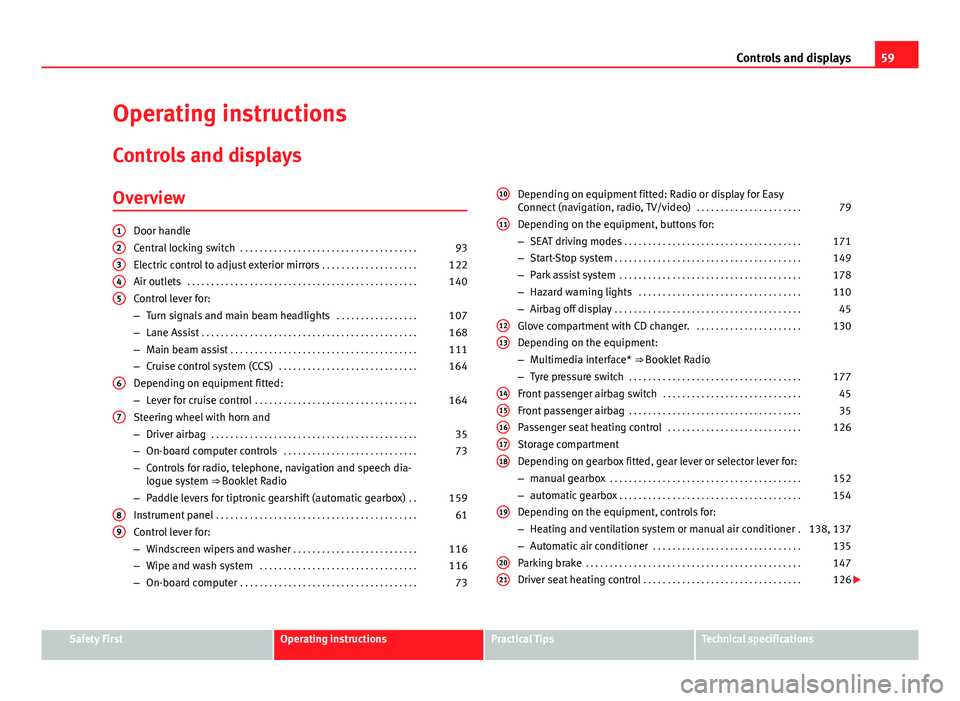
Overview
Door handle
Central locking switch . . . . . . . . . . . . . . . . . . . . . . . . . . . . . . . . . . . . . 93
Electric control to adjust exterior mirrors . . . . . . . . . . . . . . . . . . . .122
Air outlets . . . . . . . . . . . . . . . . . . . . . . . . . . . . . . . . . . . . . . . . . . . . . . . . 140
Control lever for:
– Turn signals and main beam headlights . . . . . . . . . . . . . . . . .107
– Lane Assist . . . . . . . . . . . . . . . . . . . . . . . . . . . . . . . . . . . . . . . . . . . . . 168
– Main beam assist . . . . . . . . . . . . . . . . . . . . . . . . . . . . . . . . . . . . . . . 111
– Cruise control system (CCS) . . . . . . . . . . . . . . . . . . . . . . . . . . . . . 164
Depending on equipment fitted:
– Lever for cruise control . . . . . . . . . . . . . . . . . . . . . . . . . . . . . . . . . . 164
Steering wheel with horn and
– Driver airbag . . . . . . . . . . . . . . . . . . . . . . . . . . . . . . . . . . . . . . . . . . . 35
– On-board computer controls . . . . . . . . . . . . . . . . . . . . . . . . . . . . 73
– Controls for radio, telephone, navigation and speech dia-
logue system ⇒ Booklet Radio
– Paddle levers for tiptronic gearshift (automatic gearbox) . .159
Instrument panel . . . . . . . . . . . . . . . . . . . . . . . . . . . . . . . . . . . . . . . . . . 61
Control lever for:
– Windscreen wipers and washer . . . . . . . . . . . . . . . . . . . . . . . . . . 116
– Wipe and wash system . . . . . . . . . . . . . . . . . . . . . . . . . . . . . . . . . 116
– On-board computer . . . . . . . . . . . . . . . . . . . . . . . . . . . . . . . . . . . . . 73
12345
6
7
89
Depending on equipment fitted: Radio or display for Easy
Connect (navigation, radio, TV/video)
. . . . . . . . . . . . . . . . . . . . . .79
Depending on the equipment, buttons for:
– SEAT driving modes . . . . . . . . . . . . . . . . . . . . . . . . . . . . . . . . . . . . . 171
– Start-Stop system . . . . . . . . . . . . . . . . . . . . . . . . . . . . . . . . . . . . . . . 149
– Park assist system . . . . . . . . . . . . . . . . . . . . . . . . . . . . . . . . . . . . . . 178
– Hazard warning lights . . . . . . . . . . . . . . . . . . . . . . . . . . . . . . . . . . 110
– Airbag off display . . . . . . . . . . . . . . . . . . . . . . . . . . . . . . . . . . . . . . . 45
Glove compartment with CD changer. . . . . . . . . . . . . . . . . . . . . . .130
Depending on the equipment:
– Multimedia interface* ⇒ Booklet Radio
– Tyre pressure switch . . . . . . . . . . . . . . . . . . . . . . . . . . . . . . . . . . . . 177
Front passenger airbag switch . . . . . . . . . . . . . . . . . . . . . . . . . . . . . 45
Front passenger airbag . . . . . . . . . . . . . . . . . . . . . . . . . . . . . . . . . . . . 35
Passenger seat heating control . . . . . . . . . . . . . . . . . . . . . . . . . . . . 126
Storage compartment
Depending on gearbox fitted, gear lever or selector lever for:
– manual gearbox . . . . . . . . . . . . . . . . . . . . . . . . . . . . . . . . . . . . . . . . 152
– automatic gearbox . . . . . . . . . . . . . . . . . . . . . . . . . . . . . . . . . . . . . . 154
Depending on the equipment, controls for:
– Heating and ventilation system or manual air conditioner .138, 137
– Automatic air conditioner . . . . . . . . . . . . . . . . . . . . . . . . . . . . . . . 135
Parking brake . . . . . . . . . . . . . . . . . . . . . . . . . . . . . . . . . . . . . . . . . . . . . 147
Driver seat heating control . . . . . . . . . . . . . . . . . . . . . . . . . . . . . . . . . 126
10
11
1213
1415161718
19
2021
Safety FirstOperating instructionsPractical TipsTechnical specifications
Page 72 of 289
71
Instruments and warning/control lamps
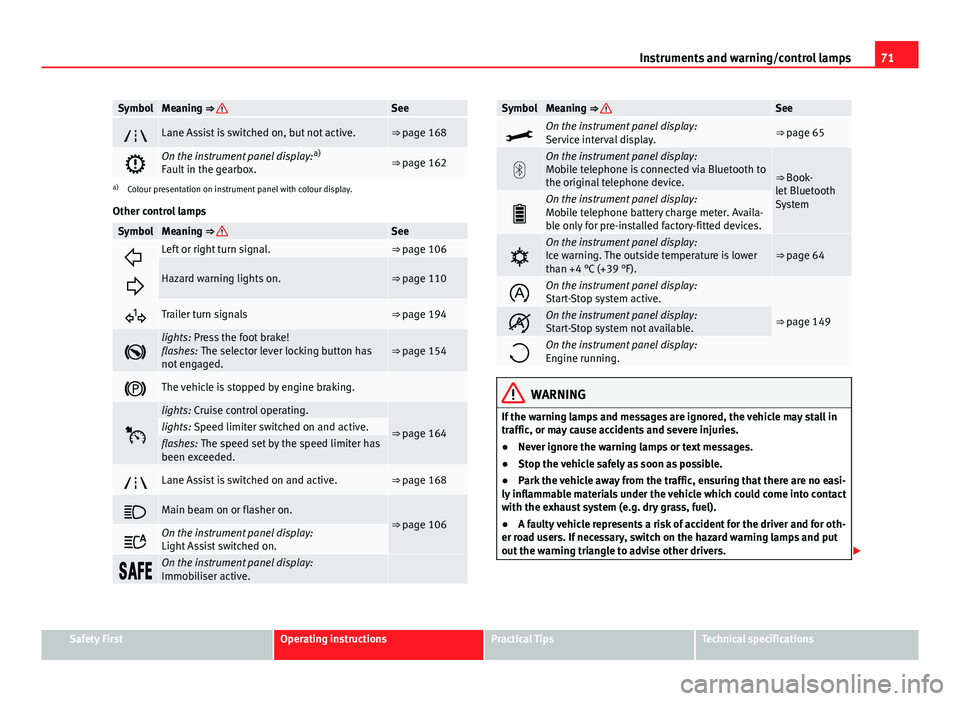
SymbolMeaning ⇒ See
Lane Assist is switched on, but not active.⇒ page 168
On the instrument panel display: a)
Fault in the gearbox.⇒ page 162
a) Colour presentation on instrument panel with colour display.
Other control lamps
SymbolMeaning ⇒ See
Left or right turn signal.⇒ page 106
Hazard warning lights on.⇒ page 110
Trailer turn signals⇒ page 194
lights: Press the foot brake!
flashes: The selector lever locking button has
not engaged.⇒ page 154
The vehicle is stopped by engine braking.
lights: Cruise control operating.
⇒ page 164lights: Speed limiter switched on and active.flashes: The speed set by the speed limiter has
been exceeded.
Lane Assist is switched on and active.⇒ page 168
Main beam on or flasher on.⇒ page 106
On the instrument panel display:
Light Assist switched on.
On the instrument panel display:
Immobiliser active.
SymbolMeaning ⇒ See
On the instrument panel display:
Service interval display.⇒ page 65
On the instrument panel display:
Mobile telephone is connected via Bluetooth to
the original telephone device.
⇒ Book-
let Bluetooth
System
On the instrument panel display:
Mobile telephone battery charge meter. Availa-
ble only for pre-installed factory-fitted devices.
On the instrument panel display:
Ice warning. The outside temperature is lower
than +4 °C (+39 °F).⇒ page 64
On the instrument panel display:
Start-Stop system active.
⇒ page 149On the instrument panel display:
Start-Stop system not available.
On the instrument panel display:
Engine running.
WARNING
If the warning lamps and messages are ignored, the vehicle may stall in
traffic, or may cause accidents and severe injuries.
● Never ignore the warning lamps or text messages.
● Stop the vehicle safely as soon as possible.
● Park the vehicle away from the traffic, ensuring that there are no easi-
ly inflammable materials under the vehicle which could come into contact
with the exhaust system (e.g. dry grass, fuel).
● A faulty vehicle represents a risk of accident for the driver and for oth-
er road users. If necessary, switch on the hazard warning lamps and put
out the warning triangle to advise other drivers.
Safety FirstOperating instructionsPractical TipsTechnical specifications
Page 159 of 289
158Driving
CAUTION
● If you stop the vehicle on a gradient, do not attempt to stop it from roll-
ing by depressing the accelerator when a gear has been selected. This
could cause overheating and damage the automatic gearbox. Apply the
handbrake firmly or press the brake pedal in order to prevent the vehicle
from rolling back.
● If you allow the car to roll with the selector lever in position N with the
engine switched off, the automatic gearbox will be damaged as it will not be
lubricated.
● In certain driving situations or traffic conditions, such as frequently
starting, prolonged creeping of the vehicle, or traffic jams with continuous
stoppages, the automatic gearbox could overheat causing damage! If the
warning lamp lights up, stop the vehicle as soon as possible and wait for
the gearbox to cool ⇒ page 162.
● In certain driving situations or traffic conditions, such as frequently
starting, prolonged creeping of the vehicle, or traffic jams with continuous
stoppages, the automatic gearbox could overheat causing damage! If the
warning lamp lights up, stop the vehicle as soon as possible and wait for
the gearbox to cool ⇒ page 162.
Downhill speed control*
The downhill speed control function helps the driver when
driving down steep gradients.
Downhill speed control is activated when the selector lever is in D/S and
the driver applies the foot brake. The automatic gearbox automatically en-
gages a lower gear that is suitable for the slope. The downhill speed control
function attempts to maintain the speed at which the vehicle was travelling
when the foot brake was applied (subject to the laws of physics and techni-
cal drive limitations). It may be necessary to adjust the speed again using
the foot brake in certain situations. Given that the downhill speed control
can only change down to 3rd gear, on very steep descents the tiptronic mode may be required. In this case, manually reduce the tiptronic to 2nd or
1st gear to use the engine brake and reduce the charge on the brakes.
Downhill speed control is deactivated as soon as the road levels out again
or you press the accelerator pedal.
On vehicles with cruise control system* ⇒
page 164, downhill speed con-
trol is activated when you set a cruising speed.
WARNING
The downhill speed control cannot defy the laws of physics. Therefore,
speed cannot be maintained constant in all situations. Always be pre-
pared to use the brakes!
Page 165 of 289

164Driver assistance systems
Driver assistance systems
Cruise control system (CCS)*
Introduction
The cruise control system (CCS) is able to maintain the set speed from 20
km/h (15 mph).
A constant speed is maintained using the engine power control or by apply-
ing the active brake ⇒
.
Additional information and warnings:
● Change gear ⇒ page 154.
● Accessories and technical modifications ⇒ page 230.
WARNING
Use of the cruise control could cause accidents and severe injuries if it is
not possible to drive at a constant speed maintaining the safety distance.
● Do not use the cruise control in heavy traffic, if the distance from the
vehicle in front is insufficient, on steep roads, with several bends or in
slippery circumstances (snow, ice, rain or loose gravel), or on flooded
roads.
● Never use the CCS when driving off-road or on unpaved roads.
● Always adapt your speed and the distance to the vehicles ahead in
line with visibility, weather conditions, the condition of the road and the
traffic situation.
● To avoid unexpected operation of the cruise control system, turn it off
every time you finish using it.
WARNING (Continued)
● It is dangerous to use a set speed which is too high for the prevailing
road, traffic or weather conditions.
● When travelling down hills, the CCS cannot maintain a constant
speed. The vehicle tends to accelerate under its own weight. Select a
lower gear or use the foot brake to slow the vehicle.
Warning and control lamp
Fig. 94 Instrument panel display: CCS status indications
Page 166 of 289

165
Driver assistance systems
Control lamp
lights upPossible cause
Cruise control is active
Several warning and control lamps should light up for a few seconds when
the ignition is switched on, signalling that the function is being verified.
They will switch off after a few seconds.
Displayed on the CCS screen
Status Fig. 94: CCS temporarily switched off. The set speed is displayed in small fig-
ures.
System error. Contact a specialised workshop.
CCS switched on. The speed memory is empty.
The CCS is switched on. The set speed is displayed in large figures.
WARNING
If the warning lamps and messages are ignored, the vehicle may stall in
traffic, or may cause accidents and severe injuries.
● Never ignore the warning lamps or text messages.
CAUTION
Failure to heed the control lamps and text messages when they appear may
result in faults in the vehicle.
A
BCD
Safety FirstOperating instructionsPractical TipsTechnical specifications
Page 167 of 289
166Driver assistance systems
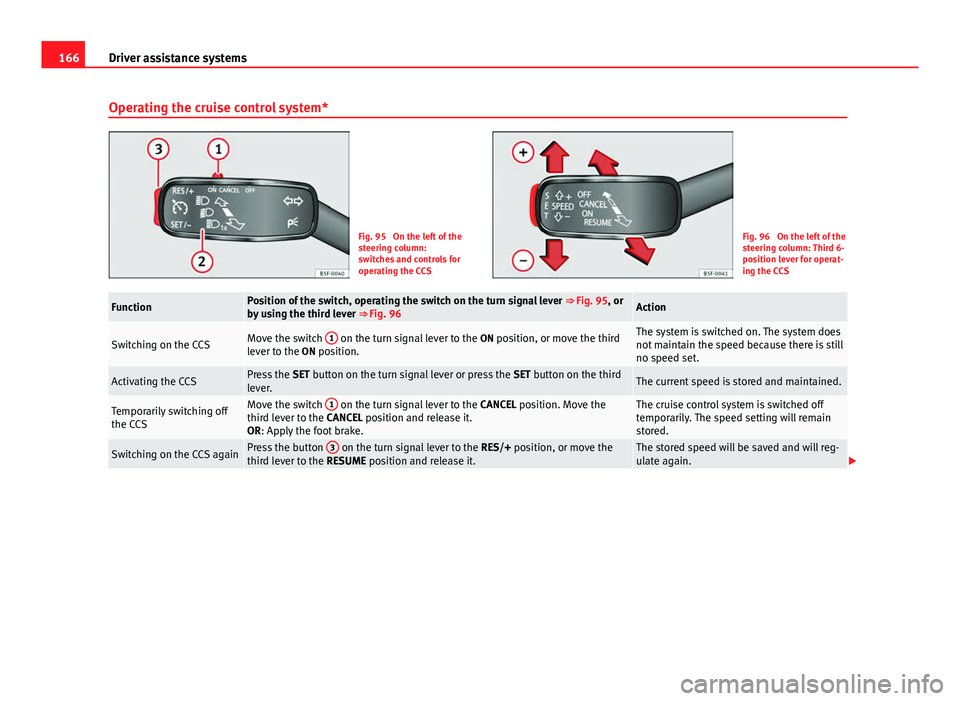
Operating the cruise control system*
Fig. 95 On the left of the
steering column:
switches and controls for
operating the CCSFig. 96 On the left of the
steering column: Third 6-
position lever for operat-
ing the CCS
FunctionPosition of the switch, operating the switch on the turn signal lever ⇒ Fig. 95, or
by using the third lever ⇒ Fig. 96Action
Switching on the CCSMove the switch 1 on the turn signal lever to the
ON position, or move the third
lever to the ON position.The system is switched on. The system does
not maintain the speed because there is still
no speed set.
Activating the CCSPress the SET button on the turn signal lever or press the SET button on the third
lever.The current speed is stored and maintained.
Temporarily switching off
the CCSMove the switch 1 on the turn signal lever to the
CANCEL position. Move the
third lever to the CANCEL position and release it.
OR: Apply the foot brake.The cruise control system is switched off
temporarily. The speed setting will remain
stored.
Switching on the CCS againPress the button 3 on the turn signal lever to the
RES/+ position, or move the
third lever to the RESUME position and release it.The stored speed will be saved and will reg-
ulate again.
Page 169 of 289
168Driver assistance systems
Travelling down hills with the CCS
When travelling down hills the CCS cannot maintain a constant speed. Slow
the vehicle down using the brake pedal and reduce gears if required.
Automatic off
The cruise control system (CCS) is switched off automatically or temporarily:
● If the system detects a fault that could affect the working order of the
CCS.
● If you press and maintain the accelerator pedal for a certain time, driv-
ing faster than the stored speed.
● If the dynamic driving control systems intervene (i.e. ASR or ESC).
● If the airbag is triggered.
Lane Assist system* Introduction
Additional information and warnings:
● SEAT information system ⇒ page 73
● Accessories, parts replacement, repairs and modifications ⇒ page 230
WARNING
The intelligent technology in the Lane Assist system cannot change the
limits imposed by the laws of physics and by the very nature of the sys-
tem. Careless or uncontrolled use of the Lane Assist system may cause
accidents and injury. The system is not a replacement for driver aware-
ness.
● Always adapt your speed and the distance to the vehicles ahead in
line with visibility, weather conditions, the condition of the road and the
traffic situation.
● Always keep your hands on the steering wheel so it can be turned at
any time.
● The Lane Assist system does not detect all road markings. The road
surfaces, road structures or objects in poor condition can be incorrectly
detected as road markings under certain circumstances by the Lane As-
sist system. In such situations, switch the Lane Assist system off imme-
diately.
● Please observe the indications on the instrument panel and act as is
necessary.
● Always pay attention to the vehicle's surroundings.
● When the area of vision of the camera becomes dirty, covered or is
damaged, the Lane Assist system function can be affected.
CAUTION
In order to avoid influencing the operation of the system, the following
points must be taken into account:
● Regularly clean the area of vision of the camera and keep it in a clean
state, without snow or ice.
● Do not cover the area of vision of the camera.
● Check that the area of vision of the windscreen camera is not damaged.
Page 186 of 289
185
Intelligent technology
Disable ASR
ASR can be disabled through the Easy Connect system ⇒ page 79 or by
pressing the OFF
button. The traction control system will be disabled.
The control lamp will light up. For vehicles with a driver information sys-
tem* the driver will be informed that ASR is disabled.
In the following exceptional circumstances enabling the ESC Sport mode to
improve the traction of the wheels is tenable:
● when rocking the vehicle backwards and forwards to free it.
● Driving in deep snow or on loose surfaces.
Activate ASR
ASR can be switched on through the Easy Connect system ⇒ page 79 or by
pressing the OFF
button. The traction control system will be enabled.
The control lamp switches off. For vehicles with a driver information sys-
tem* the driver will be informed that ASR is enabled.
WARNING
You should switch on the ESC Sport mode only if the traffic conditions
and your driving ability allow you to do so safely: risk of skidding!
● With ESC in Sport mode, the stabilising function will be limited to al-
low for a sportier drive. The driving wheels could spin and the vehicle
could skid.
Note
● ESC Sport mode cannot be activated if the cruise control* actively inter-
venes. Brakes
New brake pads
For the first 400 km (250 miles), new brake pads have not yet reached their
maximum braking capacity, and need to be “run in” first. However, you can
compensate for the slightly reduced braking effect by applying more pres-
sure on the brake pedal. Avoid overloading the brakes while running them
in.
Wear
The rate of wear on the
brake pads depends a great deal on how you drive
and the conditions in which the vehicle is operated. This is a particular
problem in urban traffic and short stretches, or with very sporty driving.
Depending on the speed, the braking force, and the environmental condi-
tions (for example, the temperature, air humidity, etc.) noises may be pro-
duced on braking.
Wet roads or road salt
In certain situations (for example, on driving through flooded areas, in se-
vere downpours or after washing the vehicle) the braking action could be
delayed if the discs and pads are damp, or frozen in winter. In this case the
brakes should be dried by pressing the brake pedal several times.
At high speed and with the windscreen wipers activated, the brake pads will
briefly touch the brake discs. This takes place, although unnoticeable to the
driver, at regular intervals to improve the response time of the brakes when
they are wet.
The effectiveness of the brakes can also be temporarily reduced if the vehi-
cle is driven for some distance without using the brakes when there is a lot
of salt on the road in winter. The layer of salt that accumulates on the discs
and pads can be removed by gently applying the brakes a few times.
Safety FirstOperating instructionsPractical TipsTechnical specifications
Page 231 of 289

230Accessories and modifications to the vehicle
Accessories and modifications to the vehicle
Accessories, replacement parts and repairs
Always ask your dealer or specialist retailer for advice be-
fore purchasing accessories and replacement parts.
Your vehicle is designed to offer a high standard of active and passive safe-
ty. For this reason, we recommend that you ask a SEAT Official Service for
advice before fitting accessories or replacement parts. Your SEAT Official
Service has the latest information from the manufacturer and can recom-
mend accessories and replacement parts which are suitable for your re-
quirements. They can also answer any questions you might have regarding
official regulations.
We recommend you to use only SEAT accessories and Genuine SEAT parts ®
.
SEAT has tested these parts and accessories for suitability, reliability and
safety. SEAT Official Services have the necessary experience and facilities to
ensure that the parts are installed correctly and professionally.
Any retro-fitted equipment which has a direct effect on the vehicle and/or
the way it is driven (e.g. cruise control system or electronically-controlled
suspension) must be approved for use in your vehicle and bear the e mark
(the European Union's authorisation symbol).
If any additional electrical components are fitted which do not serve to con-
trol the vehicle itself (for instance a refrigerator box, laptop or ventilator fan,
etc.), these must bear the mark (manufacturer conformity declaration in
the European Union).
WARNING
Accessories, for example telephone holders or cup holders, should never
be fitted on the covers, or within the working range of the airbags. Other-
wise, there is a danger of injury if the airbag is triggered in an accident.
Technical modifications
Modifications must always be carried out according to our
specifications.
Unauthorised modifications to the electronic components, software, wiring
or data transfer in the vehicle may cause malfunctioning. Due to the way the
electronic components are linked together in networks, other indirect sys-
tems may be affected by the faults. This can seriously impair safety, lead to
excessive wear of components, and also invalidate your vehicle registration
documents.
You will appreciate that your SEAT dealership cannot be held liable for any
damage caused by modifications and/or work performed incorrectly.
We recommend that all work should be performed by a SEAT Official Service
using Genuine SEAT parts
®
.
WARNING
Incorrectly performed modifications or other work on your vehicle can
lead to malfunctions and cause accidents.
Radio transmitters and business equipment
Radio transmitters (fixed installation)
Any retrofit installations of radio transmitters in the vehicle require prior ap-
proval. SEAT generally authorises in-vehicle installations of approved types
of radio transmitters provided that: