trailer Seat Leon 5D 2012 Owner's manual
[x] Cancel search | Manufacturer: SEAT, Model Year: 2012, Model line: Leon 5D, Model: Seat Leon 5D 2012Pages: 289, PDF Size: 3.81 MB
Page 5 of 289
Trailer . . . . . . . . . . . . . . . . . . . . . . . . . . . . . . . . . . . . . 194
Trailer towing . . . . . . . . . . . . . . . . . . . . . . . . . . . . . 194
Retrofitting a towing bracket* . . . . . . . . . . . . . . . 196
Care and cleaning . . . . . . . . . . . . . . . . . . . . . . . . . 198
General information . . . . . . . . . . . . . . . . . . . . . . . 198
Care of vehicle exterior . . . . . . . . . . . . . . . . . . . . . 198
Care of the vehicle interior . . . . . . . . . . . . . . . . . . 202
Checking and refilling levels . . . . . . . . . . . . . . . 206
Fuel . . . . . . . . . . . . . . . . . . . . . . . . . . . . . . . . . . . . 206
Filling the tank . . . . . . . . . . . . . . . . . . . . . . . . . . . . 207
Bonnet . . . . . . . . . . . . . . . . . . . . . . . . . . . . . . . . . . 209
Engine oil . . . . . . . . . . . . . . . . . . . . . . . . . . . . . . . . 211
Cooling system . . . . . . . . . . . . . . . . . . . . . . . . . . . 215
Brake fluid . . . . . . . . . . . . . . . . . . . . . . . . . . . . . . . 217
Battery . . . . . . . . . . . . . . . . . . . . . . . . . . . . . . . . . . 217
Windscreen washer reservoir and wiper blades . 220
Wheels and tyres . . . . . . . . . . . . . . . . . . . . . . . . . . 223
Wheels . . . . . . . . . . . . . . . . . . . . . . . . . . . . . . . . . . 223
Accessories and modifications to the vehicle 230
Accessories, replacement parts and repairs . . . . 230
Technical modifications . . . . . . . . . . . . . . . . . . . . 230
Radio transmitters and business equipment . . . 230
Emergencies . . . . . . . . . . . . . . . . . . . . . . . . . . . . . . 232
General information . . . . . . . . . . . . . . . . . . . . . . . 232
Equipment . . . . . . . . . . . . . . . . . . . . . . . . . . . . . . . 232
Tyre repair kit . . . . . . . . . . . . . . . . . . . . . . . . . . . . . 233
Changing a wheel . . . . . . . . . . . . . . . . . . . . . . . . . 235
Spare wheel . . . . . . . . . . . . . . . . . . . . . . . . . . . . . . 240
Jump starting . . . . . . . . . . . . . . . . . . . . . . . . . . . . . 241
Towing and tow-starting the vehicle . . . . . . . . . . 244
Fuses and bulbs . . . . . . . . . . . . . . . . . . . . . . . . . . . 249
Electrical fuses . . . . . . . . . . . . . . . . . . . . . . . . . . . 249
Bulbs . . . . . . . . . . . . . . . . . . . . . . . . . . . . . . . . . . . 252
Changing bulbs in headlight unit . . . . . . . . . . . . 254
Changing bulb for front fog light . . . . . . . . . . . . . 256
Changing tail light bulbs (on side panel) . . . . . . 257 Changing tail light bulbs (on rear lid) . . . . . . . . . 259
Changing number plate light bulbs . . . . . . . . . . . 261
Technical specifications . . . . . . . . . . . . 263
Technical specifications . . . . . . . . . . . . . . . . . . . . 263
Important . . . . . . . . . . . . . . . . . . . . . . . . . . . . . . . . 263
Vehicle identification data . . . . . . . . . . . . . . . . . . 264
Information on fuel consumption . . . . . . . . . . . . 265
Towing a trailer . . . . . . . . . . . . . . . . . . . . . . . . . . . 265
Wheels . . . . . . . . . . . . . . . . . . . . . . . . . . . . . . . . . . 266
Engine specifications . . . . . . . . . . . . . . . . . . . . . . 267
Dimensions and capacities . . . . . . . . . . . . . . . . . 276
Index . . . . . . . . . . . . . . . . . . . . . . . . . . . . . . . . . . . 277
4Table of Contents
Page 70 of 289
69
Instruments and warning/control lamps
Vehicles with an automatic gearbox*
The display is only visible in tiptronic mode ⇒ page 159
The following display symbols mean:
● Shifting up a gear
● Shifting down a gear
CAUTION
The gear-change indicator is intended to help save fuel. It is not intended to
recommend the right gear for all driving situations. In certain situations, on-
ly the driver can choose the correct gear (for instance when overtaking, driv-
ing up a steep gradient or towing a trailer).
Note
The display disappears from the instrument panel when you press the
clutch pedal.
Control lamps Control and warning lamps
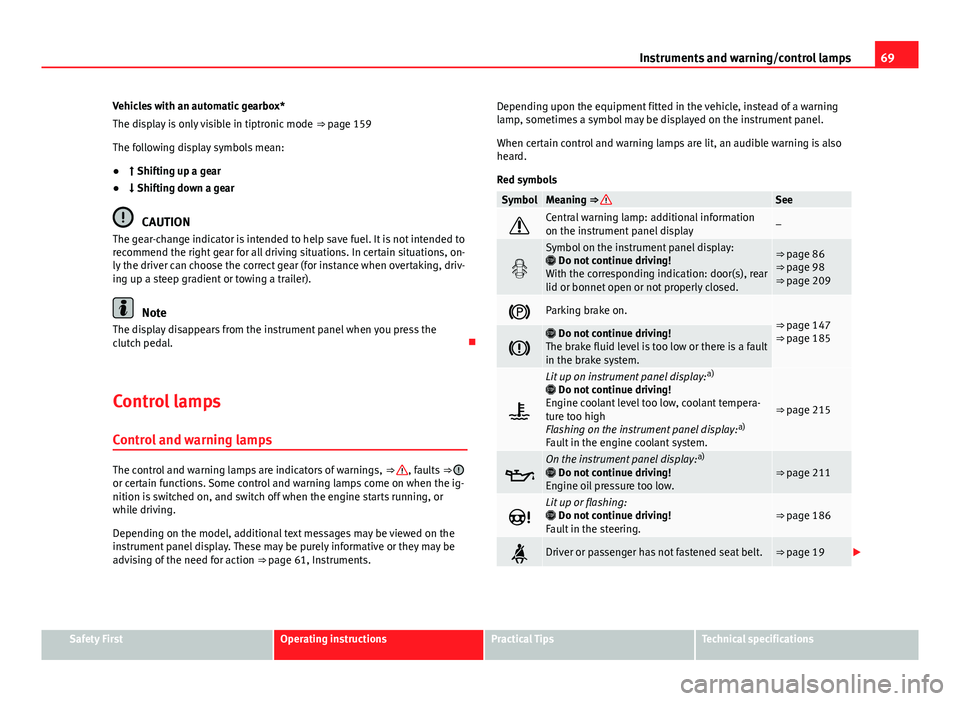
The control and warning lamps are indicators of warnings, ⇒ , faults ⇒ or certain functions. Some control and warning lamps come on when the ig-
nition is switched on, and switch off when the engine starts running, or
while driving.
Depending on the model, additional text messages may be viewed on the
instrument panel display. These may be purely informative or they may be
advising of the need for action ⇒ page 61, Instruments. Depending upon the equipment fitted in the vehicle, instead of a warning
lamp, sometimes a symbol may be displayed on the instrument panel.
When certain control and warning lamps are lit, an audible warning is also
heard.
Red symbols
SymbolMeaning ⇒ See
Central warning lamp: additional information
on the instrument panel display–
Symbol on the instrument panel display:
Do not continue driving!
With the corresponding indication: door(s), rear
lid or bonnet open or not properly closed.⇒ page 86
⇒ page 98
⇒ page 209
Parking brake on.⇒ page 147
⇒ page 185
Do not continue driving!
The brake fluid level is too low or there is a fault
in the brake system.
Lit up on instrument panel display: a)
Do not continue driving!
Engine coolant level too low, coolant tempera-
ture too high
Flashing on the instrument panel display: a)
Fault in the engine coolant system.
⇒ page 215
On the instrument panel display: a)
Do not continue driving!
Engine oil pressure too low.⇒ page 211
Lit up or flashing:
Do not continue driving!
Fault in the steering.⇒ page 186
Driver or passenger has not fastened seat belt.⇒ page 19
Safety FirstOperating instructionsPractical TipsTechnical specifications
Page 72 of 289
71
Instruments and warning/control lamps
SymbolMeaning ⇒ See
Lane Assist is switched on, but not active.⇒ page 168
On the instrument panel display: a)
Fault in the gearbox.⇒ page 162
a) Colour presentation on instrument panel with colour display.
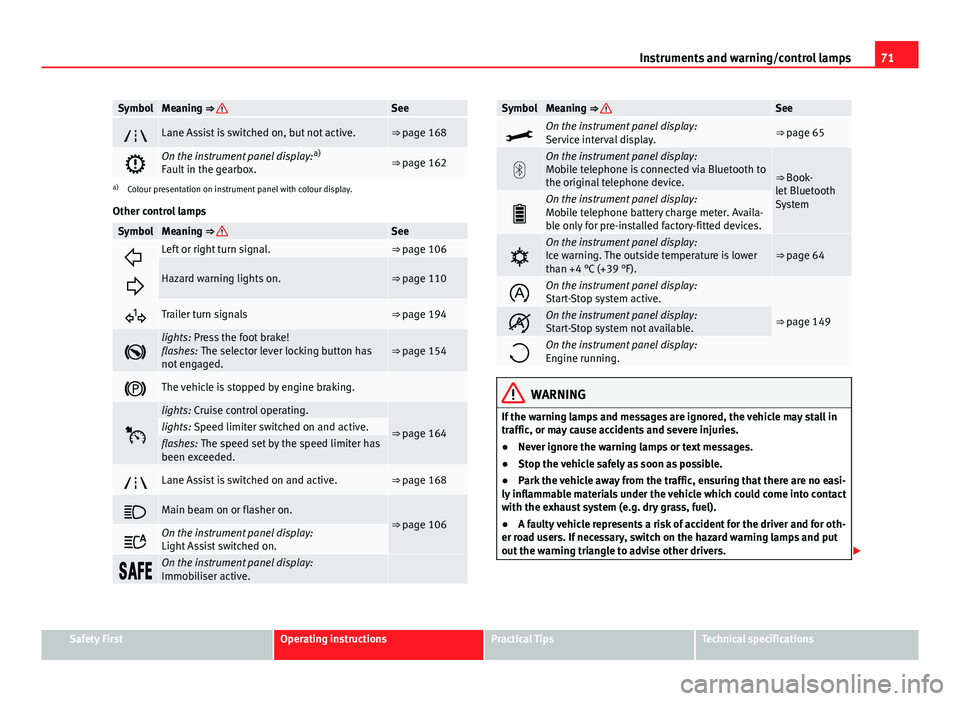
Other control lamps
SymbolMeaning ⇒ See
Left or right turn signal.⇒ page 106
Hazard warning lights on.⇒ page 110
Trailer turn signals⇒ page 194
lights: Press the foot brake!
flashes: The selector lever locking button has
not engaged.⇒ page 154
The vehicle is stopped by engine braking.
lights: Cruise control operating.
⇒ page 164lights: Speed limiter switched on and active.flashes: The speed set by the speed limiter has
been exceeded.
Lane Assist is switched on and active.⇒ page 168
Main beam on or flasher on.⇒ page 106
On the instrument panel display:
Light Assist switched on.
On the instrument panel display:
Immobiliser active.
SymbolMeaning ⇒ See
On the instrument panel display:
Service interval display.⇒ page 65
On the instrument panel display:
Mobile telephone is connected via Bluetooth to
the original telephone device.
⇒ Book-
let Bluetooth
System
On the instrument panel display:
Mobile telephone battery charge meter. Availa-
ble only for pre-installed factory-fitted devices.
On the instrument panel display:
Ice warning. The outside temperature is lower
than +4 °C (+39 °F).⇒ page 64
On the instrument panel display:
Start-Stop system active.
⇒ page 149On the instrument panel display:
Start-Stop system not available.
On the instrument panel display:
Engine running.
WARNING
If the warning lamps and messages are ignored, the vehicle may stall in
traffic, or may cause accidents and severe injuries.
● Never ignore the warning lamps or text messages.
● Stop the vehicle safely as soon as possible.
● Park the vehicle away from the traffic, ensuring that there are no easi-
ly inflammable materials under the vehicle which could come into contact
with the exhaust system (e.g. dry grass, fuel).
● A faulty vehicle represents a risk of accident for the driver and for oth-
er road users. If necessary, switch on the hazard warning lamps and put
out the warning triangle to advise other drivers.
Safety FirstOperating instructionsPractical TipsTechnical specifications
Page 95 of 289
94Opening and closing
● When the door is mechanically unlocked using the vehicle key without
turning the ignition within the following 15 seconds.
● A door is opened.
● The bonnet is opened.
● The rear lid is opened.
● When the ignition is switched on with a non-authorised key.
● When the vehicle battery is disconnected.
● Movement inside the vehicle (in vehicles with interior monitoring
⇒ page 95).
● When the vehicle is towed (in vehicles with anti-tow system
⇒ page 95).
● When the vehicle is raised (in vehicles with anti-tow system
⇒ page 95).
● When the vehicle is transported on a ferry or by rail (vehicles with an an-
ti-tow system or vehicle interior monitoring ⇒ page 95).
● When a trailer connected to the anti-theft alarm system is disconnected.
How to turn OFF the alarm
Unlock the vehicle with the unlocking button on the key or turn on the igni-
tion with a valid key.
Note
● The alarm will be triggered once more when anybody enters the same
zone of surveillance or any other zone. If, for example, after opening a door,
the rear lid is also opened.
● The anti-theft alarm
is not activated when the vehicle is locked from
the inside using the central locking button. ●
If the driver door is unlocked mechanically with the key, only the driver
door is unlocked, the rest of the doors remain locked. Only when the igni-
tion has been turned on will the other doors be available - but not unlocked
- and the central lock button activated.
● If the vehicle battery is run down or flat then the anti-theft alarm will not
operate correctly.
Vehicle interior monitoring and anti-tow system*
Monitoring or control function incorporated in the anti-theft
alarm* which detects unauthorized vehicle entry by means
of ultrasound.
Activation
– It is automatically switched on when the anti-theft alarm is acti-
vated.
Deactivation
– Open the vehicle with the key, either mechanically 1)
or by press-
ing the
button on the remote control.
– Press the button
on the remote control twice. The volumetric
sensor and tilt sensors will be deactivated. The alarm system re-
mains activated.
The vehicle interior monitoring and the anti-tow system are automatically
switched on again next time the vehicle is locked.
1)
The time period from when the door is opened until the key is inserted in the contact
should not exceed 15 sec., otherwise the alarm will be triggered.
Page 107 of 289

106Lights and visibility
Lights and visibility
Lights Introduction
The legal requirements regarding the use of vehicle lights in each country
must be observed.
The driver is personally responsible for the correct use and adjustment of
the lights in all situations.
Additional information and warnings:
● Information system ⇒ page 73
● Changing bulbs ⇒ page 252
WARNING
If the headlights are regulated too high and the main beam is not used
correctly, there is a risk of dazzling or distracting other road users. This
could result in a serious accident.
● Always make sure that the headlights are correctly adjusted.
● Never use the main beam or headlight flasher when it can dazzle oth-
er drivers.
Control lamps
lights upPossible causeSolution
Driving light totally or partially
faulty.
Replace the corresponding
bulb ⇒ page 252.
If all the bulbs are OK, the vehi-
cle should be taken to a speci-
alised workshop if necessary.
Rear fog light switched on.⇒ page 108.
Fog lights switched on
Left or right turn signal.
The control lamp flashes twice
as fast when a vehicle or trailer
turn signal is faulty.If necessary, check the vehicle
and trailer lighting.
Main beam on or flasher on.⇒ page 107.
Light Assist on.⇒ page 109.
Several warning and control lamps should light up for a few seconds when
the ignition is switched on, signalling that the function is being verified.
They will switch off after a few seconds.
Page 109 of 289
108Lights and visibility
Note
● The turn signal only works when the ignition is switched on. The hazard
warning lights also work when the ignition is switched off.
● If a trailer turn signal malfunctions, the control lamp will stop flashing
(trailer turn signals) and the vehicle turn signal will flash at double speed.
● The main beam headlights can only be switched on if the dipped beam
headlights are already on.
Turning lights on and off
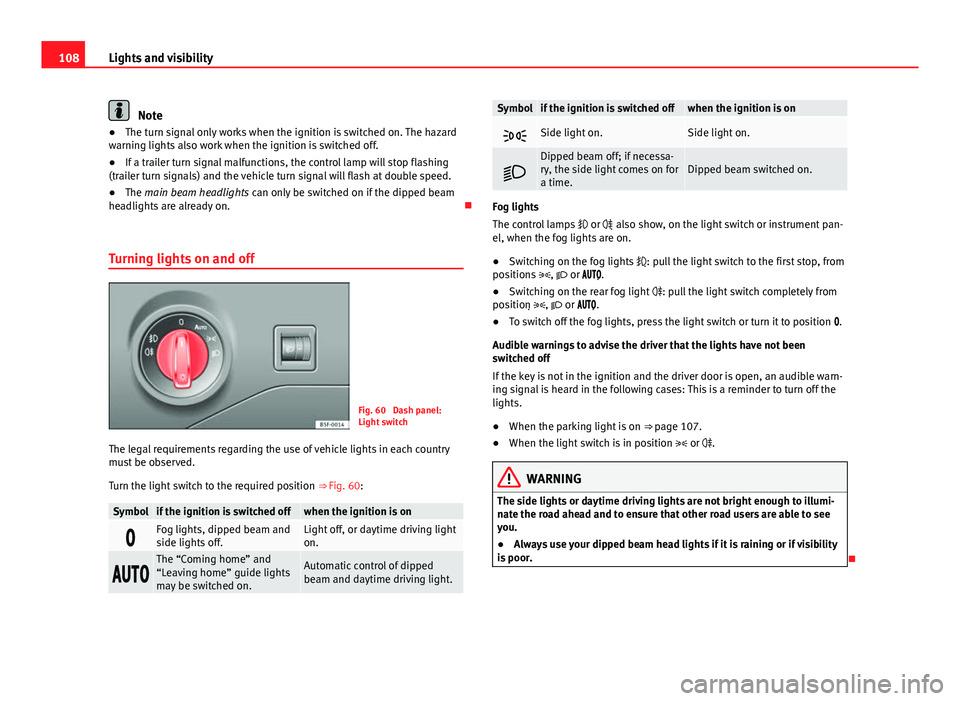
Fig. 60 Dash panel:
Light switch
The legal requirements regarding the use of vehicle lights in each country
must be observed.
Turn the light switch to the required position ⇒ Fig. 60:
Symbolif the ignition is switched offwhen the ignition is on
Fog lights, dipped beam and
side lights off.Light off, or daytime driving light
on.
The “Coming home” and
“Leaving home” guide lights
may be switched on.Automatic control of dipped
beam and daytime driving light.
Symbolif the ignition is switched offwhen the ignition is on
Side light on.Side light on.
Dipped beam off; if necessa-
ry, the side light comes on for
a time.Dipped beam switched on.
Fog lights
The control lamps
or also show, on the light switch or instrument pan-
el, when the fog lights are on.
● Switching on the fog lights : pull the light switch to the first stop, from
positions , or .
● Switching on the rear fog light : pull the light switch completely from
position , or .
● To switch off the fog lights, press the light switch or turn it to position .
Audible warnings to advise the driver that the lights have not been
switched off
If the key is not in the ignition and the driver door is open, an audible warn-
ing signal is heard in the following cases: This is a reminder to turn off the
lights.
● When the parking light is on ⇒ page 107.
● When the light switch is in position or .
WARNING
The side lights or daytime driving lights are not bright enough to illumi-
nate the road ahead and to ensure that other road users are able to see
you.
● Always use your dipped beam head lights if it is raining or if visibility
is poor.
Page 115 of 289

114Lights and visibility
Headlight range control, lighting of the instrument panel
and controls
Fig. 62 Next to the
steering wheel: Head-
light range control
Lighting of the instrument panel and controls*
Depending on the model, lighting of the instrument panel and controls can
be adjusted in the Easy Connect system, using the button
and the func-
tion button SETUP ⇒ page 81.
Headlight range control
The headlight range control ⇒ Fig. 62 is modified according to the value of
the headlight beam and the vehicle load status. This offers the driver opti-
mum visibility and the headlights do not dazzle oncoming drivers ⇒
.
The headlights can only be adjusted when the dipped beam is switched on.
To reset, turn switch ⇒ Fig. 62:
ValueVehicle load status a)–Two front occupants, luggage compartment empty1All seats occupied, luggage compartment empty
ValueVehicle load statusa)
2All seats occupied, luggage compartment full With trailer
and minimum drawbar load
3Driver only, luggage compartment full With trailer and
maximum drawbar load
a)
If the vehicle load does not correspond to those shown in the table, it is possible to select
intermediary positions.
Dynamic headlight range control
The control is not mounted in vehicles with dynamic headlight range con-
trol. The headlight range is automatically adjusted according to the vehicle
load status when the headlights are switched on.
Instrument panel lighting
In vehicles with the daytime driving light, the instrument panel lighting
switches on in dark conditions (for example, when passing through a tun-
nel). This reminds the driver to manually switch on the dipped beam, so
that the vehicle rear lights also switch on ⇒ page 109.
WARNING
Heavy objects in the vehicle may mean that the headlights dazzle and
distract other drivers. This could result in a serious accident.
● Adjust the light beam to the vehicle load status so that it does not
blind other drivers.
Page 151 of 289

150Driving
Basic requirements for the Start-Stop mode
● The driver door must be closed.
● The driver must have their seat belt fastened.
● The bonnet must be closed.
● The vehicle must have travelled at more than 4 km/h (2 mph) since the
last stop.
● The vehicle cannot be towing a trailer.
WARNING
● Never switch the engine off until the vehicle is stationary. The brake
servo and power steering functions will not be completely covered under
warranty. More force may also be needed to turn the steering wheel or to
brake. As you cannot steer and brake in the normal manner, there is a
greater risk of accidents and serious injury.
● Never remove the key from the ignition if the vehicle is in motion.
Otherwise, the steering could lock making it impossible to steer the vehi-
cle.
● Always take the ignition key with you whenever you leave the vehicle,
even temporarily. This is particularly important if there are children in
the vehicle, as they might otherwise be able to start the engine or use
power-operated equipment (e.g. the electric windows), which could
cause injuries.
● To avoid injury, make sure that the Start-Stop system is switched off
when working in the engine compartment ⇒ page 152.
CAUTION
The Start-Stop system must always be switched off when driving through
flooded areas ⇒ page 152. Stop/Start the engine
Vehicles with a manual gearbox
–
When the vehicle is stopped, put it into neutral and release the
clutch pedal. The engine will switch off. The warning lamp
will appear on the instrument panel display.
– When the clutch pedal is pressed the engine will start up again.
The warning lamp will switch off.
Vehicles with an automatic gearbox
– Use the foot brake to bring the vehicle to a stop and keep the
brake pedal pressed down with your foot. The engine will switch
off. The warning lamp will appear in the display.
– When you take your foot off the brake pedal the engine will start
up again. The warning lamp will switch off.
Additional information related to the automatic gearbox
The engine stops when the selector lever is in the positions P, D, N and S, in
addition to when in manual mode. With the selector lever in position P, the
engine will also remain switched off when you take your foot off the brake
pedal. In order to start the engine up again the accelerator must be press-
ed, or another gear engaged or the brake released.
If the selector lever is placed in position R during the stopping phase, the
engine will start up again.
Change from position D to P to prevent the engine from accidentally starting
when changing and passing by position R.
Page 158 of 289
157
Driving
Stopping/Parking
If the driver door is opened and the selector lever is not in position
P, the vehicle could move. Driver message: Gear change: selector
lever in drive position! will be displayed. Additionally, a buzzer will sound.
– Press and hold the brake pedal ⇒
.
– Apply the handbrake.
– Move the selector lever to position P.
Holding the car on a hill
– Always apply the brake pedal firmly to prevent the vehicle from
“moving backwards; if necessary, apply the handbrake” ⇒
.
Do not try to stop the vehicle “rolling back” by increasing the
engine speed when a gear is engaged (pressing the accelera-
tor) ⇒
.
Moving off uphill in vehicles without Hill start assistant*
– Apply the handbrake.
– Once you have engaged a gear press the accelerator carefully
and disengage the handbrake.
Moving off uphill in vehicles without Hill start assistant*
– Once you have engaged a gear, release the footbrake and press
the accelerator ⇒ page 148, Hill hold assist*.
Driving down hills: In some situations (on mountain roads or when towing a
trailer or caravan) it can be advantageous to switch temporarily to the man-
ual gearbox programme so that the gear ratios can be selected manually to
suit the driving conditions ⇒
. On level ground it is sufficient to move the selector lever to position P. On
slopes, first engage the parking brake and then put the selection lever into
the P position. This avoids overloading the locking mechanism and it will be
easier to move the selector lever from position P.
WARNING
● As a driver you should never leave your vehicle if the engine is run-
ning and a gear is engaged. If you have to leave your vehicle while the
engine is running, you must apply the handbrake and engage the parking
lock P.
● If the engine is running and a gear is engaged (D/S or R) or the vehi-
cle is in tiptronic mode, you will need to hold the car with the footbrake.
Otherwise, the car will creep forwards as the power transmission is not
fully interrupted even when the engine is idling.
● Take care not to accidentally press the accelerator pedal when the ve-
hicle is stopped. The vehicle could otherwise start moving immediately
(in some cases even if the parking brake is engaged) resulting in the risk
of an accident.
● While you are selecting a gear and the vehicle is stopped with the en-
gine running, do not accelerate. Failure to do so could result in an acci-
dent.
● Never move the selector lever to R or P when driving: this could result
in an accident!
● Before you drive down a steep gradient, reduce your speed and use
tiptronic to select a low gear.
● Never allow the brake to rub and do not use the brake pedal too often
or for long periods. Constant braking causes overheating in the brakes.
This could significantly reduce braking power, increase braking distance
or even result in the total failure of the brake system.
● To avoid rolling back on gradients always hold the vehicle with the
footbrake or handbrake if you have to stop.
Safety FirstOperating instructionsPractical TipsTechnical specifications
Page 174 of 289

173
Driver assistance systems
Driving pro-
fileCharacteristics
EcoPlaces the vehicle in a particularly low state of consumption,
facilitating a fuel-saving driving style that is respectful to the
environment.
IndividualEnables some configurations to be modified by pressing the
Profile settings button. The functions that can be adjusted
depend on the equipment fitted in the vehicle.
WARNING
When operating SEAT Drive Mode, pay attention to all traffic. Doing oth-
erwise could cause an accident.
Note
● The vehicle will start in the mode that was selected at the moment it was
switched off.
● Changing modes can alter vehicle handling. The SEAT Drive Mode func-
tion does not allow configurations that compromise safety under any cir-
cumstances.
● Your speed and driving style must always be adjusted to visibility,
weather, and traffic conditions.
● The eco mode is not available when towing a trailer. Tiredness detection (break
recommendation)*
Introduction
The Tiredness detection informs the driver when their driving behaviour
shows signs of fatigue.
Additional information and warnings:
● Easy Connect system ⇒ page 79
● Accessories, change a part, repairs and adjustments (information stored
in the control units) ⇒ page 230
WARNING
Do not let the comfort afforded by the Tiredness detection system tempt
you into taking any risks when driving. Take regular breaks, sufficient in
length when making long journeys.
● The driver always assumes the responsibility of driving to their full
capacity.
● Never drive if you are tired.
● The system does not detect the tiredness of the driver in all circum-
stances. Consult the information in the section ⇒ page 174, System limi-
tations.
● In some situations the system may incorrectly interpret an intended
driving manoeuvre as driver tiredness.
● No warning is given in the event of the effect called microsleep!
● Please observe the indications on the instrument panel and act as is
necessary.
Safety FirstOperating instructionsPractical TipsTechnical specifications