air condition Seat Leon 5D 2013 User Guide
[x] Cancel search | Manufacturer: SEAT, Model Year: 2013, Model line: Leon 5D, Model: Seat Leon 5D 2013Pages: 339, PDF Size: 4.8 MB
Page 156 of 339

154Air conditioning
CAUTION
● Switch the air conditioner off if you think it may be broken. This will
avoid additional damage. Have the air conditioner checked by a specialised
workshop.
● Repairs to the air conditioner require specialist knowledge and special
tools. SEAT recommends visiting a SEAT Official Service.
Note
● When the cooling system is turned off, air coming from the outside will
not be dried. To prevent fogging of the windows, SEAT recommends leaving
the cooling system (compressor) turned on. To do this, press the button
.
The button lamp should light up.
● The maximum heat output required to defrost windows as quickly as
possible is only available when the engine has reached its normal running
temperature.
● Keep the air intake slots in front of the windscreen free of snow, ice and
leaves to ensure heating and cooling are not impaired, and to prevent the
windows from misting over. Air conditioner controls
Fig. 113 In the centre console: Climatronic controls
To switch a function on or off, press the appropriate button. Press the but-
ton again to switch off the function.
The LED on each control lights up to indicate that the respective function of
a control has been switched on.
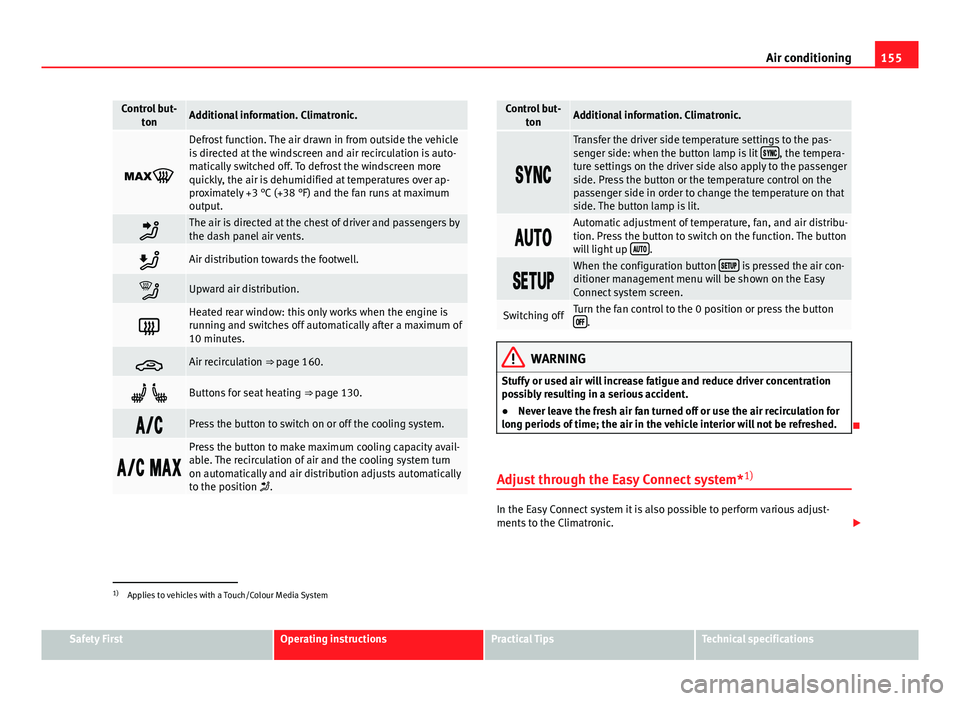
Control but- tonAdditional information. Climatronic.
1TemperatureThe left and right sides can be adjusted separately. Rotate
the control to adjust the temperature accordingly.
2FanThe power of the fan is automatically adjusted. The fan is
also adjusted manually by turning the control.
3Air distribu-tionThe airflow adjusts automatically for comfort. You can also
switch it on manually using the buttons 3.
4Indications on the temperature display screen selected for
the right and left sides.
Page 157 of 339
155
Air conditioning
Control but-
tonAdditional information. Climatronic.
Defrost function. The air drawn in from outside the vehicle
is directed at the windscreen and air recirculation is auto-
matically switched off. To defrost the windscreen more
quickly, the air is dehumidified at temperatures over ap-
proximately +3 °C (+38 °F) and the fan runs at maximum
output.
The air is directed at the chest of driver and passengers by
the dash panel air vents.
Air distribution towards the footwell.
Upward air distribution.
Heated rear window: this only works when the engine is
running and switches off automatically after a maximum of
10 minutes.
Air recirculation ⇒ page 160.
Buttons for seat heating ⇒ page 130.
Press the button to switch on or off the cooling system.
Press the button to make maximum cooling capacity avail-
able. The recirculation of air and the cooling system turn
on automatically and air distribution adjusts automatically
to the position .
Control but-
tonAdditional information. Climatronic.
Transfer the driver side temperature settings to the pas-
senger side: when the button lamp is lit , the tempera-
ture settings on the driver side also apply to the passenger
side. Press the button or the temperature control on the
passenger side in order to change the temperature on that
side. The button lamp is lit.
Automatic adjustment of temperature, fan, and air distribu-
tion. Press the button to switch on the function. The button
will light up
.
When the configuration button is pressed the air con-
ditioner management menu will be shown on the Easy
Connect system screen.
Switching offTurn the fan control to the 0 position or press the button .
WARNING
Stuffy or used air will increase fatigue and reduce driver concentration
possibly resulting in a serious accident.
● Never leave the fresh air fan turned off or use the air recirculation for
long periods of time; the air in the vehicle interior will not be refreshed.
Adjust through the Easy Connect system* 1)
In the Easy Connect system it is also possible to perform various adjust-
ments to the Climatronic.
1)
Applies to vehicles with a Touch/Colour Media System
Safety FirstOperating instructionsPractical TipsTechnical specifications
Page 158 of 339
156Air conditioning
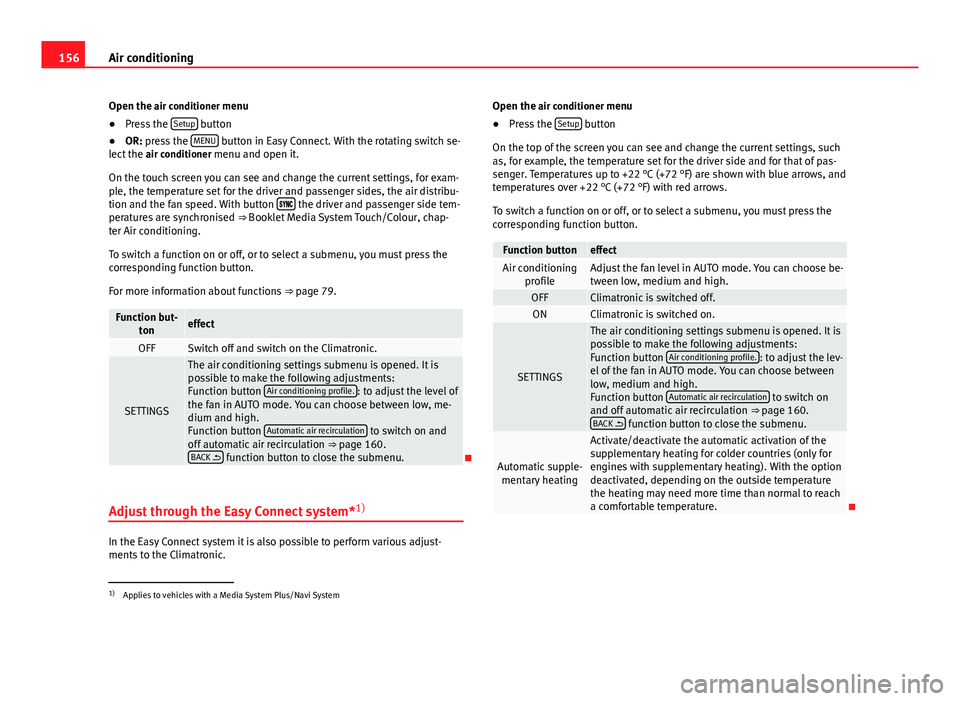
Open the air conditioner menu
● Press the Setup
button
● OR: press the MENU button in Easy Connect. With the rotating switch se-
lect the air conditioner menu and open it.
On the touch screen you can see and change the current settings, for exam-
ple, the temperature set for the driver and passenger sides, the air distribu-
tion and the fan speed. With button
the driver and passenger side tem-
peratures are synchronised ⇒ Booklet Media System Touch/Colour, chap-
ter Air conditioning.
To switch a function on or off, or to select a submenu, you must press the
corresponding function button.
For more information about functions ⇒ page 79.
Function but-
toneffect
OFFSwitch off and switch on the Climatronic.
SETTINGS
The air conditioning settings submenu is opened. It is
possible to make the following adjustments:
Function button Air conditioning profile.
: to adjust the level of
the fan in AUTO mode. You can choose between low, me-
dium and high.
Function button Automatic air recirculation
to switch on and
off automatic air recirculation ⇒ page 160.
BACK
function button to close the submenu.
Adjust through the Easy Connect system* 1)
In the Easy Connect system it is also possible to perform various adjust-
ments to the Climatronic. Open the air conditioner menu
● Press the Setup
button
On the top of the screen you can see and change the current settings, such
as, for example, the temperature set for the driver side and for that of pas-
senger. Temperatures up to +22 °C (+72 °F) are shown with blue arrows, and
temperatures over +22 °C (+72 °F) with red arrows.
To switch a function on or off, or to select a submenu, you must press the
corresponding function button.
Function buttoneffectAir conditioning profileAdjust the fan level in AUTO mode. You can choose be-
tween low, medium and high.
OFFClimatronic is switched off.ONClimatronic is switched on.
SETTINGS
The air conditioning settings submenu is opened. It is
possible to make the following adjustments:
Function button Air conditioning profile.
: to adjust the lev-
el of the fan in AUTO mode. You can choose between
low, medium and high.
Function button Automatic air recirculation
to switch on
and off automatic air recirculation ⇒ page 160.
BACK
function button to close the submenu.
Automatic supple-
mentary heating
Activate/deactivate the automatic activation of the
supplementary heating for colder countries (only for
engines with supplementary heating). With the option
deactivated, depending on the outside temperature
the heating may need more time than normal to reach
a comfortable temperature.
1) Applies to vehicles with a Media System Plus/Navi System
Page 159 of 339
157
Air conditioning
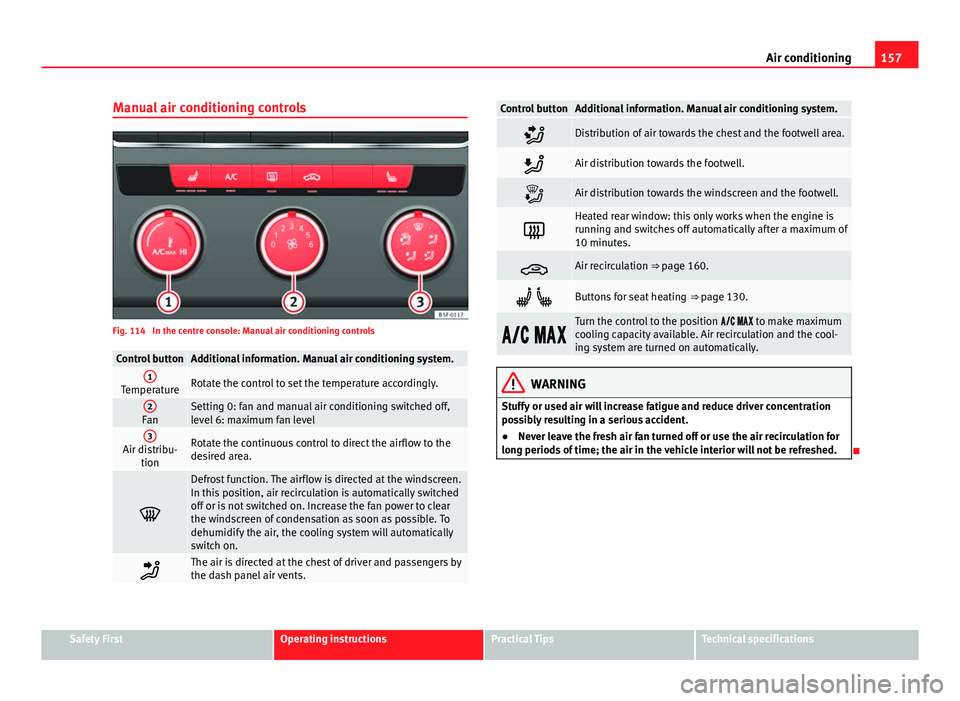
Manual air conditioning controls
Fig. 114 In the centre console: Manual air conditioning controls
Control buttonAdditional information. Manual air conditioning system.1TemperatureRotate the control to set the temperature accordingly.
2FanSetting 0: fan and manual air conditioning switched off,
level 6: maximum fan level
3Air distribu- tionRotate the continuous control to direct the airflow to the
desired area.
Defrost function. The airflow is directed at the windscreen.
In this position, air recirculation is automatically switched
off or is not switched on. Increase the fan power to clear
the windscreen of condensation as soon as possible. To
dehumidify the air, the cooling system will automatically
switch on.
The air is directed at the chest of driver and passengers by
the dash panel air vents.
Control buttonAdditional information. Manual air conditioning system.
Distribution of air towards the chest and the footwell area.
Air distribution towards the footwell.
Air distribution towards the windscreen and the footwell.
Heated rear window: this only works when the engine is
running and switches off automatically after a maximum of
10 minutes.
Air recirculation ⇒ page 160.
Buttons for seat heating ⇒ page 130.
Turn the control to the position to make maximum
cooling capacity available. Air recirculation and the cool-
ing system are turned on automatically.
WARNING
Stuffy or used air will increase fatigue and reduce driver concentration
possibly resulting in a serious accident.
● Never leave the fresh air fan turned off or use the air recirculation for
long periods of time; the air in the vehicle interior will not be refreshed.
Safety FirstOperating instructionsPractical TipsTechnical specifications
Page 160 of 339
158Air conditioning
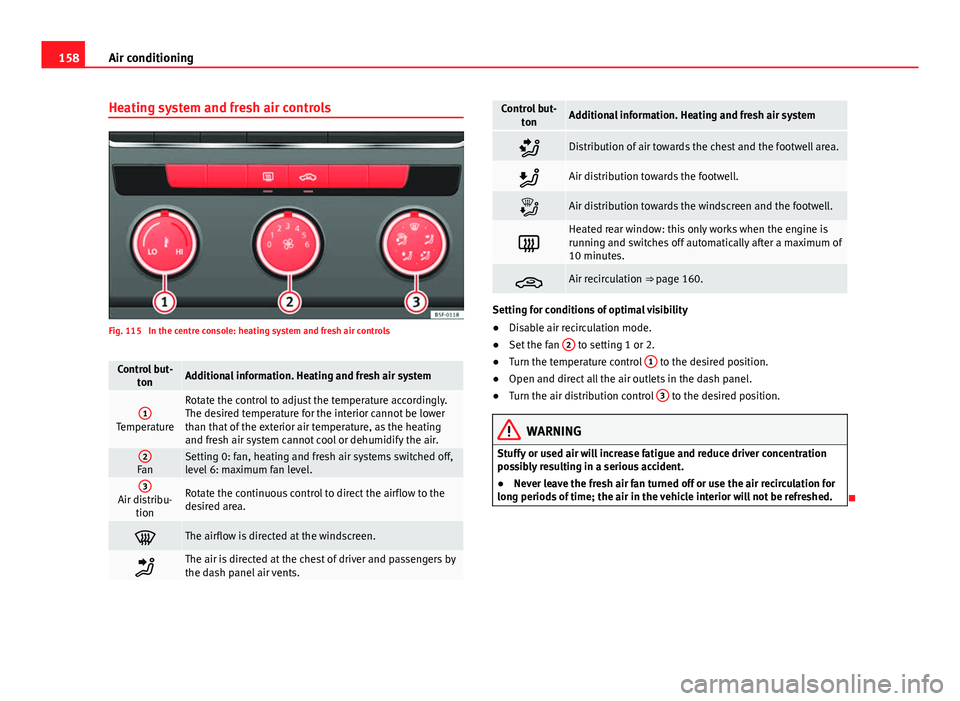
Heating system and fresh air controls
Fig. 115 In the centre console: heating system and fresh air controls
Control but-
tonAdditional information. Heating and fresh air system
1Temperature
Rotate the control to adjust the temperature accordingly.
The desired temperature for the interior cannot be lower
than that of the exterior air temperature, as the heating
and fresh air system cannot cool or dehumidify the air.
2FanSetting 0: fan, heating and fresh air systems switched off,
level 6: maximum fan level.
3Air distribu-tionRotate the continuous control to direct the airflow to the
desired area.
The airflow is directed at the windscreen.
The air is directed at the chest of driver and passengers by
the dash panel air vents.
Control but- tonAdditional information. Heating and fresh air system
Distribution of air towards the chest and the footwell area.
Air distribution towards the footwell.
Air distribution towards the windscreen and the footwell.
Heated rear window: this only works when the engine is
running and switches off automatically after a maximum of
10 minutes.
Air recirculation ⇒ page 160.
Setting for conditions of optimal visibility
●Disable air recirculation mode.
● Set the fan 2
to setting 1 or 2.
● Turn the temperature control 1 to the desired position.
● Open and direct all the air outlets in the dash panel.
● Turn the air distribution control 3
to the desired position.
WARNING
Stuffy or used air will increase fatigue and reduce driver concentration
possibly resulting in a serious accident.
● Never leave the fresh air fan turned off or use the air recirculation for
long periods of time; the air in the vehicle interior will not be refreshed.
Page 161 of 339

159
Air conditioning
Instructions for use of the air conditioner
The interior cooling system only works when the engine is running and fan
is switched on.
The air conditioner operates most effectively with the windows and the pan-
oramic sliding sunroof closed. However, if the vehicle has heated up after
standing in the sun for some time, the air inside can be cooled more quickly
by opening the windows and the panoramic sliding sunroof briefly.
Setting for conditions of optimal visibility
When the air conditioning is switched on, the temperature and the air hu-
midity in the vehicle interior drop. Hence, when the outside air humidity is
high, the windows do not mist over and comfort for the vehicle occupants is
improved:
With manual air conditioning
● Switch off air recirculation.
● Set the fan to the required setting.
● Turn the temperature control to the centre position.
● Open and direct all the air outlets in the dash panel.
● Turn the air distribution control to the required position.
● Press the button
to switch on the cooling system. The button will
light up.
With Climatronic
● Press button
.
● Set the temperature to +22 °C (+72 °F).
● Open and direct all the air outlets in the dash panel.
Climatronic: change the temperature unit on the screen of the radio or on
the factory-fitted navigation system
Changing the temperature display from Celsius to Fahrenheit on radio or on
the factory-fitted navigation system is done using the menu on the instru-
ment panel ⇒ page 73. The cooling system cannot be activated
If the air conditioning system cannot be switched on, this may be caused by
the following:
●
The engine is not running.
● The fan is switched off.
● The air conditioner fuse has blown.
● The outside temperature is lower than approximately +3 °C (+38 °F).
● The air conditioner compressor has been temporarily switched off be-
cause the engine coolant temperature is too high.
● Another fault in the vehicle. Have the air conditioner checked by a speci-
alised workshop.
Special Characteristics
If the humidity and temperature outside the vehicle are high, condensation
can drip off the evaporator in the cooling system and form a pool under-
neath the vehicle. This is normal and does not indicate a leak!
Note
After starting the engine, any residual humidity in the air conditioner could
mist over the windscreen. Switch on the defrost function as soon as possi-
ble to clear the windscreen of condensation.
Safety FirstOperating instructionsPractical TipsTechnical specifications
Page 162 of 339
160Air conditioning
Air vents
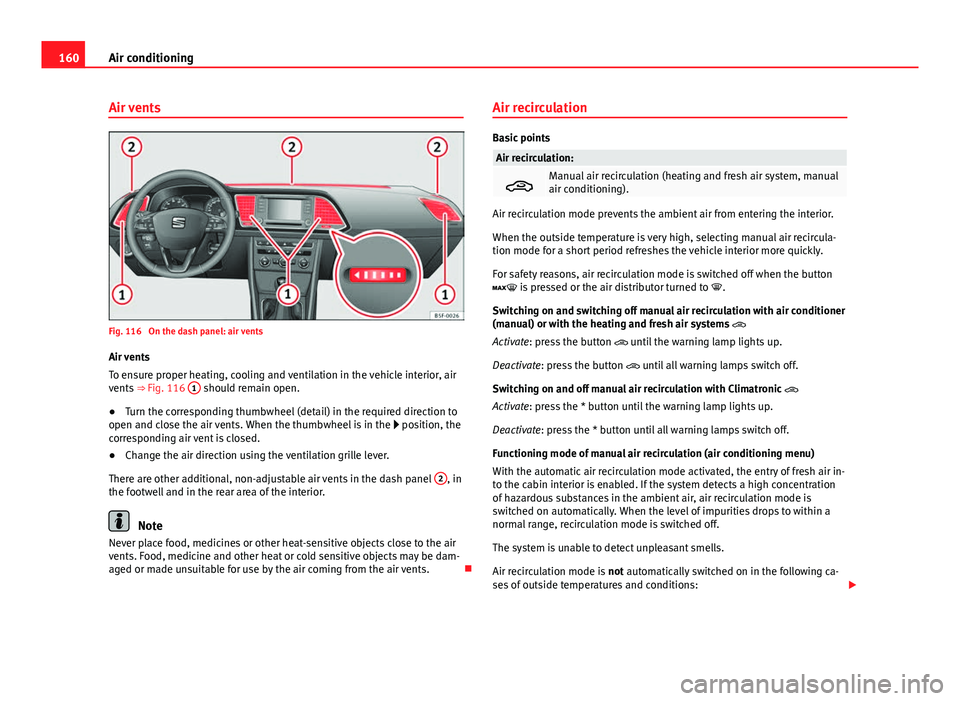
Fig. 116 On the dash panel: air vents
Air vents
To ensure proper heating, cooling and ventilation in the vehicle interior, air
vents ⇒ Fig. 116 1
should remain open.
● Turn the corresponding thumbwheel (detail) in the required direction to
open and close the air vents. When the thumbwheel is in the position, the
corresponding air vent is closed.
● Change the air direction using the ventilation grille lever.
There are other additional, non-adjustable air vents in the dash panel 2
, in
the footwell and in the rear area of the interior.
Note
Never place food, medicines or other heat-sensitive objects close to the air
vents. Food, medicine and other heat or cold sensitive objects may be dam-
aged or made unsuitable for use by the air coming from the air vents. Air recirculation
Basic points
Air recirculation:
Manual air recirculation (heating and fresh air system, manual
air conditioning).
Air recirculation mode prevents the ambient air from entering the interior.
When the outside temperature is very high, selecting manual air recircula-
tion mode for a short period refreshes the vehicle interior more quickly.
For safety reasons, air recirculation mode is switched off when the button
is pressed or the air distributor turned to
.
Switching on and switching off manual air recirculation with air conditioner
(manual) or with the heating and fresh air systems
Activate: press the button until the warning lamp lights up.
Deactivate: press the button until all warning lamps switch off.
Switching on and off manual air recirculation with Climatronic
Activate: press the * button until the warning lamp lights up.
Deactivate: press the * button until all warning lamps switch off.
Functioning mode of manual air recirculation (air conditioning menu)
With the automatic air recirculation mode activated, the entry of fresh air in-
to the cabin interior is enabled. If the system detects a high concentration
of hazardous substances in the ambient air, air recirculation mode is
switched on automatically. When the level of impurities drops to within a
normal range, recirculation mode is switched off.
The system is unable to detect unpleasant smells.
Air recirculation mode is not automatically switched on in the following ca-
ses of outside temperatures and conditions:
Page 163 of 339
161
Air conditioning
● The cooling system is switched on (the * button lamp is on) and the am-
bient temperature is below +3 °C (+38 °F).
● The cooling system and the windscreen wipers are switched off and the
outside temperature is below +10 °C (+50 °F).
● The cooling system is switched on, the outside temperature is below
+15 °C (+59 °F) and the windscreen wipers are switched on.
Activation/deactivation of automatic air recirculation is done in the air con-
ditioner menu, under Configuration.
WARNING
Stuffy or used air will increase fatigue and reduce driver concentration
possibly resulting in a serious accident.
● Never use recirculation mode for long periods as it does not refresh
the air inside the vehicle.
● If the cooling system is switched off and air recirculation mode
switched on, the windows can mist over very quickly, considerably limit-
ing visibility.
● Switch air recirculation mode off when it is not required.
CAUTION
Do not smoke when air recirculation is switched on in vehicles with an air
conditioner. The smoke taken in could lie on the cooling system vaporiser
and on the activated charcoal cartridge of the dust and pollen filter, leading
to a permanently unpleasant smell.
Note
Climatronic: Air recirculation mode switches on to prevent exhaust gas from
entering the vehicle interior when it is in reverse and while the automatic
windscreen wash and wipe is working.
Safety FirstOperating instructionsPractical TipsTechnical specifications
Page 169 of 339
167
Driving
Always apply the handbrake as far as it will go in order to prevent yourself
from driving with the handbrake applied by mistake ⇒
.
The handbrake warning lamp lights up when the handbrake is applied
and the ignition switched on. The warning lamp turns off when the hand-
brake is released.
If you drive faster than 6 km/h (4 mph) with the handbrake on, the following
message* will appear on the instrument panel display: HANDBRAKE ON. You
will also hear an audible warning.
WARNING
● Never use the handbrake to stop the vehicle when it is in motion. The
braking distance is considerably longer, because braking is only applied
to the rear wheels. Risk of accident!
● If the handbrake is only partially released, this will cause the rear
brakes to overheat, which can impair the function of the brake system
and could lead to an accident. This also causes premature wear on the
rear brake pads.
CAUTION
Always apply the handbrake before you leave the vehicle. The first gear
should also be selected.
Parking
The handbrake should always be firmly applied when the
vehicle is parked.
Always note the following points when parking the vehicle:
– Use the brake pedal to stop the vehicle. –
Apply the handbrake.
– Select first gear.
– Switch the engine off and remove the key from the ignition. Turn
the steering wheel slightly to engage the steering lock.
– Always take you keys with you when you leave the vehicle ⇒
.
Additional notes on parking the vehicle on gradients:
Turn the steering wheel so that the vehicle rolls against the kerb if it started
to roll.
● If the vehicle is parked facing downhill, turn the front wheels so that
they point towards the kerb .
● If the vehicle is parked facing uphill, turn the front wheels so that they
point away from the kerb .
● Secure the vehicle as normal by applying the handbrake firmly and se-
lecting first gear.
WARNING
● Take measures to reduce the risk of injury when you leave your vehi-
cle unattended.
● Never park where the hot exhaust system could ignite inflammable
materials, such as dry grass, low bushes, spilt fuel etc.
● Never allow vehicle occupants to remain in the vehicle when it is
locked. They would be unable to open the vehicle from the inside, and
could become trapped in the vehicle in an emergency. In the event of an
emergency, locked doors will delay assistance to vehicle occupants.
● Never leave children alone in the vehicle. They could set the vehicle
in motion, for example, by releasing the handbrake or the gearbox lever.
● Depending on weather conditions, it may become extremely hot or
cold inside the vehicle. This can be fatal.
Safety FirstOperating instructionsPractical TipsTechnical specifications
Page 173 of 339
171
Driving
● The engine has not yet reached the minimum required temperature for
the Start-Stop mode.
● The interior temperature selected for the air conditioner has not yet
been reached.
● The interior temperature is very high/low.
● Defrost function button activated ⇒ page 154.
● The parking aid* is switched on.
● The battery is very low.
● The steering wheel is overly turned or is being turned.
● If there is a danger of misting.
● After engaging reverse gear.
● In case of a very steep gradient.
The indication is shown on the instrument panel display, and in addition,
the driver information system* shows, .
The engine starts by itself
During a stopping phase the normal Start-Stop mode can be interrupted in
the following situations: The engine restarts by itself without involvement
from the driver.
● The interior temperature differs from the value selected on the air condi-
tioner.
● Defrost function button activated ⇒ page 154.
● The brake has been pressed several times consecutively.
● The battery is too low.
● High power consumption.
Note
In vehicles with an automatic gearbox, if the selector lever is placed in posi-
tion D, N or S after engaging reverse gear, the vehicle must be driven at a
speed faster than 10 km/h (5 mph) for the system to return to conditions in
which the engine can be stopped. Manually switching on/off the Start-Stop system
If you do not wish to use the system, you can switch it off
manually.
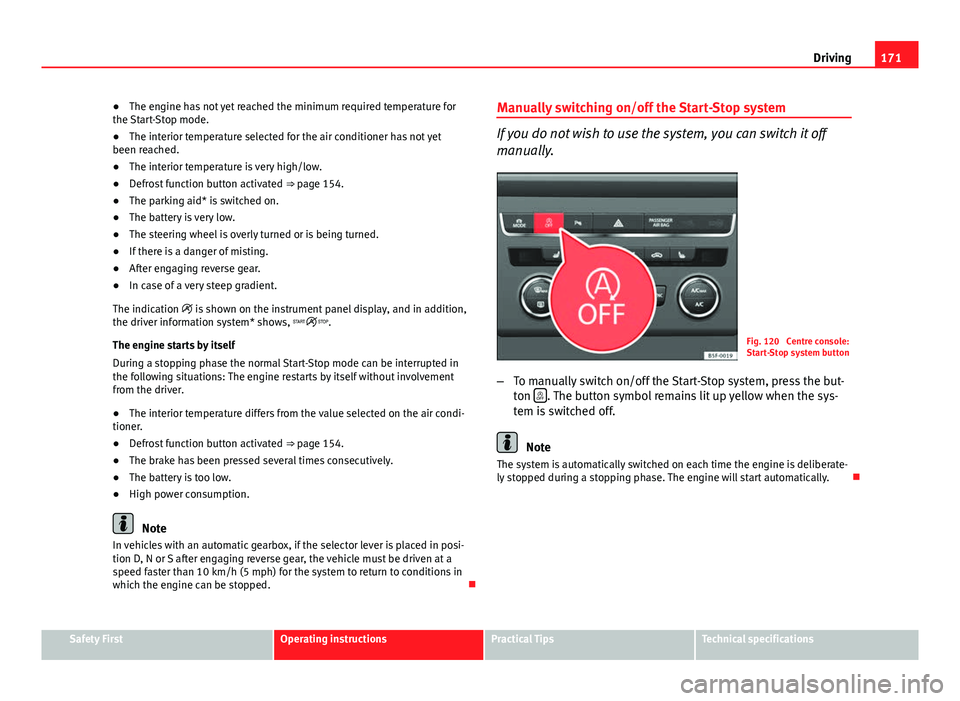
Fig. 120 Centre console:
Start-Stop system button
– To manually switch on/off the Start-Stop system, press the but-
ton
. The button symbol remains lit up yellow when the sys-
tem is switched off.
Note
The system is automatically switched on each time the engine is deliberate-
ly stopped during a stopping phase. The engine will start automatically.
Safety FirstOperating instructionsPractical TipsTechnical specifications