airbag off Seat Leon 5D 2013 User Guide
[x] Cancel search | Manufacturer: SEAT, Model Year: 2013, Model line: Leon 5D, Model: Seat Leon 5D 2013Pages: 339, PDF Size: 4.8 MB
Page 48 of 339
46Airbag system
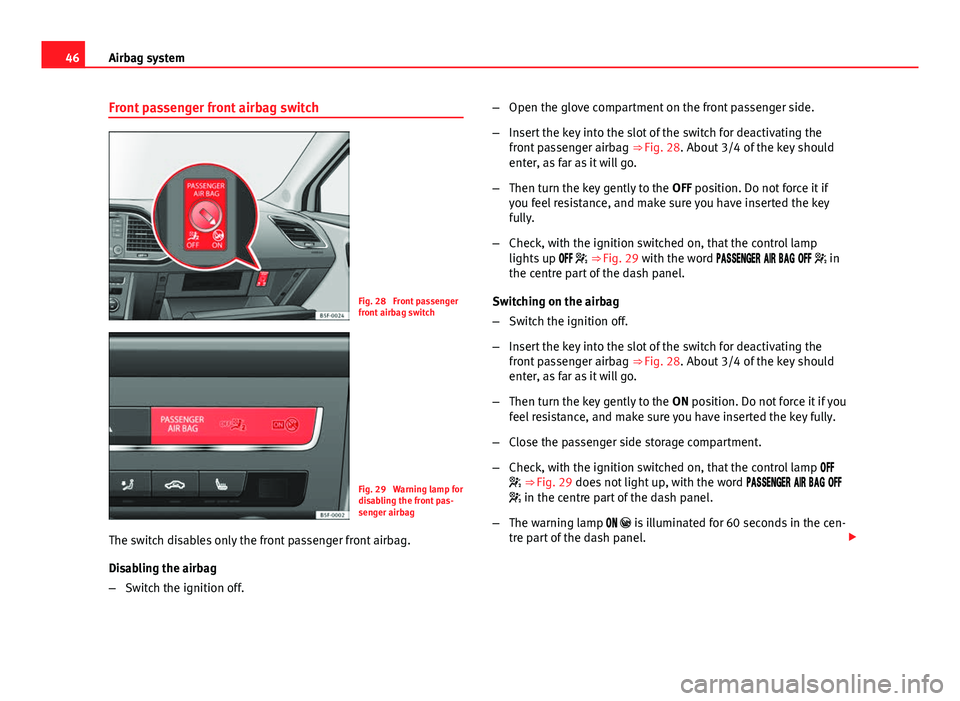
Front passenger front airbag switch
Fig. 28 Front passenger
front airbag switch
Fig. 29 Warning lamp for
disabling the front pas-
senger airbag
The switch disables only the front passenger front airbag.
Disabling the airbag
– Switch the ignition off. –
Open the glove compartment on the front passenger side.
– Insert the key into the slot of the switch for deactivating the
front passenger airbag ⇒ Fig. 28. About 3/4 of the key should
enter, as far as it will go.
– Then turn the key gently to the OFF position. Do not force it if
you feel resistance, and make sure you have inserted the key
fully.
– Check, with the ignition switched on, that the control lamp
lights up ⇒ Fig. 29 with the word in
the centre part of the dash panel.
Switching on the airbag
– Switch the ignition off.
– Insert the key into the slot of the switch for deactivating the
front passenger airbag ⇒ Fig. 28. About 3/4 of the key should
enter, as far as it will go.
– Then turn the key gently to the ON position. Do not force it if you
feel resistance, and make sure you have inserted the key fully.
– Close the passenger side storage compartment.
– Check, with the ignition switched on, that the control lamp
⇒ Fig. 29 does not light up, with the word
in the centre part of the dash panel.
– The warning lamp is illuminated for 60 seconds in the cen-
tre part of the dash panel.
Page 49 of 339
47
Airbag system
Control lamp with the word (front passenger airbag
disabled)
If the front passenger front airbag is disabled, after switching on the igni-
tion, the control lamp will light up for several seconds, then it will switch off
for about 1 s and then switch on again.
If the control lamp is flashing, there is a fault in the disabling of the airbag
system ⇒
. Please go immediately to an Official Service.
WARNING
● The driver of the vehicle is responsible for disabling or switching on
the airbag.
● Always switch off the ignition before disabling the front passenger
airbag! Failure to do so could result in a fault in the airbag deactivation
system.
● Never leave the key in the airbag deactivation switch as it could get
damaged or activate or deactivate the airbag during driving.
● If the control lamp (airbag deactivated) flashes, the front pas-
senger front airbag will not trigger in the event of an accident! Have the
system immediately checked by an Official Service.
Safety FirstOperating instructionsPractical TipsTechnical specifications
Page 61 of 339

59
Controls and displays
Operating instructions Controls and displays
Overview
Door handle
Central locking switch . . . . . . . . . . . . . . . . . . . . . . . . . . . . . . . . . . . . . 94
Electric control to adjust exterior mirrors . . . . . . . . . . . . . . . . . . . .125
Air outlets . . . . . . . . . . . . . . . . . . . . . . . . . . . . . . . . . . . . . . . . . . . . . . . . 160
Control lever for:
– Turn signals and main beam headlights . . . . . . . . . . . . . . . . .110
– Lane Assist . . . . . . . . . . . . . . . . . . . . . . . . . . . . . . . . . . . . . . . . . . . . . 207
– Main beam assist . . . . . . . . . . . . . . . . . . . . . . . . . . . . . . . . . . . . . . . 114
– Cruise control system (CCS) . . . . . . . . . . . . . . . . . . . . . . . . . . . . . 184
Depending on equipment fitted:
– Lever for cruise control . . . . . . . . . . . . . . . . . . . . . . . . . . . . . . . . . . 184
Steering wheel with horn and
– Driver airbag . . . . . . . . . . . . . . . . . . . . . . . . . . . . . . . . . . . . . . . . . . . 36
– On-board computer controls . . . . . . . . . . . . . . . . . . . . . . . . . . . . 73
– Controls for radio, telephone, navigation and speech dia-
logue system ⇒ Booklet Radio
– Paddle levers for tiptronic gearshift (automatic gearbox) . .178
Instrument panel . . . . . . . . . . . . . . . . . . . . . . . . . . . . . . . . . . . . . . . . . . 61
Control lever for:
– Windscreen wipers and washer . . . . . . . . . . . . . . . . . . . . . . . . . . 120
– Wipe and wash system . . . . . . . . . . . . . . . . . . . . . . . . . . . . . . . . . 120
– On-board computer . . . . . . . . . . . . . . . . . . . . . . . . . . . . . . . . . . . . . 73
12345
6
7
89
Depending on equipment fitted: Radio or display for Easy
Connect (navigation, radio, TV/video)
. . . . . . . . . . . . . . . . . . . . . .79
Depending on the equipment, buttons for:
– SEAT driving modes . . . . . . . . . . . . . . . . . . . . . . . . . . . . . . . . . . . . . 211
– Start-Stop system . . . . . . . . . . . . . . . . . . . . . . . . . . . . . . . . . . . . . . . 169
– Park assist system . . . . . . . . . . . . . . . . . . . . . . . . . . . . . . . . . . . . . . 217
– Hazard warning lights . . . . . . . . . . . . . . . . . . . . . . . . . . . . . . . . . . 113
– Airbag off display . . . . . . . . . . . . . . . . . . . . . . . . . . . . . . . . . . . . . . . 46
Glove box with (depending on equipment): . . . . . . . . . . . . . . . . .134
– CD player* and/or SD card* ⇒ Booklet Radio
– Multimedia interface* ⇒ Booklet Radio
Tyre pressure switch . . . . . . . . . . . . . . . . . . . . . . . . . . . . . . . . . . . . . . . 216
Front passenger airbag switch . . . . . . . . . . . . . . . . . . . . . . . . . . . . . 46
Front passenger airbag . . . . . . . . . . . . . . . . . . . . . . . . . . . . . . . . . . . . 36
Passenger seat heating control . . . . . . . . . . . . . . . . . . . . . . . . . . . . 130
Storage compartment
Depending on gearbox fitted, gear lever or selector lever for:
– manual gearbox . . . . . . . . . . . . . . . . . . . . . . . . . . . . . . . . . . . . . . . . 172
– automatic gearbox . . . . . . . . . . . . . . . . . . . . . . . . . . . . . . . . . . . . . . 173
Depending on the equipment, controls for:
– Heating and ventilation system or manual air conditioner .158, 157
– Automatic air conditioner . . . . . . . . . . . . . . . . . . . . . . . . . . . . . . . 154
Parking brake . . . . . . . . . . . . . . . . . . . . . . . . . . . . . . . . . . . . . . . . . . . . . 166
Driver seat heating control . . . . . . . . . . . . . . . . . . . . . . . . . . . . . . . . . 130
10
11
12
131415161718
19
2021
Safety FirstOperating instructionsPractical TipsTechnical specifications
Page 73 of 339
71
Instruments and warning/control lamps
SymbolMeaning ⇒ See
On the instrument panel display: a)
Level of windscreen washer fluid too low.⇒ page 120
Fuel tank almost empty.⇒ page 248
Flashing on the instrument panel display: a)
Fault in the oil level detection. Control manual-
ly.
⇒ page 253Lit up on the instrument panel display: a)
Engine oil level insufficient.
Fault in airbag system and seat belt tensioners.
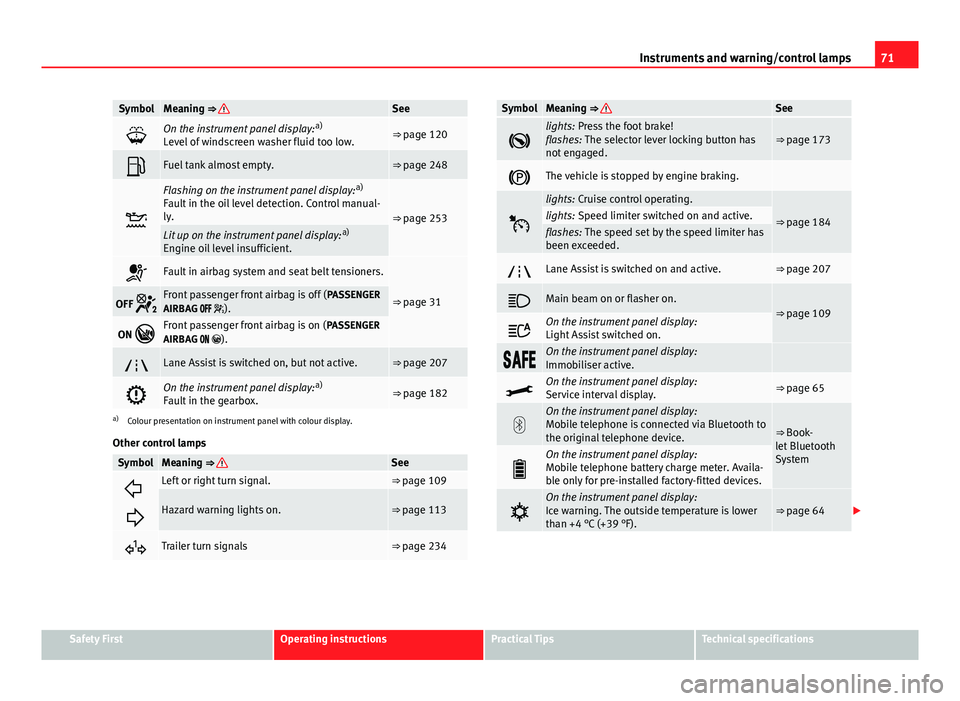
⇒ page 31OFF Front passenger front airbag is off ( PASSENGER
AIRBAG ).
ON Front passenger front airbag is on ( PASSENGER
AIRBAG ).
Lane Assist is switched on, but not active.⇒ page 207
On the instrument panel display: a)
Fault in the gearbox.⇒ page 182
a) Colour presentation on instrument panel with colour display.
Other control lamps
SymbolMeaning ⇒ See
Left or right turn signal.⇒ page 109
Hazard warning lights on.⇒ page 113
Trailer turn signals⇒ page 234
SymbolMeaning ⇒ See
lights: Press the foot brake!
flashes: The selector lever locking button has
not engaged.⇒ page 173
The vehicle is stopped by engine braking.
lights: Cruise control operating.
⇒ page 184lights: Speed limiter switched on and active.flashes: The speed set by the speed limiter has
been exceeded.
Lane Assist is switched on and active.⇒ page 207
Main beam on or flasher on.⇒ page 109
On the instrument panel display:
Light Assist switched on.
On the instrument panel display:
Immobiliser active.
On the instrument panel display:
Service interval display.⇒ page 65
On the instrument panel display:
Mobile telephone is connected via Bluetooth to
the original telephone device.
⇒ Book-
let Bluetooth
System
On the instrument panel display:
Mobile telephone battery charge meter. Availa-
ble only for pre-installed factory-fitted devices.
On the instrument panel display:
Ice warning. The outside temperature is lower
than +4 °C (+39 °F).⇒ page 64
Safety FirstOperating instructionsPractical TipsTechnical specifications
Page 89 of 339
87
Opening and closing
Opening and closing Central locking system
Description
The vehicle can be locked and unlocked via the central locking system.
There are several methods, depending on the vehicle equipment:
● key with remote control ⇒ page 92,
● lock on driver door (emergency opening ⇒ page 98) or
● interior central locking switch ⇒ page 94.
Unlocking one side of the vehicle only
When you lock the vehicle with the key, the doors and the rear lid are
locked. When you open the door, you can either unlock only the driver door,
or all the vehicle doors. To select the required option, use Easy Connect*
⇒ page 93.
Central locking (Auto Lock)
The Auto Lock function locks the doors and the rear lid when the vehicle ex-
ceeds a speed of about 15 km/h (10 mph).
The vehicle is unlocked again when the ignition key is removed. Alternative-
ly, the vehicle can also be unlocked via the central locking switch or by pull-
ing one of the inside door handles. The Auto Lock function can be switched
on and off on the sound system or on the Easy Connect* system
⇒ page 93.
In the event of an accident in which the airbags inflate, the doors will be au-
tomatically unlocked to facilitate access and assistance. Anti-theft security system (Safelock)
1)
The following message is displayed on the instrument panel to remind the
driver that when the vehicle is closed from the outside, the anti-theft securi-
ty system is switched on. Do not forget the Safelock. Please see Instruction
Manual. The vehicle cannot be opened from inside. This makes it more diffi-
cult for unauthorised persons to break into the vehicle ⇒ .
The anti-theft security system can be switched off each time the vehicle is
locked:
● Turn the key a second time to the lock position, in the door lock, for the
next two seconds . If necessary, remove the protective cover on the driver
door handle ⇒ page 98. or
● Press
on the remote control key for a second time
for the following 2
seconds.
The flashing frequency of the diode in the door sill immediately confirms
the process. Initially, the diode flashes in a fast sequence for a brief period,
then it stops for approximately 30 seconds and, lastly continues flashing
slowly.
Anti-theft alarm system*
If the anti-theft alarm system senses interference with the vehicle it triggers
an audible and visible alarm.
The anti-theft alarm system is automatically switched on when locking the
vehicle. It switches off when the vehicle is unlocked from a distance.
When the driver door is unlocked with the key, you should switch on the ig-
nition within 15 seconds. Otherwise the alarm will be triggered. On some
export versions, the alarm is triggered immediately when you open a door.
1)
The availability of this function depends on the vehicle equipment.
Safety FirstOperating instructionsPractical TipsTechnical specifications
Page 96 of 339
94Opening and closing
Central locking switch
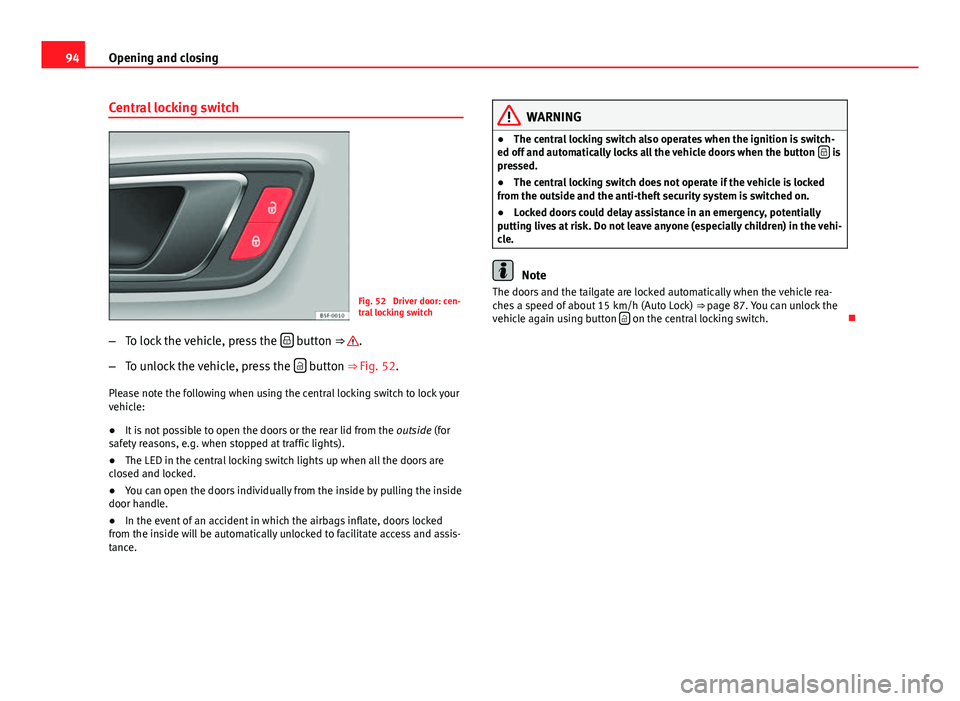
Fig. 52 Driver door: cen-
tral locking switch
– To lock the vehicle, press the
button ⇒ .
– To unlock the vehicle, press the
button ⇒ Fig. 52.
Please note the following when using the central locking switch to lock your
vehicle:
● It is not possible to open the doors or the rear lid from the outside (for
safety reasons, e.g. when stopped at traffic lights).
● The LED in the central locking switch lights up when all the doors are
closed and locked.
● You can open the doors individually from the inside by pulling the inside
door handle.
● In the event of an accident in which the airbags inflate, doors locked
from the inside will be automatically unlocked to facilitate access and assis-
tance.
WARNING
● The central locking switch also operates when the ignition is switch-
ed off and automatically locks all the vehicle doors when the button
is
pressed.
● The central locking switch does not operate if the vehicle is locked
from the outside and the anti-theft security system is switched on.
● Locked doors could delay assistance in an emergency, potentially
putting lives at risk. Do not leave anyone (especially children) in the vehi-
cle.
Note
The doors and the tailgate are locked automatically when the vehicle rea-
ches a speed of about 15 km/h (Auto Lock) ⇒ page 87. You can unlock the
vehicle again using button
on the central locking switch.
Page 190 of 339
188Driver assistance systems
Travelling down hills with the CCS
When travelling down hills the CCS cannot maintain a constant speed. Slow
the vehicle down using the brake pedal and reduce gears if required.
Automatic off
The cruise control system (CCS) is switched off automatically or temporarily:
● If the system detects a fault that could affect the working order of the
CCS.
● If you press and maintain the accelerator pedal for a certain time, driv-
ing faster than the stored speed.
● If the dynamic driving control systems intervene (i.e. ASR or ESC).
● If the airbag is triggered.
Page 225 of 339
223
Intelligent technology
Multi-collision brake
In an accident, the multi-collision brake can help the driver by braking to
avoid the risk of skidding during the accident, which could lead to further
collisions.
The multi-collision brake works for front, side or rear accidents, when the
airbag control unit records its activation level and the accident takes place
at a speed of over 10 km/h (6 mph). The ESC automatically brakes the vehi-
cle, as long as the accident has not damaged the ESC, the brake hydraulics
or the on-board network.
The following actions control automatic braking during the accident:
● When the driver presses the accelerator. The automatic braking does not
take place.
● When the braking pressure through pressing the brake pedal is greater
than the system’s braking pressure. The vehicle will brake manually.
● Multi-collision braking will not be available if ESC is malfunctioning.
WARNING
● The ESC, ABS, ASR, EDL, electronic self-locking differential or selec-
tive torque control systems cannot exceed the limits imposed by the laws
of physics. Always bear this in mind, especially on wet or slippery roads.
If you notice the systems cutting in, you should reduce your speed imme-
diately to suit the road and traffic conditions. Do not be encouraged to
take risks by the presence of more safety systems. If you do, an accident
may occur.
● Please remember that the accident risk always increases if you drive
fast, especially in corners or on a slippery road, or if you follow too close
behind the vehicle in front of you. The ESC, ABS, brake assist, EDL, elec-
tronic self-locking and selective torque control systems cannot prevent
accidents: risk of accidents!
● Accelerate with caution on slippery surfaces (for example, icy or
snow-covered). Despite the control systems, the driven wheels could
spin, affecting the stability of the vehicle: risk of accident!
Note
● The ABS and ASR will only operate correctly if the four wheels have iden-
tical tyres. Any differences in the rolling radius of the tyres can cause the
system to reduce engine power when this is not desired.
● The regulating processes of the systems can make noises when they in-
tervene.
● If the warning lamp lights up, or alternatively, there could be a
fault ⇒ page 69.
Switching on/off the ESC and ASR
The ESC is switched on automatically when the engine is
started. The ESC cannot be deactivated. ESC in “Sport Mode”
Sport mode is activated through the Easy Connect system menu ⇒ page 79.
The ability of the ESC to stabilise the vehicle is limited; the traction control
system (ASR) becomes disabled ⇒
.
The control lamp will light up. For vehicles with a driver information sys-
tem*, the driver will be shown the electronic stability control (ESC) option:
sport. Warning! Limited stability .
In the following exceptional circumstances enabling the ESC Sport mode to
improve the traction of the wheels is tenable:
● “Swing” the vehicle to unblock it.
● Driving in deep snow or on loose surfaces.
Disable ESC Sport mode
Through the Easy Connect system ⇒ page 79. The warning lamp will
switch off. For vehicles with a driver information system*, the driver will be
shown the electronic stability control (ESC) option: on .
Safety FirstOperating instructionsPractical TipsTechnical specifications
Page 230 of 339

228Intelligent technology
To restore the necessary energy balance, the system will then temporarily
shut off the electrical components that are using a lot of power, or reduce
the current they are consuming. Heating systems in particular use a large
amount of electrical power. If you notice, for instance, that the seat heating*
or the heated rear window is not working, they may have been temporarily
switched off or regulated to a lower heat output. These systems will be
available again as soon as sufficient electrical power is available.
You may also notice that the engine runs at a slightly faster idling speed.
This is quite normal, and no cause for concern. The increased idling speed
allows the alternator to meet the greater power requirement and charge the
battery at the same time.
Information recorded in the control units
Your vehicle is fitted at the factory with a series of electronic control units
responsible for the engine and gearbox management. In addition, the con-
trol units supervise the correct performance of the exhaust gas system and
the airbag systems.
Therefore, while the vehicle is being driven, these electronic control units
are continuously analysing the vehicle data. In the event of faults or devia-
tions from the theoretical values, only this data is stored. Generally, the in-
strument panel warning lamps indicate whether there are any malfunctions.
This data can only be read and analysed using special equipment.
The storing of the data allows specialised workshops to detect and repair
faults. Stored data may include:
● Important data about the engine and gearbox
● Speed
● Direction of travel ●
Braking force
● Seat belt check
The vehicle control units never record conversations held by passengers in
the vehicle.
If the control unit records an accident with airbag activation, the system
may automatically send a signal. This will depend on the network operator.
Normally, transmission is only possible in areas with sufficient coverage.
Event Data Recorder
The vehicle is not fitted with an event data recorder.
An event data recorder temporarily stores the vehicle information. There-
fore, in the event of accident, it is possible to obtain detailed information
about how the accident occurred. For example, in vehicles with airbag sys-
tems, data relating to speed of impact, seat belt status, seat positions and
airbag activation times may be stored. The volume of data depends on the
manufacturer.
Event data recorders can only be mounted with authorisation from the vehi-
cle owner and, in some countries, they are governed by local legislation.
Reprogramming control units
On the whole, all the data required for the component management is stor-
ed in the control units. The programming of certain convenience functions,
such as the turn signal convenience mode, individual door opening and dis-
play indications can be modified using special equipment at the workshop.
If the convenience functions are reprogrammed, the Instruction Manual in-
formation and descriptions will not coincide with the modified functions.
Therefore, SEAT recommends that any changes are recorded in the “Other
workshop notes section” of the Service Plan.
You can find out about possible reprogramming at your SEAT Official Serv-
ice.
Page 274 of 339
272Accessories and modifications to the vehicle
Accessories and modifications to the vehicle
Accessories, replacement parts and repairs
Always ask your dealer or specialist retailer for advice be-
fore purchasing accessories and replacement parts.
Your vehicle is designed to offer a high standard of active and passive safe-
ty. For this reason, we recommend that you ask a SEAT Official Service for
advice before fitting accessories or replacement parts. Your SEAT Official
Service has the latest information from the manufacturer and can recom-
mend accessories and replacement parts which are suitable for your re-
quirements. They can also answer any questions you might have regarding
official regulations.
We recommend you to use only SEAT accessories and Genuine SEAT parts ®
.
SEAT has tested these parts and accessories for suitability, reliability and
safety. SEAT Official Services have the necessary experience and facilities to
ensure that the parts are installed correctly and professionally.
Any retro-fitted equipment which has a direct effect on the vehicle and/or
the way it is driven e.g. cruise control system or electronically-controlled
suspension, must bear the e mark (the European Union's authorisation
symbol) and be approved for use in the vehicle in question.
If any additional electrical components are fitted which do not serve to con-
trol the vehicle itself (for instance a refrigerator box, laptop or ventilator fan,
etc.), these must bear the mark (manufacturer conformity declaration in
the European Union).
WARNING
Accessories, for example telephone holders or cup holders, should never
be fitted on the covers, or within the working range of the airbags. Other-
wise, there is a danger of injury if the airbag is triggered in an accident.
Technical modifications
Modifications must always be carried out according to our
specifications.
Unauthorised modifications to the electronic components, software, wiring
or data transfer in the vehicle may cause malfunctioning. Due to the way the
electronic components are linked together in networks, other indirect sys-
tems may be affected by the faults. This can seriously impair safety, lead to
excessive wear of components, and also invalidate your vehicle registration
documents.
You will appreciate that your SEAT dealership cannot be held liable for any
damage caused by modifications and/or work performed incorrectly.
We recommend that all work should be performed by a SEAT Official Service
using Genuine SEAT parts
®
.
WARNING
Incorrectly performed modifications or other work on your vehicle can
lead to malfunctions and cause accidents.
Radio transmitters and business equipment
Radio transmitters (fixed installation)
Any retrofit installations of radio transmitters in the vehicle require prior ap-
proval. SEAT generally authorises in-vehicle installations of approved types
of radio transmitters provided that: