infotainment Seat Leon 5D 2014 NAVI SYSTEM PLUS
[x] Cancel search | Manufacturer: SEAT, Model Year: 2014, Model line: Leon 5D, Model: Seat Leon 5D 2014Pages: 84, PDF Size: 2.08 MB
Page 35 of 84
Audio and Media Mode
The connection of an external audio source is
indicated by AUX on the screen ››› Fig. 28 .
Connecting an external audio source to the
AUX-IN multimedia socket
● Lower the base volume on the Infotainment
system.
● Connect the external audio source to the
AUX-IN multimedia socket.
● Start playback on the external audio
source.
● In the MEDIA main menu, press the SOURCEfunction button and select
AUX .
The output volume
of
the c onnected external
audio source should be adjusted to the vol-
ume of the other audio sources ››› page 72.
Information on operating an external audio
source connected to the AUX-IN multimedia
socket
OperationEffect
Selection of another au-
dio source from the Info-
tainment system.The external audio source
continues to run in the
background.
Stopping playback on the
external audio source.The infotainment system
remains in the AUX menu.
Disconnecting the plug
from the AUX-IN multime-
dia socket.The Infotainment system
changes to the playback of
the last audio source used. Note
● Please read and observe the manufactur-
er's instruction manual for the external audio
source.
● Interference may be heard if the external
audio source is powered from the vehicle’s
12-volt socket. Connecting an external audio source
via Bluetooth
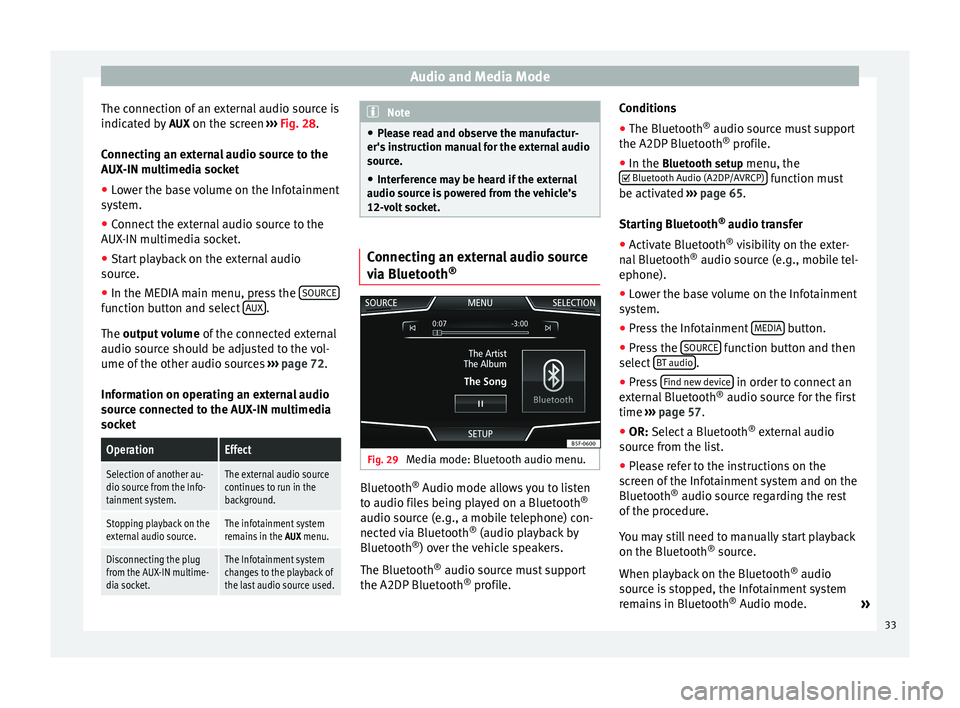
® Fig. 29
Media mode: Bluetooth audio menu. Bluetooth
®
Audio mode allows you to listen
to audio files being played on a Bluetooth ®
audio source (e.g., a mobile telephone) con-
nected via Bluetooth ®
(audio playback by
Bluetooth ®
) over the vehicle speakers.
The Bluetooth ®
audio source must support
the A2DP Bluetooth ®
profile. Conditions
●
The Bluetooth ®
audio source must support
the A2DP Bluetooth ®
profile.
● In the Bluetooth setup menu, the
Bluet
ooth Audio (A2DP/AVRCP) function must
be activated ››› page 65 .
St ar
ting Bluetooth ®
audio transfer
● Activate Bluetooth ®
visibility on the exter-
nal Bluetooth ®
audio source (e.g., mobile tel-
ephone).
● Lower the base volume on the Infotainment
system.
● Press the Infotainment MEDIA button.
● Press the SOURCE function button and then
select BT audio .
● Press Find new device in order to connect an
external Bluetooth ®
audio source for the first
time ››› page 57 .
● OR: Select a Bluetooth ®
e xt
ernal audio
source from the list.
● Please refer to the instructions on the
screen of the Infotainment system and on the
Bluetooth ®
audio source regarding the rest
of the procedure.
You may still need to manually start playback
on the Bluetooth ®
source.
When playback on the Bluetooth ®
audio
source is stopped, the Infotainment system
remains in Bluetooth ®
Audio mode. »
33
Page 36 of 84
Audio and Media Mode
Controlling playback
The extent to which the Bluetooth ®
audio
source can be controlled via the Infotainment
system depends on the connected Blue-
tooth ®
audio source.
The available functions will depend on the
Bluetooth ®
Audio profile that the connected
external player supports.
With media players that support the AVRCP
Bluetooth ®
profile, playback on the Blue-
tooth ®
audio source can be automatically
started or stopped when the unit is switched
to Bluetooth ®
Audio mode or to a different
audio source. In addition, it is possible to
view or change the track via the Infotainment
system. Note
● Due to the large number of possible Blue-
tooth ®
audio sources, it is not possible to
guarantee fault-free operation of all descri-
bed functions.
● Always switch off the warning and service
tones on a connected Bluetooth ®
audio
source, e.g. key tones on a mobile telephone,
to prevent possible interference noise and
malfunctions.
● Do not connect an external media player to
play music via Bluetooth ®
and via the USB
port ››› page 31 at the same time with the Infotainment system, as this could cause
playback limitations.
● If the external player is an Apple device™,
it cannot be simultaneously connected by
USB and by Bluetooth. Jukebox (SSD)
Fig. 30
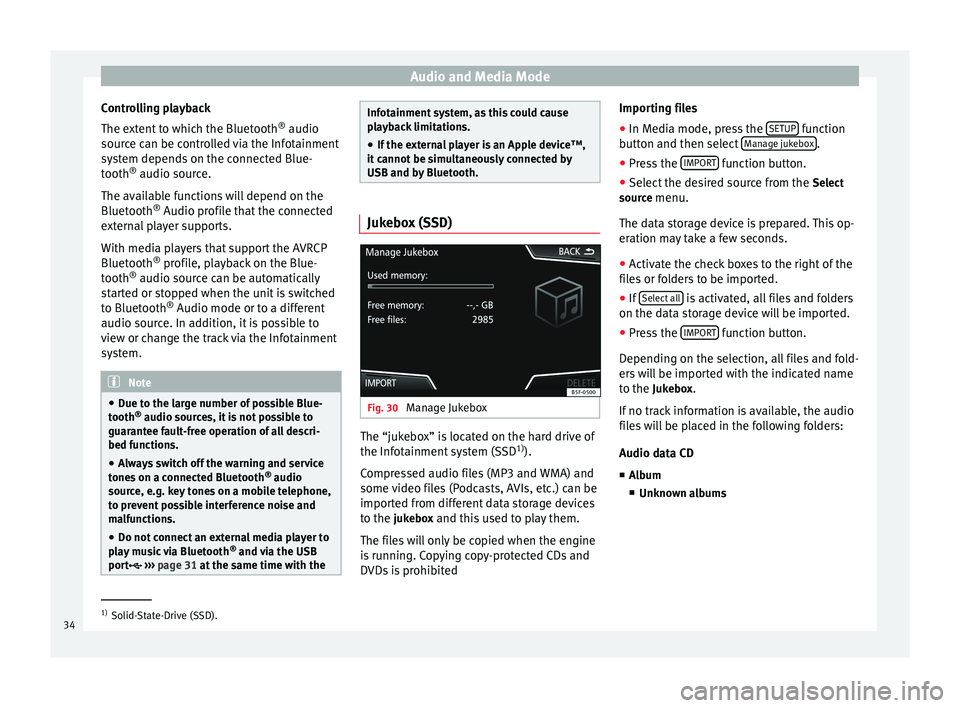
Manage Jukebox The “jukebox” is located on the hard drive of
the Infotainment system (SSD
1)
).
Compressed audio files (MP3 and WMA) and
some video files (Podcasts, AVIs, etc.) can be
imported from different data storage devices
to the jukebox and this used to play them. The files will only be copied when the engine
is running. Copying copy-protected CDs and
DVDs is prohibited Importing files
● In Media mode, press the SETUP function
button and then select Manage jukebox .
● Press the IMPORT function button.
● Select the desired source from the Select
source menu.
The data storage device is prepared. This op-
eration may take a few seconds.
● Activate the check boxes to the right of the
files or folders to be imported.
● If Select all is activated, all files and folders
on the data storage device will be imported.
● Press the IMPORT function button.
Depending on the selection, all files and fold-
ers will be imported with the indicated name
to the Jukebox. If no track information is available, the audio
files will be placed in the following folders:
Audio data CD
■ Album
■ Unknown albums 1)
Solid-State-Drive (SSD).
34
Page 37 of 84
Audio and Media Mode
■ Track. mp3 1)
■ Artists
■Unknown artists
■ Unknown albums
■ Track. mp3 1)
Functions and progress display during the
copying operation
While copying, an animation is displayed
along with the progress percentage on the
import screen.
Audio data CD : It is not possible to copy and
p l
ay files at the same time.
● Press the Cancel function button to end the
import of the whole track that is currently be-
ing imported.
● To obtain information on the status of the
import, press the Information function button.
● Press the BACK function button to close
the import screen with the progress informa-
tion.
● When the file import ends, the following
message will appear: All files imported.
Deleting files
● In Media mode, press the SETUP function
button and then select Manage jukebox .●
Press the DELETE function button.
● Activate the check boxes to the right of the
files or folders to be deleted.
● If Select all is activated, all the files and
folders on the data storage device will be de-
leted.
● Press the DELETE function button. The files
and folders will be deleted according to the
selection made.
● When the files have been deleted, the fol-
lowing message will appear: All files deleted.
● Press the BACK function button to close
the menu.
Opening stored audio and video files
● Change to Jukebox (SSD) content
››› page 28 .
When s t
oring the tracks, they are stored un-
der different categories and lists according to
the information available.
The tracks saved can be checked and opened
from these lists according to different catego-
ries.
Jukebox
● Track list
● Artist ●
Album
● Music genre
● Title
● Video
● Unreadable files (an unsupported file has
been imported). Note
● If the Infotainment system cancels a copy-
ing operation, check the storage space on the
internal hard drive and check the data stor-
age device.
● Due to copyright laws, before any change in
ownership of the Infotainment system, all
files stored on the jukebox must be deleted. 1)
The name and extension of the file are examples.
35
Page 38 of 84
Audio and Media Mode
Connecting an external audio source
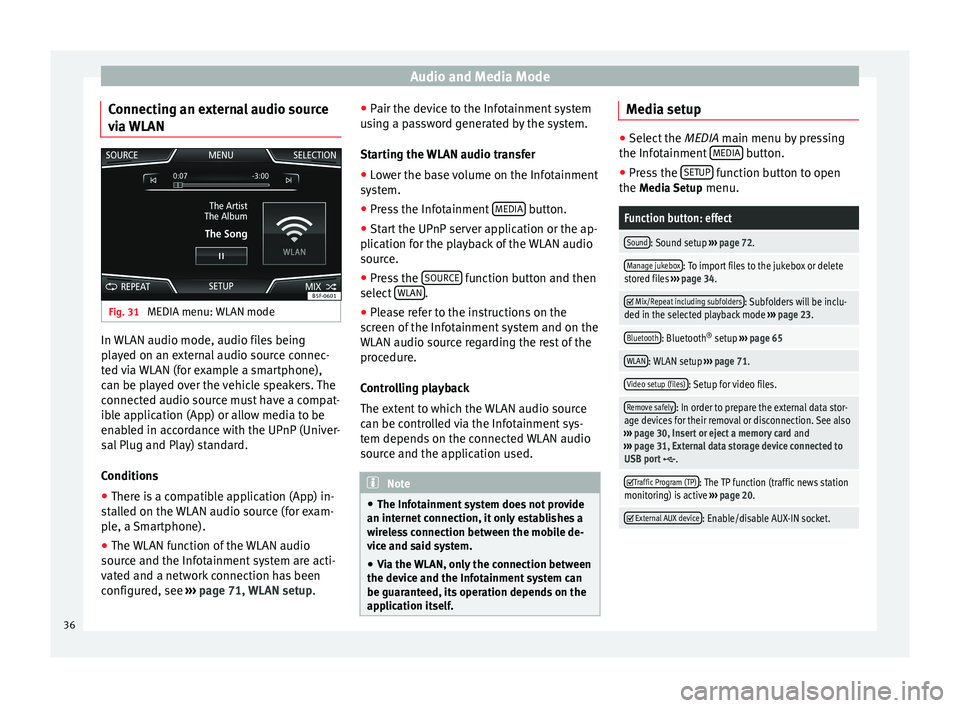
via WLAN Fig. 31
MEDIA menu: WLAN mode In WLAN audio mode, audio files being
played on an external audio source connec-
ted via WLAN (for example a smartphone),
can be played over the vehicle speakers. The
connected audio source must have a compat-
ible application (App) or allow media to be
enabled in accordance with the UPnP (Univer-
sal Plug and Play) standard.
Conditions
● There is a compatible application (App) in-
stalled on the WLAN audio source (for exam-
ple, a Smartphone).
● The WLAN function of the WLAN audio
source and the Infotainment system are acti-
vated and a network connection has been
configured, see ››› page 71, WLAN setup. ●
Pair the device to the Infotainment system
using a password generated by the system.
Starting the WLAN audio transfer
● Lower the base volume on the Infotainment
system.
● Press the Infotainment MEDIA button.
● Start the UPnP server application or the ap-
plication for the playback of the WLAN audio
source.
● Press the SOURCE function button and then
select WLAN .
● Please refer to the instructions on the
screen of the Infotainment system and on the
WLAN audio source regarding the rest of the
procedure.
Controlling playback
The extent to which the WLAN audio source
can be controlled via the Infotainment sys-
tem depends on the connected WLAN audio
source and the application used. Note
● The Infotainment system does not provide
an internet connection, it only establishes a
wireless connection between the mobile de-
vice and said system.
● Via the WLAN, only the connection between
the device and the Infotainment system can
be guaranteed, its operation depends on the
application itself. Media setup
●
Select the MEDIA main menu by pressing
the Inf ot
ainment MEDIA button.
● Press the SETUP function button to open
the Media Setup menu.
Function button: effect
Sound: Sound setup ››› page 72.
Manage jukebox: To import files to the jukebox or delete
stored files ››› page 34.
Mix/Repeat including subfolders: Subfolders will be inclu-
ded in the selected playback mode ››› page 23.
Bluetooth: Bluetooth ®
setup ››› page 65
WLAN: WLAN setup ››› page 71.
Video setup (files): Setup for video files.
Remove safely: In order to prepare the external data stor-
age devices for their removal or disconnection. See also
››› page 30, Insert or eject a memory card and
››› page 31, External data storage device connected to
USB port
.
Traffic Program (TP): The TP function (traffic news station
monitoring) is active ››› page 20.
External AUX device: Enable/disable AUX-IN socket.
36
Page 39 of 84
Audio and Media Mode
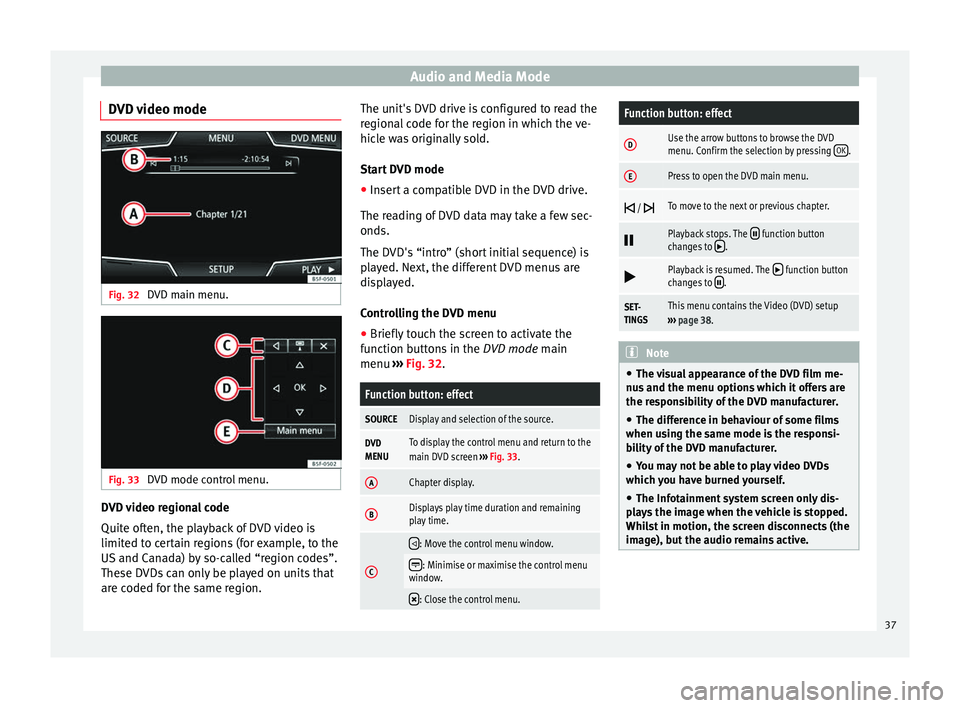
DVD video mode Fig. 32
DVD main menu. Fig. 33
DVD mode control menu. DVD video regional code
Quite often, the playback of DVD video is
limited to certain regions (for example, to the
US and Canada) by so-called “region codes”.
These DVDs can only be played on units that
are coded for the same region. The unit's DVD drive is configured to read the
regional code for the region in which the ve-
hicle was originally sold.
Start DVD mode
● Insert a compatible DVD in the DVD drive.
The reading of DVD data may take a few sec-
onds.
The DVD's “intro” (short initial sequence) is
played. Next, the different DVD menus are
displayed.
Controlling the DVD menu
● Briefly touch the screen to activate the
function buttons in the DVD mode main
menu ›
›
› Fig. 32.
Function button: effect
SOURCEDisplay and selection of the source.
DVD
MENUTo display the control menu and return to the
main DVD screen ››› Fig. 33.
AChapter display.
BDisplays play time duration and remaining
play time.
C
: Move the control menu window.
: Minimise or maximise the control menu
window.
: Close the control menu.
Function button: effect
DUse the arrow buttons to browse the DVD
menu. Confirm the selection by pressing
OK.
EPress to open the DVD main menu.
/ To move to the next or previous chapter.
Playback stops. The function button
changes to .
Playback is resumed. The function button
changes to .
SET-
TINGSThis menu contains the Video (DVD) setup
››› page 38. Note
● The visual appearance of the DVD film me-
nus and the menu options which it offers are
the responsibility of the DVD manufacturer.
● The difference in behaviour of some films
when using the same mode is the responsi-
bility of the DVD manufacturer.
● You may not be able to play video DVDs
which you have burned yourself.
● The Infotainment system screen only dis-
plays the image when the vehicle is stopped.
Whilst in motion, the screen disconnects (the
image), but the audio remains active. 37
Page 40 of 84
Audio and Media Mode
DVD video setup On the DVD mode
main menu, press the
S
ETUP function and then select the option
Video setup (DVD).
Function button: effect
Format: To select the screen format. If Automatic is selec-
ted, it adjusts automatically to the optimal format for the
screen.
Audio channel: select language for acoustic voice output.
Subtitles: To select the subtitle language.
Enter/change PIN for parental settings: Parental settings pass-
word.
Parental settings: To select the level of protection for DVD
playback. The options in the Video setup (DVD) menu
may vary depending on the DVD or the chap-
ter currently being played.
The available audio language channels and
subtitles depend on the inserted DVD.
All or a part of the DVD video content may be
protected by means of a password (PIN) if the
DVD is compatible with parental settings. Fur-
thermore, the level of protection can be set
according to age with 1 being the least re-
strictive (appropriate for all audiences) and
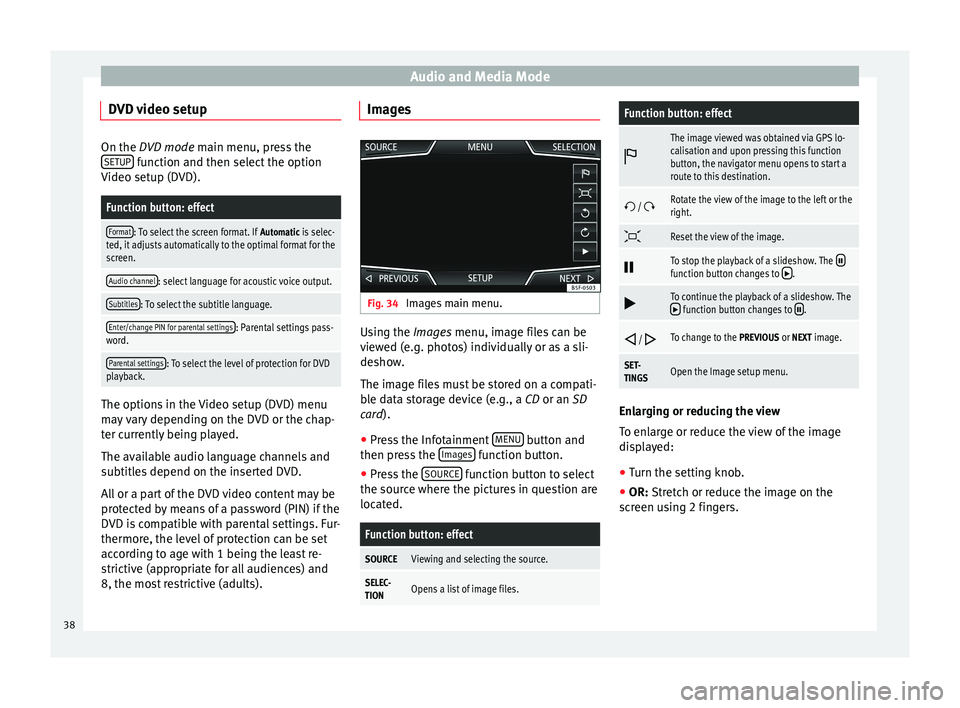
8, the most restrictive (adults). Images
Fig. 34
Images main menu. Using the
Images
menu, image files can be
v
iewed (e.g. photos) individually or as a sli-
deshow.
The image files must be stored on a compati-
ble data storage device (e.g., a
CD or an SD
card).
● Press the Infotainment MENU button and
then press the Images function button.
● Press the SOURCE function button to select
the source where the pictures in question are
located.
Function button: effect
SOURCEViewing and selecting the source.
SELEC-
TIONOpens a list of image files.
Function button: effect
The image viewed was obtained via GPS lo-
calisation and upon pressing this function
button, the navigator menu opens to start a
route to this destination.
/ Rotate the view of the image to the left or the
right.
Reset the view of the image.
To stop the playback of a slideshow. The function button changes to .
To continue the playback of a slideshow. The function button changes to .
/ To change to the PREVIOUS or NEXT image.
SET-
TINGSOpen the Image setup menu.
Enlarging or reducing the view
To enlarge or reduce the view of the image
displayed:
●
Turn the setting knob.
● OR: Stretch or reduce the image on the
s c
reen using 2 fingers.
38
Page 42 of 84
Navigation
Navigation Navigation, entry and control Introduction General information
The current vehicle position is determined by
means of the GPS satellite system (Global Po-
sitioning System). Sensors in the vehicle
measure distances that have been driven.
The measurement values are compared with
the detailed map data and the road informa-
tion stored therein. Traffic reports, if any, will
also be taken into account in the route calcu-
lation (dynamic route guidance
››› page 47 ). Using all the data available,
the Inf ot
ainment system calculates the opti-
mum route to the destination.
The destination is defined by entering an ad-
dress or a point of interest, e.g. a petrol sta-
tion or hotel.
Spoken instructions and visual guidance on
the navigation unit and on the dash panel
will direct you to your destination.
Depending on the country, some infotain-
ment system functions can no longer be se-
lected when the vehicle is travelling above a
certain speed. This is not a malfunction, but
simply a legal requirement. Navigation messages When the Infotainment system is unable to
receive any data from GPS satellites (due to a
dense tree canopy, underground car park),
navigation can still continue using the vehi-
cle sensors.
Possible navigation limitations
In areas that are not or are only partially digi-
tised on the data storage device (e.g. insuffi-
cient definition of one-way streets and road
categories), the Infotainment system will still
attempt to provide route guidance.
If navigation data are unavailable or incom-
plete, the navigation system may be unable
to determine the exact vehicle position. As a
result, the navigation may not be as exact as
usual.
Navigation area and updating of navigation
data
Roads and streets are subject to constant
change (e.g. new roads, changes to street
names and building numbers). Therefore, if
the navigation data is not updated, then er-
rors or inaccuracies may occur during guid-
ance.
SEAT recommends updating navigation data
on a regular basis. Up to date navigation da-
ta can be acquired at a SEAT dealer.
Updating and installing navigation
data The Infotainment system is equipped with an
internal navigation data memory. The re-
quired navigation data may already be prein-
stalled, depending on the country.
The Infotainment system always requires the
navigation data that is currently valid for this
unit in order to allow all functions to be used
in full. Using an old version may lead to er-
rors during navigation.
Updating navigation data
Compatible memory cards can be obtained
from SEAT dealers.
The navigation data must be installed after
downloading. Navigation is not possible from
the memory card.
Installing navigation data
The installation process takes about 2 hours.
If the Infotainment system is switched off, the
installation process is paused and will auto-
matically resume when switched back on.
● Switch the ignition on.
● Insert the memory card containing the navi-
gation data ›››
page 23 .
● Pr e
ss the Infotainment MENU button and
then select Setup .
40
Page 43 of 84
Navigation
● In the System setup menu, press the
S y
stem information function button.
● Press Update software to import the stored
navigation data.
● Follow the instructions displayed on the
screen.
Once installed, the memory card can be re-
moved. The memory card must be prepared
for removal ››› page 23. CAUTION
Do not remove the memory card while the
navigation data is being installed. The memo-
ry card may be irreparably damaged! Note
● The navigation memory card may not be
used as memory storage for other files. The
Infotainment system will not recognise the
files saved on it.
● SEAT recommends a CLASS 10 1)
memory
card for the use of navigation data. The use of
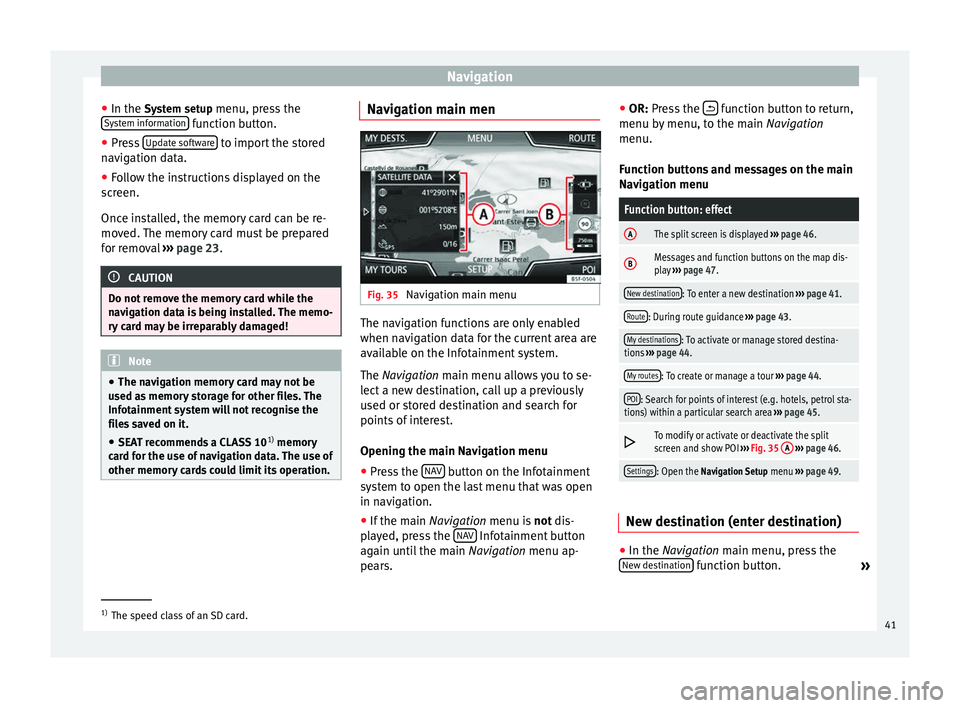
other memory cards could limit its operation. Navigation main men
Fig. 35
Navigation main menu The navigation functions are only enabled
when navigation data for the current area are
available on the Infotainment system.
The
Navigation
main menu allows you to se-
l
ect a new destination, call up a previously
used or stored destination and search for
points of interest.
Opening the main Navigation menu
● Press the NAV button on the Infotainment
system to open the last menu that was open
in navigation.
● If the main Navigation menu is
not
dis-
p
layed, press the NAV Infotainment button
again until the main Navigation menu ap-
pe ar
s. ●
OR: Press the function button to return,
menu by menu, to the main Navigation
menu.
Function buttons and messages on the main
Navigation menu
Function button: effect
AThe split screen is displayed ››› page 46.
BMessages and function buttons on the map dis-
play ››› page 47.
New destination: To enter a new destination ››› page 41.
Route: During route guidance ››› page 43.
My destinations: To activate or manage stored destina-
tions ››› page 44.
My routes: To create or manage a tour ››› page 44.
POI: Search for points of interest (e.g. hotels, petrol sta-
tions) within a particular search area ››› page 45.
To modify or activate or deactivate the split
screen and show POI
››› Fig. 35 A
››› page 46.
Settings: Open the Navigation Setup menu ››› page 49. New destination (enter destination)
●
In the Navigation
main menu, press the
New de
stination function button.
»1)
The speed class of an SD card.
41
Page 45 of 84
Navigation
The calculation will be performed in accord-
ance with the data selected in the Route op- tions menu ››› page 49 .
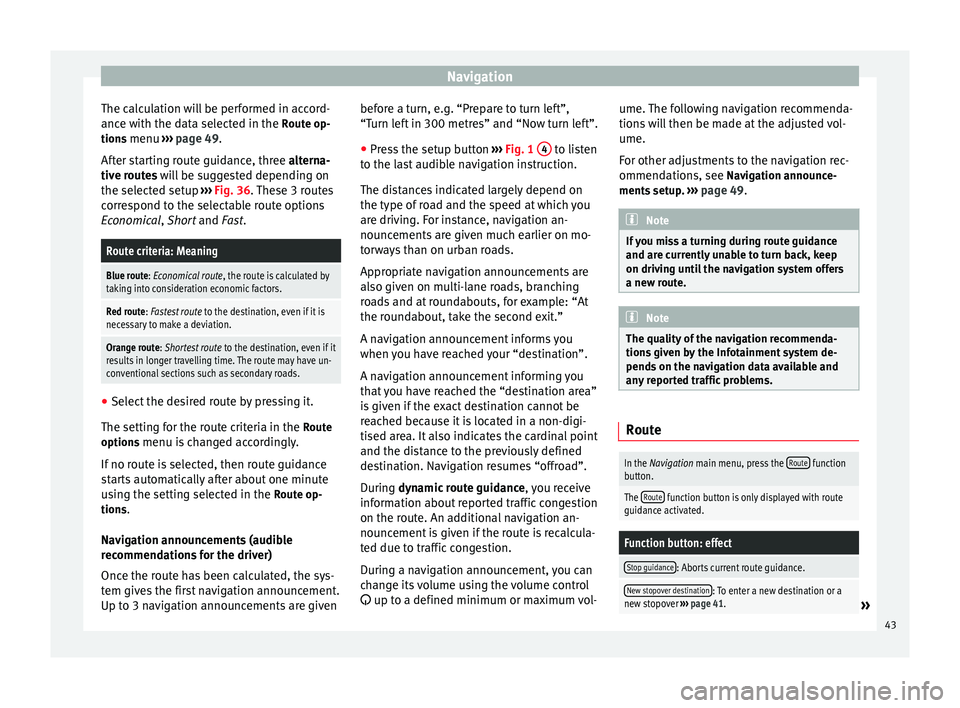
Af t
er starting route guidance, three
alterna-
tive routes will be suggested depending on
the selected setup ››› Fig. 36. These 3 routes
correspond to the selectable route options
Economical
, Short and Fast.
Route criteria: Meaning
Blue route: Economical route, the route is calculated by taking into consideration economic factors.
Red route: Fastest route to the destination, even if it is
necessary to make a deviation.
Orange route: Shortest route to the destination, even if it
results in longer travelling time. The route may have un-
conventional sections such as secondary roads. ●
Select the desired route by pressing it.
The setting for the route criteria in the Route
options menu is changed accordingly.
If no route is selected, then route guidance
starts automatically after about one minute
using the setting selected in the Route op-
tions .
Navigation announcements (audible
recommendations for the driver)
Once the route has been calculated, the sys-
tem gives the first navigation announcement.
Up to 3 navigation announcements are given before a turn, e.g. “Prepare to turn left”,
“Turn left in 300 metres” and “Now turn left”.
● Press the setup button ››› Fig. 1 4 to listen
to the last audible navigation instruction.
The distances indicated largely depend on
the type of road and the speed at which you
are driving. For instance, navigation an-
nouncements are given much earlier on mo-
torways than on urban roads.
Appropriate navigation announcements are
also given on multi-lane roads, branching
roads and at roundabouts, for example: “At
the roundabout, take the second exit.”
A navigation announcement informs you
when you have reached your “destination”.
A navigation announcement informing you
that you have reached the “destination area”
is given if the exact destination cannot be
reached because it is located in a non-digi-
tised area. It also indicates the cardinal point
and the distance to the previously defined
destination. Navigation resumes “offroad”.
During dynamic route guidance
,
y
ou receive
information about reported traffic congestion
on the route. An additional navigation an-
nouncement is given if the route is recalcula-
ted due to traffic congestion.
During a navigation announcement, you can
change its volume using the volume control
up to a defined minimum or maximum vol- ume. The following navigation recommenda-
tions will then be made at the adjusted vol-
ume.
For other adjustments to the navigation rec-
ommendations, see Navigation announce-
ments
setup. ››› page 49. Note
If you miss a turning during route guidance
and are currently unable to turn back, keep
on driving until the navigation system offers
a new route. Note
The quality of the navigation recommenda-
tions given by the Infotainment system de-
pends on the navigation data available and
any reported traffic problems. Route
In the Navigation main menu, press the
Route function
button.
The Route function button is only displayed with route
guidance activated.
Function button: effect
Stop guidance: Aborts current route guidance.
New stopover destination: To enter a new destination or a
new stopover ››› page 41.» 43
Page 47 of 84
Navigation
Several destinations can be defined in tour
mode. A trip with multiple destinations is
called a “Tour”.
The “starting point” of a tour is always the
vehicle position determined by the Infotain-
ment system. The “destination” is the end
point of a tour. “Stopover destinations” are
driven to before the destination.
● Press the My tours function button in the
main Navigation
menu.
● Sel
ect the desired function button ( Edit
tour, New tour or Tour Memory).
Function buttons on the My tours pop-up
window
Function button: effect
Edit waypoint toura) : To edit and store the active tour.
New tour: To create a new tour.
Tour memory: To Delete, Edit or Start a stored tour.
a)
This function button is only displayed when route guidance is
activated in tour mode.
Display and function buttons on the New tour
and Edit tour
menu
Function button or message: function or meaning
Stopover.
Destination.
...Estimated time of arrival at destination.
...Calculated distance to destination.
Press on the destination to display the function but-
tons.
Delete destination.
To start guidance direct to the selected
destination. Destinations that come before
the selected destination are ignored.
To open the detailed view of the destina-
tion in question.
Available function buttons.
New desti-
nationTo add a new destination to the tour.
My desti-
nationsTo add a new destination from My destina-
tions to the tour.
StoringTo store the created tour in the tour memo-
ry.
StartTo start route guidance.
CalculateTo update calculated distance and estima-
ted arrival time. a)
StopTo stop route guidance to the active desti-
nation.b)
To move a stopover or a destination to an-
other position on the list. Press and drag
to move the destination.
a)
This function button is only displayed with route guidance ac-
tivated and when a destination has been added to the tour.
b) This function button is only displayed with route guidance ac-
tivated.
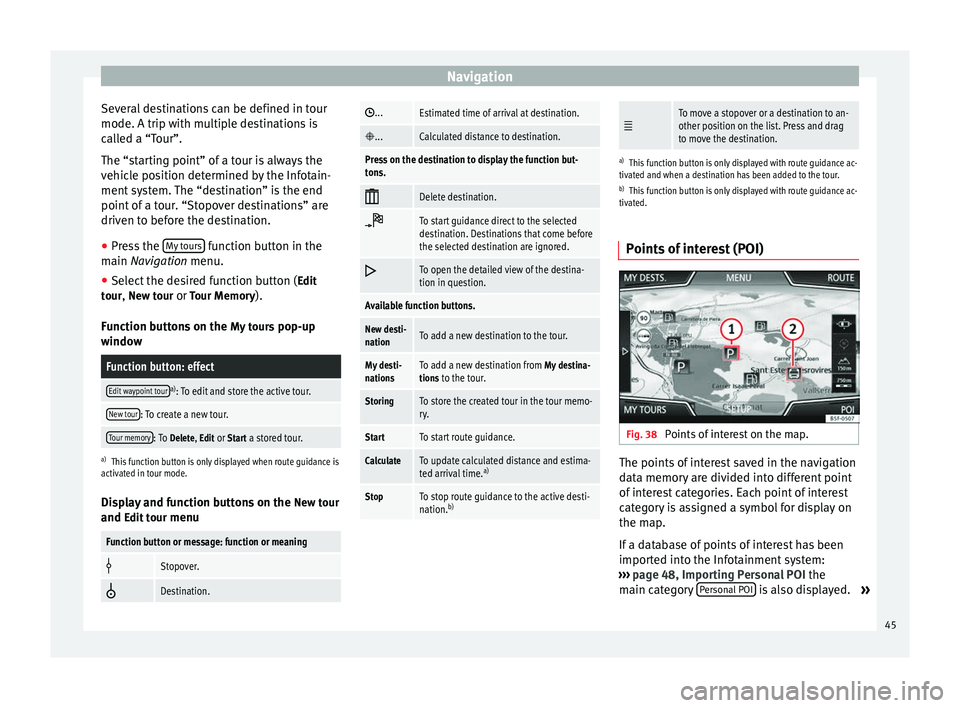
Points of interest (POI) Fig. 38
Points of interest on the map. The points of interest saved in the navigation
data memory are divided into different point
of interest categories. Each point of interest
category is assigned a symbol for display on
the map.
If a database of points of interest has been
imported into the Infotainment system:
››› page 48, Importing Personal POI the
main category Personal POI is also displayed.
»
45