ECU Seat Leon 5D 2014 User Guide
[x] Cancel search | Manufacturer: SEAT, Model Year: 2014, Model line: Leon 5D, Model: Seat Leon 5D 2014Pages: 284, PDF Size: 5.85 MB
Page 60 of 284
Safety
●
Never hold children or babies on your lap,
this can result in potentially fatal injuries to
the child!
● Never allow a child to be transported in a
vehicle without being properly secured, or to
stand up or kneel on a seat while travelling.
In an accident, the child could be flung
through the vehicle, causing possibly fatal in-
juries to themselves and to the other vehicle
occupants.
● If children assume an improper sitting posi-
tion when the vehicle is moving, they expose
themselves to greater risk of injury in the
event of a sudden braking manoeuvre or in an
accident. This is particularly important if the
child is travelling on the front passenger seat
and the airbag system is triggered in an acci-
dent; as this could cause serious injury or
even death.
● A suitable child seat can protect your child!
● Never leave a child alone in the child seat
or inside the vehicle because depending on
the season, very high temperatures may be
reached inside a parked vehicle, which could
be fatal.
● Children who are less than 1.5 metres tall
must not wear a normal seat belt without a
child seat, as this could cause injuries to the
abdominal and neck areas during a sudden
braking manoeuvre or in an accident.
● Do not allow the seat belt to become twis-
ted and the seat belt should be properly in
place ››› page 43.
● On ly
one child may occupy a child seat
››› page 58, Child seats. ●
When a child seat is mounted in the rear
seats, the door child-proof lock should be ac-
tivated ››› page 87. Child seats
Categorisation of child seats into
groups Use only child seats that are officially ap-
proved and suitable for the child.
Child seats are subject to the regulation ECE-
R 44. ECE-R stands for: Economic Commis-
sion for Europe Regulations.
The child seats are grouped into 5 catego-
ries:
Group 0 : Up to 10 kg (up to around 9
months)
Gr oup 0+
: Up to 13 kg (up to around 18
months)
Group 1
: from 9 to 18 kg (up to approx. 4
years old)
Group 2
: from 15 to 25 kg (up to approx. 7
years old)
Group 3: From 22 to 36 kg (over around 7
ye
ars old) Child seats that have been tested and ap-
proved under the ECE R44 standard bear the
test mark on the seat (the letter E in a circle
with the test number below it).
Follow the manufacturer's instructions and
observe any statutory requirements when in-
stalling and using child seats.
We recommend you to always include the
manufacturer's Child Seat Instruction Manual
together with the on-board documentation.
SEAT recommends you use child seats from
the Original Accessories Catalogue
. The
se
child seats have been designed and tested
for use in SEAT vehicles. You can find the
right child seat for your model and age group
at SEAT dealers. WARNING
Read and always observe information and
warnings concerning the use of child seats
››› page 57. Securing the child seat using the seat
belt
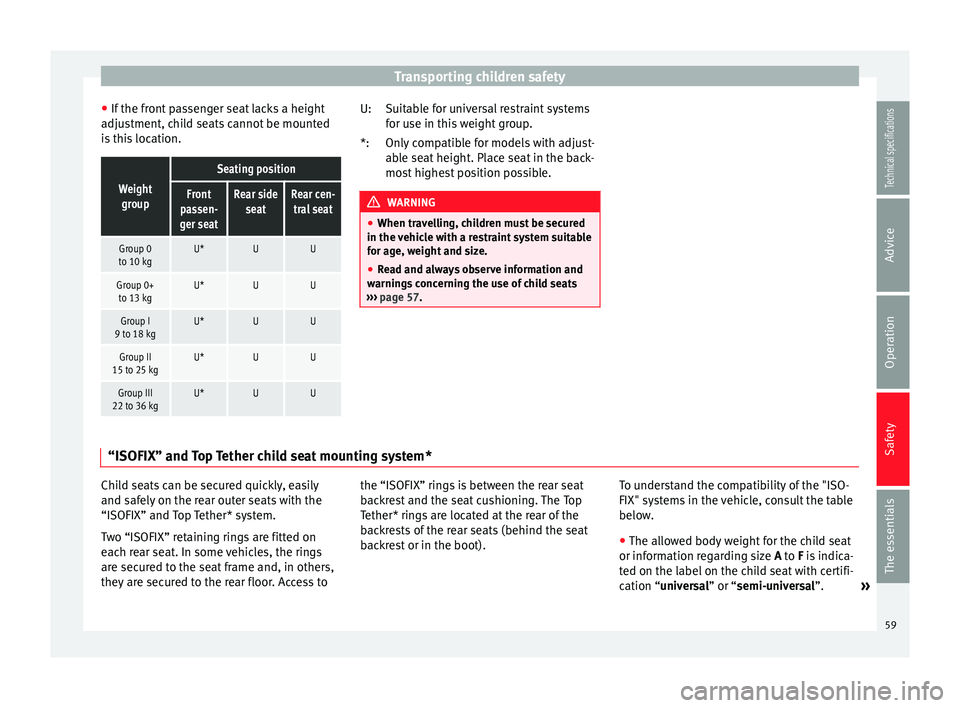
The seat belt may be used to secure
univer-
sal type child seats to the vehicle seats
m ark
ed with a U in the table below.
58
Page 61 of 284
Transporting children safety
● If the front passenger seat lacks a height
adjustment, child seats cannot be mounted
is this location.Weight group
Seating position
Front
passen-
ger seatRear side seatRear cen-tral seat
Group 0
to 10 kgU*UU
Group 0+ to 13 kgU*UU
Group I
9 to 18 kgU*UU
Group II
15 to 25 kgU*UU
Group III
22 to 36 kgU*UU Suitable for universal restraint systems
for use in this weight group.
Only compatible for models with adjust-
able seat height. Place seat in the back-
most highest position possible.
WARNING
● When travelling, children must be secured
in the vehicle with a restraint system suitable
for age, weight and size.
● Read and always observe information and
warnings concerning the use of child seats
››› page 57. U:
*:
“ISOFIX” and Top Tether child seat mounting system* Child seats can be secured quickly, easily
and safely on the rear outer seats with the
“ISOFIX” and Top Tether* system.
Two “ISOFIX” retaining rings are fitted on
each rear seat. In some vehicles, the rings
are secured to the seat frame and, in others,
they are secured to the rear floor. Access to
the “ISOFIX” rings is between the rear seat
backrest and the seat cushioning. The Top
Tether* rings are located at the rear of the
backrests of the rear seats (behind the seat
backrest or in the boot).
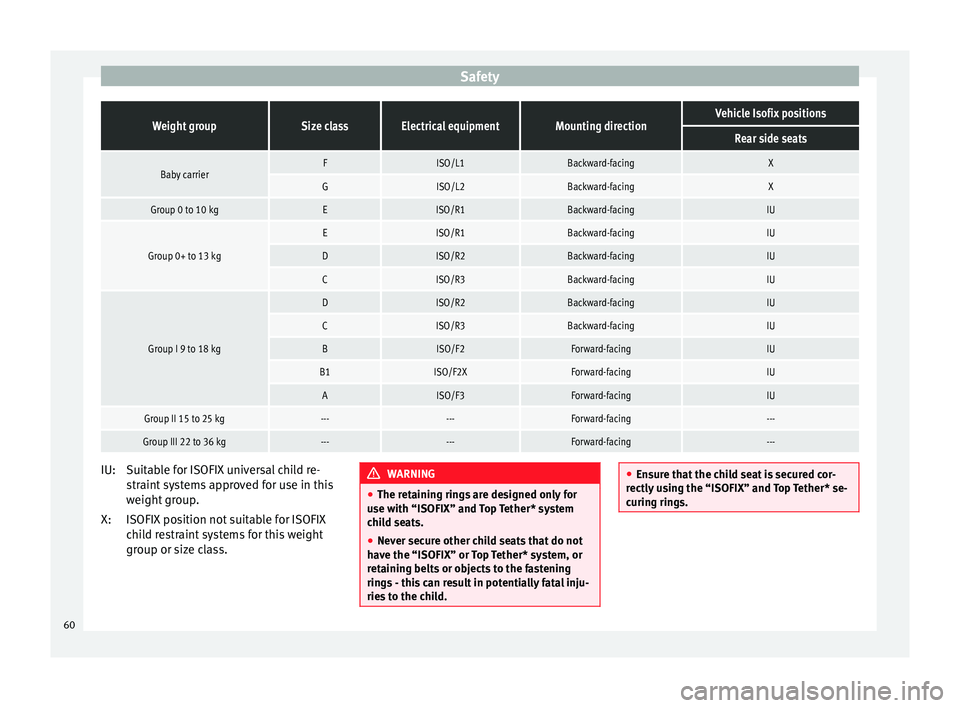
To understand the compatibility of the "ISO-
FIX" systems in the vehicle, consult the table
below.
● The allowed body weight for the child seat
or information regarding size A
to
F is indica-
ted on the label on the child seat with certifi-
cation “
universal” or “semi-universal”. »
59
Technical specifications
Advice
Operation
Safety
The essentials
Page 62 of 284
SafetyWeight groupSize classElectrical equipmentMounting directionVehicle Isofix positions
Rear side seats
Baby carrierFISO/L1Backward-facingX
GISO/L2Backward-facingX
Group 0 to 10 kgEISO/R1Backward-facingIU
Group 0+ to 13 kg
EISO/R1Backward-facingIU
DISO/R2Backward-facingIU
CISO/R3Backward-facingIU
Group I 9 to 18 kg
DISO/R2Backward-facingIU
CISO/R3Backward-facingIU
BISO/F2Forward-facingIU
B1ISO/F2XForward-facingIU
AISO/F3Forward-facingIU
Group II 15 to 25 kg------Forward-facing---
Group III 22 to 36 kg------Forward-facing---
Suitable for ISOFIX universal child re-
straint systems approved for use in this
weight group.
ISOFIX position not suitable for ISOFIX
child restraint systems for this weight
group or size class.
IU:
X: WARNING
● The retaining rings are designed only for
use with “ISOFIX” and Top Tether* system
child seats.
● Never secure other child seats that do not
have the “ISOFIX” or Top Tether* system, or
retaining belts or objects to the fastening
rings - this can result in potentially fatal inju-
ries to the child. ●
Ensure that the child seat is secured cor-
rectly using the “ISOFIX” and Top Tether* se-
curing rings. 60
Page 63 of 284

Transporting children safety
“ISOFIX” child seat mounting system Fig. 78
ISOFIX securing rings. When removing or fitting the child seat,
please be sure to follow the manufacturer's
instructions.
– Remove the protective caps of the “ISOFIX”
rings by placing a finger in the hole and
pulling up ››› Fig. 78 .
– Pr e
ss the child seat onto the “ISOFIX” re-
taining rings until the child seat can be
heard to engage securely. If the child seat
is equipped with Top Tether* anchor points,
secure it to the correspondent ring
››› Fig. 79
. Observe the manufacturer's in-
structions.
– Do a test by pulling both sides of the child
seat to ensure that it is properly anchored.
Child seats with the “ISOFIX” and Top Tether*
attachment system are available from Techni-
cal Services. Top Tether* retainer straps
Fig. 79
Position of the Top Tether rings on the
back of the rear seat. Child seats with the Top Tether system come
with a strap for securing the seat to the vehi-
cle anchor point, located at the back of the
rear seat backrest and provide greater re-
straint.
The objective of this strap is to reduce for-
ward movements of the child seat in a crash,
to reduce the risk of injuries to the head from
hitting the inside of the vehicle.
Using the Top Tether in rear-facing mounted
seats
Currently, there are very few rear-facing child
safety seats that have Top Tether. Please
carefully read and follow the seat manufac-
turer instructions to learn the proper way to
install the Top Tether strap. Fitting the Top Tether child restraint to
the anchoring point
Fig. 80
Retainer strap: correct adjustment
and fitting. Securing the Top Tether child restraint to the
anchor point situated on the rear of the
backrest
– Pull out the fastening belt of the child re-
straint seat according to the manufacturer's
instructions.
– Guide the Top Tether fastening belt under
the rear seat head restraint ››› Fig. 80 (lift
the he a
d restraint where necessary).
– Slide the belt so that the Top Tether belt of
the child restraint seat is correctly secured
to the anchor on the back of the rear seat
››› Fig. 79.
– Firmly
tighten the Top Tether belt following
the child restraint seat manufacturer's in-
structions. »
61
Technical specifications
Advice
Operation
Safety
The essentials
Page 64 of 284
Safety
Releasing the retaining strap
– Release the retainer strap in line with the
instructions given by the manufacturer.
– Push the lock and release it from the an-
choring support. WARNING
An undue installation of the safety seat will
increase the risk of injury in the event of a
crash.
● Never tie the retainer strap to a hook in the
luggage compartment.
● Never secure or tie luggage or other items
to the lower anchorages (ISOFIX) or the upper
ones (Top Tether). 62
Page 84 of 284
Operation
Opening and closing Central locking system Description The vehicle can be locked and unlocked via
the central locking system. There are several
methods, depending on the vehicle equip-
ment:
●
key with remote control ››› page 84 ,
● lock on driver door (emergency opening
››› page 227 ) or
● int erior c
entral locking switch ››› page 85.
Unlocking one side of the vehicle only
When you lock the vehicle with the key, the
doors and the rear lid are locked. When you
open the door, you can either unlock only the
driver door
, or all the vehicle doors. To select
the required option, use Easy Connect*
››› page 85
.
Automatic locking (Auto Lock)*
The Auto Lock function locks the doors and
the rear lid when the vehicle exceeds a speed
of about 15 km/h (10 mph).
The vehicle is unlocked again when the igni-
tion key is removed. Alternatively, the vehicle
can also be unlocked via the central locking
switch or by pulling one of the inside door handles. The Auto Lock function can be
switched on and off on the sound system or
on the Easy Connect* system
››› page 85.
In the event of an accident in which the air-
bags inflate, the doors will be automatically
unlocked to facilitate access and assistance.
Anti-theft alarm system*
If the anti-theft alarm system senses interfer-
ence with the vehicle it triggers an audible
and visible alarm.
The anti-theft alarm system is automatically
switched on when locking the vehicle. It
switches off when the vehicle is unlocked
from a distance.
When the driver door is unlocked with the
key, you should switch on the ignition within
15 seconds. Otherwise the alarm will be trig-
gered. On some export versions, the alarm is
triggered immediately when you open a door.
To deactivate the alarm, press the button on the remote control key, or switch on the
ignition. After a certain time, the alarm will
automatically switch off.
Switch off the vehicle interior monitoring and
tow-away protection if you wish to prevent
the alarm from being triggered accidentally
››› page 89 . T
urn s
ignals
The turn signals will flash twice when the ve-
hicle is unlocked and once when the vehicle
is locked.
If it does not flash, this indicates that one of
the doors, the rear lid or the bonnet is not
closed correctly.
Accidental lock-out
The central locking system prevents you from
being locked out of the vehicle in the follow-
ing situations:
● If the driver door is open, the vehicle can-
not be locked with the central locking switch
››› page 85.
Loc
k the vehicle with the remote control key,
when all the doors and the rear lid have been
closed. This prevents the accidental locking
of the vehicle. WARNING
Do not leave anyone (especially children) in
the vehicle if it is locked from the outside and
the anti-theft security system* is enabled, as
the doors and windows cannot then be
opened from the inside. Locked doors could
delay assistance in an emergency, potentially
putting lives at risk. 82
Page 86 of 284

Operation
The vehicle keys or new spare keys can be
obtained from a SEAT Official Service, a spe-
cialised workshop or an approved key service
qualified to create this kind of key.
New keys or spare keys must be synchron-
ised before use ››› page 87. CAUTION
All of the vehicle keys contain electronic com-
ponents. Protect them from damage, impacts
and humidity. Note
● Only use the key button when you require
the corresponding function. Pushing the but-
ton unnecessarily could accidentally unlock
the vehicle or trigger the alarm. It is also pos-
sible even when you are outside the radius of
action.
● Key operation can be greatly influenced by
overlapping radio signals close to the vehicle
working in the same range of frequencies, for
example, radio transmitters or mobile tele-
phones.
● Obstacles between the remote control and
the vehicle, bad weather conditions and dis-
charged batteries can considerably reduce
the range of the remote control.
● If the buttons of the vehicle key are press-
ed ››› Fig. 91 or ››› Fig. 92 or one of the central
locking buttons ››› page 85 is pressed re-
peat
edly in short succession, the central
locking briefly disconnects as protection against overloading. The vehicle is then un-
locked. Lock it if necessary.
Remote unlock/lock
Read the additional information carefully
››› page 9
The vehicle will be locked again automatical-
ly if you do not open one of the doors or the
rear lid within 30 seconds after unlocking the
car. This function prevents the vehicle from
remaining unlocked if the unlocking button is
pressed by mistake. This does not apply if
you press the button for at least one sec-
ond.
In vehicles with a security central locking
feature (selective unlocking of side doors)
› ›
› page 84, when the button is pressed
once, only the driver door and the fuel tank
flap are unlocked. When the button is press-
ed a second time, all the vehicle doors are
unlocked. WARNING
Observe the safety warnings ››› in Descrip-
tion on page 82. Note
● Do not use the remote control key until the
vehicle is visible. ●
Other functions of the remote control key
››› page 91, Convenience opening/closing. Selective unlocking system
The selective unlocking system allows you to
only unlock the driver door and the fuel tank
flap. All other doors and the rear lid remain
locked.
Unlocking the driver door and tank flap
– Press button on the remote control key
once , or turn the key
onc
e
to open.
Unlocking all the doors, the rear lid and the
tank flap simultaneously.
– Within 5 seconds, press button on the
remote control key twice, or turn the key to
open twice
within 5 seconds.
The anti-theft security system* and the anti-
theft alarm* are immediately disabled if you
unlock only the driver door, without unlock-
ing the other doors.
In vehicles with Easy Connect*, you can pro-
gramme the security central locking system
directly ››› page 85.
84
Page 87 of 284

Opening and closing
Programming the central locking
system You can use Easy Connect* to select which
doors are unlocked with the central locking
system. Using the radio or the Easy Connect*
system, you can select whether the vehicle
automatically closes with the “Auto Lock”
programme at speeds of more than 15 km/h
(10 mph).
Programming the unlocking of the doors
(vehicles with Easy Connect)
– Select: control button Systems or Vehicle
systems > Vehicle settings > Central locking >
Unlocking doors.
Programming the Auto Lock (vehicles with
radio)
– Select: SETUP button > control button
Central locking > Locking while driving
.
Programming the Auto Lock (vehicles with
Easy Connect)
– Select: control button Systems
or Vehicle
systems > Vehicle settings
> Locking while
driving .
Unlocking doors You can choose to unlock all
the doors or only the driver door
when you
unlock the vehicle. In all
the options, the fuel
tank flap is also unlocked. With the Driver setting, when you press the
button on the remote control key only the
door on the driver's side is unlocked. If that
button is pressed twice, the rest of the doors
and the rear lid will be unlocked.
In vehicles with a conventional key, turn the
key in the door lock, in the direction of open-
ing, twice within 2 seconds.
If the button is pressed, all the vehicle
doors are locked. At the same time, a confir-
mation signal* is heard.
Auto Lock/Locking while driving. If you select
on, all the vehicle doors are locked at speeds above 15 km/h (10 mph).
Central locking switch Read the additional information carefully
››› page 9
Please note the following when using the
central locking switch to lock your vehicle:
● It is not possible to open the doors or the
rear lid from the outside
(for safety reasons,
e.
g. when stopped at traffic lights).
● The LED in the central locking switch lights
up when all the doors are closed and locked.
● You can open the doors individually from
the inside by pulling the inside door handle. ●
In the event of an accident in which the air-
bags inflate, doors locked from the inside will
be automatically unlocked to facilitate access
and assistance. WARNING
● The central locking switch also operates
when the ignition is switched off and auto-
matically locks all the vehicle doors when the
button is pressed.
● The central locking switch does not operate
if the vehicle is locked from the outside and
the anti-theft security system is switched on.
● Locked doors could delay assistance in an
emergency, potentially putting lives at risk.
Do not leave anyone, especially children, in
the vehicle. Note
The doors and the tailgate are locked auto-
matically when the vehicle reaches a speed of
about 15 km/h (Auto Lock) ››› page 82. You
can unlock the vehicle again using button on the central locking switch.
Anti-theft security system (Safelock)*
The following message is displayed on the in-
strument panel to remind the driver that
when the vehicle is closed from the outside,
the anti-theft security system is switched on.
Do not forget the Safelock. Please see »
85
Technical specifications
Advice
Operation
Safety
The essentials
Page 88 of 284

Operation
Instruction Manual. The vehicle cannot be
opened from inside. This makes it more diffi-
cult for unauthorised persons to break into
the vehicle ››› in Description on page 82.
The anti-theft security system can be switch-
ed off each time the vehicle is locked:
● Turn the key a second time to the lock posi-
tion, in the door lock, for the next two sec-
ond s. If necessary, remove the protective cov-
er on the driver door handle ››› page 227 or
else
● Press on the remote control key for a
second time for the following 2 seconds.
The fl a
shing frequency of the diode in the
door sill immediately confirms the process.
Initially, the diode flashes in a fast sequence
for a brief period, then it stops for approxi-
mately 30 seconds and, lastly continues
flashing slowly. Changing the battery Fig. 93
Vehicle key: opening the battery com-
partment Fig. 94
Vehicle key: removing the battery SEAT recommends you ask a specialised
workshop to replace the battery.
The battery is located to the rear of the vehi-
cle key, under a cover.Changing the battery
● Unfold the vehicle key shaft ››› page 83.
● Remove the cover from the back of the ve-
hicle key ››› Fig. 93 in the direction of the ar-
r o
w ››› .
● Extract the battery from the compartment
using a suitable thin object ››› Fig. 94 .
● Plac
e the new battery in the compartment
as shown ››› Fig. 94
, pressing in the opposite
direction to that shown by the arrow ››› .
● Fit the cover as shown ››› Fig. 93 , pressing
it onto the vehicle key casing in the opposite
direction to that shown by the arrow until it
clicks into place. CAUTION
● If the battery is not changed correctly, the
vehicle key may be damaged.
● Use of unsuitable batteries may damage
the vehicle key. For this reason, always re-
place the dead battery with another of the
same voltage, size and specifications.
● When fitting the battery, check that the po-
larity is correct. For the sake of the environment
Please dispose of your used batteries correct-
ly and with respect for the environment. 86
Page 91 of 284

Opening and closing
their movements will trigger the alarm) or
when, for example, the vehicle is transported
or has to be towed with only one axle on the
ground.
False alarms
Interior monitoring will only operate correctly
if the vehicle is completely closed. Please ob-
serve related legal requirements.
The following cases may cause a false alarm:
● Open windows (partially or fully).
● Panoramic/tilting sunroof open (partially or
completely).
● Movement of objects inside the vehicle,
such as loose papers, items hanging from
the rear vision mirror (air fresheners), etc. Note
● If the vehicle is relocked and the alarm is
activated without the volumetric sensor func-
tion, relocking will activate the alarm with all
its functions, except the volumetric sensor.
This function is reactivated when the alarm is
switched on again, unless it is deliberately
switched off.
● If the alarm has been triggered by the volu-
metric sensor, this will be indicated by a
flashing of the warning lamp on the driver
door when the vehicle is opened. The flash is
different to the flash indicating the alarm is
activated. ●
The vibration of a mobile phone left inside
the vehicle may cause the vehicle interior
monitoring alarm to trigger, as both sensors
react to movements and shakes inside the ve-
hicle.
● If on activating the alarm, any door or the
rear lid is open, only the alarm will be activa-
ted. The vehicle interior monitoring and the
anti-tow system will only be activated once
all the doors are closed (including the rear
lid). Deactivating the vehicle interior
monitoring and tow-away protection*
Fig. 96
Vehicle interior monitoring/tow-away
protection button. When the vehicle is locked, the alarm will be
triggered if movements are detected in the
interior (e.g. by animals) or if the vehicle's in-
clination is changed (e.g. during transport).
You can prevent the alarm from being trig-gered accidentally by switching off the vehi-
cle interior monitoring and/or tow-away pro-
tection.
– To switch off the vehicle interior monitoring
and tow-away protection, switch off the ig-
nition and press button ››› Fig. 96 . The indi-
c at
or on the button will light up.
– When the vehicle is locked now, the vehicle
interior monitoring and the tow-away pro-
tection are switched off until the next time
the door is opened.
If the anti-theft security system (Safelock)*
››› page 85 is switched off, the vehicle interior
monitorin
g and the tow-away protection are
automatically switched off. WARNING
Observe the safety warnings ››› in Descrip-
tion on page 82. Rear lid (luggage
compartment)
Rear lid Read the additional information carefully
››› page 9
The rear lid opening system operates electri-
cally. It is activated by using the handle on
the boot lid. »
89
Technical specifications
Advice
Operation
Safety
The essentials