warning Seat Leon 5D 2014 Workshop Manual
[x] Cancel search | Manufacturer: SEAT, Model Year: 2014, Model line: Leon 5D, Model: Seat Leon 5D 2014Pages: 284, PDF Size: 5.85 MB
Page 83 of 284

Introduction to the Easy Connect system*
service intervals permitted in the
››› Book-
let Maintenance Programme. Introduction to the Easy
Connect system*
System Settings (CAR)* Introduction To select the settings menus, press the Easy
Connect
button and the
Setup function
button.
The actual number of menus available and
the name of the various options in these me-
nus will depend on the vehicle’s electronics
and equipment. WARNING
Any distraction may lead to an accident, with
the risk of injury. Operating the Easy Connect
system while driving could distract you from
traffic. CAR menu Setup
Read the additional information carefully
››› page 17
Pressing the menu button will always take
you to the last menu used.
When the function button check box is activa-
ted , the function is active. Pressing the menu button
will always take
you to the last menu used.
Any changes made using the settings menus
are automatically saved on closing those me-
nus.Function buttons in the ve-
hicle’s settings menuPage
ESC system››› page 143
Tyres››› page 212
Driver assistance››› table on page 18
Parking and manoeuvring››› page 173
Vehicle lights››› table on page 18
Rear vision mirrors and wind-
screen wipers››› table on page 18
Opening and closing››› table on page 18
Multifunction display››› page 19
Date and time››› table on page 18
Units››› table on page 18
Service››› page 67
Factory settings››› table on page 18 81
Technical specifications
Advice
Operation
Safety
The essentials
Page 84 of 284
Operation
Opening and closing Central locking system Description The vehicle can be locked and unlocked via
the central locking system. There are several
methods, depending on the vehicle equip-
ment:
●
key with remote control ››› page 84 ,
● lock on driver door (emergency opening
››› page 227 ) or
● int erior c
entral locking switch ››› page 85.
Unlocking one side of the vehicle only
When you lock the vehicle with the key, the
doors and the rear lid are locked. When you
open the door, you can either unlock only the
driver door
, or all the vehicle doors. To select
the required option, use Easy Connect*
››› page 85
.
Automatic locking (Auto Lock)*
The Auto Lock function locks the doors and
the rear lid when the vehicle exceeds a speed
of about 15 km/h (10 mph).
The vehicle is unlocked again when the igni-
tion key is removed. Alternatively, the vehicle
can also be unlocked via the central locking
switch or by pulling one of the inside door handles. The Auto Lock function can be
switched on and off on the sound system or
on the Easy Connect* system
››› page 85.
In the event of an accident in which the air-
bags inflate, the doors will be automatically
unlocked to facilitate access and assistance.
Anti-theft alarm system*
If the anti-theft alarm system senses interfer-
ence with the vehicle it triggers an audible
and visible alarm.
The anti-theft alarm system is automatically
switched on when locking the vehicle. It
switches off when the vehicle is unlocked
from a distance.
When the driver door is unlocked with the
key, you should switch on the ignition within
15 seconds. Otherwise the alarm will be trig-
gered. On some export versions, the alarm is
triggered immediately when you open a door.
To deactivate the alarm, press the button on the remote control key, or switch on the
ignition. After a certain time, the alarm will
automatically switch off.
Switch off the vehicle interior monitoring and
tow-away protection if you wish to prevent
the alarm from being triggered accidentally
››› page 89 . T
urn s
ignals
The turn signals will flash twice when the ve-
hicle is unlocked and once when the vehicle
is locked.
If it does not flash, this indicates that one of
the doors, the rear lid or the bonnet is not
closed correctly.
Accidental lock-out
The central locking system prevents you from
being locked out of the vehicle in the follow-
ing situations:
● If the driver door is open, the vehicle can-
not be locked with the central locking switch
››› page 85.
Loc
k the vehicle with the remote control key,
when all the doors and the rear lid have been
closed. This prevents the accidental locking
of the vehicle. WARNING
Do not leave anyone (especially children) in
the vehicle if it is locked from the outside and
the anti-theft security system* is enabled, as
the doors and windows cannot then be
opened from the inside. Locked doors could
delay assistance in an emergency, potentially
putting lives at risk. 82
Page 86 of 284

Operation
The vehicle keys or new spare keys can be
obtained from a SEAT Official Service, a spe-
cialised workshop or an approved key service
qualified to create this kind of key.
New keys or spare keys must be synchron-
ised before use ››› page 87. CAUTION
All of the vehicle keys contain electronic com-
ponents. Protect them from damage, impacts
and humidity. Note
● Only use the key button when you require
the corresponding function. Pushing the but-
ton unnecessarily could accidentally unlock
the vehicle or trigger the alarm. It is also pos-
sible even when you are outside the radius of
action.
● Key operation can be greatly influenced by
overlapping radio signals close to the vehicle
working in the same range of frequencies, for
example, radio transmitters or mobile tele-
phones.
● Obstacles between the remote control and
the vehicle, bad weather conditions and dis-
charged batteries can considerably reduce
the range of the remote control.
● If the buttons of the vehicle key are press-
ed ››› Fig. 91 or ››› Fig. 92 or one of the central
locking buttons ››› page 85 is pressed re-
peat
edly in short succession, the central
locking briefly disconnects as protection against overloading. The vehicle is then un-
locked. Lock it if necessary.
Remote unlock/lock
Read the additional information carefully
››› page 9
The vehicle will be locked again automatical-
ly if you do not open one of the doors or the
rear lid within 30 seconds after unlocking the
car. This function prevents the vehicle from
remaining unlocked if the unlocking button is
pressed by mistake. This does not apply if
you press the button for at least one sec-
ond.
In vehicles with a security central locking
feature (selective unlocking of side doors)
› ›
› page 84, when the button is pressed
once, only the driver door and the fuel tank
flap are unlocked. When the button is press-
ed a second time, all the vehicle doors are
unlocked. WARNING
Observe the safety warnings ››› in Descrip-
tion on page 82. Note
● Do not use the remote control key until the
vehicle is visible. ●
Other functions of the remote control key
››› page 91, Convenience opening/closing. Selective unlocking system
The selective unlocking system allows you to
only unlock the driver door and the fuel tank
flap. All other doors and the rear lid remain
locked.
Unlocking the driver door and tank flap
– Press button on the remote control key
once , or turn the key
onc
e
to open.
Unlocking all the doors, the rear lid and the
tank flap simultaneously.
– Within 5 seconds, press button on the
remote control key twice, or turn the key to
open twice
within 5 seconds.
The anti-theft security system* and the anti-
theft alarm* are immediately disabled if you
unlock only the driver door, without unlock-
ing the other doors.
In vehicles with Easy Connect*, you can pro-
gramme the security central locking system
directly ››› page 85.
84
Page 87 of 284

Opening and closing
Programming the central locking
system You can use Easy Connect* to select which
doors are unlocked with the central locking
system. Using the radio or the Easy Connect*
system, you can select whether the vehicle
automatically closes with the “Auto Lock”
programme at speeds of more than 15 km/h
(10 mph).
Programming the unlocking of the doors
(vehicles with Easy Connect)
– Select: control button Systems or Vehicle
systems > Vehicle settings > Central locking >
Unlocking doors.
Programming the Auto Lock (vehicles with
radio)
– Select: SETUP button > control button
Central locking > Locking while driving
.
Programming the Auto Lock (vehicles with
Easy Connect)
– Select: control button Systems
or Vehicle
systems > Vehicle settings
> Locking while
driving .
Unlocking doors You can choose to unlock all
the doors or only the driver door
when you
unlock the vehicle. In all
the options, the fuel
tank flap is also unlocked. With the Driver setting, when you press the
button on the remote control key only the
door on the driver's side is unlocked. If that
button is pressed twice, the rest of the doors
and the rear lid will be unlocked.
In vehicles with a conventional key, turn the
key in the door lock, in the direction of open-
ing, twice within 2 seconds.
If the button is pressed, all the vehicle
doors are locked. At the same time, a confir-
mation signal* is heard.
Auto Lock/Locking while driving. If you select
on, all the vehicle doors are locked at speeds above 15 km/h (10 mph).
Central locking switch Read the additional information carefully
››› page 9
Please note the following when using the
central locking switch to lock your vehicle:
● It is not possible to open the doors or the
rear lid from the outside
(for safety reasons,
e.
g. when stopped at traffic lights).
● The LED in the central locking switch lights
up when all the doors are closed and locked.
● You can open the doors individually from
the inside by pulling the inside door handle. ●
In the event of an accident in which the air-
bags inflate, doors locked from the inside will
be automatically unlocked to facilitate access
and assistance. WARNING
● The central locking switch also operates
when the ignition is switched off and auto-
matically locks all the vehicle doors when the
button is pressed.
● The central locking switch does not operate
if the vehicle is locked from the outside and
the anti-theft security system is switched on.
● Locked doors could delay assistance in an
emergency, potentially putting lives at risk.
Do not leave anyone, especially children, in
the vehicle. Note
The doors and the tailgate are locked auto-
matically when the vehicle reaches a speed of
about 15 km/h (Auto Lock) ››› page 82. You
can unlock the vehicle again using button on the central locking switch.
Anti-theft security system (Safelock)*
The following message is displayed on the in-
strument panel to remind the driver that
when the vehicle is closed from the outside,
the anti-theft security system is switched on.
Do not forget the Safelock. Please see »
85
Technical specifications
Advice
Operation
Safety
The essentials
Page 89 of 284
Opening and closing
Synchronising the vehicle key If the button
is pressed frequently outside
of the vehicle range, it is possible that the ve-
hicle can no longer be locked or unlocked us-
ing the key. In this case, the key must be re-
synchronised as described below:
● Unfold the vehicle key shaft ››› page 83.
● If necessary, remove the cover from the
driver door lever ››› page 227.
● Press the button on the vehicle key. For
this, it must remain with the vehicle.
● Open the vehicle within one minute using
the key shift. The key has been synchronised.
● If necessary, fit the cap.
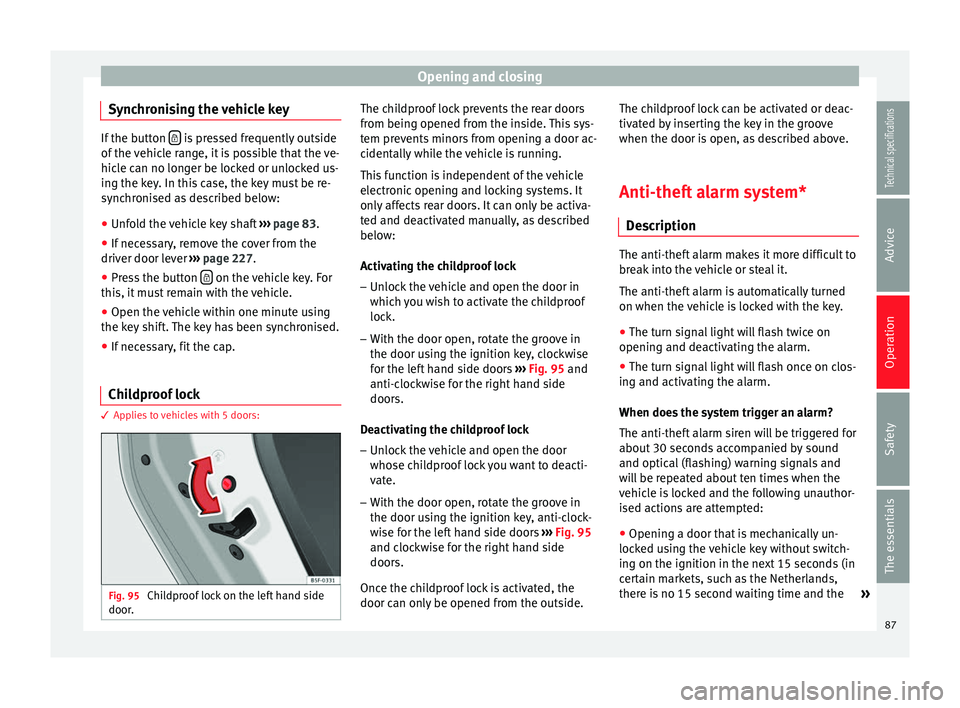
Childproof lock 3 Applies to vehicles with 5 doors:
Fig. 95
Childproof lock on the left hand side
door. The childproof lock prevents the rear doors
from being opened from the inside. This sys-
tem prevents minors from opening a door ac-
cidentally while the vehicle is running.
This function is independent of the vehicle
electronic opening and locking systems. It
only affects rear doors. It can only be activa-
ted and deactivated manually, as described
below:
Activating the childproof lock
– Unlock the vehicle and open the door in
which you wish to activate the childproof
lock.
– With the door open, rotate the groove in
the door using the ignition key, clockwise
for the left hand side doors ››› Fig. 95 and
anti-c loc
kwise for the right hand side
doors.
Deactivating the childproof lock – Unlock the vehicle and open the door
whose childproof lock you want to deacti-
vate.
– With the door open, rotate the groove in
the door using the ignition key, anti-clock-
wise for the left hand side doors ››› Fig. 95
and clockwise for the right hand side
doors.
Once the childproof lock is activated, the
door can only be opened from the outside. The childproof lock can be activated or deac-
tivated by inserting the key in the groove
when the door is open, as described above.
Anti-theft alarm system* Description The anti-theft alarm makes it more difficult to
break into the vehicle or steal it.
The anti-theft alarm is automatically turned
on when the vehicle is locked with the key.
● The turn signal light will flash twice on
opening and deactivating the alarm.
● The turn signal light will flash once on clos-
ing and activating the alarm.
When does the system trigger an alarm?
The anti-theft alarm siren will be triggered for
about 30 seconds accompanied by sound
and optical (flashing) warning signals and
will be repeated about ten times when the
vehicle is locked and the following unauthor-
ised actions are attempted:
● Opening a door that is mechanically un-
locked using the vehicle key without switch-
ing on the ignition in the next 15 seconds (in
certain markets, such as the Netherlands,
there is no 15 second waiting time and the »
87
Technical specifications
Advice
Operation
Safety
The essentials
Page 90 of 284

Operation
alarm is activated immediately on opening
the door).
● A door is opened.
● The bonnet is opened.
● The rear lid is opened.
● When the ignition is switched on with a
non-authorised key.
● When the vehicle battery is disconnected.
● Movement inside the vehicle (in vehicles
with interior monitoring ››› page 89).
● When the vehicle is towed (in vehicles with
anti-tow system ››› page 89 ).
● When the v
ehicle is raised (in vehicles with
anti-tow system ››› page 89
).
● When the vehicle is transported on a ferry
or by rail (vehicles with an anti-tow system or
vehicle interior monitoring ››› page 89).
● When a trailer connected to the anti-theft
alarm system is disconnected.
How to turn OFF the alarm
Unlock the vehicle with the unlocking button
on the key or turn on the ignition with a valid
key. Note
● After 28 days, the indicator light will be
switched off to prevent the battery from ex-
hausting if the vehicle has been left parked for a long period of time. The alarm system
remains activated.
● If, after the audible warning goes off, an-
other monitored area is accessed (e.g. the
rear lid is opened after a door has been
opened), the alarm is triggered again.
● The anti-theft alarm is not activated when
the vehicle is locked from within using the
central locking button .
● If the driver door is unlocked mechanically
with the key, only the driver door is unlocked,
the rest of the doors remain locked. Only
when the ignition has been turned on will the
other doors be available - but not unlocked -
and the central lock button will be activated.
● If the vehicle battery is run down or flat
then the anti-theft alarm will not operate cor-
rectly.
● Vehicle monitoring remains active even if
the battery is disconnected or not working for
any reason.
● The alarm is triggered immediately if one of
the battery cables is disconnected while the
alarm system is active. Vehicle interior monitoring and anti-
tow system*
It is a monitoring or control function incorpo-
rated in the anti-theft alarm* which detects
unauthorized vehicle entry by means of ultra-
sound.Activation
– It is automatically switched on when the
anti-theft alarm is activated.
Deactivation – Open the vehicle with the key, either me-
chanically or by pressing the button on
the remote control. The time period from
when the door is opened until the key is in-
serted in the contact should not exceed 15
seconds, otherwise the alarm will be trig-
gered.
– Press the button on the remote control
twice. The volumetric sensor and tilt sen-
sors will be deactivated. The alarm system
remains activated.
The vehicle interior monitoring and the anti-
tow system are automatically switched on
again next time the vehicle is locked.
The vehicle interior monitoring and anti-tow
sensor (tilt sensor) are automatically switch-
ed on when the anti-theft alarm is switched
on. In order to activate it, all the doors and
the rear lid must be closed.
If you wish to switch off the vehicle interior
monitoring and the anti-tow system, it must
be done each time that the vehicle is locked;
if not, they will be automatically switched on.
The vehicle interior monitoring and the anti-
tow system should be switched off if animals
are left inside the locked vehicle (otherwise,
88
Page 91 of 284

Opening and closing
their movements will trigger the alarm) or
when, for example, the vehicle is transported
or has to be towed with only one axle on the
ground.
False alarms
Interior monitoring will only operate correctly
if the vehicle is completely closed. Please ob-
serve related legal requirements.
The following cases may cause a false alarm:
● Open windows (partially or fully).
● Panoramic/tilting sunroof open (partially or
completely).
● Movement of objects inside the vehicle,
such as loose papers, items hanging from
the rear vision mirror (air fresheners), etc. Note
● If the vehicle is relocked and the alarm is
activated without the volumetric sensor func-
tion, relocking will activate the alarm with all
its functions, except the volumetric sensor.
This function is reactivated when the alarm is
switched on again, unless it is deliberately
switched off.
● If the alarm has been triggered by the volu-
metric sensor, this will be indicated by a
flashing of the warning lamp on the driver
door when the vehicle is opened. The flash is
different to the flash indicating the alarm is
activated. ●
The vibration of a mobile phone left inside
the vehicle may cause the vehicle interior
monitoring alarm to trigger, as both sensors
react to movements and shakes inside the ve-
hicle.
● If on activating the alarm, any door or the
rear lid is open, only the alarm will be activa-
ted. The vehicle interior monitoring and the
anti-tow system will only be activated once
all the doors are closed (including the rear
lid). Deactivating the vehicle interior
monitoring and tow-away protection*
Fig. 96
Vehicle interior monitoring/tow-away
protection button. When the vehicle is locked, the alarm will be
triggered if movements are detected in the
interior (e.g. by animals) or if the vehicle's in-
clination is changed (e.g. during transport).
You can prevent the alarm from being trig-gered accidentally by switching off the vehi-
cle interior monitoring and/or tow-away pro-
tection.
– To switch off the vehicle interior monitoring
and tow-away protection, switch off the ig-
nition and press button ››› Fig. 96 . The indi-
c at
or on the button will light up.
– When the vehicle is locked now, the vehicle
interior monitoring and the tow-away pro-
tection are switched off until the next time
the door is opened.
If the anti-theft security system (Safelock)*
››› page 85 is switched off, the vehicle interior
monitorin
g and the tow-away protection are
automatically switched off. WARNING
Observe the safety warnings ››› in Descrip-
tion on page 82. Rear lid (luggage
compartment)
Rear lid Read the additional information carefully
››› page 9
The rear lid opening system operates electri-
cally. It is activated by using the handle on
the boot lid. »
89
Technical specifications
Advice
Operation
Safety
The essentials
Page 92 of 284

Operation
To change the locking / unlocking status,
press the button or the button
1›››
page 9
on the remote control key.
A w arnin
g appears on the instrument panel
display if the rear lid is open or not properly
closed.* An audible warning is also given if
the rear lid is open when the car is driven
faster than 6 km/h*. WARNING
Observe the safety warnings ››› in Intro-
duction on page 227.
● Alw
ays close the rear lid properly. Risk of
accident or injury.
● The rear lid must not be opened when the
reverse or rear fog lights are lit. This may
damage the tail lights.
● Do not close the rear lid by pushing it down
with your hand on the rear window. The glass
could smash. Risk of injury!
● Ensure the rear lid is locked after closing it.
If not, it may open unexpectedly while driv-
ing.
● Closing the rear lid without observing and
ensuring it is clear could cause serious injury
to you and to third parties. Make sure that no
one is in the path of the rear lid.
● Never drive with the rear lid open or half-
closed, exhaust gases may penetrate into the
interior of the vehicle. Danger of poisoning!
● If you only open the rear lid, do not leave
the key inside. The vehicle cannot be opened
if the key is left inside. Tailgate automatic lock
Where the vehicle has been locked by press-
ing the
button on the remote control with
the rear lid open, the rear lid will lock auto-
matically when closed.
The automatic tailgate locking time extension
function can be activated. Where this func-
tion is activated and once the rear lid has
been unlocked by pressing the button on
the remote control key ››› page 84, the rear lid
can be re-opened for a certain length of time.
Where required, the automatic tailgate lock-
ing time extension function can be activated
or deactivated at an Authorised SEAT Service,
which will provide all the necessary informa-
tion.
Before the vehicle locks automatically, there
is a risk of intruders getting into the vehicle.
Therefore, we recommend you always lock
the vehicle by pressing the button on the
remote control or by using the central locking
button. Electric windows
Opening and closing of the electric
windows* Fig. 97
Detail of the driver door: controls for
the windows (5-door vehicle with front and
rear electric windows). Read the additional information carefully
››› page 10
The front and rear electric windows can be
operated by using the controls on the driver
door. The other doors each have a switch for
their own window.
Always close the windows fully if you park
the vehicle or leave it unattended ››› .
You can use the electric windows for approx.
10 minutes after switching off the ignition if
neither the driver door nor the front passen-
ger door has been opened and the key has
not been removed from the ignition.
90
Page 93 of 284

Opening and closing
Safety switch * (only in 5-door vehicles)
Saf ety
switch 5 on the driver door can be
used to disable the electric window buttons
in the rear doors.
Safety switch not pressed: buttons on rear
doors are activated.
Safety switch pressed: buttons on rear doors
are deactivated.
The safety control symbol lights up in yel-
lo w if
the buttons on the rear door are switch-
ed off. WARNING
Observe the safety warnings ››› in Intro-
duction on page 227.
● Inc orr
ect use of the electric windows can
result in injury.
● Never close the rear lid without observing
and ensuring it is clear, to do otherwise could
cause serious injury to you and third parties.
Make sure that no one is in the path of a win-
dow.
● The engine may accidentally be started and
be out of control.
● If the ignition is switched on, the electric
equipment could be activated with risk of in-
jury, for example, in the electric windows.
● The doors can be locked using the remote
control key. This could become an obstacle
for assistance in an emergency situation. ●
Always take the key with you when you
leave the vehicle.
● The electric windows will work until the ig-
nition has been switched off and one of the
front doors has been opened.
● If necessary, use the safety switch to disa-
ble the rear electric windows. Make sure that
they have been disabled. Note
If the window is not able to close because it
is stiff or because of an obstruction, the win-
dow will automatically open again
››› page 91
. If this happens, check why the
w indo
w could not be closed before attempt-
ing to close it again. Roll-back function
The roll-back function reduces the risk of in-
jury when the electric windows close.
● If a window is obstructed when closing au-
tomatically, the window stops at this point
and lowers immediately ››› .
● Next, check why the window does not close
before attempting it again.
● If you try within the following 10 seconds
and the window closes again with difficulty
or there is an obstruction, the automatic clos-
ing will stop working for 10 seconds. ●
If the window is still obstructed, the win-
dow will stop at this point.
● If there is no obvious reason why the win-
dow cannot be closed, try to close it again by
pulling the tab within ten seconds. The win-
dow closes with maximum force. The roll-
back function is now deactivated.
● If more than 10 seconds pass, the window
will open fully when you operate one of the
buttons. One-touch closing is reactivated. WARNING
Observe the safety warnings ››› in Opening
and closing of the electric windows* on
page 91.
● The r o
ll-back function does not prevent fin-
gers or other parts of the body getting
pinched against the window frame. Risk of
accident. Convenience opening/closing
Use the convenience opening/closing func-
tion to easily open/close all the windows and
the sliding/tilting sunroof* from the outside.
Convenience open function
– Press and hold button on the remote
control key until all the windows and the
sliding/tilting sunroof* have reached the
desired position, or »
91
Technical specifications
Advice
Operation
Safety
The essentials
Page 94 of 284

Operation
– First unlock the vehicle using button on
the remote control key and then keep the
key in the driver door lock until all the win-
dows and the sliding/tilting sunroof* have
reached the required position.
Convenience close function
– Press and hold button on the remote
control key until all the windows and the
sliding/tilting sunroof* are closed ››› , or
– Keep the key in the driver door in the "lock"
position until all the windows and the slid-
ing/tilting sunroof* are closed.
Programming convenience opening in the
Easy Connect*
– Select: function button CAR > control but-
ton Vehicle systems* > Car settings > Central
locking > Open the window by holding button
down or else > Front window on/off or else
Roof on/off *. WARNING
● Take care when closing the sliding/tilting
sunroof* and windows. There is a risk of suf-
fering injury.
● For safety reasons, you should only use the
remote control open and close functions with-
in about 2 metres of the vehicle. To avoid in-
juries, always keep an eye on the windows
and the sliding/tilting sunroof* when press-
ing the button to close them. The windows stop moving as soon as the button is re-
leased.
One-touch opening and closing*
One-touch opening and closing means you
do not have to hold down the button.
Buttons
››› Fig. 97 1 ,
2 ,
3 and
4 have
two positions for opening windows and two
for closing them. This makes it easier to open
and close windows to the desired position.
One-touch closing
– Pull up the window button briefly up to the
second position. The window closes fully.
One-touch opening
– Push down the window button briefly up to
the second position. The window opens
fully.
Restoring one-touch opening and closing
The automatic open and close function will
not work if the battery has been temporarily
disconnected. The function can be restored
as follows:
– Close the window as far as it will go by lift-
ing and holding the electric window switch. –
Release the switch and then lift it again for
1 second. This will re-enable the automatic
function.
If you push (or pull) a button to the first
stage, the window will open (or close) until
you release the button. If you push or lift the
button briefly to the second stage, the win-
dow will open (one-touch opening) or close
(one-touch closing) automatically. If you op-
erate the button while the window is opening
or closing, it stops at this position.
Panoramic sliding sunroof*
Opening or closing the panoramic
sliding sunroof Read the additional information carefully
››› page 11
The panoramic sliding sunroof will only work
with the ignition on. It can be opened or
closed for a few minutes after the ignition
has been switched off, provided the driver
door and the front passenger door are not
opened. WARNING
Careless or uncontrolled use of the panoram-
ic sliding sunroof can cause serious injuries. 92