turn signal Seat Mii 2012 Owner's manual
[x] Cancel search | Manufacturer: SEAT, Model Year: 2012, Model line: Mii, Model: Seat Mii 2012Pages: 308, PDF Size: 4.13 MB
Page 8 of 308
6Exterior views
Vehicle diagram
Exterior views
Side view
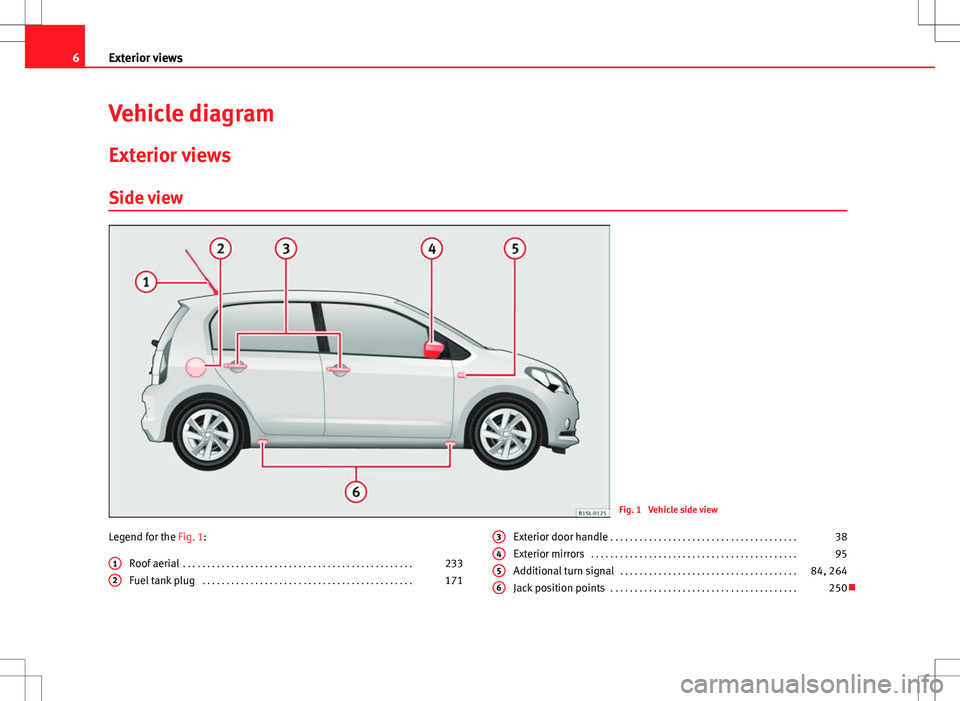
Fig. 1 Vehicle side view
Legend for the Fig. 1: Roof aerial . . . . . . . . . . . . . . . . . . . . . . . . . . . . . . . . . . . . . . . . . . . . . . . . 233
Fuel tank plug . . . . . . . . . . . . . . . . . . . . . . . . . . . . . . . . . . . . . . . . . . . . 171
1
2
Exterior door handle
. . . . . . . . . . . . . . . . . . . . . . . . . . . . . . . . . . . . . . . 38
Exterior mirrors . . . . . . . . . . . . . . . . . . . . . . . . . . . . . . . . . . . . . . . . . . . 95
Additional turn signal . . . . . . . . . . . . . . . . . . . . . . . . . . . . . . . . . . . . . 84, 264
Jack position points . . . . . . . . . . . . . . . . . . . . . . . . . . . . . . . . . . . . . . . 2503456
Page 13 of 308

11
Vehicle interior
Legend for the Fig. 5: Light switch . . . . . . . . . . . . . . . . . . . . . . . . . . . . . . . . . . . . . . . . . . . . 84
– Light off or daytime driving light - -
– Side/dipped lights
– Fog lights
Headlamp range adjustment . . . . . . . . . . . . . . . . . . . . . . . . . . . . 84
Air outlet . . . . . . . . . . . . . . . . . . . . . . . . . . . . . . . . . . . . . . . . . . . . . . . . . 164
Lever for . . . . . . . . . . . . . . . . . . . . . . . . . . . . . . . . . . . . . . . . . . . . . . . . . . 84
– Main beam headlights
– Headlight flasher
– Turn signals
– Cruise control system (CCS) – – – /+ – /- 152
Instrument panel:
– Instruments . . . . . . . . . . . . . . . . . . . . . . . . . . . . . . . . . . . . . . . . . . . . 17
– Digital display . . . . . . . . . . . . . . . . . . . . . . . . . . . . . . . . . . . . . . . . . . 17
– Indicator lamps . . . . . . . . . . . . . . . . . . . . . . . . . . . . . . . . . . . . . . . . . 15
Windscreen wiper/ windscreen wash lever . . . . . . . . . . . . . . . . . .91
– Windscreen wipers –
– Intermittent wipe
– “Brief wipe” x
– Windscreen wipers
– Automatic windscreen wash/wipe
– Rear window wiper
– Automatic rear window wash/wipe
– Lever with buttons for controlling the SEAT information
system - , / . . . . . . . . . . . . . . . . . . . . . . . . . . . . . . . . . . . . 22
Horn (works only when the ignition is on)
Ignition lock . . . . . . . . . . . . . . . . . . . . . . . . . . . . . . . . . . . . . . . . . . . . . . 119
Pedals . . . . . . . . . . . . . . . . . . . . . . . . . . . . . . . . . . . . . . . . . . . . . . . . . . . . 124
1
234
5
6
789
Steering column adjustment lever
. . . . . . . . . . . . . . . . . . . . . . . . . . 48
Driver front airbag . . . . . . . . . . . . . . . . . . . . . . . . . . . . . . . . . . . . . . . . . 67
Storage compartment . . . . . . . . . . . . . . . . . . . . . . . . . . . . . . . . . . . . . 108101112
Vehicle diagramPrior to a journey...While drivingCare, cleaning and mainte-
nanceIf and whenTechnical Data
Page 18 of 308

16Instrument panel
SymbolMeaning ⇒ See
Rear fog light switched on.⇒ page 84
lights up or flashes: Fault in catalytic con-
verter.
⇒ page 236
Fault in engine management.
lights up or flashes: Fault in the steering
system.⇒ page 147
Fuel tank almost empty.⇒ page 171
Fault in airbag system and seat belt tension-
ers.⇒ page 67
lights up: the Start-Stop system is enabled.
ALTERNATIVELY:
flashes: the Start-Stop system is not availa-
ble.
⇒ page 160
The Start-Stop system is enabled but the en-
gine cannot be automatically stopped.
Left or right turn signal.⇒ page 84Hazard warning lights on.⇒ page 240
Cruise control operating.⇒ page 152
Main beam on or flasher on.⇒ page 84
The natural gas engine coolant temperature
is too low.
WARNING
If the warning lamps are ignored, the vehicle may stall in traffic, or may
cause accidents and severe injuries.
● Never ignore the warning lamps.
● Stop the vehicle safely as soon as possible.
● Park the vehicle away from the traffic, ensuring that there are no easi-
ly inflammable materials under the vehicle which could come into contact
with the exhaust system (e.g. dry grass, fuel).
● A faulty vehicle represents a risk of accident for the driver and for oth-
er road users. If necessary, switch on the hazard warning lamps and put
out the warning triangle to advise other drivers.
● Before opening the bonnet, switch off the engine and allow it to cool.
● In any vehicle, the engine compartment is a hazardous area and could
cause severe injuries ⇒ page 180.
CAUTION
Failure to heed the warning lamps when they appear may result in faults in
the vehicle.
Page 27 of 308
25
Before starting the engine
Prior to a journey... Before starting the engine
Tips for driving
Introduction
Depending upon how you expect to use your vehicle, it may a good idea to
protect the engine from below. A guard underneath the engine may help to
reduce the risk of damage to the lower part of the vehicle and the oil sump
when driving over kerbs, or along dirt tracks or rough roads... Before instal-
lation, SEAT recommends going to a SEAT dealership.
Additional information and warnings:
● Ensure you are correctly seated ⇒ page 48
● Transporting ⇒ page 97
● Starting, changing gears, parking ⇒ page 119
● Ecological driving ⇒ page 144
● Notes for the user ⇒ page 233
WARNING
Driving under the influence of alcohol, drugs, medication or narcotics
may result in severe accidents and even loss of life.
● Alcohol, drugs, medication and narcotics may significantly alter per-
ception, affect reaction times and safety while driving, which could result
in the loss of control of the vehicle.
Journey preparations and safe driving
Check list
For your own safety, for the safety of vehicle occupants in the vehicle, and
for that of other road users, the following should be checked before and
during each journey
⇒
:
¥ Check that the lights and turn signals operate correctly.
¥ Check the tyre pressures (
⇒ page 210) and level of fuel
(⇒ page 171).
¥ Ensure there is good visibility through all the windows.
¥ Make sure that all objects and bags in the storage compartments, in
the luggage compartment and, where applicable, on the roof, are se-
curely fastened
⇒ page 97.
¥ Ensure there is nothing obstructing the free passage of the foot ped-
als.
¥ Use child retention systems appropriate for the child's body weight
and height
⇒ page 76.
¥ Correctly adjust front seat, head rests and rear-view mirrors to suit
your height
⇒ page 48, ⇒ page 95.
¥ Wear close-fitting shoes which do not prevent you from using the
pedals correctly.
¥ The driver's floor mat in the footwell should be fixed to the floor,
leaving the pedal area unobstructed.
¥ Before starting out, ensure you are correctly seated and remain in
this position throughout the journey. This applies to all passengers
in the vehicle
⇒ page 48.
Vehicle diagramPrior to a journey...While drivingCare, cleaning and mainte-
nanceIf and whenTechnical Data
Page 37 of 308

35
Unlocking and locking
FunctionHandling the buttons
on the vehicle
⇒ Fig. 17Handling the vehicle key
⇒ Fig. 17 in the lock cylinder or
with the vehicle mechanical key
⇒ Fig. 18.
Unlocking the
rear lid.Press button .Insert the vehicle key into the
lock cylinder of the driver door
and turn the key
in an anticlock-
wise direction.
Locking the rear
lid.Press button .Insert the vehicle key into the
lock cylinder of the driver door
and turn the key
in a clockwise
direction.
Attention: Depending on the operating of the central locking set by the Spe-
cialised workshop, in order to unlock all the doors and the rear lid, press
the button
twice.
The vehicle key only locks and unlocks the vehicle if it is within range of the
vehicle and if the battery has enough power.
● Upon locking the vehicle, all turn signals will flash once in confirmation.
● Upon unlocking the vehicle, all turn signals will flash twice in confirma-
tion.
If the turn signals do not flash in confirmation, at least one of the doors or
the rear lid has been left unlocked.
If the driver door is open, the vehicle cannot be locked with the key. If you
unlock the vehicle without opening any doors or the rear lid, it will lock
again automatically after a few seconds. This function prevents the vehicle
from remaining unlocked if the unlocking button is pressed by mistake. Mechanical locking
FunctionHandling the vehicle mechanical key
⇒ Fig. 18
in the lock cylinder.
Locking the driver door
manually.
To unlock, insert the vehicle key into the lock cyl-
inder of the driver door and turn the key in an
anticlockwise direction.
To lock, insert the vehicle key into the lock cylin-
der of the driver door and turn the key in a clock-
wise direction.
Locking and unlocking
the rear lid.
To unlock, insert the vehicle key into the lock cyl-
inder of the driver door and turn the key in an
anticlockwise direction.
To lock, insert the vehicle key into the lock cylin-
der of the driver door and turn the key in a clock-
wise direction.
If the driver door is open, the vehicle cannot be locked with the vehicle key.
Vehicle diagramPrior to a journey...While drivingCare, cleaning and mainte-
nanceIf and whenTechnical Data
Page 86 of 308
84Lights and visibility
Lights and visibility
Lights Introduction
Observe the legal requirements regarding the use of vehicle lights in each
country.
The driver is personally responsible for the correct use and adjustment of
the lights in all situations.
Additional information and warnings:
● Exterior detail ⇒ page 6
● SEAT information system ⇒ page 22
● Changing bulbs ⇒ page 264
WARNING
If the headlights are set too high and the main beam is not used correct-
ly, there is a risk of dazzling or distracting other road users. This could
result in serious accident.
● Always make sure that the headlamps are correctly adjusted.
● Never use the main beam or flashed headlamps as this could dazzle
other drivers.
Warning lamps
lights upPossible causeSolution
Rear fog light switched on.⇒ page 86.
Fog lights switched on.⇒ page 86.
Left or right turn signal.
The control lamp flashes twice
as fast when a vehicle turn sig-
nal is faulty.If necessary, check the vehicle
lighting.
Main beam on or flasher on.⇒ page 85.
Several warning and control lamps light up for a few seconds when the igni-
tion is switched on while a test of the function is being carried out. They will
switch off after a few seconds.
WARNING
If the warning lamps are ignored, the vehicle may stall in traffic, or may
cause accidents and severe injuries.
● Never ignore the warning lamps.
● Stop the vehicle safely as soon as possible.
● Park the vehicle at a suitable distance away from the traffic ensuring
that the exhaust system is not in contact with inflammable material, for
example, dry grass, fuel, oil, etc.
● A faulty vehicle represents a risk of accident for the driver and for oth-
er road users. If necessary, switch on the hazard warning lamps and put
out the warning triangle to advise other drivers.
Page 87 of 308

85
Lights and visibility
CAUTION
Failure to heed the warning lamps when they appear may result in faults in
the vehicle.
Turn signal and main beam lever
Fig. 55 Turn signal and
main beam lever in their
initial position
Move the lever to the required position:
Right turn signal.
Left turn signal.
Switching on main beam ⇒
. When the main beam is switched on,
the warning lamp is switched on in the instrument panel.
Switch on the flasher or switch off the main beam headlights. The flash-
ed beam comes on if the lever is pressed. The warning lamp will
light up during this process.
123
4
Push the lever all the way down to turn off the corresponding function.
Convenience turn signals
For the convenience turn signals, move the lever as far as possible upwards
or downwards and release the lever. The turn signal will flash 3 times.
The convenience indicators can be deactivated at a Specialised workshop.
WARNING
Incorrect use of the headlamps may cause accidents and serious injury,
as the main beam may distract or dazzle other drivers.
Note
The turn signal only works when the ignition is switched on. The hazard
warning lights system also works when the ignition is switched off
⇒ page 240.
Note
If any of both turn signals fails, the warning lamp will start flashing twice
faster than normal.
Note
The main beam headlights can only be switched on if the dipped beam
headlights are already on.
Vehicle diagramPrior to a journey...While drivingCare, cleaning and mainte-
nanceIf and whenTechnical Data
Page 88 of 308

86Lights and visibility
Turning on and off lights
Fig. 56 Next to the steering wheel: diagram of some of
the types of light switch
Observe the legal requirements regarding the use of vehicle lights in each
country.
Turn the light switch to the required position ⇒ Fig. 56: when the ignition is turned offwhen the ignition is on
Fog lights, dipped beam and
side lights off.Lights off, daytime driving light
on.
Side light on.Side light on.
Dipped beam off; if necessary,
the side light comes on for a
time.Dipped beam switched on.
Fog lights*
The control lamp appears on the fog lights control connected. ●
Switching on the fog lights : Turn the switch to position or pull out
to the first stop.
● Switching on the rear fog light : turn the light switch to position or
pull out to the maximum.
● To switch off the fog lights, press the light switch or turn it to position .
Audible warnings to advise the driver that the lights have not been
switched off
If the key is not in the ignition and the driver door is open, an audible warn-
ing signal is heard in the following cases: This is a reminder to turn off the
lights.
● When the light switch is in position .
● When the light switch is in position .
Page 89 of 308
87
Lights and visibility
WARNING
The side lights or daytime driving lights are not bright enough to illumi-
nate the road ahead and to ensure that other road users are able to see
you.
● Always use your dipped beam head lights if it is raining or if visibility
is poor.
Lights and visibility: functions
Parking light remains on both sides
If when switching off the ignition, the light control remains in the posi-
tion and the vehicle is closed from outside, both headlights, in addition
to the side lights and the rear lights will light up.
Daytime driving light
The daytime driving light consists of individual lights in the front head-
lamps.
When the daytime driving light is switched on, only the individual lights
come on ⇒
.
The daytime lights are switched on each time the ignition is turned on if the
light switch is in position .
Switching the daytime driving light on and off
To switch the daytime driving light on or off, it is necessary to fit or remove
the corresponding fuse. Ask for professional assistance for this.
WARNING
If the road is not well-lit and the vehicle is not clearly visible to other
drivers, there is a risk of accident.
● Never use the daytime driving light if the road is not well-lit as a re-
sult of the weather conditions and poor visibility. The daytime driving
lights are not bright enough to illuminate the road ahead and to ensure
that other road users are able to see you.
● The rear lights do not come on with the daytime driving light. A vehi-
cle which does not have the rear lights on may not be visible to other
drivers in the darkness, if it is raining or in conditions of poor visibility.
Note
The headlights, rear lights and turn signals may mist up temporarily on the
inside in cool or damp weather. This is normal and in no way effects the
useful life of the vehicle lighting system.
Adjusting the headlights
In those countries where vehicles drive on the other side of the road to the
home country, the asymmetric dipped beam may dazzle drivers of oncom-
ing vehicles.
For this reason, stickers may need to be used to cover the headlights when
driving abroad. For further information, please refer to a specialised work-
shop. SEAT recommends visiting a Technical Service.
Note
The use of stickers to cover headlights is only permitted over a short period.
To modify the direction of the headlamps more permanently, please take
the vehicle to a specialised workshop. SEAT recommends visiting a Techni-
cal Service.
Vehicle diagramPrior to a journey...While drivingCare, cleaning and mainte-
nanceIf and whenTechnical Data
Page 155 of 308

153
Driver assistance systems
Cruise control system operation
Fig. 95 Turn signal and
main beam headlights
lever on the left of the
steering column: CCS
buttons and controls
FunctionControl position, control
operations ⇒ Fig. 95Action
Switching on the
cruise control sys-
tem.Control B in the position
.
The system is switched on.
After switching on, no
speeds are stored and no
regulator has yet been
placed.
Switching on the
cruise control sys-
tem.Press button A in the
area .The current speed is stor-
ed and maintained.
Temporarily
switching off the
cruise control sys-
tem.Place control B in the po-
sition .
OR:. Press the brake or
clutch pedal.The cruise control system
is switched off temporari-
ly. The speed setting will
remain stored.
Switching the
speed setting
back on.Press button A in the
area .The stored speed is
reached again and main-
tained.
FunctionControl position, control
operations ⇒ Fig. 95Action
Increasing the
stored speed (dur-
ing CCS setting).
Press the button A in the
area briefly to in-
crease speed in shot
measures of about. 1 km/
h (1 mph) and store.
The vehicle accelerates ac-
tively until it reaches the
new stored speed.
Keep button A pressed in
the area for a long
time to continually in-
crease speed until releas-
ing and storing.
Reducing the stor-
ed speed (during
CCS setting).
Press the button A in the
area briefly to reduce
the stored speed in shot
measures of about. 1 km/
h (1 mph) and store.
Reduce speed without
braking, by interrupting
the accelerator until reach-
ing the new stored speed.
Keep button A pressed in
the area for a long
time to continually de-
crease stored speed until
releasing and storing.
Switching off the
cruise control sys-
tem.Control B in the position
.The system is switched off.
The stored speed is de-
leted.
Travelling down hills with the CCS
When travelling down hills the CCS cannot maintain a constant speed. Slow
the vehicle down using the brake pedal and reduce gears if required.
Automatic off
The cruise control system (CCS) is switched off automatically or temporarily:
Vehicle diagramPrior to a journey...While drivingCare, cleaning and mainte-
nanceIf and whenTechnical Data