brake light Seat Mii 2013 User Guide
[x] Cancel search | Manufacturer: SEAT, Model Year: 2013, Model line: Mii, Model: Seat Mii 2013Pages: 306, PDF Size: 4.3 MB
Page 137 of 306
135
Starting, changing gears, parking
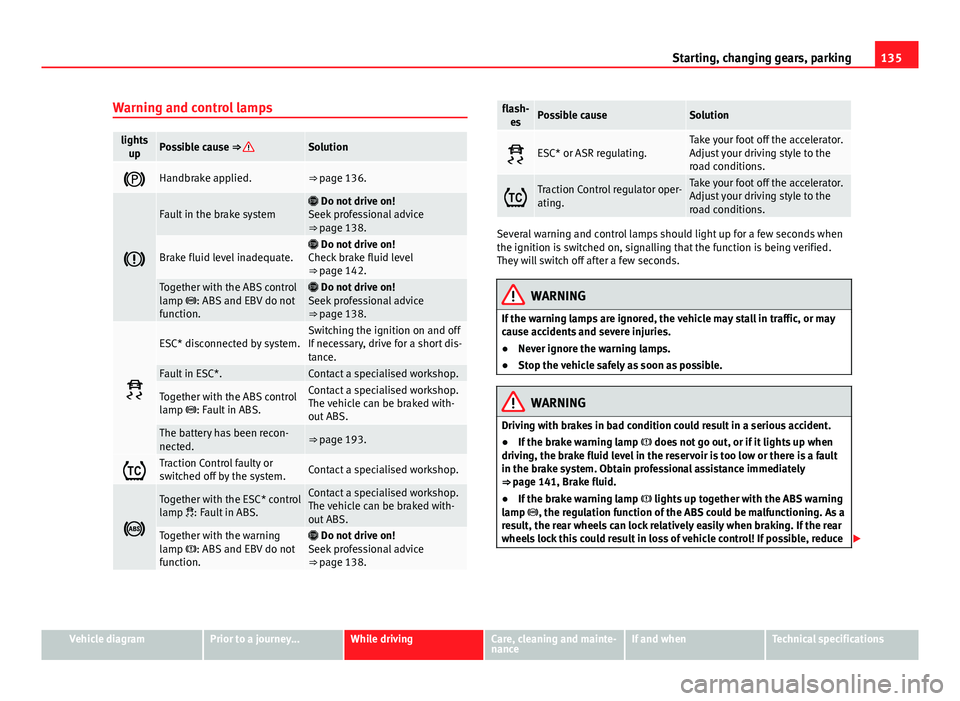
Warning and control lamps
lights upPossible cause ⇒ Solution
Handbrake applied.⇒ page 136.
Fault in the brake system Do not drive on!
Seek professional advice
⇒ page 138.
Brake fluid level inadequate. Do not drive on!
Check brake fluid level
⇒ page 142.
Together with the ABS control
lamp : ABS and EBV do not
function. Do not drive on!
Seek professional advice
⇒ page 138.
ESC* disconnected by system.Switching the ignition on and off
If necessary, drive for a short dis-
tance.
Fault in ESC*.Contact a specialised workshop.
Together with the ABS control
lamp : Fault in ABS.Contact a specialised workshop.
The vehicle can be braked with-
out ABS.
The battery has been recon-
nected.⇒ page 193.
Traction Control faulty or
switched off by the system.Contact a specialised workshop.
Together with the ESC* control
lamp : Fault in ABS.Contact a specialised workshop.
The vehicle can be braked with-
out ABS.
Together with the warning
lamp : ABS and EBV do not
function. Do not drive on!
Seek professional advice
⇒ page 138.
flash- esPossible causeSolution
ESC* or ASR regulating.Take your foot off the accelerator.
Adjust your driving style to the
road conditions.
Traction Control regulator oper-
ating.Take your foot off the accelerator.
Adjust your driving style to the
road conditions.
Several warning and control lamps should light up for a few seconds when
the ignition is switched on, signalling that the function is being verified.
They will switch off after a few seconds.
WARNING
If the warning lamps are ignored, the vehicle may stall in traffic, or may
cause accidents and severe injuries.
● Never ignore the warning lamps.
● Stop the vehicle safely as soon as possible.
WARNING
Driving with brakes in bad condition could result in a serious accident.
● If the brake warning lamp does not go out, or if it lights up when
driving, the brake fluid level in the reservoir is too low or there is a fault
in the brake system. Obtain professional assistance immediately
⇒ page 141, Brake fluid.
● If the brake warning lamp lights up together with the ABS warning
lamp , the regulation function of the ABS could be malfunctioning. As a
result, the rear wheels can lock relatively easily when braking. If the rear
wheels lock this could result in loss of vehicle control! If possible, reduce
Vehicle diagramPrior to a journey...While drivingCare, cleaning and mainte-
nanceIf and whenTechnical specifications
Page 138 of 306
136Starting, changing gears, parking
WARNING (Continued)
your speed and drive carefully to a specialised workshop close by to
check the brake system. During the following journey, avoid sudden brak-
ing and manoeuvres.
● If the ABS warning lamp does not go out or if it lights while driv-
ing, the ABS is malfunctioning. The vehicle can only be stopped using
normal braking without ABS. The protection provided by the ABS is not
available. Visit a specialised workshop as soon as possible.
CAUTION
Failure to heed the warning lamps when they appear may result in faults in
the vehicle.
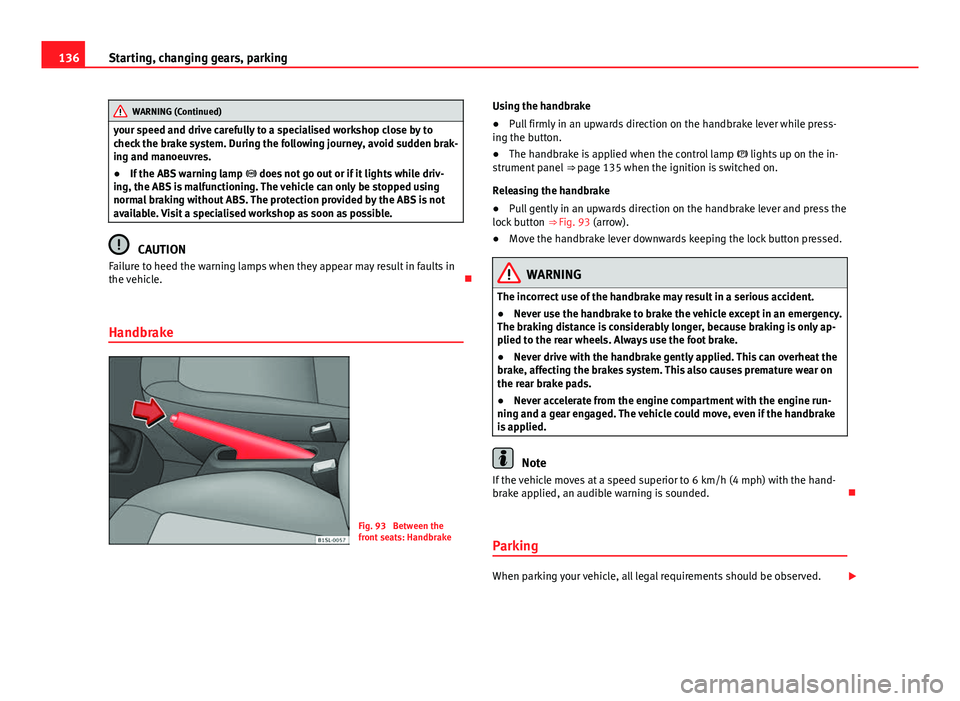
Handbrake
Fig. 93 Between the
front seats: Handbrake Using the handbrake
●
Pull firmly in an upwards direction on the handbrake lever while press-
ing the button.
● The handbrake is applied when the control lamp lights up on the in-
strument panel ⇒ page 135 when the ignition is switched on.
Releasing the handbrake
● Pull gently in an upwards direction on the handbrake lever and press the
lock button ⇒ Fig. 93 (arrow).
● Move the handbrake lever downwards keeping the lock button pressed.
WARNING
The incorrect use of the handbrake may result in a serious accident.
● Never use the handbrake to brake the vehicle except in an emergency.
The braking distance is considerably longer, because braking is only ap-
plied to the rear wheels. Always use the foot brake.
● Never drive with the handbrake gently applied. This can overheat the
brake, affecting the brakes system. This also causes premature wear on
the rear brake pads.
● Never accelerate from the engine compartment with the engine run-
ning and a gear engaged. The vehicle could move, even if the handbrake
is applied.
Note
If the vehicle moves at a speed superior to 6 km/h (4 mph) with the hand-
brake applied, an audible warning is sounded.
Parking
When parking your vehicle, all legal requirements should be observed.
Page 139 of 306
137
Starting, changing gears, parking
To park the vehicle
Complete operations only in the sequence given.
● Park the vehicle on a suitable surface ⇒
.
● Press and hold the brake pedal until the vehicle comes to a standstill.
● Apply the handbrake firmly ⇒ page 136.
● For an automatic gearbox, move the selector lever to position P.
● Switch off the engine and release the brake pedal.
● Remove the key from the ignition.
● If necessary, turn the steering wheel slightly to lock the steering.
● With a manual gearbox, engage the 1st gear on flat ground and slopes,
or even the reverse gear on hills, and release the clutch pedal.
● Ensure that all passengers leave the vehicle, especially children.
● When leaving the vehicle, take all keys with you.
● Lock the vehicle.
Additional information for steep slopes and hills
Before switching off the engine, rotate the steering wheel so that if the vehi-
cle should move then it will be held by the kerb.
● On slopes, turn the front wheels so that they are against the edge of the
kerb.
● Uphill, turn the wheels towards the centre of the road.
WARNING
The components of the exhaust system reach very high temperatures.
This could cause a fire and considerable damage.
● Always park your vehicle so that no part of the exhaust system can
come in contact with flammable materials (such as wood, leaves, spilled
fuel, dried grass, etc).
CAUTION
● Special care should be taken when parking in areas with high kerbs or
fixed barriers. Objects protruding from the ground may damage the bumper
or other parts of the vehicle during manoeuvres. To avoid damage, stop be-
fore the wheels touched the barrier or kerb.
● Special attention is required when driving through entrances, over
ramps, kerbs or other objects. The vehicle underbody, bumpers, mudguards
and running gear, and the engine and exhaust system could be damaged as
you drive over these objects.
Information about the brakes
For the first 200 to 300 km (120 to 190 mph), the new brake pads have not
yet reached their maximum braking capacity, and need to be “run in” first
⇒
. The slightly reduced braking effect can be compensated for by in-
creasing pressure on the brake pedal. While running in, the full braking dis-
tance or emergency braking distance is larger then when the brake pads
have been run in. While running in, avoid full power braking or situations
requiring braking performance. For example, in heavy traffic.
The rate of wear of the brake pads depends to a great extent on the condi-
tions in which the vehicle is used and the way the vehicle is driven. If the
vehicle is used frequently in city traffic or for short trips or driven sport style,
visit a specialised workshop regularly, more frequently than advised in the
Maintenance Programme, to have the bake pads checked.
If you drive with wet brakes, for example, after crossing areas of water, in
heavy rainfall or even after washing the car, the effect of the brakes is less-
ened as the brake discs are wet or even frozen (in winter). At higher speed,
dry the brakes as quickly as possible by braking gently several times. Only
do this without endangering vehicles behind you or any other road users
⇒
.
Vehicle diagramPrior to a journey...While drivingCare, cleaning and mainte-
nanceIf and whenTechnical specifications
Page 144 of 306
142Starting, changing gears, parking
recommends the use of brake fluid in accordance with the VW 501 14
standard. If this brake fluid is not available or another brake fluid is used for
different reasons, use a brake fluid that complies with the United States
standard FMVSS 116 DOT 4 or the German standard DIN ISO 4925 CLASS 4
⇒
.
Brake fluids conforming to the standard VW 501 14, fulfil the American re-
quirements of the FMVSS 116 DOT 4 standard and the German
DIN ISO 4925 CLASS 4 standard. However, fluids that comply with the Amer-
ican FMVSS 116 DOT 4 standard or the German DIN ISO 4925 CLASS 4
standard do not necessarily comply with the VW 501 14 standard. Always
check the information on the brake fluid container and ensure that you are
using suitable brake fluid.
A suitable brake fluid can be obtained from SEAT dealerships.
Brake fluid level
The level of the brake fluid should always be between the MIN and MAX
marks, or above the MIN mark ⇒
.
It is not always possible to check the level of the brake fluid, as in some
models the engine components make it difficult to see the brake fluid reser-
voir. If you cannot read the exact brake fluid level, consult a specialist.
The brake fluid level drops slightly when the vehicle is being used due to
wear of the brake pads and the automatic readjustment of the brake.
Changing the brake fluid
The brake fluid should be changed in accordance with the instructions giv-
en in the Maintenance Programme. Have the brake fluid changed by a spe-
cialised workshop. SEAT recommends visiting a Technical Service. This
means that only brake fluid complying with the required specifications will
be used.
WARNING
If the brake fluid level is low or unsuitable/old brake fluid is used, the
brake system may fail or braking power will be reduced.
● Check the brake system and the brake fluid level regularly!
● The brake fluid should be changed regularly in accordance with the
instructions given in the Maintenance Programme.
● When the brake fluid is used and brakes are subjected to extreme
braking forces, bubbles of vapour form in the brake system. These bub-
bles of water vapour can significantly reduce braking power, notably in-
creasing braking distance, and could even result in the total failure of the
brake system.
● Always ensure that you use suitable brake fluid. Only used brake fluid
that conforms to the VW 501 14 standard, FMVSS 116 DOT 4 standard or
even the DIN ISO 4925 CLASS 4 standard. Other types of brake fluid
could affect brake operation and reduce braking power. Do not use a
brake fluid if the container does not specify compliance with the
VW 501 14, FMVSS 116 DOT 4 or DIN ISO 4925 CLASS 4 standards.
● The replacement brake fluid must be new.
WARNING
Brake fluid is poisonous.
● To reduce the risk of poisoning, do not keep brake fluid in drinks bot-
tles/containers or similar. Other people could drink from these recipients
even if the contents are clearly marked.
● Always keep brake fluid in the original container; keep it correctly
sealed and out of reach of children.
CAUTION
Brake fluid damages the vehicle paintwork. Wipe off any brake fluid from
the paintwork immediately.
Page 146 of 306
144Starting, changing gears, parking
Ecological driving
Introduction
Fuel consumption, environmental impact and engine, brake and tyre wear
depend largely on 3 factors:
● Personal driving style.
● Conditions of use (weather, road surface).
● Technical requirements.
Savings of up to 25% in fuel consumption are possible with an appropriate
driving style and the adoption of certain simple tips.
WARNING
Always adapt your speed and the distance to the vehicles ahead in line
with visibility, weather conditions, the condition of the road and the traf-
fic situation.
Economic driving style
Changing gear early
General instructions: The highest gear is always the most economical gear.
As a guideline, for the majority of vehicles: At a speed of 30 km/h (19 mph),
drive in third gear, at 40 km/h (25 mph) in fourth gear and at 50 km/h
(30 mph) in fifth gear.
In addition, skipping gears when shifting up helps to save fuel, weather and
traffic conditions permitting. Do not wait until the last moment before changing gear. Only use first gear
when you move off and change to second gear quickly. Avoid the kick-down
function in vehicles with automatic gearbox.
Vehicles with a gear display help to achieve an economical driving style as
the display indicates the best moment to change gear.
Let the vehicle roll
If you take your foot off the accelerator, the fuel supply is stopped and con-
sumption is reduced.
Allow the vehicle to roll without accelerating, for example when approach-
ing a red traffic light. However, if the vehicle is rolling too slowly or the dis-
tance is too long, the clutch pedal should be pressed to declutch. The en-
gine will then operate at idle speed.
If the vehicle is going to be at a standstill for a period of time, switch off the
engine; for example, while waiting at a level crossing.
Think ahead and “flow” with the traffic
Frequent acceleration and braking considerably increase fuel consumption.
If you think ahead as you drive and keep a safe distance from the vehicle in
front, it is possible to slow down by simply lifting your foot off the accelera-
tor. This eliminates the need for constant braking and acceleration.
Calm and steady driving
Constancy is more important than speed: The more you drive at a constant
speed, the lower the fuel consumption.
When driving on the motorway, it is more efficient to drive at a constant and
more moderate speed than to be continuously accelerating and braking. As
a general rule, you will reach your destination just as quickly when you drive
at a constant speed.
The cruise control function helps you to achieve a constant style of driving.
Page 147 of 306
145
Starting, changing gears, parking
Moderate use of additional electrical appliances
It is important to travel in comfort, but convenience systems should be used
in an ecological manner.
Some equipment, when connected, increase fuel consumption considera-
bly, for example:
● Air conditioning cooling system: If the air conditioning system is re-
quired to cool to significantly lower temperatures than the true outside tem-
perature, it will require a large quantity of energy from the engine. There-
fore, we recommend that the selected temperature for the vehicle is not too
different to the outside temperature. It is a good idea to open all the win-
dows of the car before starting your journey, and to drive a short distance
with all the windows open to allow the vehicle to cool down slightly. Only
then should you close all the windows and switch on the air conditioning.
Keep windows closed when travelling at high speeds. Driving with the win-
dows open increases fuel consumption.
● Switch off the seat heating when the seats have warmed up.
● Switch off the heated rear window when it is not moist or covered in ice.
Other factors which increase fuel consumption (examples):
● Fault in engine management.
● Driving on hills. Saving fuel while driving
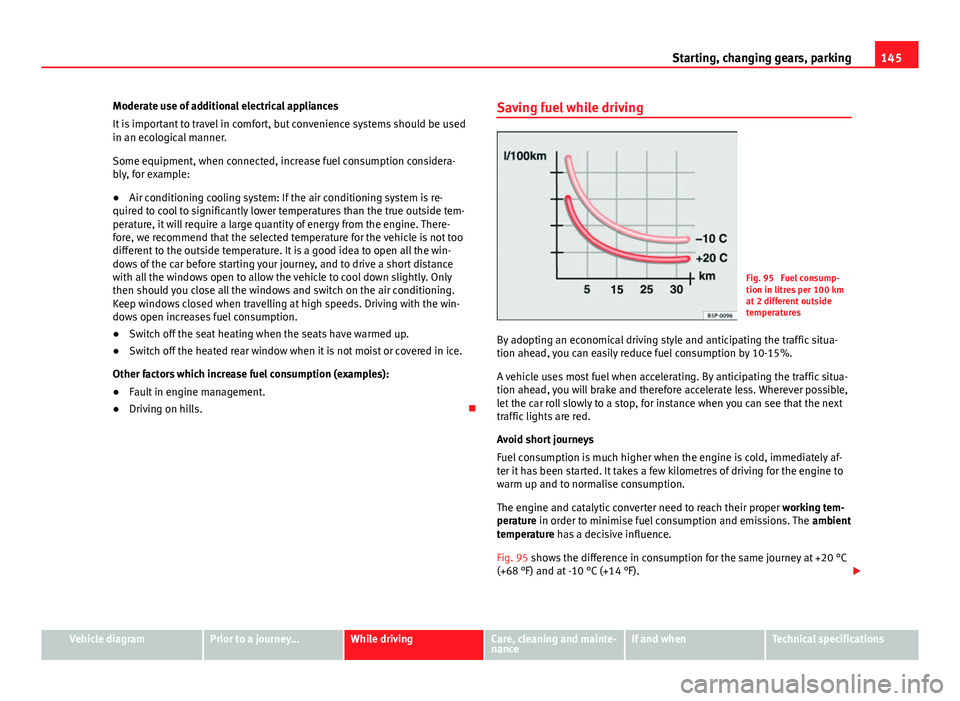
Fig. 95 Fuel consump-
tion in litres per 100 km
at 2 different outside
temperatures
By adopting an economical driving style and anticipating the traffic situa-
tion ahead, you can easily reduce fuel consumption by 10-15%.
A vehicle uses most fuel when accelerating. By anticipating the traffic situa-
tion ahead, you will brake and therefore accelerate less. Wherever possible,
let the car roll slowly to a stop, for instance when you can see that the next
traffic lights are red.
Avoid short journeys
Fuel consumption is much higher when the engine is cold, immediately af-
ter it has been started. It takes a few kilometres of driving for the engine to
warm up and to normalise consumption.
The engine and catalytic converter need to reach their proper working tem-
perature in order to minimise fuel consumption and emissions. The ambient
temperature has a decisive influence.
Fig. 95 shows the difference in consumption for the same journey at +20 °C
(+68 °F) and at -10 °C (+14 °F).
Vehicle diagramPrior to a journey...While drivingCare, cleaning and mainte-
nanceIf and whenTechnical specifications
Page 154 of 306
152Driver assistance systems
Cruise control* (Cruise control system - CCS)
Introduction
The cruise control system (CCS) is able to individually maintain the set
speed when driving forwards from approx. 20 km/h (15 mph).
The CCS only slows down by reducing the accelerator but not by braking
⇒
.
Additional information and warnings:
● Changing gear ⇒ page 124
● Accessories, parts replacement, repairs and modifications ⇒ page 222
WARNING
Use of the cruise control could cause accidents and severe injuries if it is
not possible to drive at a constant speed maintaining the safety distance.
● Do not use the cruise control in heavy traffic, if the distance from the
vehicle in front is insufficient, on steep roads, with several bends or in
slippery circumstances (snow, ice, rain or loose gravel), or on flooded
roads.
● Never use the CCS when driving off-road or on unpaved roads.
● Always adapt your speed and the distance to the vehicles ahead in
line with visibility, weather conditions, the condition of the road and the
traffic situation.
● To avoid unexpected operation of the cruise control system, turn it off
every time you finish using it.
● It is dangerous to use a set speed which is too high for the prevailing
road, traffic or weather conditions.
● When travelling down hills, the CCS cannot maintain a constant
speed. The vehicle tends to accelerate under its own weight. Select a
lower gear or use the foot brake to slow the vehicle.
Control lamp
lights upPossible cause
This cruise control system maintains the set speed of
the vehicle.
Several warning and control lamps should light up for a few seconds when
the ignition is switched on, signalling that the function is being verified.
They will switch off after a few seconds.
WARNING
If the warning lamps are ignored, the vehicle may stall in traffic, or may
cause accidents and severe injuries.
● Never ignore the warning lamps.
CAUTION
Failure to heed the warning lamps when they appear may result in faults in
the vehicle.
Page 155 of 306
153
Driver assistance systems
Cruise control system operation
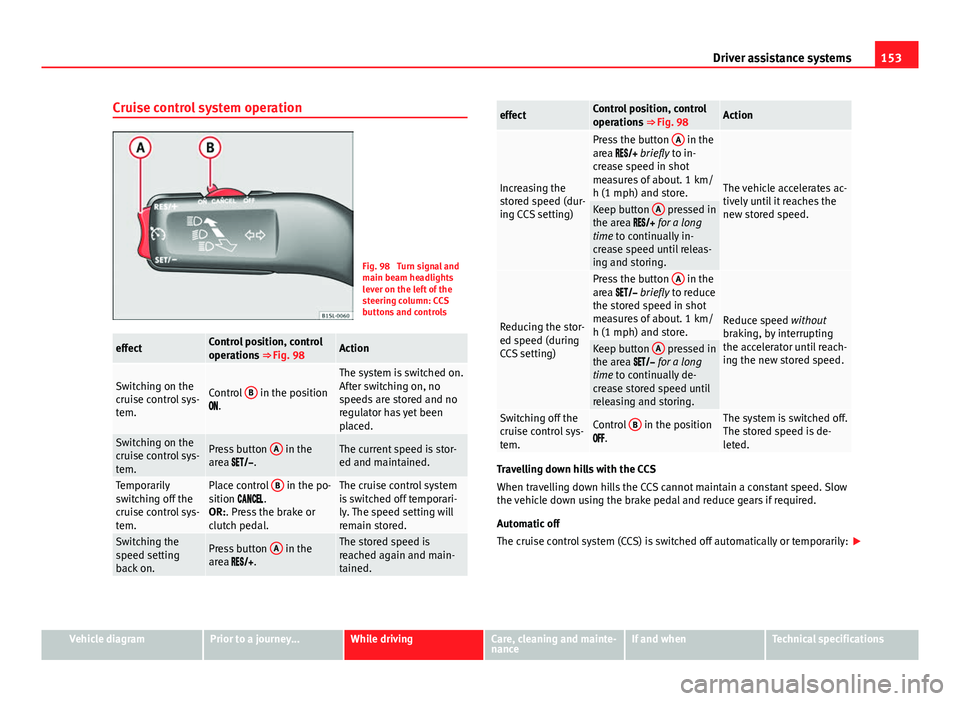
Fig. 98 Turn signal and
main beam headlights
lever on the left of the
steering column: CCS
buttons and controls
effectControl position, control
operations ⇒ Fig. 98Action
Switching on the
cruise control sys-
tem.Control B in the position
.
The system is switched on.
After switching on, no
speeds are stored and no
regulator has yet been
placed.
Switching on the
cruise control sys-
tem.Press button A in the
area .The current speed is stor-
ed and maintained.
Temporarily
switching off the
cruise control sys-
tem.Place control B in the po-
sition .
OR:. Press the brake or
clutch pedal.The cruise control system
is switched off temporari-
ly. The speed setting will
remain stored.
Switching the
speed setting
back on.Press button A in the
area .The stored speed is
reached again and main-
tained.
effectControl position, control
operations ⇒ Fig. 98Action
Increasing the
stored speed (dur-
ing CCS setting)
Press the button A in the
area briefly to in-
crease speed in shot
measures of about. 1 km/
h (1 mph) and store.
The vehicle accelerates ac-
tively until it reaches the
new stored speed.
Keep button A pressed in
the area for a long
time to continually in-
crease speed until releas-
ing and storing.
Reducing the stor-
ed speed (during
CCS setting)
Press the button A in the
area briefly to reduce
the stored speed in shot
measures of about. 1 km/
h (1 mph) and store.
Reduce speed without
braking, by interrupting
the accelerator until reach-
ing the new stored speed.
Keep button A pressed in
the area for a long
time to continually de-
crease stored speed until
releasing and storing.
Switching off the
cruise control sys-
tem.Control B in the position
.The system is switched off.
The stored speed is de-
leted.
Travelling down hills with the CCS
When travelling down hills the CCS cannot maintain a constant speed. Slow
the vehicle down using the brake pedal and reduce gears if required.
Automatic off
The cruise control system (CCS) is switched off automatically or temporarily:
Vehicle diagramPrior to a journey...While drivingCare, cleaning and mainte-
nanceIf and whenTechnical specifications
Page 158 of 306
156Driver assistance systems
Note
If the City Safety Assist function activates a brake, the brake pedal range is
reduced. This makes the brake pedal seem “harder”.
Note
Automatic brake intervention by the City Safety Assist function can be can-
celled by pressing the clutch pedal, the accelerator pedal or by a corrective
intervention.
Note
During the automatic braking by the City Safety Assist function you may
hear unusual noises. This is normal and is produced in the brakes system.
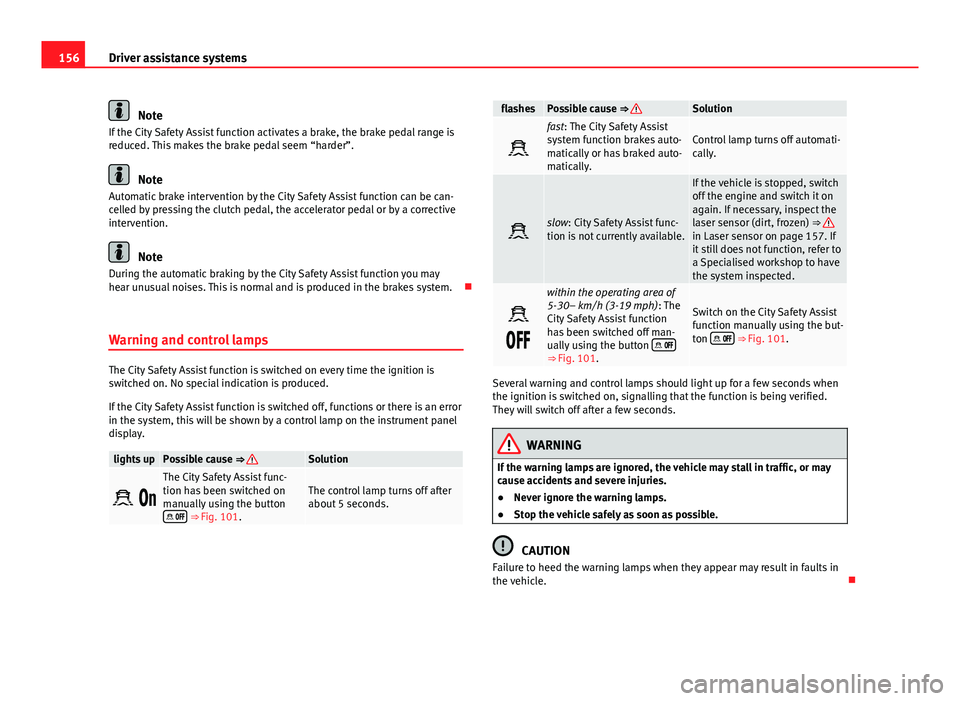
Warning and control lamps
The City Safety Assist function is switched on every time the ignition is
switched on. No special indication is produced.
If the City Safety Assist function is switched off, functions or there is an error
in the system, this will be shown by a control lamp on the instrument panel
display.
lights upPossible cause ⇒ Solution
The City Safety Assist func-
tion has been switched on
manually using the button
⇒ Fig. 101.
The control lamp turns off after
about 5 seconds.
flashesPossible cause ⇒ Solution
fast: The City Safety Assist
system function brakes auto-
matically or has braked auto-
matically.Control lamp turns off automati-
cally.
slow: City Safety Assist func-
tion is not currently available.
If the vehicle is stopped, switch
off the engine and switch it on
again. If necessary, inspect the
laser sensor (dirt, frozen) ⇒
in Laser sensor on page 157. If
it still does not function, refer to
a Specialised workshop to have
the system inspected.
within the operating area of
5-30– km/h (3-19 mph): The
City Safety Assist function
has been switched off man-
ually using the button
⇒
Fig. 101.
Switch on the City Safety Assist
function manually using the but-
ton
⇒ Fig. 101.
Several warning and control lamps should light up for a few seconds when
the ignition is switched on, signalling that the function is being verified.
They will switch off after a few seconds.
WARNING
If the warning lamps are ignored, the vehicle may stall in traffic, or may
cause accidents and severe injuries.
● Never ignore the warning lamps.
● Stop the vehicle safely as soon as possible.
CAUTION
Failure to heed the warning lamps when they appear may result in faults in
the vehicle.
Page 162 of 306
160Driver assistance systems
Malfunction in the laser sensor
If the laser sensor operation is impaired, for example due to heavy rain,
spray, snow or dirt, the City Safety Assist system function is temporarily
switched off. On the instrument panel display the control lamp flashes.
When the fault in the laser sensor has been rectified, the City Safety Assist
system function automatically becomes available. The control lamp
switches off.
The following conditions could prevent the City Safety Assist system from
functioning:
● Tight bends.
● Accelerator pressed all the way down to the floor.
● If the City Safety Assist system is switched off or there is a fault
⇒ page 156.
● If the laser sensor is dirty, covered or overheated ⇒ page 157.
● In the event of snow, heavy rain or dense fog.
● If there are vehicles in front.
● Vehicles changing lanes.
● Vehicles moving in the opposite direction in the same lane.
● Very dirty vehicles with a low degree of reflection.
● Presence of thick dust.
Hill hold
Introduction
Additional information and warnings:
● SEAT information system ⇒ page 22
● Braking, stopping and parking ⇒ page 134 ●
Vehicle battery ⇒ page 193
● Wheels and tyres ⇒ page 210
● Accessories, parts replacement, repairs and modifications ⇒ page 222
● Jump starting ⇒ page 275
WARNING
The smart technology included in the hill hold cannot change the laws of
physics. Do not let the extra convenience afforded by the hill hold tempt
you into taking any risks when driving.
● Any accidental movement of the vehicle could result in serious injury.
● The hill hold is not a replacement for driver awareness.
● Adjust your speed and driving style to visibility, weather, road and
traffic conditions.
● The hill hold cannot always keep the vehicle at a standstill on a slope
or brake sufficiently when travelling downhill (e.g. on slippery or frozen
surfaces).
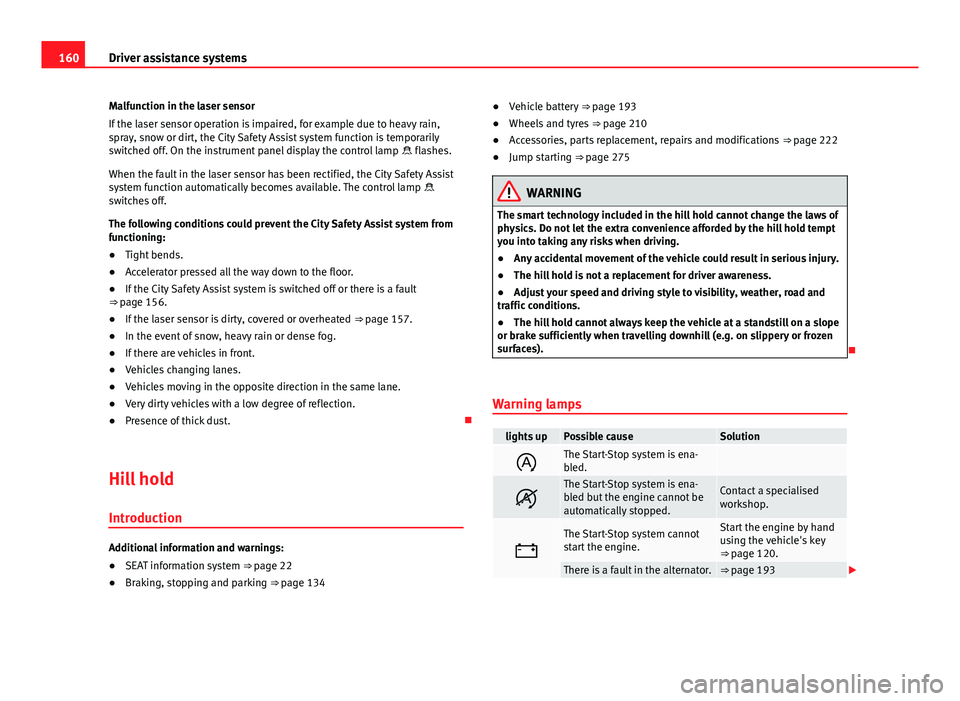
Warning lamps
lights upPossible causeSolution
The Start-Stop system is ena-
bled.
The Start-Stop system is ena-
bled but the engine cannot be
automatically stopped.Contact a specialised
workshop.
The Start-Stop system cannot
start the engine.Start the engine by hand
using the vehicle's key
⇒ page 120.
There is a fault in the alternator.⇒ page 193