service Seat Toledo 2012 User Guide
[x] Cancel search | Manufacturer: SEAT, Model Year: 2012, Model line: Toledo, Model: Seat Toledo 2012Pages: 249, PDF Size: 3.6 MB
Page 59 of 249
58Controls and displays
In vehicles equipped with an informative display the service interval display
can be reset from the menu, Settings ⇒ page 63.
CAUTION
We advise against resetting the service interval display yourself, given that
this action could cause an imbalance in the service intervals, and as a re-
sult, faults in the vehicle.
Note
● Never reset the display between service intervals as this could lead to
erroneous indications.
● After disconnecting the battery of the vehicle, the service interval dis-
play values remain stored.
● If the general instrument panel is changed after a repair, the correct val-
ues must be input in the service interval display. This operation is carried
out by a specialised service.
● After resetting the display with flexible service intervals, the information
will be indicated in the same way as vehicles with fixed service intervals.
Therefore, we recommend that a SEAT Authorised Service resets the service
interval display, who will do so correctly using diagnostics equipment.
● For more detailed information please consult the Maintenance Pro-
gramme.
Digital clock
The clock is set using the buttons 5 to 6
⇒ Fig. 31
⇒ page 55.
Select the indication you want to change with button 5
and make the ad-
justment with button 6.
In vehicles equipped with an informative display this can be reset from the
menu, Time ⇒ page 63. Recommended gear display
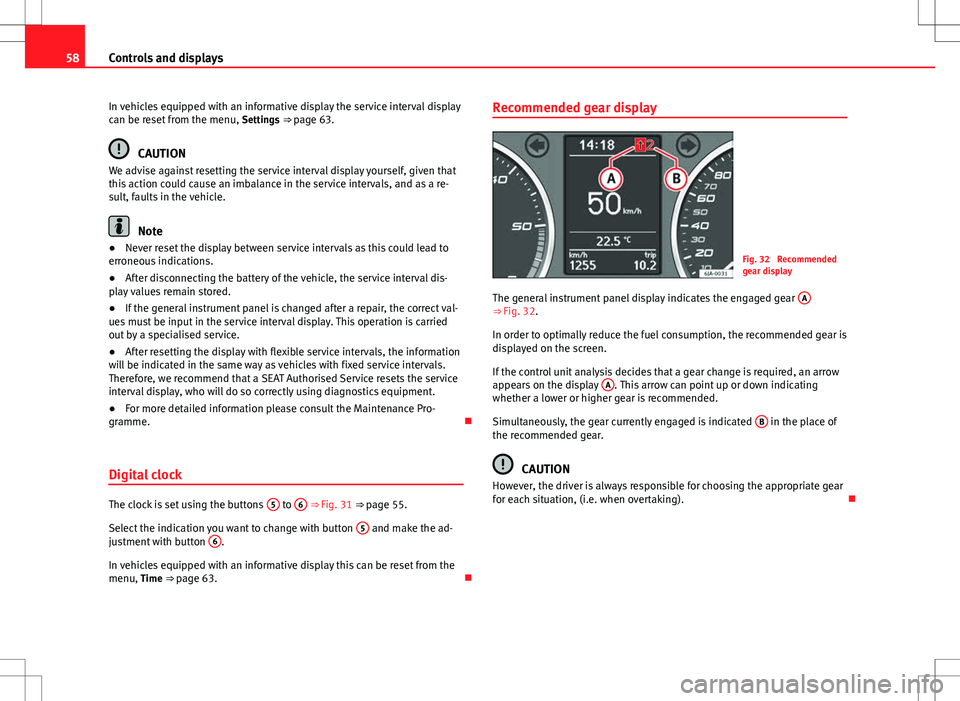
Fig. 32 Recommended
gear display
The general instrument panel display indicates the engaged gear A
⇒ Fig. 32.
In order to optimally reduce the fuel consumption, the recommended gear is
displayed on the screen.
If the control unit analysis decides that a gear change is required, an arrow
appears on the display A
. This arrow can point up or down indicating
whether a lower or higher gear is recommended.
Simultaneously, the gear currently engaged is indicated B
in the place of
the recommended gear.
CAUTION
However, the driver is always responsible for choosing the appropriate gear
for each situation, (i.e. when overtaking).
Page 64 of 249
63
Controls and displays
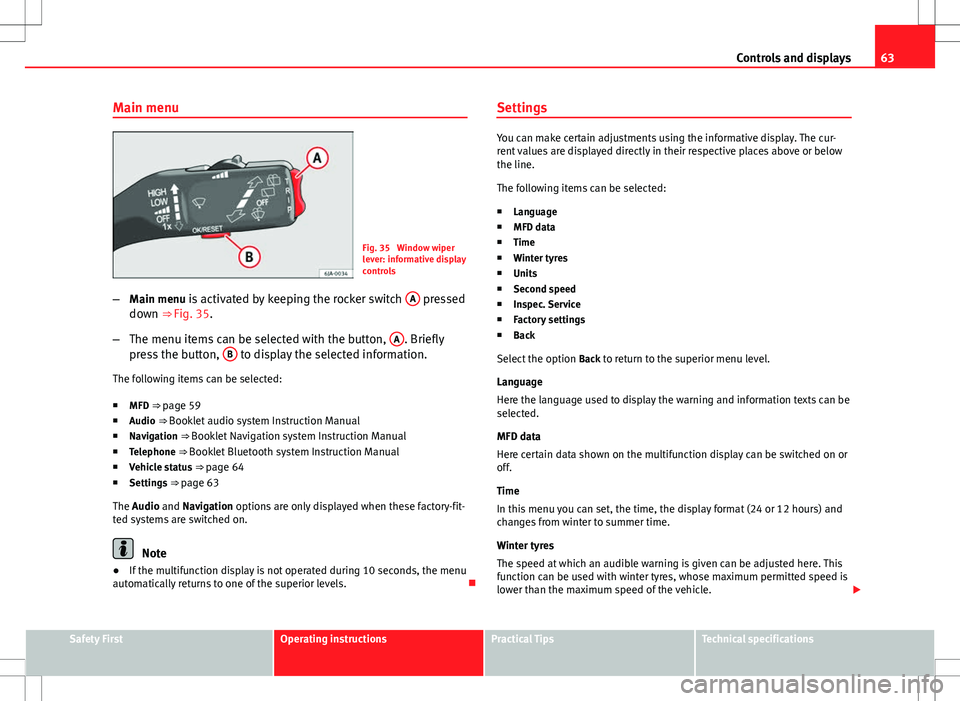
Main menu
Fig. 35 Window wiper
lever: informative display
controls
– Main menu is activated by keeping the rocker switch A
pressed
down ⇒ Fig. 35.
– The menu items can be selected with the button, A
. Briefly
press the button, B to display the selected information.
The following items can be selected:
■ MFD ⇒ page 59
■ Audio ⇒ Booklet audio system Instruction Manual
■ Navigation ⇒ Booklet Navigation system Instruction Manual
■ Telephone ⇒ Booklet Bluetooth system Instruction Manual
■ Vehicle status ⇒ page 64
■ Settings ⇒ page 63
The Audio and Navigation options are only displayed when these factory-fit-
ted systems are switched on.
Note
● If the multifunction display is not operated during 10 seconds, the menu
automatically returns to one of the superior levels. Settings
You can make certain adjustments using the informative display. The cur-
rent values are displayed directly in their respective places above or below
the line.
The following items can be selected:
■ Language
■ MFD data
■ Time
■ Winter tyres
■ Units
■ Second speed
■ Inspec. Service
■ Factory settings
■ Back
Select the option Back to return to the superior menu level.
Language
Here the language used to display the warning and information texts can be
selected.
MFD data
Here certain data shown on the multifunction display can be switched on or
off.
Time
In this menu you can set, the time, the display format (24 or 12 hours) and
changes from winter to summer time.
Winter tyres
The speed at which an audible warning is given can be adjusted here. This
function can be used with winter tyres, whose maximum permitted speed is
lower than the maximum speed of the vehicle.
Safety FirstOperating instructionsPractical TipsTechnical specifications
Page 65 of 249

64Controls and displays
When exceeding the maximum speed the following is shown on the display: Winter tyres max speed … km/h … (mph)
Units
The units of measure for temperature, consumption and journey distances
can be set here.
Second speed
The second speed can be activated/deactivated in mph or km/h respective-
ly here.
Inspection Service
Here you can choose to display the kilometres (miles) and days remaining
until the next service, and reset the service interval display.
Factory settings
Select Factory setting to reset the values of the informative display to their
factory settings.
Door, rear lid or bonnet open indicator
If at least one of the doors, rear lid or bonnet is open, a symbol is shown on
the informative display indicating that the door, rear lid or bonnet con-
cerned is open.
An audible warning is also given simultaneously if the vehicle is being driv-
en at a speed of above 6 km/h (4 mph). Auto-check system
Vehicle status
When the ignition is switched on, some vehicle functions such as the condi-
tion of its systems are automatically checked.
The warning messages about eventual faults in addition to other informa-
tion is displayed on the informative display. This information is displayed
together with their respective symbols on the informative display or by
warning lamps that light up on the general instrument panel
⇒ page 65.
The option, Vehicle status, appears in the menu when at least one warning
message is present. The first of the warnings given is displayed upon se-
lecting this option. If there is more than one message present, this is dis-
played on the screen, i.e. 1/3. This means that the warning currently dis- played is the first of a total of three.
Warning symbols
The engine oil pressure is too low⇒ page 67
Automatic gearbox overheated clutches⇒ page 64
Engine oil level,
engine oil sensor faulty⇒ page 67
Engine oil pressure fault⇒ page 65
Automatic gearbox overheated clutches
If the symbol appears on the informative display, the temperature of the
automatic gearbox clutches has reached an unacceptable level.
The informative display indicates:
Gearbox overheated. Stop! Instruction Manual!
Page 66 of 249
65
Controls and displays
Stop the vehicle in this case, stop the engine and wait until the symbol
has switched off. Danger of damage to the gearbox! You can continue driv-
ing once the symbol is switched off.
Engine oil pressure fault
If the symbol appears on the informative display, the vehicle must be im-
mediately taken to a specialised service. Information regarding the maxi-
mum engine speed is displayed together with this symbol.
WARNING
If the vehicle has to be stopped for technical reasons, park it a safe dis-
tance away from moving traffic, switch off the engine and turn on the
hazard warning lights ⇒ page 98.
Note
● If a warning appears on the informative display it must be confirmed by
pressing the button, B
⇒ Fig. 35 ⇒
page 63 before proceeding to the main
menu.
● The symbols are displayed again until the fault is corrected. After the
first time a symbol is displayed they reappear, but without a message for
the driver.
Control lamps Summary
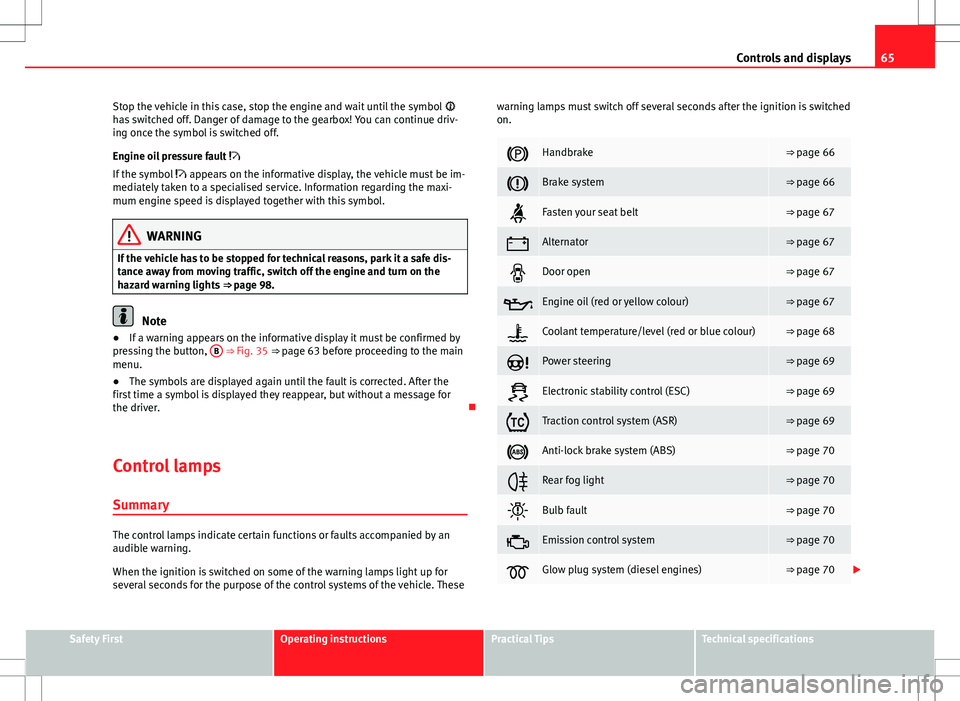
The control lamps indicate certain functions or faults accompanied by an
audible warning.
When the ignition is switched on some of the warning lamps light up for
several seconds for the purpose of the control systems of the vehicle. These warning lamps must switch off several seconds after the ignition is switched
on.
Handbrake⇒ page 66
Brake system⇒ page 66
Fasten your seat belt⇒ page 67
Alternator⇒ page 67
Door open⇒ page 67
Engine oil (red or yellow colour)⇒ page 67
Coolant temperature/level (red or blue colour)⇒ page 68
Power steering⇒ page 69
Electronic stability control (ESC)⇒ page 69
Traction control system (ASR)⇒ page 69
Anti-lock brake system (ABS)⇒ page 70
Rear fog light⇒ page 70
Bulb fault⇒ page 70
Emission control system⇒ page 70
Glow plug system (diesel engines)⇒ page 70
Safety FirstOperating instructionsPractical TipsTechnical specifications
Page 67 of 249

66Controls and displays
Engine electronics control (petrol engines)⇒ page 71
Particulate filter (diesel engines)⇒ page 71
Fuel reserve⇒ page 71
Airbag system⇒ page 72
Tyre pressure⇒ page 72
Liquid level in the window washer system⇒ page 73
Turn signals (left/right)⇒ page 73
Fog lights⇒ page 73
Cruise speed⇒ page 73
Selector lever lock⇒ page 73
Main beams⇒ page 73
WARNING
● Failure to observe control lamps and warning messages can result in
serious personal injuries or damage to your vehicle.
● The engine compartment is a dangerous area! Carrying out work in
the engine compartment, i.e. checking and filling service liquids, can
lead to injury, scalding, burns and fires. Therefore the corresponding
warnings must always be observed ⇒ page 173, Engine compartment.
Handbrake
If the
warning lamp lights up, the handbrake is applied. Additionally,
driving the vehicle at speeds exceeding 6 km/h (4 mph) for at least 3 sec-
onds produces an audible warning.
The informative display indicates:
Release the handbrake!
Brake system
The warning lamp lights up if the brake fluid level falls too low or if there
is a fault in the ABS system.
The informative display indicates:
Brake fluid Instruction Manual!
Stop the vehicle, switch off the engine and check the level of the brake fluid
⇒ page 181
WARNING
● If the vehicle has to be stopped for technical reasons, park it a safe
distance away from moving traffic, switch off the engine and turn on the
hazard warning lights ⇒ page 98.
● The following indications must be taken into account when opening
the engine compartment to check the brake fluid ⇒ page 173, Engine
compartment.
Page 72 of 249

71
Controls and displays
If the warning lamp starts to flash while driving, there is a fault in the
engine power control electronic system. The engine control unit allows driv-
ing to continue in an emergency program.
Seek professional help.
Engine management (diesel engines)
If the warning lamp is lit up, there is a fault in the engine management
system. The engine control unit allows driving to continue in an emergency
program.
Seek professional help.
Particulate filter (diesel engines)
The particulate filter eliminates soot from emissions. The particles accumu-
late in the filter where they are normally burned off.
If the warning lamp is lit up, the filter is obstructed by soot.
In order for the filter to clean itself (if the traffic conditions ⇒
so permit) it
is essential to drive for at least 15 minutes (or until the warning lamp
switches off) with 4th or 5th gear engaged (automatic gearbox: position S)
at a minimum speed of 60 km/h (37 mph) with the engine speed between
1800-2500 1/min.
The warning lamp switches off once the filter has been successfully
cleaned.
If the cleaning process is not successful, the warning lamp does not
switch off and the warning lamp starts to flash.
The informative display indicates: Diesel particulate filter. Instruction Manual!
The engine control unit allows driving to continue in an emergency program.
When switching the ignition off and on again, the warning lamp also
lights up.
Seek professional help.
WARNING
● The particulate filter attains very high temperatures. Therefore, do
not park the vehicle in places where the exhaust pipe could come into
contact with dry grass or with highly-flammable materials. Risk of fire!
● Always adjust your speed to suit the weather, road, terrain and traffic
conditions. Never be encouraged, by the recommendations shown in the
warning lamps, to fail to respect traffic legislation.
CAUTION
While the warning lamp is lit up, the fuel consumption is high, and in
certain conditions, the engine power is reduced.
Note
● In order for the particulate filter to burn off soot in a correct manner,
avoid carrying out frequent short journeys.
● Using diesel fuel with a high sulphur count can considerably reduce the
useful life of the particulate filter. The specialised service provides informa-
tion about the countries where fuel with a high sulphur content is used.
Fuel reserve
The warning lamp lights up when approximately only 7 litres of fuel re-
main in the tank.
Safety FirstOperating instructionsPractical TipsTechnical specifications
Page 73 of 249
72Controls and displays
The informative display indicates: Refuel! Fuel range…km...(miles)
Note
The message on the display switches off only after refuelling and carrying
out a short journey.
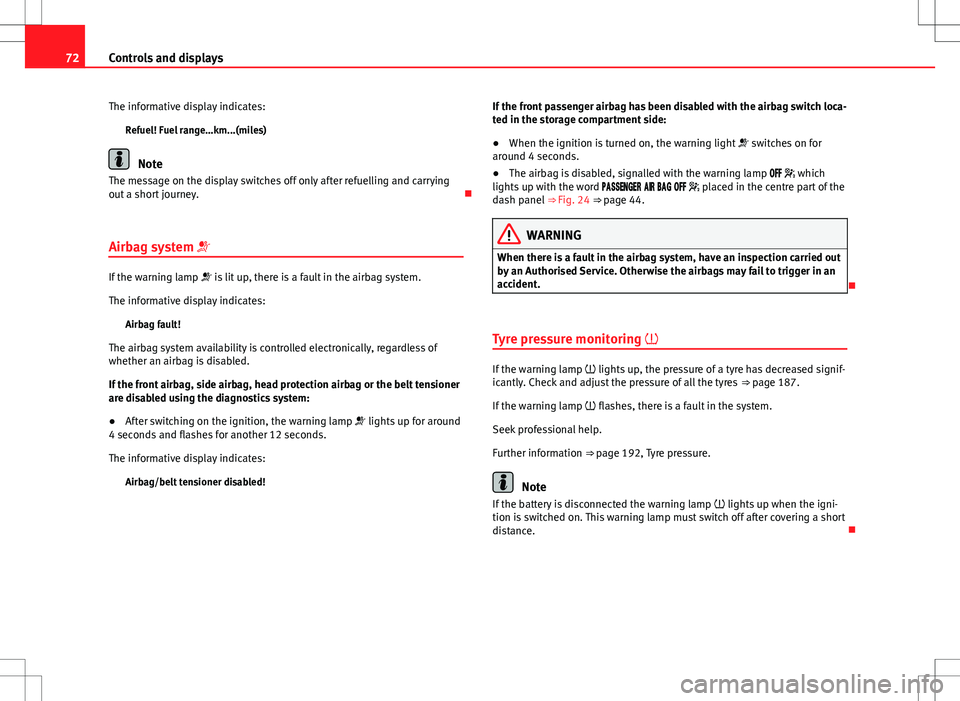
Airbag system
If the warning lamp is lit up, there is a fault in the airbag system.
The informative display indicates: Airbag fault!
The airbag system availability is controlled electronically, regardless of
whether an airbag is disabled.
If the front airbag, side airbag, head protection airbag or the belt tensioner
are disabled using the diagnostics system:
● After switching on the ignition, the warning lamp lights up for around
4 seconds and flashes for another 12 seconds.
The informative display indicates:
Airbag/belt tensioner disabled! If the front passenger airbag has been disabled with the airbag switch loca-
ted in the storage compartment side:
●
When the ignition is turned on, the warning light switches on for
around 4 seconds.
● The airbag is disabled, signalled with the warning lamp which
lights up with the word placed in the centre part of the
dash panel ⇒ Fig. 24 ⇒ page 44.
WARNING
When there is a fault in the airbag system, have an inspection carried out
by an Authorised Service. Otherwise the airbags may fail to trigger in an
accident.
Tyre pressure monitoring
If the warning lamp lights up, the pressure of a tyre has decreased signif-
icantly. Check and adjust the pressure of all the tyres ⇒ page 187.
If the warning lamp flashes, there is a fault in the system.
Seek professional help.
Further information ⇒ page 192, Tyre pressure.
Note
If the battery is disconnected the warning lamp lights up when the igni-
tion is switched on. This warning lamp must switch off after covering a short
distance.
Page 85 of 249
84Opening and closing
If the Safe lock is out of service, the control lamp on the driver door will
flash quickly for 2 seconds before switching off for 30 seconds and then
flashing at a slower rate.
The Safe lock is re-activated on unlocking and locking the vehicle again.
If the vehicle is locked and the Safe lock is deactivated, the vehicle can be
opened from inside by pulling on the door handle.
WARNING
Do not leave people or animals in locked vehicles with the Safe lock acti-
vated: the doors and windows cannot then be opened from the inside.
Doors locked in this manner could delay assistance in an emergency.
Risk of death!
Note
● The anti-theft alarm switches on automatically when the vehicle is
locked, even if the Safe lock is deactivated. The Vehicle interior monitoring,
however, is not activated.
● Given that the Safe function will be activated on locking the vehicle,
CHECK DEADLOCK will be shown on the general instrument panel display. On
vehicles equipped with an informative display, Caution SAFE! On-board docu-
mentation! will be indicated. Unlocking the vehicle with the key
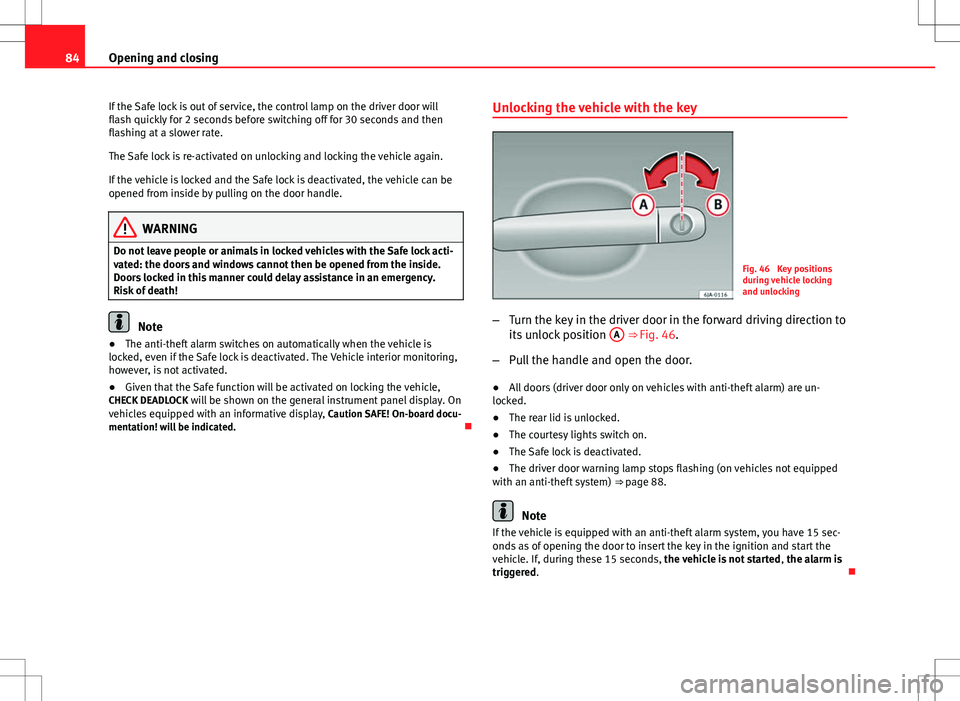
Fig. 46 Key positions
during vehicle locking
and unlocking
– Turn the key in the driver door in the forward driving direction to
its unlock position A
⇒ Fig. 46.
– Pull the handle and open the door.
● All doors (driver door only on vehicles with anti-theft alarm) are un-
locked.
● The rear lid is unlocked.
● The courtesy lights switch on.
● The Safe lock is deactivated.
● The driver door warning lamp stops flashing (on vehicles not equipped
with an anti-theft system) ⇒ page 88.
Note
If the vehicle is equipped with an anti-theft alarm system, you have 15 sec-
onds as of opening the door to insert the key in the ignition and start the
vehicle. If, during these 15 seconds, the vehicle is not started , the alarm is
triggered.
Page 89 of 249
88Opening and closing
Remote control synchronisation
If the vehicle cannot be locked or unlocked using the remote control, the
code of the key might not match that of the control unit. This can occur
when the remote control buttons are frequently pressed outside the range
of the system or if the remote control battery has been replaced.
In this case, it must be synchronised as follows:
●Press any key on the remote control key.
● Open the door using the key within the next minute.
Anti-theft alarm system
General notes
The anti-theft alarm system increases vehicle protection from intruders. If
the anti-theft alarm system senses interference with the vehicle it triggers
an audible and visible alarm.
Activating the alarm system
The anti-theft alarm switches on automatically when the vehicle is locked
using the remote control key or inserting the key in the driver door. The
alarm is activated around 30 seconds after the vehicle is locked.
Deactivating the alarm system
The anti-theft alarm system is deactivated when the remote control unlock
button is pressed. If the vehicle is not opened within 30 seconds after emit-
ting the radiofrequency signal, the system will be reactivated.
If the vehicle is unlocked using by inserting the key in the driver door, the
ignition must be switched on within 15 seconds. This deactivates the alarm system. If, during these 15 seconds, the vehicle is not started
, the alarm is
triggered.
When does the system trigger an alarm?
The following areas of the vehicle are monitored:
● Bonnet
● Rear lid
● Doors
● Ignition
● Tilt angle ⇒ page 89, Vehicle interior monitoring and tow-away protec-
tion system
● The interior ⇒ page 89, Vehicle interior monitoring and tow-away pro-
tection system
● Drop in voltage in the car systems
● The factory-fitted towing bracket
The alarm is triggered immediately if one of the battery cables is disconnec-
ted while the alarm system is active.
How to turn off the alarm
To deactivate the alarm, press the unlock button on the remote control key
or switch on the ignition.
Note
● The alarm horn power supply has a 5-year useful life. Contact an Official
Service for more detailed information.
● To make sure that the anti-theft alarm is fully operative when leaving the
vehicle, check that all the doors and windows are closed.
● Remote control and receiver unit coding means that the remote control
cannot be used on other vehicles.
Page 91 of 249

90Opening and closing
Automatic rear lid locking
Where the vehicle has been locked by pressing the button on the remote
control with the rear lid open, the rear lid will lock automatically when
closed.
The automatic rear lid locking time extension function can be activated.
Where this function is activated and once the rear lid has been unlocked by
pressing the
button on the remote control key
2 ⇒
page 87, the rear lid
can be re-opened for a certain length of time.
Where required, the automatic rear lid locking time extension function can
be activated or deactivated at a SEAT Authorised Service, which will provide
all of the necessary information.
Before the vehicle locks automatically, there is a risk of intruders getting in-
to the vehicle. Therefore, we recommend you always lock the vehicle by
pressing the
button on the remote control or by using the key without re-
mote control ⇒ page 85 Rear lid
The rear lid opening system is electrically operated. It is acti-
vated by using the catch on the rear lid.
Fig. 51 Rear lid: opening
from the outside
Fig. 52 Close-up of the
inside trim of the rear lid:
hand grip