ignition Seat Toledo 2013 Owner's Guide
[x] Cancel search | Manufacturer: SEAT, Model Year: 2013, Model line: Toledo, Model: Seat Toledo 2013Pages: 258, PDF Size: 3.94 MB
Page 97 of 258
95
Opening and closing
Release
– Fold down the backrest of the rear seat ⇒ page 113.
– Insert the car key in the opening in the mat.
– Move it towards the arrow to release the rear lid.
– Open the rear lid.
Opening and closing electric windows Introduction
WARNING
● When locking the vehicle from the outside, make sure that nobody is
inside the vehicle, as the windows cannot be opened from the inside in
an emergency.
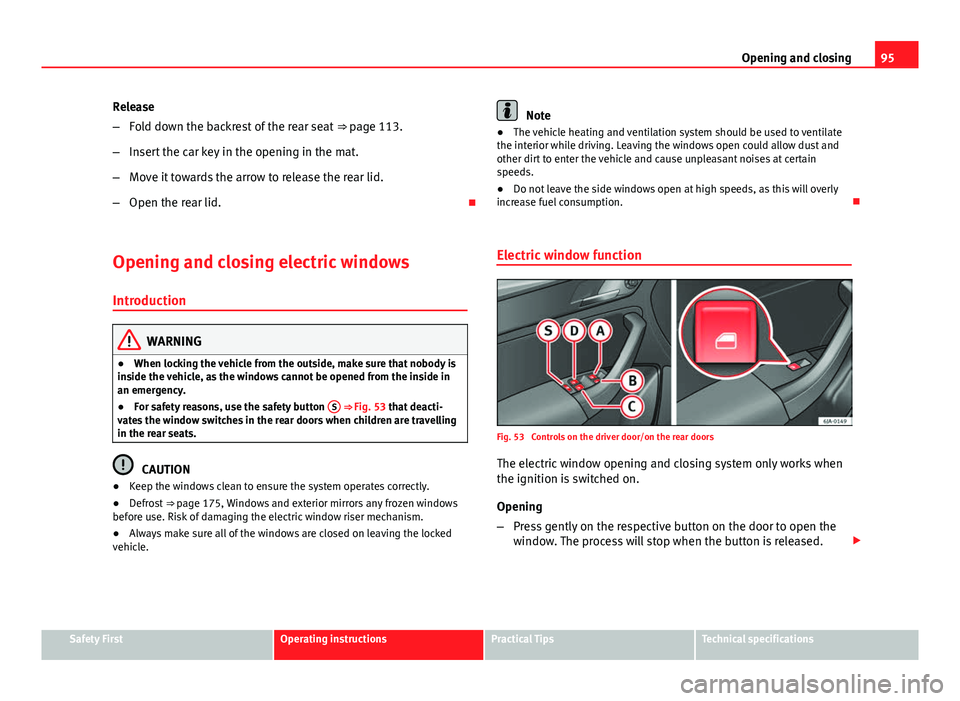
● For safety reasons, use the safety button S
⇒ Fig. 53 that deacti-
vates the window switches in the rear doors when children are travelling
in the rear seats.
CAUTION
● Keep the windows clean to ensure the system operates correctly.
● Defrost ⇒ page 175, Windows and exterior mirrors any frozen windows
before use. Risk of damaging the electric window riser mechanism.
● Always make sure all of the windows are closed on leaving the locked
vehicle.
Note
● The vehicle heating and ventilation system should be used to ventilate
the interior while driving. Leaving the windows open could allow dust and
other dirt to enter the vehicle and cause unpleasant noises at certain
speeds.
● Do not leave the side windows open at high speeds, as this will overly
increase fuel consumption.
Electric window function
Fig. 53 Controls on the driver door/on the rear doors
The electric window opening and closing system only works when
the ignition is switched on.
Opening
– Press gently on the respective button on the door to open the
window. The process will stop when the button is released.
Safety FirstOperating instructionsPractical TipsTechnical specifications
Page 99 of 258
97
Lights and visibility
Lights and visibility
Lights Introduction
The location of the controls of right-hand drive cars differs slightly from the
location shown here ⇒ Fig. 54 ⇒ page 97. However, the symbols indicat-
ing the respective positions of the controls remain the same.
WARNING
Never drive with only the side lights on! The side lights are not bright
enough to illuminate the road ahead and to ensure that other road users
are able to see you. Always use your dipped beam headlights if it is dark
or if visibility is poor.
CAUTION
● Use the lights in line with local law.
● However, drivers always remain responsible for correctly adjusting and
using the lights.
Note
● An audible warning will be heard when the light control is set to and
you remove the ignition key and open the door. Once the driver door is
closed (ignition off), the audible warning will stop, whereas the side lights
will remain on to light up the stationary vehicle if necessary.
● Depending on weather conditions (cold or wet), the lights may mist up
temporarily on the inside. This is particularly the case in the event of a dif-
ference in temperature between the inside and in front of the light. By
switching on the lights, the area through which the beam of light is projec- ted will quickly be demisted, although the edges may remain misted. The
real lights and turn signals can mist up. This has no influence on the useful
life of the lighting system.
Switching lights on and off
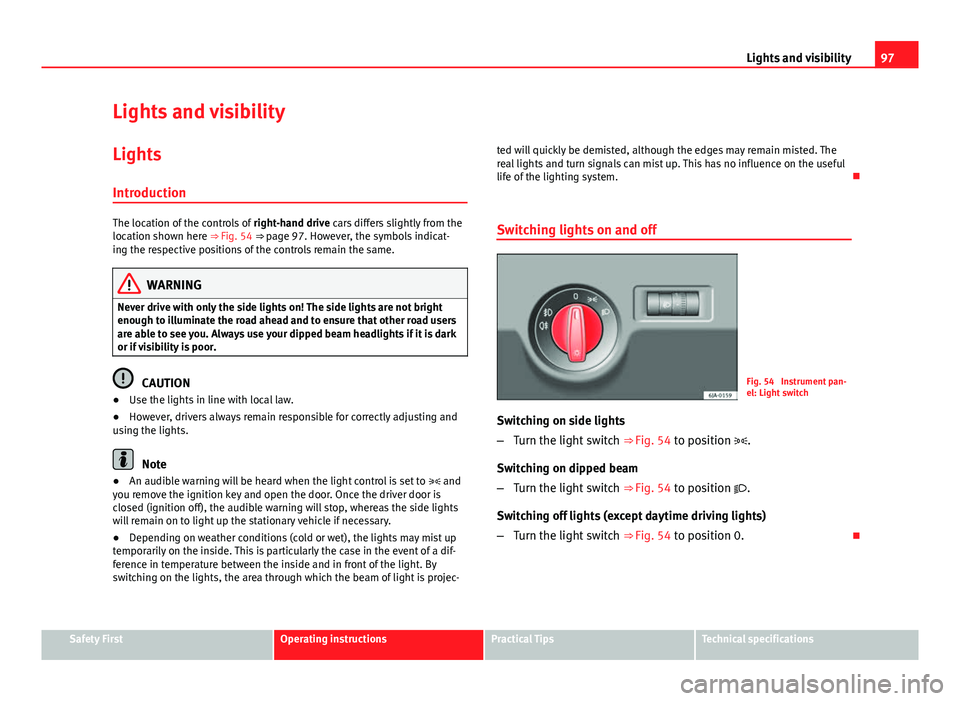
Fig. 54 Instrument pan-
el: Light switch
Switching on side lights
– Turn the light switch ⇒ Fig. 54 to position .
Switching on dipped beam
– Turn the light switch ⇒ Fig. 54 to position .
Switching off lights (except daytime driving lights)
– Turn the light switch ⇒ Fig. 54 to position 0.
Safety FirstOperating instructionsPractical TipsTechnical specifications
Page 100 of 258
98Lights and visibility
DAY LIGHT Function*
Switching on daytime driving lights
Turn the light switch ⇒ Fig. 54 ⇒ page 97 to position 0.
Switching off daytime driving lights in vehicles with the START-
STOP system
– Switch the ignition off.
– Move the turn signal lever ⇒ Fig. 57 towards the steering wheel,
pressing it down and keeping it in this position.
– Switch on the ignition – wait for the left turn signal to flash 4
times.
– Switch off the ignition – wait until you hear the audible warning
to confirm that the daytime driving lights have been switched
off.
– Release the turn signal lever.
Switching on daytime driving lights in vehicles with the START-
STOP system
– Switch the ignition off.
– Move the turn signal lever ⇒ Fig. 57 towards the steering wheel,
pressing it up and keeping it in this position.
– Switch on the ignition – wait for the right turn signal to flash 4
times. –
Switch off the ignition – wait until you hear the audible warning
to confirm that the daytime driving lights have been switched
on.
– Release the turn signal lever.
Deactivation of the daytime running light function 1)
● The daytime running light function is deactivated by removing the corre-
sponding fuse ⇒ page 219.
Activation of the daytime running light function 1)
● The daytime running light function is activated by placing the corre-
sponding fuse ⇒ page 219.
Note
The daytime driving lights work when the ignition is switched on.
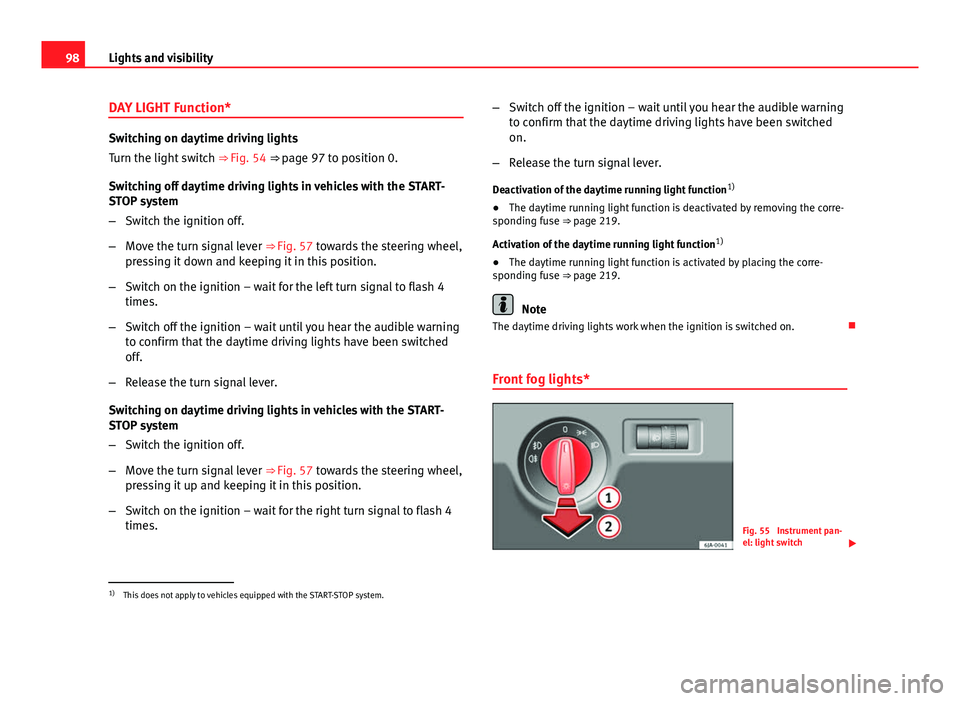
Front fog lights*
Fig. 55 Instrument pan-
el: light switch
1)
This does not apply to vehicles equipped with the START-STOP system.
Page 102 of 258
100Lights and visibility
Note
Make sure you set the range of the main lights when the dipped beam
headlights are switched on.
Turn signal and main beam lever
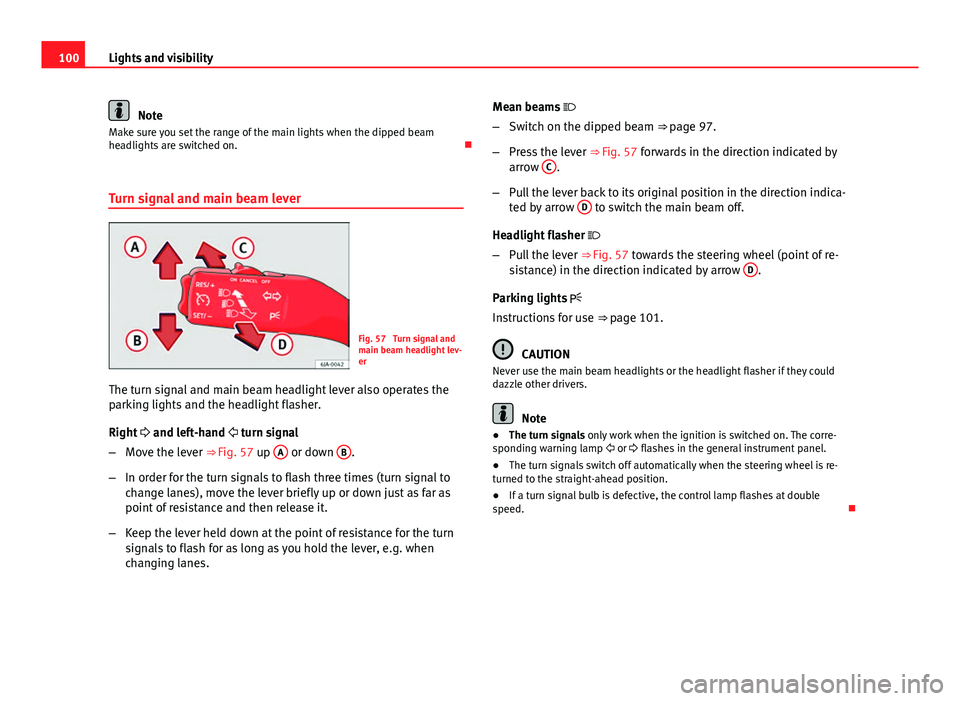
Fig. 57 Turn signal and
main beam headlight lev-
er
The turn signal and main beam headlight lever also operates the
parking lights and the headlight flasher.
Right and left-hand turn signal
– Move the lever ⇒ Fig. 57 up A
or down B.
– In order for the turn signals to flash three times (turn signal to
change lanes), move the lever briefly up or down just as far as
point of resistance and then release it.
– Keep the lever held down at the point of resistance for the turn
signals to flash for as long as you hold the lever, e.g. when
changing lanes. Mean beams
– Switch on the dipped beam ⇒ page 97.
– Press the lever ⇒ Fig. 57 forwards in the direction indicated by
arrow C
.
– Pull the lever back to its original position in the direction indica-
ted by arrow D
to switch the main beam off.
Headlight flasher
– Pull the lever ⇒ Fig. 57 towards the steering wheel (point of re-
sistance) in the direction indicated by arrow D
.
Parking lights
Instructions for use ⇒ page 101.
CAUTION
Never use the main beam headlights or the headlight flasher if they could
dazzle other drivers.
Note
● The turn signals only work when the ignition is switched on. The corre-
sponding warning lamp or flashes in the general instrument panel.
● The turn signals switch off automatically when the steering wheel is re-
turned to the straight-ahead position.
● If a turn signal bulb is defective, the control lamp flashes at double
speed.
Page 103 of 258
101
Lights and visibility
Parking lights*
Parking lights
– Switch the ignition off.
– Move the turn signal lever ⇒ Fig. 57 ⇒ page 100 up or down to
turn on the right or left-hand parking lights respectively.
Parking light on both sides
– Turn the light switch ⇒ Fig. 54 ⇒ page 97 to position and
engage the steering lock.
Note
● The parking lights only work when the ignition is switched on.
● The parking light will not come on automatically on switching the igni-
tion off if the left or right-hand turn signal is left on.
Front fog lights with CORNER function*
Front fog lights with CORNER function provide better lighting of the area
around the car when driving through a corner or parking, etc.
Front fog lights with CORNER function switch on depending on how far you
turn the steering wheel or whether or not the turn signals 1)
are switched on,
if the following conditions are met:
● the vehicle is stationary, the ignition is switched on or you are moving at
a speed less than 40 km/h (25 mph)
● The daytime driving light is switched off ●
The dipped beam is switched on
● The fog lights are switched off
● Reverse gear is not engaged
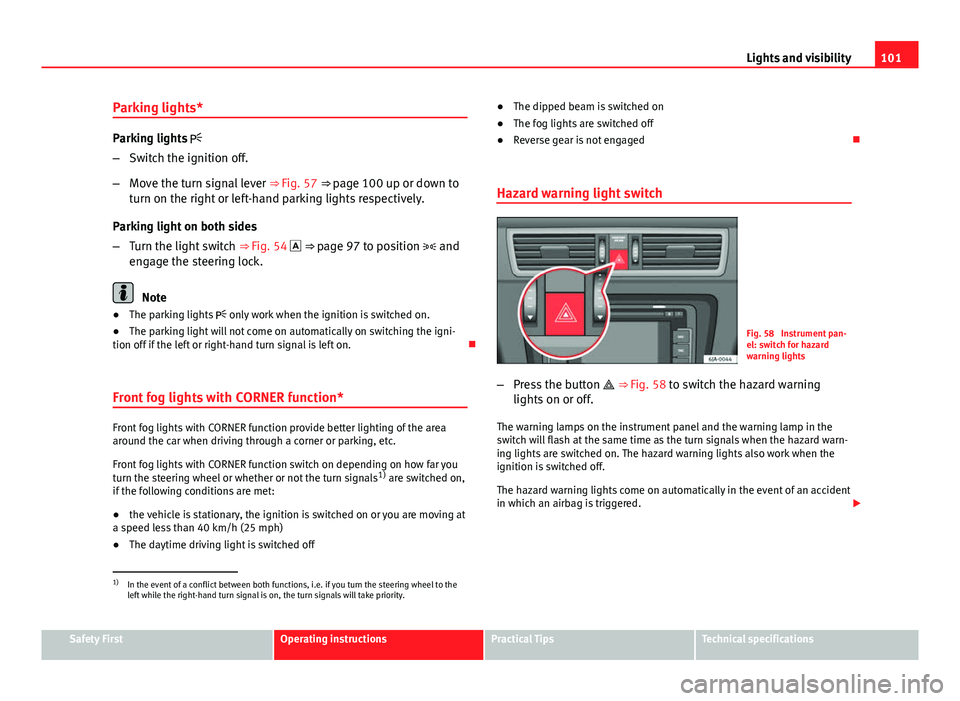
Hazard warning light switch
Fig. 58 Instrument pan-
el: switch for hazard
warning lights
– Press the button ⇒ Fig. 58 to switch the hazard warning
lights on or off.
The warning lamps on the instrument panel and the warning lamp in the
switch will flash at the same time as the turn signals when the hazard warn-
ing lights are switched on. The hazard warning lights also work when the
ignition is switched off.
The hazard warning lights come on automatically in the event of an accident
in which an airbag is triggered.
1)
In the event of a conflict between both functions, i.e. if you turn the steering wheel to the
left while the right-hand turn signal is on, the turn signals will take priority.
Safety FirstOperating instructionsPractical TipsTechnical specifications
Page 104 of 258
102Lights and visibility
Note
Switch on the hazard warning lights to warn other road users, for example:
● When reaching the tail end of a traffic jam
● If the vehicle has a technical fault or you are involved in an emergency
situation.
Interior lights
Interior lighting – version 1
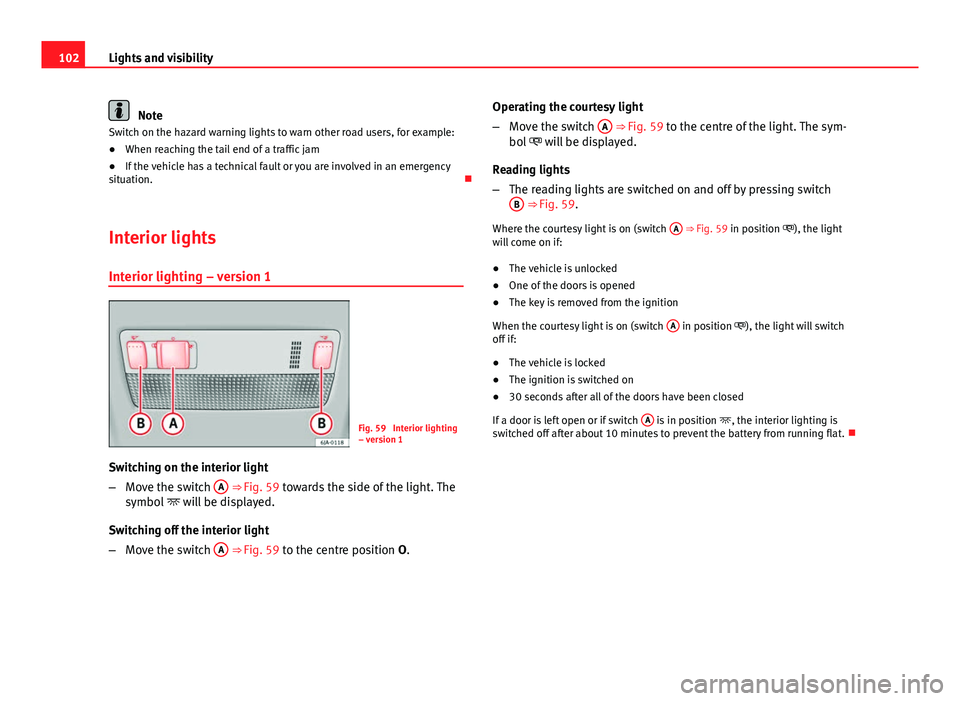
Fig. 59 Interior lighting
– version 1
Switching on the interior light
– Move the switch A
⇒ Fig. 59 towards the side of the light. The
symbol will be displayed.
Switching off the interior light
– Move the switch A
⇒
Fig. 59 to the centre position O
. Operating the courtesy light
–
Move the switch A
⇒ Fig. 59 to the centre of the light. The sym-
bol will be displayed.
Reading lights
– The reading lights are switched on and off by pressing switch
B
⇒ Fig. 59.
Where the courtesy light is on (switch A
⇒ Fig. 59 in position ), the light
will come on if:
● The vehicle is unlocked
● One of the doors is opened
● The key is removed from the ignition
When the courtesy light is on (switch A
in position ), the light will switch
off if:
● The vehicle is locked
● The ignition is switched on
● 30 seconds after all of the doors have been closed
If a door is left open or if switch A
is in position
, the interior lighting is
switched off after about 10 minutes to prevent the battery from running flat.
Page 108 of 258
106Lights and visibility
Windscreen wipers and windscreen washers
Introduction
The windscreen wipers and windscreen washers only work when the igni-
tion is switched on.
The rear window is wiped once if the windscreen wipers are switched on and
reverse gear is engaged.
Fill the windscreen washer fluid ⇒ page 190.
WARNING
● Make sure the blades ⇒ page 107 are in perfect condition for good
visibility and safe driving.
● In cold conditions, you should not use the wash/wipe system unless
you have warmed the windscreen with the heating and ventilation sys-
tem. The windscreen washer fluid could otherwise freeze on the wind-
screen and obscure your view of the road.
CAUTION
● During the winter, always check that the windscreen wiper blades are
not frozen to the glass before each trip or before switching on the ignition. If
you switch on the windscreen wipers when the wiper blades are frozen to
the glass, this could damage both the wiper blades and the wiper motor.
● If the ignition is switched off when the windscreen wipers are on, they
will start operating in the same mode when the ignition is switched back
on. The wiper blades could be frozen to the glass at low temperatures when
the ignition is switched off.
● Carefully separate the frozen wipers from the windscreen or rear win-
dow.
● Remove snow and ice from the wipers before starting your journey. ●
Careless handling could lead to the wiper arms damaging the wind-
screen.
● For safety reasons, the wiper blades should be changed once or twice a
year. They can be purchased at a SEAT Authorised Service.
● The ignition cannot be switched on while the windscreen wiper arms are
in a raised position. Otherwise, the windscreen wipers would return to their
original position and could damage the paintwork on the bonnet.
Note
Keep the wipers clean. The wipers can be soiled with remains of wax solu-
tions from car washes ⇒ page 173.
● On vehicles equipped with windscreen washer jets, these are heated
once the engine is running.
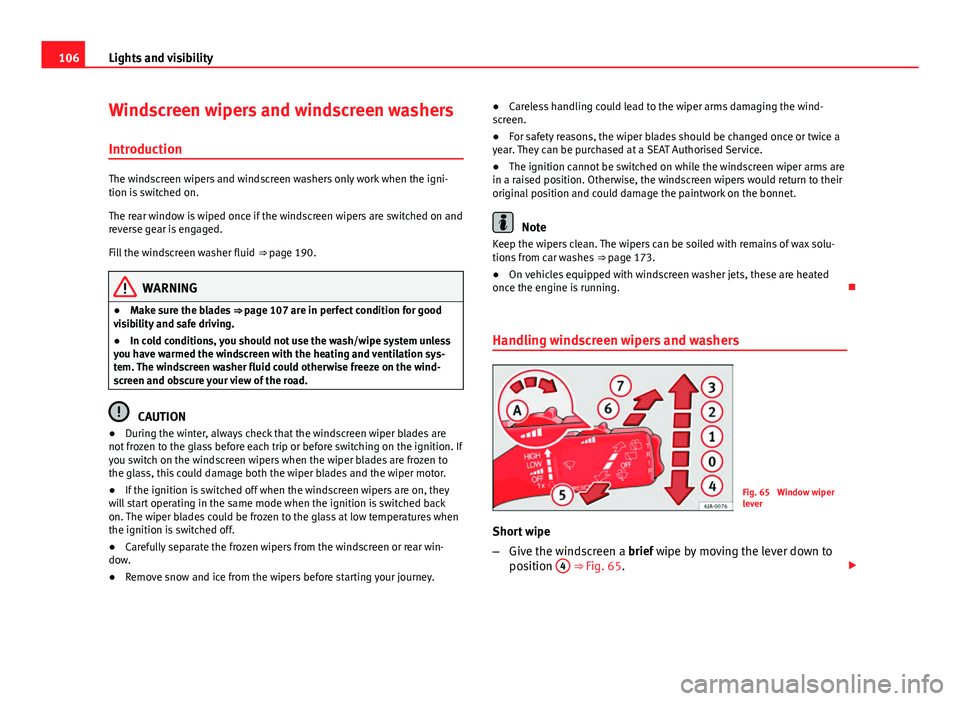
Handling windscreen wipers and washers
Fig. 65 Window wiper
lever
Short wipe
– Give the windscreen a brief wipe by moving the lever down to
position 4
⇒ Fig. 65.
Page 110 of 258
108Lights and visibility
Set the windscreen wiper arms to the service position before
changing the blades.
Service position for changing wiper blades
–Close the bonnet.
– Switch the ignition on and off.
– Press the lever to position 4
⇒ Fig. 65 ⇒ page 106, the wind-
screen wiper arms are set to the service position.
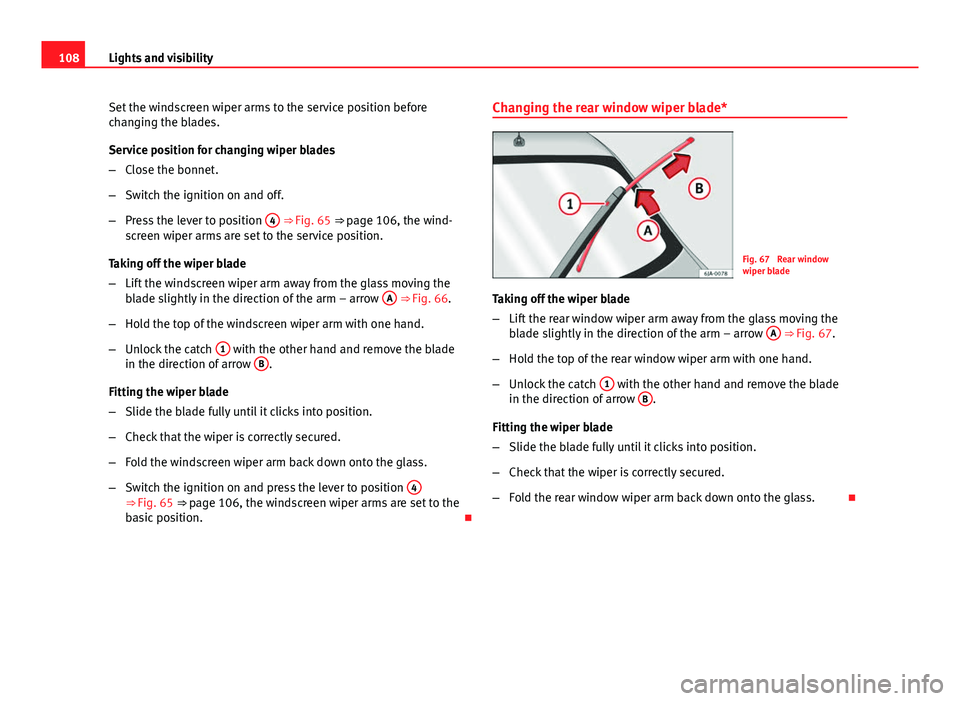
Taking off the wiper blade
– Lift the windscreen wiper arm away from the glass moving the
blade slightly in the direction of the arm – arrow A
⇒ Fig. 66.
– Hold the top of the windscreen wiper arm with one hand.
– Unlock the catch 1
with the other hand and remove the blade
in the direction of arrow B.
Fitting the wiper blade
– Slide the blade fully until it clicks into position.
– Check that the wiper is correctly secured.
– Fold the windscreen wiper arm back down onto the glass.
– Switch the ignition on and press the lever to position 4
⇒ Fig. 65 ⇒
page 106, the windscreen wiper arms are set to the
basic position. Changing the rear window wiper blade*
Fig. 67 Rear window
wiper blade
Taking off the wiper blade
– Lift the rear window wiper arm away from the glass moving the
blade slightly in the direction of the arm – arrow A
⇒ Fig. 67.
– Hold the top of the rear window wiper arm with one hand.
– Unlock the catch 1
with the other hand and remove the blade
in the direction of arrow B.
Fitting the wiper blade
– Slide the blade fully until it clicks into position.
– Check that the wiper is correctly secured.
– Fold the rear window wiper arm back down onto the glass.
Page 124 of 258
122Seats and storage
WARNING
● Take care when using the cigarette lighter! Carelessness or negli-
gence when using the cigarette lighter can cause burns and serious inju-
ries.
● The cigarette lighter also works when the ignition is off and when the
ignition key is removed. Therefore, never leave children unsupervised in
the vehicle.
Note
● The 12 volt power socket of the cigarette lighter can also be used as a
power source for electrical appliances ⇒ page 122, 12 V power socket.
● Additional information ⇒ page 204, Accessories, modifications and
spare parts.
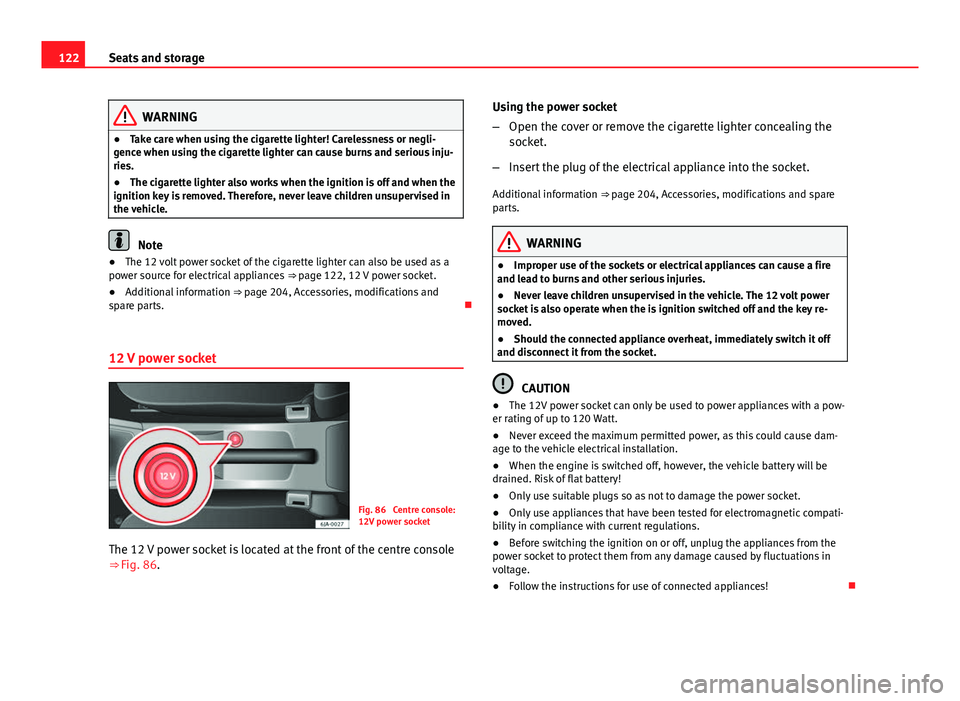
12 V power socket
Fig. 86 Centre console:
12V power socket
The 12 V power socket is located at the front of the centre console
⇒ Fig. 86. Using the power socket
–
Open the cover or remove the cigarette lighter concealing the
socket.
– Insert the plug of the electrical appliance into the socket.
Additional information ⇒ page 204, Accessories, modifications and spare
parts.
WARNING
● Improper use of the sockets or electrical appliances can cause a fire
and lead to burns and other serious injuries.
● Never leave children unsupervised in the vehicle. The 12 volt power
socket is also operate when the is ignition switched off and the key re-
moved.
● Should the connected appliance overheat, immediately switch it off
and disconnect it from the socket.
CAUTION
● The 12V power socket can only be used to power appliances with a pow-
er rating of up to 120 Watt.
● Never exceed the maximum permitted power, as this could cause dam-
age to the vehicle electrical installation.
● When the engine is switched off, however, the vehicle battery will be
drained. Risk of flat battery!
● Only use suitable plugs so as not to damage the power socket.
● Only use appliances that have been tested for electromagnetic compati-
bility in compliance with current regulations.
● Before switching the ignition on or off, unplug the appliances from the
power socket to protect them from any damage caused by fluctuations in
voltage.
● Follow the instructions for use of connected appliances!
Page 136 of 258
134Heating and air conditioning
Air conditioning selection
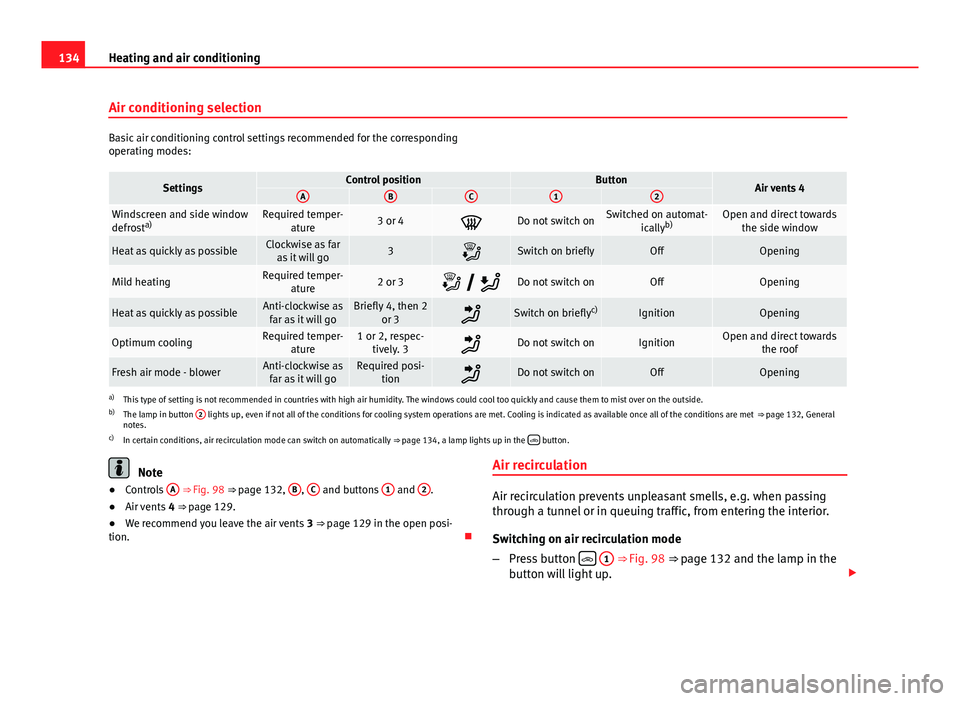
Basic air conditioning control settings recommended for the corresponding
operating modes:
SettingsControl positionButtonAir vents 4ABC12
Windscreen and side window
defrosta)Required temper-
ature3 or 4Do not switch onSwitched on automat- icallyb)Open and direct towards
the side window
Heat as quickly as possibleClockwise as faras it will go3Switch on brieflyOffOpening
Mild heatingRequired temper- ature2 or 3 Do not switch onOffOpening
Heat as quickly as possibleAnti-clockwise as
far as it will goBriefly 4, then 2 or 3Switch on briefly c)IgnitionOpening
Optimum coolingRequired temper-
ature1 or 2, respec-tively. 3Do not switch onIgnitionOpen and direct towards the roof
Fresh air mode - blowerAnti-clockwise asfar as it will goRequired posi- tionDo not switch onOffOpening
a)This type of setting is not recommended in countries with high air humidity. The windows could cool too quickly and cause them to mist over on the outside.
b) The lamp in button 2 lights up, even if not all of the conditions for cooling system operations are met. Cooling is indicated as available once all of the conditions are met
⇒ page 132, General
notes.
c) In certain conditions, air recirculation mode can switch on automatically ⇒ page 134, a lamp lights up in the
button.
Note
● Controls A ⇒ Fig. 98 ⇒ page 132, B, C and buttons 1 and 2.
● Air vents 4 ⇒ page 129.
● We recommend you leave the air vents 3 ⇒ page 129 in the open posi-
tion. Air recirculationAir recirculation prevents unpleasant smells, e.g. when passing
through a tunnel or in queuing traffic, from entering the interior.
Switching on air recirculation mode
–
Press button
1 ⇒ Fig. 98 ⇒ page 132 and the lamp in the
button will light up.