lights Seat Toledo 2013 Owner's Guide
[x] Cancel search | Manufacturer: SEAT, Model Year: 2013, Model line: Toledo, Model: Seat Toledo 2013Pages: 258, PDF Size: 3.94 MB
Page 106 of 258

104Lights and visibility
Visibility
Heated rear window
Fig. 62 Heated rear win-
dow switch
– Switch the heated rear window on or off by pressing the button
⇒ Fig. 62, the warning lamp in the button will come on or go
off respectively.
The heated rear window only works when the engine is running.
After approx. 7 minutes, the rear window heating device switches off auto-
matically.
For the sake of the environment
The heated rear window should be switched off as soon as the glass is dem-
isted. By saving electrical power you can also save fuel ⇒ page 160, Save
electrical energy.
Note
In the event of a drop in voltage in the onboard systems, the heated rear
window switches off automatically to ensure enough power to control the
engine ⇒ page 194, Automatic disconnection of electrical equipment. Sun visors
Fig. 63 Driver sun visor
Fig. 64 Front passenger
sun visor
The sun visors for the driver and the front passenger can be pulled out of
their central supports and turned towards the doors in the direction of arrow 1
⇒ Fig. 63 and 2
⇒ Fig. 64 respectively.
The strip A
is to store small objects such as notepaper, etc.
The front passenger sun visor includes a vanity mirror B
with a cover. The
cover is opened by sliding it in the direction indicated by arrow 3
⇒
Fig. 64.
Page 107 of 258
105
Lights and visibility
WARNING
Do not turn sun visors with attached objects such as ball-pens, etc. to-
wards the head protection airbag triggering zone on the side windows.
The head protection airbags could injure occupants if triggered.
Safety FirstOperating instructionsPractical TipsTechnical specifications
Page 108 of 258
106Lights and visibility
Windscreen wipers and windscreen washers
Introduction
The windscreen wipers and windscreen washers only work when the igni-
tion is switched on.
The rear window is wiped once if the windscreen wipers are switched on and
reverse gear is engaged.
Fill the windscreen washer fluid ⇒ page 190.
WARNING
● Make sure the blades ⇒ page 107 are in perfect condition for good
visibility and safe driving.
● In cold conditions, you should not use the wash/wipe system unless
you have warmed the windscreen with the heating and ventilation sys-
tem. The windscreen washer fluid could otherwise freeze on the wind-
screen and obscure your view of the road.
CAUTION
● During the winter, always check that the windscreen wiper blades are
not frozen to the glass before each trip or before switching on the ignition. If
you switch on the windscreen wipers when the wiper blades are frozen to
the glass, this could damage both the wiper blades and the wiper motor.
● If the ignition is switched off when the windscreen wipers are on, they
will start operating in the same mode when the ignition is switched back
on. The wiper blades could be frozen to the glass at low temperatures when
the ignition is switched off.
● Carefully separate the frozen wipers from the windscreen or rear win-
dow.
● Remove snow and ice from the wipers before starting your journey. ●
Careless handling could lead to the wiper arms damaging the wind-
screen.
● For safety reasons, the wiper blades should be changed once or twice a
year. They can be purchased at a SEAT Authorised Service.
● The ignition cannot be switched on while the windscreen wiper arms are
in a raised position. Otherwise, the windscreen wipers would return to their
original position and could damage the paintwork on the bonnet.
Note
Keep the wipers clean. The wipers can be soiled with remains of wax solu-
tions from car washes ⇒ page 173.
● On vehicles equipped with windscreen washer jets, these are heated
once the engine is running.
Handling windscreen wipers and washers
Fig. 65 Window wiper
lever
Short wipe
– Give the windscreen a brief wipe by moving the lever down to
position 4
⇒ Fig. 65.
Page 109 of 258
107
Lights and visibility
Interval wipe
– Move the lever up to the stop 1
⇒ Fig. 65.
– Set the required interval wipe using the control A
.
Slow wipe
– Move the lever up to the stop 2
⇒ Fig. 65.
Continuous wipe
– Move the lever up to the stop 3
⇒ Fig. 65.
Automatic wash and wipe
– Pull the lever towards the steering wheel, position 5
⇒ Fig. 65,
and the windscreen washer and wipers are switched on.
– Release the lever. The washer will stop and the windscreen wip-
ers will keep running for 1–3 wipes (depending on the wind-
screen washer operating time).
Rear window wiper *
– Press the lever forwards to the stop 6
⇒ Fig. 65 and the rear
window wiper will run every 6 seconds.
Automatic rear window wash wipe*
– Press the lever forwards fully to position 7
⇒ Fig. 65 and the
rear window wiper and washer are switched on at the same
time.
– Release the lever. The rear window washer will stop and the rear
window wipers will keep running for 1–3 wipes (depending on
the jet operating time). When released, the lever remains in po-
sition 6
. Switching off the wipers
–
Move the lever to position 0
⇒ Fig. 65.
Headlight washer system*
The headlight washers operate briefly if the dipped or main beam is on and
the lever is raised to position 5 ⇒ Fig. 65. The headlight washer system al-
so operates every ten windscreen wash cycles.
Clean off stubborn dirt (insects, etc.) from the headlights at regular inter-
vals, for instance when filling the fuel tank. Please observe the following in-
dications ⇒ page 175, Headlights.
To ensure the system works properly in winter, keep the nozzle holders free
of snow and remove any ice with a de-icer spray.
CAUTION
Never pull on the nozzle holders. Risk of damage to the system!
Changing the windscreen wiper blades
Fig. 66 Windscreen wip-
er blades
Safety FirstOperating instructionsPractical TipsTechnical specifications
Page 110 of 258
108Lights and visibility
Set the windscreen wiper arms to the service position before
changing the blades.
Service position for changing wiper blades
–Close the bonnet.
– Switch the ignition on and off.
– Press the lever to position 4
⇒ Fig. 65 ⇒ page 106, the wind-
screen wiper arms are set to the service position.
Taking off the wiper blade
– Lift the windscreen wiper arm away from the glass moving the
blade slightly in the direction of the arm – arrow A
⇒ Fig. 66.
– Hold the top of the windscreen wiper arm with one hand.
– Unlock the catch 1
with the other hand and remove the blade
in the direction of arrow B.
Fitting the wiper blade
– Slide the blade fully until it clicks into position.
– Check that the wiper is correctly secured.
– Fold the windscreen wiper arm back down onto the glass.
– Switch the ignition on and press the lever to position 4
⇒ Fig. 65 ⇒
page 106, the windscreen wiper arms are set to the
basic position. Changing the rear window wiper blade*
Fig. 67 Rear window
wiper blade
Taking off the wiper blade
– Lift the rear window wiper arm away from the glass moving the
blade slightly in the direction of the arm – arrow A
⇒ Fig. 67.
– Hold the top of the rear window wiper arm with one hand.
– Unlock the catch 1
with the other hand and remove the blade
in the direction of arrow B.
Fitting the wiper blade
– Slide the blade fully until it clicks into position.
– Check that the wiper is correctly secured.
– Fold the rear window wiper arm back down onto the glass.
Page 111 of 258
109
Lights and visibility
Rear vision mirrors
Interior rear vision mirror with manual anti-dazzle
adjustment
Basic settings
– Push the lever at the bottom of the mirror away from you.
Rear vision mirror anti-dazzle setting
– Pull the lever at the bottom of the mirror towards you.
Exterior mirrors
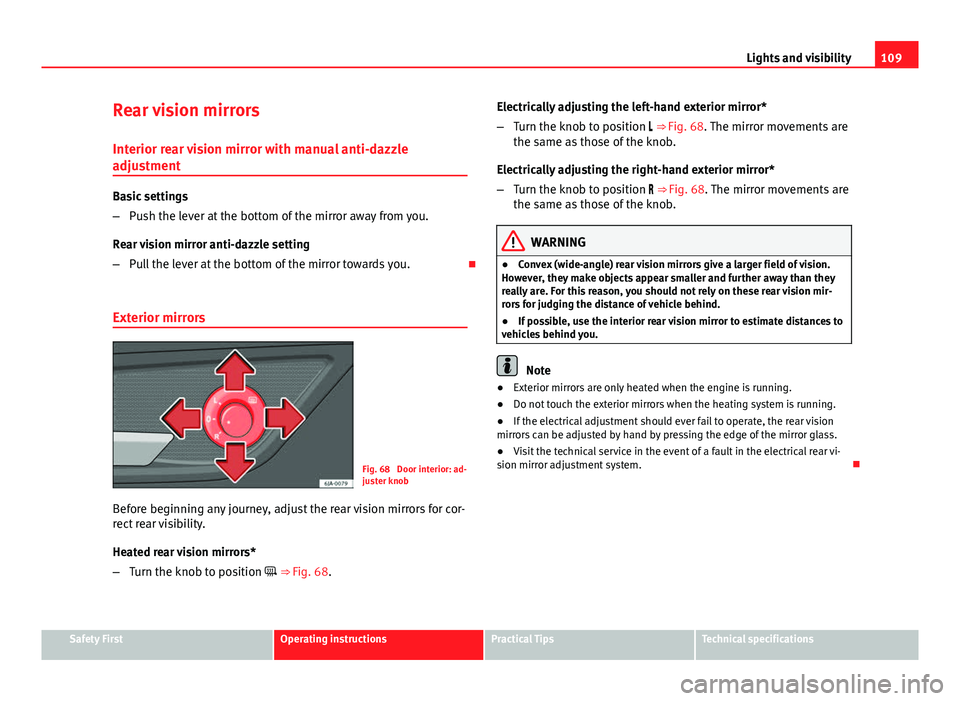
Fig. 68 Door interior: ad-
juster knob
Before beginning any journey, adjust the rear vision mirrors for cor-
rect rear visibility.
Heated rear vision mirrors*
– Turn the knob to position ⇒ Fig. 68. Electrically adjusting the left-hand exterior mirror*
–
Turn the knob to position ⇒ Fig. 68. The mirror movements are
the same as those of the knob.
Electrically adjusting the right-hand exterior mirror*
– Turn the knob to position ⇒ Fig. 68. The mirror movements are
the same as those of the knob.
WARNING
● Convex (wide-angle) rear vision mirrors give a larger field of vision.
However, they make objects appear smaller and further away than they
really are. For this reason, you should not rely on these rear vision mir-
rors for judging the distance of vehicle behind.
● If possible, use the interior rear vision mirror to estimate distances to
vehicles behind you.
Note
● Exterior mirrors are only heated when the engine is running.
● Do not touch the exterior mirrors when the heating system is running.
● If the electrical adjustment should ever fail to operate, the rear vision
mirrors can be adjusted by hand by pressing the edge of the mirror glass.
● Visit the technical service in the event of a fault in the electrical rear vi-
sion mirror adjustment system.
Safety FirstOperating instructionsPractical TipsTechnical specifications
Page 135 of 258
133
Heating and air conditioning
Switching cooling on and off
– Press button A/C
2 ⇒ Fig. 98 and the lamp in the button will
light up.
– Press the A/C
2 button again and the LED in the button will
switch off.
Note
● If the air distribution is directed towards the windows, all, of the heating
power is used to defrost the windscreen. No warm air is directed to the foot-
well area. This could limit heating comfort.
● The A/C
button lamp lights up after the system has been switched on,
even if not all of the conditions for cooling system operations are met. Cool-
ing is indicated as available once all of the conditions are met ⇒ page 132,
General notes.
Safety FirstOperating instructionsPractical TipsTechnical specifications
Page 136 of 258
134Heating and air conditioning
Air conditioning selection
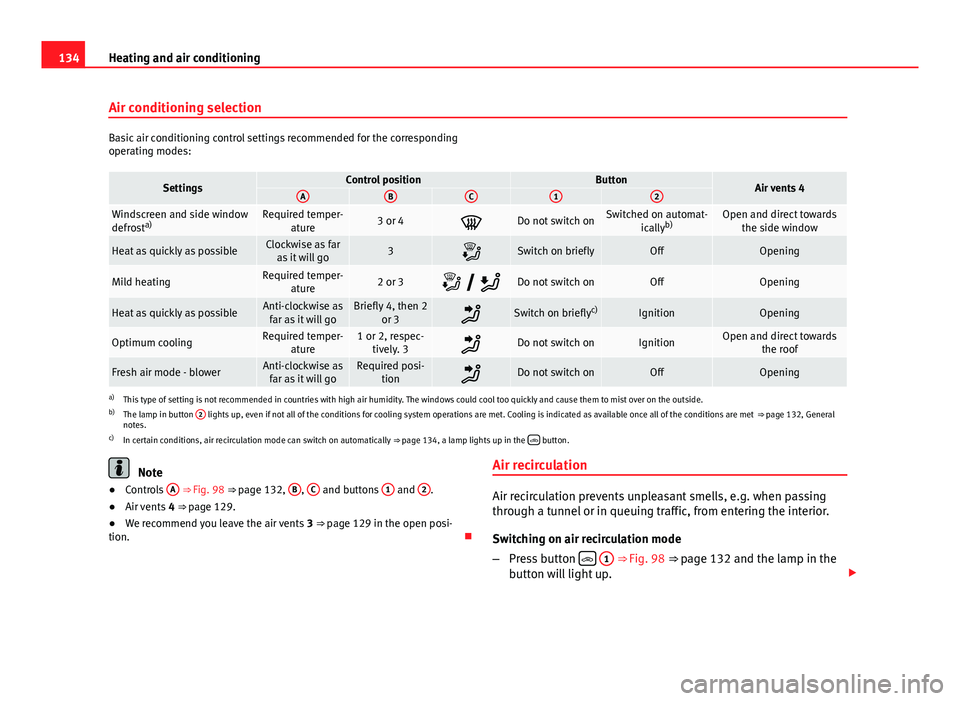
Basic air conditioning control settings recommended for the corresponding
operating modes:
SettingsControl positionButtonAir vents 4ABC12
Windscreen and side window
defrosta)Required temper-
ature3 or 4Do not switch onSwitched on automat- icallyb)Open and direct towards
the side window
Heat as quickly as possibleClockwise as faras it will go3Switch on brieflyOffOpening
Mild heatingRequired temper- ature2 or 3 Do not switch onOffOpening
Heat as quickly as possibleAnti-clockwise as
far as it will goBriefly 4, then 2 or 3Switch on briefly c)IgnitionOpening
Optimum coolingRequired temper-
ature1 or 2, respec-tively. 3Do not switch onIgnitionOpen and direct towards the roof
Fresh air mode - blowerAnti-clockwise asfar as it will goRequired posi- tionDo not switch onOffOpening
a)This type of setting is not recommended in countries with high air humidity. The windows could cool too quickly and cause them to mist over on the outside.
b) The lamp in button 2 lights up, even if not all of the conditions for cooling system operations are met. Cooling is indicated as available once all of the conditions are met
⇒ page 132, General
notes.
c) In certain conditions, air recirculation mode can switch on automatically ⇒ page 134, a lamp lights up in the
button.
Note
● Controls A ⇒ Fig. 98 ⇒ page 132, B, C and buttons 1 and 2.
● Air vents 4 ⇒ page 129.
● We recommend you leave the air vents 3 ⇒ page 129 in the open posi-
tion. Air recirculationAir recirculation prevents unpleasant smells, e.g. when passing
through a tunnel or in queuing traffic, from entering the interior.
Switching on air recirculation mode
–
Press button
1 ⇒ Fig. 98 ⇒ page 132 and the lamp in the
button will light up.
Page 144 of 258
142Driving
● If the engine does not start after 10 seconds, turn the key back to posi-
tion 1
. Repeat the action after 30 seconds.
● Release the handbrake before moving off.
Switching off the engine
Stop the engine by turning the ignition key to position 1 ⇒ Fig. 101
⇒ page 141.
Brakes and brake servo systems Introduction
WARNING
● The brake servo only works when the engine is running. Braking
when the engine is switched off requires more strength on the brake ped-
al. Risk of accident!
● Press down on the clutch pedal when stopping and braking with a
manual gearbox, petrol engine vehicle at low speed. Otherwise, the
brake servo might not work properly. Risk of accident!
● In the event of damage to the standard front spoiler or where a differ-
ent front spoiler, hubcaps, etc. are subsequently fitted, make sure the air
vent to the brakes on the front wheels is not blocked. Otherwise, braking
operations may be impaired. Risk of accident!
● Always fully release the handbrake. If it is only partially released, this
will cause overheating of the rear brakes, which can impair the function
of the brake system. Risk of accident!
WARNING (Continued)
● Never leave children unsupervised in the vehicle. They could release
the handbrake or move the gear lever. The vehicle could start moving.
Risk of accident!
● Insufficient fuel can cause the engine to run irregularly or to switch
off. Brake assist systems could be impaired. Risk of accident!
● Always adjust your driving style to suit visibility, the weather and
road and traffic conditions. The best vehicle safety offered by brake as-
sist systems must never encourage you to run greater risks. Risk of acci-
dent!
CAUTION
● Observe the information concerning new brake pads ⇒ page 157.
● Where braking is not necessary, do not wear down the brake pads by
pressing down gently on the brake pedal. This causes the brakes to over-
heat, increasing their wear and increasing braking distances.
● To ensure the brake assist systems work properly, all wheels must be fit-
ted with tyres approved by the manufacturer.
Note
● If you brake suddenly and the brake system control unit regards the sit-
uation as hazardous for the drivers behind you, the brake lights will begin
to flash automatically. After reducing speed to approx. 10 km/h (6 mph) or
stopping the vehicle, the brake lights will stop flashing and the hazard
warning lights will switch on. The hazard warning lights are automatically
switched off when you accelerate or restart the vehicle.
● On long, steep gradients, reduce your speed and change to a lower gear
(manual gearbox) or move the selector lever to a lower gear position (auto-
matic gearbox). This uses the force of the engine and the brakes do not suf-
fer as much. If you still have to brake, do so intermittently, pressing down
repeatedly on the brake pedal.
Page 146 of 258
144Driving
The warning lamp lights up when the handbrake is applied with the ignition
on .
Stability system (ESC)
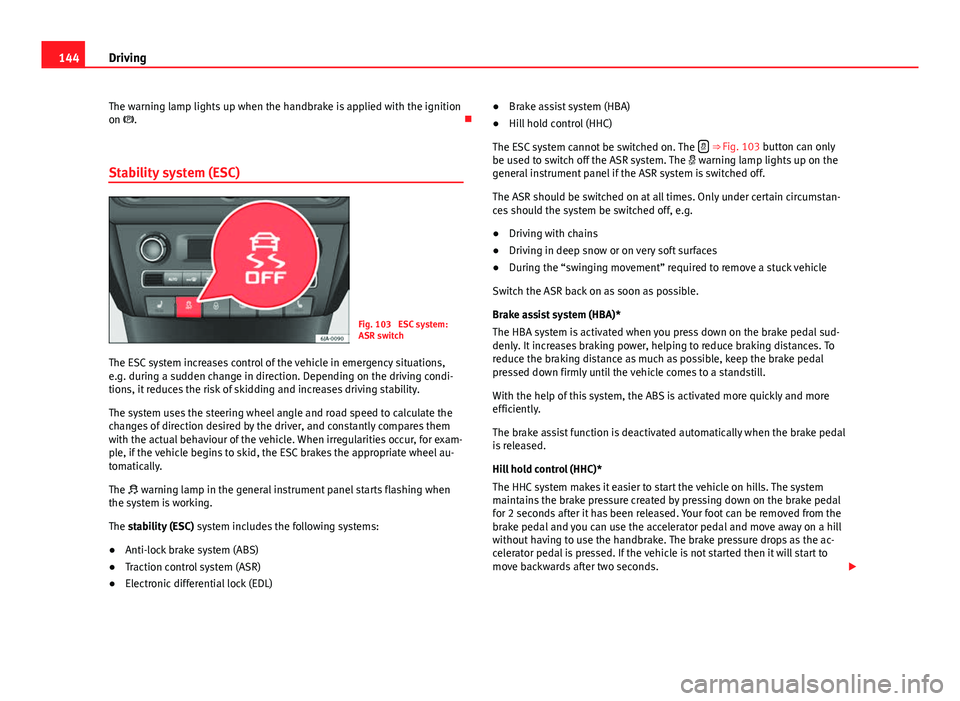
Fig. 103 ESC system:
ASR switch
The ESC system increases control of the vehicle in emergency situations,
e.g. during a sudden change in direction. Depending on the driving condi-
tions, it reduces the risk of skidding and increases driving stability.
The system uses the steering wheel angle and road speed to calculate the
changes of direction desired by the driver, and constantly compares them
with the actual behaviour of the vehicle. When irregularities occur, for exam-
ple, if the vehicle begins to skid, the ESC brakes the appropriate wheel au-
tomatically.
The warning lamp in the general instrument panel starts flashing when
the system is working.
The stability (ESC) system includes the following systems:
● Anti-lock brake system (ABS)
● Traction control system (ASR)
● Electronic differential lock (EDL) ●
Brake assist system (HBA)
● Hill hold control (HHC)
The ESC system cannot be switched on. The
⇒ Fig. 103 button can only
be used to switch off the ASR system. The warning lamp lights up on the
general instrument panel if the ASR system is switched off.
The ASR should be switched on at all times. Only under certain circumstan-
ces should the system be switched off, e.g.
● Driving with chains
● Driving in deep snow or on very soft surfaces
● During the “swinging movement” required to remove a stuck vehicle
Switch the ASR back on as soon as possible.
Brake assist system (HBA)*
The HBA system is activated when you press down on the brake pedal sud-
denly. It increases braking power, helping to reduce braking distances. To
reduce the braking distance as much as possible, keep the brake pedal
pressed down firmly until the vehicle comes to a standstill.
With the help of this system, the ABS is activated more quickly and more
efficiently.
The brake assist function is deactivated automatically when the brake pedal
is released.
Hill hold control (HHC)*
The HHC system makes it easier to start the vehicle on hills. The system
maintains the brake pressure created by pressing down on the brake pedal
for 2 seconds after it has been released. Your foot can be removed from the
brake pedal and you can use the accelerator pedal and move away on a hill
without having to use the handbrake. The brake pressure drops as the ac-
celerator pedal is pressed. If the vehicle is not started then it will start to
move backwards after two seconds.