ESP Seat Toledo 2014 User Guide
[x] Cancel search | Manufacturer: SEAT, Model Year: 2014, Model line: Toledo, Model: Seat Toledo 2014Pages: 200, PDF Size: 4.37 MB
Page 32 of 200
Operation
Instruments and warning lamps
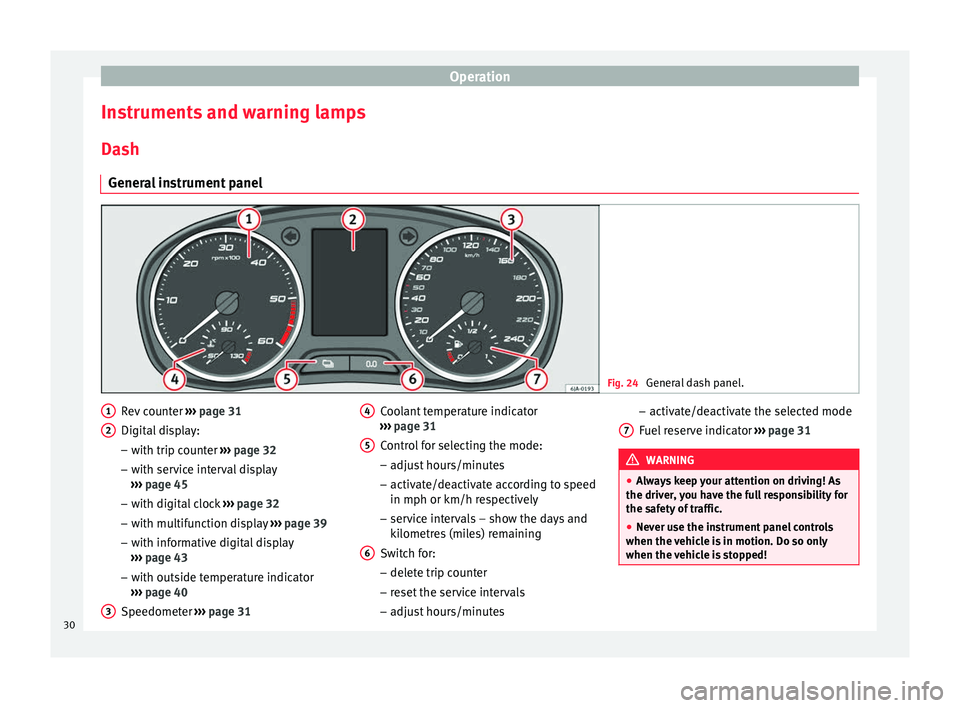
Dash General instrument panel Fig. 24
General dash panel. Rev counter
››› page 31
Digital display:
– with trip counter ››› page 32
– with service interval display
››› page 45
– with digital clock ››› page 32
– with multifunction display ››› page 39
– with informative digital display
››› page 43
– with outside temperature indicator
››› page 40
Speedometer ››› page 31
1 2
3 Coolant temperature indicator
››› page 31
Control for selecting the mode:
– adjust hours/minutes
– activate/deactivate according to speed
in mph or km/h respectively
– service intervals – show the days and
kilometres (miles) remaining
Switch for:
– delete trip counter
– reset the service intervals
– adjust hours/minutes
4 5
6 –
activate/deactivate the selected mode
Fuel reserve indicator ››› page 31 WARNING
● Always keep your attention on driving! As
the driver, you have the full responsibility for
the safety of traffic.
● Never use the instrument panel controls
when the vehicle is in motion. Do so only
when the vehicle is stopped! 7
30
Page 34 of 200
Operation
Trip counter* Daily trip counter (trip)
The daily trip counter indicates the distance
that has been covered since the last time the
function was reset in 100 metre sections.
In order to reset the daily distance covered
keep the button
6
››› Fig. 24 ››› page 30
pressed down.
Odometer
The odometer indicates the total number of
kilometres (or mileage) that the vehicle has
covered until now.
Fault indication
In the event of a fault the word Error
will be
permanently displayed on the informative
display. Please take the vehicle to a special-
ised Technical Service to solve this fault. Note
In vehicles equipped with an informative dis-
play, if the indicator of the second speed in
mph or in kph are activated respectively, this
speed will be displayed in place of the odom-
eter. Digital clock
The clock is set using the buttons
5 to
6 ›››
Fig. 24 ››› p
age 30.
Select the indication you want to change with
button 5 and make the adjustment with but-
ton 6 .
In vehicles equipped with an informative dis-
play this can be reset from the menu, Time
››› page 44.
R ec
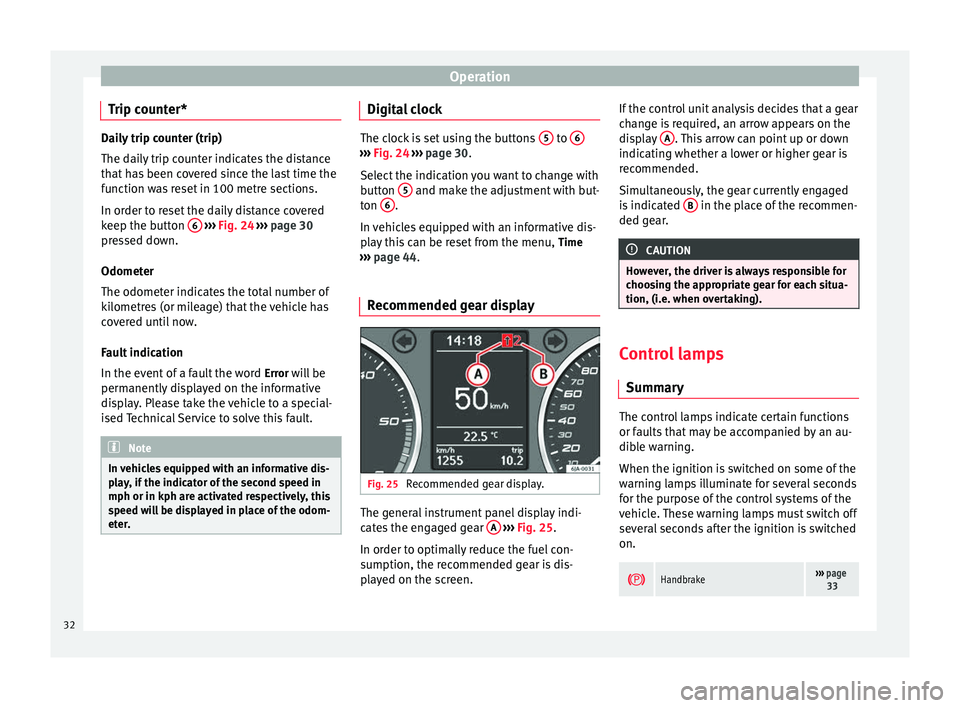
ommended gear display Fig. 25
Recommended gear display. The general instrument panel display indi-
cates the engaged gear
A
›››
Fig. 25 .
In or der t
o optimally reduce the fuel con-
sumption, the recommended gear is dis-
played on the screen. If the control unit analysis decides that a gear
change is required, an arrow appears on the
display
A . This arrow can point up or down
indicating whether a lower or higher gear is
recommended.
Simultaneously, the gear currently engaged
is indicated B in the place of the recommen-
ded gear. CAUTION
However, the driver is always responsible for
choosing the appropriate gear for each situa-
tion, (i.e. when overtaking). Control lamps
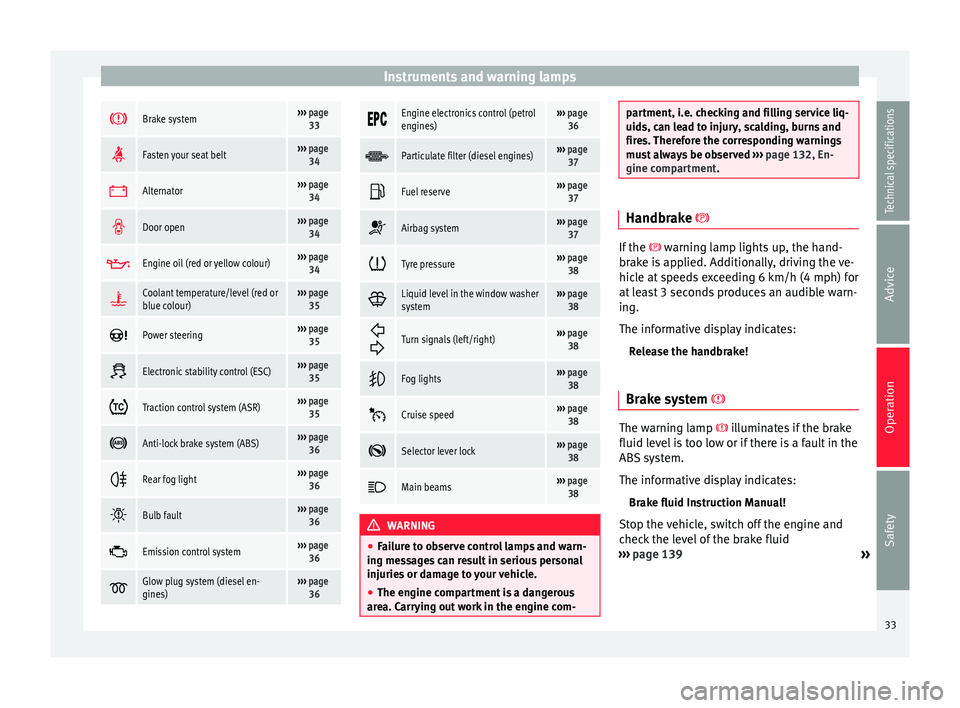
Summary The control lamps indicate certain functions
or faults that may be accompanied by an au-
dible warning.
When the ignition is switched on some of the
warning lamps illuminate for several seconds
for the purpose of the control systems of the
vehicle. These warning lamps must switch off
several seconds after the ignition is switched
on.
Handbrake›››
page
33 32
Page 35 of 200
Instruments and warning lamps
Brake system›››
page
33
Fasten your seat belt›››
page
34
Alternator›››
page
34
Door open›››
page
34
Engine oil (red or yellow colour)›››
page
34
Coolant temperature/level (red or
blue colour)›››
page
35
Power steering›››
page
35
Electronic stability control (ESC)›››
page
35
Traction control system (ASR)›››
page
35
Anti-lock brake system (ABS)›››
page
36
Rear fog light›››
page
36
Bulb fault›››
page
36
Emission control system›››
page
36
Glow plug system (diesel en-
gines)›››
page
36
Engine electronics control (petrol
engines)›››
page
36
Particulate filter (diesel engines)›››
page
37
Fuel reserve›››
page
37
Airbag system›››
page
37
Tyre pressure›››
page
38
Liquid level in the window washer
system›››
page
38
Turn signals (left/right)››› page
38
Fog lights›››
page
38
Cruise speed›››
page
38
Selector lever lock›››
page
38
Main beams›››
page
38 WARNING
● Failure to observe control lamps and warn-
ing messages can result in serious personal
injuries or damage to your vehicle.
● The engine compartment is a dangerous
area. Carrying out work in the engine com- partment, i.e. checking and filling service liq-
uids, can lead to injury, scalding, burns and
fires. Therefore the corresponding warnings
must always be observed
››› page 132, En-
gine compartment. Handbrake
If the
warning lamp lights up, the hand-
br ak
e is applied. Additionally, driving the ve-
hicle at speeds exceeding 6 km/h (4 mph) for
at least 3 seconds produces an audible warn-
ing.
The informative display indicates:
Release the handbrake!
Brake system The warning lamp
illuminates if the brake
fluid level is too low or if there is a fault in the
ABS system.
The informative display indicates:
Brake fluid Instruction Manual!
Stop the vehicle, switch off the engine and
check the level of the brake fluid
››› page 139
»
33
Technical specifications
Advice
Operation
Safety
Page 37 of 200

Instruments and warning lamps
Coolant level and temperature If the warning lamp
(blue) is lit up, the en-
gine h a
s not yet reached its operating tem-
perature 1)
. Avoid high engine speeds, hard
acceleration and subjecting the engine to
high loads.
If the warning lamp (red) is lit up or flash-
ing, the c
oolant temperature is too high or its
level is too low.
The informative display indicates:
Check coolant! Instruction Manual!
Stop the vehicle, switch off the engine, check
the coolant level ›››
page 138 and refill if
nec e
ssary ››› page 138.
If the c
oolant is situated in the prescribed
area, the high temperature may be due to a
fault in the cooling system fan. Check the ra-
diator fan fuse and replace it if necessary
››› page 165, Changing fuses in the engine
compartment
.
If the warning lamp (red) remains lit up,
despite both the coolant level and the radia-
tor fan fuse being in correct condition,
stop the vehicle!
Go to a technical service. WARNING
● Take care when opening the coolant reser-
voir. When the engine is warm or hot, the
system is pressurised – Danger of burns!
Wait for the engine to cool before opening
the cover.
● Do not touch the fan. The fan can switch on
automatically regardless of whether the igni-
tion is switched on. Power steering
If the
warning lamp is illuminated, there is
a fault in the power steering.
The power steering system functions with re-
duced power steering effect.
Go to a technical service.
Stability Control (ESC) If the control lamp
flashes, the ESC is
working.
If the warning lamp illuminates on igni-
tion, the ESC system may have switched off
due to technical reasons. Turn off the ignition
and turn it on again. Upon switching on the
ignition again, if the warning lamp has switched off, this means the ESC is function-
ing correctly again.
If the
warning lamp is illuminated there is
a f au
lt in the ESC.
The informative display indicates: Report No.: electronic stability control (ESC)
or Report No.: Traction control system (ASR)
Go to a technical service.
Further information ››› page 108, Stability
system (ESC). Note
If the battery is disconnected and connected
again, the yellow warning lamp lights up
when the ignition i s
switched on. This warn-
ing lamp must switch off after covering a
short distance. Traction control system (ASR)
If the control lamp
flashes, the ASR is
working.
If the
warning lamp illuminates on igni-
tion, the TCS system may have switched off
due to technical reasons. Turn off the ignition »1)
This does not apply to vehicles equipped with an
informative display. 35
Technical specifications
Advice
Operation
Safety
Page 41 of 200
Information system
Information system
Multi-function display* (on
board computer) Introduction The multifunction display can only be operat-
ed when the ignition is switched on. When
the ignition is switched on the last function
selected before it was switched off is dis-
played.
The multifunction display data is shown on
the screen
›››
Fig. 26 › › ›
page 39.
In vehicles fitted with an informative display
››› page 43 the system can be adjusted so
that
certain data is not shown. WARNING
Always keep your attention on driving! As the
driver, you have the full responsibility for the
safety of traffic. Note
● If the second speed in mph (km/h) is dis-
played, the current speed in km/h (mph) is
not displayed on the screen. Memory
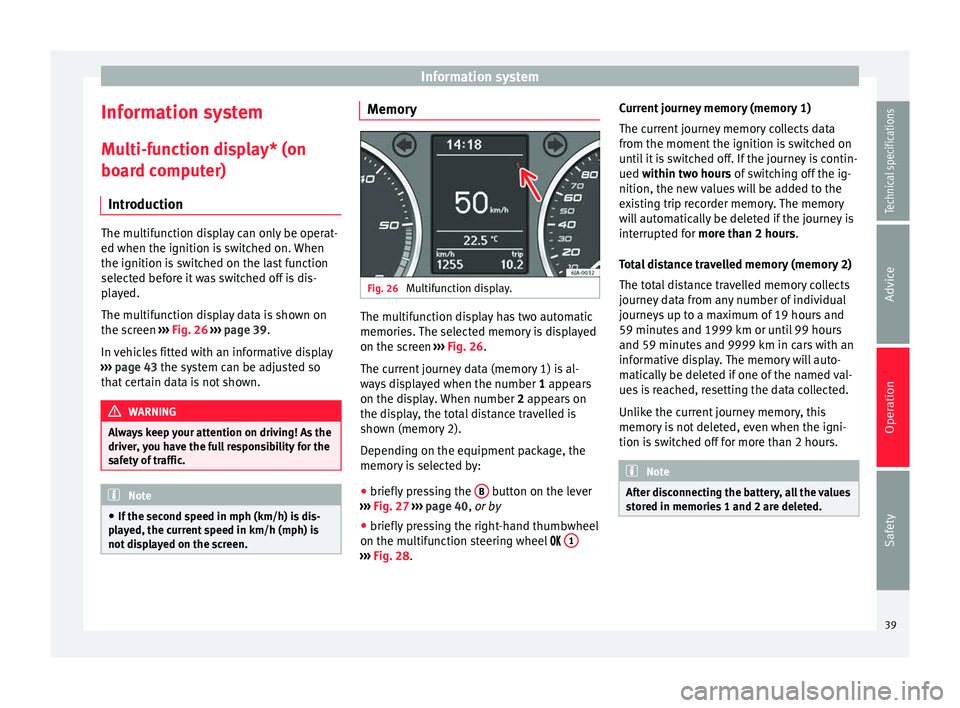
Fig. 26
Multifunction display. The multifunction display has two automatic
memories. The selected memory is displayed
on the screen
››› Fig. 26 .
The c urr
ent journey data (memory 1) is al-
ways displayed when the number 1
appears
on the display. When number 2 appears on
the display, the total distance travelled is
shown (memory 2).
Depending on the equipment package, the
memory is selected by:
● briefly pressing the B button on the lever
››› Fig. 27 ›
›
›
page 40, or by
● briefly pressing the right-hand thumbwheel
on the multifunction steering wheel 1 ›››
Fig. 28 . C
urr
ent journey memory (memory 1)
The current journey memory collects data
from the moment the ignition is switched on
until it is switched off. If the journey is contin-
ued
within two hours of switching off the ig-
nition, the new values will be added to the
existing trip recorder memory. The memory
will automatically be deleted if the journey is
interrupted for
more than 2 hours.
Total distance travelled memory (memory 2)
The total distance travelled memory collects
journey data from any number of individual
journeys up to a maximum of 19 hours and
59 minutes and 1999 km or until 99 hours
and 59 minutes and 9999 km in cars with an
informative display. The memory will auto-
matically be deleted if one of the named val-
ues is reached, resetting the data collected.
Unlike the current journey memory, this
memory is not deleted, even when the igni-
tion is switched off for more than 2 hours. Note
After disconnecting the battery, all the values
stored in memories 1 and 2 are deleted. 39
Technical specifications
Advice
Operation
Safety
Page 45 of 200

Information system
– Press the thumbwheel on the multifunction
steering wheel once again to activate the
possibility of changing the speed limit.
If the indicated speed is exceeded at any
time, an audible warning is given. The mes-
sage Speed warning
appears simultaneously
on the di
splay with the imputed speed limit.
The speed limit stays in the memory even af-
ter switching the ignition off and on.
MAXI DOT* (Informative
display) Introduction The informative display informs about the
current operational status of your vehicle.
Additionally, the screen also displays infor-
mation for the radio, the multifunction dis-
play, the telephone, the navigation system,
the devices connected to the MDI input and
the automatic gearbox
››› page 100. WARNING
Always keep your attention on driving! As the
driver, you have the full responsibility for the
safety of traffic. Main menu
Fig. 29
Windscreen wiper lever: informative
display controls. Fig. 30
Multifunction steering wheel: controls
on the steering wheel. Depending on the equipment package:
– The Main menu is enabled by keeping rock-
er switch A
››› Fig. 29 on the multifunction
l ev
er pressed. –
The menu options can be selected with but-
ton A . Briefly press the button,
B to dis-
play the selected information.
or – The Main menu is enabled by pressing but-
t on
s A
››› Fig. 30 on the multifunction
s t
eering wheel.
– The menu options can be selected using
thumbwheel B on the multifunction steer-
ing wheel. Briefly press thumbwheel B on
the multifunction steering wheel to display
the selected information.
The following options can be selected:
■ MFD ››› page 39
■ Audio ››› Booklet Audio system Instruction
Manual
■ Navigation ››› Booklet Navigation system
Instruction Manual
■ Telephone ››› Booklet Audio system instruc-
tions manual or ››› Booklet Navigation sys-
tem instruction manual
■ Vehicle status ››› page 44
■ Settings ››› page 44
The Audio
and
Navigation options are only
displayed when these factory-fitted systems
are switched on. Note
● If the multifunction display is not operated
during 10 seconds, the menu automatically
returns to one of the higher levels. 43
Technical specifications
Advice
Operation
Safety
Page 46 of 200
Operation
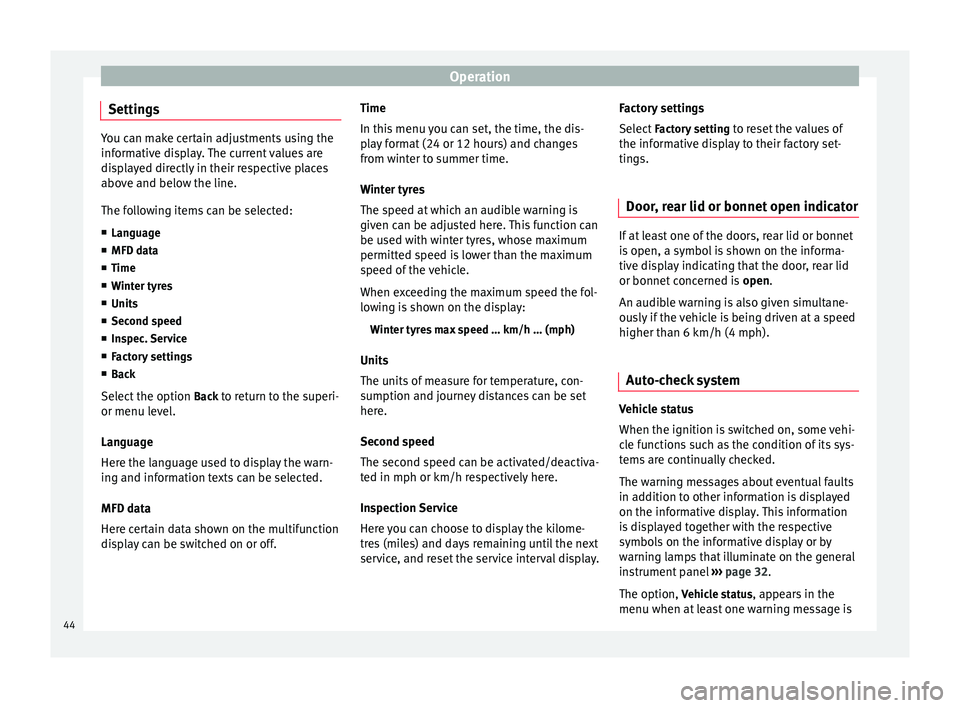
Settings You can make certain adjustments using the
informative display. The current values are
displayed directly in their respective places
above and below the line.
The following items can be selected:
■ Language
■ MFD data
■ Time
■ Winter tyres
■ Units
■ Second speed
■ Inspec. Service
■ Factory settings
■ Back
Select the option Back
to return to the superi-
or menu level.
Language
Here the language used to display the warn-
ing and information texts can be selected.
MFD data
Here certain data shown on the multifunction
display can be switched on or off. Time
In this menu you can set, the time, the dis-
play format (24 or 12 hours) and changes
from winter to summer time.
Winter tyres
The speed at which an audible warning is
given can be adjusted here. This function can
be used with winter tyres, whose maximum
permitted speed is lower than the maximum
speed of the vehicle.
When exceeding the maximum speed the fol-
lowing is shown on the display:
Winter tyres max speed … km/h … (mph)
Units
The units of measure for temperature, con-
sumption and journey distances can be set
here.
Second speed
The second speed can be activated/deactiva-
ted in mph or km/h respectively here.
Inspection Service
Here you can choose to display the kilome-
tres (miles) and days remaining until the next
service, and reset the service interval display. Factory settings
Select
Factory setting to reset the values of
the informative display to their factory set-
tings.
Door, rear lid or bonnet open indicator If at least one of the doors, rear lid or bonnet
is open, a symbol is shown on the informa-
tive display indicating that the door, rear lid
or bonnet concerned is
open.
An audib l
e warning is also given simultane-
ously if the vehicle is being driven at a speed
higher than 6 km/h (4 mph).
Auto-check system Vehicle status
When the ignition is switched on, some vehi-
cle functions such as the condition of its sys-
tems are continually checked.
The warning messages about eventual faults
in addition to other information is displayed
on the informative display. This information
is displayed together with the respective
symbols on the informative display or by
warning lamps that illuminate on the general
instrument panel
›››
page 32 .
The option, V
ehic
le status , appears in the
menu when at least one warning message is
44
Page 51 of 200

CommunicationButtonRadioMedia (except AUX)AUXTelephone
a)Navigation a)
FChange menu on instrument
panelChange menu on instrumentpanelChange menu on instrumentpanelChange menu on instrumentpanelChange menu on instrumentpanel
GEnable/disable voice control a)Enable/disable voice controla)Enable/disable voice controla)No functionb)Enable/disable voice control
H TurnNext/previous preset station c)Next/previous songc)Acts upon the dash panel
menu depending on where it is locatedActs upon the dash panel
menu depending on where it is locatedActs upon the dash panel
menu depending on where it is located
H Press
Acts on the MFA or confirms
the menu option of the dash
panel depending on the menu optionActs on the MFA or confirms
the menu option of the dash
panel depending on the menu optionActs on the MFA or confirms
the menu option of the dash
panel depending on the menu optionActs on the MFA or confirms
the menu option of the dash
panel depending on the menu optionActs on the MFA or confirms
the menu option of the dash
panel depending on the menu option
a)According to the vehicle's equipment package.
b) When a call is being made, radio/media functionality (except AUX).
c) Only if the dash panel is in audio menu.
Voice control Fig. 33
Multifunction steering wheel: voice
control. The time during which the system is ready to
receive voice commands and execute them is
called dialogue. The system provides acous-
tic warnings and if necessary, will guide you
through the respective functions.
It is recommended to use the
Help menu the
first time that voice control is used in order to
familiarize yourself with this function.
Optimum operation of the voice commands
depends on several factors:
● Speak slowly and clearly, as far as possi-
ble. The system will not recognise words pro-
nounced unclearly, or words and numbers in
which syllables are omitted. ●
Speak with normal voice volume, without
exaggerated intonation or long pauses.
● Close the doors, windows and sunroof for
the purpose of dampening or insulating
against unwanted noise from the exterior. Do
not aim the air from the diffusers at the roof.
● If you are driving very fast, it is recommen-
ded that you speak a little louder.
● While talking, avoid making other noise in-
side the vehicle, i.e., occupants that are talk-
ing at the same time.
● Do not speak when the system is providing
information. »
49
Technical specifications
Advice
Operation
Safety
Page 54 of 200
Operation
transmitters near the vehicle that operate on
the same frequency (e.g. mobile phone, tele-
vision transmitter).
● If the central locking system or the anti-
theft alarm only responds to the remote con-
trol at a distance of less than 3 metres, then
the battery must be replaced ››› page 53.
● If the driver door is open, the vehicle can-
not be locked using the remote control. Unlocking and locking the vehicle
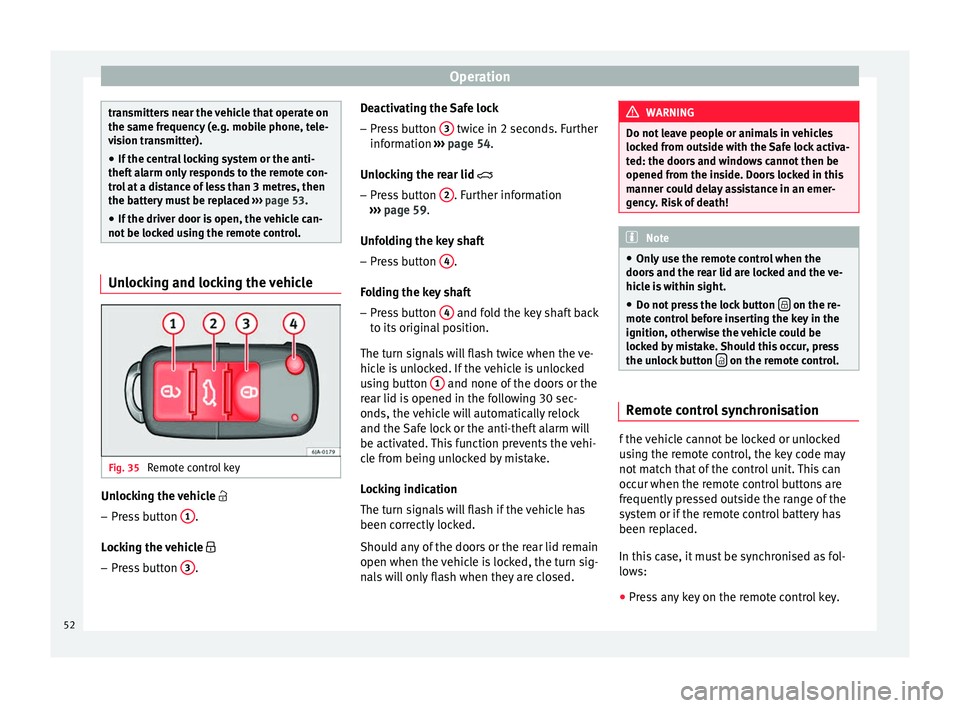
Fig. 35
Remote control key Unlocking the vehicle
– Press button 1 .
Locking the vehicle
– Press button 3 . Deactivating the Safe lock
– Press button 3 twice in 2 seconds. Further
information ››› page 54.
Unlocking the rear lid
– Pr e
ss button 2 . Further information
››› page 59 .
Unf o
lding the key shaft
– Press button 4 .
Folding the key shaft
– Press button 4 and fold the key shaft back
to its original position.
The turn signals will flash twice when the ve-
hicle is unlocked. If the vehicle is unlocked
using button 1 and none of the doors or the
rear lid is opened in the following 30 sec-
onds, the vehicle will automatically relock
and the Safe lock or the anti-theft alarm will
be activated. This function prevents the vehi-
cle from being unlocked by mistake.
Locking indication
The turn signals will flash if the vehicle has
been correctly locked.
Should any of the doors or the rear lid remain
open when the vehicle is locked, the turn sig-
nals will only flash when they are closed. WARNING
Do not leave people or animals in vehicles
locked from outside with the Safe lock activa-
ted: the doors and windows cannot then be
opened from the inside. Doors locked in this
manner could delay assistance in an emer-
gency. Risk of death! Note
● Only use the remote control when the
doors and the rear lid are locked and the ve-
hicle is within sight.
● Do not press the lock button on the re-
mote control before inserting the key in the
ignition, otherwise the vehicle could be
locked by mistake. Should this occur, press
the unlock button on the remote control.
Remote control synchronisation
f the vehicle cannot be locked or unlocked
using the remote control, the key code may
not match that of the control unit. This can
occur when the remote control buttons are
frequently pressed outside the range of the
system or if the remote control battery has
been replaced.
In this case, it must be synchronised as fol-
lows:
● Press any key on the remote control key.
52
Page 62 of 200

Operation
Electric window opening and
closing Introduction WARNING
● When locking the vehicle from the outside,
make sure that nobody is inside the vehicle,
as the windows cannot be opened from the
inside in an emergency.
● For safety reasons, use safety button 5›››
Fig. 44 that deactivates the window
sw it
ches on the rear doors when children are
travelling in the rear seats. CAUTION
● Keep the windows clean to ensure the sys-
tem operates correctly.
● Defrost ››› page 125, Windows and exterior
mirrors any frozen windows before use. Oth-
er w
ise you run the risk of damaging the elec-
tric window riser mechanism.
● Always make sure all of the windows are
closed on leaving the locked vehicle. Note
● The vehicle heating and ventilation system
should be used to ventilate the interior while
driving. Leaving the windows open could al-
low dust and other dirt to enter the vehicle and cause unpleasant noises at certain
speeds.
● Do not leave the side windows open at high
speeds, as this will overly increase fuel con-
sumption. Using electric window switches
Fig. 44
Detail of the driver door: controls for
the windows. The electric window opening and closing sys-
tem only works when the ignition is switched
on.
Opening
– Press gently on the respective button on
the door to open the window. The process
will stop when the button is released.
– The driver door window can also be auto-
matically opened by pressing the button as far as it will go (fully open). Press the but-
ton again to immediately stop it.
Closing
– Press the respective button gently to close
the window. The process will stop when the
button is released.
Window control buttons Button for window in front left door
Button for window in front right door
Button for window in rear left door
Button for window in rear right door
Safety switch for deactivating the electric
window buttons in the rear doors
Safety button
Press the safety button 5
››› Fig. 44 to deac-
tiv at
e the controls on the rear doors. Pressing
the safety button 5 again will reactivate the
controls on the rear doors.
If the rear door controls are deactivated, the
warning lamp on the safety button 5 will
light up. Note
The electric window opening mechanism is
equipped with a thermostat switch. This may
overheat if the window is opened and closed
repeatedly. This causes the window to lock
temporarily. Once the thermostat switch has 1
2
3
4
5
60