display Seat Toledo 2014 Owner's Guide
[x] Cancel search | Manufacturer: SEAT, Model Year: 2014, Model line: Toledo, Model: Seat Toledo 2014Pages: 200, PDF Size: 4.37 MB
Page 95 of 200

Heating and air conditioning
Switching on air recirculation mode
– Press button
1
››› Fig. 87
›
›› page 90
and the lamp in the button will illuminate.
Switching off air recirculation mode
– Press button
1
››› Fig. 87
›
›› p
age 90
again and the lamp in the button will
switch off.
If air distribution control C
››› Fig. 87
››› page 90 is in position
, air r
ec
irculation
mode switches off automatically Press the button to switch air recirculation mode
back on in this position. WARNING
Read and observe the safety warnings ››› in
General notes on page 87. Climatronic* (automatic air
conditioning)
General notes Climatronic automatically maintains a com-
fortable temperature. To do so, it automati- cally regulates the supplied air temperature
and the blower and air distribution levels.
The system also allows for the effect of sun-
light, so there is no need for manual adjust-
ment.
Automatic operations
›
›
› page 94
guarantee maximum comfort any time of
year.
Climatronic description
Cooling only works if the following conditions
are met:
● The engine is running
● the outside temperature is above +2 °C
(+36 °F);
● A/C
18
››› Fig. 88
›
›› p
age 94 switched
on.
In order to ensure engines subject to heavy
loads are cooled, the air conditioning com-
pressor is switched off in the event of high
coolant temperatures.
Recommended setting for all seasons of the
year
● Set the required temperature. We recom-
mend +22 °C (72 °F). ●
Press the AUTO button
12
››› Fig. 88
››› page 94 .
● Adju s
t vents 3 ››› p
age 88 and 4 so that the
air flow is directed slightly upwards.
Change between degrees Centigrade and
degrees Fahrenheit
Keep the AUTO and
A/C
››› Fig. 88
››› page 94 buttons pressed down at the
s ame time.
The data is displayed on the
screen in the units required. Note
A visit to the specialised service once a year
is recommended to clean the Climatronic sys-
tem. 93
Technical specifications
Advice
Operation
Safety
Page 96 of 200

Operation
Controls Fig. 88
Climatronic: controls. Buttons/controls
Interior temperature setting
Display Selected interior temperature
Degrees Centigrade or Fahrenheit
Automatic air conditioning mode
Defrost or demist windscreen
Air flow direction
Air recirculation
Cooling on/off
Selected blower speed
Buttons/controls Set blower speed
Interior temperature sensor
Automatic mode
1 2
3
4
5
6
7
8
9
10
11
12 Defrost or demist windscreen
Air distribution to windows
Air distribution to upper body
Air distribution to footwells
Air recirculation
Cooling on/off
Note
The interior temperature sensor 11
››› Fig. 88
››› page 94 is at the bottom. Do not cover it
w ith s
tickers or the like, as this could have a
negative effect on Climatronic operations. 13
14
15
16
17
18 Automatic mode
Automatic mode is used to maintain a con-
stant temperature and demist the windows
inside the vehicle.
Switching on automatic mode
– Set the interior temperature between
+18 °C (+64 °F) and +29 °C (+84 °F).
– Adjust vents 3 ››› page 88 and 4 so that the
air flow is directed slightly upwards.
– Press the AUTO button
12
››› Fig. 88 and
A UT
O displayed on the screen.
Automatic mode is switched off by pressing
the air distribution buttons or increasing or
decreasing the blower speed. However, the
temperature remains regulated.
94
Page 97 of 200

Heating and air conditioning
Temperature selection –
When you switch on the ignition, control 1›››
Fig. 88 ››› page 94 can be used to set the
required interior temperature.
It is possible to select interior temperatures
from +18 °C (+64 °F) to +29 °C (+84 °F). In
this range the temperature is regulated auto-
matically. If a temperature below +18 °C
(+64 °F) is selected, “LO” is displayed on the
screen. If a temperature above +29 °C
(+84 °F) is selected, “HI” is displayed on the
screen. At both extremes, Climatronic works
at maximum cooling or heating power, re-
spectively. The temperature is not regulated.
In the event of prolonged, irregular distribu-
tion of the air flow from the outlets (particu-
larly the footwells) and significant differen-
ces in temperature, e.g. on leaving the vehi-
cle, sensitive people may catch cold.
Air recirculation Air recirculation prevents unpleasant smells,
e.g. when passing through a tunnel or in
queuing traffic, from entering the interior.
Switching on air recirculation mode
– Press button
17
›››
Fig. 88 ›
›
›
page 94
and the symbol is displayed on the
screen. Switching off air recirculation mode
– Press button
17
››› Fig. 88
›
›› p
age 94
and the symbol disappears from the
screen. WARNING
Read and observe the safety warnings ››› in
General notes on page 87. Note
If air recirculation mode remains on for 15 mi-
nutes, the symbol will start to flash on
the screen to indicate prolonged air recircula-
tion. If air recirculation is not switched off,
the symbol will continue to flash for about 5
minutes. Blower selection
Climatronic automatically regulates the blow-
er speed according to the interior tempera-
ture. It is possible, however, to set the blower
speed to suit requirements.
–
Turn rotary control 10
›››
Fig. 88 ›
›
›
page 94
counter-clockwise (to lower the speed) or
clockwise (to increase the speed).
Climatronic will switch off when the blower
switches off. WARNING
● Used air can cause tiredness, reduce atten-
tion spans and cause the windows to mist
over. This increases the risk of an accident.
● Do not switch off Climatronic for longer
than necessary.
● Switch Climatronic back on as soon as the
windows begin to mist over. Windscreen defrosting
Switching on windscreen defrosting
– Press button
13
›››
Fig. 88 ›
›
›
page 94.
Switching off windscreen defrosting – Press button
13
›››
Fig. 88 ›
›
›
page 94
several times or press the AUTO button.
The temperature is regulated automatically.
The air output is increased from vents 1
››› page 88 and
2
. 95
Technical specifications
Advice
Operation
Safety
Page 99 of 200

Driving
Note
● The engine can only be started with the
original SEAT key.
● Loud running noises may be heard briefly
after cold-starting the engine. This is normal
and is no cause for concern.
● After the engine has been stopped and the
ignition switched off, the radiator fan may
continue running for around 10 minutes.
● If the engine still does not start after a sec-
ond attempt, the fuel pump fuse might have
blown. Check it and replace if necessary
››› page 163 or contact your Specialised
Ser v
ice.
● You should always engage the steering lock
when you exit the vehicle. This will hinder
any attempts at theft. Power steering
The power steering allows you to turn the
steering wheel more easily.
If the power steering fails or the engine is off
(towing), it is still possible to turn the vehi-
cle's steering wheel fully. However, you need
more strength to steer the vehicle. Start-up lock security system
(immobiliser) There is an electronic chip in the key. The
electronic immobiliser is deactivated when
the key is inserted into the ignition. The elec-
tronic immobiliser is automatically activated
when the key is removed from the ignition.
The engine will not start if an unauthorised
key is used.
The informative display indicates:
Immobiliser active!
Ignition lock Fig. 89
Ignition key positions. Petrol engines
1 – Ignition switched off, engine stopped,
steering can be locked
2 – Ignition switched on3 – Starting
Diesel engines 1 – Fuel supply stopped, ignition switched
off, engine stopped, steering can be locked
2 – Engine pre-heating, ignition switched
on
3 – Starting
To engage the Steering lock without the key
in the ignition, t urn the s
teering wheel slight-
ly until you hear it engage.
If the steering lock is engaged and it is diffi-
cult or impossible to turn the key to position 2 , release the lock by turning the steering
wheel slightly in both directions.
Starting the engine Vehicles with a
diesel engine are equipped
with a glow plug system. When you switch on
the ignition, the glow plug warning lamp
will light up. The engine can be started
straight away when the lamp switches off.
Do not connect electrical appliances during
preheating so as not the drain the vehicle
battery unnecessarily. »
97
Technical specifications
Advice
Operation
Safety
Page 102 of 200

Operation
Manual gearbox Changing gears Fig. 91
Gear shift diagram of a 5- or 6-speed
manual gearbox When changing gear, always depress the
clutch pedal fully and keep it pressed down
to avoid excessive clutch wear.
In order to drive at an optimum RPM, follow
the gear change indications
››› page 32.
Engage reverse gear only when the vehicle is
stopped. On engaging reverse gear while the
engine is running, first wait a moment with
the clutch pedal pressed down fully to limit
gear shift noise.
The reverse lights switch on when the reverse
gear is selected and the ignition is on. WARNING
Never engage reverse gear when moving for-
ward. Risk of accident! Note
Do not rest your hand on the gear lever while
driving. The pressure of your hand could lead
to premature wear of the gear system. Automatic gearbox
Basic information The gearbox changes up and down automati-
cally. The gearbox can be set to
Tiptronic
mode. The gears can be changed manually in
this mode ›››
page 102 .
The en gine c
an only be started
in positions P
or N. If, on engaging the steering lock,
switching the ignition on/off or starting the
engine, the selector lever is not in these posi-
tions, the informative display will show Move
the selector lever to position P/N! , or P/N
is
shown on the general dash panel display.
At temperatures below -10 °C (14 °F), the en-
gine can only be started in position P.
Mov
e the selector lever to position P when
parking the vehicle on a flat surface. On a
slope, the handbrake should be firmly ap-
plied before moving the selector lever to the park position. This reduces the load on the
lock mechanism while making it easier to
move the selector lever from position P.
If, while the vehicle is moving, the selector
lever is accidentally moved to position
N, re-
le
ase the accelerator and wait for the engine
to idle before moving it back into position. WARNING
● Never press the accelerator when selecting
the automatic gearbox operating mode when
the vehicle is stationary. Risk of accident!
● Never move the selector lever to positions
R or P when driving. Risk of accident!
● If the vehicle is to be stopped with a gear
selected and the engine idling (e.g. waiting
or moving slowly at traffic lights), press down
on the brake pedal because the transmission
is not entirely interrupted when the engine is
idling and the vehicle will tend to start mov-
ing.
● Apply the handbrake firmly and put the se-
lector lever in position P before opening the
bonnet and working on the vehicle with the
engine running. Risk of accident! Strictly fol-
low the safety instructions ››› page 132, En-
gine compartment.
● When s t
opping on a slope (hill), try not to
stop the vehicle from moving by pressing the
“accelerator” with a gear selected. This could
overheat the clutch. If the clutch risks being
burnt due to this force, it would switch off 100
Page 103 of 200

Driving
and the vehicle could move backwards. Risk
of accident!
●
If you have to stop on a hill, press down on
the brake pedal to stop the vehicle from mov-
ing.
● The drive wheels could lose traction on a
slippery road surface when the kick-down
function is activated. Risk of sliding! CAUTION
● In DSG automatic gearboxes, the double
clutch is protected from overloads. If the hill
hold control is used, the clutches are subjec-
ted to greater force if the vehicle is at a
standstill on a slope or suddenly accelerating
on a slope.
● Should the clutches overheat, the sym-
bol is shown on the informative display with
a warning message Gear overheated. Stop! In-
struction Manual! An audible warning is also heard. Stop the vehicle in this case, stop the
engine and wait until the symbol has
switched off. Danger of damage to the gear-
box! You can continue driving once the sym-
bol is switched off. Starting and driving
Starting
– Press and hold the brake pedal.
– Press and hold the interlock button on the
selector lever knob and move the selector lever to position
››› page 101 before releas-
ing the interlock button.
– Release the brake and press the accelera-
tor.
Stopping
– The selector lever does not have to be
moved to position N
if the vehicle is stop-
ped f
or a short period, e.g. at intersections.
Applying the brake is enough. However, the
engine must remain idling.
Parking
– Press the brake pedal.
– Apply the handbrake.
– Press the interlock button, move the selec-
tor lever to position P and release the but-
ton.
Kick-down feature
The kick-down feature allows maximum ac-
celeration to be reached.
In any gear programme, press down fully on
the accelerator for the automatic gearbox to
activate the kick-down feature. This function
takes priority over the gear programmes with-
out taking into account the position of the se-
lector lever (
D, S or Tiptronic) and is used to
reach maximum acceleration, using full en-
gine power. Depending on the road speed
and engine speed, the automatic gearbox shifts down and the vehicle accelerates. It
only shifts up after the maximum engine
speed has been reached.
Selector lever positions Fig. 92
Selector lever/Informative display: se-
lector lever positions. The current position of the selector lever is
shown on the general instrument panel dis-
play
1
››› Fig. 92 .
»
101
Technical specifications
Advice
Operation
Safety
Page 104 of 200
Operation
P – Parking position
In this position, the driven wheels are me-
chanically locked.
The parking position can only be selected
when the vehicle is stationary.
If you want to move the selector lever from
this position, press the interlock button on
the selector lever knob while pressing down
on the brake pedal.
If the battery is drained, the selector lever
cannot be moved from position P.
R – Reverse
Reverse gear must be engaged only when the
vehicle is stationary and the engine is idling.
To move the selector lever to position R from
positions P or
N, press the interlock button
on the selector lever knob and press down on
the brake pedal.
The reverse lights come on when the selector
lever is in position R and the ignition is on.
N – Neutral (idling)
Neutral (idling) is engaged in this position.
To move the selector lever from position N (if
the lever has remained in this position for
more than 2 seconds) to position D or R at
speeds of less than 5 km/h (3 mph) and
when the vehicle is stationary, press down on
the brake pedal. D – Drive (forwards)
In this position, the gearbox automatically
changes to a lower or higher gear, depending
on engine requirements, the driving speed
and the gear shift programme.
To move the selector lever to position D from
position N
at speeds of less than 5 km/h (3
mph) and when the
vehicle is stationary,
press down on the brake pedal.
In some situations (e.g. on mountain roads or
when towing a trailer or caravan), it can be
advantageous to switch temporarily to the
manual shift programme ››› page 102 so that
the gear ratios can be selected manually to
suit driving conditions.
S – Sports driving position
Shifting up later than usual makes full use of
the engine power. This shifts down earlier in
relation to position D
.
T
o move the selector lever to position S from
position
D, press the interlock button on the
selector lever knob. Tiptronic gearbox Fig. 93
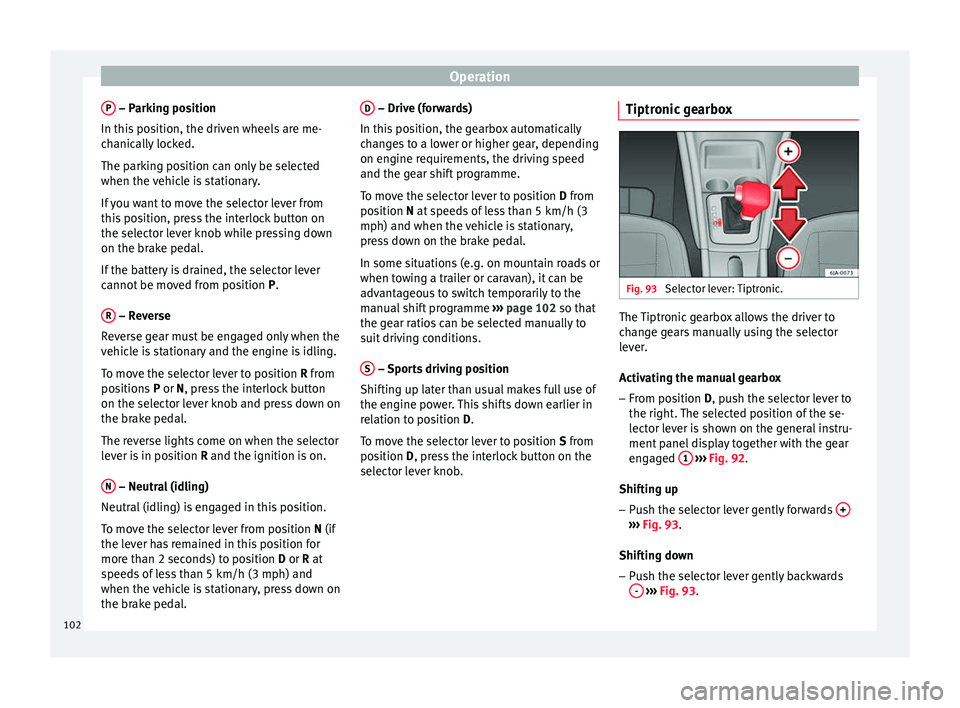
Selector lever: Tiptronic. The Tiptronic gearbox allows the driver to
change gears manually using the selector
lever.
Activating the manual gearbox
– From position D
, push the selector lever to
the right
. The selected position of the se-
lector lever is shown on the general instru-
ment panel display together with the gear
engaged 1
››› Fig. 92 .
Shif tin
g up
– Push the selector lever gently forwards + ›››
Fig. 93 .
Shif tin
g down
– Push the selector lever gently backwards
-
››› Fig. 93 .
102
Page 106 of 200

Operation
shift down manually when driving downhill to
use the braking effect of the engine.
Back-up programme A back-up programme exists in case of faults.
In the event of a fault in the gearbox electron-
ics, it will continue to work in one of the cor-
responding back-up programmes. All seg-
ments of the screen are lit up or switched off.
The fault can be seen as follows:
● The gearbox only engages certain gears
● Reverse gear R cannot be engaged
● The m
anual gearbox switches off in the
back-up programme Note
If the gearbox switches to the back-up pro-
gramme, visit an Authorised Service as soon
as possible to solve the problem. Run-in and economical driving
The first 1,500 km Over the first 1,500 kilometres the engine
must be run in. Up to 1000 kilometres
– Do not drive at more than 3/4 of the maxi-
mum speed corresponding to the engaged
gear, i.e. up to 3/4 of the maximum permit-
ted engine speed.
– Do not drive at full speed.
– Avoid high engine speeds.
– Do not tow a trailer.
From 1000 to 1500 kilometres (600 to 900
miles) – Slowly increase the engine speed until
r e
aching the maximum permitted speed of
the engaged gear, i.e. the maximum per-
mitted engine speed.
During its first few hours of running, the in-
ternal friction in the engine is greater than
later on, when all the moving parts have bed-
ded in. How the vehicle is driven over approx-
imately the first 1,500 kilometres (900
miles), determines the success of the proc-
ess of running in the engine.
Even after running in, the vehicle should not
be unnecessarily driven at high engine
speeds
. The maximum permitted engine
speed is marked at the start of the red zone
on the rev counter dial. The gear must be
changed up when the red area is reached in
vehicles with a manual gearbox. Extremely
high engine speeds when accelerating are
automatically limited, however the engine is not protected against high engine speeds
produced by incorrectly changing to a lower
gear, which could cause the engine to run at
revs above the maximum permitted amount,
and consequently result in damage to the en-
gine.
Additionally, vehicles with a manual gearbox
must also bear the following in mind: do not
drive with the engine speed too low. Change
down to a lower gear when the engine no
longer runs smoothly. Observe the recom-
mendations for changing gear
››› page 32,
Recommended gear display.
New tyres
New tyres must be submitted to “running in”,
given that initially their grip is not yet at the
maximum level. During the first 500 km (120
miles) drive very carefully.
New brake pads
New brake pads do not yet provide maximum
friction capacity. First they must be “run in”.
During the first 200 km (120 miles) drive very
carefully. CAUTION
All the information for speed and engine
speed refers to an engine that operates at op-
erating temperature. Do not run the engine at
high engine speeds, neither when stopped or
while driving. 104
Page 108 of 200
Operation
●
Refuelling just once with leaded petrol dis-
ables the exhaust system! Economical and environmentally
friendly driving
Fuel consumption, environmental pollution
and wear to the engine, brakes and tyres de-
pends in large part on your driving style. By
adopting an economical driving style and an-
ticipating the traffic situation ahead, you can
easily reduce fuel consumption by 10-15%.
Some tips on how to help you reduce pollu-
tion while saving money are listed below.
Drive anticipating the traffic situation
A vehicle uses most fuel when accelerating.
When you anticipate situations, you have to
brake less often and, thus, accelerate less. If
it is possible, let the vehicle roll with a
gear
engaged , for example, if you see a red light
ahe a
d. The braking effect achieved in this
way helps to reduce the wear of brakes and
tyres; emissions and fuel consumption are
reduced to zero (disconnection due to iner-
tia).
Change gear early to save energy
An effective way of saving fuel is to change
up
quickly through the gears. Running the
engine at high rpm in the lower gears uses
an unnecessary amount of fuel. Manual gearbox:
shift up from first to second
gear as soon as possible. We recommend
that, whenever possible, you change to a
higher gear upon reaching 2000 rpm. Follow
the “recommended gear” indication that ap-
pears on the instrument panel ››› page 32,
Recommended gear display.
Avoid driving at high speed
We advise you not to drive at the top speed
permitted by the vehicle. Fuel consumption,
exhaust emissions and noise levels all in-
crease very rapidly at higher speeds. Driving
at moderate speeds will help to save fuel.
Avoid idling
It is worthwhile switching off the engine
when waiting in a traffic jam, at level cross-
ings or at traffic lights with a long red phase.
The fuel saved after only 30 - 40 seconds is
greater than the amount of fuel needed to re-
start the engine.
The engine takes a long time to warm up
when it is idling. Mechanical wear and pollu-
tant emissions are also especially high dur-
ing this initial warm-up phase. It is therefore
best to drive off immediately after starting
the engine. Avoid running the engine at high
speed. Periodic maintenance
Periodic maintenance work guarantees that,
before beginning a journey, you will not con-
sume more than the required amount of fuel.
A well-serviced engine gives you the benefit
of
improved fuel efficiency as well as maxi-
mum reliability and an enhanced resale val-
ue.
A badly serviced engine can consume up to
10% more fuel than necessary.
Avoid short journeys
To reduce the consumption and emission of
polluting exhaust gases, the engine and the
exhaust gas filtration systems should reach
the optimum operating temperature.
With the en
gine cold, fuel consumption is
proportionally higher. The engine does not
warm up and fuel consumption does not nor-
malise until having driven approximately four
kilometres (2.5 miles). This is why we recom-
mend avoiding short trips whenever possi-
ble.
Maintain the correct tyre pressures
Bear in mind that keeping the tyres at an ad-
equate pressure saves fuel. If the tyre pres-
sure is just one bar (14.5 psi/100 kPa) too
low, fuel consumption can increase by as
much as 5%. Due to the greater rolling resist-
ance, under-inflation also increases tyre wear
wear and impairs handling.
106
Page 112 of 200
Operation
Electronic differential lock If one of the wheels starts to skid, the EDL
brakes that wheel, transmitting the driving
force to the other wheels. This increases ve-
hicle stability and improves driving stability.
To prevent the disc brake of the braking
wheel from overheating, the EDL cuts out au-
tomatically if subjected to excessive loads.
The vehicle will continue to function normally
without EDL. The EDL will switch on again au-
tomatically when the brake has cooled down.
Parking aid* Functioning Fig. 96
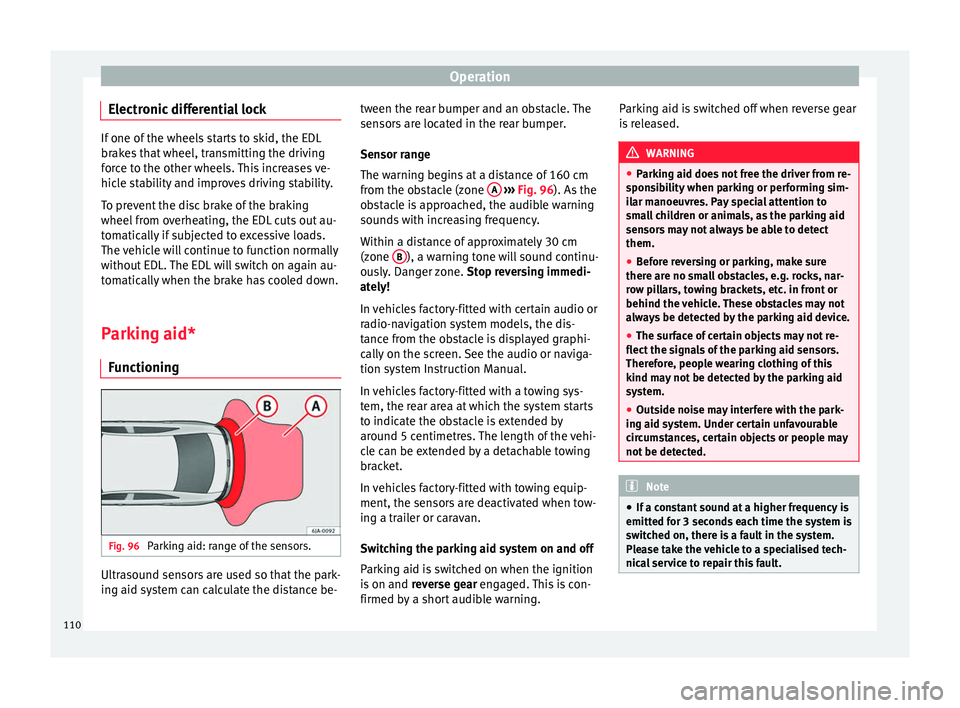
Parking aid: range of the sensors. Ultrasound sensors are used so that the park-
ing aid system can calculate the distance be- tween the rear bumper and an obstacle. The
sensors are located in the rear bumper.
Sensor range
The warning begins at a distance of 160 cm
from the obstacle (zone
A
››› Fig. 96 ). As the
o b
stacle is approached, the audible warning
sounds with increasing frequency.
Within a distance of approximately 30 cm
(zone B ), a warning tone will sound continu-
ously. Danger zone. Stop reversing immedi-
ately!
In vehicles factory-fitted with certain audio or
radio-navigation system models, the dis-
tance from the obstacle is displayed graphi-
cally on the screen. See the audio or naviga-
tion system Instruction Manual.
In vehicles factory-fitted with a towing sys-
tem, the rear area at which the system starts
to indicate the obstacle is extended by
around 5 centimetres. The length of the vehi-
cle can be extended by a detachable towing
bracket.
In vehicles factory-fitted with towing equip-
ment, the sensors are deactivated when tow-
ing a trailer or caravan.
Switching the parking aid system on and off
Parking aid is switched on when the ignition
is on and reverse gear engaged. This is con-
firmed by a short audible warning. Parking aid is switched off when reverse gear
is released. WARNING
● Parking aid does not free the driver from re-
sponsibility when parking or performing sim-
ilar manoeuvres. Pay special attention to
small children or animals, as the parking aid
sensors may not always be able to detect
them.
● Before reversing or parking, make sure
there are no small obstacles, e.g. rocks, nar-
row pillars, towing brackets, etc. in front or
behind the vehicle. These obstacles may not
always be detected by the parking aid device.
● The surface of certain objects may not re-
flect the signals of the parking aid sensors.
Therefore, people wearing clothing of this
kind may not be detected by the parking aid
system.
● Outside noise may interfere with the park-
ing aid system. Under certain unfavourable
circumstances, certain objects or people may
not be detected. Note
● If a constant sound at a higher frequency is
emitted for 3 seconds each time the system is
switched on, there is a fault in the system.
Please take the vehicle to a specialised tech-
nical service to repair this fault. 110