battery Seat Toledo 2017 User Guide
[x] Cancel search | Manufacturer: SEAT, Model Year: 2017, Model line: Toledo, Model: Seat Toledo 2017Pages: 248, PDF Size: 5.86 MB
Page 112 of 248
Operation
WARNING
● Never l e
ave the key inside whenever you
leave the vehicle - even if only for a moment.
This is particularly important if children are
to remain in the vehicle. Children might start
the engine or some other electrical compo-
nent, e.g. electric windows. Risk of injury!
● Wait until the vehicle has completely stop-
ped before t
aking the key out of the ignition.
Otherwise the steering wheel may lock sud-
denly. Risk of accident! CAUTION
● Eac h k
ey contains electronic components
and must, therefore, be protected from damp-
ness and strong vibrations.
● Keep the grooves in the key shaft clean.
Any dir
t (fibre from clothing, dust, etc.) has a
negative impact on locks, ignition, etc. Note
Should a key be lost, request a duplicate key
from an Authori sed S
EAT dealer. Replacing the battery in the remote
c
ontr
o
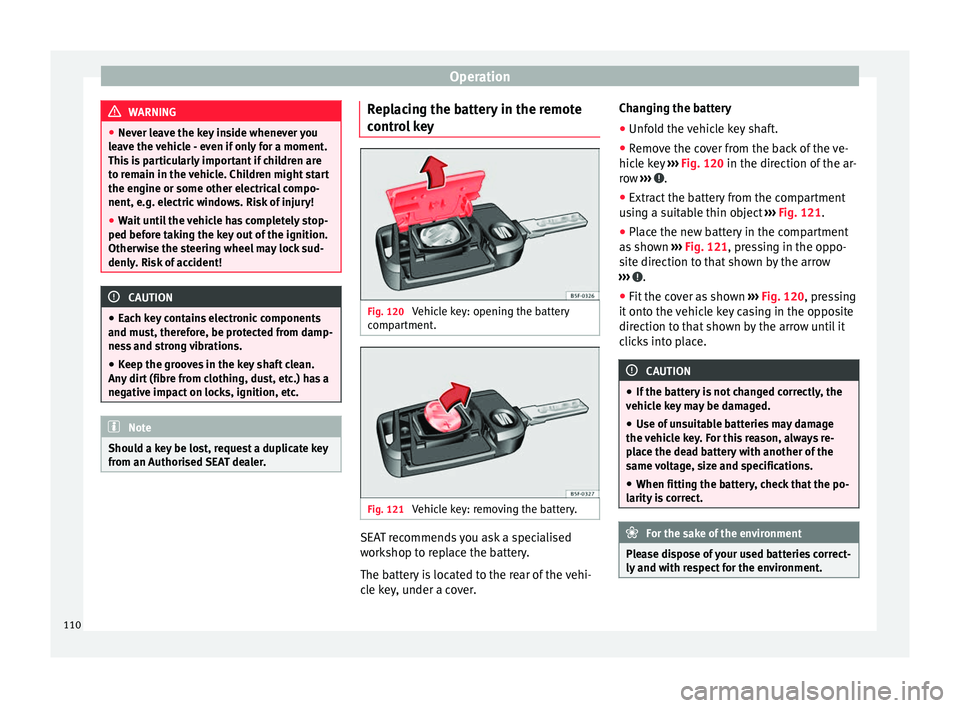
l key Fig. 120
Vehicle key: opening the battery
c omp
ar
tment. Fig. 121
Vehicle key: removing the battery. SEAT recommends you ask a specialised
w
ork
shop t
o replace the battery.
The battery is located to the rear of the vehi-
cle key, under a cover. Changing the battery
● Unfold the vehicle key shaft.
● Remove the cover from the back of the ve-
hicle k
ey ››› Fig. 120 in the direction of the ar-
row ››› .
● Extract the battery from the compartment
u s
in
g a suitable thin object ››› Fig. 121.
● Place the new battery in the compartment
as sho
wn ››› Fig. 121, pressing in the oppo-
site direction to that shown by the arrow
››› .
● Fit the cover as shown ››
›
Fig. 120 , pressing
it onto the vehicle key casing in the opposite
direction to that shown by the arrow until it
clicks into place. CAUTION
● If the b att
ery is not changed correctly, the
vehicle key may be damaged.
● Use of unsuitable batteries may damage
the vehic
le key. For this reason, always re-
place the dead battery with another of the
same voltage, size and specifications.
● When fitting the battery, check that the po-
larity i
s correct. For the sake of the environment
Please dispose of your used batteries correct-
ly and w ith r
espect for the environment.110
Page 118 of 248
Operation
pointed at it again, all the windows will
pro
b
ably open ››› page 115, Convenience
functions. Note
● If the v
ehicle battery has little or no charge,
or the vehicle key battery is almost or entire-
ly out of charge, it is likely that the vehicle
will not be able to be lock or unlocked with
the Keyless Access system. The vehicle can
be unlocked or locked manually
››› page 9.
● If there is no valid key inside the vehicle or
the syst
em fails to detect one, a warning will
display on the dash panel screen. This could
happen if any other radio frequency signal in-
terferes with the key signal (e.g. from a mo-
bile device accessory) or if the key is covered
by another object (e.g. an aluminium case).
● If the sensors are very dirty, e.g. have a lay-
er of sa
lt, the correct functioning of the sen-
sors on the door handles may be affected. If
this is the case, wash the vehicle
››› page 195.
● If the vehicle is equipped with an automatic
gearbo
x, it may only be locked in the gear
stick is in position P. Child-proof locking
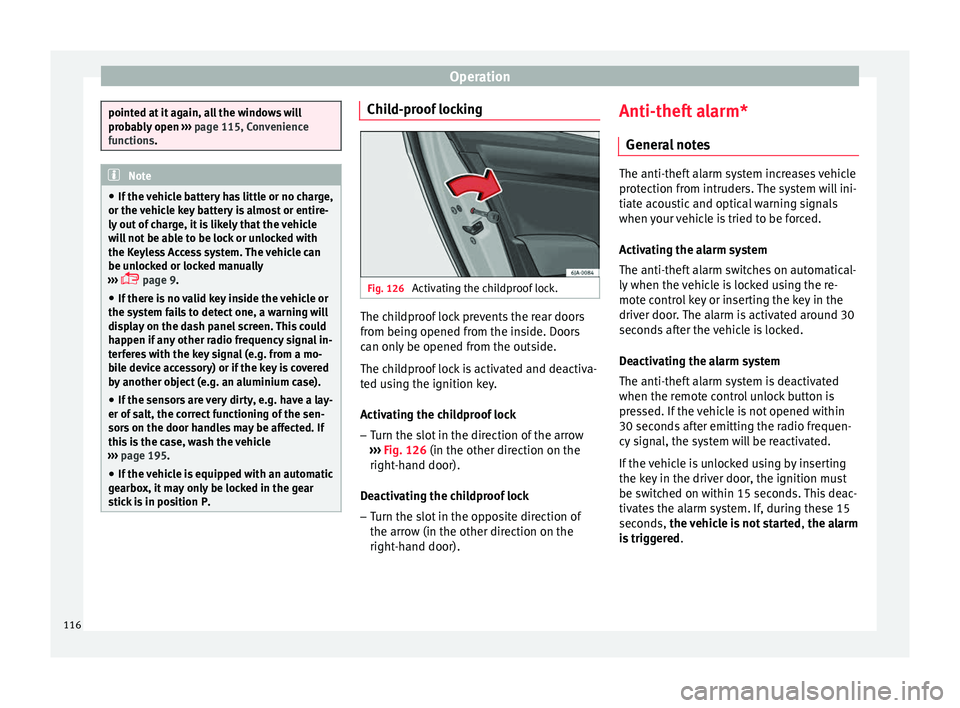
Fig. 126
Activating the childproof lock. The childproof lock prevents the rear doors
fr
om bein
g opened fr
om the inside. Doors
can only be opened from the outside.
The childproof lock is activated and deactiva-
ted using the ignition key.
Activating the childproof lock
– Turn the slot in the direction of the arrow
›››
Fig. 126 (in the other direction on the
right-hand door).
Deactivating the childproof lock – Turn the slot in the opposite direction of
the arrow (in the other dir
ection on the
right-hand door). Anti-theft alarm*
General
notes The anti-theft alarm system increases vehicle
prot
ection fr
om intruders. The system will ini-
tiate acoustic and optical warning signals
when your vehicle is tried to be forced.
Activating the alarm system
The anti-theft alarm switches on automatical-
ly when the vehicle is locked using the re-
mote control key or inserting the key in the
driver door. The alarm is activated around 30
seconds after the vehicle is locked.
Deactivating the alarm system
The anti-theft alarm system is deactivated
when the remote control unlock button is
pressed. If the vehicle is not opened within
30 seconds after emitting the radio frequen-
cy signal, the system will be reactivated.
If the vehicle is unlocked using by inserting
the key in the driver door, the ignition must
be switched on within 15 seconds. This deac-
tivates the alarm system. If, during these 15
seconds, the vehicle is not started , the alarm
is triggered .
116
Page 119 of 248
Opening and closing
When does the system trigger an alarm?
The f o
l
lowing areas of the vehicle are moni-
tored:
● Bonnet
● rear lid;
● Doors
● Ignition
● Tilt angle ››› pag
e 117, Vehicle interior
monitoring and anti-tow system
● The interior ››› pag
e 117, Vehicle interior
monitoring and anti-tow system
● Drop in voltage in the car systems
● The factory-fitted towing bracket
The alarm is
triggered immediately if one of
the battery cables is disconnected while the
alarm system is active.
How to turn OFF the alarm
To deactivate the alarm, press the unlock but-
ton on the remote control key or switch on
the ignition. Note
● The al arm horn po
wer supply has a 5-year
useful life. Contact an Official Service for
more detailed information.
● To make sure that the anti-theft alarm is
ful
ly operative when leaving the vehicle,
check that all the doors and windows are
closed. ●
Remot e c
ontrol and receiver unit coding
means that the remote control cannot be
used on other vehicles. Vehicle interior monitoring and anti-
to
w sy
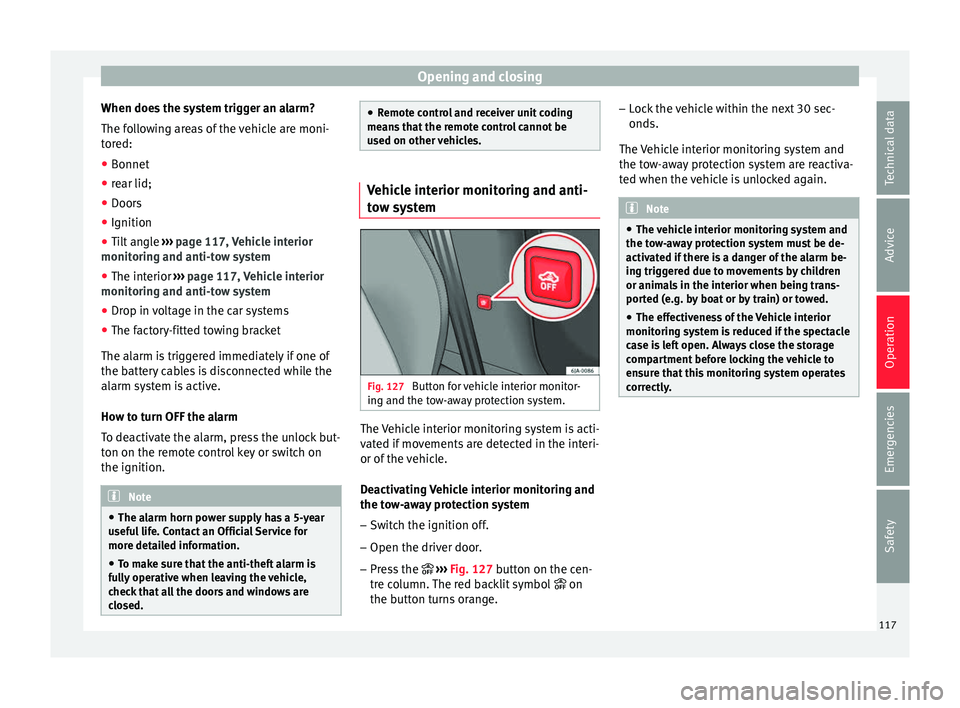
stem Fig. 127
Button for vehicle interior monitor-
in g and the t
o
w-away protection system. The Vehicle interior monitoring system is acti-
v
at
ed if
movements are detected in the interi-
or of the vehicle.
Deactivating Vehicle interior monitoring and
the tow-away protection system
– Switch the ignition off.
– Open the driver door.
– Press the ››› Fig. 127
button on the cen-
tre column. The red backlit symbol on
the button turns orange. –
Lock
the vehicle within the next 30 sec-
onds.
The Vehicle interior monitoring system and
the tow-away protection system are reactiva-
ted when the vehicle is unlocked again. Note
● The v ehic
le interior monitoring system and
the tow-away protection system must be de-
activated if there is a danger of the alarm be-
ing triggered due to movements by children
or animals in the interior when being trans-
ported (e.g. by boat or by train) or towed.
● The effectiveness of the Vehicle interior
monitoring sy
stem is reduced if the spectacle
case is left open. Always close the storage
compartment before locking the vehicle to
ensure that this monitoring system operates
correctly. 117
Technical data
Advice
Operation
Emergencies
Safety
Page 129 of 248
Lights and visibility
Where the courtesy light is on (switch A›››
Fig. 136 in po s
ition ), the light will come
on if:
● the vehicle is unlocked,
● one of the doors is opened,
● The key is removed from the ignition
When the court
esy light is on (switch A in
po s
ition
), the light will switch off if:
● the vehicle is locked,
● the ignition is switched on,
● 30 seconds after all of the doors have been
closed
If
a door is left open or if switch A is in the
po s
ition, the int
erior lighting switches off
after about 10 minutes to prevent the battery
from running flat.
Rear interior light Fig. 138
Rear interior light. Press the button
››
›
Fig. 138 to switch the
lighting on or off.
Interior lights / ambient light* The lighting of the central console area, the
door handl
e
s, the storage pockets in the
front doors and the footwell area will switch
on fully when the doors are opened and will
decrease in intensity while driving with the
dipped beam headlights on.
Depending on the version, a logo is back-lit
on the front passenger's side of the dash
panel. This light comes on when the dipped
beam is activated.
The intensity of the ambient light* can be ad-
justed using the menu Easy Connect > Lighting settings > Vehicle inte-
rior lighting ›››
page 21.
Glove box light The light will come on automatically when
the glo
v
e c
ompartment is opened. The light
will go out when the glove compartment is
closed. Luggage compartment light The light switches on automatically when the
boot i
s
open and switches off automatically
10 minutes after the boot lid has been
opened.
Visibility Heated r
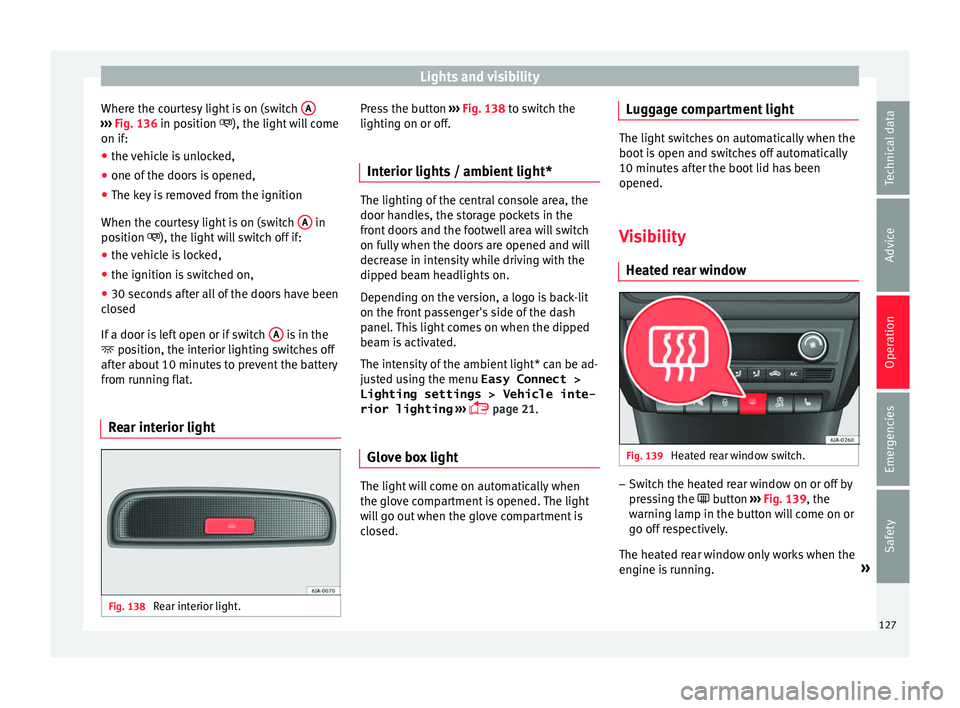
ear window Fig. 139
Heated rear window switch. –
Switch the heated rear window on or off by
pr e
s
sing the button ›››
Fig. 139, the
warning lamp in the button will come on or
go off respectively.
The heated rear window only works when the
engine is running. »
127
Technical data
Advice
Operation
Emergencies
Safety
Page 135 of 248
Seats and head restraints
The cushion and backrest of the front seats
c an be he
at
ed electrically.
Press the or button ››› Fig. 145 to switch
on and adjust the heated front seats.
Press once to connect the heating at maxi-
mum force.
Press the button again to reduce the force of
the heating and switch it off. The force is indi-
cated by the number of warning lamps lit on
the button. WARNING
Do not use the heated seat if your perception
of p ain and/or t
emperature or that of your
passenger is limited, e.g. due to medication,
paralysis or chronic illness (e.g. diabetes). It
could cause burns on the back, buttocks and
legs that are difficult to heal. If you still want
to use the heated seat, take frequent breaks
on long journeys so that the body can recover
from the trip. Ask your doctor about your par-
ticular situation. CAUTION
● To av oid d
amaging the heating elements,
do not kneel on the seat or apply sharp pres-
sure at a single point to the seat cushion or
backrest.
● Do not use the heated seats if nobody is
sitting on them or if
there are items attached
to or lying on them, such as a child seat or a bag, etc. This could lead to a fault in the seat
heatin
g el
ements.
● Do not clean the seats with anything damp
›››
page 200. Note
● On ly c
onnect the heated seats when the
engine is running. This provides considerable
savings on the battery capacity.
● In the event of a drop in voltage in the on-
board sy
stems, the heated seats switch off
automatically to ensure enough power to con-
trol the engine ››› page 216, Automatic dis-
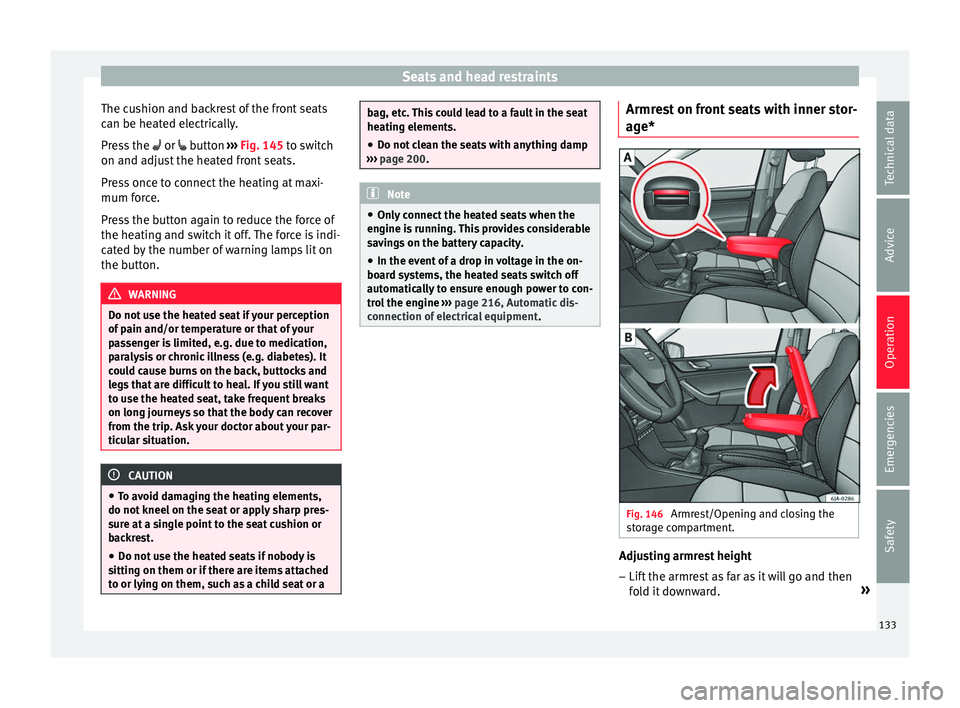
connection of electrical equipment . Armrest on front seats with inner stor-
ag
e* Fig. 146
Armrest/Opening and closing the
s t
or
age compartment. Adjusting armrest height
– Lift the armrest as far as it will go and then
fo l
d it downward. »
133
Technical data
Advice
Operation
Emergencies
Safety
Page 141 of 248
Transport and practical equipment
●
Never e x
ceed the maximum permitted pow-
er, as this could cause damage to the vehicle
electrical installation.
● With the engine switched off, however, the
vehicl
e battery will drain. Risk of discharging
the battery!
● Only use suitable plugs so as not to dam-
age the pow
er socket.
● Only use appliances that have been tested
for electr
omagnetic compatibility in compli-
ance with current regulations.
● Before switching the ignition on or off, un-
plug the app
liances from the power socket to
protect them from any damage caused by
fluctuations in voltage.
● Follow the instructions for use of connected
appli
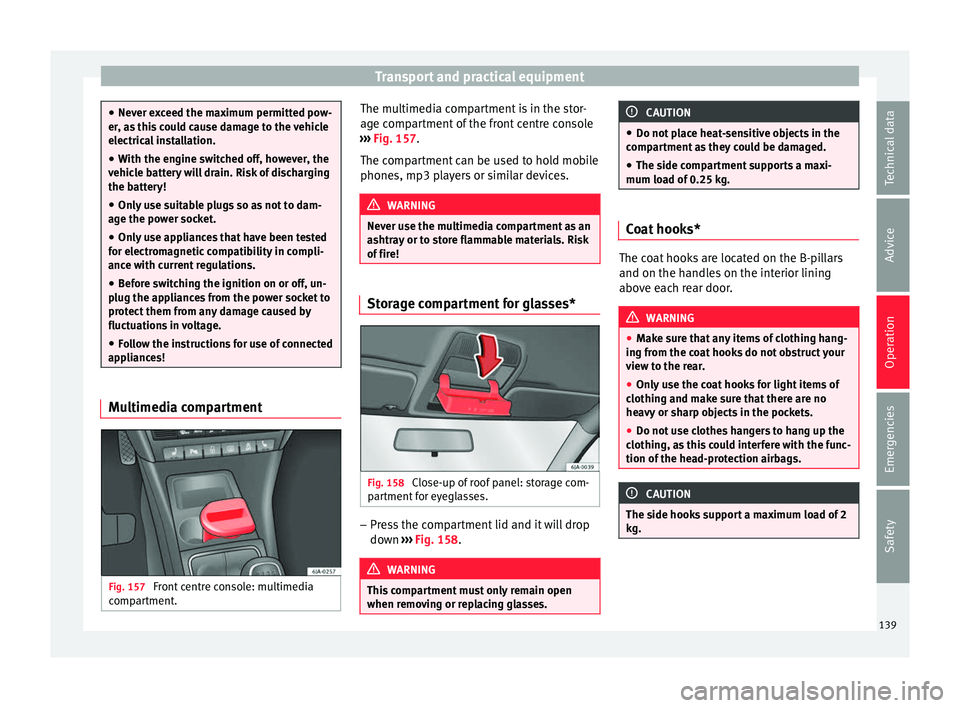
ances! Multimedia compartment
Fig. 157
Front centre console: multimedia
c omp
ar
tment. The multimedia compartment is in the stor-
ag
e c
omp
artment of the front centre console
››› Fig. 157.
The compartment can be used to hold mobile
phones, mp3 players or similar devices. WARNING
Never use the multimedia compartment as an
ashtr a
y or to store flammable materials. Risk
of fire! Storage compartment for glasses*
Fig. 158
Close-up of roof panel: storage com-
p ar
tment
for eyeglasses. –
Press the compartment lid and it will drop
do wn ›
›
› Fig. 158. WARNING
This compartment must only remain open
when remo v
ing or replacing glasses. CAUTION
● Do not p l
ace heat-sensitive objects in the
compartment as they could be damaged.
● The side compartment supports a maxi-
mum load of
0.25 kg. Coat hooks*
The coat hooks are located on the B-pillars
and on the handl
e
s on the interior lining
above each rear door. WARNING
● Mak e s
ure that any items of clothing hang-
ing from the coat hooks do not obstruct your
view to the rear.
● Only use the coat hooks for light items of
clothing and m
ake sure that there are no
heavy or sharp objects in the pockets.
● Do not use clothes hangers to hang up the
clothing, a
s this could interfere with the func-
tion of the head-protection airbags. CAUTION
The side hooks support a maximum load of 2
kg. 139
Technical data
Advice
Operation
Emergencies
Safety
Page 155 of 248
Driving
●
Never l e
ave the vehicle unattended if the
engine is running.
● Never switch the engine off until the vehi-
cle h
as come to a complete stop. Risk of acci-
dent! CAUTION
● Turnin g the s
teering wheel fully in either
direction when the vehicle is stationary and
the engine is in gear puts the power steering
under great stress. This could lead to noise.
Never leave the steering wheel turned fully in
either direction for more than 15 seconds.
Risk of damage to the power steering system!
● The starter motor may only be used (key
position 3
››› Fig. 173 ›
›› page 154 in the ig-
nition) if the engine is off. Using the starter
motor when the engine is running could dam-
age it.
● Immediately release the ignition key when
the engine st
arts, otherwise damage could be
caused to the starter motor.
● When the engine is cold, you should avoid
high engine speed
s, driving at full throttle
and over-loading the engine before it reaches
operating temperature. Risk of engine dam-
age!
● Do not tow-start the engine. Risk of engine
damag
e! In vehicles with a catalytic convert-
er, fuel that has not been burned could reach
the catalytic converter and catch fire in it.
This would lead to a fault in the catalytic con-
verter. You may use the battery from another vehicle to help you start your engine
›› ›
page 52.
● After prolonged and demanding operation
of the engine, when the j
ourney has ended,
do not stop the engine immediately. Let the
engine run at idle for about one more minute.
This will stop the engine from overheating. For the sake of the environment
Do not warm up the engine when the vehicle
i s s
tationary. If possible, move off immediate-
ly after starting the engine. This will help the
engine reach operating temperature more
quickly, reducing the quantity of emissions. Note
● The engine c an on
ly be started with the
original SEAT key.
● Loud running noises may be heard briefly
after c
old-starting the engine. This is normal
and is no cause for concern.
● After the engine has been stopped and the
ignition switc
hed off, the radiator fan may
continue running for around 10 minutes.
● If the engine still does not start after a sec-
ond attempt, the fuel
pump fuse might have
blown. Check it and replace if necessary
››› page 81 or contact your Specialised Serv-
ice.
● You should always engage the steering lock
when you e
xit the vehicle. This will hinder
any attempts at theft. Power steering
The power steering allows you to turn the
st
eerin
g wheel more easily.
If the power steering fails or the engine is off
(towing), it is still possible to turn the vehi-
cle's steering wheel fully. However, you need
more strength to steer the vehicle.
Driver control lamps and warnings (in red) Faulty steering! To
park the vehicle
If the warning lamp remains on and the driver
indication appears, the power steering could
be faulty.
Do not continue driving. Seek specialist as-
sistance. (in yellow) Steering: System
fault! You may continue driving.
If the warning lamp comes on, the steering
could react with more difficultly or more sen-
sitivity than normal. In addition, when driving
in a straight line the steering wheel may be
off-centre.
Drive slowly to a specialised workshop and
have the fault repaired. (in yellow) Steering lock:
fault! Go to an Official Service
The electronic steering lock is malfunction-
ing. »
153
Technical data
Advice
Operation
Emergencies
Safety
Page 157 of 248
Driving
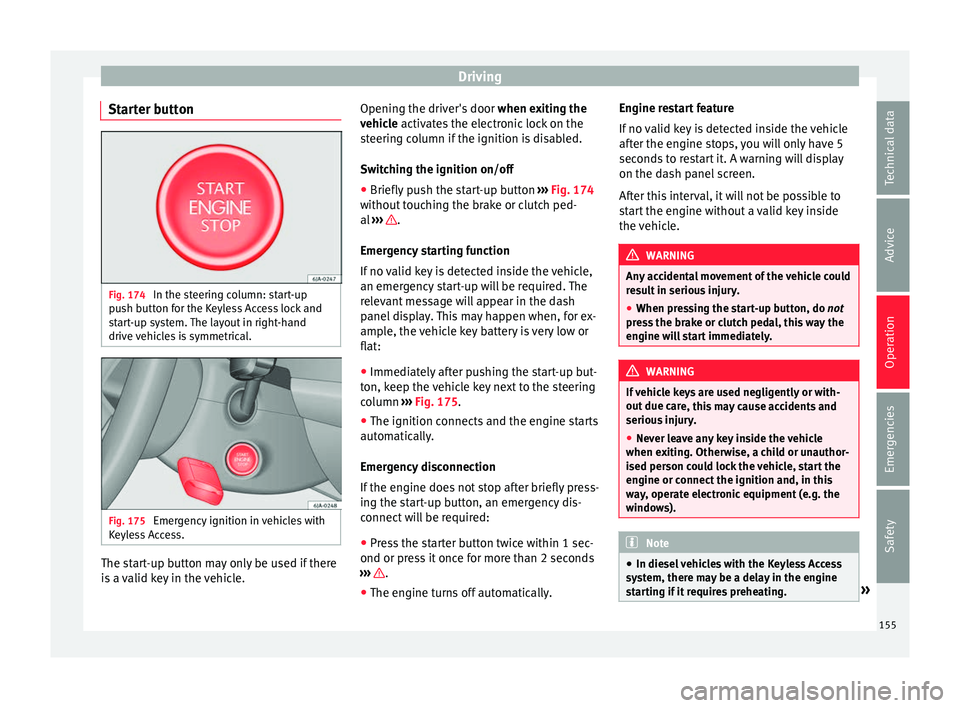
Starter button Fig. 174
In the steering column: start-up
p u
sh b
utton for the Keyless Access lock and
start-up system. The layout in right-hand
drive vehicles is symmetrical. Fig. 175
Emergency ignition in vehicles with
K eyl
e
ss Access. The start-up button may only be used if there
i
s a
valid key in the vehicle. Opening the driver's door
when exitin
g the
vehicle activates the electronic lock on the
steering column if the ignition is disabled.
Switching the ignition on/off
● Briefly push the start-up button ›››
Fig. 174
without touching the brake or clutch ped-
al ››› .
Emer g
ency
starting function
If no valid key is detected inside the vehicle,
an emergency start-up will be required. The
relevant message will appear in the dash
panel display. This may happen when, for ex-
ample, the vehicle key battery is very low or
flat:
● Immediately after pushing the start-up but-
ton, keep the
vehicle key next to the steering
column ››› Fig. 175.
● The ignition connects and the engine starts
automatic
ally.
Emergency disconnection
If the engine does not stop after briefly press-
ing the start-up button, an emergency dis-
connect will be required:
● Press the starter button twice within 1 sec-
ond or pres
s it once for more than 2 seconds
››› .
● The engine turns off automatically. Engine restart feature
If
no
v
alid key is detected inside the vehicle
after the engine stops, you will only have 5
seconds to restart it. A warning will display
on the dash panel screen.
After this interval, it will not be possible to
start the engine without a valid key inside
the vehicle. WARNING
Any accidental movement of the vehicle could
re s
ult in serious injury.
● When pressing the start-up button, do not
pre
ss the brake or clutch pedal, this way the
engine will start immediately. WARNING
If vehicle keys are used negligently or with-
out due c ar
e, this may cause accidents and
serious injury.
● Never leave any key inside the vehicle
when exitin
g. Otherwise, a child or unauthor-
ised person could lock the vehicle, start the
engine or connect the ignition and, in this
way, operate electronic equipment (e.g. the
windows). Note
● In diesel
vehicles with the Keyless Access
system, there may be a delay in the engine
starting if it requires preheating. » 155
Technical data
Advice
Operation
Emergencies
Safety
Page 158 of 248

Operation
●
If the v
ehicle is stationary for a long time
with the ignition on, the vehicle battery
might be discharged and it might not be pos-
sible to start the engine. Starting the engine
Vehicles with a
diesel en
gine are equipped
with a glow plug system. When you switch on
the ignition, the glow plug warning lamp
will light up. The engine can be started
straight away when the lamp switches off.
Do not connect electrical appliances during
preheating so as not the drain the vehicle
battery unnecessarily.
Starting the engine
● Move the gearbox lever into neutral or
mov e the sel
ector lever to position P or N and
pull firmly on the handbrake.
● Press the clutch pedal all the way down
and star
t the engine 3
› ›
› Fig. 173
›
›› page 154, without pressing the accelera-
tor. Keep the clutch pedal pressed down until
the engine starts.
● Release the ignition key as soon as the en-
gine star
ts. The key returns to position 2 .
● If the engine does not start after 10 sec-
ond s, t
urn the k
ey back to position 1 . Re-
pe at
the action af
ter 30 seconds.
● Release the handbrake before moving off. Switching off the engine with the key Stop the engine by turning the ignition key to
pos
ition 1
››› Fig. 173 ›
›› page 154.
Brakes and brake servo sys-
tems Introduction WARNING
● The brak e ser
vo only works when the en-
gine is running. Braking when the engine is
switched off requires applying more strength
to the brake pedal. Risk of accident!
● Press down on the clutch pedal when stop-
ping and brak
ing with a manual gearbox, pet-
rol engine vehicle at low speed. Otherwise,
the brake servo might not work properly. Risk
of accident!
● In the event of damage to the standard
front s
poiler or where a different front spoil-
er, wheel trims, etc. are subsequently fitted,
make sure the air vent to the brakes on the
front wheels is not blocked. Otherwise, brak-
ing operations may be impaired. Risk of acci-
dent!
● Always fully release the handbrake. If it is
only p
artially released, this will cause over-
heating of the rear brakes, which can impair
the function of the brake system. Risk of acci-
dent! ●
Never l e
ave children unsupervised in the
vehicle. They could release the handbrake or
move the gear lever. The vehicle could start
moving. Risk of accident!
● Insufficient fuel can cause the engine to run
irregu
larly or to switch off. Brake assist sys-
tems could be impaired. Risk of accident!
● Always adjust your driving style to suit visi-
bility
, the weather and road and traffic condi-
tions. The best vehicle safety offered by
brake assist systems must never encourage
you to run greater risks. Risk of accident! CAUTION
● Ob ser
ve the information concerning new
brake pads ››› page 165.
● Where braking is not necessary, do not
wear do
wn the brake pads by pressing down
gently on the brake pedal. This causes the
brakes to overheat, increasing their wear and
increasing braking distances.
● To ensure the brake assist systems work
properly, a
ll wheels must be fitted with tyres
approved by the manufacturer. Note
● If y
ou brake suddenly and the brake system
control unit regards the situation as hazard-
ous for the drivers behind you, the brake
lights will begin to flash automatically. After
reducing speed to approximately 10 km/h (6
mph) or stopping the vehicle, the brake lights
will stop flashing and the hazard warning 156
Page 161 of 248
Driving
from the brake pedal and you can use the ac-
c el
er
ator pedal and move away on a hill with-
out having to use the handbrake. The brake
pressure drops as the accelerator pedal is
pressed. If the vehicle cannot be started, it
will start to move backwards after 2 seconds.
The HHC is activated on gradients of over
5%, if the driver door is closed. It only works
for starting on hills, moving both forward and
in reverse. It is not activated during start-up
down hill.
Control lamp
If the control lamp flashes, the ESC is
working.
If the warning lamp illuminates on igni-
tion, the ESC system may have switched off
due to technical reasons. Turn off the ignition
and turn it on again. Upon switching on the
ignition again, if the warning lamp has
switched off, this means the ESC is function-
ing correctly again.
If the warning lamp is illuminated there is
a fault in the ESC.
The informative display indicates:
Report No.: electronic stability
control (ESC)
or Report No.: Traction control
system (ASR) Go to a technical service. Note
If the battery is disconnected and connected
again, the y
ellow warning lamp lights up
when the ignition is switched on. This warn-
ing lamp must switch off after covering a
short distance. Anti-lock brake system (ABS)
The ABS system prevents the wheels locking
durin
g br
ak
ing. This helps the driver keep
control of the vehicle.
The driver is made aware of ABS assistance
by the pulsating of the brake pedal and a
characteristic noise.
Keep the brake pedal pressed down while the
ABS is working. The ABS will switch off when
the brake pedal is released. Never brake in-
termittently while the ABS is working!
Control lamp
If the warning lamp is illuminated, there is
a fault in the ABS.
The informative display indicates:
ABS fault
The brake system alone is operational in the
vehicle, without ABS.
Go to a technical service. WARNING
● If the w
arning lamp illuminates together
with the ››› page 157 warning lamp, ,
stop the vehicle! Go to a technical service.
● A fault in the Anti-lock brake system (ABS)
can le
ad to longer braking distances – Risk of
accident! Anti-slip regulation of the driving
wheels
(ASR)
* If the wheels start to slip, the TCS adapts the
en
gine s
peed t
o the driving conditions. Par-
ticularly in unfavourable conditions, the TCS
helps starting, accelerating and hill starts.
If the control lamp flashes, the ASR is
working.
If the warning lamp illuminates on igni-
tion, the TCS system may have switched off
due to technical reasons. Turn off the ignition
and turn it on again. Upon switching on the
ignition again, if the warning lamp has
switched off, this means the TCS is function-
ing correctly again.
If the warning lamp remains illuminated,
there is a fault in the TCS.
The informative display indicates:
Report No.: Traction control
system (ASR) »
159
Technical data
Advice
Operation
Emergencies
Safety