bonnet Seat Toledo 2017 User Guide
[x] Cancel search | Manufacturer: SEAT, Model Year: 2017, Model line: Toledo, Model: Seat Toledo 2017Pages: 248, PDF Size: 5.86 MB
Page 103 of 248
Introduction to the Easy Connect system*
panel display. These may be purely informa-
tiv e or they
m
ay be advising of the need for
action ››› page 96.
Depending upon the equipment fitted in the
vehicle, instead of a warning lamp, some-
times a symbol may be displayed on the in-
strument panel.
When certain control and warning lamps are
lit, an audible warning is also heard. WARNING
If the warning lamps and messages are ignor-
ed, the v ehic
le may stall in traffic, or may
cause accidents and severe injuries.
● Never ignore the warning lamps or text
mess
ages.
● Stop the vehicle safely as soon as possible.
● Park the vehicle away from traffic and en-
sure th
at there are no highly flammable ma-
terials under the vehicle that could come into
contact with the exhaust system (e.g. dry
grass, fuel).
● A faulty vehicle represents a risk of acci-
dent for the driv
er and for other road users. If
necessary, switch on the hazard warning
lamps and put out the warning triangle to ad-
vise other drivers.
● Before opening the bonnet, switch off the
engine and al
low it to cool.
● In any vehicle, the engine compartment is a
hazar
dous area and could cause severe inju-
ries ››› page 204. CAUTION
Failure to heed the control lamps and text
mes s
ages when they appear may result in
faults in the vehicle. Introduction to the Easy
C
onnect
sy
stem*
System settings (CAR)* CAR menu Read the additional information carefully
›› ›
page 21
To select the settings menus, press the Easy
Connect button and the
S
ET
TINGS func-
tion b utt
on.
The act
ual number of menus available and
the name of the various options in these me-
nus will depend on the vehicle’s electronics
and equipment.
When the function button check box is activa-
ted , the function is active.
Pressing the menu button will always take
y ou t
o the l
ast menu used.
Any changes made using the settings menus
are automatically saved on closing those me-
nus.
Function buttons in the vehicle settings
menuPage
ESC system››› page 158
Tyres››› page 221» 101
Technical data
Advice
Operation
Emergencies
Safety
Page 119 of 248
Opening and closing
When does the system trigger an alarm?
The f o
l
lowing areas of the vehicle are moni-
tored:
● Bonnet
● rear lid;
● Doors
● Ignition
● Tilt angle ››› pag
e 117, Vehicle interior
monitoring and anti-tow system
● The interior ››› pag
e 117, Vehicle interior
monitoring and anti-tow system
● Drop in voltage in the car systems
● The factory-fitted towing bracket
The alarm is
triggered immediately if one of
the battery cables is disconnected while the
alarm system is active.
How to turn OFF the alarm
To deactivate the alarm, press the unlock but-
ton on the remote control key or switch on
the ignition. Note
● The al arm horn po
wer supply has a 5-year
useful life. Contact an Official Service for
more detailed information.
● To make sure that the anti-theft alarm is
ful
ly operative when leaving the vehicle,
check that all the doors and windows are
closed. ●
Remot e c
ontrol and receiver unit coding
means that the remote control cannot be
used on other vehicles. Vehicle interior monitoring and anti-
to
w sy
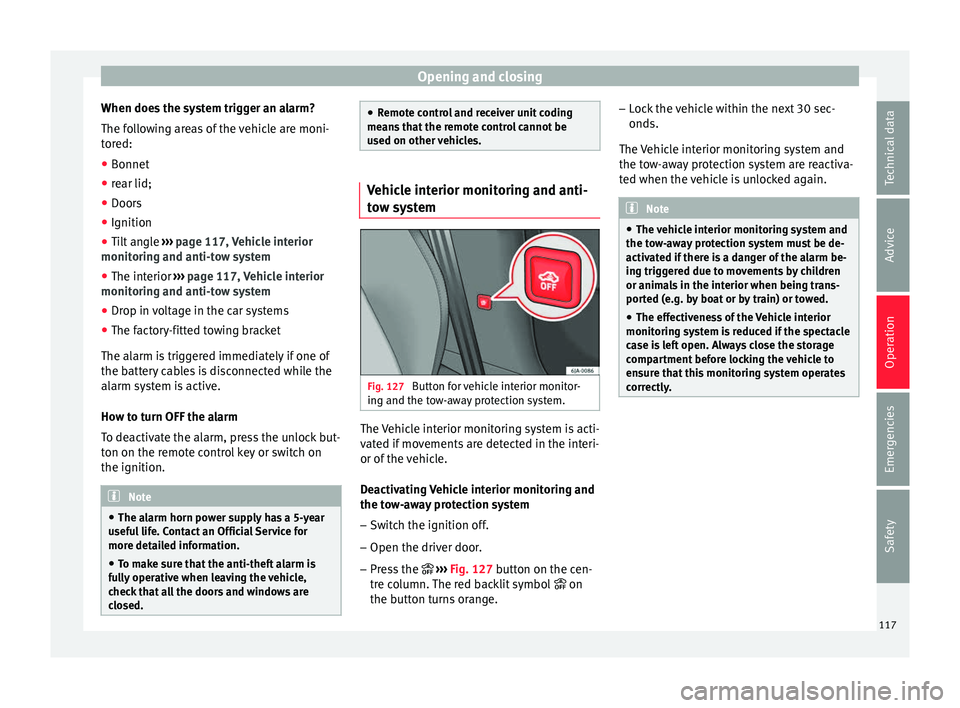
stem Fig. 127
Button for vehicle interior monitor-
in g and the t
o
w-away protection system. The Vehicle interior monitoring system is acti-
v
at
ed if
movements are detected in the interi-
or of the vehicle.
Deactivating Vehicle interior monitoring and
the tow-away protection system
– Switch the ignition off.
– Open the driver door.
– Press the ››› Fig. 127
button on the cen-
tre column. The red backlit symbol on
the button turns orange. –
Lock
the vehicle within the next 30 sec-
onds.
The Vehicle interior monitoring system and
the tow-away protection system are reactiva-
ted when the vehicle is unlocked again. Note
● The v ehic
le interior monitoring system and
the tow-away protection system must be de-
activated if there is a danger of the alarm be-
ing triggered due to movements by children
or animals in the interior when being trans-
ported (e.g. by boat or by train) or towed.
● The effectiveness of the Vehicle interior
monitoring sy
stem is reduced if the spectacle
case is left open. Always close the storage
compartment before locking the vehicle to
ensure that this monitoring system operates
correctly. 117
Technical data
Advice
Operation
Emergencies
Safety
Page 131 of 248
Lights and visibility
the ignition. If you switch on the windscreen
wiper
s
when the wiper blades are frozen to
the glass, this could damage both the wiper
blades and the wiper motor.
● If the ignition is switched off when the
winds
creen wipers are on, they will start op-
erating in the same mode when the ignition
is switched back on. The wiper blades may be
frozen to the glass at low temperatures when
the ignition is switched off.
● Carefully separate the frozen wipers from
the winds
creen or rear window.
● Remove snow and ice from the wipers be-
fore s
tarting your journey.
● Careless handling could lead to the wiper
arms dam
aging the windscreen.
● For safety reasons, the wiper blades should
be chan
ged once or twice a year. They can be
purchased at a SEAT Authorised Service.
● The ignition cannot be switched on while
the winds
creen wiper arms are in a raised po-
sition. Otherwise, the windscreen wipers
would return to their original position and
could damage the paintwork on the bonnet. Note
Keep the wipers clean. The wipers can be
soil ed w
ith remains of wax solutions from car
washes ››› page 196.
● On vehicles equipped with windscreen
washer j
ets, these are heated once the en-
gine is running. Operating windscreen wipers and
w
a
sher
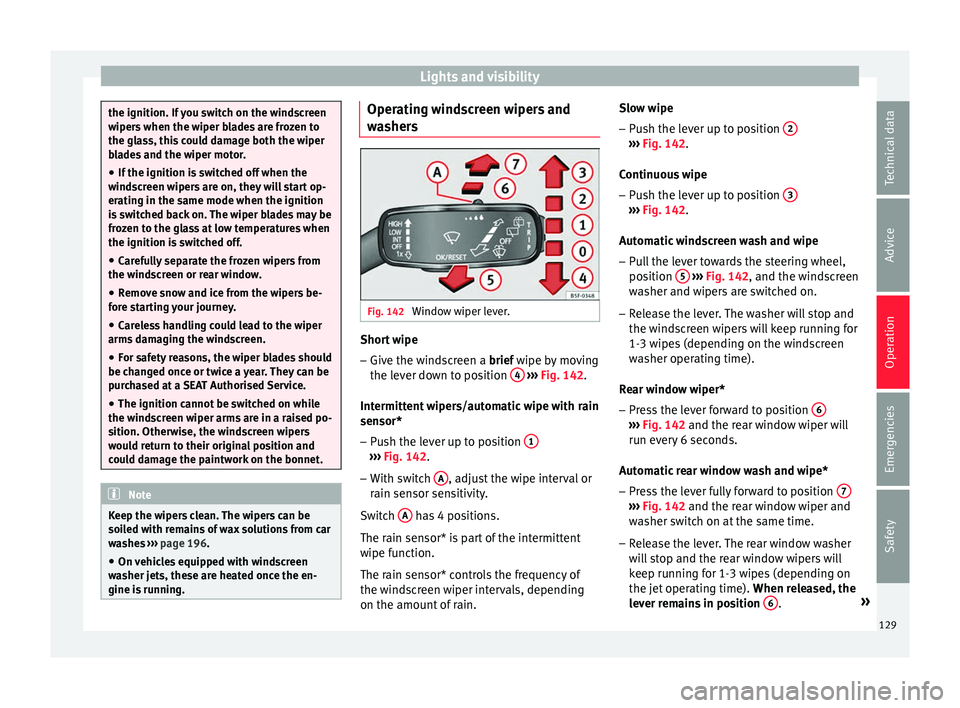
s Fig. 142
Window wiper lever. Short wipe
– Give the windscreen a brief w ipe b
y
moving
the lever down to position 4
› ›
› Fig. 142 .
Intermittent wipers/automatic wipe with rain
sensor* – Push the lever up to position 1 ›››
Fig. 142.
– With switch A , adjust the wipe interval or
r ain sen
sor sen
sitivity.
Switch A has 4 positions.
The r ain sen
sor* i
s part of the intermittent
wipe function.
The rain sensor* controls the frequency of
the windscreen wiper intervals, depending
on the amount of rain. Slow wipe
–
Push the lever up to position 2 ›››
Fig. 142.
C ontinuou
s
wipe
– Push the lever up to position 3 ›››
Fig. 142.
Aut om
atic
windscreen wash and wipe
– Pull the lever towards the steering wheel,
position 5
› ››
Fig. 142
, and the w
indscreen
washer and wipers are switched on.
– Release the lever. The washer will stop and
the winds
creen wipers will keep running for
1-3 wipes (depending on the windscreen
washer operating time).
Rear window wiper*
– Press the lever forward to position 6 ›››
Fig. 142 and the re ar w
indow wiper will
run every 6 seconds.
Automatic rear window wash and wipe* – Press the lever fully forward to position 7 ›››
Fig. 142 and the re ar w
indow wiper and
washer switch on at the same time.
– Release the lever. The rear window washer
wi l
l stop and the rear window wipers will
keep running for 1-3 wipes (depending on
the jet operating time). When released, the
lever remains in position 6 .
»
129
Technical data
Advice
Operation
Emergencies
Safety
Page 163 of 248
Driving
slope, the handbrake should be firmly ap-
p lied bef
or
e moving the selector lever to the
park position. This reduces the load on the
lock mechanism while making it easier to
move the selector lever from position P.
If, while the vehicle is moving, the selector
lever is accidentally moved to position N, re-
lease the accelerator and wait for the engine
to idle before moving it back into position. WARNING
● Never pr e
ss the accelerator when selecting
the automatic gearbox operating mode when
the vehicle is stationary. Risk of accident!
● Never move the selector lever to positions
R or P when driving. Ri
sk of accident!
● If the vehicle is to be stopped with a gear
selected and the en
gine idling (e.g. waiting
or moving slowly at traffic lights), press down
on the brake pedal because the transmission
is not entirely interrupted when the engine is
idling and the vehicle will tend to start mov-
ing.
● Apply the handbrake firmly and put the se-
lector l
ever in position P before opening the
bonnet and working on the vehicle with the
engine running. Risk of accident! Strictly fol-
low the safety instructions ››› page 204, En-
gine compartment.
● When stopping on a slope (hill), try not to
stop the
vehicle from moving by pressing the
“accelerator” with a gear selected. This could
overheat the clutch. If the clutch risks being burnt due to this force, it would switch off
and the v
ehic
le could move backwards. Risk
of accident!
● If you have to stop on a hill, press down on
the brake ped
al to stop the vehicle from mov-
ing.
● The drive wheels could lose traction on a
slipper
y road surface when the kick-down
function is activated. Risk of sliding! CAUTION
● In D SG aut om
atic gearboxes, the double
clutch is protected from overloads. If the hill
hold control is used, the clutches are subjec-
ted to greater force if the vehicle is at a
standstill on a slope or suddenly accelerating
on a slope.
● Should the clutches overheat, the sym-
bol i
s shown on the informative display with
a warning message Gear overheated.
Stop! Instruction Manual! An audible
warning is also heard. Stop the vehicle in this
case, stop the engine and wait until the sym-
bol has switched off. Danger of damage to
the gearbox! You can continue driving once
the symbol is switched off. Starting and driving
Starting
– Press and hold the brake pedal. –
Pr e
s
s and hold the interlock button on the
selector lever knob and move the selector
lever to position ››› page 162 before releas-
ing the interlock button.
– Release the brake and press the accelera-
tor.
St
opping
– The selector lever does not have to be
moved t
o position N if the vehicle is stop-
ped for a short period, e.g. at intersections.
Applying the brake is enough. However, the
engine must remain idling.
Parking
– Press the brake pedal.
– Apply the handbrake.
– Press the interlock button, move the selec-
tor lev
er to position P and release the but-
ton.
Kick-down feature
The kick-down feature allows maximum ac-
celeration to be reached.
In any gear programme, press down fully on
the accelerator for the automatic gearbox to
activate the kick-down feature. This function
takes priority over the gear programmes with-
out taking into account the position of the se-
lector lever (D, S or Tiptronic) and is used to
reach maximum acceleration, using full »
161
Technical data
Advice
Operation
Emergencies
Safety
Page 186 of 248
Operation
– Shif t
t
o neutral.
– Release the clutch pedal.
Automatic
engine start up (Start phase)
– Press the clutch.
Switc
hing the Start-Stop system on and off
The Start-Stop system can be switched on
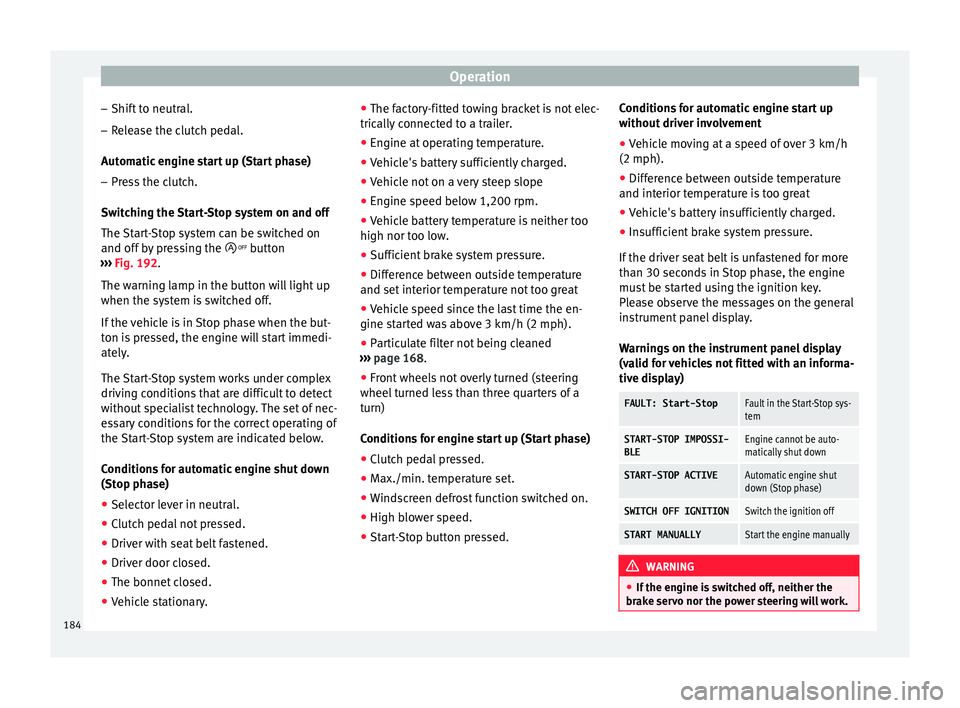
and off by pressing the button
››› Fig. 192.
The warning lamp in the button will light up
when the system is switched off.
If the vehicle is in Stop phase when the but-
ton is pressed, the engine will start immedi-
ately.
The Start-Stop system works under complex
driving conditions that are difficult to detect
without specialist technology. The set of nec-
essary conditions for the correct operating of
the Start-Stop system are indicated below.
Conditions for automatic engine shut down
(Stop phase) ● Selector lever in neutral.
● Clutch pedal not pressed.
● Driver with seat belt fastened.
● Driver door closed.
● The bonnet closed.
● Vehicle stationary. ●
The factor
y-fitted towing bracket is not elec-
trically connected to a trailer.
● Engine at operating temperature.
● Vehicle's battery sufficiently charged.
● Vehicle not on a very steep slope
● Engine speed below 1,200 rpm.
● Vehicle battery temperature is neither too
high nor too low
.
● Sufficient brake system pressure.
● Difference between outside temperature
and set interior t
emperature not too great
● Vehicle speed since the last time the en-
gine star
ted was above 3 km/h (2 mph).
● Particulate filter not being cleaned
›››
page 168.
● Front wheels not overly turned (steering
wheel turned l
ess than three quarters of a
turn)
Conditions for engine start up (Start phase)
● Clutch pedal pressed.
● Max./min. temperature set.
● Windscreen defrost function switched on.
● High blower speed.
● Start-Stop button pressed. Conditions for automatic engine start up
without driv
er involvement
● Vehicle moving at a speed of over 3 km/h
(2 mph).
● Difference between outside temperature
and interior temper
ature is too great
● Vehicle's battery insufficiently charged.
● Insufficient brake system pressure.
If the driver se
at belt is unfastened for more
than 30 seconds in Stop phase, the engine
must be started using the ignition key.
Please observe the messages on the general
instrument panel display.
Warnings on the instrument panel display
(valid for vehicles not fitted with an informa-
tive display)
FAULT: Start-StopFault in the Start-Stop sys-
tem
START-STOP IMPOSSI-
BLEEngine cannot be auto-
matically shut down
START-STOP ACTIVEAutomatic engine shut
down (Stop phase)
SWITCH OFF IGNITIONSwitch the ignition off
START MANUALLYStart the engine manually WARNING
● If the en gine i
s switched off, neither the
brake servo nor the power steering will work. 184
Page 197 of 248
Care and maintenance
●
The modification of the s
uspension of the
vehicle wheels, including the use of non-per-
mitted combinations of tyres and rims can al-
ter the operation of the airbag system and in-
crease the risk of serious or fatal injuries in
an accident.
● During all jobs on the airbag system, in ad-
dition to the remo
val and fitting of parts of
the system in the course of other repair jobs,
parts of the airbag system can be damaged.
Therefore in the event of an accident, this
may cause the airbags to activate incorrectly
or not activate at all. Radio and aerial reception
In vehicles factory-fitted with an audio or
n
av
ig
ation system, the aerial may be instal-
led in different places:
● inside the rear window next to the heating
elements,
● on the roof
of the vehicle.
Care and cleaning Introduction Regular and suitable care helps to
m
aint ain
the u
seful life of your vehicle. This may also
be one of the requirements for upholding any warranty claims in the event of corrosion or
paint def
ects.
We recommend you use cleaning products
from the SEAT Original Accessories pro-
gramme available in SEAT dealers. Please fol-
low the instructions for use on the packag-
ing. WARNING
● Cle
aning products and other materials used
for car care can damage the health if mis-
used.
● Always keep car care materials in a safe
plac
e out of the reach of children. Risk of poi-
soning!
● When washing the car during the winter
season: Moi
sture and ice on the brakes may
affect braking efficiency. Risk of accident!
● The ignition must always be switched off
when the car is
washed. Risk of accident!
● Do not clean the underside of the car or in-
side the wheel ar
ches without protecting your
hands and arms. You may cut yourself on
sharp metal parts!
● Perfumes and air fresheners inside the ve-
hicle m
ay be harmful to health at high tem-
peratures in the interior. CAUTION
● Check the c
olour-fastness of your clothing
to avoid damaging or visibly staining the fab-
ric (leather), upholstery and fabric trim. ●
Cle
aning products containing solvents may
damage the material being cleaned.
● Do not wash the vehicle in direct sunlight.
Risk of
damage to paintwork.
● If washing the vehicle with a hose in win-
ter, do not
direct the jet of water directly at
the locks or at the door seals or bonnet. Risk
of freezing.
● Do not use sponges for removing insects or
abras
ive household sponges, etc. on painted
surfaces. Risk of damage to the painted sur-
face!
● Do not put stickers on the inner side of the
rear w
indow in areas where heating elements
or the aerial are located. This could cause
damage and, in the case of the aerial, radio
and navigation system reception faults.
● Do not clean the inside of the window with
sharp ob
jects or corrosive or acidic cleaning
products. Risk of damaging the heating ele-
ments or the aerial.
● Do not attach any fragrance or air freshener
to the da
sh panel. Risk of damage to the
dash panel!
● To avoid damaging the parking aid system
sensors, s
pray them only briefly at a mini-
mum distance of 10 cm when cleaning the ve-
hicle with a high-pressure or steam cleaner.
● Do not clean the roof panel with a brush.
Risk of
damage to the panel surface! » 195
Technical data
Advice
Operation
Emergencies
Safety
Page 206 of 248
Advice
Water in the fuel filter 1)
If
y
our vehicle has a diesel engine and is
equipped with a fuel filter with a water sepa-
rator, the instrument panel may display the
following warning: Water in the
fuel filter. If this is the case, take the
vehicle to a specialised workshop so that
they can drain the fuel filter. CAUTION
● The v ehic
le is not designed for the use of
FAME fuel (biodiesel). The fuel system would
be damaged if you used biodiesel.
● Do not mix fuel additives, the so-called
“thinners”, petro
l or similar additives with
diesel fuel.
● If poor-quality diesel fuel is used, it may be
neces
sary to drain the fuel filter more fre-
quently than is specified in the Maintenance
Programme. We recommend having this done
by a specialised workshop. If water is allowed
to collect in the filter, this can cause engine
performance problems. Engine compartment
Intr oduction Read the additional information carefully
›› ›
page 11
Always be aware of the danger of injury and
scalding as well as the risk of accident or fire
when working in the engine compartment,
e.g. when checking and refilling fluids.
Therefore, always observe the warnings and
follow all general safety precautions. The en-
gine compartment is a dangerous area . WARNING
● Never open the bonnet if
you see steam,
smoke or coolant escaping from the engine
compartment. Risk of scalding! Wait until no
steam or coolant can be seen before opening
the bonnet.
● Switch off the engine and remove the key
from the ignition.
● Eng
age neutral in vehicles with manual
gearbo
x and move the selector lever to posi-
tion P in vehicles with automatic gearbox.
● Apply the handbrake firmly.
● Wait for the engine to cool down.
● For safety reasons, the bonnet must always
be closed when the
vehicle is moving. There- fore, after closing the bonnet always check
that
it
is properly secured.
● Should you notice that the bonnet is not
safely
secured when the vehicle is moving,
stop the vehicle immediately and close the
bonnet properly. Risk of accident!
● Keep children away from the engine com-
partment
.
● Do not touch hot engine parts. Risk of
burns!
● Nev
er spill fluids on hot engine compart-
ments. The
se fluids can cause a fire (e.g. anti-
freeze in coolant)!
● Take care not to cause short circuits in the
electrica
l system, especially when working
on the battery.
● Never touch the radiator fan when the en-
gine is hot
. The fan may start running sud-
denly!
● Never cover the engine with additional in-
sul
ating materials such as a blanket. Risk of
fire!
● Do not unscrew the cap on the coolant ex-
pans
ion tank when the engine is hot. The
cooling system is under pressure!
● Protect face, hands and arms from any hot
ste
am or hot coolant released by covering the
cap with a large, thick rag when opening the
expansion tank.
● Do not leave any objects, such as cloths or
tool
s, in the engine compartment. 1)
Valid for the market: Algeria.
204
Page 207 of 248
Checking and refilling levels
●
When work in
g underneath the vehicle, se-
cure it so that it cannot roll away and support
it safely on suitable supports. The hydraulic
jack is not sufficient for this purpose. Risk of
injuries!
● If any tests have to be performed with the
engine runnin
g, there is an extra safety risk
from rotating parts, such as the drive belt, al-
ternator and radiator fan, etc., and from the
high-voltage ignition system. You should also
note the following:
– Never touch the electrical wiring of the
ignition system.
– Keep away from moving engine parts
when wearing jewellery, loose clothing or
long hair. Risk of fatal injuries! All jewel- lery must be removed, hair tied back and
close-fitting clothing worn.
● Observe the following additional warnings
if work
on the fuel system or the electrical
system is necessary.
–Always disconnect the battery from the
on-board network.
– Do not smoke.
– Never work near naked flames.
– Always keep an approved fire extinguish-
er immediately available. CAUTION
● When top pin
g up fluids, make sure the cor-
rect fluid is put into the correct filler opening. Otherwise this can cause serious malfunc-
tions
or en
gine damage!
● Never open the bonnet using the release
catc
h. Risk of damage! For the sake of the environment
Due to the environmentally-friendly disposal
of fluid s, the equipment
necessary and the
knowledge required, let an authorised SEAT
dealer change fluids during service inspec-
tions of the vehicle. Note
● Ple a
se contact an authorised SEAT dealer
with any doubts regarding fluids.
● Fluids of the correct specifications can be
acquired fr
om the selection of SEAT Original
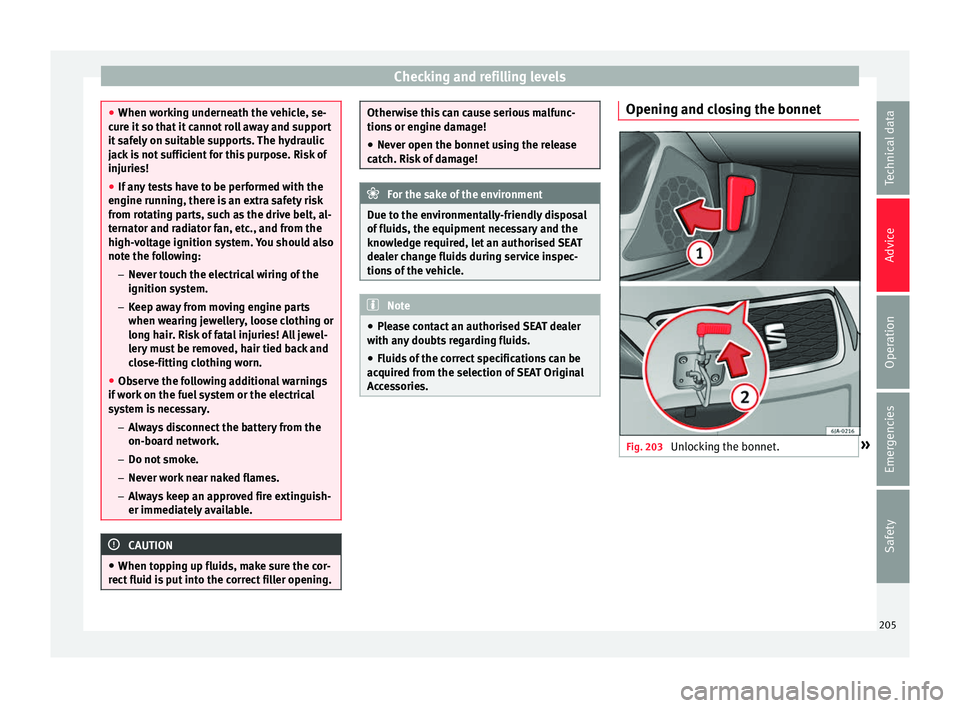
Accessories. Opening and closing the bonnet
Fig. 203
Unlocking the bonnet. » 205
Technical data
Advice
Operation
Emergencies
Safety
Page 208 of 248
Advice
Fig. 204
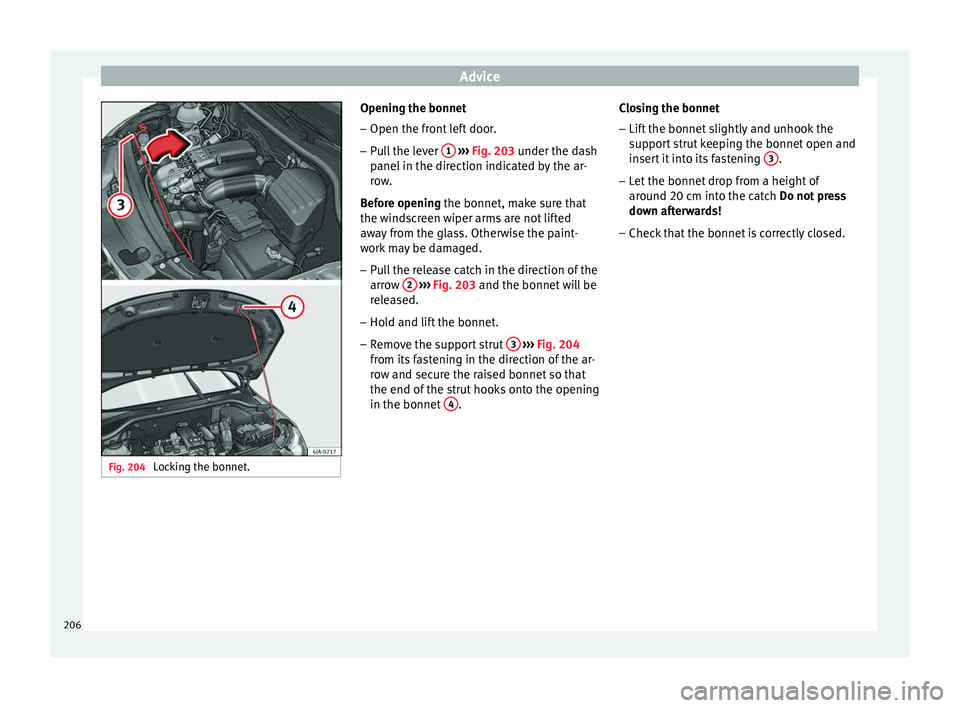
Locking the bonnet. Opening the bonnet
–
Open the front left door.
– Pull the lever 1
› ››
Fig. 203
u nder the dash
panel in the direction indicated by the ar-
row.
Before opening the bonnet, make sure that
the windscreen wiper arms are not lifted
away from the glass. Otherwise the paint-
work may be damaged.
– Pull the release catch in the direction of the
arrow 2
› ››
Fig. 203
and the bonnet
will be
released.
– Hold and lift the bonnet.
– Remove the support strut 3
› ›
› Fig. 204
fr
om its fastening in the direction of the ar-
row and secure the raised bonnet so that
the end of the strut hooks onto the opening
in the bonnet 4 .Closing the bonnet
– Lift the bonnet slightly and unhook the
sup
por
t strut keeping the bonnet open and
insert it into its fastening 3 .
– Let the bonnet drop from a height of
ar ou
nd 20 c
m into the catch Do not press
down afterwards!
– Check that the bonnet is correctly closed.
206
Page 211 of 248
Checking and refilling levels
Go to a technical service.
The c ontr
o
l lamp lights up yellow (insuf-
ficient oil level)
The informative display indicates:
Check the oil level!
Stop the vehicle, switch off the engine and
check the engine oil level ››› page 209
If the bonnet remains open for more than 30
seconds, the warning lamp switches off. If
the engine oil is not refilled, the warning
lamp illuminates again after 100 km (62
miles).
The control lamp flashes yellow (oil level
sensor faulty)
The informative display indicates:
Oil sensor. Workshop!
If the engine oil level sensor is faulty, The
warning lamp flashes various times after
the ignition is switched on and an audible
warning is given.
Go to a technical service. Checking engine oil level
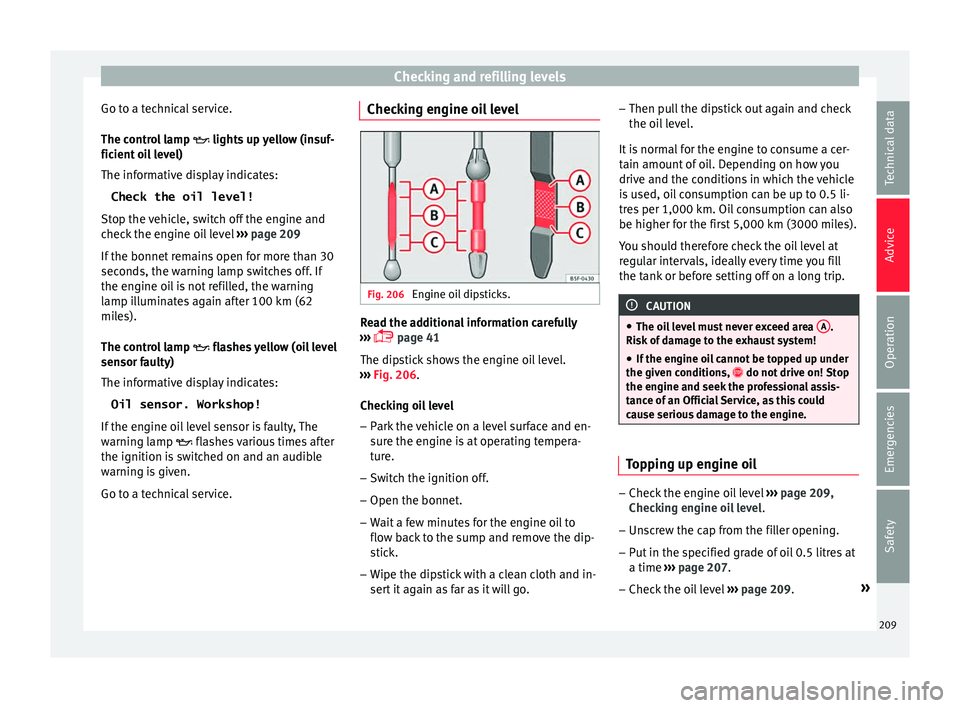
Fig. 206
Engine oil dipsticks. Read the additional information carefully
› ›
›
page 41
The dipstick shows the engine oil level.
››› Fig. 206.
Checking oil level – Park the vehicle on a level surface and en-
sure the en
gine is at operating tempera-
ture.
– Switch the ignition off.
– Open the bonnet.
– Wait a few minutes for the engine oil to
flow bac
k to the sump and remove the dip-
stick.
– Wipe the dipstick with a clean cloth and in-
sert it
again as far as it will go. –
Then pul
l the dipstick out again and check
the oil level.
It is normal for the engine to consume a cer-
tain amount of oil. Depending on how you
drive and the conditions in which the vehicle
is used, oil consumption can be up to 0.5 li-
tres per 1,000 km. Oil consumption can also
be higher for the first 5,000 km (3000 miles).
You should therefore check the oil level at
regular intervals, ideally every time you fill
the tank or before setting off on a long trip. CAUTION
● The oil l
evel must never exceed area A .
Risk of
damage to the exhaust system!
● If the engine oil cannot be topped up under
the given condition
s, do not drive on! Stop
the engine and seek the professional assis-
tance of an Official Service, as this could
cause serious damage to the engine. Topping up engine oil
–
Check the engine oil level ››
›
page 209,
Checking engine oil level .
– Unscrew the cap from the filler opening.
– Put in the specified grade of oil 0.5 litres at
a time ›››
page 207.
– Check the oil level ›››
page 209. »
209
Technical data
Advice
Operation
Emergencies
Safety