park assist Seat Toledo 2017 User Guide
[x] Cancel search | Manufacturer: SEAT, Model Year: 2017, Model line: Toledo, Model: Seat Toledo 2017Pages: 248, PDF Size: 5.86 MB
Page 173 of 248
Driver assistance systems
registered. Pay special attention to children
and anima
l
s.
● Always keep visual control of the vehicle
surrou
ndings: use the mirrors for additional
help. CAUTION
Parking Aid functions may be negatively af-
f ect ed b
y different factors that may lead to
damage to the vehicle or its immediate sur-
rounds:
● Under certain circumstances, the system
does not
detect or display certain objects:
– Objects such as chains, trailer draw bars,
fences, posts and thin trees.
– Objects that are located above the sen-
sors, such as protrusions in a wall.
– Objects with certain surfaces or struc-
tures, such as wire mesh fences or pow-
der snow.
● Certain surfaces of objects and garments
do not refl
ect the ultrasound sensors' sig-
nals. The system cannot detect, at least cor-
rectly, these objects or people wearing such
clothes.
● Ultrasound sensor signals may be affected
by e
xternal sound sources. In certain circum-
stances this may prevent them from detect-
ing people or objects.
● Please note that low obstacles detected by
the syst
em may no longer be registered by
the sensors as the car moves closer, so the system will not give any further warning. In
cer
t
ain circumstances, objects such as high
kerbs that could damage the bottom of the
vehicle are not detected either.
● If the first warning from the Parking Aid is
ignored, the v
ehicle could suffer considerable
damage.
● The knocks or damage on the radiator
grill
e, bumper, wheel arch and vehicle under-
body can adjust the orientation of the sen-
sors. This can affect the parking aid function.
Have the function checked by a specialised
workshop. Note
● In cer t
ain situations, the system can give a
warning even though there is no obstacle in
the detected area, e.g:
–with rough or cobbled floors or ground
with long grass;
– with external ultrasound sources, such as
cleaning vehicles or other vehicles;
– In downpours, intense snow or dense ex-
haust gases;
– if the registration plate (front or rear) is
not properly affixed to the bumper sur-
face;
– or in locations such as the brow of a hill.
● In order to guarantee good system opera-
tion, keep the ultr
asound sensors clean, free
of snow or ice, and do not cover them with
adhesives or other objects. ●
If y
ou use high-pressure or vapour equip-
ment to clean the ultrasound sensors, apply
it directly only very briefly and always from a
distance of more than 10 cm.
● Retrofitting of accessories to the vehicle,
such a
s a bicycle rack, may interfere with the
operation of the Parking Aid.
● In order to familiarise yourself with the sys-
tem, it i
s advised that you practice parking in
an area or car park that is free from traffic.
There must be good weather and light condi-
tions.
● The volume and tone of the warnings can
be modified, in addition t
o the indications
››› page 174.
● In vehicles without a driv
er information
system, these parameters can be modified in
a SEAT Official Service or in a specialised
workshop.
● Please observe information on towing a
trail
er ››› page 175.
● The display on the Easy Connect screen
shows
a slight time delay. Rear parking aid*
The rear Parking Aid assists the driver in
p
ark
in
g by means of audible warning
sounds. »
171
Technical data
Advice
Operation
Emergencies
Safety
Page 174 of 248

Operation
Description
Ther e ar
e sen
sors integrated in the rear
bumper. When the sensors detect an obsta-
cle, you are alerted by audible warnings.
Make particularly sure that the sensors are
not covered by adhesives, residues and the
like, as this could affect the system's opera-
tion. Cleaning instructions ››› page 197.
The approximate measurement range of the
rear sensors is:
side area0.90 m
central area1.60 m As you approach the obstacle, the time inter-
v
al
betw
een the audible warnings will be re-
duced. When you reach around 0.30 m the
warning will be constant: Do not continue to
move forward (or backward) ››› in General
inf orm
ation on p
age 170, ››› in General in-
f orm
ation on p
age 171 !
If you maintain separation from the obstacle,
the volume of the warning begins to reduce
after four seconds (does not affect the tone
of the constant warning).
Activating/Deactivating
When engaging reverse gear, the parking aid
is automatically switched on. This is con-
firmed with a short warning. On disengaging reverse gear, the Parking Aid
syst
em is disconnected immediately.
Parking aid plus* Fig. 182
Represented area. Parking system plus assists you audibly and
v
i
s
ually when parking.
There are sensors integrated in the front and
rear bumpers. When they detect an obstacle,
you are alerted by audible warnings and visu-
ally on the Easy Connect system.
In the event of danger of a frontal collision,
the audible warnings come from the front of
the vehicle, and in the event of the danger of
a rear-end collision they come from the rear.
Make particularly sure that the sensors are
not covered by adhesives, residues and the
like, as this could affect the system's opera-
tion. Cleaning instructions ››› page 197. The approximate measurement range of the
sensors
is:
1.20 m
0.90 m
1.60 m
0.90 m
As you approach the obstacle, the time inter-
val between the audible warnings will be re-
duced. When you reach around 0.30 m the
warning will be constant: do not continue to
move forward (or backward)!
If you maintain separation from the obstacle,
the volume of the warning begins to reduce
after four seconds (does not affect the tone
of the constant warning).
Parking aid operation Fig. 183
Centre console: parking aid button. A
B
C
D
172
Page 175 of 248
Driver assistance systems
Manual connection of Parking Aid
● Press the butt
on once.
Manual disconnection of Parking Aid
● Press the button
again.
Manual disconnection of Parking Aid display
(the audible sounds remain active)
● Press a button on the main menu of the fac-
tory
-assembled infotainment system.
● OR: press the BACK fu
nction button.
Automatic connection of Parking Aid ● Engage reverse gear or turn the selector
lever t
o position R.
● OR: If the vehicle approaches an obstacle
that
is in its forwards path at a speed below
10 km/h (6 mph) ››› page 173, Automatic ac-
tivation. The obstacle is detected as of a dis-
tance of approx. 95 cm if the automatic con-
nection is activated in the infotainment sys-
tem. A reduced display is shown.
Automatic disconnection of Parking Aid
● Move the selector lever to position P.
● OR: accelerate to more than approx.
10 km/h (6 mph) for
ward.
Temporary suppression of sound in Parking
Aid
● Press the function b
utton. Change from reduced view to full view
●
Engage reverse gear or turn the selector
lever t
o position R.
● OR: press the car icon in reduced view.
If nec
essary, switch to the rear-assist image
(Rear View Camera “RVC”)
● Engage reverse gear or turn the selector
lever t
o position R.
● OR: Press the RVC fu
nction button.
A short confirmation signal will be heard and
the button symbol will light up yellow when
the system is switched on.
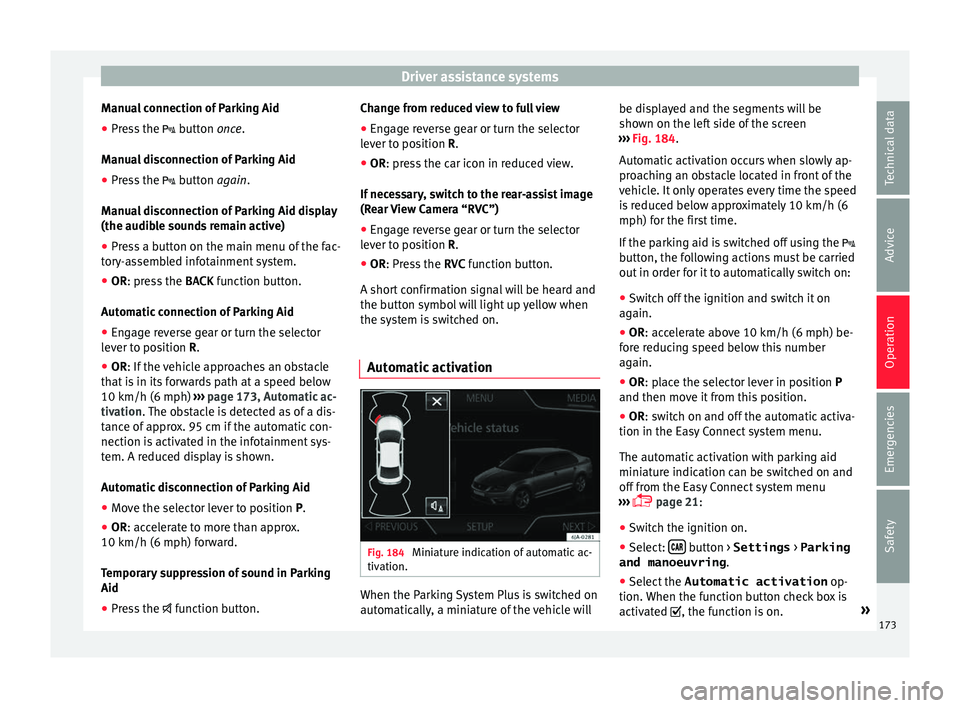
Automatic activation Fig. 184
Miniature indication of automatic ac-
tiv ation. When the Parking System Plus is switched on
aut
om
atic
ally, a miniature of the vehicle will be displayed and the segments will be
shown on the lef
t side of the screen
››› Fig. 184.
Automatic activation occurs when slowly ap-
proaching an obstacle located in front of the
vehicle. It only operates every time the speed
is reduced below approximately 10 km/h (6
mph) for the first time.
If the parking aid is switched off using the
button, the following actions must be carried
out in order for it to automatically switch on:
● Switch off the ignition and switch it on
again.
● OR: ac
celerate above 10 km/h (6 mph) be-
for
e reducing speed below this number
again.
● OR: place the selector lever in position P
and then mov
e it from this position.
● OR: switch on and off the automatic activa-
tion in the Ea
sy Connect system menu.
The automatic activation with parking aid
miniature indication can be switched on and
off from the Easy Connect system menu
››› page 21:
● Switch the ignition on.
● Select: button > Settings
> Parking
and manoeuvring .
● Select the Automatic activation op-
tion. When the f
u
nction button check box is
activated , the function is on. »
173
Technical data
Advice
Operation
Emergencies
Safety
Page 177 of 248
Driver assistance systems
Error messages When the Parking Aid is activated or when it
is
sw
itched on, if a continuous warning can
be heard for several seconds (additionally, in
the case of Parking system Plus, the LED of
the button flashes), there is a fault in the
system.
Parking System Plus*
If there is a fault in a sensor, the symbol is
displayed on the Easy Connect display in
front of/behind the vehicle. If a rear sensor is
faulty, only the obstacles in the areas A and
B are displayed
››
›
Fig. 182. If a front sensor
is faulty, only the obstacles in the areas Cand
D are displayed.
Hav e the f
au
lt corrected by a specialised
workshop without delay.
Towing bracket In vehicles equipped with a towing bracket
dev
ic
e fr
om the factory, when the trailer is
connected electrically, the Parking Aid rear
sensors will not be activated when reverse
gear is engaged, when the selector lever is
turned to position R or when the button is
pressed. Parking System Plus
The dist
ance to possible obstacles at the rear
of the vehicle will not be displayed on the
screen and nor will it be indicated by means
of audible sound signals.
The Easy Connect system screen will only dis-
play objects detected at the front, and the ve-
hicle's trajectory will be hidden.
Rear Assist “Rear View Cam-
era”*
Operatin
g and safety warnings WARNING
● The Re ar As
sist does not make it possible
to precisely calculate the distance from ob-
stacles (people, vehicles, etc.) and nor can it
overcome the system's own limits, hence us-
ing it may cause serious accidents and inju-
ries if used negligently or without due care.
The driver should be aware of his/her sur-
roundings at all times to ensure safe driving.
● The camera lens expands and distorts the
field of
vision and displays the objects on the
screen in a different, vague manner. The per-
ception of distances is also distorted by this
effect.
● Due to the screen resolution or insufficient
light condition
s, some items may be dis-
played in an unsatisfactory manner or not at all. Take special care with thin posts, fences,
rai
lin
gs or trees that might not be displayed
on screen and could damage the vehicle.
● The rear assist has blind spots where it is
not pos
sible to represent people or objects
(small children, animals and certain objects
cannot be detected in its field of vision). Mon-
itor the vehicle's surrounding area at all
times.
● Keep the camera lens clean, free of ice and
snow
, and do not cover it.
● The system is not a replacement for driver
awar
eness. Supervise the parking operation
at all times, as well as the vehicle's surround-
ing area. Adapt your speed and driving style
at all times to suit visibility, weather, road
and traffic conditions.
● Do not be distracted from the traffic by
looking at
the screen.
● The images on the rear assist screen are
only tw
o-dimensional. Due to a lack of spatial
depth, protruding parts or holes in the road,
for example, are more difficult to detect or
may not be seen at all.
● Vehicle load modifies the representation of
the orientation lines
displayed. The width
represented by the lines diminishes with ve-
hicle load. Pay special attention to the vehi-
cle's surroundings when the inside of the ve-
hicle of the luggage compartment is carrying
a heavy load.
● In the following situations, the objects or
other vehic
les shown in the navigation sys-
tem display appear to be further away or » 175
Technical data
Advice
Operation
Emergencies
Safety
Page 178 of 248
Operation
closer than they really are: Pay special atten-
tion:
– On mov in
g from a horizontal plane to a
slope.
– On moving from a slope to a horizontal
plane.
– If the vehicle is heavily loaded at the
rear.
– When the vehicle approaches objects
that are not on the ground surface or are
jutting out from it. These objects may al-
so be outside the camera's angle of vi-
sion when reversing. Note
● It i s
important to take great care and pay
special attention if you are not yet familiar
with the system.
● Rear assist will not be available if the vehi-
cle's
rear lid is open. Instructions for use
Fig. 186
On the rear bumper: location of the
r e
ar a
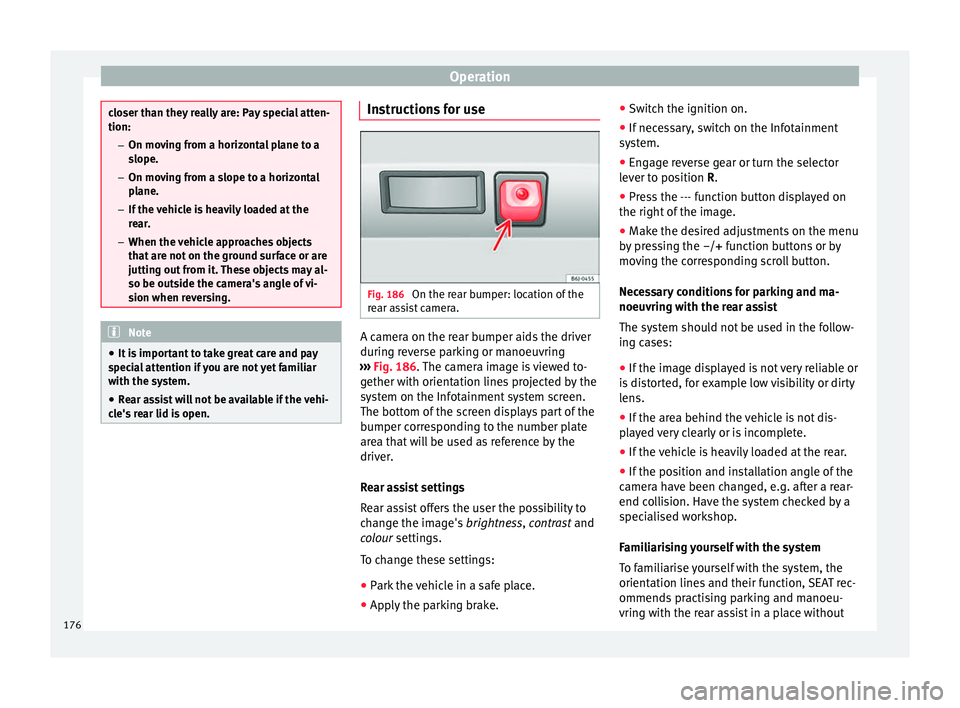
ssist camera. A camera on the rear bumper aids the driver
durin
g r
ev
erse parking or manoeuvring
››› Fig. 186. The camera image is viewed to-
gether with orientation lines projected by the
system on the Infotainment system screen.
The bottom of the screen displays part of the
bumper corresponding to the number plate
area that will be used as reference by the
driver.
Rear assist settings
Rear assist offers the user the possibility to
change the image's brightness, contrast and
colour settings.
To change these settings:
● Park the vehicle in a safe place.
● Apply the parking brake. ●
Switc
h the ignition on.
● If necessary, switch on the Infotainment
syst
em.
● Engage reverse gear or turn the selector
lever t
o position R.
● Press the --- function button displayed on
the right of the im
age.
● Make the desired adjustments on the menu
by pr
essing the –/+ function buttons or by
moving the corresponding scroll button.
Necessary conditions for parking and ma-
noeuvring with the rear assist
The system should not be used in the follow-
ing cases:
● If the image displayed is not very reliable or
is di
storted, for example low visibility or dirty
lens.
● If the area behind the vehicle is not dis-
pla
yed very clearly or is incomplete.
● If the vehicle is heavily loaded at the rear.
● If the position and installation angle of the
camera h
ave been changed, e.g. after a rear-
end collision. Have the system checked by a
specialised workshop.
Familiarising yourself with the system
To familiarise yourself with the system, the
orientation lines and their function, SEAT rec-
ommends practising parking and manoeu-
vring with the rear assist in a place without
176
Page 179 of 248
Driver assistance systems
too much traffic or in a car park when there
ar e g
ood w
eather and visibility conditions.
Cleaning the camera lens
Keep the camera lens clean and clear of snow
and ice:
● Moisten the lens using a normal alcohol-
based gl
ass cleaning product and clean the
lens with a dry cloth.
● Remove snow using a small brush.
● Use de-icing spray to remove any ice. CAUTION
● Never u se abr
asive cleaning products to
clean the camera lens.
● Do not use hot or warm water to remove ice
or snow fr
om the camera lens. Doing so could
damage the camera. Parking and manoeuvring with the
r
e
ar a
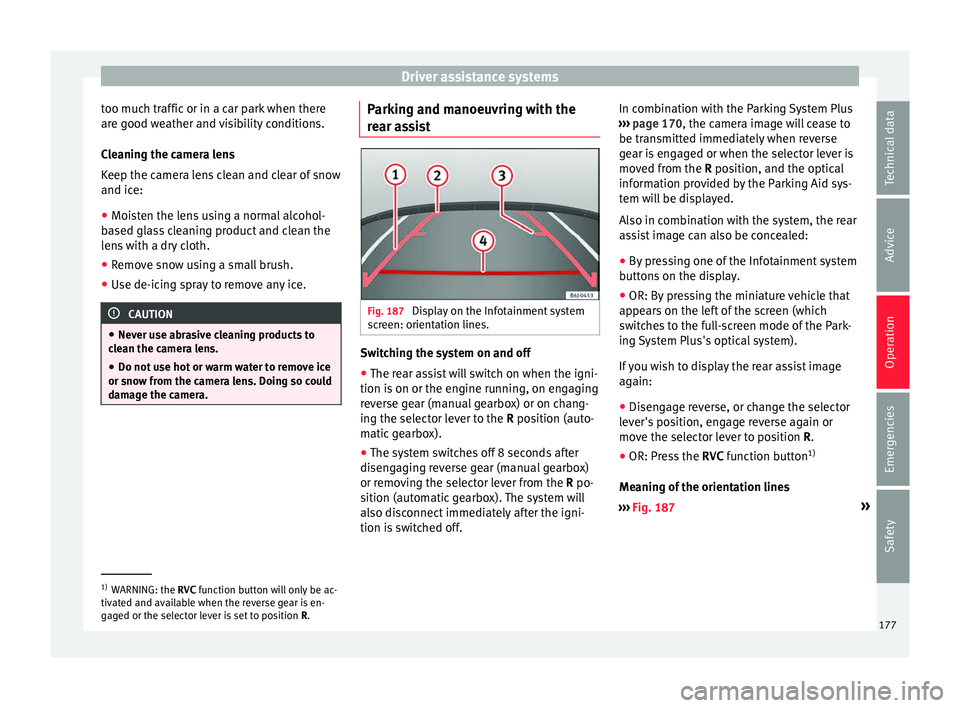
ssist Fig. 187
Display on the Infotainment system
s c
r
een: orientation lines. Switching the system on and off
●
The rear assist will switch on when the igni-
tion i s
on or the en
gine running, on engaging
reverse gear (manual gearbox) or on chang-
ing the selector lever to the R position (auto-
matic gearbox).
● The system switches off 8 seconds after
diseng
aging reverse gear (manual gearbox)
or removing the selector lever from the R po-
sition (automatic gearbox). The system will
also disconnect immediately after the igni-
tion is switched off. In combination with the Parking System Plus
›››
page 170, the camera image will cease to
be transmitted immediately when reverse
gear is engaged or when the selector lever is
moved from the R position, and the optical
information provided by the Parking Aid sys-
tem will be displayed.
Also in combination with the system, the rear
assist image can also be concealed:
● By pressing one of the Infotainment system
button
s on the display.
● OR: By pressing the miniature vehicle that
appear
s on the left of the screen (which
switches to the full-screen mode of the Park-
ing System Plus's optical system).
If you wish to display the rear assist image
again:
● Disengage reverse, or change the selector
lever's
position, engage reverse again or
move the selector lever to position R.
● OR: Press the RVC function b
utton1)
Meaning of the orientation lines
››› Fig. 187 »1)
WARNING: the RVC function b
utton will only be ac-
tivated and available when the reverse gear is en-
gaged or the selector lever is set to position R.
177
Technical data
Advice
Operation
Emergencies
Safety
Page 183 of 248
Driver assistance systems
●
The Front As
sist does not react to animals
or vehicles crossing your path or approaching
head-on down the same lane.
● The Front Assist does not react to pedes-
trians
walking in the same direction or ap-
proaching head-on down the same lane.
● The driver must always be ready to take
over the c
ontrol of the vehicle.
● When the Front Assist causes a braking,
the brake ped
al is “harder”.
● Automatic interventions by the Front Assist
on the brake
s may be interrupted by pressing
the clutch, accelerator or moving the wheel. Note
● When the Front As
sist is connected, the in-
dications on the instrument panel screen may
be concealed by warnings from other func-
tions, such as an incoming call.
● When the Front Assist causes a braking,
the brake ped
al is “harder”.
● Automatic interventions by the Front Assist
on the brake
s may be interrupted by pressing
the clutch, accelerator or moving the wheel.
● The Front Assist may brake the vehicle until
it st
ops completely. However, the brake sys-
tem does not halt the vehicle permanently.
Use the foot brake!
● If the Front Assist does not work as descri-
bed in this c
hapter (e.g. in intervenes several
times unnecessarily), switch it off. Have the
system checked by a specialised workshop.
SEAT recommends visiting a SEAT dealership. Radar sensor
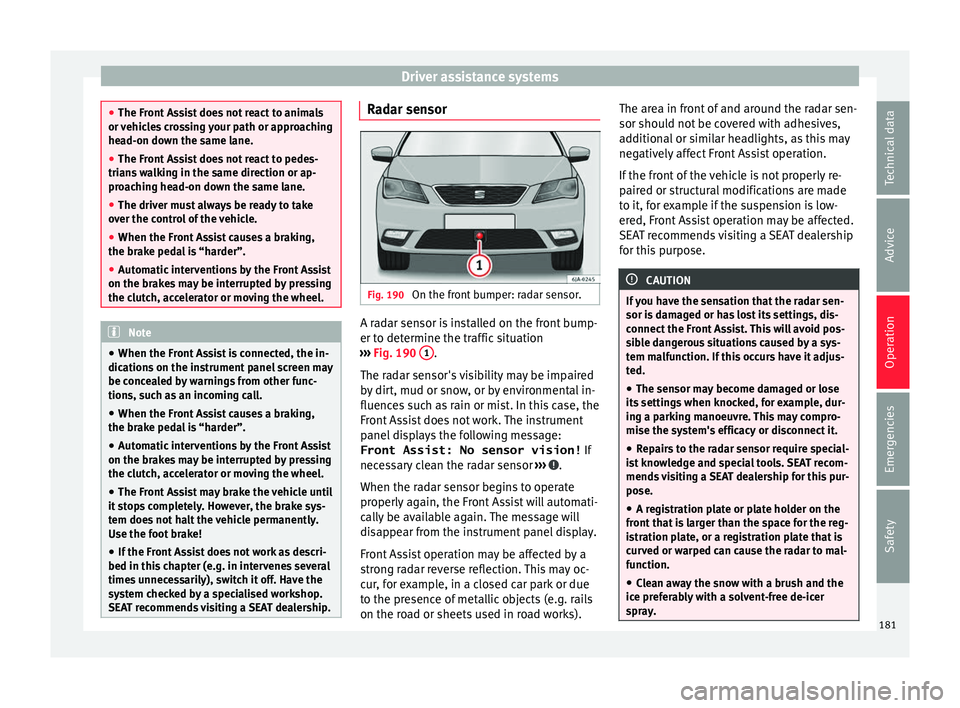
Fig. 190
On the front bumper: radar sensor. A radar sensor is installed on the front bump-
er t
o det
ermine the tr
affic situation
››› Fig. 190 1 .
The r a
d
ar sensor's visibility may be impaired
by dirt, mud or snow, or by environmental in-
fluences such as rain or mist. In this case, the
Front Assist does not work. The instrument
panel displays the following message:
Front Assist: No sensor vision! If
necessary clean the radar sensor ››› .
When the r a
d
ar sensor begins to operate
properly again, the Front Assist will automati-
cally be available again. The message will
disappear from the instrument panel display.
Front Assist operation may be affected by a
strong radar reverse reflection. This may oc-
cur, for example, in a closed car park or due
to the presence of metallic objects (e.g. rails
on the road or sheets used in road works). The area in front of and around the radar sen-
sor should not
be covered with adhesives,
additional or similar headlights, as this may
negatively affect Front Assist operation.
If the front of the vehicle is not properly re-
paired or structural modifications are made
to it, for example if the suspension is low-
ered, Front Assist operation may be affected.
SEAT recommends visiting a SEAT dealership
for this purpose. CAUTION
If you have the sensation that the radar sen-
sor is d
amaged or has lost its settings, dis-
connect the Front Assist. This will avoid pos-
sible dangerous situations caused by a sys-
tem malfunction. If this occurs have it adjus-
ted.
● The sensor may become damaged or lose
its settin
gs when knocked, for example, dur-
ing a parking manoeuvre. This may compro-
mise the system's efficacy or disconnect it.
● Repairs to the radar sensor require special-
ist
knowledge and special tools. SEAT recom-
mends visiting a SEAT dealership for this pur-
pose.
● A registration plate or plate holder on the
front th
at is larger than the space for the reg-
istration plate, or a registration plate that is
curved or warped can cause the radar to mal-
function.
● Clean away the snow with a brush and the
ice pref
erably with a solvent-free de-icer
spray. 181
Technical data
Advice
Operation
Emergencies
Safety
Page 237 of 248
Index
Index
A
ABS contr
o
l lamp . . . . . . . . . . . . . . . . . . . . . . . . . . . 159
see also Anti-lock brake system . . . . . . 158, 159
Accessories . . . . . . . . . . . . . . . . . . . . . . . . . 138, 194
Additional consumers (efficiency program) . . . . . 30
Adjusting front head restraints . . . . . . . . . . . . . . . . . . . . . . 60
seats . . . . . . . . . . . . . . . . . . . . . . . . . . . . . . . . . . 57
Adjusting the head restraints front head restraints . . . . . . . . . . . . . . . . . . . . . 132
Adjustment CAR menu . . . . . . . . . . . . . . . . . . . . . . . . . . . . . 101
front head restraints . . . . . . . . . . . . . . . . . . . . . 132
lights . . . . . . . . . . . . . . . . . . . . . . . . . . . . . . . . . 122
rear head restraints . . . . . . . . . . . . . . . . . . . . . . 60
Aerial . . . . . . . . . . . . . . . . . . . . . . . . . . . . . . . . . . . 196
Air-conditioning economic use . . . . . . . . . . . . . . . . . . . . . . . . . . 146
Airbag covers . . . . . . . . . . . . . . . . . . . . . . . . . . . . . 14
Airbags . . . . . . . . . . . . . . . . . . . . . . . . . . . . . . . . . . 67 description . . . . . . . . . . . . . . . . . . . . . . . . . . . . . 68
Airbag system . . . . . . . . . . . . . . . . . . . . . . . . . . 14, 67 activation . . . . . . . . . . . . . . . . . . . . . . . . . . . . . . 69
control lamp . . . . . . . . . . . . . . . . . . . . . . . . . . . . 69
deactivation of front airbag . . . . . . . . . . . . . 69, 72
description . . . . . . . . . . . . . . . . . . . . . . . . . . . . . 68
front airbags . . . . . . . . . . . . . . . . . . . . . . . . . 14, 70
functioning . . . . . . . . . . . . . . . . . . . . . . . . . . . . . 69
head-protection airbags . . . . . . . . . . . . . . . 16, 71
side airbags . . . . . . . . . . . . . . . . . . . . . . . . . 15, 70
Air conditioning . . . . . . . . . . . . . . . . . . . . . . . . 37, 38 air vents . . . . . . . . . . . . . . . . . . . . . . . . . . . . . . 147
faults . . . . . . . . . . . . . . . . . . . . . . . . . . . . . . . . . 146 introduction . . . . . . . . . . . . . . . . . . . . . . . . . . . 146
operation . . . . . . . . . . . . . . . . . . . . . . . . . . . . . .
149
Alarm system . . . . . . . . . . . . . . . . . . . . . . . . . . . . 116
Alternator control lamp . . . . . . . . . . . . . . . . . . . . . . . . . . . 214
Ambient lighting . . . . . . . . . . . . . . . . . . . . . . . . . 127
Anchoring the front tow line. . . . . . . . . . . . . . . . . . . . . . . . . 80
Anti-freeze . . . . . . . . . . . . . . . . . . . . . . . . . . . . . . . 42
Anti-lock brake system . . . . . . . . . . . . . . . . 158, 159
Anti-puncture . . . . . . . . . . . . . . . . . . . . . . . . . . 46, 77
Anti-puncture kit . . . . . . . . . . . . . . . . . . . . . . . . 46, 77 check after 10 minutes . . . . . . . . . . . . . . . . . . . . 79
Anti-slip regulation . . . . . . . . . . . . . . . . . . . . . . . 159
Anti-theft alarm . . . . . . . . . . . . . . . . . . . . . . . . . . 116
Anti-theft security system . . . . . . . . . . . . . . . . . . . . 9
Anti-theft system . . . . . . . . . . . . . . . . . . . . . . . . . 112
Armrests front seats . . . . . . . . . . . . . . . . . . . . . . . . . . . . . 133
rear seats . . . . . . . . . . . . . . . . . . . . . . . . . . . . . 134
Ashtrays . . . . . . . . . . . . . . . . . . . . . . . . . . . . . . . . 138
Aspects to note before setting off . . . . . . . . . . . . . 56
ASR control lamp . . . . . . . . . . . . . . . . . . . . . . . . . . . 159
see also Traction control system . . . . . . 158, 159
Assistance systems ABS . . . . . . . . . . . . . . . . . . . . . . . . . . . . . . . . . . 159
ASR . . . . . . . . . . . . . . . . . . . . . . . . . . . . . . . . . . 159
cruise speed . . . . . . . . . . . . . . . . . . . . . . . . . . . 178
EDL . . . . . . . . . . . . . . . . . . . . . . . . . . . . . . . . . . 160
emergency brake assist (Front Assist) . . . . . . . 179
fatigue detection . . . . . . . . . . . . . . . . . . . . . . . 185
parking aid . . . . . . . . . . . . . . . . . . . . . . . 170, 171
Start-Stop . . . . . . . . . . . . . . . . . . . . . . . . . . . . . 183
tyre monitoring system . . . . . . . . . . . . . . . . . . 221
Assisted starting . . . . . . . . . . . . . . . . . . . . . . . . . . 52 Audible signal . . . . . . . . . . . . . . . . . . . . . . . . . . . . 62
contro l and warning lamps . . . . . . . . . . . . . . . 100
Automatic air conditioning climatronic . . . . . . . . . . . . . . . . . . . . . . . . . . . . 150
Automatic car washes see Washing . . . . . . . . . . . . . . . . . . . . . . . . . . . 196
Automatic gearbox driving programmes . . . . . . . . . . . . . . . . . . . . . 164
emergency program . . . . . . . . . . . . . . . . . . . . . 164
instructions for use . . . . . . . . . . . . . . . . . . . . . 160
kick-down . . . . . . . . . . . . . . . . . . . . . . . . . . . . . 161
manual release of selector lever . . . . . . . . . . . . 36
parking . . . . . . . . . . . . . . . . . . . . . . . . . . . . . . . 161
selector lever lock . . . . . . . . . . . . . . . . . . . . . . . 163
selector lever positions . . . . . . . . . . . . . . . . . . 162
starting . . . . . . . . . . . . . . . . . . . . . . . . . . . . . . . 161
stopping . . . . . . . . . . . . . . . . . . . . . . . . . . . . . . 161
tiptronic . . . . . . . . . . . . . . . . . . . . . . . . . . 160, 163
AUX-IN . . . . . . . . . . . . . . . . . . . . . . . . . . . . . . . . . . 108
B Back seat folding down and raising the back seat back- rest . . . . . . . . . . . . . . . . . . . . . . . . . . . . . . . . . 134
Ball coupling disassembly . . . . . . . . . . . . . . . . . . . . . . . . . . . 192
Battery . . . . . . . . . . . . . . . . . . . . . . . . . . . . . . . . . . 110
Before setting off . . . . . . . . . . . . . . . . . . . . . . . . . . 56
Belt tightening . . . . . . . . . . . . . . . . . . . . . . . . . . . . 66
Biodiesel . . . . . . . . . . . . . . . . . . . . . . . . . . . . . . . . 203
Bonnet . . . . . . . . . . . . . . . . . . . . . . . . . . . . . 11, 207 opening the bonnet . . . . . . . . . . . . . . . . . . . . . 205
Brake assist . . . . . . . . . . . . . . . . . . . . . . . . . . . . . 158
Brake fluid . . . . . . . . . . . . . . . . . . . . . . . . . . . . . . . 43 checking . . . . . . . . . . . . . . . . . . . . . . . . . . . . . . 211
235
Page 242 of 248
Index
Journey data . . . . . . . . . . . . . . . . . . . . . . . . . . . . . . 23
Jump l e
a
ds . . . . . . . . . . . . . . . . . . . . . . . . . . . . . . . 52
K Key-operated switch . . . . . . . . . . . . . . . . . . . . . . . . 69
Keyless Access go . . . . . . . . . . . . . . . . . . . . . . . . . . . . . . . . . . . 155
keyless-Entry . . . . . . . . . . . . . . . . . . . . . . . . . . . 114
keyless-Exit . . . . . . . . . . . . . . . . . . . . . . . . . . . . 114
Keyless-Go . . . . . . . . . . . . . . . . . . . . . . . . . . . . 114
special characteristics . . . . . . . . . . . . . . . . . . . 115
starter button . . . . . . . . . . . . . . . . . . . . . . . . . . 155
unlocking and locking the vehicle . . . . . . . . . . 114
Keyless Access lock and ignition system: see Keyless Access . . . . . . . . . . . . . . . . . . . . . . 114
Keys remote control . . . . . . . . . . . . . . . . . . . . . . . . . 109
replacing the battery . . . . . . . . . . . . . . . . . . . . 110
unlocking and locking . . . . . . . . . . . . . . . . . . . . . 9
vehicle key . . . . . . . . . . . . . . . . . . . . . . . . . . . . 109
L Lever main beam headlights . . . . . . . . . . . . . . . . . . . 123
turn signals . . . . . . . . . . . . . . . . . . . . . . . . . . . . 123
Lifting the vehicle . . . . . . . . . . . . . . . . . . . . . . . . . . 49
Lighting of the instrument panel . . . . . . . . . . . . . 122
Lights . . . . . . . . . . . . . . . . . . . . . . . . . . . . . . 18, 120 automatic dipped beam control . . . . . . . . . . . 123
changing a bulb . . . . . . . . . . . . . . . . . . . . . . . . . 84
coming home and Leaving Home . . . . . . . . . . 125
control and warning lamps . . . . . . . . . . . . . . . 121
daytime running lights . . . . . . . . . . . . . . . . . . . 122
dipped beam . . . . . . . . . . . . . . . . . . . . . . . . . . 121
fog lights . . . . . . . . . . . . . . . . . . . . . . . . . . . . . . 124
fog lights with the cornering function . . . . . . . 124
glove box . . . . . . . . . . . . . . . . . . . . . . . . . . . . . . 127 hazard warning lights . . . . . . . . . . . . . . . . . . . . 19
headlight
flasher . . . . . . . . . . . . . . . . . . . . . . . 123
headlight range control . . . . . . . . . . . . . . . . . . 122
interior lights . . . . . . . . . . . . . . . . . . . . . 126, 127
lighting of the controls . . . . . . . . . . . . . . . . . . . 122
lighting of the instruments . . . . . . . . . . . . . . . 122
light switch . . . . . . . . . . . . . . . . . . . . . . . . . . . . 120
luggage compartment . . . . . . . . . . . . . . . . . . . 127
main beam headlights . . . . . . . . . . . . . . . . . . . 123
main beams . . . . . . . . . . . . . . . . . . . . . . . . . . . . 19
parking lights . . . . . . . . . . . . . . . . . . . . . . . . . . 126
parking lights on both sides . . . . . . . . . . . . . . 126
rear fog light . . . . . . . . . . . . . . . . . . . . . . . . . . . 125
rear interior light . . . . . . . . . . . . . . . . . . . . . . . . 127
side lights . . . . . . . . . . . . . . . . . . . . . . . . . . . . . 121
switch . . . . . . . . . . . . . . . . . . . . . . . . . . . . . . . . . 18
turn signals . . . . . . . . . . . . . . . . . . . . . . . . . . . . 123
Loading the vehicle . . . . . . . . . . . . . . . . . . . . . . . 140 luggage compartment . . . . . . . . . . . . . . . . . . . . 10
Locking central locking . . . . . . . . . . . . . . . . . . . . . . . . . 112
remote control . . . . . . . . . . . . . . . . . . . . . . . . . 108
Locking and unlocking in the door cylinder . . . . . . . . . . . . . . . . . . . . . . . 9
with Keyless Access . . . . . . . . . . . . . . . . . . . . . 114
with the central locking button . . . . . . . . . . . . 113
Locking the front passenger door manually . . . . . 10
Luggage compartment . . . . . . . . . . . . . . . . . . . . . . 10 automatic locking . . . . . . . . . . . . . . . . . . . . . . . 118
category N1 vehicles . . . . . . . . . . . . . . . . . . . . 142
light . . . . . . . . . . . . . . . . . . . . . . . . . . . . . . . . . . 127
manual release mechanism . . . . . . . . . . . . . . . . 10
opening and closing . . . . . . . . . . . . . . . . . . . . 118
rear shelf . . . . . . . . . . . . . . . . . . . . . . . . . . . . . . 144
retaining elements . . . . . . . . . . . . . . . . . . . . . . 142
retaining nets . . . . . . . . . . . . . . . . . . . . . . . . . . 143 Luggage Compartment
hook . . . . . . . . . . . . . . . . . . . . . . . . . . . . . . . . . 143
M Maint
enance intervals . . . . . . . . . . . . . . . . . . . . . 207
Malfunction catalytic converter . . . . . . . . . . . . . . . . . . . . . . 168
diesel particulate filter . . . . . . . . . . . . . . . . . . . 168
emergency braking assistance system (FrontAssist) . . . . . . . . . . . . . . . . . . . . . . . . . . . . . . 181
gearbox . . . . . . . . . . . . . . . . . . . . . . . . . . . . . . . 164
Manual air conditioning . . . . . . . . . . . . . . . . . . . 148 air recirculation . . . . . . . . . . . . . . . . . . . . . . . . . 149
Manual gearbox gear lever . . . . . . . . . . . . . . . . . . . . . . . . . . . . . 160
Manual release mechanism rear lid . . . . . . . . . . . . . . . . . . . . . . . . . . . . . . . . . 10
MFD see Driver information system . . . . . . . . . . . . . . 23
Mirror vanity mirror . . . . . . . . . . . . . . . . . . . . . . . . . . . 128
Mobile . . . . . . . . . . . . . . . . . . . . . . . . . . . . . . . . . . 195
Mobile telephones . . . . . . . . . . . . . . . . . . . . . . . . 195
Model plate . . . . . . . . . . . . . . . . . . . . . . . . . . . . . . 223
Multi-function display (MFD) . . . . . . . . . . . . . . . . . 23
Multimedia . . . . . . . . . . . . . . . . . . . . . . . . . . . . . . 108
Multimedia compartment . . . . . . . . . . . . . . . . . . 139
N
Number of seats . . . . . . . . . . . . . . . . . . . . . . . . . . . 62
O Odometer . . . . . . . . . . . . . . . . . . . . . . . . . . . . . 96, 99 reset button . . . . . . . . . . . . . . . . . . . . . . . . . . . . 99
Oil change . . . . . . . . . . . . . . . . . . . . . . . . . . . . . . . 210
Oil properties . . . . . . . . . . . . . . . . . . . . . . . . . . . . . 42
240
Page 243 of 248
Index
On-board computer se
e
Driver information system . . . . . . . . . . . . . . 23
Open and close . . . . . . . . . . . . . . . . . . . . . . . . . . 108
Opening . . . . . . . . . . . . . . . . . . . . . . . . . . . . . . . . 108 bonnet . . . . . . . . . . . . . . . . . . . . . . . . . . . . . . . . 205
fuel tank flap . . . . . . . . . . . . . . . . . . . . . . . . . . . 201
vehicle, with Keyless Access . . . . . . . . . . . . . . 114
windows . . . . . . . . . . . . . . . . . . . . . . . . . . . . . . 119
Opening and closing . . . . . . . . . . . . . . . . . . . . . . . . 9 bonnet . . . . . . . . . . . . . . . . . . . . . . . . . . . . . . . . 205
central locking . . . . . . . . . . . . . . . . . . . . . . . . . 112
fuel tank flap . . . . . . . . . . . . . . . . . . . . . . . . . . . 201
in the door cylinder . . . . . . . . . . . . . . . . . . . . . . . 9
rear lid . . . . . . . . . . . . . . . . . . . . . . . . . . . . . . . . . 10
windows . . . . . . . . . . . . . . . . . . . . . . . . . . . . . . 119
with the central locking button . . . . . . . . . . . . 113
Outside temperature . . . . . . . . . . . . . . . . . . . . . . . 29
P Paint care . . . . . . . . . . . . . . . . . . . . . . . . . . . . . . . . . . 197
damage . . . . . . . . . . . . . . . . . . . . . . . . . . . . . . . 198
Paintwork code . . . . . . . . . . . . . . . . . . . . . . . . . . . . . . . . . . 223
Parking aid . . . . . . . . . . . . . . . . . . . . . . . . . . . . . . 170 adjusting the display and audible warnings . 174
automatic activation . . . . . . . . . . . . . . . . . . . . 173
malfunction . . . . . . . . . . . . . . . . . . . . . . . . . . . . 175
operation . . . . . . . . . . . . . . . . . . . . . . . . . . . . . . 172
parking aid plus . . . . . . . . . . . . . . . . . . . . . . . . 172
rear parking aid . . . . . . . . . . . . . . . . . . . . . . . . 171
sensors and camera: cleaning . . . . . . . . . . . . . 197
surrounds warning . . . . . . . . . . . . . . . . . . . . . . 172
towing bracket . . . . . . . . . . . . . . . . . . . . . . . . . 175
visual indication . . . . . . . . . . . . . . . . . . . . . . . . 174
Parking aid system see Parking aid . . . . . . . . . . . . . . . . . . . . 170, 172 Parking distance warning system
see Parking aid . . . . . . . . . . . . . . . . . . . . 170, 172
ParkPilot see Parking aid . . . . . . . . . . . . . . . . . . . . 170, 172
Parts . . . . . . . . . . . . . . . . . . . . . . . . . . . . . . . . . . . 194
Passenger see Correct sitting position . . . . . . . . . 57, 58, 59
Pedals . . . . . . . . . . . . . . . . . . . . . . . . . . . . . . . . . . . 61
Petrol additives . . . . . . . . . . . . . . . . . . . . . . . . . . . . . . 202
preheating . . . . . . . . . . . . . . . . . . . . . . . . . . . . 152
refuelling . . . . . . . . . . . . . . . . . . . . . . . . . . . . . . 202
Plastic parts: cleaning . . . . . . . . . . . . . . . . . . . . . 198
Polishing . . . . . . . . . . . . . . . . . . . . . . . . . . . . . . . . 197
Positioning seat belts during pregnancy . . . . . . . . . . . . . . . . . . . . . . . . 65
seat belts . . . . . . . . . . . . . . . . . . . . . . . . . . . . . . 65
Power . . . . . . . . . . . . . . . . . . . . . . . . . . . . . . . . . . 138
Power socket, 12 V . . . . . . . . . . . . . . . . . . . . . . . . 138
Power socket, 5 V . . . . . . . . . . . . . . . . . . . . . . . . . 138
Power steering . . . . . . . . . . . . . . . . . . . . . . . . . . . 153 control lamp . . . . . . . . . . . . . . . . . . . . . . . . . . . 153
Pre-heating system control lamp . . . . . . . . . . . . . . . . . . . . . . . . . . . 169
Preheating . . . . . . . . . . . . . . . . . . . . . . . . . . . . . . 152
Puncture action . . . . . . . . . . . . . . . . . . . . . . . . . . . . . . . . . 45
R
Radar sensor . . . . . . . . . . . . . . . . . . . . . . . . . . . . . 181
Radiator fan . . . . . . . . . . . . . . . . . . . . . . . . . . . . . 207
Raising the vehicle . . . . . . . . . . . . . . . . . . . . . . . . . 49
Rear headrests . . . . . . . . . . . . . . . . . . . . . . . . . . . . . . 60
Rear Assist . . . . . . . . . . . . . . . . . . . . . . . . . . . . . . 175 instructions for use . . . . . . . . . . . . . . . . . . . . . 176
parking . . . . . . . . . . . . . . . . . . . . . . . . . . . . . . . 177 screen . . . . . . . . . . . . . . . . . . . . . . . . . . . . . . . . 176
speci
al characteristics . . . . . . . . . . . . . . . . . . . 176
Rear Assist system . . . . . . . . . . . . . . . . . . . . . . . . 175
Rear fog light control lamp . . . . . . . . . . . . . . . . . . . . . . . . . . . 121
Rear lid . . . . . . . . . . . . . . . . . . . . . . . . . . . . . 10, 118 see also Luggage compartment . . . . . . . . . . . 118
Rear seat passengers see Correct sitting position . . . . . . . . . 57, 58, 59
Rear View Camera . . . . . . . . . . . . . . . . . . . . . . . . . 175
Rear view mirror adjusting the exterior mirrors . . . . . . . . . . . . . 130
anti-dazzle . . . . . . . . . . . . . . . . . . . . . . . . . . . . 130
interior anti-dazzle . . . . . . . . . . . . . . . . . . . . . . 130
Rear window wiper blades changing . . . . . . . . . . . . . . . . . . . . . . . . . . . . . . . 55
cleaning . . . . . . . . . . . . . . . . . . . . . . . . . . . . . . . 55
Refuelling . . . . . . . . . . . . . . . . . . . . . . . . . . . . . . . 201 opening the fuel tank flap . . . . . . . . . . . . . . . . 201
Remote control . . . . . . . . . . . . . . . . . . . . . . . . . . . 108 synchronisation . . . . . . . . . . . . . . . . . . . . . . . . 109
Repair work . . . . . . . . . . . . . . . . . . . . . . . . . . . . . . 194
Replacement parts . . . . . . . . . . . . . . . . . . . . . . . . . . . . . . . . . 194
Replacement parts . . . . . . . . . . . . . . . . . . . . . . . . 194
Replacing the battery of the vehicle key . . . . . . . . . . . . . . . . . . . . . . . 110
Reset the trip recorder . . . . . . . . . . . . . . . . . . . . . . 99
Rev counter . . . . . . . . . . . . . . . . . . . . . . . . . . . . . . . 97
Reverse (automatic gearbox) . . . . . . . . . . . . . . . . 162
Revolution counter . . . . . . . . . . . . . . . . . . . . . . . . . 96
Rims changing a wheel . . . . . . . . . . . . . . . . . . . . . . . . 47
Roll-back function windows . . . . . . . . . . . . . . . . . . . . . . . . . . . . . . 120
RON (petrol) . . . . . . . . . . . . . . . . . . . . . . . . . . . . . 202
241