wheel Seat Toledo 2017 Service Manual
[x] Cancel search | Manufacturer: SEAT, Model Year: 2017, Model line: Toledo, Model: Seat Toledo 2017Pages: 248, PDF Size: 5.86 MB
Page 112 of 248
Operation
WARNING
● Never l e
ave the key inside whenever you
leave the vehicle - even if only for a moment.
This is particularly important if children are
to remain in the vehicle. Children might start
the engine or some other electrical compo-
nent, e.g. electric windows. Risk of injury!
● Wait until the vehicle has completely stop-
ped before t
aking the key out of the ignition.
Otherwise the steering wheel may lock sud-
denly. Risk of accident! CAUTION
● Eac h k
ey contains electronic components
and must, therefore, be protected from damp-
ness and strong vibrations.
● Keep the grooves in the key shaft clean.
Any dir
t (fibre from clothing, dust, etc.) has a
negative impact on locks, ignition, etc. Note
Should a key be lost, request a duplicate key
from an Authori sed S
EAT dealer. Replacing the battery in the remote
c
ontr
o
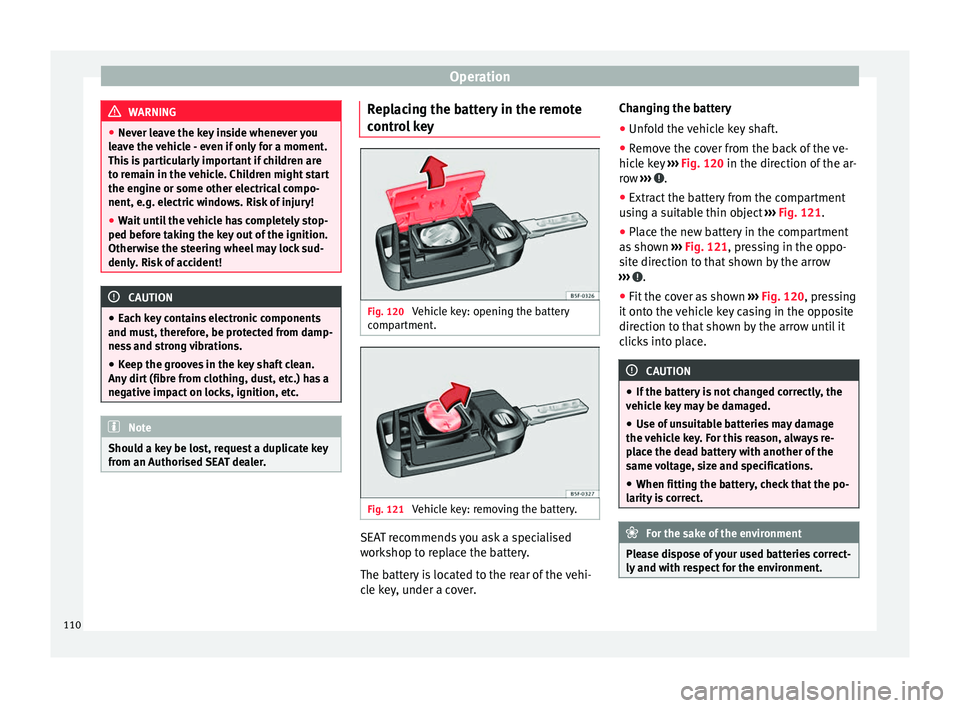
l key Fig. 120
Vehicle key: opening the battery
c omp
ar
tment. Fig. 121
Vehicle key: removing the battery. SEAT recommends you ask a specialised
w
ork
shop t
o replace the battery.
The battery is located to the rear of the vehi-
cle key, under a cover. Changing the battery
● Unfold the vehicle key shaft.
● Remove the cover from the back of the ve-
hicle k
ey ››› Fig. 120 in the direction of the ar-
row ››› .
● Extract the battery from the compartment
u s
in
g a suitable thin object ››› Fig. 121.
● Place the new battery in the compartment
as sho
wn ››› Fig. 121, pressing in the oppo-
site direction to that shown by the arrow
››› .
● Fit the cover as shown ››
›
Fig. 120 , pressing
it onto the vehicle key casing in the opposite
direction to that shown by the arrow until it
clicks into place. CAUTION
● If the b att
ery is not changed correctly, the
vehicle key may be damaged.
● Use of unsuitable batteries may damage
the vehic
le key. For this reason, always re-
place the dead battery with another of the
same voltage, size and specifications.
● When fitting the battery, check that the po-
larity i
s correct. For the sake of the environment
Please dispose of your used batteries correct-
ly and w ith r
espect for the environment.110
Page 125 of 248
Lights and visibility
Note
Please observe any relevant legal require-
ments whic
h may apply in your country. Turn signal and main beam headlights
lev
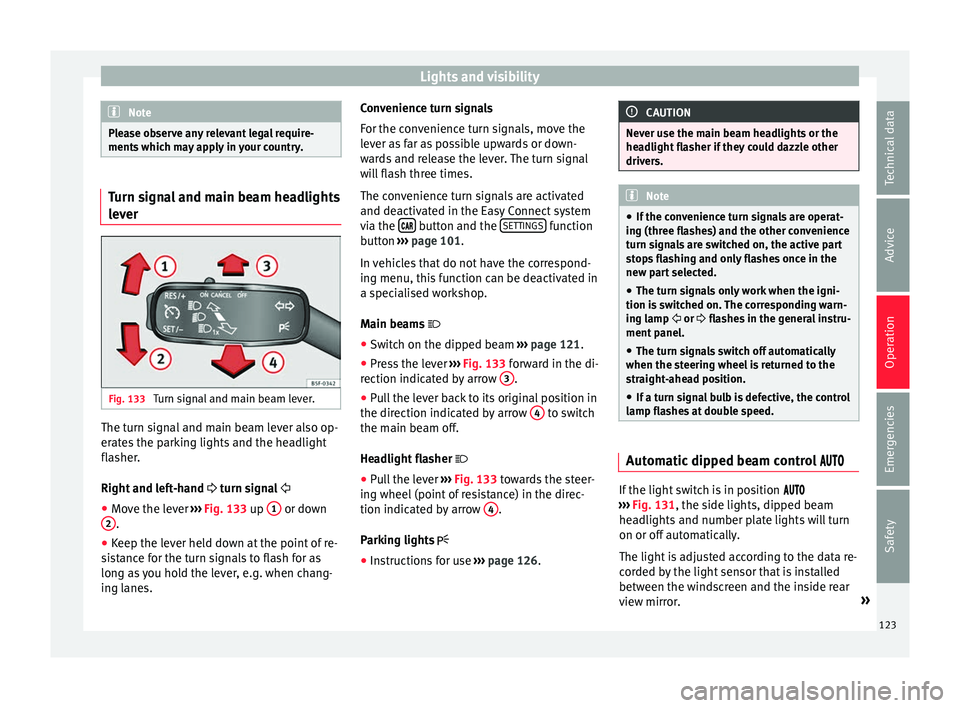
er Fig. 133
Turn signal and main beam lever. The turn signal and main beam lever also op-
er
at
e
s the parking lights and the headlight
flasher.
Right and left-hand turn signal
● Move the lever ›››
Fig. 133 up 1 or down
2 .
● Keep the lever held down at the point of re-
s i
s
tance for the turn signals to flash for as
long as you hold the lever, e.g. when chang-
ing lanes. Convenience turn signals
For the con
venience turn signals, move the
lever as far as possible upwards or down-
wards and release the lever. The turn signal
will flash three times.
The convenience turn signals are activated
and deactivated in the Easy Connect system
via the button and the
S
ET
TINGS function
b utt
on ›
›› page 101.
In vehicles that do not have the correspond-
ing menu, this function can be deactivated in
a specialised workshop.
Main beams
● Switch on the dipped beam ›››
page 121.
● Press the lever ›››
Fig. 133 forward in the di-
rection indicated by arrow 3 .
● Pull the lever back to its original position in
the dir ection indic
at
ed by arrow 4 to switch
the m ain be
am off
.
Headlight flasher
● Pull the lever ›››
Fig. 133 towards the steer-
ing wheel (point of resistance) in the direc-
tion indicated by arrow 4 .
P ark
in
g lights
● Instructions for use ›››
page 126. CAUTION
Never use the main beam headlights or the
hea dlight
flasher if they could dazzle other
drivers. Note
● If the c on
venience turn signals are operat-
ing (three flashes) and the other convenience
turn signals are switched on, the active part
stops flashing and only flashes once in the
new part selected.
● The turn signals only work when the igni-
tion is sw
itched on. The corresponding warn-
ing lamp or flashes in the general instru-
ment panel.
● The turn signals switch off automatically
when the steerin
g wheel is returned to the
straight-ahead position.
● If a turn signal bulb is defective, the control
lamp fla
shes at double speed. Automatic dipped beam control
If the light switch is in position
› ›
› Fig. 131, the side lights, dipped beam
headlights and number plate lights will turn
on or off automatically.
The light is adjusted according to the data re-
corded by the light sensor that is installed
between the windscreen and the inside rear
view mirror. »
123
Technical data
Advice
Operation
Emergencies
Safety
Page 126 of 248
Operation
If the light switch is in position
, the
symbol located next to the light switch will
light up. If the light illuminates automatically,
symbol located next to the light switch
will also illuminate.
Automatic headlights in case of rain
If the light switch is in position and the
automatic wiping in rain is on for more than
10 seconds, or the wipe (position 2 or
3 )
i s
on f
or longer than 15 seconds,
››› page 129 then the side lights and dipped
beam headlights will automatically switch
on.
The light automatically switches off if more
than 4 minutes have elapsed and the auto-
matic wipe or wipe (position 2 or
3 ) have
not been sw
it
ched on. CAUTION
Do not cover the windscreen light sensor with
stic k
ers or similar objects; this could impair
operation. Fog lights*
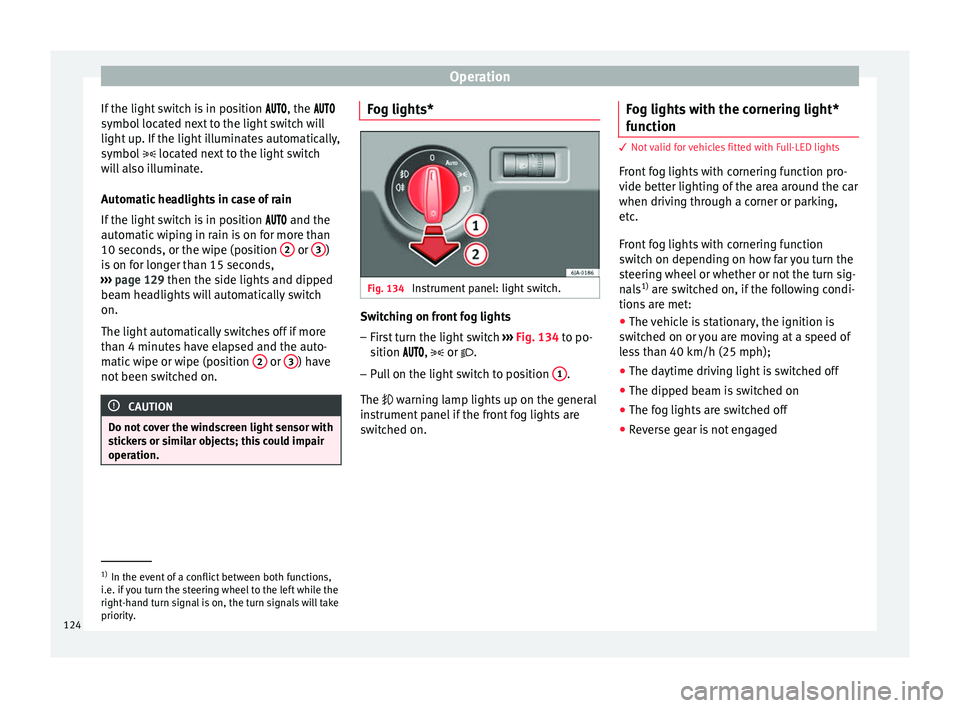
Fig. 134
Instrument panel: light switch. Switching on front fog lights
– First turn the light switch ››
›
Fig. 134 to po-
sition , or .
– Pull on the light switch to position 1 .
The w arnin
g l
amp lights up on the general
instrument panel if the front fog lights are
switched on. Fog lights with the cornering light*
function 3
Not valid for vehicles fitted with Full-LED lights
Fr ont
fog lights with cornering function pro-
vide better lighting of the area around the car
when driving through a corner or parking,
etc.
Front fog lights with cornering function
switch on depending on how far you turn the
steering wheel or whether or not the turn sig-
nals 1)
are switched on, if the following condi-
tions are met:
● The vehicle is stationary, the ignition is
swit c
hed on or you are moving at a speed of
less than 40 km/h (25 mph);
● The daytime driving light is switched off
● The dipped beam is switched on
● The fog lights are switched off
● Reverse gear is not engaged 1)
In the event of a conflict between both functions,
i.e. if
you turn the steering wheel to the left while the
right-hand turn signal is on, the turn signals will take
priority.
124
Page 131 of 248
Lights and visibility
the ignition. If you switch on the windscreen
wiper
s
when the wiper blades are frozen to
the glass, this could damage both the wiper
blades and the wiper motor.
● If the ignition is switched off when the
winds
creen wipers are on, they will start op-
erating in the same mode when the ignition
is switched back on. The wiper blades may be
frozen to the glass at low temperatures when
the ignition is switched off.
● Carefully separate the frozen wipers from
the winds
creen or rear window.
● Remove snow and ice from the wipers be-
fore s
tarting your journey.
● Careless handling could lead to the wiper
arms dam
aging the windscreen.
● For safety reasons, the wiper blades should
be chan
ged once or twice a year. They can be
purchased at a SEAT Authorised Service.
● The ignition cannot be switched on while
the winds
creen wiper arms are in a raised po-
sition. Otherwise, the windscreen wipers
would return to their original position and
could damage the paintwork on the bonnet. Note
Keep the wipers clean. The wipers can be
soil ed w
ith remains of wax solutions from car
washes ››› page 196.
● On vehicles equipped with windscreen
washer j
ets, these are heated once the en-
gine is running. Operating windscreen wipers and
w
a
sher
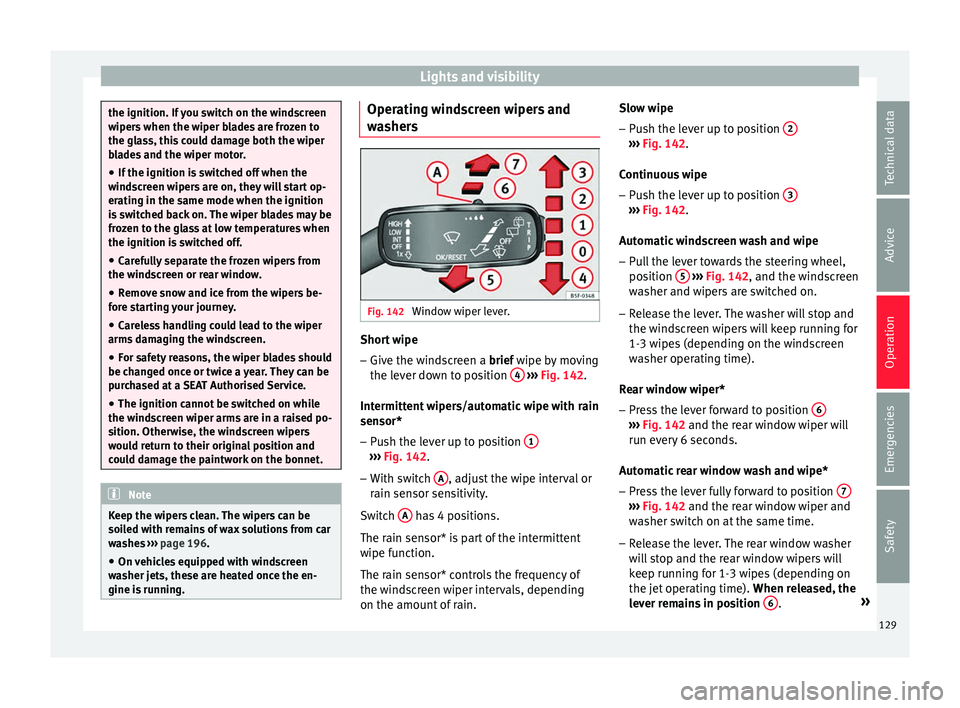
s Fig. 142
Window wiper lever. Short wipe
– Give the windscreen a brief w ipe b
y
moving
the lever down to position 4
› ›
› Fig. 142 .
Intermittent wipers/automatic wipe with rain
sensor* – Push the lever up to position 1 ›››
Fig. 142.
– With switch A , adjust the wipe interval or
r ain sen
sor sen
sitivity.
Switch A has 4 positions.
The r ain sen
sor* i
s part of the intermittent
wipe function.
The rain sensor* controls the frequency of
the windscreen wiper intervals, depending
on the amount of rain. Slow wipe
–
Push the lever up to position 2 ›››
Fig. 142.
C ontinuou
s
wipe
– Push the lever up to position 3 ›››
Fig. 142.
Aut om
atic
windscreen wash and wipe
– Pull the lever towards the steering wheel,
position 5
› ››
Fig. 142
, and the w
indscreen
washer and wipers are switched on.
– Release the lever. The washer will stop and
the winds
creen wipers will keep running for
1-3 wipes (depending on the windscreen
washer operating time).
Rear window wiper*
– Press the lever forward to position 6 ›››
Fig. 142 and the re ar w
indow wiper will
run every 6 seconds.
Automatic rear window wash and wipe* – Press the lever fully forward to position 7 ›››
Fig. 142 and the re ar w
indow wiper and
washer switch on at the same time.
– Release the lever. The rear window washer
wi l
l stop and the rear window wipers will
keep running for 1-3 wipes (depending on
the jet operating time). When released, the
lever remains in position 6 .
»
129
Technical data
Advice
Operation
Emergencies
Safety
Page 133 of 248
Seats and head restraints
Seats and head restraints
Adju s
tin
g seats and head re-
straints
Introduction Read the additional information carefully
›› ›
page 11
Set the driver seat in such a way that the
pedals can be fully depressed with your legs
slightly bent.
Set the driver seat backrest so that you can
reach the upper point of the steering wheel
with your arms slightly bent.
The correct seat position is very important
for:
● reaching all of the controls safely and
quick ly
,
● a relaxed posture that will not produce fati-
gue,
● maximum protection from the seat belts
and airbag sys
tem WARNING
● Adjus t
the driver seat only when the vehi-
cle is stationary. Risk of accident!
● Be careful when adjusting the front seats!
Carel
ess and uncontrolled adjustment can
cause injuries. ●
The bac k
rests must not be reclined too far
back while driving. This could limit the effect
of the seat belts and the airbag system. Risk
of injury!
● Never transport more than the permitted
amount of
people in your vehicle.
● Every occupant in the vehicle must properly
fas
ten and wear the seat belt belonging to
his or her seat. Children must be protected
with an appropriate child restraint system
››› page 73, Transporting children safely.
● The front seats, head restraints and seat
belts mu
st always be adjusted to the size of
the vehicle occupant to provide you and your
passengers with the greatest possible protec-
tion.
● Your feet should remain in the footwell
while the
vehicle is moving; never rest them
on the dash panel, on the window or on the
seat! This also applies to passengers. An in-
correct sitting position exposes you to an in-
creased risk of injury in case of a sudden
braking or an accident. If the airbag is trig-
gered, you could sustain severe injuries due
to an incorrect sitting position!
● It is important for the driver and front pas-
senger t
o keep a distance of at least 25 cm
from the steering wheel and dash panel. Fail-
ure to respect the minimum distance means
that the airbag will not protect you. Risk of
fatal injury if triggered!
● Objects must not be placed in the footwell,
as they
could move to the area of the pedals
in the event of a braking manoeuvre or
change of direction. This would prevent the clutch, brake or accelerator from being press-
ed.
●
Do not place any items on the front passen-
ger se at
other than those allowed (e.g. child
seat). Risk of accident! Note
After a certain time, the backrest angle ad-
ju stment
mechanism may gain a certain
amount of play. 131
Technical data
Advice
Operation
Emergencies
Safety
Page 137 of 248
Transport and practical equipment
CAUTION
Take care when handling the rear backrests
so as not
to damage the seat belts. The seat
belt must never be left behind the lifted back-
rest. Transport and practical
equipment
Pr actic
a
l equipment
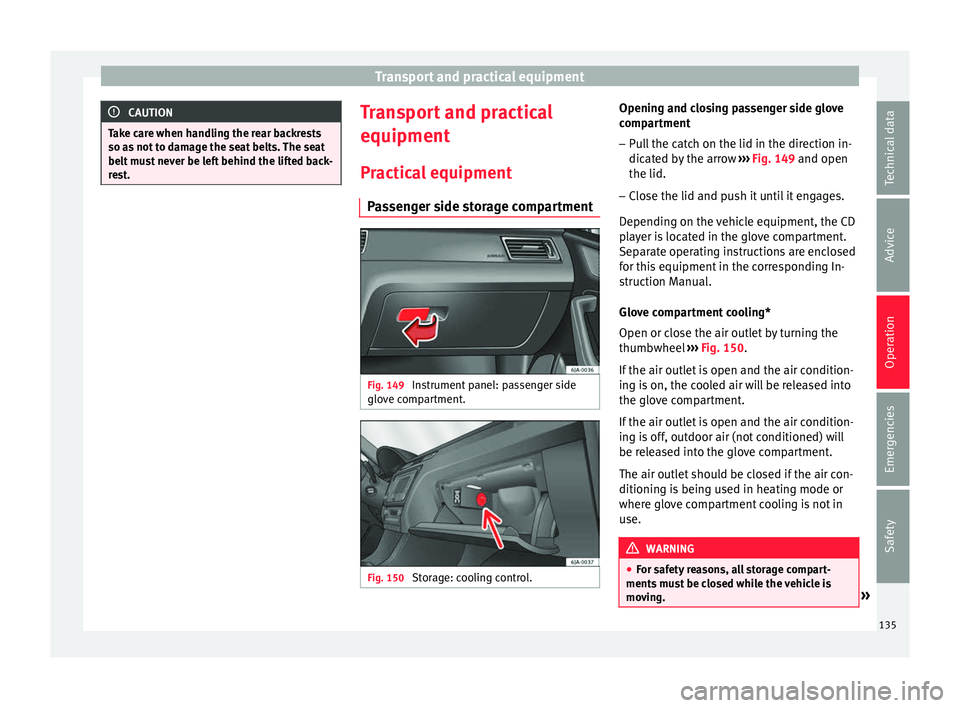
Passenger side storage compartment Fig. 149
Instrument panel: passenger side
glo v
e c
ompartment. Fig. 150
Storage: cooling control. Opening and closing passenger side glove
c
omp ar
tment
– Pull the catch on the lid in the direction in-
dicated b
y the arrow ››› Fig. 149 and open
the lid.
– Close the lid and push it until it engages.
Depending on the
vehicle equipment, the CD
player is located in the glove compartment.
Separate operating instructions are enclosed
for this equipment in the corresponding In-
struction Manual.
Glove compartment cooling*
Open or close the air outlet by turning the
thumbwheel ››› Fig. 150.
If the air outlet is open and the air condition-
ing is on, the cooled air will be released into
the glove compartment.
If the air outlet is open and the air condition-
ing is off, outdoor air (not conditioned) will
be released into the glove compartment.
The air outlet should be closed if the air con-
ditioning is being used in heating mode or
where glove compartment cooling is not in
use. WARNING
● For s af
ety reasons, all storage compart-
ments must be closed while the vehicle is
moving. » 135
Technical data
Advice
Operation
Emergencies
Safety
Page 155 of 248
Driving
●
Never l e
ave the vehicle unattended if the
engine is running.
● Never switch the engine off until the vehi-
cle h
as come to a complete stop. Risk of acci-
dent! CAUTION
● Turnin g the s
teering wheel fully in either
direction when the vehicle is stationary and
the engine is in gear puts the power steering
under great stress. This could lead to noise.
Never leave the steering wheel turned fully in
either direction for more than 15 seconds.
Risk of damage to the power steering system!
● The starter motor may only be used (key
position 3
››› Fig. 173 ›
›› page 154 in the ig-
nition) if the engine is off. Using the starter
motor when the engine is running could dam-
age it.
● Immediately release the ignition key when
the engine st
arts, otherwise damage could be
caused to the starter motor.
● When the engine is cold, you should avoid
high engine speed
s, driving at full throttle
and over-loading the engine before it reaches
operating temperature. Risk of engine dam-
age!
● Do not tow-start the engine. Risk of engine
damag
e! In vehicles with a catalytic convert-
er, fuel that has not been burned could reach
the catalytic converter and catch fire in it.
This would lead to a fault in the catalytic con-
verter. You may use the battery from another vehicle to help you start your engine
›› ›
page 52.
● After prolonged and demanding operation
of the engine, when the j
ourney has ended,
do not stop the engine immediately. Let the
engine run at idle for about one more minute.
This will stop the engine from overheating. For the sake of the environment
Do not warm up the engine when the vehicle
i s s
tationary. If possible, move off immediate-
ly after starting the engine. This will help the
engine reach operating temperature more
quickly, reducing the quantity of emissions. Note
● The engine c an on
ly be started with the
original SEAT key.
● Loud running noises may be heard briefly
after c
old-starting the engine. This is normal
and is no cause for concern.
● After the engine has been stopped and the
ignition switc
hed off, the radiator fan may
continue running for around 10 minutes.
● If the engine still does not start after a sec-
ond attempt, the fuel
pump fuse might have
blown. Check it and replace if necessary
››› page 81 or contact your Specialised Serv-
ice.
● You should always engage the steering lock
when you e
xit the vehicle. This will hinder
any attempts at theft. Power steering
The power steering allows you to turn the
st
eerin
g wheel more easily.
If the power steering fails or the engine is off
(towing), it is still possible to turn the vehi-
cle's steering wheel fully. However, you need
more strength to steer the vehicle.
Driver control lamps and warnings (in red) Faulty steering! To
park the vehicle
If the warning lamp remains on and the driver
indication appears, the power steering could
be faulty.
Do not continue driving. Seek specialist as-
sistance. (in yellow) Steering: System
fault! You may continue driving.
If the warning lamp comes on, the steering
could react with more difficultly or more sen-
sitivity than normal. In addition, when driving
in a straight line the steering wheel may be
off-centre.
Drive slowly to a specialised workshop and
have the fault repaired. (in yellow) Steering lock:
fault! Go to an Official Service
The electronic steering lock is malfunction-
ing. »
153
Technical data
Advice
Operation
Emergencies
Safety
Page 156 of 248
Operation
Go to a specialised workshop as soon as
po s
s
ible and have the fault repaired. WARNING
Take it immediately to a specialised work-
shop and hav e the f
ault repaired: risk of acci-
dent! Note
If the lamp (in red) or (in
yellow) lights
up briefly, you may continue driving. Start-up lock security system (immo-
b
i
li
ser) There is an electronic chip in the key. The
el
ectr
onic
immobiliser is deactivated when
the key is inserted into the ignition. The elec-
tronic immobiliser is automatically activated
when the key is removed from the ignition.
The engine will not start if an unauthorised
key is used.
The informative display indicates:
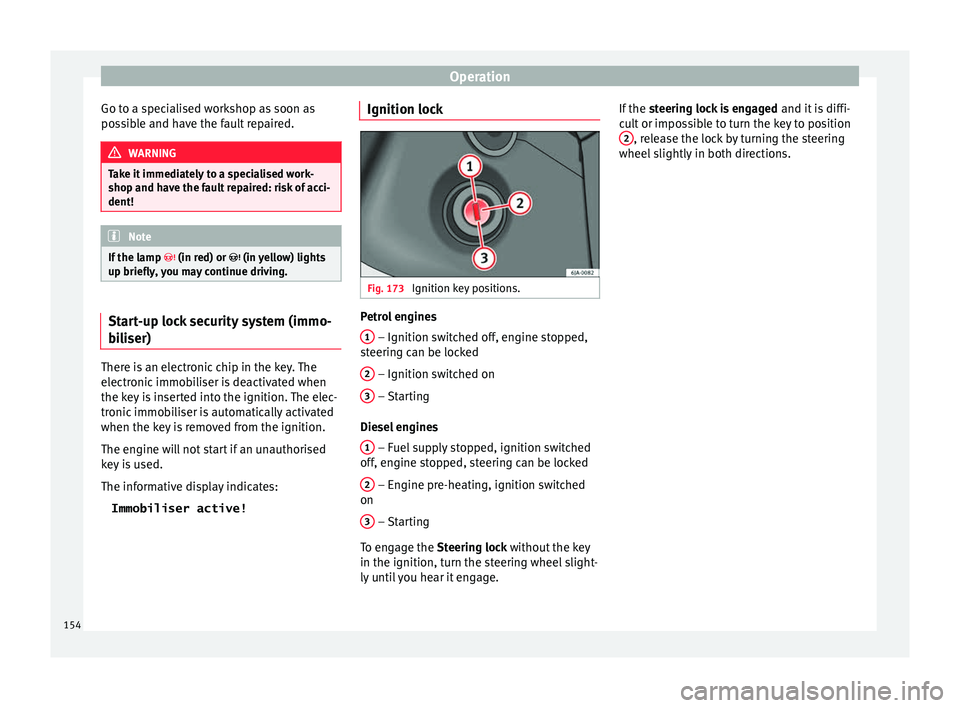
Immobiliser active! Ignition lock
Fig. 173
Ignition key positions. Petrol engines
1 – Ignition switched off, engine stopped,
s t
eerin
g can be locked
2 – Ignition switched on
3 – Starting
Die sel
en
gines
1 – Fuel supply stopped, ignition switched
off , en
gine s
topped, steering can be locked
2 – Engine pre-heating, ignition switched
on
3 – Starting
T o en
g
age the Steering lock without the key
in the ignition, turn the steering wheel slight-
ly until you hear it engage. If the
steering lock is engaged and it i
s diffi-
cult or impossible to turn the key to position 2 , release the lock by turning the steering
wheel s
lightly
in both directions.
154
Page 158 of 248

Operation
●
If the v
ehicle is stationary for a long time
with the ignition on, the vehicle battery
might be discharged and it might not be pos-
sible to start the engine. Starting the engine
Vehicles with a
diesel en
gine are equipped
with a glow plug system. When you switch on
the ignition, the glow plug warning lamp
will light up. The engine can be started
straight away when the lamp switches off.
Do not connect electrical appliances during
preheating so as not the drain the vehicle
battery unnecessarily.
Starting the engine
● Move the gearbox lever into neutral or
mov e the sel
ector lever to position P or N and
pull firmly on the handbrake.
● Press the clutch pedal all the way down
and star
t the engine 3
› ›
› Fig. 173
›
›› page 154, without pressing the accelera-
tor. Keep the clutch pedal pressed down until
the engine starts.
● Release the ignition key as soon as the en-
gine star
ts. The key returns to position 2 .
● If the engine does not start after 10 sec-
ond s, t
urn the k
ey back to position 1 . Re-
pe at
the action af
ter 30 seconds.
● Release the handbrake before moving off. Switching off the engine with the key Stop the engine by turning the ignition key to
pos
ition 1
››› Fig. 173 ›
›› page 154.
Brakes and brake servo sys-
tems Introduction WARNING
● The brak e ser
vo only works when the en-
gine is running. Braking when the engine is
switched off requires applying more strength
to the brake pedal. Risk of accident!
● Press down on the clutch pedal when stop-
ping and brak
ing with a manual gearbox, pet-
rol engine vehicle at low speed. Otherwise,
the brake servo might not work properly. Risk
of accident!
● In the event of damage to the standard
front s
poiler or where a different front spoil-
er, wheel trims, etc. are subsequently fitted,
make sure the air vent to the brakes on the
front wheels is not blocked. Otherwise, brak-
ing operations may be impaired. Risk of acci-
dent!
● Always fully release the handbrake. If it is
only p
artially released, this will cause over-
heating of the rear brakes, which can impair
the function of the brake system. Risk of acci-
dent! ●
Never l e
ave children unsupervised in the
vehicle. They could release the handbrake or
move the gear lever. The vehicle could start
moving. Risk of accident!
● Insufficient fuel can cause the engine to run
irregu
larly or to switch off. Brake assist sys-
tems could be impaired. Risk of accident!
● Always adjust your driving style to suit visi-
bility
, the weather and road and traffic condi-
tions. The best vehicle safety offered by
brake assist systems must never encourage
you to run greater risks. Risk of accident! CAUTION
● Ob ser
ve the information concerning new
brake pads ››› page 165.
● Where braking is not necessary, do not
wear do
wn the brake pads by pressing down
gently on the brake pedal. This causes the
brakes to overheat, increasing their wear and
increasing braking distances.
● To ensure the brake assist systems work
properly, a
ll wheels must be fitted with tyres
approved by the manufacturer. Note
● If y
ou brake suddenly and the brake system
control unit regards the situation as hazard-
ous for the drivers behind you, the brake
lights will begin to flash automatically. After
reducing speed to approximately 10 km/h (6
mph) or stopping the vehicle, the brake lights
will stop flashing and the hazard warning 156
Page 159 of 248
Driving
lights will switch on. The hazard warning
lights
ar
e automatically switched off when
you accelerate or restart the vehicle.
● On long, steep gradients, reduce your
speed and ch
ange to a lower gear (manual
gearbox) or move the selector lever to a lower
gear position (automatic gearbox). This uses
the force of the engine and the brakes do not
suffer as much. If you still have to brake, do
so intermittently, pressing down repeatedly
on the brake pedal.
● Vehicle modifications (e.g. to the engine,
brake
s, frame or a combination of wheels and
tyres) could impair the brake assist systems
››› page 194, Accessories and modifications
to the vehicle .
● In the event of a fault in the ABS system,
the ESC, T
CS and EDL are switched off auto-
matically. A fault in the ABS is indicated by
the ››› page 159 warning lamp. Control lamp
The warning lamp i
l
lumin
ates if the brake
fluid level is too low or if there is a fault in the
ABS system.
The informative display indicates:
Brake fluid Instruction Manual!
Stop the vehicle, switch off the engine and
check the level of the brake fluid
››› page 211 WARNING
● The fo l
lowing indications must be taken in-
to account when opening the engine com-
partment to check the brake fluid
››› page 204, Engine compartment.
● If the warning lamp illumin
ates together
with the warning lamp ››› page 159, ,
stop the vehicle! Go to a technical service.
● A fault in the brake system or in the Anti-
lock br
ake system (ABS) can lead to longer
braking distances – Risk of accident! Brakes
Wear
The r
at
e of
wear of the brake pads depends
on the driving style and on the way in which
the vehicle is used. The brake pads will wear
more quickly if you use your vehicle frequent-
ly in urban traffic and short trips or drive in a
sporty style. Under these demanding condi-
tions, visit your specialised service, even be-
fore the scheduled service date, so that the
thickness of the brake pads can be meas-
ured.
Wet roads or road salt
If brakes are wet or frozen, or if you are driv-
ing on roads which have been gritted with
salt, braking power may set in later than nor-
mal. Dry the brakes as soon as possible by
braking repeatedly. Corrosion
Long period
s of inactivity and little use can
lead to rust on the brake discs and dirt on the
brake pads. Where the brake system is sub-
jected to light stress or in the case of corro-
sion, clean the brake discs by braking fully
several times at a high speed.
Brake system fault
If you notice that the braking distance sud-
denly increases and the brake pedal can be
pressed down more fully, there may be a fault
in the brake system. Visit a specialised serv-
ice immediately and adjust your driving style
to the extent of the damage and to limit the
effect of the brakes.
Low brake fluid level
Insufficient brake fluid could cause faults in
the brake system. The brake fluid level is con-
trolled electronically ››› page 157, Control
lamp.
Brake servo
The brake servo supplements the pressure
you exert on the brake pedal. The brake servo
only works when the engine is running.
157
Technical data
Advice
Operation
Emergencies
Safety