ignition SKODA CITIGO 2013 1.G Owner's Guide
[x] Cancel search | Manufacturer: SKODA, Model Year: 2013, Model line: CITIGO, Model: SKODA CITIGO 2013 1.GPages: 176, PDF Size: 10.54 MB
Page 41 of 176
Sun visorsFig. 30
Sun visor: Driver's side/front passenger's side
First read and observe the introductory information given on page 37.
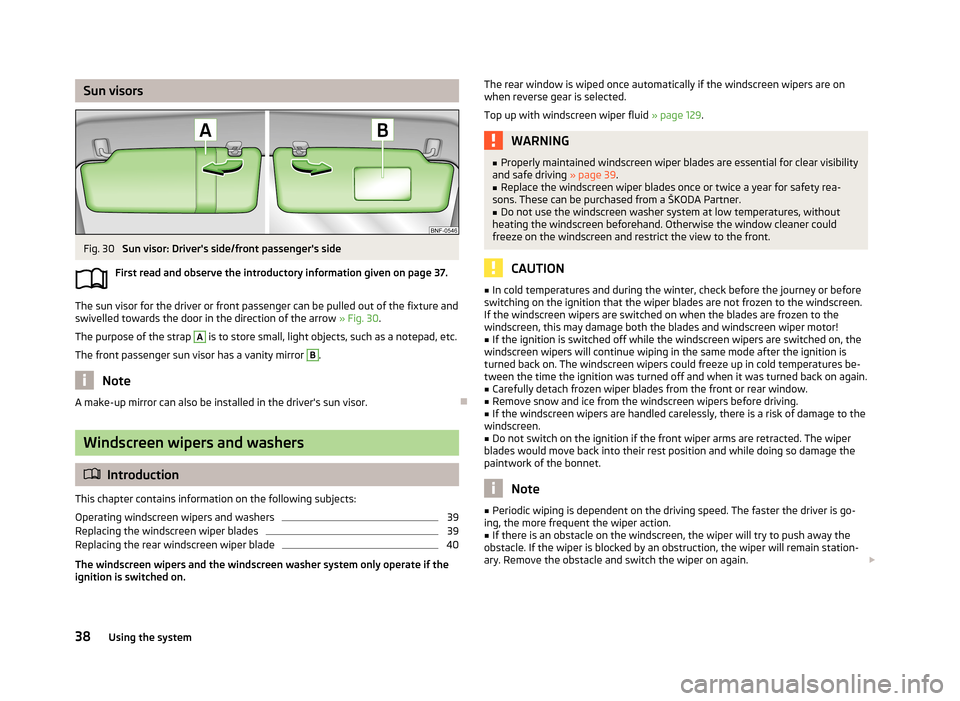
The sun visor for the driver or front passenger can be pulled out of the fixture and
swivelled towards the door in the direction of the arrow » Fig. 30.
The purpose of the strap
A
is to store small, light objects, such as a notepad, etc.
The front passenger sun visor has a vanity mirror
B
.
Note
A make-up mirror can also be installed in the driver's sun visor.
Windscreen wipers and washers
Introduction
This chapter contains information on the following subjects:
Operating windscreen wipers and washers
39
Replacing the windscreen wiper blades
39
Replacing the rear windscreen wiper blade
40
The windscreen wipers and the windscreen washer system only operate if the ignition is switched on.
The rear window is wiped once automatically if the windscreen wipers are on
when reverse gear is selected.
Top up with windscreen wiper fluid » page 129.WARNING■
Properly maintained windscreen wiper blades are essential for clear visibility
and safe driving » page 39.■
Replace the windscreen wiper blades once or twice a year for safety rea-
sons. These can be purchased from a ŠKODA Partner.
■
Do not use the windscreen washer system at low temperatures, without
heating the windscreen beforehand. Otherwise the window cleaner could
freeze on the windscreen and restrict the view to the front.
CAUTION
■ In cold temperatures and during the winter, check before the journey or before
switching on the ignition that the wiper blades are not frozen to the windscreen. If the windscreen wipers are switched on when the blades are frozen to the
windscreen, this may damage both the blades and windscreen wiper motor!■
If the ignition is switched off while the windscreen wipers are switched on, the
windscreen wipers will continue wiping in the same mode after the ignition is
turned back on. The windscreen wipers could freeze up in cold temperatures be- tween the time the ignition was turned off and when it was turned back on again.
■
Carefully detach frozen wiper blades from the front or rear window.
■
Remove snow and ice from the windscreen wipers before driving.
■
If the windscreen wipers are handled carelessly, there is a risk of damage to the
windscreen.
■
Do not switch on the ignition if the front wiper arms are retracted. The wiper
blades would move back into their rest position and while doing so damage the
paintwork of the bonnet.
Note
■ Periodic wiping is dependent on the driving speed. The faster the driver is go-
ing, the more frequent the wiper action.■
If there is an obstacle on the windscreen, the wiper will try to push away the
obstacle. If the wiper is blocked by an obstruction, the wiper will remain station-
ary. Remove the obstacle and switch the wiper on again.
38Using the system
Page 42 of 176
■The capacity of the windscreen washer fluid reservoir is approximately 3 litres.■The wiper blades should be cleaned on a regular basis with a windscreen clean-
er to avoid any smears. The wiper blades should be cleaned with a sponge or
cloth if they are heavily soiled by insect residues, for example.
Operating windscreen wipers and washers
Fig. 31
Operating lever: Windscreen wipers and washer settings
First read and observe the introductory information and safety warn-
ings
on page 38.
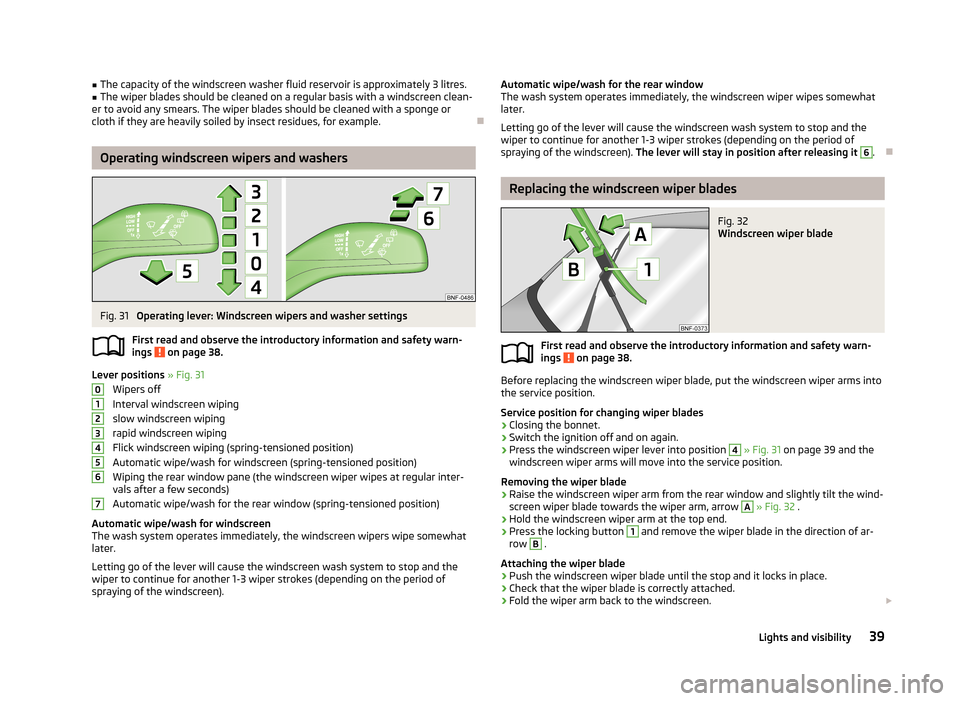
Lever positions » Fig. 31
Wipers off
Interval windscreen wiping
slow windscreen wiping
rapid windscreen wiping
Flick windscreen wiping (spring-tensioned position)
Automatic wipe/wash for windscreen (spring-tensioned position) Wiping the rear window pane (the windscreen wiper wipes at regular inter- vals after a few seconds)
Automatic wipe/wash for the rear window (spring-tensioned position)
Automatic wipe/wash for windscreen
The wash system operates immediately, the windscreen wipers wipe somewhat
later.
Letting go of the lever will cause the windscreen wash system to stop and the
wiper to continue for another 1-3 wiper strokes (depending on the period of
spraying of the windscreen).
01234567Automatic wipe/wash for the rear window The wash system operates immediately, the windscreen wiper wipes somewhatlater.
Letting go of the lever will cause the windscreen wash system to stop and the wiper to continue for another 1-3 wiper strokes (depending on the period ofspraying of the windscreen). The lever will stay in position after releasing it 6
.
Replacing the windscreen wiper blades
Fig. 32
Windscreen wiper blade
First read and observe the introductory information and safety warn-
ings on page 38.
Before replacing the windscreen wiper blade, put the windscreen wiper arms into
the service position.
Service position for changing wiper blades
›
Closing the bonnet.
›
Switch the ignition off and on again.
›
Press the windscreen wiper lever into position
4
» Fig. 31 on page 39 and the
windscreen wiper arms will move into the service position.
Removing the wiper blade
›
Raise the windscreen wiper arm from the rear window and slightly tilt the wind-
screen wiper blade towards the wiper arm, arrow
A
» Fig. 32 .
›
Hold the windscreen wiper arm at the top end.
›
Press the locking button
1
and remove the wiper blade in the direction of ar-
row
B
.
Attaching the wiper blade
›
Push the windscreen wiper blade until the stop and it locks in place.
›
Check that the wiper blade is correctly attached.
›
Fold the wiper arm back to the windscreen.
39Lights and visibility
Page 43 of 176
›Turn on the ignition and press the windscreen wiper lever into position4
» Fig. 31 on page 39 ; the windscreen wiper arms move to the home position.
Replacing the rear windscreen wiper blade
Fig. 33
Rear window wiper blade
First read and observe the introductory information and safety warn-
ings on page 38.
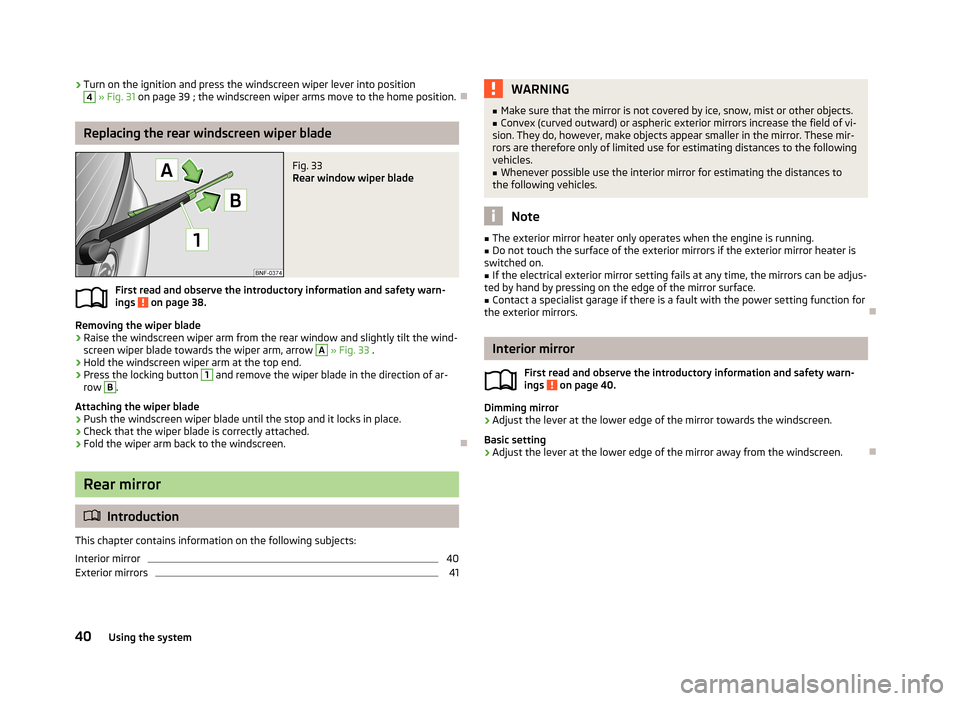
Removing the wiper blade
›
Raise the windscreen wiper arm from the rear window and slightly tilt the wind-
screen wiper blade towards the wiper arm, arrow
A
» Fig. 33 .
›
Hold the windscreen wiper arm at the top end.
›
Press the locking button
1
and remove the wiper blade in the direction of ar-
row
B
.
Attaching the wiper blade
›
Push the windscreen wiper blade until the stop and it locks in place.
›
Check that the wiper blade is correctly attached.
›
Fold the wiper arm back to the windscreen.
Rear mirror
Introduction
This chapter contains information on the following subjects:
Interior mirror
40
Exterior mirrors
41WARNING■ Make sure that the mirror is not covered by ice, snow, mist or other objects.■Convex (curved outward) or aspheric exterior mirrors increase the field of vi-
sion. They do, however, make objects appear smaller in the mirror. These mir-
rors are therefore only of limited use for estimating distances to the following
vehicles.■
Whenever possible use the interior mirror for estimating the distances to
the following vehicles.
Note
■ The exterior mirror heater only operates when the engine is running.■Do not touch the surface of the exterior mirrors if the exterior mirror heater is
switched on.■
If the electrical exterior mirror setting fails at any time, the mirrors can be adjus-
ted by hand by pressing on the edge of the mirror surface.
■
Contact a specialist garage if there is a fault with the power setting function for
the exterior mirrors.
Interior mirror
First read and observe the introductory information and safety warn-
ings
on page 40.
Dimming mirror
›
Adjust the lever at the lower edge of the mirror towards the windscreen.
Basic setting
›
Adjust the lever at the lower edge of the mirror away from the windscreen.
40Using the system
Page 55 of 176
Cigarette lighterFig. 50
Centre console: Cigarette lighter
First read and observe the introductory information and safety warn-
ings on page 50.
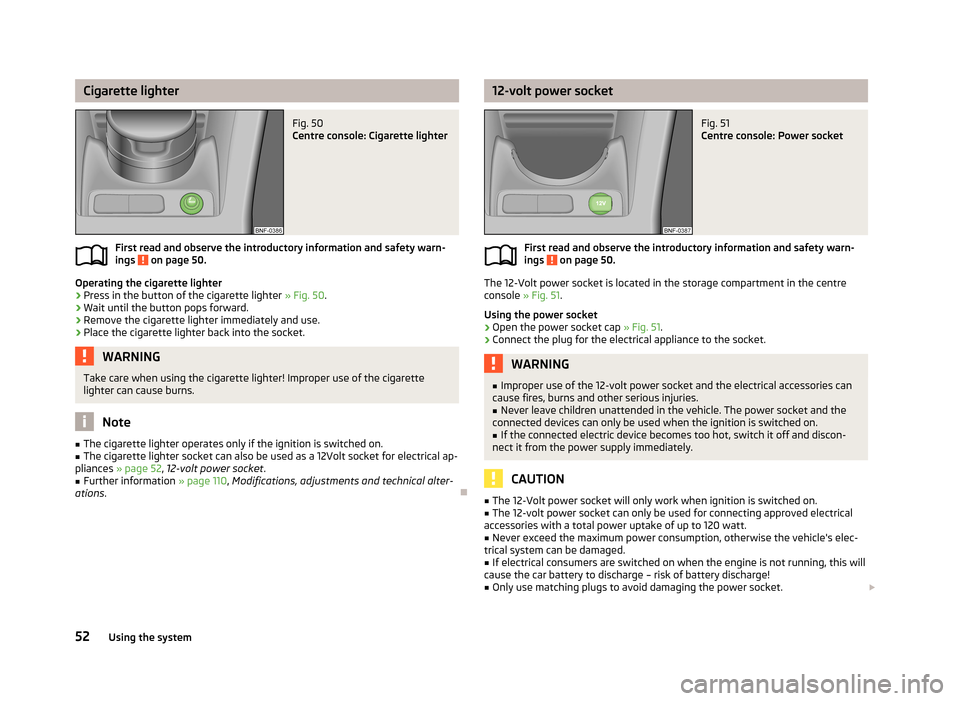
Operating the cigarette lighter
›
Press in the button of the cigarette lighter » Fig. 50.
›
Wait until the button pops forward.
›
Remove the cigarette lighter immediately and use.
›
Place the cigarette lighter back into the socket.
WARNINGTake care when using the cigarette lighter! Improper use of the cigarette
lighter can cause burns.
Note
■ The cigarette lighter operates only if the ignition is switched on.■The cigarette lighter socket can also be used as a 12Volt socket for electrical ap-
pliances » page 52 , 12-volt power socket .■
Further information » page 110, Modifications, adjustments and technical alter-
ations .
12-volt power socketFig. 51
Centre console: Power socket
First read and observe the introductory information and safety warn-
ings on page 50.
The 12-Volt power socket is located in the storage compartment in the centre
console » Fig. 51.
Using the power socket
›
Open the power socket cap » Fig. 51.
›
Connect the plug for the electrical appliance to the socket.
WARNING■
Improper use of the 12-volt power socket and the electrical accessories can
cause fires, burns and other serious injuries.■
Never leave children unattended in the vehicle. The power socket and the
connected devices can only be used when the ignition is switched on.
■
If the connected electric device becomes too hot, switch it off and discon-
nect it from the power supply immediately.
CAUTION
■ The 12-Volt power socket will only work when ignition is switched on.■The 12-volt power socket can only be used for connecting approved electrical
accessories with a total power uptake of up to 120 watt.■
Never exceed the maximum power consumption, otherwise the vehicle's elec-
trical system can be damaged.
■
If electrical consumers are switched on when the engine is not running, this will
cause the car battery to discharge – risk of battery discharge!
■
Only use matching plugs to avoid damaging the power socket.
52Using the system
Page 56 of 176
■Only use accessories that have been tested for electromagnetic compatibility in
accordance with the applicable directives.■
Before turning the ignition on or off, and before starting the car, switch off the
device connected to the 12-volt power socket to prevent any damage caused by
voltage fluctuations.
■
Observe the operating instructions for the connected devices!
Clothes hooks
First read and observe the introductory information and safety warn-ings
on page 50.
The clothes hooks are located at the centre door bars.
WARNING■ Ensure that any clothes hanging from the hooks do not impair your vision to
the rear.■
Only use the hooks for hanging light items of clothing and ensure that there
are no heavy or sharp-edged objects in the pockets.
■
Do not use clothes hangers for hanging up items of clothing otherwise this
may reduce the effectiveness of side airbag.
CAUTION
The maximum permissible load of the hooks is 2 kg.
Parking ticket holder
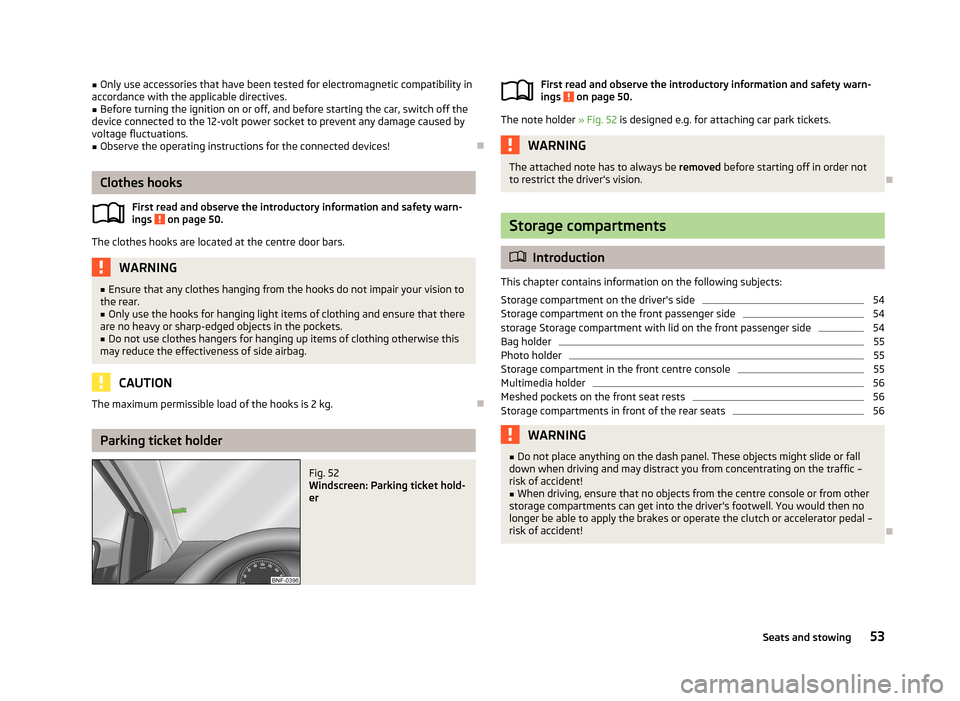
Fig. 52
Windscreen: Parking ticket hold-
erFirst read and observe the introductory information and safety warn-
ings on page 50.
The note holder » Fig. 52 is designed e.g. for attaching car park tickets.
WARNINGThe attached note has to always be removed before starting off in order not
to restrict the driver's vision.
Storage compartments
Introduction
This chapter contains information on the following subjects:
Storage compartment on the driver's side
54
Storage compartment on the front passenger side
54
storage Storage compartment with lid on the front passenger side
54
Bag holder
55
Photo holder
55
Storage compartment in the front centre console
55
Multimedia holder
56
Meshed pockets on the front seat rests
56
Storage compartments in front of the rear seats
56WARNING■ Do not place anything on the dash panel. These objects might slide or fall
down when driving and may distract you from concentrating on the traffic –
risk of accident!■
When driving, ensure that no objects from the centre console or from other
storage compartments can get into the driver's footwell. You would then no
longer be able to apply the brakes or operate the clutch or accelerator pedal –
risk of accident!
53Seats and stowing
Page 70 of 176
It is still fully possible to steer the vehicle if the power steering fails or if the en-gine is not running (e.g. when towing). However, greater physical effort is re-
quired to turn the steering wheel.
If there is a fault in the power steering, the warning light or
lights up in the
instrument cluster » page 18.
Starting and stopping the engine
Introduction
This chapter contains information on the following subjects:
Electronic immobilizer
68
Ignition lock
68
Starting the engine
68
Switching off the engine
68
The engine can only be started using a correctly coded original key.
The engine running noises may louder at first be louder for a short time afterstarting the cold engine. This is quite normal and is not an operating problem.
WARNING■ When driving, the ignition key must always be in the position 2 » Fig. 68 on
page 68 (ignition switched on) without the engine running. This position is
indicated by the warning lights coming on. If this is not the case, this could re-
sult in unexpected locking of the steering wheel – risk of accident!■
Only pull the ignition key from the ignition lock when the vehicle has come
to a complete stop (by applying the handbrake). Otherwise, the steering could
be blocked – risk of accident!
■
When leaving the vehicle, the ignition must always be removed. This is par-
ticularly important if children are left in the vehicle. Children could otherwise
start the engine for example – risk of accident or injury!
■
Never leave the vehicle unattended with the engine running.
■
Never switch off the engine before the vehicle is stationary – risk of acci-
dent!
WARNING■ Never leave the engine running in unventilated or closed rooms. The ex-
haust gases from the engine contain substances such as odourless and col-
ourless carbon monoxide (a poisonous gas) – risk to life!■
Carbon monoxide can cause unconsciousness and death.
CAUTION
■ The starter must only be operated when the engine is not running and the vehi-
cle is at a standstill. The starter or engine can be damaged if the starter is activa-
ted when the engine is running 3
» Fig. 68 on page 68.
■
If the engine does not start up after a second attempt, the fuse for the fuel
pump may have a fault. Check the fuse and replace if necessary » page 154,
Fuses on the underside of the dash panel , or seek assistance from a specialist ga-
rage.
■
Let go of the ignition key as soon as the engine starts otherwise the starter
could be damaged.
■
Do not tow start the engine – there is a risk of damaging the engine and the
catalytic converter. The battery from another vehicle can be used as a jump-start
aid » page 150 , Jump-starting .
CAUTION
■
Avoid high engine revolutions, full throttle and high engine loads before the en-
gine has reached its operating temperature – risk of damaging the engine!■
Do not switch the engine off immediately at the end of your journey after the
engine has been operated over a prolonged period at high loads but leave it to
run at an idling speed for about 1 minute. This prevents any possible accumulation
of heat when the engine is switched off.
For the sake of the environment
Do not warm up the engine while the vehicle is stationary. If possible, start your
journey as soon as the engine has started. Through this the engine reaches its
operating temperature more rapidly and the pollutant emissions are lower.
Note
After switching off the ignition, the radiator fan can intermittently continue to op-
erate for approx. 10 minutes.
67Starting-off and Driving
Page 71 of 176
Electronic immobilizerFirst read and observe the introductory information and safety warn-ings
on page 67.
An electronic chip is integrated in the head of the key. The immobiliser is deacti-vated with the aid of this chip when the key is inserted in the ignition lock. The
electronic immobiliser is automatically activated when the ignition key is with-
drawn from the lock.
The engine will not start if a non-authorized ignition key is used.
Ignition lock
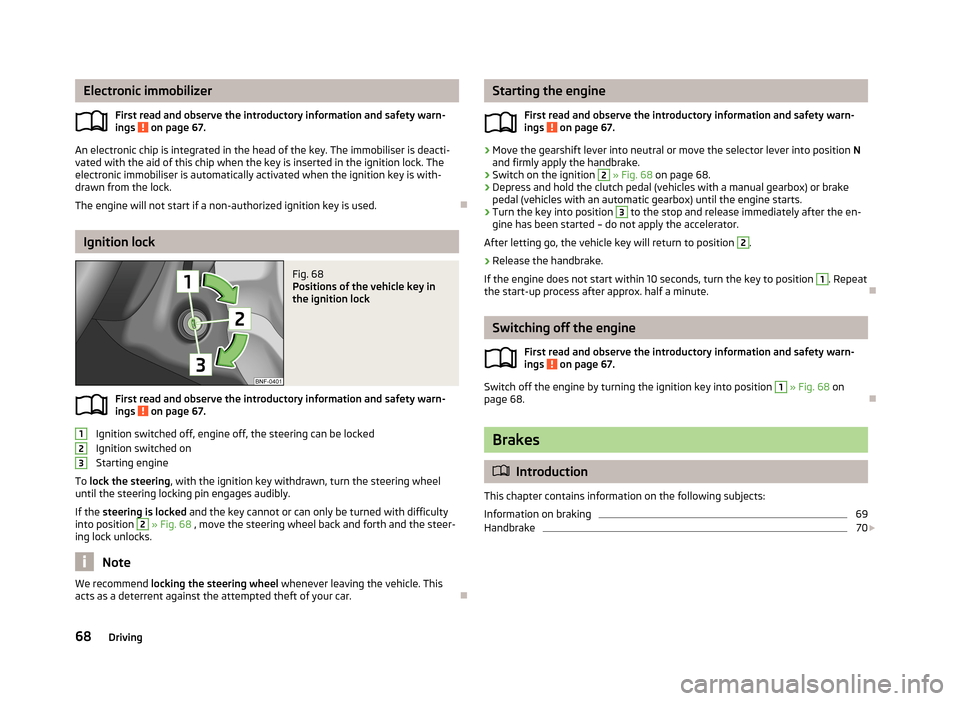
Fig. 68
Positions of the vehicle key in
the ignition lock
First read and observe the introductory information and safety warn-
ings on page 67.
Ignition switched off, engine off, the steering can be locked
Ignition switched on
Starting engine
To lock the steering , with the ignition key withdrawn, turn the steering wheel
until the steering locking pin engages audibly.
If the steering is locked and the key cannot or can only be turned with difficulty
into position
2
» Fig. 68 , move the steering wheel back and forth and the steer-
ing lock unlocks.
Note
We recommend locking the steering wheel
whenever leaving the vehicle. This
acts as a deterrent against the attempted theft of your car.
123Starting the engine
First read and observe the introductory information and safety warn-
ings
on page 67.
›
Move the gearshift lever into neutral or move the selector lever into position N
and firmly apply the handbrake.
›
Switch on the ignition
2
» Fig. 68 on page 68.
›
Depress and hold the clutch pedal (vehicles with a manual gearbox) or brake
pedal (vehicles with an automatic gearbox) until the engine starts.
›
Turn the key into position
3
to the stop and release immediately after the en-
gine has been started – do not apply the accelerator.
After letting go, the vehicle key will return to position
2
.
›
Release the handbrake.
If the engine does not start within 10 seconds, turn the key to position
1
. Repeat
the start-up process after approx. half a minute.
Switching off the engine
First read and observe the introductory information and safety warn-ings
on page 67.
Switch off the engine by turning the ignition key into position
1
» Fig. 68 on
page 68.
Brakes
Introduction
This chapter contains information on the following subjects:
Information on braking
69
Handbrake
70
68Driving
Page 73 of 176
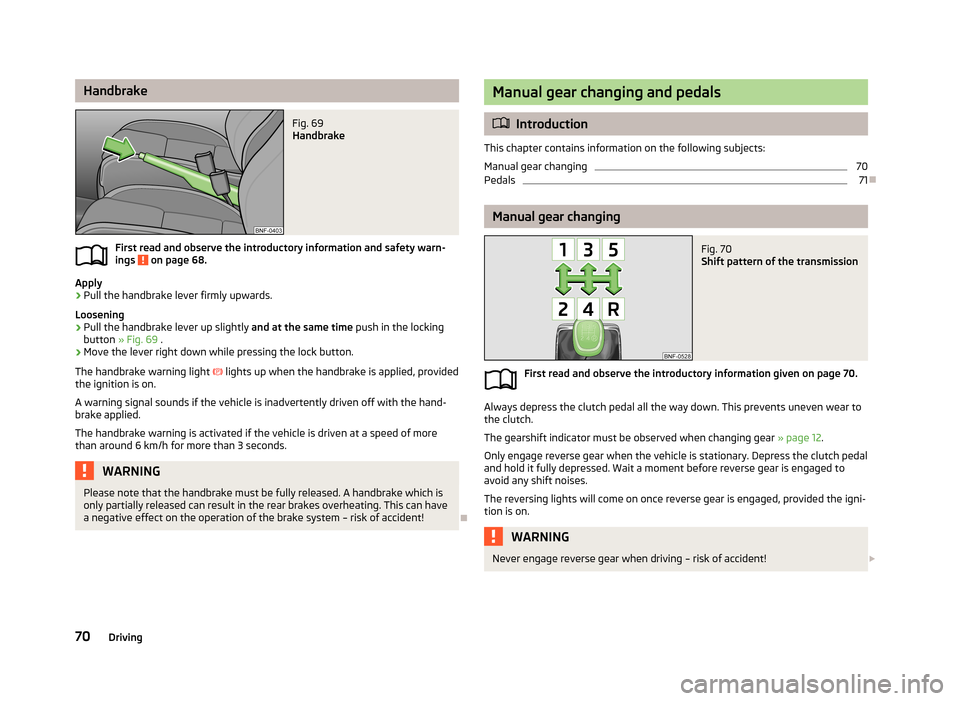
HandbrakeFig. 69
Handbrake
First read and observe the introductory information and safety warn-ings on page 68.
Apply
›
Pull the handbrake lever firmly upwards.
Loosening
›
Pull the handbrake lever up slightly and at the same time push in the locking
button » Fig. 69 .
›
Move the lever right down while pressing the lock button.
The handbrake warning light
lights up when the handbrake is applied, provided
the ignition is on.
A warning signal sounds if the vehicle is inadvertently driven off with the hand-
brake applied.
The handbrake warning is activated if the vehicle is driven at a speed of more
than around 6 km/h for more than 3 seconds.
WARNINGPlease note that the handbrake must be fully released. A handbrake which is only partially released can result in the rear brakes overheating. This can havea negative effect on the operation of the brake system – risk of accident!
Manual gear changing and pedals
Introduction
This chapter contains information on the following subjects:
Manual gear changing
70
Pedals
71
Manual gear changing
Fig. 70
Shift pattern of the transmission
First read and observe the introductory information given on page 70.
Always depress the clutch pedal all the way down. This prevents uneven wear to
the clutch.
The gearshift indicator must be observed when changing gear » page 12.
Only engage reverse gear when the vehicle is stationary. Depress the clutch pedal
and hold it fully depressed. Wait a moment before reverse gear is engaged to
avoid any shift noises.
The reversing lights will come on once reverse gear is engaged, provided the igni- tion is on.
WARNINGNever engage reverse gear when driving – risk of accident! 70Driving
Page 83 of 176
Assist systems
Brake assist systems
Introduction
This chapter contains information on the following subjects:
Electronic Stability Control (ESC)
80
Antilock Braking System (ABS)
81
Traction Control System (TCS)
81
Electronic Differential Lock (EDL)
81WARNING■ A lack of fuel can cause irregular engine running or cause the engine to shut
down. The brake assist systems would then fail to function – risk of accident!■
Adjust the speed and driving style to the current visibility, weather, road and
traffic conditions. The increased safety provided by the brake assist systems
must not tempt you to take safety risks – risk of accident!
■
In the event of an ABS fault, visit a specialist garage immediately. Adjust
your style of driving according to the damage to the ABS, as you will not know
the exact extent of the damage or the extent to which this is limiting the
braking efficiency.
CAUTION
■ All four wheels must be fitted with the same tyres approved by the manufactur-
er to ensure the brake assist systems operate correctly.■
Changes to the vehicle (e.g. to the engine, brakes, chassis) can influence the
functionality of the brake assist systems » page 110, Modifications, adjustments
and technical alterations .
■
If a fault occurs in the ABS system, the ESC, ASR and EDL will also fail to work.
An ABS fault is indicated with the warning light » page 19 .
Electronic Stability Control (ESC)
First read and observe the introductory information and safety warn-
ings
on page 80.
The ESC system helps improve control of the vehicle in situations where it is be-
ing operated at its dynamic limits, such as a sudden change to the direction of
travel. Depending on the conditions of the road surface, the risk of skidding is re-
duced, thereby improving the vehicle's driving stability .
The ESC system is automatically activated each time the ignition is switched on.The direction which the driver wishes to take is determined based on the steering angle and the speed of the vehicle and is constantly compared with the actualbehaviour of the vehicle. In the event of deviations, such as the car beginning to
skid, the ESC system will automatically brake the appropriate wheel.
During an intervention of the system, the warning light
flashes in the instru-
ment cluster.
The following systems are integrated into the electronic stabilisation control
(ESC) :
› Antilock brake system (ABS),
› Traction control (TCS);
› Electronic Differential Lock (EDL)
› Hydraulic Brake Assist (HBA)
› Hill Hold Control (HHC).
In the event of an ESC fault, the ESC warning light
illuminates in the instru-
ment cluster » page 18.
Hydraulic Brake Assist (HBA)
HBA increases the braking effect and helps to shorten the braking distance.
The HBA is activated by very quick operation of the brake pedal. In order to ach-
ieve the shortest possible braking distance, the brake pedal must be applied firm-
ly until the vehicle has come to a standstill.
The HBA function is automatically switched off when the brake pedal is released. The ABS is activated faster and more effectively with the intervention of the HBA.
Hill Hold Control (HHC)
When driving on slopes, HHC allows you to move your foot from the brake pedal to the accelerator pedal without having to use the handbrake.
The system holds the brake pressure produced by the activation of the brakepedal for approx. 2 seconds after the brake pedal is released.
80Driving
Page 84 of 176
The brake pressure drops gradually the more you operate the accelerator pedal. Ifthe vehicle does not start off within 2 seconds, it starts to roll back.
The HHC is active as of a 5 % slope, if the driver door is closed. HHC is always only active on slopes when in forward or reverse start off. When driving downhill, it isinactive.
Antilock Braking System (ABS)
First read and observe the introductory information and safety warn-
ings
on page 80.
ABS prevents the wheels locking when braking. Thus helping the driver to main-
tain control of the vehicle.
The intervention of the ABS is noticeable from the pulsating movements of the
brake pedal which is accompanied by noises.
When the ABS system is active, do not brake periodically or reduce the pressure
on the brake pedal.
Traction Control System (TCS)
First read and observe the introductory information and safety warn-
ings
on page 80.
If the wheels are slipping, the TCS adapts the engine speed to the conditions of
the road surface. The TCS makes it much easier to start off, accelerate and climb
steep hills even if the conditions of the road surface are unfavourable.
The TCS function is automatically activated each time the ignition is switched on.
During an intervention of the system, the warning light flashes in the instru-
ment cluster.
If there is a fault in the TCS, the warning light then lights up in the instrument cluster
» page 19 .
Electronic Differential Lock (EDL)
First read and observe the introductory information and safety warn-
ings
on page 80.
If one of the wheels starts to spin, the EDL system brakes the spinning wheel and transfers the driving force to the other wheels. This ensures the stability of the
vehicle and a quick journey.
The EDL switches off automatically in order to avoid excessive heat generation
on the brake of the wheel being braked. The vehicle can continue to be driven
and has the same characteristics as a vehicle not fitted with EDL. The EDL
switches on again automatically as soon as the brake has cooled down.
Parking aid
Introduction
This chapter contains information on the following subjects:
Function
82
Visual parking system
82WARNING■ The parking aid is not a substitute for the driver paying proper attention and
it is always the driver's responsibility to take care when reversing the vehicle
or carrying out similar manoeuvres. Pay particular attention to small children
and animals as they are not recognised by the parking aid sensors.■
Before reversing, you should make sure that there are no small obstacles,
such as rocks, thin posts, trailer drawbars etc. behind your vehicle. Such ob-
stacles may not be recognised by the parking aid sensors.
■
Under certain circumstances, surfaces of certain objects and types of cloth-
ing cannot reflect the system signals. Thus, these objects or people who wear
such clothing are not recognised by the System sensors.
■
External sound sources can have a detrimental effect on the system. Under
adverse conditions, this may cause objects or people to not be recognised by the system.
81Assist systems