ESP SKODA CITIGO 2015 1.G User Guide
[x] Cancel search | Manufacturer: SKODA, Model Year: 2015, Model line: CITIGO, Model: SKODA CITIGO 2015 1.GPages: 160, PDF Size: 23.1 MB
Page 50 of 160
CAUTIONIf leaving the vehicle without needing the parking lights on, always turn the
light switch to position .
Note
If the light switch is in the position , the ignition key is removed and the
driver's door is open, an audible warning signal will sound. The audible warning
signal is switched off when the driver's door is closed, however the side lights
remain on to illuminate the parked vehicle if necessary.
Daylight running lights (DAY LIGHT)
Read and observe
on page 47 first.
The daytime running lights light up the area in front of and to the rear of the
vehicle (only applicable for some countries).
The daytime running lights are switched on automatically if the following
conditions are met.
The ignition is switched on.
The light switch is in the position
or
.
The light switch is in position
and the fog lights are turned on, the daytime
running lights will turn off.
The light switch is in position
, the lighting of the instrument cluster is switch-
ed off.
WARNINGAlways switch on the low beam when visibility is poor.
Turn signal and main beam
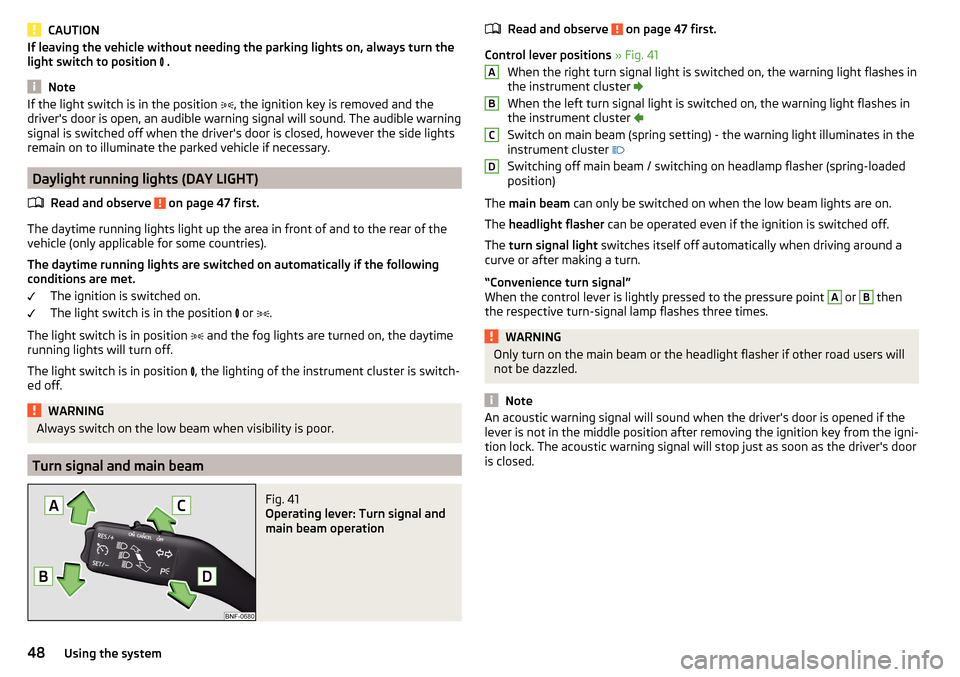
Fig. 41
Operating lever: Turn signal and
main beam operation
Read and observe on page 47 first.
Control lever positions » Fig. 41
When the right turn signal light is switched on, the warning light flashes in
the instrument cluster
When the left turn signal light is switched on, the warning light flashes in
the instrument cluster
Switch on main beam (spring setting) - the warning light illuminates in the
instrument cluster
Switching off main beam / switching on headlamp flasher (spring-loaded position)
The main beam can only be switched on when the low beam lights are on.
The headlight flasher can be operated even if the ignition is switched off.
The turn signal light switches itself off automatically when driving around a
curve or after making a turn.
“Convenience turn signal”
When the control lever is lightly pressed to the pressure point
A
or
B
then
the respective turn-signal lamp flashes three times.
WARNINGOnly turn on the main beam or the headlight flasher if other road users will
not be dazzled.
Note
An acoustic warning signal will sound when the driver's door is opened if the
lever is not in the middle position after removing the ignition key from the igni-
tion lock. The acoustic warning signal will stop just as soon as the driver's door
is closed.ABCD48Using the system
Page 57 of 160
WARNINGPlease note the following points about the head restraint settings
» page 8 , Correct and safe seated position .
Note
The front headrests are integrated into the seat backrests and cannot be ad-
justed in height.
Headrests - removing and installing
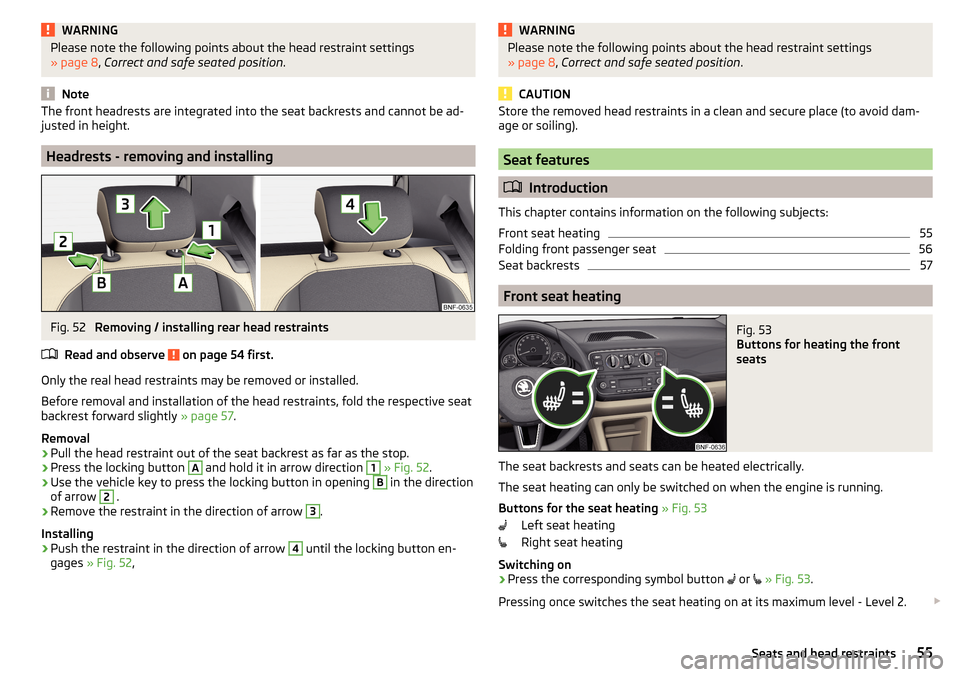
Fig. 52
Removing / installing rear head restraints
Read and observe
on page 54 first.
Only the real head restraints may be removed or installed.
Before removal and installation of the head restraints, fold the respective seat
backrest forward slightly » page 57.
Removal
›
Pull the head restraint out of the seat backrest as far as the stop.
›
Press the locking button
A
and hold it in arrow direction
1
» Fig. 52 .
›
Use the vehicle key to press the locking button in opening
B
in the direction
of arrow
2
.
›
Remove the restraint in the direction of arrow
3
.
Installing
›
Push the restraint in the direction of arrow
4
until the locking button en-
gages » Fig. 52 ,
WARNINGPlease note the following points about the head restraint settings
» page 8 , Correct and safe seated position .
CAUTION
Store the removed head restraints in a clean and secure place (to avoid dam-
age or soiling).
Seat features
Introduction
This chapter contains information on the following subjects:
Front seat heating
55
Folding front passenger seat
56
Seat backrests
57
Front seat heating
Fig. 53
Buttons for heating the front
seats
The seat backrests and seats can be heated electrically.
The seat heating can only be switched on when the engine is running.
Buttons for the seat heating » Fig. 53
Left seat heating
Right seat heating
Switching on
›
Press the corresponding symbol button
or
» Fig. 53 .
Pressing once switches the seat heating on at its maximum level - Level 2.
55Seats and head restraints
Page 59 of 160
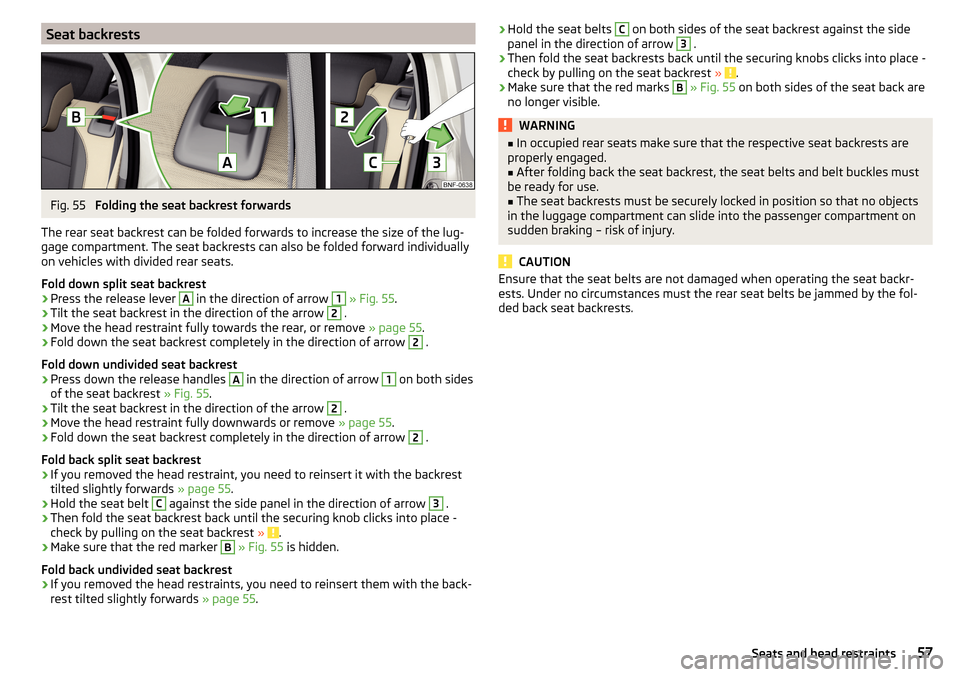
Seat backrestsFig. 55
Folding the seat backrest forwards
The rear seat backrest can be folded forwards to increase the size of the lug-
gage compartment. The seat backrests can also be folded forward individually
on vehicles with divided rear seats.
Fold down split seat backrest
›
Press the release lever
A
in the direction of arrow
1
» Fig. 55 .
›
Tilt the seat backrest in the direction of the arrow
2
.
›
Move the head restraint fully towards the rear, or remove » page 55.
›
Fold down the seat backrest completely in the direction of arrow
2
.
Fold down undivided seat backrest
›
Press down the release handles
A
in the direction of arrow
1
on both sides
of the seat backrest » Fig. 55.
›
Tilt the seat backrest in the direction of the arrow
2
.
›
Move the head restraint fully downwards or remove » page 55.
›
Fold down the seat backrest completely in the direction of arrow
2
.
Fold back split seat backrest
›
If you removed the head restraint, you need to reinsert it with the backrest
tilted slightly forwards » page 55.
›
Hold the seat belt
C
against the side panel in the direction of arrow
3
.
›
Then fold the seat backrest back until the securing knob clicks into place -
check by pulling on the seat backrest » .
›
Make sure that the red marker
B
» Fig. 55 is hidden.
Fold back undivided seat backrest
›
If you removed the head restraints, you need to reinsert them with the back-
rest tilted slightly forwards » page 55.
›Hold the seat belts C on both sides of the seat backrest against the side
panel in the direction of arrow 3 .›
Then fold the seat backrests back until the securing knobs clicks into place -
check by pulling on the seat backrest » .
›
Make sure that the red marks
B
» Fig. 55 on both sides of the seat back are
no longer visible.
WARNING■ In occupied rear seats make sure that the respective seat backrests are
properly engaged.■
After folding back the seat backrest, the seat belts and belt buckles must
be ready for use.
■
The seat backrests must be securely locked in position so that no objects
in the luggage compartment can slide into the passenger compartment on
sudden braking – risk of injury.
CAUTION
Ensure that the seat belts are not damaged when operating the seat backr-
ests. Under no circumstances must the rear seat belts be jammed by the fol-
ded back seat backrests.57Seats and head restraints
Page 66 of 160
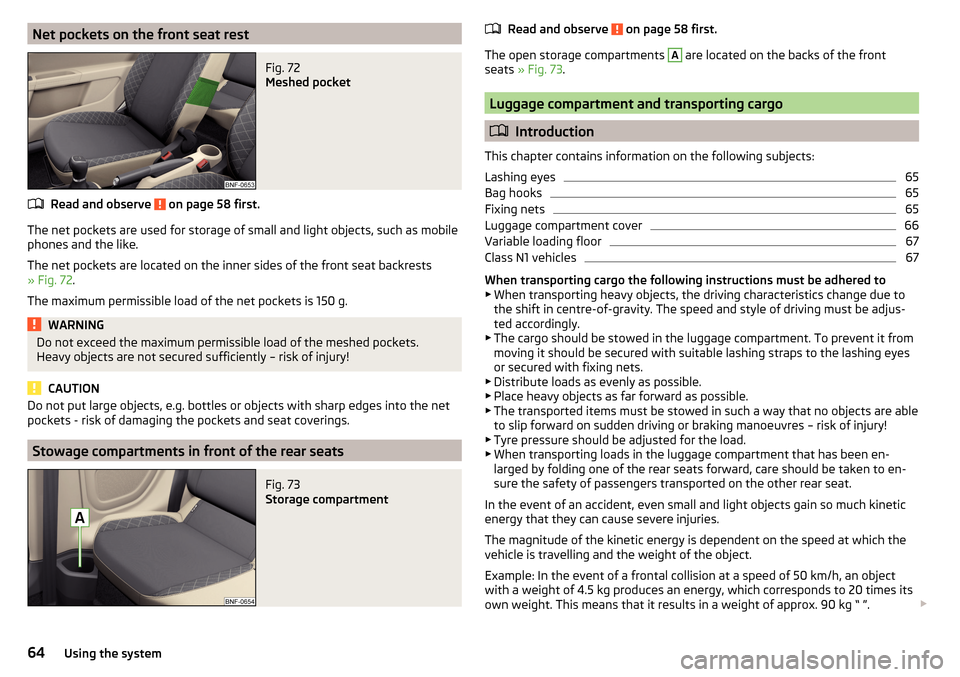
Net pockets on the front seat restFig. 72
Meshed pocket
Read and observe on page 58 first.
The net pockets are used for storage of small and light objects, such as mobilephones and the like.
The net pockets are located on the inner sides of the front seat backrests
» Fig. 72 .
The maximum permissible load of the net pockets is 150 g.
WARNINGDo not exceed the maximum permissible load of the meshed pockets.
Heavy objects are not secured sufficiently – risk of injury!
CAUTION
Do not put large objects, e.g. bottles or objects with sharp edges into the net
pockets - risk of damaging the pockets and seat coverings.
Stowage compartments in front of the rear seats
Fig. 73
Storage compartment
Read and observe on page 58 first.
The open storage compartments
A
are located on the backs of the front
seats » Fig. 73 .
Luggage compartment and transporting cargo
Introduction
This chapter contains information on the following subjects:
Lashing eyes
65
Bag hooks
65
Fixing nets
65
Luggage compartment cover
66
Variable loading floor
67
Class N1 vehicles
67
When transporting cargo the following instructions must be adhered to
▶ When transporting heavy objects, the driving characteristics change due to
the shift in centre-of-gravity. The speed and style of driving must be adjus-
ted accordingly.
▶ The cargo should be stowed in the luggage compartment. To prevent it from
moving it should be secured with suitable lashing straps to the lashing eyes
or secured with fixing nets.
▶ Distribute loads as evenly as possible.
▶ Place heavy objects as far forward as possible.
▶ The transported items must be stowed in such a way that no objects are able
to slip forward on sudden driving or braking manoeuvres – risk of injury!
▶ Tyre pressure should be adjusted for the load.
▶ When transporting loads in the luggage compartment that has been en-
larged by folding one of the rear seats forward, care should be taken to en-
sure the safety of passengers transported on the other rear seat.
In the event of an accident, even small and light objects gain so much kinetic
energy that they can cause severe injuries.
The magnitude of the kinetic energy is dependent on the speed at which the
vehicle is travelling and the weight of the object.
Example: In the event of a frontal collision at a speed of 50 km/h, an object
with a weight of 4.5 kg produces an energy, which corresponds to 20 times its
own weight. This means that it results in a weight of approx. 90 kg “ ”.
64Using the system
Page 67 of 160
Luggage compartment light
The warning light illuminates when boot is opened.
The warning light turns off when the boot is closed.
If the boot lid is open and the ignition switched off, the light will extinguish
automatically after around 10 minutes.WARNING■ Never exceed the maximum permissible load for the respective fasteners,
nets, hooks etc. If heavy objects have not been suitably secured – risk of
injury!■
If the cargo is tied down with unsuitable or damaged lashing straps, inju-
ries can occur in the event of braking manoeuvres or accidents.
■
Loose cargo can be thrown forward during a sudden manoeuvre or in the
event of an accident and can injure the occupants or other road users.
■
Loose cargo could hit a deployed airbag and injure occupants – danger of
death!
CAUTION
■ Never exceed the maximum permissible load for the respective fasteners,
nets, hooks etc. - these could become damaged.■
Please ensure that the heating elements for the rear window heater are not
damaged as a result of abrasive objects.
Lashing eyes
Fig. 74
Lashing
Read and observe and on page 65 first.
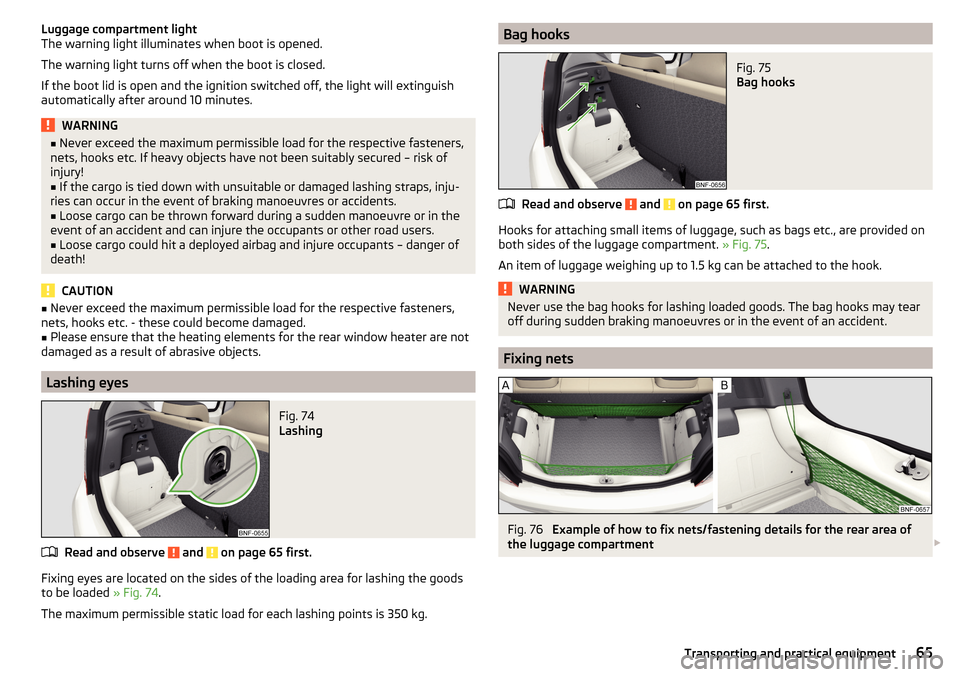
Fixing eyes are located on the sides of the loading area for lashing the goods to be loaded » Fig. 74.
The maximum permissible static load for each lashing points is 350 kg.
Bag hooksFig. 75
Bag hooks
Read and observe and on page 65 first.
Hooks for attaching small items of luggage, such as bags etc., are provided on
both sides of the luggage compartment. » Fig. 75.
An item of luggage weighing up to 1.5 kg can be attached to the hook.
WARNINGNever use the bag hooks for lashing loaded goods. The bag hooks may tear
off during sudden braking manoeuvres or in the event of an accident.
Fixing nets
Fig. 76
Example of how to fix nets/fastening details for the rear area of
the luggage compartment
65Transporting and practical equipment
Page 74 of 160
Communication and multimedia
Telephone and Move & Fun
Introduction
This chapter contains information on the following subjects:
Mobile phones and two-way radio systems
72
Multifunction device Move & Fun - install/remove
72
Multifunction device Move & Fun - operation
73WARNINGYou should, first and foremost, concentrate fully on driving at all times! As
the driver you are fully responsible for the operation of your vehicle. Use
the telephone system only to such an extent that you are in full control of
your vehicle at any time.
Mobile phones and two-way radio systems
Read and observe
on page 72 first.
ŠKODA permits the operation of mobile phones and two-way radio systems
with a professionally installed external aerial and a maximum transmission
power of up to 10 watts.
Please consult a ŠKODA Partner for information about the possibility of instal-
ling and operating mobile phones and two-way radio systems with a transmis-
sion power of more than 10 W.
Operating mobile phones or two-way radio systems may interfere with the
functionality of the electronic systems in your vehicle.
The possible reasons for this are. ▶ no external aerial.
▶ external aerial incorrectly installed.
▶ transmission power greater than 10 watts.
WARNING■ If a mobile phone or a two-way radio system is operated in a vehicle with-
out an external aerial or an external aerial which has been installed incor-
rectly, this can increase the strength of the electromagnetic field inside the
vehicle.■
Two-way radio systems, mobile phones or mounts must not be installed
on airbag covers or within the immediate deployment range of the airbags.
■
Never leave a mobile phone on a seat, on the dash panel or in another
area from which it can be thrown during a sudden braking manoeuvre, an
accident or a collision — risk of injury.
Note
■ We recommend that the installation of mobile phones and two-way radio
systems in a vehicle be carried out by a specialist garage.■
The range of the Bluetooth ®
connection to the hands-free system is restric-
ted to the vehicle interior. The range is dependent on local factors, e.g. obsta-
cles between the devices and mutual interferences with other devices. If your
mobile phone is in a jacket pocket, for example, this can lead to difficulties
when establishing a connection with the hands-free-system or transferring
data.
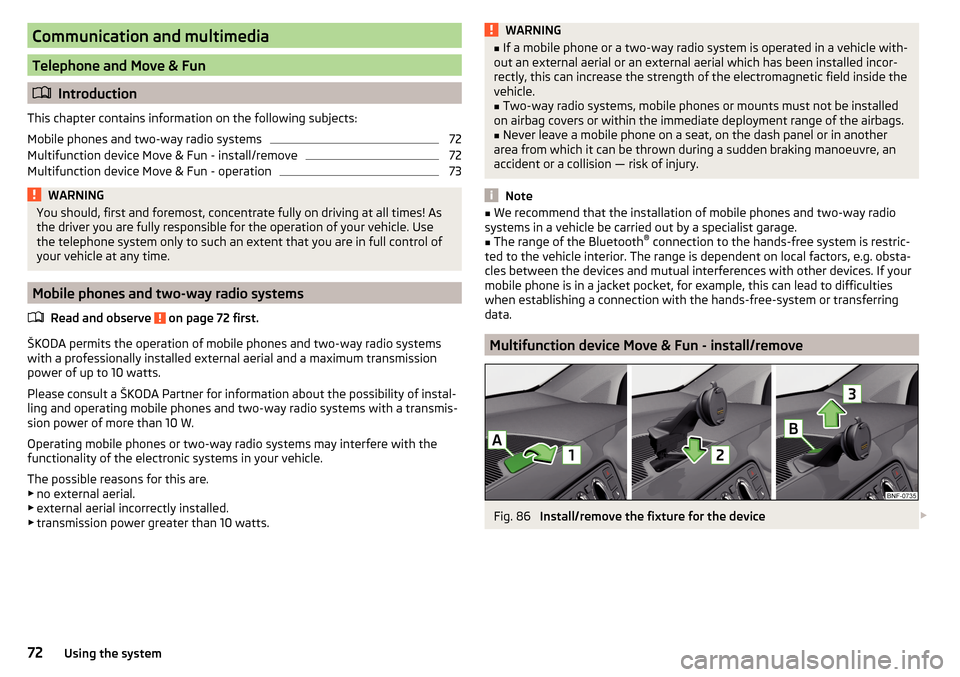
Multifunction device Move & Fun - install/remove
Fig. 86
Install/remove the fixture for the device
72Using the system
Page 85 of 160
The gearbox shifts down one or more gears depending on the vehicle speed
and engine speed, and the vehicle accelerates.
The gearbox does not shift up into the highest gear until the engine has
reached its maximum revolutions for this gear range.WARNINGRapid acceleration, particularly on slippery roads, can lead to loss of vehicle
control – risk of accident!
Running-in and economical driving
Introduction
This chapter contains information on the following subjects:
Running-in
83
Tips for economical driving
83
The fuel consumption, degree of pollution and vehicle wear depend on driving
style, road condition, weather conditions and the like.
Running-in
Driving in the engine
The engine has to be run in during the first 1 500 kilometres. During this peri-
od, the driving style decides on the quality of the driving-in process.
During the first 1 000 km we recommend not driving faster than 3/4 of the
maximum permissible engine speed, not to drive at full throttle and to dis-
pense with the trailer.
In the area of 1,000 to 1,500 kilometres the engine load can be increased up
to the maximum permitted engine speed.
New tyres
New tyres must firstly be “run in” since they do not offer optimal grip at first.
Therefore, drive especially carefully for the first 500 km or so.
New brake pads
New brake pads have to first “grind in” because these do not initially have the
best possible braking effect.
Therefore, drive especially carefully for the first 200 km or so.
Tips for economical driving
To achieve the lowest possible fuel consumption, the following instructions
must be observed.
Looking ahead when driving
Avoid unnecessary acceleration and braking.
Switch in an energy saving and timely manner Observe the recommended gear » page 30.
Avoid full throttle and high speeds
Fuel consumption can be reduced by half if only three-quarters of the possible
top speed of your vehicle is used.
Reducing idling
If the vehicle is fitted with the START - STOP system there is an automatic re-
duction of the idling. If the engine is stopped on vehicles without START-STOP
system, such as when waiting in a traffic jam, the fuel economy is already
greater after 30 - 40 s than the fuel quantity which is required for engine re-
start.
Avoid short distances
When driving a short distance of less than about 4 km, the engine cannot
reach its operating temperature. As long as the engine has not reached oper-
ating temperature, the fuel consumption is significantly higher than with the
engine hot.
Pay attention to the correct tyre inflation pressure being maintained
Further information » page 117.
Avoid unnecessary ballast
Per 100 kg of weight, consumption increases by about 0.3 l/100 km. At a speed
of 100 - 120 km/h, a vehicle fitted with a roof rack cross member without a load
will use about 10 % more fuel than normal due to the increased aerodynamic
drag.
Saving electricity
Only turn on electrical consumers (e.g. seat, window and mirror heating and
similar) for as long as necessary.
Use the cooling system economically
The air conditioning system compressor uses power from the engine when in
cooling mode, which will affect the fuel consumption. 83Starting-off and Driving
Page 86 of 160
It recommended to open the windows or the doors of a vehicle for which the
interior has been strongly heated through the effect of direct sunlight in order
to allow the heated air to escape.
The cooling system should not be on if the windows are open.
Avoiding damage to your vehicle
Introduction
This chapter contains information on the following subjects:
Driving Tips
84
Driving through water
84
This section of the manual contains important information on preventing dam-
age to the vehicle while driving.
Driving Tips
Only drive on such roads and in such terrain, which match the vehicle parame-
ters » page 142 , Technical data as well as your driving skills.
The driver is always responsible for deciding whether the vehicle can handle
travelling in the given terrain.
WARNING■ Always adjust your driving to the current terrain and weather conditions.
Excessive speed or incorrect driving manoeuvres can cause damage to the
vehicle and lead to serious injuries.■
Combustible objects such as dry leaves or twigs caught under the base of
the vehicle could ignite on hot vehicle parts - risk of fire!
CAUTION
■ Pay attention to the ground clearance of the vehicle! When driving over ob-
jects which are larger than the ground clearance, the vehicle can get damaged.■
Any objects that get trapped under the vehicle floor must be removed as
soon as possible. These objects can damage the fuel lines, the brake system,
seals and other parts of the vehicle.
■
Drive slowly in unknown terrain and watch out for unexpected obstacles,
such as potholes, rocks, stumps, etc.
■
Check up on confusing sections of unpaved roads before travelling on them
and consider whether such travelling is possible without risk.
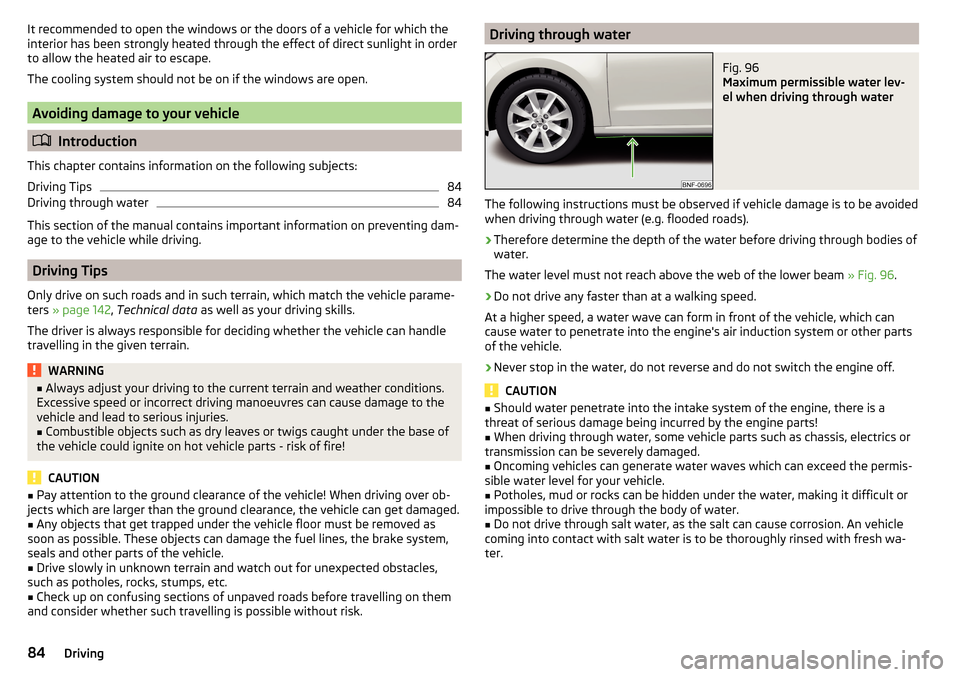
Driving through waterFig. 96
Maximum permissible water lev-
el when driving through water
The following instructions must be observed if vehicle damage is to be avoided
when driving through water (e.g. flooded roads).
›
Therefore determine the depth of the water before driving through bodies of
water.
The water level must not reach above the web of the lower beam » Fig. 96.
›
Do not drive any faster than at a walking speed.
At a higher speed, a water wave can form in front of the vehicle, which can
cause water to penetrate into the engine's air induction system or other parts
of the vehicle.
›
Never stop in the water, do not reverse and do not switch the engine off.
CAUTION
■ Should water penetrate into the intake system of the engine, there is a
threat of serious damage being incurred by the engine parts!■
When driving through water, some vehicle parts such as chassis, electrics or
transmission can be severely damaged.
■
Oncoming vehicles can generate water waves which can exceed the permis-
sible water level for your vehicle.
■
Potholes, mud or rocks can be hidden under the water, making it difficult or
impossible to drive through the body of water.
■
Do not drive through salt water, as the salt can cause corrosion. An vehicle
coming into contact with salt water is to be thoroughly rinsed with fresh wa-
ter.
84Driving
Page 87 of 160
Assist systems
General information
Introduction
WARNINGThe following general instructions regarding the use of assistance systems
must be observed.■
The assistance systems serve merely to support the driver and do not re-
lieve the driver of responsibility for the operation of the vehicle.
■
The increased safety as well as the increased occupant protection offered
by the assistance systems must not tempt you to take safety risks - there
is a risk of an accident!
■
Adjust the speed and driving style to the current visibility, weather, road
and traffic conditions.
■
The assistance systems have physical and system-related limitations. For
this reason, the driver may experience some undesired or delayed system
responses in certain situations. You should therefore always be alert and
ready to intervene!
■
Only activate, deactivate and set the assistance systems to keep you fully
in control of the vehicle in every traffic situation - otherwise there is a risk
of an accident!
Braking and stabilisation systems
Introduction
This chapter contains information on the following subjects:
Stability Control (ESC)
85
Anti-lock braking system (ABS)
85
Traction control (TCS)
85
Electronic Differential Lock (EDL)
86
Brake Assist (HBA)
86
Hill Start Assist (HHC)
86
This chapter describes the functions of the brake and stabilization systems.
The error display is in Chapter » page 34, Warning lights .
The brake and stabilisation systems are automatically activated each time the
ignition is switched on, unless otherwise indicated.
WARNINGThe general information relating to the use of assistance systems must be
observed » page 85, in section Introduction .
Stability Control (ESC)
Read and observe
on page 85 first.
The ESC improves vehicle stability in dynamic driving situations, such as whenthe vehicle starts to skid.
The ESC monitors whether the desired direction of the current vehicle motion
is occurring. In case of any deviation (e.g. oversteer), the ESC automatically
brakes individual wheels to maintain the desired direction.
During an intervention of the system, the warning light flashes in the instru-
ment cluster.
Anti-lock braking system (ABS)
Read and observe
on page 85 first.
ABS prevents the wheels locking when braking. Thus helping the driver to
maintain control of the vehicle.
The intervention of the ABS is noticeable from the pulsating movements of
the brake pedal which is accompanied by noises.
When the ABS system is active, do not brake periodically or reduce the pres-
sure on the brake pedal.
Traction control (TCS)
Read and observe
on page 85 first.
TCS prevents the spinning of the wheels on the drive axle. TCS reduces the
drive power transmitted to the wheels that are spinning Thus, for example,
driving on road surfaces with low grip is made easier.
If there is a TCS intervention, the warning light flashes in the instrument
cluster.
85Assist systems
Page 88 of 160
Electronic Differential Lock (EDL)Read and observe
on page 85 first.
EDL prevents the turning of the respective wheel of the driven axle. EDL
brakes the spinning wheel, if necessary, and transmits the driving force to the
other driving wheel. Driving becomes easier on road surfaces with different
traction under each wheel of the driven axle.
The EDL switches off automatically in order to avoid excessive heat generation
on the brake of the wheel being braked. Once the brakes have cooled down,
there is an automatic re-activation of EDL.
Brake Assist (HBA)
Read and observe
on page 85 first.
HBA increases the braking effect and helps to shorten the braking distance.The HBA is activated by very quick operation of the brake pedal. In order to
achieve the shortest possible braking distance, the brake pedal must be ap-
plied firmly until the vehicle has come to a standstill.
The HBA function is automatically switched off when the brake pedal is re-
leased.
Hill Start Assist (HHC)
Read and observe
on page 85 first.
When driving on slopes, HHC allows you to move your foot from the brake ped-al to the accelerator pedal without having to use the handbrake.
The system holds the brake pressure produced by the activation of the brake pedal for approx. 2 seconds after the brake pedal is released.
The HHC is active as of a 5 % slope, if the driver door is closed. HHC is always
only active on slopes when in forward or reverse start off.
Parking aid (ParkPilot)
Introduction
This chapter contains information on the following subjects:
Function
87
Visual parking system
87
The parking aid (hereinafter referred to as: the system) draws attention to any
obstacles via audible signals and a display in the Move & Fun multifunction de-
vice screen when manoeuvring in the vicinity of the vehicle » page 87, Visual
parking system .
WARNING■
The general information relating to the use of assistance systems must
be observed » page 85, in section Introduction .■
Moving persons or objects may not be recognized by the system sensors.
■
Under certain circumstances, surfaces of certain objects and types of
clothing cannot reflect the system signals. For this reason, such people or
objects may not be recognised by the system sensors.
■
External noise sources may affect the signals of the system sensors. Un-
der adverse conditions, this may cause objects or people not to be recog-
nised by the system.
■
Before reversing, you should make sure that there are no small obstacles,
such as rocks, thin posts, trailer drawbars etc. behind your vehicle. Such ob-
stacles may not be recognised by the system sensors.
CAUTION
■ Keep the system sensors clean, snow-and ice-free and do not cover with any
objects of any kind, otherwise the system functioning may be impaired.■
Under adverse weather conditions (heavy rain, water vapour, very low or
high temperatures etc.), the system function may be limited - “incorrect recog-
nition of obstacle”.
■
Additionally installed accessories such as e.g. bicycle carriers can impair the
system function.
86Driving