remove SKODA CITIGO 2016 1.G User Guide
[x] Cancel search | Manufacturer: SKODA, Model Year: 2016, Model line: CITIGO, Model: SKODA CITIGO 2016 1.GPages: 172, PDF Size: 24.59 MB
Page 65 of 172
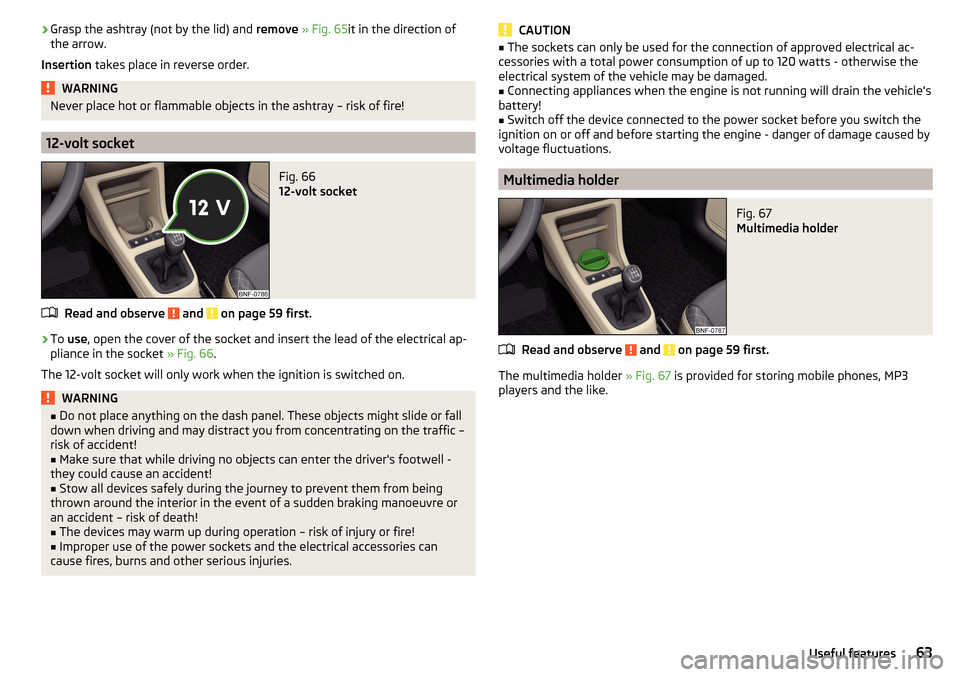
›Grasp the ashtray (not by the lid) and
remove » Fig. 65 it in the direction of
the arrow.
Insertion takes place in reverse order.WARNINGNever place hot or flammable objects in the ashtray – risk of fire!
12-volt socket
Fig. 66
12-volt socket
Read and observe and on page 59 first.
›
To use , open the cover of the socket and insert the lead of the electrical ap-
pliance in the socket » Fig. 66.
The 12-volt socket will only work when the ignition is switched on.
WARNING■ Do not place anything on the dash panel. These objects might slide or fall
down when driving and may distract you from concentrating on the traffic –
risk of accident!■
Make sure that while driving no objects can enter the driver's footwell -
they could cause an accident!
■
Stow all devices safely during the journey to prevent them from being
thrown around the interior in the event of a sudden braking manoeuvre or
an accident – risk of death!
■
The devices may warm up during operation – risk of injury or fire!
■
Improper use of the power sockets and the electrical accessories can
cause fires, burns and other serious injuries.
CAUTION■ The sockets can only be used for the connection of approved electrical ac-
cessories with a total power consumption of up to 120 watts - otherwise the
electrical system of the vehicle may be damaged.■
Connecting appliances when the engine is not running will drain the vehicle's
battery!
■
Switch off the device connected to the power socket before you switch the
ignition on or off and before starting the engine - danger of damage caused by
voltage fluctuations.
Multimedia holder
Fig. 67
Multimedia holder
Read and observe and on page 59 first.
The multimedia holder » Fig. 67 is provided for storing mobile phones, MP3
players and the like.
63Useful features
Page 66 of 172
Storage compartment on the front passenger side - version 1Fig. 68
Storage compartment on the
front passenger side
Read and observe and on page 59 first.
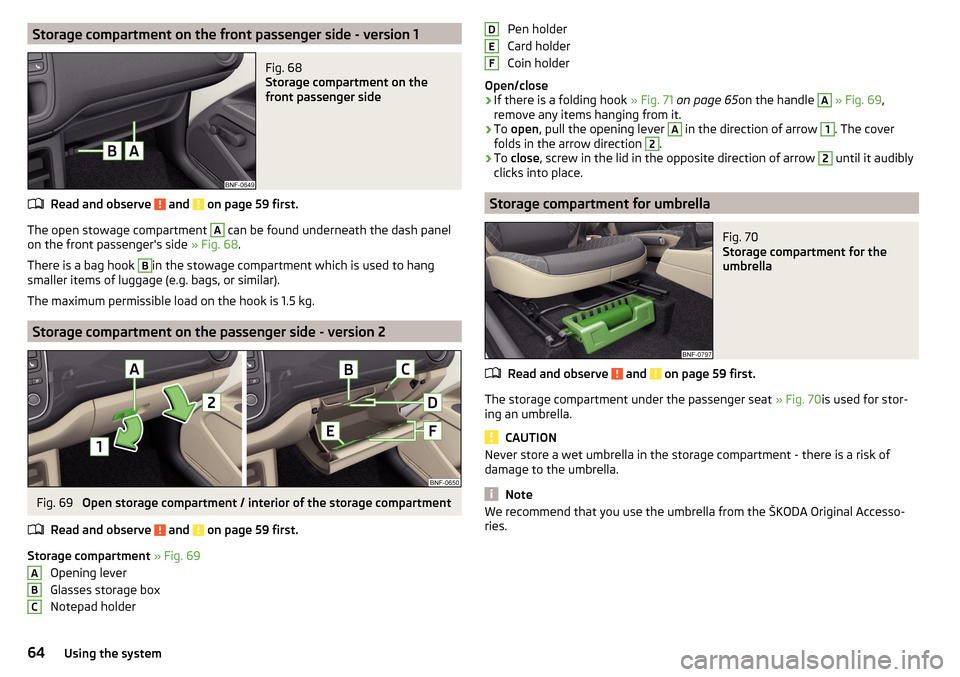
The open stowage compartment
A
can be found underneath the dash panel
on the front passenger's side » Fig. 68.
There is a bag hook
B
in the stowage compartment which is used to hang
smaller items of luggage (e.g. bags, or similar).
The maximum permissible load on the hook is 1.5 kg.
Storage compartment on the passenger side - version 2
Fig. 69
Open storage compartment / interior of the storage compartment
Read and observe
and on page 59 first.
Storage compartment » Fig. 69
Opening lever
Glasses storage box
Notepad holder
ABCPen holder
Card holder
Coin holder
Open/close›
If there is a folding hook » Fig. 71 on page 65 on the handle
A
» Fig. 69 ,
remove any items hanging from it.
›
To open , pull the opening lever
A
in the direction of arrow
1
. The cover
folds in the arrow direction
2
.
›
To close , screw in the lid in the opposite direction of arrow
2
until it audibly
clicks into place.
Storage compartment for umbrella
Fig. 70
Storage compartment for the
umbrella
Read and observe and on page 59 first.
The storage compartment under the passenger seat » Fig. 70is used for stor-
ing an umbrella.
CAUTION
Never store a wet umbrella in the storage compartment - there is a risk of
damage to the umbrella.
Note
We recommend that you use the umbrella from the ŠKODA Original Accesso-
ries.DEF64Using the system
Page 68 of 172
Stowage compartments in front of the rear seatsFig. 74
Storage compartment
Read and observe and on page 59 first.
The open storage compartments
A
are located on the backs of the front
seats » Fig. 74 .
Phone bracket
Introduction
This chapter contains information on the following subjects:
Fasten bracket to the adapter
66
Attach adapter to the panel
66
Inserting / removing phone
67
In the telephone bracket, a telephone (or similar device) which is 122x56 mm to
164x83 mm can be transversely mounted.
The maximum permissible load of the compartment is 200 g.
WARNINGNever work with the device when driving –There is a risk of accident!
CAUTION
■ Never exceed the maximum permissible load of the bracket- there is a risk of
damage or functional impairment.■
Make sure that no liquid or moisture gets into the opening for the fixture -
There is a risk of damage to the vehicle’s electrical system.
■
Use a dry cloth to clean the adapter and the bracket.
Fasten bracket to the adapterFig. 75
Insert bracket into the adapter / remove bracket from the adapter
Read and observe
and on page 66 first.
›
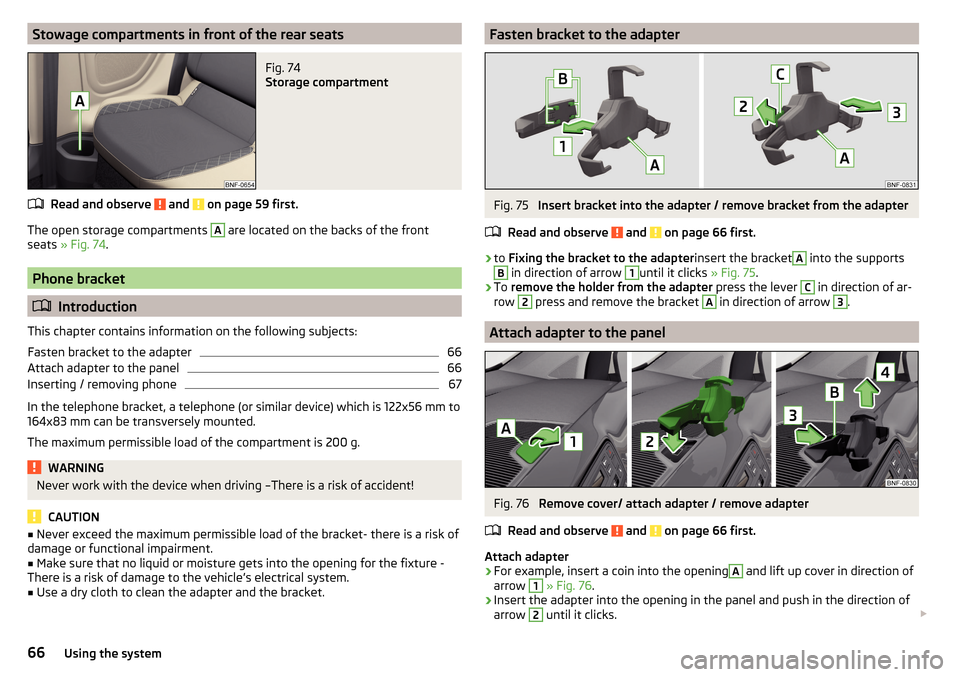
to Fixing the bracket to the adapter insert the bracket
A
into the supports
B
in direction of arrow
1
until it clicks » Fig. 75.
›
To remove the holder from the adapter press the lever
C
in direction of ar-
row
2
press and remove the bracket
A
in direction of arrow
3
.
Attach adapter to the panel
Fig. 76
Remove cover/ attach adapter / remove adapter
Read and observe
and on page 66 first.
Attach adapter
›
For example, insert a coin into the opening
A
and lift up cover in direction of
arrow
1
» Fig. 76 .
›
Insert the adapter into the opening in the panel and push in the direction of
arrow
2
until it clicks.
66Using the system
Page 69 of 172
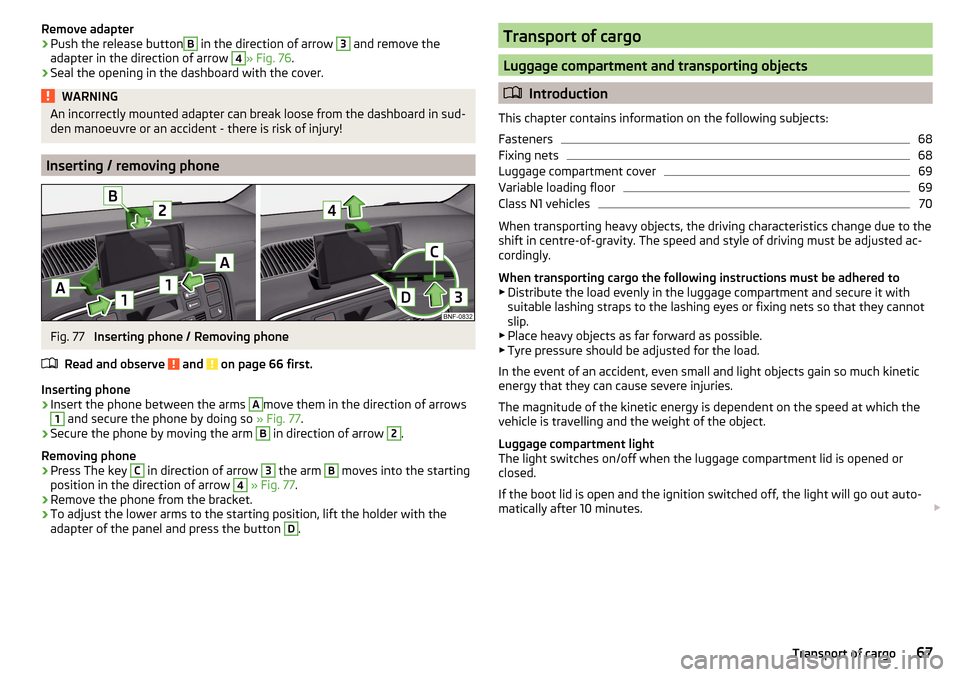
Remove adapter›Push the release buttonB in the direction of arrow 3 and remove the
adapter in the direction of arrow 4
» Fig. 76 .
›
Seal the opening in the dashboard with the cover.
WARNINGAn incorrectly mounted adapter can break loose from the dashboard in sud-
den manoeuvre or an accident - there is risk of injury!
Inserting / removing phone
Fig. 77
Inserting phone / Removing phone
Read and observe
and on page 66 first.
Inserting phone
›
Insert the phone between the arms
A
move them in the direction of arrows
1
and secure the phone by doing so » Fig. 77.
›
Secure the phone by moving the arm
B
in direction of arrow
2
.
Removing phone
›
Press The key
C
in direction of arrow
3
the arm
B
moves into the starting
position in the direction of arrow
4
» Fig. 77 .
›
Remove the phone from the bracket.
›
To adjust the lower arms to the starting position, lift the holder with the
adapter of the panel and press the button
D
.
Transport of cargo
Luggage compartment and transporting objects
Introduction
This chapter contains information on the following subjects:
Fasteners
68
Fixing nets
68
Luggage compartment cover
69
Variable loading floor
69
Class N1 vehicles
70
When transporting heavy objects, the driving characteristics change due to the
shift in centre-of-gravity. The speed and style of driving must be adjusted ac-
cordingly.
When transporting cargo the following instructions must be adhered to
▶ Distribute the load evenly in the luggage compartment and secure it with
suitable lashing straps to the lashing eyes or fixing nets so that they cannot
slip.
▶ Place heavy objects as far forward as possible.
▶ Tyre pressure should be adjusted for the load.
In the event of an accident, even small and light objects gain so much kinetic
energy that they can cause severe injuries.
The magnitude of the kinetic energy is dependent on the speed at which the
vehicle is travelling and the weight of the object.
Luggage compartment light
The light switches on/off when the luggage compartment lid is opened or
closed.
If the boot lid is open and the ignition switched off, the light will go out auto-
matically after 10 minutes.
67Transport of cargo
Page 71 of 172
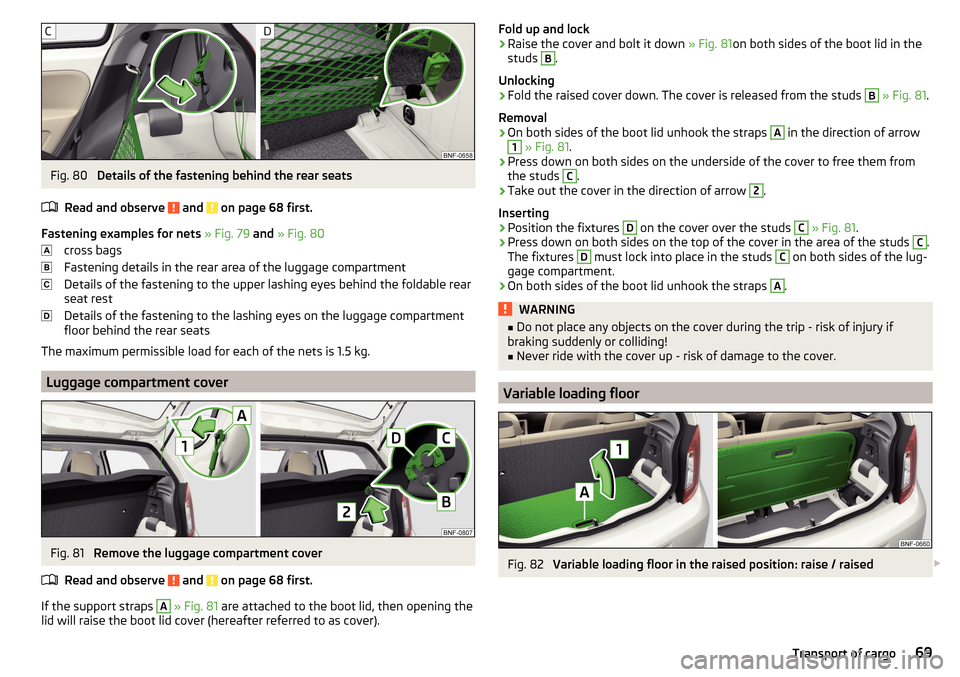
Fig. 80
Details of the fastening behind the rear seats
Read and observe
and on page 68 first.
Fastening examples for nets » Fig. 79 and » Fig. 80
cross bags
Fastening details in the rear area of the luggage compartment
Details of the fastening to the upper lashing eyes behind the foldable rear
seat rest
Details of the fastening to the lashing eyes on the luggage compartment
floor behind the rear seats
The maximum permissible load for each of the nets is 1.5 kg.
Luggage compartment cover
Fig. 81
Remove the luggage compartment cover
Read and observe
and on page 68 first.
If the support straps
A
» Fig. 81 are attached to the boot lid, then opening the
lid will raise the boot lid cover (hereafter referred to as cover).
Fold up and lock›Raise the cover and bolt it down » Fig. 81on both sides of the boot lid in the
studs B
.
Unlocking
›
Fold the raised cover down. The cover is released from the studs
B
» Fig. 81 .
Removal
›
On both sides of the boot lid unhook the straps
A
in the direction of arrow
1
» Fig. 81 .
›
Press down on both sides on the underside of the cover to free them from
the studs
C
.
›
Take out the cover in the direction of arrow
2
.
Inserting
›
Position the fixtures
D
on the cover over the studs
C
» Fig. 81 .
›
Press down on both sides on the top of the cover in the area of the studs
C
.
The fixtures
D
must lock into place in the studs
C
on both sides of the lug-
gage compartment.
›
On both sides of the boot lid unhook the straps
A
.
WARNING■ Do not place any objects on the cover during the trip - risk of injury if
braking suddenly or colliding!■
Never ride with the cover up - risk of damage to the cover.
Variable loading floor
Fig. 82
Variable loading floor in the raised position: raise / raised
69Transport of cargo
Page 81 of 172
System settings›
Press the button
→
.
Menus for the system settings ■
Screen
- setting the screen displays
■
Language
- set the device language
■
Bluetooth
- Bluetooth ®
device settings
■
App connection
- Turn the connection on / off with the Move & Funapplication
■
Remove source safely
- Safe removal of external devices
■
Factory settings
- reset to factory settings
■
System information
- System Information
■
Copyright
- license information of the device
Display settings ▶ Press the button
→
→
screen
.
■
Switch off screen (in 10 s)
- Enable / disable the automatic display shut-off func-
tion
■
Brightness: ...
- Adjusts the brightness of the display
■
Show clock in standby mode
- Time and date shown on the display when the igni-
tion is switched on and the unit is switched off
■
Colour: ...
- Colour selection for the display representation
Settings the device language
▶ Press the button
→
→
Language
.
▶ Set the desired language.
By selecting the menu item
automatically (same as instrum. cluster)
the device lan-
guage is set according to the language setting for the MAXI DOTdisplay
» page 41 .
Bluetooth settings ▶ Press the button
→
Press
→
Bluetooth
.
■
Bluetooth
- Switch on/off Bluetooth ®
function
■
Visibility: ...
- switch on/off the visibility of the Bluetooth ®
device for other devi-
ces
■
System name: ...
- Bluetooth ®
device name (Skoda BT XXXXwhere XXXX repre-
sents the last four digits of the vehicle identification number)
■
Paired devices
- display the list of paired Bluetooth ®
devices
■
Find devices
- searches for available devices
■
Bluetooth audio (A2DP/AVRCP)
- Turn on/off the ability to connect an audio device
(e.g. MP3 player, tablet etc.)
Connection with the application
▶ Press the button
→ →
App connection
.
■
Data transfer active
- Turn the connection on / off with the Move & Funapplica-
tion
Safe removal of the external device ▶ Press the button
→
Press →
Remove source safely
.
▶ Select the external device to be removed.
Factory settings (to factory settings) ▶ Press the button
→
→
Factory settings
.
▶ Select the menu item to be reset to factory settings.
By selecting the menu item
Reset all
, all device menus are reset to factory set-
tings.
System information
▶ Press the button
→
→
system information
.
■ Part Number: - Part number of the device
■ Software: - Version of the software used
■ Hardware: - Version of the hardware used
■ Bluetooth: - Version of the Bluetooth ®
software used
▶ to Update device software press the function button
.
The information about available software updates with a ŠKODA partner.
Radio settings
›
Press the button
→
.
■
Arrow buttons: ...
- Setting the station change function (function keys and
)
■
Presets
- Change between stations stored under the preset buttons
■
Stations
- Change between all available stations of the selected broadcast-
ing range
■
Traffic programme (TP)
- Switches TP traffic programme on/off
■
Radio text
- Switching the text display radio (valid only for FM and DAB) on and
off
■
Delete stored stations
- Delete the preset buttons
■
FM station list: ...
- Sort the channels in the list of available stations on the FM
radio range
■
Alphabetically
- Sorting by name
■
By group
- Sorting by PI code
79Swing/ Blues Radio
Page 82 of 172
■Advanced FM settings - Additional FM broadcast range settings
■RDS Regional: ...
- Setting the automatic change to a regional stations with a
stronger reception signal ■
Automatic
- Switching on the automatic change
■
Fix
- Turn off the automatic change
■
Radio Data System (RDS)
- enable/disable RDS function (receiving additional in-
formation from the station)
■
Automatic frequency control (AF)
- Search for alternative frequencies of the sta-
tion currently being played to on/off
■
Advanced setup DAB
- Other DAB broadcast area settings
■
DAB traffic announcements
- Switch on/off DAB traffic announcements
■
Other DAB announcements
- Switch on/off other announcements (e.g., warn-
ings, regional weather, sports reports, financial news)
■
DAB - DAB station tracking
- Switch on/off automatic DAB station tracking on
another frequency or in other station groups
■
Automatic DAB - FM switching
- Switch on/off auto-switching from DAB to the
FM broadcasting range if the DAB signal is lost
Media settings
›
Press the button
→
.
■
Mix/repeat including subfolders
- Switching the title display including subfolders
■
Select Bluetooth device
- Display the list of paired Bluetooth ®
-Devices
» page 93 , Managing paired Bluetooth devices
Device settings - Blues
Sound settings
›
Press the button .
■
Volume
- Volume settings
■
Max. switch-on vol.
- Sets the maximum volume when the device is turned on
■
Announcements
- Adjustment of traffic announcements volume (TP)
■
Speed-dependent vol. adjustment
- increases the volume as speed increases
■
AUX volume: ...
- Sets the volume for the device connected via AUX
■
Quiet
- low volume
■
Medium
- Medium volume
■
Loud
- High volume
■
Balance - Fader
- Setting the sound focus between left and right, front and rear
(applies to equipment with four speakers)
■Balance - Setting the sound focus between the left and right (applies to equip-
ment with two speakers)
■Bass - Mid - Treble
- setting the equaliser
Main menu settings
›
Press the button .
›
Choose the desired menu item by turning the controller
.
›
Confirm menu item selection by pressing the controller
.
■
Radio
- Radio menu settings » page 80, Radio settings
■
Media
- Media menu settings » page 81, Media settings
■
Screen
- setting the screen displays » page 81, Display settings
■
Language
- set the device language » page 81, Device language settings
■
Remove source safely
- Safe removal of external devices » page 81, Safe re-
moval of the external device
■
Factory settings
- reset to factory settings » page 81, Factory settings (to fac-
tory settings)
■
System information
- System Information » page 81, System information
■
Copyright
- license information of the device
Radio settings
›
Press the button →
Radio
.
■
Arrow buttons: ...
- Setting the station change function (buttons and )
■
Presets
- Change between stations stored under the preset buttons
■
Stations
- Change between all available stations of the selected broadcast-
ing range
■
Traffic programme (TP)
- Switches TP traffic programme on/off
■
Delete presets
- Deletes the preset buttons
■
Sort: ...
- Sort the channels in the list of available stations on the FM radio
range
■
Alphabetically
- Sorting by name
■
By group
- Sorting by PI code
■
Advanced FM settings
- Additional FM broadcast range settings
■
RDS Reg .: ...
- Setting the automatic change to a regional stations with a
stronger reception signal ■
Automatic
Automatic - Switching on the automatic change function
■
Fix
- Turn off the automatic change
80Infotainment
Page 83 of 172
■Radio Data System (RDS) - enable/disable RDS function (receiving additional in-
formation from the station)
■Frequency control (AF)
- Search for alternative frequencies of the station cur-
rently being played to on/off
■
Advanced setup DAB
- Other DAB broadcast area settings
■
DAB traffic announcements
- Switch on/off DAB traffic announcements
■
Other DAB announcements
- Switch on/off other announcements (e.g., warn-
ings, regional weather, sports reports, financial news)
■
Station tracking. DAB
- Switch on/off automatic DAB station tracking on anoth-
er frequency or in other station groups
■
Aut. DAB - FM switching
- Switch on/off auto-switching from DAB to the FM
broadcasting range if the DAB signal is lost
Media settings
›
Press the button
→
Media
.
■
Mix/repeat including sub-folders
- Switching the title display on/off including sub-
folders
Display settings
›
Press the button →
Screen
.
■
Screen off (in 10 seconds)
- Enable / disable the automatic power off function
■
Brightness: ...
- Adjusts the brightness of the display
■
Show time in standby
- Time and date displayed on the screen when the ignition
is switched on and the unit is switched off
Device language settings
›
Press the button
→
Language
.
›
Set the desired language.
By selecting the menu item
Auto (= instrum. cluster)
the device language is set ac-
cording to the language setting for the MAXI DOTdisplay » page 41.
Safe removal of the external device
›
Press the button
→
Remove source safely
.
›
Select the external device to be removed.
Factory settings (to factory settings)›
Press the button →
Factory settings
.
›
Select the menu item to be reset to factory settings.
By selecting the menu item
Reset all
, all device menus are reset to factory set-
tings.
System information
›
Press the button →
System information
.
Displaying system information.
▶ Part No .: - Part number of the device
▶ Software: - Version of the software used
▶ Hardware: - Version of the hardware used
Radio
Introduction
This chapter contains information on the following subjects:
Main menu
82
Select broadcasting range
82
Search for stations and select frequency
82
List of available stations
83
Preset buttons for your favourite channels
83
The device allows analogue radio reception of FM and AM frequency ranges as
well as DAB digital radio reception.
CAUTION
■ For vehicles with window antennas do not stick foil or metal coated stickers
to the window - Radio signal reception could be affected.■
Car parks, tunnels, tall buildings or mountains can interfere with the radio
signal even causing it to fail completely.
81Swing/ Blues Radio
Page 88 of 172
If no audio source is chosen within 5 seconds, then the main menu of the last
selected audio source is displayed.›
To select the audio source in the folder / track list the function button
repeatedly until the display on the position
B
» Fig. 101 on page 84
is dis-
played.
›
Press the function key
. Using the dial
Select the sound source » Fig. 103
and select the desired folder / track.
Playback starts automatically (does not apply to AUX).
If AUX is selected as the audio source, the playback must be started on the
connected device.
CAUTION
■ Do not save any important data or that which has not been backed up on the
connected audio sources. ŠKODA assumes no responsibility for lost or dam-
aged files or connected audio sources.■
When changing or connecting an audio source, this may cause sudden
changes in volume. Reduce the volume before changing or connecting an au-
dio source.
■
When connecting an external audio source, the external source information
messages can be displayed. These messages must be observed and if neces-
sary confirmed (e.g. enabling data transfer etc).
Note
The national copyright laws that apply in your country must be observed.
SD-card
Fig. 104
Insert the SD card
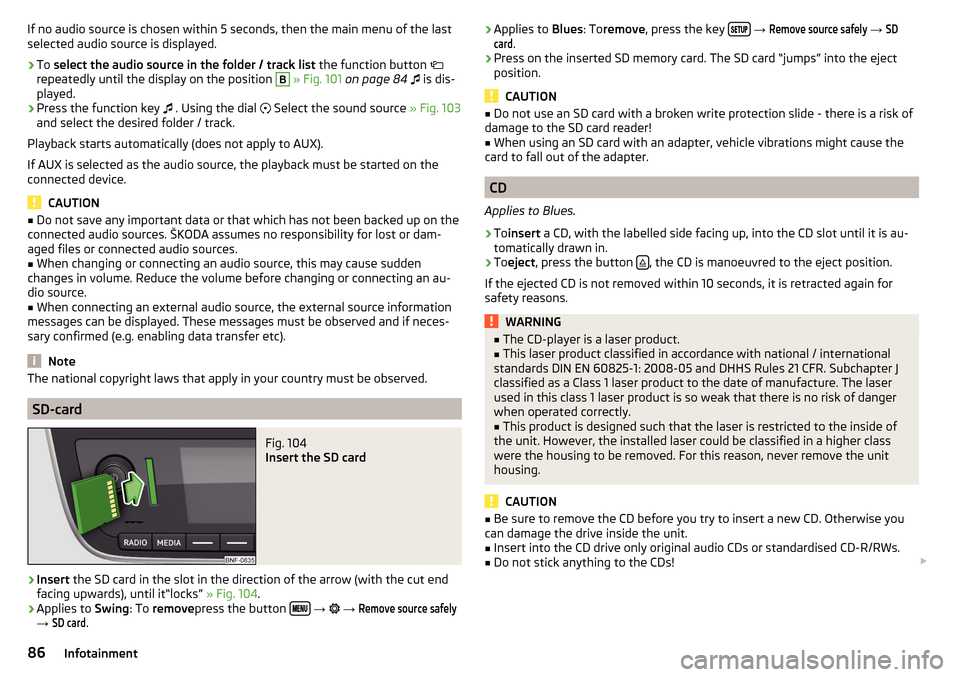
›
Insert the SD card in the slot in the direction of the arrow (with the cut end
facing upwards), until it“locks” » Fig. 104.
›
Applies to Swing: To remove press the button
→
→
Remove source safely
→
SD card
.
› Applies to
Blues: Toremove , press the key
→ Remove source safely → SDcard
.›
Press on the inserted SD memory card. The SD card “jumps” into the eject
position.
CAUTION
■ Do not use an SD card with a broken write protection slide - there is a risk of
damage to the SD card reader!■
When using an SD card with an adapter, vehicle vibrations might cause the
card to fall out of the adapter.
CD
Applies to Blues.
›
To insert a CD, with the labelled side facing up, into the CD slot until it is au-
tomatically drawn in.
›
To eject , press the button , the CD is manoeuvred to the eject position.
If the ejected CD is not removed within 10 seconds, it is retracted again for
safety reasons.
WARNING■ The CD-player is a laser product.■This laser product classified in accordance with national / international
standards DIN EN 60825-1: 2008-05 and DHHS Rules 21 CFR. Subchapter J
classified as a Class 1 laser product to the date of manufacture. The laser
used in this class 1 laser product is so weak that there is no risk of danger
when operated correctly.■
This product is designed such that the laser is restricted to the inside of
the unit. However, the installed laser could be classified in a higher class
were the housing to be removed. For this reason, never remove the unit
housing.
CAUTION
■ Be sure to remove the CD before you try to insert a new CD. Otherwise you
can damage the drive inside the unit.■
Insert into the CD drive only original audio CDs or standardised CD-R/RWs.
■
Do not stick anything to the CDs!
86Infotainment
Page 89 of 172
■If the ambient temperature is too high or too low, the CD playback may not
function properly.■
Damp (condensation) may affect the device in cold weather or high humidity.
This can cause the CD to jump or impair the play function. Once the moisture
has dissipated, playback is fully functional again.
Note
■ After pressing the button , there is a delay of a few seconds before the CD
is ejected.■
On uneven or unpaved roads, playback jumps may occur.
■
If the CD is damaged, is not readable or is inserted incorrectly, the following
message is displayed
CD is unreadable
.
■
It is possible that CDs protected by copyright cannot not be played back at all
or only in certain circumstances.
USB input
Fig. 105
USB input: in the front centre console / in the dashboard
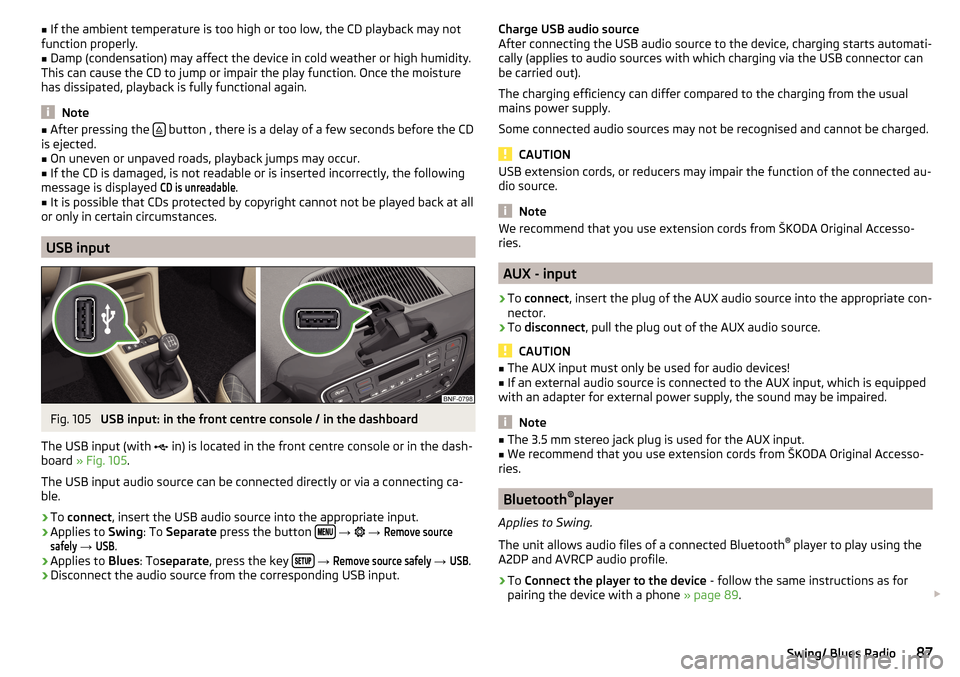
The USB input (with in) is located in the front centre console or in the dash-
board » Fig. 105 .
The USB input audio source can be connected directly or via a connecting ca-
ble.
›
To connect , insert the USB audio source into the appropriate input.
›
Applies to Swing: To Separate press the button
→
→
Remove sourcesafely
→
USB
.
›
Applies to Blues: Toseparate , press the key
→
Remove source safely
→
USB
.
›
Disconnect the audio source from the corresponding USB input.
Charge USB audio source
After connecting the USB audio source to the device, charging starts automati-
cally (applies to audio sources with which charging via the USB connector can
be carried out).
The charging efficiency can differ compared to the charging from the usual
mains power supply.
Some connected audio sources may not be recognised and cannot be charged.
CAUTION
USB extension cords, or reducers may impair the function of the connected au-
dio source.
Note
We recommend that you use extension cords from ŠKODA Original Accesso-
ries.
AUX - input
›
To connect , insert the plug of the AUX audio source into the appropriate con-
nector.
›
To disconnect , pull the plug out of the AUX audio source.
CAUTION
■
The AUX input must only be used for audio devices!■If an external audio source is connected to the AUX input, which is equipped
with an adapter for external power supply, the sound may be impaired.
Note
■ The 3.5 mm stereo jack plug is used for the AUX input.■We recommend that you use extension cords from ŠKODA Original Accesso-
ries.
Bluetooth ®
player
Applies to Swing.
The unit allows audio files of a connected Bluetooth ®
player to play using the
A2DP and AVRCP audio profile.
›
To Connect the player to the device - follow the same instructions as for
pairing the device with a phone » page 89.
87Swing/ Blues Radio