Set SKODA CITIGO 2016 1.G Owner's Guide
[x] Cancel search | Manufacturer: SKODA, Model Year: 2016, Model line: CITIGO, Model: SKODA CITIGO 2016 1.GPages: 172, PDF Size: 24.59 MB
Page 93 of 172
The phone numbers are already set at the factory. If you want to change the
numbers, then consult a ŠKODA service partner.
If no breakdown or Info calls can be made then consult a ŠKODA service part-
ner.
List of telephone contacts
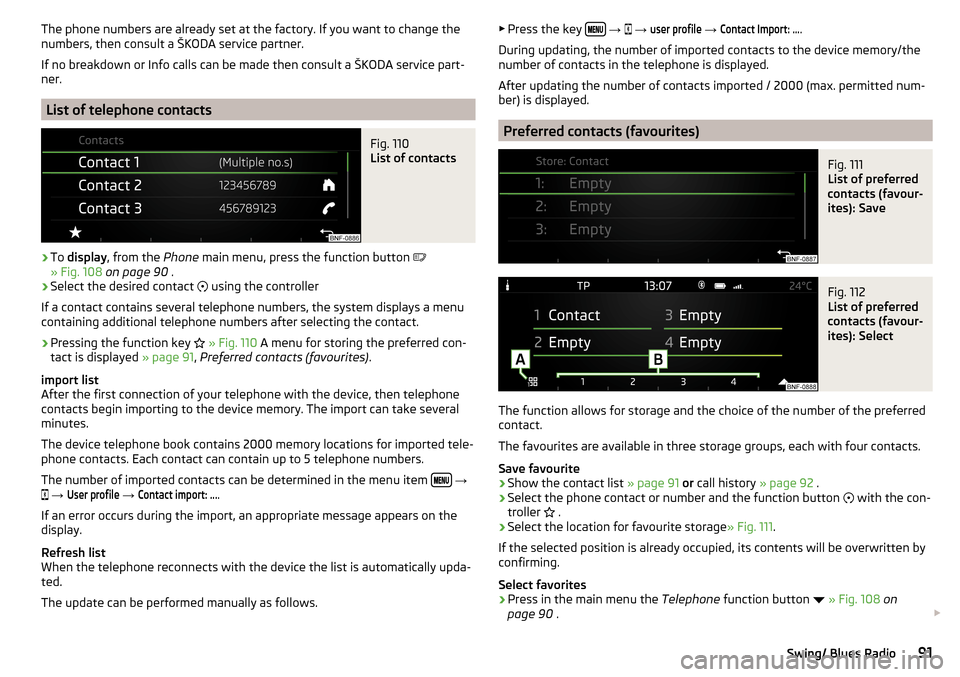
Fig. 110
List of contacts
›
To display , from the Phone main menu, press the function button
» Fig. 108 on page 90 .
›
Select the desired contact
using the controller
If a contact contains several telephone numbers, the system displays a menu
containing additional telephone numbers after selecting the contact.
›
Pressing the function key
» Fig. 110 A menu for storing the preferred con-
tact is displayed » page 91, Preferred contacts (favourites) .
import list
After the first connection of your telephone with the device, then telephone
contacts begin importing to the device memory. The import can take several
minutes.
The device telephone book contains 2000 memory locations for imported tele-
phone contacts. Each contact can contain up to 5 telephone numbers.
The number of imported contacts can be determined in the menu item
→
→
User profile
→
Contact import: ...
.
If an error occurs during the import, an appropriate message appears on the
display.
Refresh list
When the telephone reconnects with the device the list is automatically upda-
ted.
The update can be performed manually as follows.
▶ Press the key
→ → user profile → Contact Import: ....
During updating, the number of imported contacts to the device memory/the
number of contacts in the telephone is displayed.
After updating the number of contacts imported / 2000 (max. permitted num-
ber) is displayed.
Preferred contacts (favourites)
Fig. 111
List of preferred
contacts (favour-
ites): Save
Fig. 112
List of preferred
contacts (favour-
ites): Select
The function allows for storage and the choice of the number of the preferred
contact.
The favourites are available in three storage groups, each with four contacts.
Save favourite
›
Show the contact list » page 91 or call history » page 92 .
›
Select the phone contact or number and the function button
with the con-
troller .
›
Select the location for favourite storage
» Fig. 111.
If the selected position is already occupied, its contents will be overwritten by
confirming.
Select favorites
›
Press in the main menu the Telephone function button
» Fig. 108 on
page 90 .
91Swing/ Blues Radio
Page 102 of 172
CAUTIONIf not in the process of changing gear, do not leave your hand on the gearshift
lever while driving. The pressure from the hand can cause the gearshift mech-
anism to wear excessively.
Pedals
The operation of the pedals must not be hindered under any circumstances!
Only a floor mat (ex-factory or from the ŠKODA Original Accessories range)
which can be secured to the attachment points should be used in the driver's
footwell.
WARNINGThere should be no objects in the driver's footwell, otherwise the pedal op-
eration can be impeded - risk of accident!
Automated transmission
Introduction
This chapter contains information on the following subjects:
Select lever position
100
Manual shifting (Tiptronic)
101
Starting-off and driving
101
The automatic transmission changes gears automatically based on how the
engine and accelerator are being worked, the vehicle speed and the selected
driving mode.
The automatic transmission modes are set by the driver by means of the selec-
tor lever.
WARNING■ Do not accelerate when selecting drive mode prior to moving off - risk of
accident!■
Never move the selector lever to mode R when driving – risk of accident!
■
Always firmly apply the handbrake before leaving the vehicle! Otherwise,
the vehicle could be automatically set in motion - there is a risk of acci-
dents!
CAUTIONWhen stopping on a slope, never try to hold the vehicle using the accelerator
pedal – this may lead to gear damage.
Note
■ The engine can only be left on in position N, when the brake pedal is de-
pressed .■
If the selector lever position N is accidentally selected while driving, it is first
necessary to release pressure on the accelerator pedal and wait for the idling
speed of the engine to be reached before the selector lever can be engaged in
the drive position.
■
If the N symbol flashes next to the selector lever, engage the selector lever
position N.
Select lever position
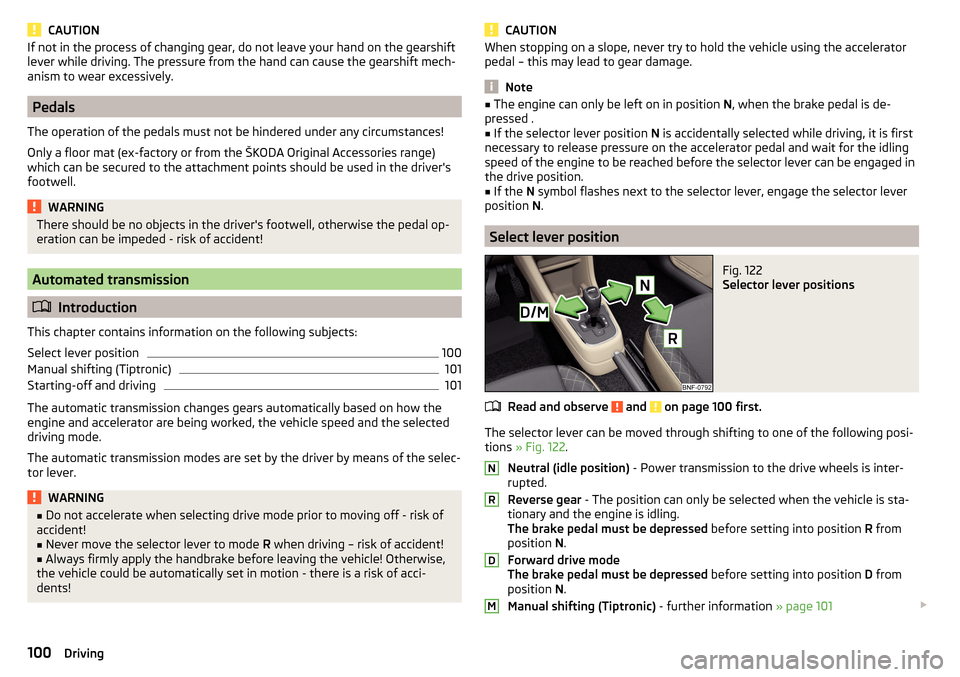
Fig. 122
Selector lever positions
Read and observe and on page 100 first.
The selector lever can be moved through shifting to one of the following posi-
tions » Fig. 122 .
Neutral (idle position) - Power transmission to the drive wheels is inter-
rupted.
Reverse gear - The position can only be selected when the vehicle is sta-
tionary and the engine is idling.
The brake pedal must be depressed before setting into position R from
position N.
Forward drive mode
The brake pedal must be depressed before setting into position D from
position N.
Manual shifting (Tiptronic) - further information » page 101
NRDM100Driving
Page 103 of 172
With driving mode set, the vehicle will not start up
If the vehicle does not start off, the problem may be that the selector lever is
not completely in the selected position. In such an instance, press the brake
pedal and put the selector lever into the required position.
Manual shifting (Tiptronic)
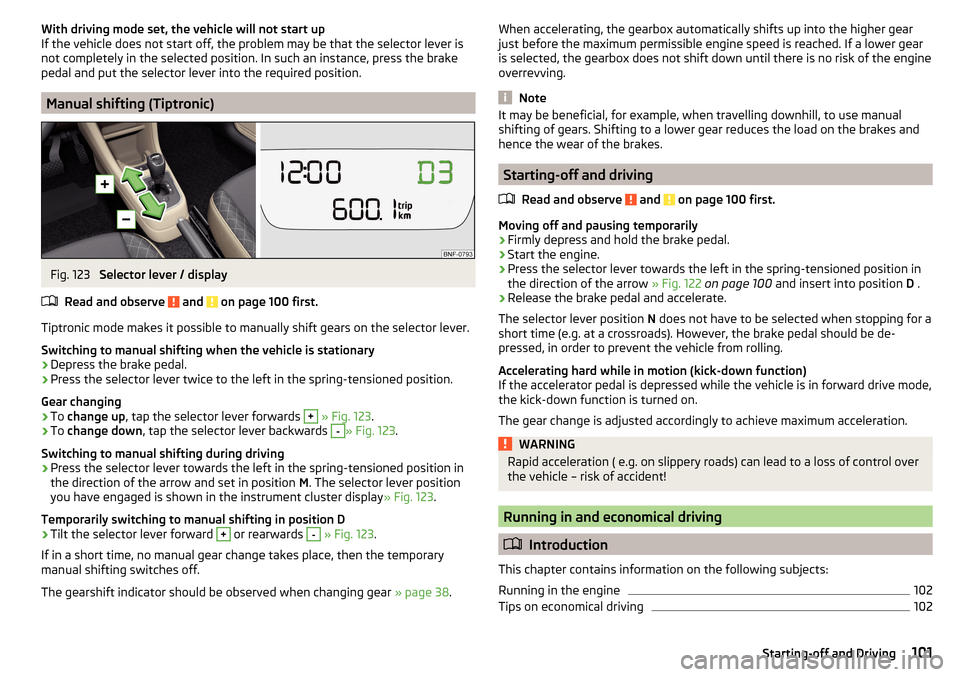
Fig. 123
Selector lever / display
Read and observe
and on page 100 first.
Tiptronic mode makes it possible to manually shift gears on the selector lever. Switching to manual shifting when the vehicle is stationary
›
Depress the brake pedal.
›
Press the selector lever twice to the left in the spring-tensioned position.
Gear changing
›
To change up , tap the selector lever forwards
+
» Fig. 123 .
›
To change down , tap the selector lever backwards
-
» Fig. 123.
Switching to manual shifting during driving
›
Press the selector lever towards the left in the spring-tensioned position in
the direction of the arrow and set in position M. The selector lever position
you have engaged is shown in the instrument cluster display » Fig. 123.
Temporarily switching to manual shifting in position D
›
Tilt the selector lever forward
+
or rearwards
-
» Fig. 123 .
If in a short time, no manual gear change takes place, then the temporary
manual shifting switches off.
The gearshift indicator should be observed when changing gear » page 38.
When accelerating, the gearbox automatically shifts up into the higher gear
just before the maximum permissible engine speed is reached. If a lower gear
is selected, the gearbox does not shift down until there is no risk of the engine
overrevving.
Note
It may be beneficial, for example, when travelling downhill, to use manual
shifting of gears. Shifting to a lower gear reduces the load on the brakes and
hence the wear of the brakes.
Starting-off and driving
Read and observe
and on page 100 first.
Moving off and pausing temporarily
›
Firmly depress and hold the brake pedal.
›
Start the engine.
›
Press the selector lever towards the left in the spring-tensioned position in
the direction of the arrow » Fig. 122 on page 100 and insert into position D .
›
Release the brake pedal and accelerate.
The selector lever position N does not have to be selected when stopping for a
short time (e.g. at a crossroads). However, the brake pedal should be de-
pressed, in order to prevent the vehicle from rolling.
Accelerating hard while in motion (kick-down function)
If the accelerator pedal is depressed while the vehicle is in forward drive mode,
the kick-down function is turned on.
The gear change is adjusted accordingly to achieve maximum acceleration.
WARNINGRapid acceleration ( e.g. on slippery roads) can lead to a loss of control over
the vehicle – risk of accident!
Running in and economical driving
Introduction
This chapter contains information on the following subjects:
Running in the engine
102
Tips on economical driving
102101Starting-off and Driving
Page 105 of 172
CAUTION■If water gets into the vehicle’s systems (e.g. the air intake system for the en-
gine) it can cause serious damage to the vehicle!■
Oncoming vehicles can generate water waves which can exceed the permis-
sible water level for your vehicle.
■
Do not drive through salt water, as the salt can cause corrosion. An vehicle
coming into contact with salt water is to be thoroughly rinsed with fresh wa-
ter.
Assist systems
General information
Introduction
WARNING■
The assistance systems serve merely to support the driver and do not re-
lieve the driver of responsibility for the operation of the vehicle.■
The increased safety as well as the increased occupant protection offered
by the assistance systems must not tempt you to take safety risks - there
is a risk of an accident!
■
Adjust the speed and driving style to the current visibility, weather, road
and traffic conditions.
■
The assistance systems have physical and system-related limitations. For
this reason, the driver may experience some undesired or delayed system
responses in certain situations. You should therefore always be alert and
ready to intervene!
■
Only activate, deactivate and set the assistance systems to keep you fully
in control of the vehicle in every traffic situation - otherwise there is a risk
of an accident!
Braking and stabilisation systems
Introduction
This chapter contains information on the following subjects:
Stability Control (ESC)
104
Anti-lock braking system (ABS)
104
Engine drag torque control (MSR)
104
Traction control (TCS)
104
Electronic Differential Lock (EDL)
104
Brake Assist (HBA)
104
Hill Start Assist (HHC)
104
The brake and stabilisation systems are automatically activated each time the
ignition is switched on, unless otherwise indicated.
The error display is in Chapter » page 31, Warning lights .
103Assist systems
Page 108 of 172
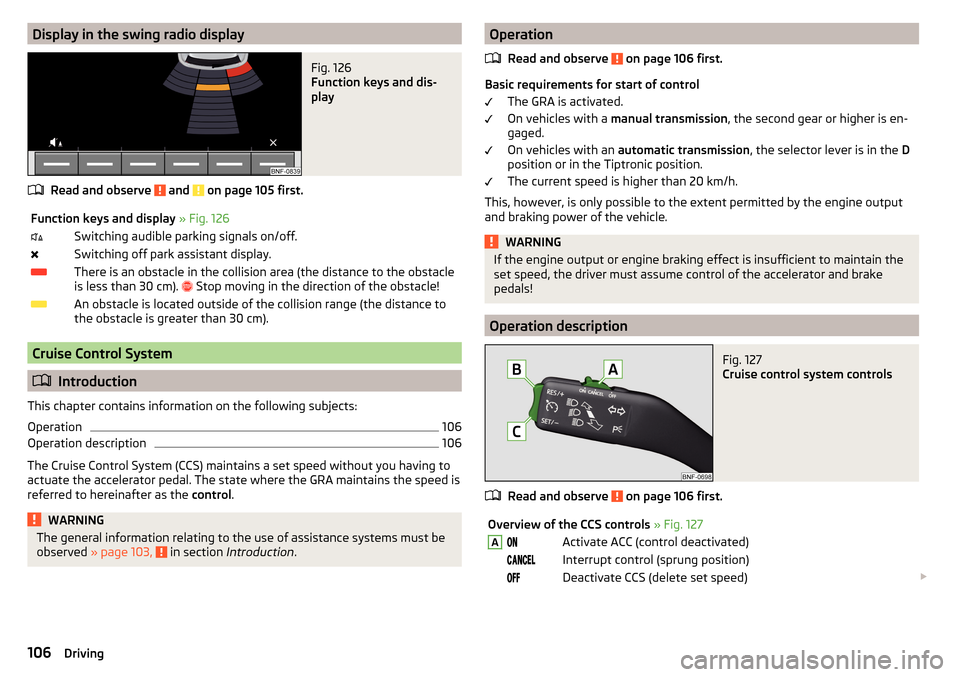
Display in the swing radio displayFig. 126
Function keys and dis-
play
Read and observe and on page 105 first.
Function keys and display » Fig. 126Switching audible parking signals on/off.Switching off park assistant display.There is an obstacle in the collision area (the distance to the obstacle
is less than 30 cm).
Stop moving in the direction of the obstacle!An obstacle is located outside of the collision range (the distance to
the obstacle is greater than 30 cm).
Cruise Control System
Introduction
This chapter contains information on the following subjects:
Operation
106
Operation description
106
The Cruise Control System (CCS) maintains a set speed without you having to
actuate the accelerator pedal. The state where the GRA maintains the speed is
referred to hereinafter as the control.
WARNINGThe general information relating to the use of assistance systems must be
observed » page 103, in section Introduction .Operation
Read and observe
on page 106 first.
Basic requirements for start of control The GRA is activated.
On vehicles with a manual transmission , the second gear or higher is en-
gaged.
On vehicles with an automatic transmission , the selector lever is in the D
position or in the Tiptronic position.
The current speed is higher than 20 km/h.
This, however, is only possible to the extent permitted by the engine output
and braking power of the vehicle.
WARNINGIf the engine output or engine braking effect is insufficient to maintain the
set speed, the driver must assume control of the accelerator and brake
pedals!
Operation description
Fig. 127
Cruise control system controls
Read and observe on page 106 first.
Overview of the CCS controls » Fig. 127AActivate ACC (control deactivated) Interrupt control (sprung position) Deactivate CCS (delete set speed) 106Driving
Page 109 of 172
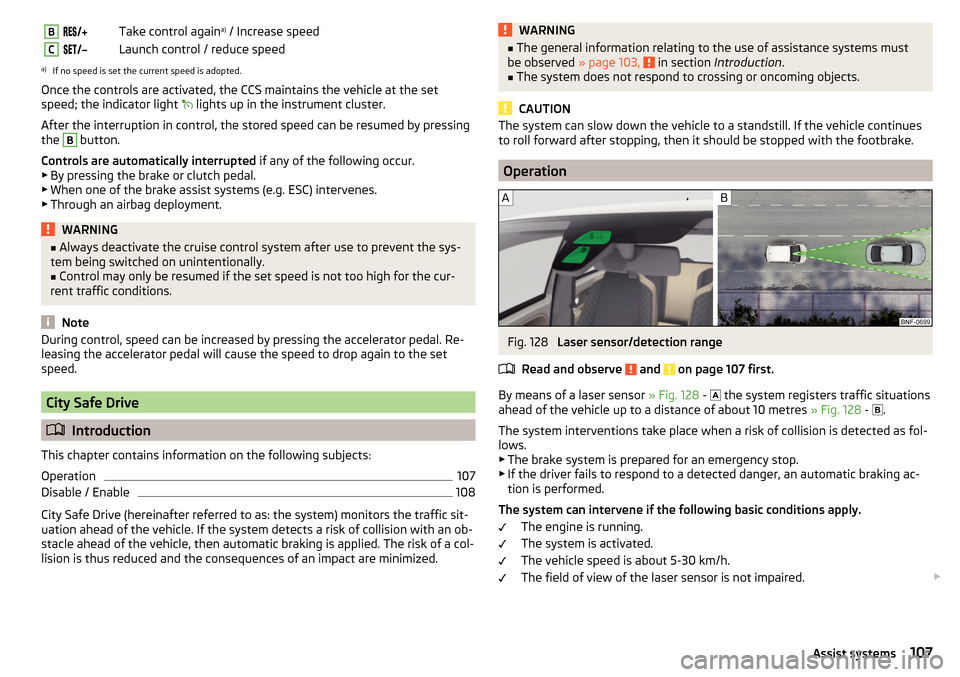
BTake control againa)
/ Increase speedCLaunch control / reduce speeda)
If no speed is set the current speed is adopted.
Once the controls are activated, the CCS maintains the vehicle at the set
speed; the indicator light
lights up in the instrument cluster.
After the interruption in control, the stored speed can be resumed by pressing
the
B
button.
Controls are automatically interrupted if any of the following occur.
▶ By pressing the brake or clutch pedal.
▶ When one of the brake assist systems (e.g. ESC) intervenes.
▶ Through an airbag deployment.
WARNING■ Always deactivate the cruise control system after use to prevent the sys-
tem being switched on unintentionally.■
Control may only be resumed if the set speed is not too high for the cur-
rent traffic conditions.
Note
During control, speed can be increased by pressing the accelerator pedal. Re-
leasing the accelerator pedal will cause the speed to drop again to the set
speed.
City Safe Drive
Introduction
This chapter contains information on the following subjects:
Operation
107
Disable / Enable
108
City Safe Drive (hereinafter referred to as: the system) monitors the traffic sit-
uation ahead of the vehicle. If the system detects a risk of collision with an ob-
stacle ahead of the vehicle, then automatic braking is applied. The risk of a col-
lision is thus reduced and the consequences of an impact are minimized.
WARNING■ The general information relating to the use of assistance systems must
be observed » page 103, in section Introduction .■
The system does not respond to crossing or oncoming objects.
CAUTION
The system can slow down the vehicle to a standstill. If the vehicle continues
to roll forward after stopping, then it should be stopped with the footbrake.
Operation
Fig. 128
Laser sensor/detection range
Read and observe
and on page 107 first.
By means of a laser sensor » Fig. 128 -
the system registers traffic situations
ahead of the vehicle up to a distance of about 10 metres » Fig. 128 -
.
The system interventions take place when a risk of collision is detected as fol- lows.
▶ The brake system is prepared for an emergency stop.
▶ If the driver fails to respond to a detected danger, an automatic braking ac-
tion is performed.
The system can intervene if the following basic conditions apply. The engine is running.
The system is activated.
The vehicle speed is about 5-30 km/h.
The field of view of the laser sensor is not impaired.
107Assist systems
Page 130 of 172
›To
disconnect , switch off the ignition and disconnect the negative terminal
first , then disconnect the positive terminal .›
When reconnecting the battery, reconnect the positive terminal first
, then
connect the negative terminal
.
If the battery is disconnected and reconnected, it is possible that the time dis-
play is reset » page 37.
CAUTION
■
Disconnect the battery only with the ignition and consumers turned off - risk
of damaging the electrical system of the vehicle.■
Before disconnecting the battery, always close the power windows and the
tilt/slide sunroof - otherwise the electrics for these may malfunction.
■
Under no circumstances mix up the charging cables – risk of fire.
Note
After disconnecting and reconnecting the vehicle battery, we recommend hav-
ing the vehicle checked by a specialist to ensure that the full functionality of
the vehicle is guaranteed.Wheels
Wheels and tyres
Introduction
This chapter contains information on the following subjects:
Advice on tyre/wheel usage
128
Tyre pressure
129
Tyre wear and wheel change
130
Spare wheel
130
Spare wheel
130
Tyre marking
131
Advice on tyre/wheel usage
During the first 500 km, new tyres do not offer optimum grip; appropriate care
should therefore be taken when driving.
Tyres with the deeper profiles should always be fitted to the front wheels.
Rims and wheel bolts are matched to each other in terms of design. We rec-
ommend that you use rims and wheel bolts from ŠKODA Original Accessories.
Wheels and tyres should always be stored in a cool, dry and dark place. The
tyres themselves should be stored vertically.
Tyre life
Tyres age and lose their original characteristics, even if they are not being
used. We recommend that you do not use tyres that are more than 6 years old.
The manufacturing date is indicated on the tyre sidewall (possibly on the in-
side ). For example, DOT ... 10 16...means, for example, that the tyre was manu-
factured in the 10. week of 2016.
Tyre damage
We recommend checking your tyres and wheel rims for damage (punctures,
cuts, splits and bulges etc.) on a regular basis.
Remove any foreign objects in the tyre’s profile immediately (e.g. small stones).
Foreign bodies which have penetrated into the tyre (e.g. screws or nails)
should not be removed and help should be sought from a specialist garage.
128General Maintenance
Page 131 of 172
Fitting new tyres
Only fit approved radial tyres of the same type, size (rolling circumference) and
the same tread pattern on one axle on all four wheels.
When mounting new tires the tires have to be replaced axle by axle.
Unidirectional tyres
The direction of rotation of the tyres is marked by arrows on the wall of the
tyre .
The specified running direction must be strictly adhered to, otherwise the fol-
lowing tyre characteristics may be degraded. ▶ Driving stability.
▶ Traction.
▶ Tyre noise and tyre wear.WARNING■ Never use tyres if you do not know anything about their condition and
age - risk of accidents.■
Never drive with damaged tyres – risk of accident.
CAUTION
■ The tyres must be protected from contact with substances (e.g. oil, grease
and fuel) which could damage them. If the tyres come into contact with these
substances, then we recommend you have this checked out in a specialist
workshop.■
Do not use rims with ground or polished surfaces in winter conditions - there
is a risk of rim damage (e.g through salt spreading).
Note
■ We recommend that any work on the wheels or tyres be carried out by a spe-
cialist garage.■
We recommend that you use tyres, snow chains and full wheel trims from
ŠKODA Original Accessories.
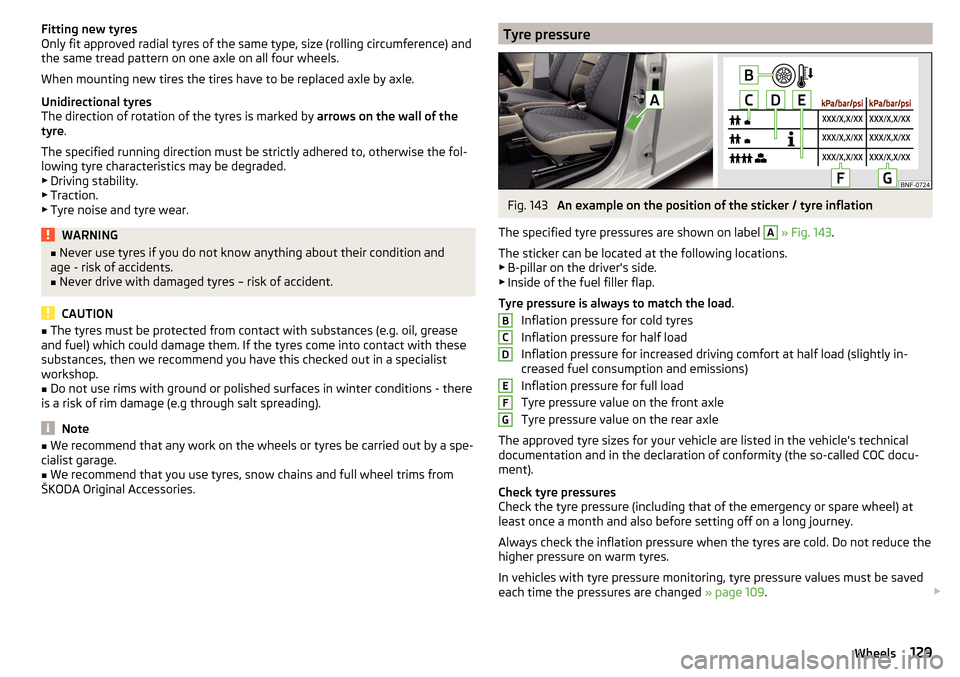
Tyre pressureFig. 143
An example on the position of the sticker / tyre inflation
The specified tyre pressures are shown on label
A
» Fig. 143 .
The sticker can be located at the following locations.
▶ B-pillar on the driver's side.
▶ Inside of the fuel filler flap.
Tyre pressure is always to match the load .
Inflation pressure for cold tyres
Inflation pressure for half load
Inflation pressure for increased driving comfort at half load (slightly in-
creased fuel consumption and emissions)
Inflation pressure for full load
Tyre pressure value on the front axle
Tyre pressure value on the rear axle
The approved tyre sizes for your vehicle are listed in the vehicle's technical
documentation and in the declaration of conformity (the so-called COC docu-
ment).
Check tyre pressures
Check the tyre pressure (including that of the emergency or spare wheel) at
least once a month and also before setting off on a long journey.
Always check the inflation pressure when the tyres are cold. Do not reduce the
higher pressure on warm tyres.
In vehicles with tyre pressure monitoring, tyre pressure values must be saved
each time the pressures are changed » page 109.
BCDEFG129Wheels
Page 136 of 172
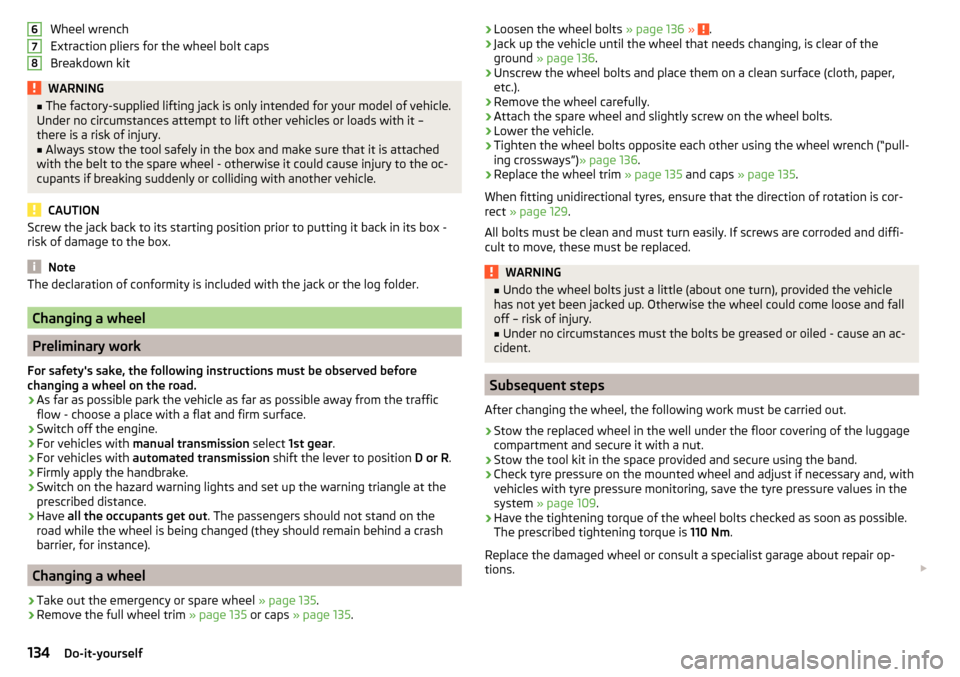
Wheel wrench
Extraction pliers for the wheel bolt caps
Breakdown kitWARNING■ The factory-supplied lifting jack is only intended for your model of vehicle.
Under no circumstances attempt to lift other vehicles or loads with it –
there is a risk of injury.■
Always stow the tool safely in the box and make sure that it is attached
with the belt to the spare wheel - otherwise it could cause injury to the oc-
cupants if breaking suddenly or colliding with another vehicle.
CAUTION
Screw the jack back to its starting position prior to putting it back in its box -
risk of damage to the box.
Note
The declaration of conformity is included with the jack or the log folder.
Changing a wheel
Preliminary work
For safety's sake, the following instructions must be observed before
changing a wheel on the road.
›
As far as possible park the vehicle as far as possible away from the traffic
flow - choose a place with a flat and firm surface.
›
Switch off the engine.
›
For vehicles with manual transmission select 1st gear .
›
For vehicles with
automated transmission shift the lever to position D or R.
›
Firmly apply the handbrake.
›
Switch on the hazard warning lights and set up the warning triangle at the
prescribed distance.
›
Have all the occupants get out . The passengers should not stand on the
road while the wheel is being changed (they should remain behind a crash
barrier, for instance).
Changing a wheel
›
Take out the emergency or spare wheel » page 135.
›
Remove the full wheel trim » page 135 or caps » page 135 .
678›Loosen the wheel bolts
» page 136 » .›Jack up the vehicle until the wheel that needs changing, is clear of the
ground » page 136 .›
Unscrew the wheel bolts and place them on a clean surface (cloth, paper,
etc.).
›
Remove the wheel carefully.
›
Attach the spare wheel and slightly screw on the wheel bolts.
›
Lower the vehicle.
›
Tighten the wheel bolts opposite each other using the wheel wrench (“pull- ing crossways”) » page 136.
›
Replace the wheel trim » page 135 and caps » page 135 .
When fitting unidirectional tyres, ensure that the direction of rotation is cor-
rect » page 129 .
All bolts must be clean and must turn easily. If screws are corroded and diffi-
cult to move, these must be replaced.
WARNING■ Undo the wheel bolts just a little (about one turn), provided the vehicle
has not yet been jacked up. Otherwise the wheel could come loose and fall
off – risk of injury.■
Under no circumstances must the bolts be greased or oiled - cause an ac-
cident.
Subsequent steps
After changing the wheel, the following work must be carried out.
›
Stow the replaced wheel in the well under the floor covering of the luggage
compartment and secure it with a nut.
›
Stow the tool kit in the space provided and secure using the band.
›
Check tyre pressure on the mounted wheel and adjust if necessary and, with
vehicles with tyre pressure monitoring, save the tyre pressure values in the
system » page 109 .
›
Have the tightening torque of the wheel bolts checked as soon as possible.
The prescribed tightening torque is 110 Nm.
Replace the damaged wheel or consult a specialist garage about repair op-
tions.
134Do-it-yourself
Page 140 of 172
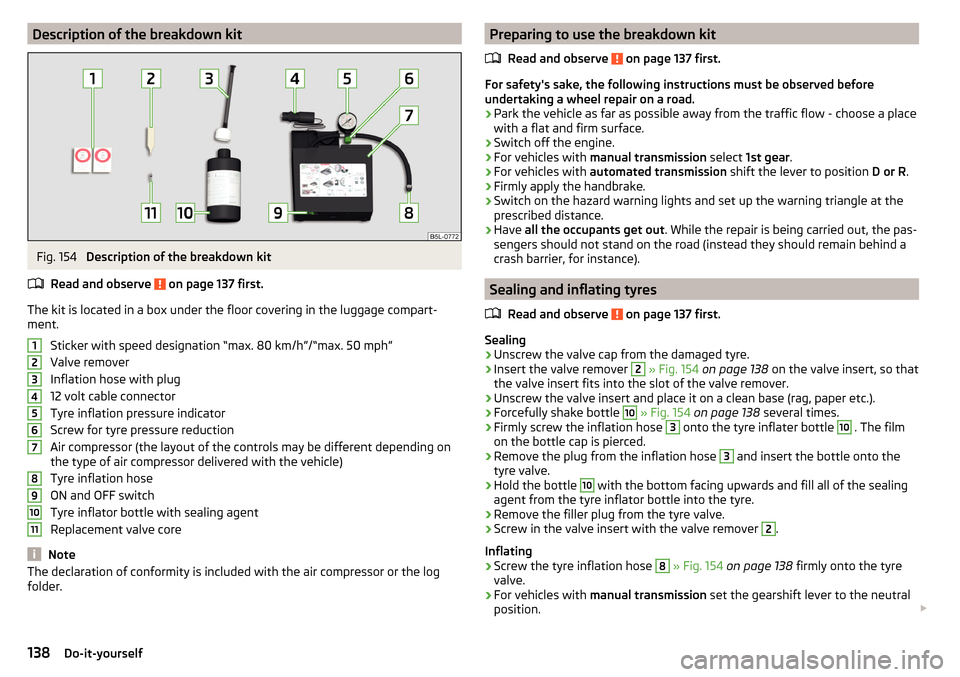
Description of the breakdown kitFig. 154
Description of the breakdown kit
Read and observe
on page 137 first.
The kit is located in a box under the floor covering in the luggage compart-
ment.
Sticker with speed designation “max. 80 km/h”/“max. 50 mph”Valve remover
Inflation hose with plug
12 volt cable connector
Tyre inflation pressure indicator
Screw for tyre pressure reduction
Air compressor (the layout of the controls may be different depending on
the type of air compressor delivered with the vehicle)
Tyre inflation hose
ON and OFF switch
Tyre inflator bottle with sealing agent
Replacement valve core
Note
The declaration of conformity is included with the air compressor or the log
folder.1234567891011Preparing to use the breakdown kit
Read and observe
on page 137 first.
For safety's sake, the following instructions must be observed before
undertaking a wheel repair on a road.
›
Park the vehicle as far as possible away from the traffic flow - choose a place
with a flat and firm surface.
›
Switch off the engine.
›
For vehicles with manual transmission select 1st gear .
›
For vehicles with automated transmission shift the lever to position D or R.
›
Firmly apply the handbrake.
›
Switch on the hazard warning lights and set up the warning triangle at the
prescribed distance.
›
Have all the occupants get out . While the repair is being carried out, the pas-
sengers should not stand on the road (instead they should remain behind a
crash barrier, for instance).
Sealing and inflating tyres
Read and observe
on page 137 first.
Sealing
›
Unscrew the valve cap from the damaged tyre.
›
Insert the valve remover
2
» Fig. 154 on page 138 on the valve insert, so that
the valve insert fits into the slot of the valve remover.
›
Unscrew the valve insert and place it on a clean base (rag, paper etc.).
›
Forcefully shake bottle
10
» Fig. 154 on page 138 several times.
›
Firmly screw the inflation hose
3
onto the tyre inflater bottle
10
. The film
on the bottle cap is pierced.
›
Remove the plug from the inflation hose
3
and insert the bottle onto the
tyre valve.
›
Hold the bottle
10
with the bottom facing upwards and fill all of the sealing
agent from the tyre inflator bottle into the tyre.
›
Remove the filler plug from the tyre valve.
›
Screw in the valve insert with the valve remover
2
.
Inflating
›
Screw the tyre inflation hose
8
» Fig. 154 on page 138 firmly onto the tyre
valve.
›
For vehicles with manual transmission set the gearshift lever to the neutral
position.
138Do-it-yourself