Set SKODA CITIGO 2016 1.G User Guide
[x] Cancel search | Manufacturer: SKODA, Model Year: 2016, Model line: CITIGO, Model: SKODA CITIGO 2016 1.GPages: 172, PDF Size: 24.59 MB
Page 45 of 172
WARNING■Never leave the key in the vehicle when you exit the vehicle. Unauthor-
ised persons (e.g. children) could lock the car, turn on the ignition or start
the engine - danger of injury and accidents!■
When leaving the vehicle, never leave persons who are not completely in-
dependent, such as children, unattended in the vehicle. These individuals
might not be able to exit the vehicle by themselves or to help themselves.
Can be fatal at very high or very low temperatures!
CAUTION
■ Each key contains electronic components; therefore it must be protected
against moisture and severe shocks.■
Keep the key grooves clean. Impurities (textile fibres, dust etc.) have a nega-
tive effect on the functionality of the locking cylinder and ignition lock.
Unlock / lock using key and lock
Fig. 26
Left side of the vehicle: Turning
the key for unlocking and locking
the vehicle
Read and observe and on page 43 first.
Unlocking/locking the vehicle with the key » Fig. 26
Unlocking the vehicle
Locking the vehicle
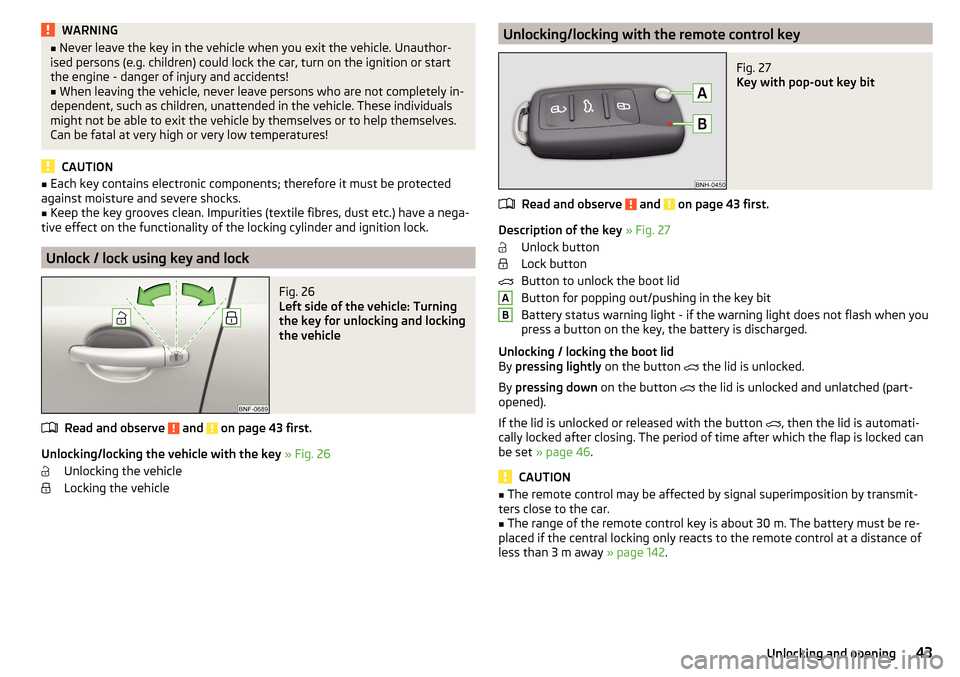
Unlocking/locking with the remote control keyFig. 27
Key with pop-out key bit
Read and observe and on page 43 first.
Description of the key » Fig. 27
Unlock button
Lock button
Button to unlock the boot lid
Button for popping out/pushing in the key bit
Battery status warning light - if the warning light does not flash when you
press a button on the key, the battery is discharged.
Unlocking / locking the boot lid
By pressing lightly on the button
the lid is unlocked.
By pressing down on the button
the lid is unlocked and unlatched (part-
opened).
If the lid is unlocked or released with the button , then the lid is automati-
cally locked after closing. The period of time after which the flap is locked can
be set » page 46 .
CAUTION
■
The remote control may be affected by signal superimposition by transmit-
ters close to the car.■
The range of the remote control key is about 30 m. The battery must be re-
placed if the central locking only reacts to the remote control at a distance of
less than 3 m away » page 142.
AB43Unlocking and opening
Page 50 of 172
Panoramic tilt / slide sunroof
Introduction
This chapter contains information on the following subjects:
Operation
48
Force limiter
48
Activate operation of the tilt / slide sunroof
48
Manually operated sunblind
49
The panoramic tilt / slide sunroof (hereinafter referred to as tilt / slide sunroof)
can only be operated when the ignition is turned on and when the outdoor
temperature is above -20 °C.
WARNINGWhen operating the tilt/slide sunroof and the sunshade, proceed with cau-
tion to avoid causing crushing injuries – risk of injury!
CAUTION
■ During the winter it may be necessary to remove any ice and snow in the vi-
cinity of the sliding/tilting roof before opening it to prevent any damage to the
opening mechanism.■
Always close the sliding/tilting roof before disconnecting the battery.
Operation
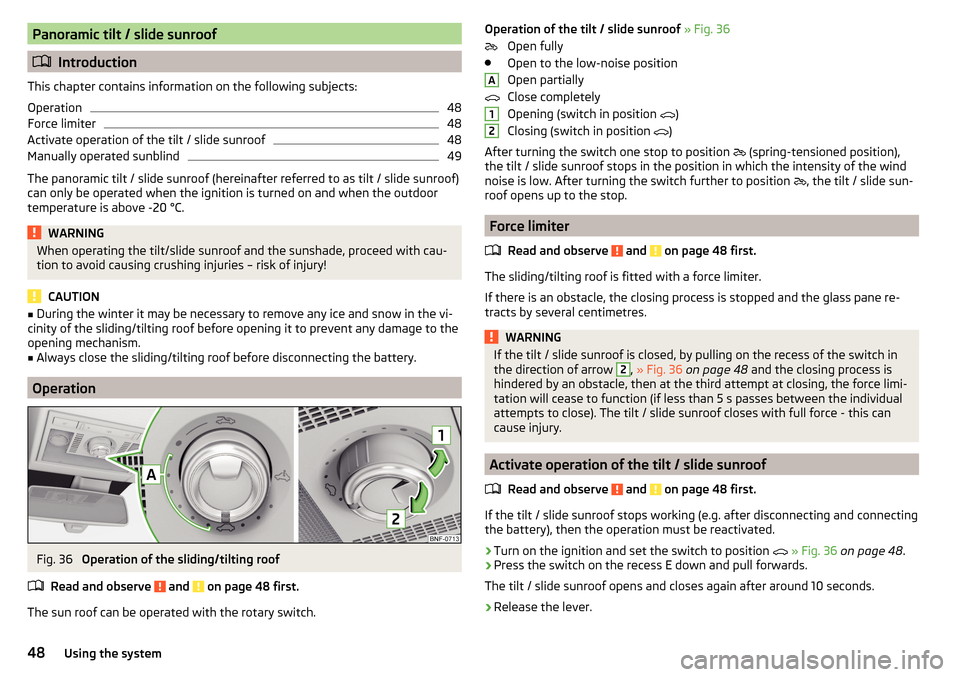
Fig. 36
Operation of the sliding/tilting roof
Read and observe
and on page 48 first.
The sun roof can be operated with the rotary switch.
Operation of the tilt / slide sunroof » Fig. 36
Open fully
Open to the low-noise position
Open partially
Close completely
Opening (switch in position
)
Closing (switch in position
)
After turning the switch one stop to position
(spring-tensioned position),
the tilt / slide sunroof stops in the position in which the intensity of the wind
noise is low. After turning the switch further to position
, the tilt / slide sun-
roof opens up to the stop.
Force limiter
Read and observe
and on page 48 first.
The sliding/tilting roof is fitted with a force limiter.
If there is an obstacle, the closing process is stopped and the glass pane re-
tracts by several centimetres.
WARNINGIf the tilt / slide sunroof is closed, by pulling on the recess of the switch in
the direction of arrow 2, » Fig. 36 on page 48 and the closing process is
hindered by an obstacle, then at the third attempt at closing, the force limi-
tation will cease to function (if less than 5 s passes between the individual
attempts to close). The tilt / slide sunroof closes with full force - this can
cause injury.
Activate operation of the tilt / slide sunroof
Read and observe
and on page 48 first.
If the tilt / slide sunroof stops working (e.g. after disconnecting and connecting
the battery), then the operation must be reactivated.
›
Turn on the ignition and set the switch to position
» Fig. 36 on page 48 .
›
Press the switch on the recess E down and pull forwards.
The tilt / slide sunroof opens and closes again after around 10 seconds.
›
Release the lever.
A1248Using the system
Page 53 of 172
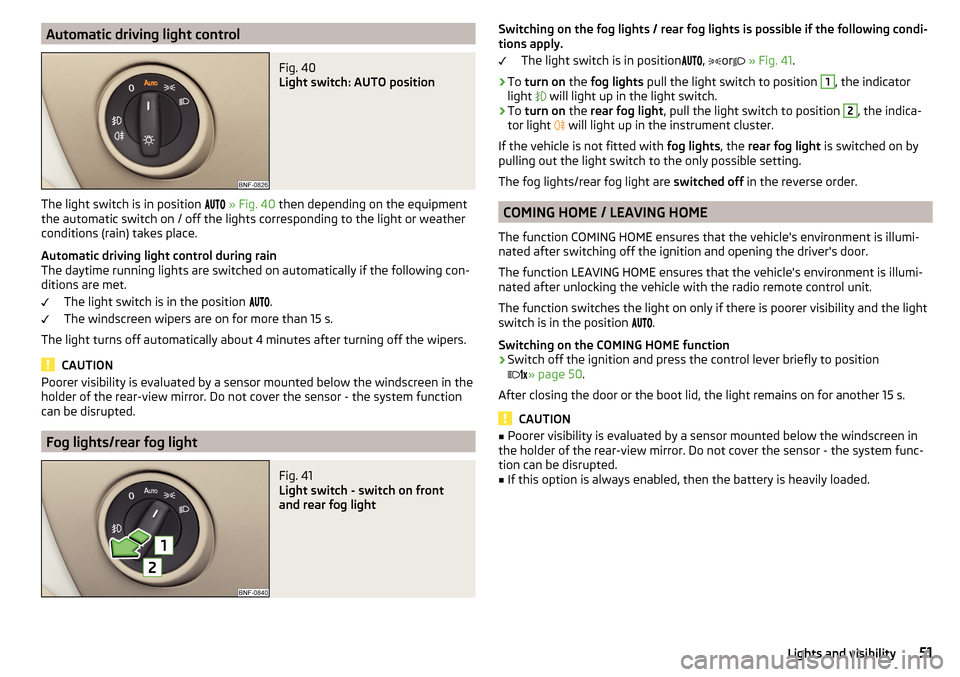
Automatic driving light controlFig. 40
Light switch: AUTO position
The light switch is in position
» Fig. 40 then depending on the equipment
the automatic switch on / off the lights corresponding to the light or weather
conditions (rain) takes place.
Automatic driving light control during rain
The daytime running lights are switched on automatically if the following con-
ditions are met.
The light switch is in the position .
The windscreen wipers are on for more than 15 s.
The light turns off automatically about 4 minutes after turning off the wipers.
CAUTION
Poorer visibility is evaluated by a sensor mounted below the windscreen in the
holder of the rear-view mirror. Do not cover the sensor - the system function
can be disrupted.
Fog lights/rear fog light
Fig. 41
Light switch - switch on front
and rear fog light
Switching on the fog lights / rear fog lights is possible if the following condi-
tions apply.
The light switch is in position
,
or
» Fig. 41 .›
To turn on the fog lights pull the light switch to position
1
, the indicator
light
will light up in the light switch.
›
To turn on the rear fog light , pull the light switch to position
2
, the indica-
tor light
will light up in the instrument cluster.
If the vehicle is not fitted with fog lights, the rear fog light is switched on by
pulling out the light switch to the only possible setting.
The fog lights/rear fog light are switched off in the reverse order.
COMING HOME / LEAVING HOME
The function COMING HOME ensures that the vehicle's environment is illumi-
nated after switching off the ignition and opening the driver's door.
The function LEAVING HOME ensures that the vehicle's environment is illumi-
nated after unlocking the vehicle with the radio remote control unit.
The function switches the light on only if there is poorer visibility and the light
switch is in the position .
Switching on the COMING HOME function
›
Switch off the ignition and press the control lever briefly to position
» page 50
.
After closing the door or the boot lid, the light remains on for another 15 s.
CAUTION
■ Poorer visibility is evaluated by a sensor mounted below the windscreen in
the holder of the rear-view mirror. Do not cover the sensor - the system func-
tion can be disrupted.■
If this option is always enabled, then the battery is heavily loaded.
51Lights and visibility
Page 56 of 172
WARNINGDo not use the windscreen washer system at low temperatures, without
heating the windscreen beforehand. The window washer fluid could other-
wise freeze on the windscreen and restrict the view to the front.
CAUTION
■ If the windscreen wipers are in the switched-off position, they cannot be
raised off the windscreen. Before collapsing the wipers, the wipers must be
set to the service position » page 143.■
In cold temperatures and during the winter, check before switching on the
ignition that the wiper blades are not frozen to the windscreen. If the wind-
screen wipers are switched on when the blades are frozen to the windscreen,
this may damage the blades and windscreen wiper motor!
■
Carefully separate frozen windscreen wiper blades from the windscreen and
free from snow and ice.
■
Handle the windscreen wipers with care - there is a risk of damage to the
windscreen by the windscreen wiper arms.
■
Do not switch on the ignition when the wiper arm is raised from the wind-
screen - there is a risk of damage to the bonnet by the wiper arms.
■
If there is an obstacle on the windscreen, the wipers will try to push away
the obstacle. The wipers then stop to prevent themselves from being dam-
aged. Only switch the wipers on again after the obstacle has been removed.
Front wipers and washers
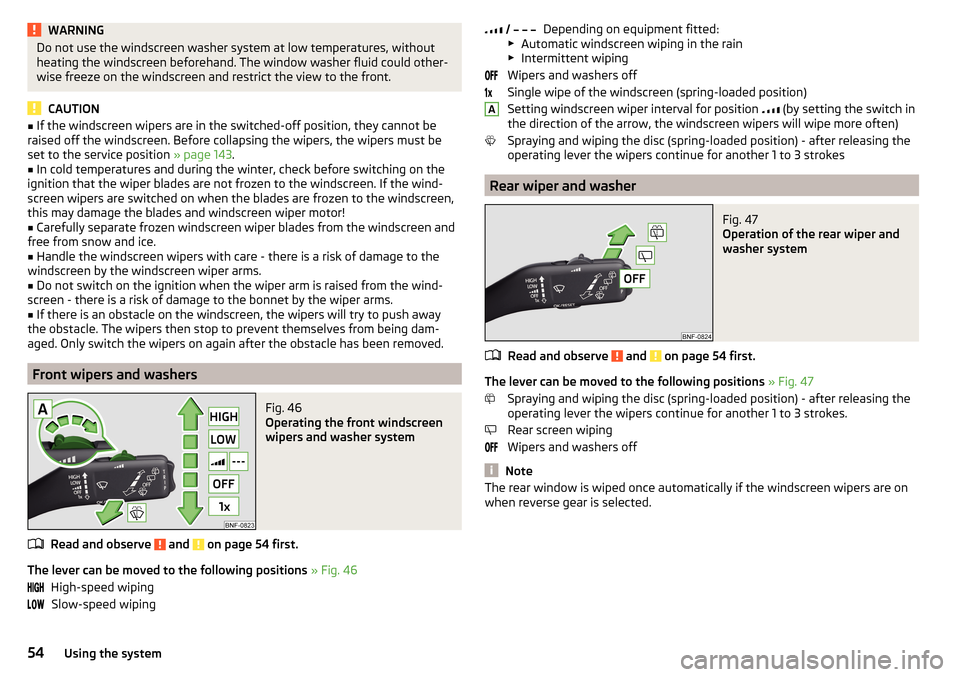
Fig. 46
Operating the front windscreen
wipers and washer system
Read and observe and on page 54 first.
The lever can be moved to the following positions » Fig. 46
High-speed wiping Slow-speed wiping
Depending on equipment fitted:
▶ Automatic windscreen wiping in the rain
▶ Intermittent wiping
Wipers and washers off
Single wipe of the windscreen (spring-loaded position)
Setting windscreen wiper interval for position
(by setting the switch in
the direction of the arrow, the windscreen wipers will wipe more often)
Spraying and wiping the disc (spring-loaded position) - after releasing the
operating lever the wipers continue for another 1 to 3 strokes
Rear wiper and washer
Fig. 47
Operation of the rear wiper and
washer system
Read and observe and on page 54 first.
The lever can be moved to the following positions » Fig. 47
Spraying and wiping the disc (spring-loaded position) - after releasing the
operating lever the wipers continue for another 1 to 3 strokes.
Rear screen wiping
Wipers and washers off
Note
The rear window is wiped once automatically if the windscreen wipers are on
when reverse gear is selected. A54Using the system
Page 57 of 172
Rear view mirror
Introduction
This chapter contains information on the following subjects:
Interior mirror dimming
55
Mirrors
55WARNINGExterior mirrors increase the field of view, however, they make objects ap-
pear smaller and further away. Therefore use the interior mirror whenever
possible, for assessing the distances to the vehicles following behind.
Interior mirror dimming
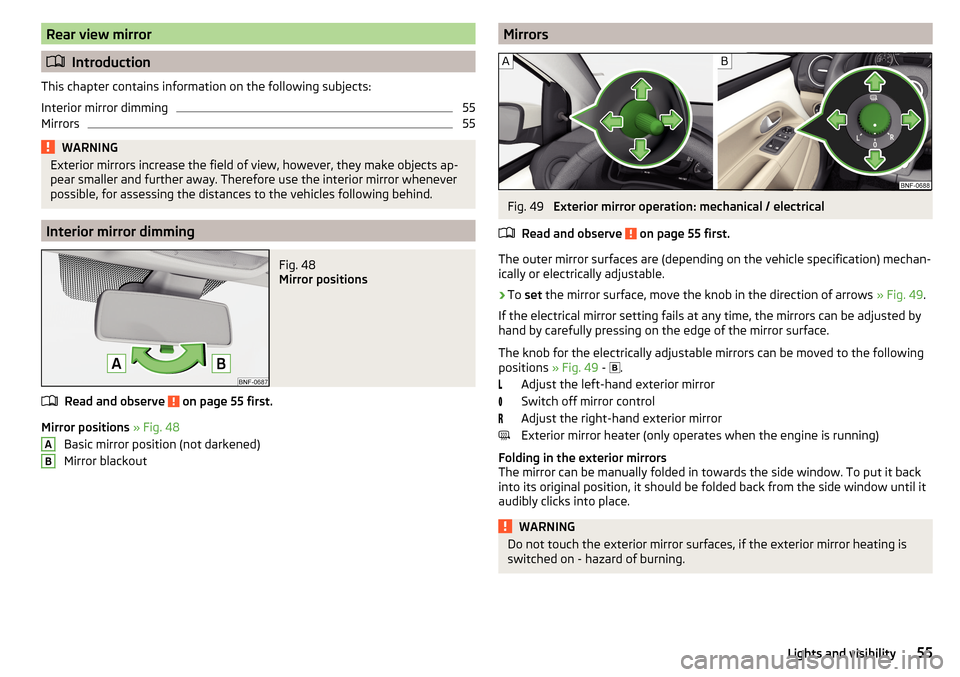
Fig. 48
Mirror positions
Read and observe on page 55 first.
Mirror positions » Fig. 48
Basic mirror position (not darkened)
Mirror blackout
ABMirrorsFig. 49
Exterior mirror operation: mechanical / electrical
Read and observe
on page 55 first.
The outer mirror surfaces are (depending on the vehicle specification) mechan-
ically or electrically adjustable.
›
To set the mirror surface, move the knob in the direction of arrows » Fig. 49.
If the electrical mirror setting fails at any time, the mirrors can be adjusted by
hand by carefully pressing on the edge of the mirror surface.
The knob for the electrically adjustable mirrors can be moved to the following
positions » Fig. 49 -
.
Adjust the left-hand exterior mirror
Switch off mirror control
Adjust the right-hand exterior mirror
Exterior mirror heater (only operates when the engine is running)
Folding in the exterior mirrors
The mirror can be manually folded in towards the side window. To put it back
into its original position, it should be folded back from the side window until it
audibly clicks into place.
WARNINGDo not touch the exterior mirror surfaces, if the exterior mirror heating is
switched on - hazard of burning.55Lights and visibility
Page 59 of 172
WARNING■If the seat backrest is folded, passengers may only be transported on the
outer seat behind the driver.■
The front passenger airbag should be switched off when transporting ob-
jects on the seat backrest that has been folded forwards » page 20.
■
Do not adjust the seat back while driving - danger of injury and accidents!
■
When moving the seat backrest, keep limbs out of the area between the
seat and seat backrest – risk of injury!
■
Never transport the following items on the seat backrest when folded
forwards. ■Objects that could restrict the driver's view.
■ Objects which make it impossible for the driver to control the vehicle
(e.g. if they roll under the pedals, or protrude into the driver's zone).
■ Objects which could lead to injury to passengers (e.g. if accelerating
sharply, braking or changing direction).
Rear seat backrests
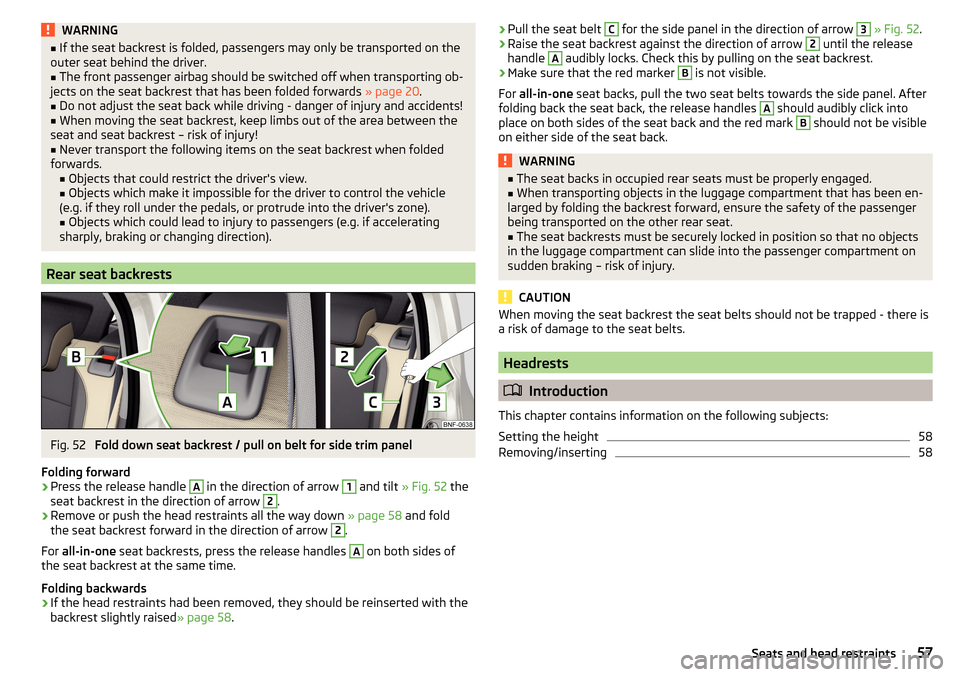
Fig. 52
Fold down seat backrest / pull on belt for side trim panel
Folding forward
›
Press the release handle
A
in the direction of arrow
1
and tilt » Fig. 52 the
seat backrest in the direction of arrow
2
.
›
Remove or push the head restraints all the way down » page 58 and fold
the seat backrest forward in the direction of arrow
2
.
For all-in-one seat backrests, press the release handles
A
on both sides of
the seat backrest at the same time.
Folding backwards
›
If the head restraints had been removed, they should be reinserted with the
backrest slightly raised » page 58.
›Pull the seat belt C for the side panel in the direction of arrow 3
» Fig. 52 .›Raise the seat backrest against the direction of arrow 2 until the release
handle A
audibly locks. Check this by pulling on the seat backrest.
›
Make sure that the red marker
B
is not visible.
For all-in-one seat backs, pull the two seat belts towards the side panel. After
folding back the seat back, the release handles
A
should audibly click into
place on both sides of the seat back and the red mark
B
should not be visible
on either side of the seat back.
WARNING■ The seat backs in occupied rear seats must be properly engaged.■When transporting objects in the luggage compartment that has been en-
larged by folding the backrest forward, ensure the safety of the passenger
being transported on the other rear seat.■
The seat backrests must be securely locked in position so that no objects
in the luggage compartment can slide into the passenger compartment on
sudden braking – risk of injury.
CAUTION
When moving the seat backrest the seat belts should not be trapped - there is
a risk of damage to the seat belts.
Headrests
Introduction
This chapter contains information on the following subjects:
Setting the height
58
Removing/inserting
5857Seats and head restraints
Page 60 of 172
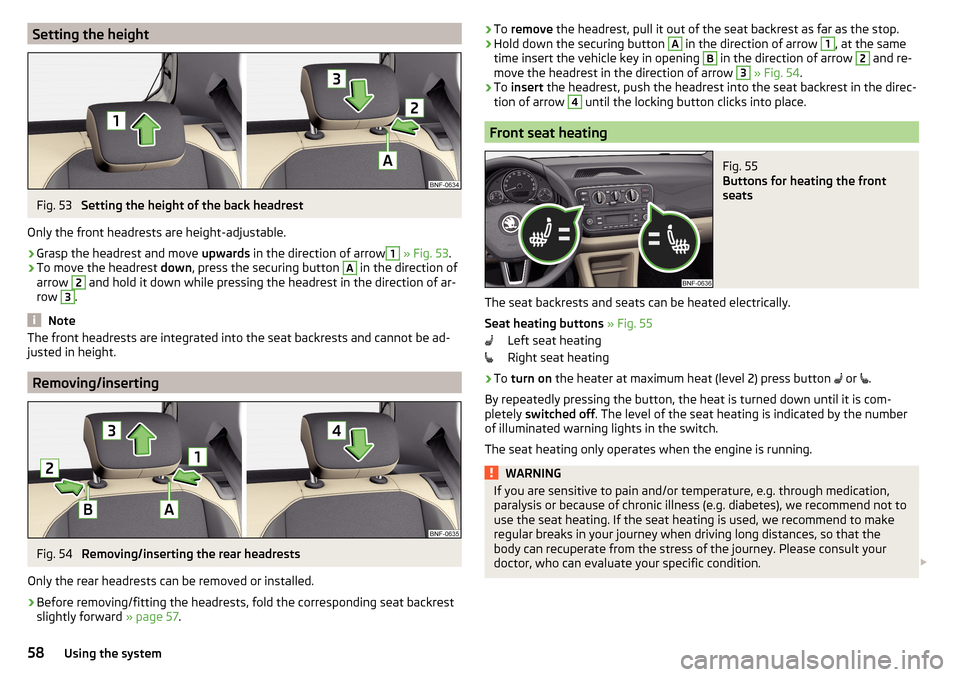
Setting the heightFig. 53
Setting the height of the back headrest
Only the front headrests are height-adjustable.
›
Grasp the headrest and move upwards in the direction of arrow
1
» Fig. 53 .
›
To move the headrest down, press the securing button
A
in the direction of
arrow
2
and hold it down while pressing the headrest in the direction of ar-
row
3
.
Note
The front headrests are integrated into the seat backrests and cannot be ad-
justed in height.
Removing/inserting
Fig. 54
Removing/inserting the rear headrests
Only the rear headrests can be removed or installed.
›
Before removing/fitting the headrests, fold the corresponding seat backrest slightly forward » page 57.
›To
remove the headrest, pull it out of the seat backrest as far as the stop.›Hold down the securing button A in the direction of arrow 1, at the same
time insert the vehicle key in opening B
in the direction of arrow
2
and re-
move the headrest in the direction of arrow
3
» Fig. 54 .
›
To insert the headrest, push the headrest into the seat backrest in the direc-
tion of arrow
4
until the locking button clicks into place.
Front seat heating
Fig. 55
Buttons for heating the front
seats
The seat backrests and seats can be heated electrically.
Seat heating buttons » Fig. 55
Left seat heating
Right seat heating
›
To turn on the heater at maximum heat (level 2) press button
or
.
By repeatedly pressing the button, the heat is turned down until it is com-
pletely switched off . The level of the seat heating is indicated by the number
of illuminated warning lights in the switch.
The seat heating only operates when the engine is running.
WARNINGIf you are sensitive to pain and/or temperature, e.g. through medication,
paralysis or because of chronic illness (e.g. diabetes), we recommend not to
use the seat heating. If the seat heating is used, we recommend to make
regular breaks in your journey when driving long distances, so that the
body can recuperate from the stress of the journey. Please consult your
doctor, who can evaluate your specific condition. 58Using the system
Page 72 of 172
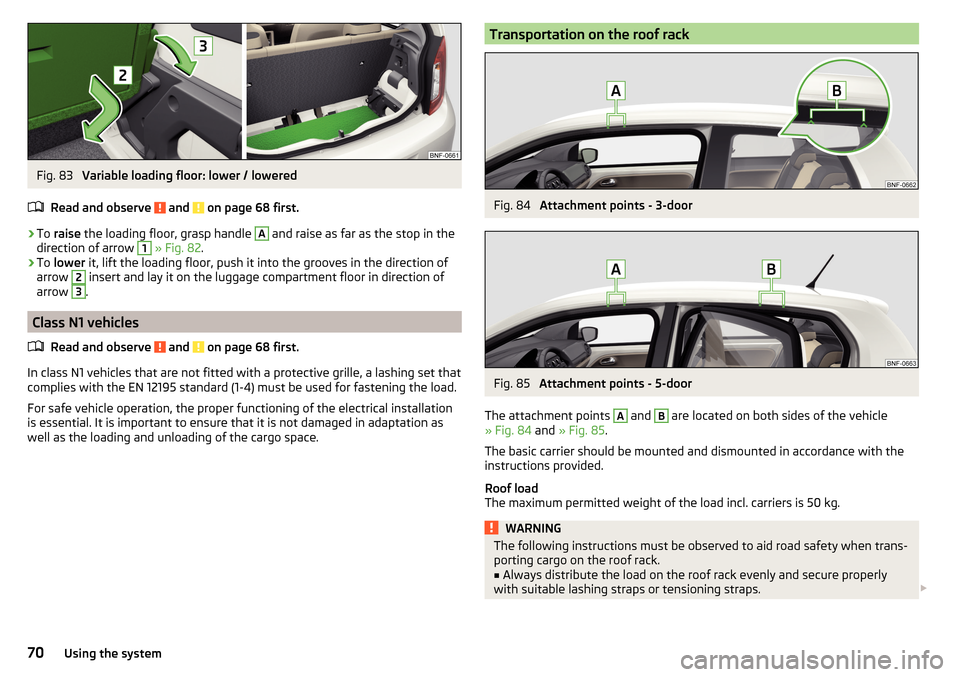
Fig. 83
Variable loading floor: lower / lowered
Read and observe
and on page 68 first.
›
To raise the loading floor, grasp handle
A
and raise as far as the stop in the
direction of arrow
1
» Fig. 82 .
›
To lower it, lift the loading floor, push it into the grooves in the direction of
arrow
2
insert and lay it on the luggage compartment floor in direction of
arrow
3
.
Class N1 vehicles
Read and observe
and on page 68 first.
In class N1 vehicles that are not fitted with a protective grille, a lashing set that
complies with the EN 12195 standard (1-4) must be used for fastening the load.
For safe vehicle operation, the proper functioning of the electrical installation
is essential. It is important to ensure that it is not damaged in adaptation as
well as the loading and unloading of the cargo space.
Transportation on the roof rackFig. 84
Attachment points - 3-door
Fig. 85
Attachment points - 5-door
The attachment points
A
and
B
are located on both sides of the vehicle
» Fig. 84 and » Fig. 85 .
The basic carrier should be mounted and dismounted in accordance with the
instructions provided.
Roof load
The maximum permitted weight of the load incl. carriers is 50 kg.
WARNINGThe following instructions must be observed to aid road safety when trans- porting cargo on the roof rack.■
Always distribute the load on the roof rack evenly and secure properly
with suitable lashing straps or tensioning straps.
70Using the system
Page 74 of 172
WARNING■The blower should always be on to prevent the windows from misting.
Otherwise there is a risk of accident.■
Under certain circumstances, air at a temperature of about 5 °C can flow
out of the vents when the cooling system is switched on.
Note
■ The air inlet in front of the windscreen must be free of e.g. ice, snow or
leaves to ensure that the heating and cooling system operates properly.■
After switching on the cooling Condensation from the evaporator of the air
conditioning may drip down and form a puddle below the vehicle. This is not a
leak!
■
If the coolant temperature is too high, the cooling system is switched off to
ensure that the engine cools down.
Heating and manual air conditioning
Fig. 86
Heating Controls
Fig. 87
Controls of the air conditioning
Read and observe on page 72 first.
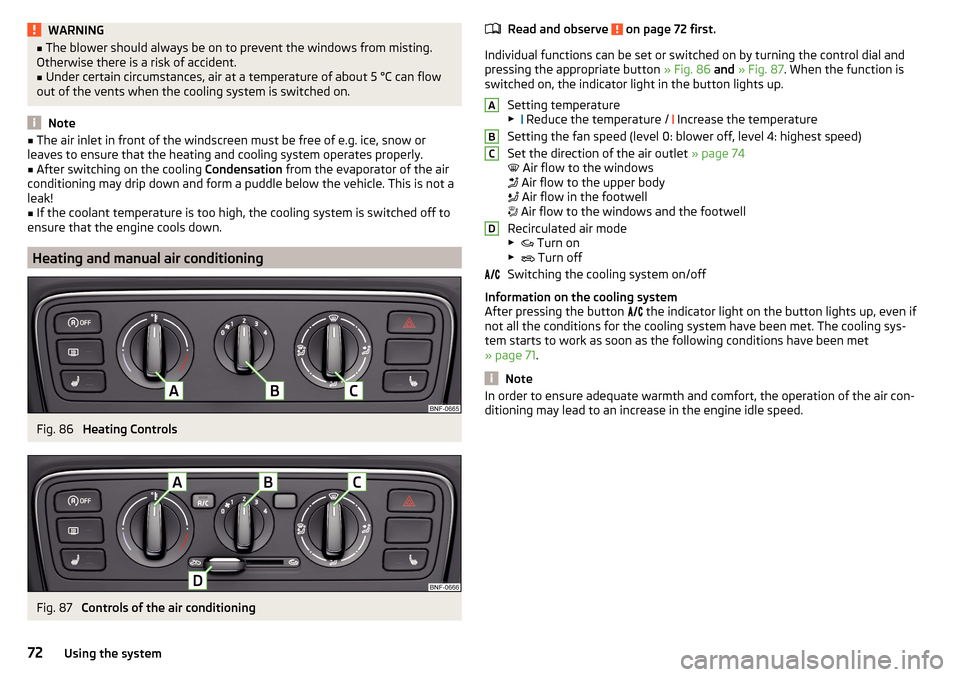
Individual functions can be set or switched on by turning the control dial and
pressing the appropriate button » Fig. 86 and » Fig. 87 . When the function is
switched on, the indicator light in the button lights up.
Setting temperature▶ Reduce the temperature /
Increase the temperature
Setting the fan speed (level 0: blower off, level 4: highest speed)
Set the direction of the air outlet » page 74
Air flow to the windows
Air flow to the upper body
Air flow in the footwell
Air flow to the windows and the footwell
Recirculated air mode
▶ Turn on
▶ Turn off
Switching the cooling system on/off
Information on the cooling system
After pressing the button the indicator light on the button lights up, even if
not all the conditions for the cooling system have been met. The cooling sys-
tem starts to work as soon as the following conditions have been met
» page 71 .
Note
In order to ensure adequate warmth and comfort, the operation of the air con-
ditioning may lead to an increase in the engine idle speed.ABCD72Using the system
Page 75 of 172
Climatronic (automatic air conditioning)Fig. 88
Controls the Climatronic
Read and observe
on page 72 first.
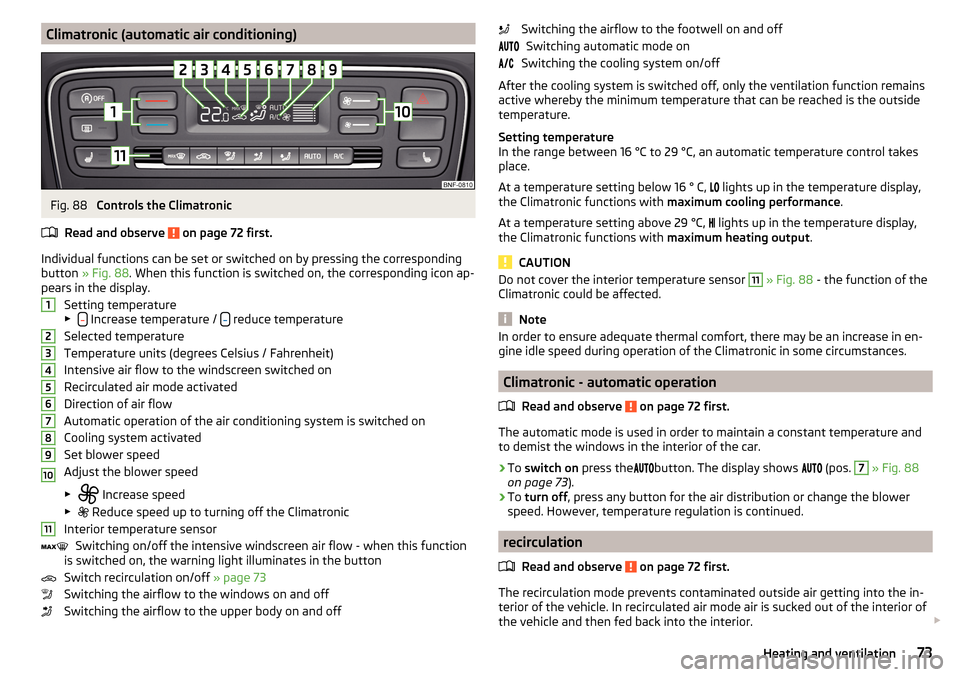
Individual functions can be set or switched on by pressing the corresponding
button » Fig. 88 . When this function is switched on, the corresponding icon ap-
pears in the display.
Setting temperature
▶
Increase temperature / reduce temperature
Selected temperature
Temperature units (degrees Celsius / Fahrenheit)
Intensive air flow to the windscreen switched on
Recirculated air mode activated
Direction of air flow
Automatic operation of the air conditioning system is switched on
Cooling system activated
Set blower speed
Adjust the blower speed
▶ Increase speed
▶ Reduce speed up to turning off the Climatronic
Interior temperature sensor Switching on/off the intensive windscreen air flow - when this function
is switched on, the warning light illuminates in the button
Switch recirculation on/off » page 73
Switching the airflow to the windows on and off
Switching the airflow to the upper body on and off
1234567891011Switching the airflow to the footwell on and off Switching automatic mode on
Switching the cooling system on/off
After the cooling system is switched off, only the ventilation function remains
active whereby the minimum temperature that can be reached is the outside
temperature.
Setting temperature
In the range between 16 °C to 29 °C, an automatic temperature control takes
place.
At a temperature setting below 16 ° C,
lights up in the temperature display,
the Climatronic functions with maximum cooling performance .
At a temperature setting above 29 °C, lights up in the temperature display,
the Climatronic functions with maximum heating output.
CAUTION
Do not cover the interior temperature sensor 11 » Fig. 88 - the function of the
Climatronic could be affected.
Note
In order to ensure adequate thermal comfort, there may be an increase in en-
gine idle speed during operation of the Climatronic in some circumstances.
Climatronic - automatic operation
Read and observe
on page 72 first.
The automatic mode is used in order to maintain a constant temperature and
to demist the windows in the interior of the car.
›
To switch on press the
button. The display shows
(pos.
7
» Fig. 88
on page 73 ).
›
To turn off , press any button for the air distribution or change the blower
speed. However, temperature regulation is continued.
recirculation
Read and observe
on page 72 first.
The recirculation mode prevents contaminated outside air getting into the in-
terior of the vehicle. In recirculated air mode air is sucked out of the interior of
the vehicle and then fed back into the interior.
73Heating and ventilation