air conditioning SKODA CITIGO 2017 User Guide
[x] Cancel search | Manufacturer: SKODA, Model Year: 2017, Model line: CITIGO, Model: SKODA CITIGO 2017Pages: 172, PDF Size: 24.54 MB
Page 154 of 172
Technical data
Technical data
Basic vehicle data
Introduction
This chapter contains information on the following subjects:
Vehicle data
152
Operating weight
153
Payload
153
Measurement of fuel consumption and CO 2 emissions according to ECE
Regulations and EU Directives
153
Dimensions
154
Departure angle
155
The details given in the vehicle's technical documentation always take prece-
dence over the details in the Owner's Manual.
The performance values listed were determined without performance-reduc- ing equipment, e.g. air conditioning system.
The values given have been determined in accordance with regulations and in
conditions prescribed by legal or technical provisions for determining the oper-
ating and technical data of vehicles.
The listed values are for the basic model without optional equipment.
Vehicle data
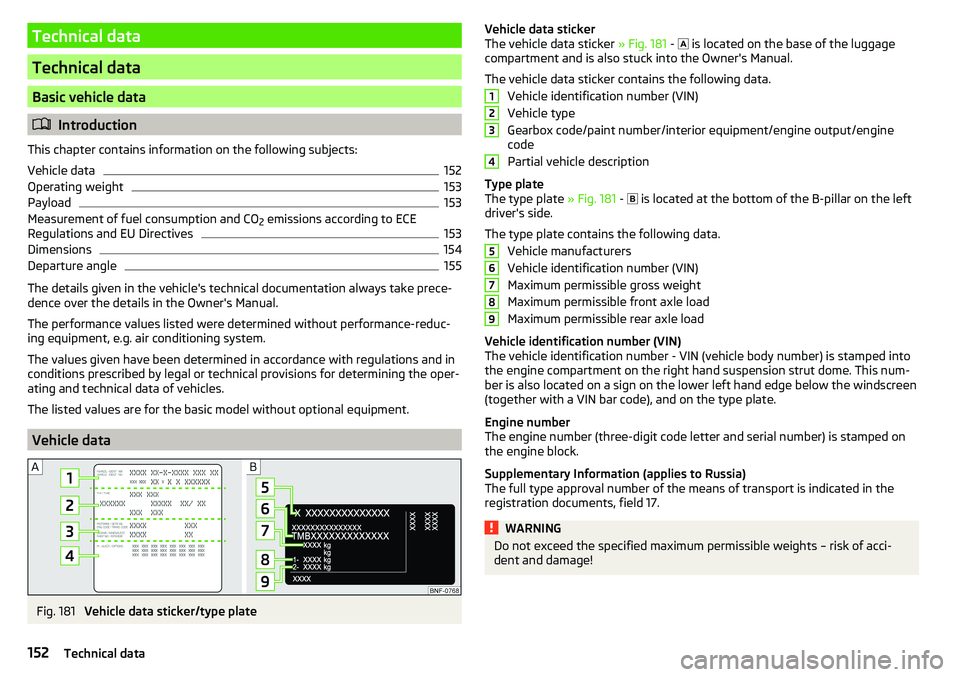
Fig. 181
Vehicle data sticker/type plate
Vehicle data sticker
The vehicle data sticker » Fig. 181 - is located on the base of the luggage
compartment and is also stuck into the Owner's Manual.
The vehicle data sticker contains the following data. Vehicle identification number (VIN)
Vehicle type
Gearbox code/paint number/interior equipment/engine output/engine code
Partial vehicle description
Type plate
The type plate » Fig. 181 -
is located at the bottom of the B-pillar on the left
driver's side.
The type plate contains the following data. Vehicle manufacturers
Vehicle identification number (VIN)
Maximum permissible gross weight
Maximum permissible front axle load
Maximum permissible rear axle load
Vehicle identification number (VIN)
The vehicle identification number - VIN (vehicle body number) is stamped into
the engine compartment on the right hand suspension strut dome. This num-
ber is also located on a sign on the lower left hand edge below the windscreen
(together with a VIN bar code), and on the type plate.
Engine number
The engine number (three-digit code letter and serial number) is stamped on the engine block.
Supplementary Information (applies to Russia)
The full type approval number of the means of transport is indicated in the
registration documents, field 17.WARNINGDo not exceed the specified maximum permissible weights – risk of acci-
dent and damage!123456789152Technical data
Page 155 of 172
Operating weight
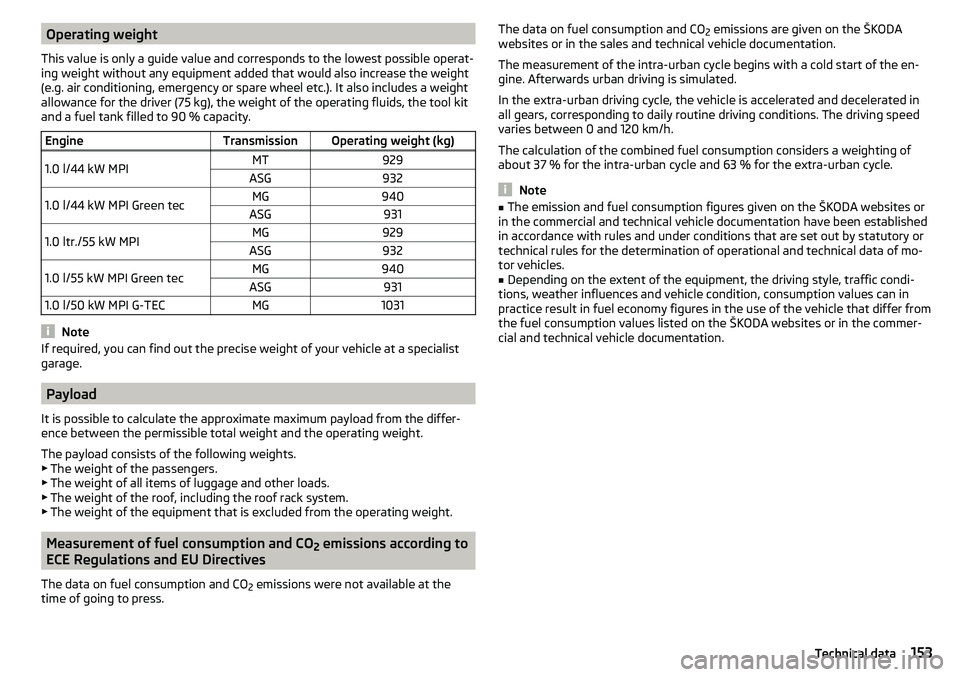
This value is only a guide value and corresponds to the lowest possible operat-
ing weight without any equipment added that would also increase the weight
(e.g. air conditioning, emergency or spare wheel etc.). It also includes a weight
allowance for the driver (75 kg), the weight of the operating fluids, the tool kit
and a fuel tank filled to 90 % capacity.EngineTransmissionOperating weight (kg)1.0 l/44 kW MPIMT929ASG9321.0 l/44 kW MPI Green tecMG940ASG9311.0 ltr./55 kW MPIMG929ASG9321.0 l/55 kW MPI Green tecMG940ASG9311.0 l/50 kW MPI G-TECMG1031
Note
If required, you can find out the precise weight of your vehicle at a specialist
garage.
Payload
It is possible to calculate the approximate maximum payload from the differ-
ence between the permissible total weight and the operating weight.
The payload consists of the following weights.
▶ The weight of the passengers.
▶ The weight of all items of luggage and other loads.
▶ The weight of the roof, including the roof rack system.
▶ The weight of the equipment that is excluded from the operating weight.
Measurement of fuel consumption and CO
2 emissions according to
ECE Regulations and EU Directives
The data on fuel consumption and CO 2 emissions were not available at the
time of going to press.
The data on fuel consumption and CO 2 emissions are given on the ŠKODA
websites or in the sales and technical vehicle documentation.
The measurement of the intra-urban cycle begins with a cold start of the en-
gine. Afterwards urban driving is simulated.
In the extra-urban driving cycle, the vehicle is accelerated and decelerated in
all gears, corresponding to daily routine driving conditions. The driving speed
varies between 0 and 120 km/h.
The calculation of the combined fuel consumption considers a weighting of
about 37 % for the intra-urban cycle and 63 % for the extra-urban cycle.
Note
■ The emission and fuel consumption figures given on the ŠKODA websites or
in the commercial and technical vehicle documentation have been established
in accordance with rules and under conditions that are set out by statutory or
technical rules for the determination of operational and technical data of mo-
tor vehicles.■
Depending on the extent of the equipment, the driving style, traffic condi-
tions, weather influences and vehicle condition, consumption values can in
practice result in fuel economy figures in the use of the vehicle that differ from
the fuel consumption values listed on the ŠKODA websites or in the commer-
cial and technical vehicle documentation.
153Technical data
Page 159 of 172
Index
A
ABS Operation
104
Warning light34
Acceptance and recycling of used vehicles
112
Accessories110
Adjusting Steering wheel
13
Adjusting the seats12
Adjustment Light range
49
Adjust radio volume77
Advice on tyre/wheel usage128
Air-conditioning system Air outlet vents
74
air bag17
Airbag Adjustments and impairments to the airbagsystem
111
Deactivation20
Deployment18
Warning light35
Airbag system17
air conditioning recirculation
73
Air conditioning71
Climatronic73
Manual air conditioning72
Air outlet vents74
All-year tyres131
Alternator Warning light
32
AM82
Anti-lock braking system (ABS)104
Anti-theft wheel bolts136
Application management93
Connection93
Main menu94
Ashtray62
Assist systems103
Audio source85
Auto check control41
Automated manual transmission Kick-down
101
Tiptronic101
Automated transmission100
Automatically turn off the radio77
Automatic driving light control51
Automatic shutdown of consumers126
Automatic transmission Defect
33
Selector lever100
Starting-off and driving101
Warning light33
Automatic transmission modes100
AUX87
Avoiding damage to your vehicle102
B
Battery Change in key
142
Belts14
Belt tensioners16
Blues radio Device language settings
81
Display settings81
Factory settings81
Media menu84
Media menu settings81
menu settings80
Radio menu81
Radio menu settings80
safe removal of the data source81
Settings80
Sound settings80
Status line77
Blues Radio75
Device description76
Information on the device system81
Blues radio display76
Bluetooth profile93
Bluetooth® player87
Bonnet Closing
122
Opening122
Boot Class N1 vehicles
70
see boot lid46
Boot lid Automatic locking
46
Open/Close46
Brake Assist (HBA)104
Brake booster98
Brake fluid125
Check125
specification125
Brake pads new
98
Brake pedal - automatic transmission warning light
36
Brakes Brake booster
98
Brake fluid125
Braking and stabilisation systems103
Handbrake98
Information on braking98
Warning lights32
Brake system103
Braking Running in
102
Breakdown kit137
Breakdown service90
see Help in an emergency10
157Index
Page 163 of 172
Manual air conditioningControls72
Manual gear changing see gear changing
99
Materials defect liability5
MAXI DOT See MAXI DOT display
41
MAXI DOT display Main menu
41
Menu item Audio41
Service39
Settings41
Mechanical window openers47
media Compatible sources
88
file formats88
Requirements and Restrictions88
Media84
Audio source85
AUX87
Bluetooth® audio87
Browser84
CD86
List84
Main menu84
Playback control85
safe removal of Blues radio data source81
safe removal of the Swing radio data source79
SD-card86
USB87
Memory40
Mirror55
Vanity53
Mobile phone75
mobility warranty6
Modifications and technical alterations110
Trailer operation112
MSR104
Multi-media AUX
87
Multifunction displayData39
Functions39
Memory40
Service39
Multimedia USB
87
Multimedia holder63
N
N1
70
Nameplate152
Nets68
NGVs see CNG
120
O
oil see Engine oil
124
Oil changing Engine oil
123
On-board computer See multifunction display
39
Online Owner's Manual8
Operating weight153
Operation Telephone
90
Operation in winter Vehicle battery
127
Original accessories111
overview cockpit
29
Overview Engine compartment
122
Fuses144
Warning lights31
P
Pairing process
89
Parking99
Parking aid105
Parking aid105
Function105
Parking sensors Display on the radio display
106
Parking the vehicle see Parking
99
Park Pilot105
Parts replacement110
Passive safety Before setting off
12
Driving safety12
Passive Safety12
Pedals100
Footmats100
Petrol118
Phone88
Bluetooth profile93
Breakdown service90
Delete favourite92
Delete paired device93
Dialilng phone number90
Emergency call90
Enter phone number90
Establishing conection89
Establishing connections93
Information service90
Pairing process89
Phone call92
Preferred contacts91
Save favourite91
Select favourites91
Phone bracket66
Phone call92
Phone number90
Pocket holder65
Pockets65
Power limit Tilt / slide sunroof
48
161Index