lock SKODA CITIGO 2017 User Guide
[x] Cancel search | Manufacturer: SKODA, Model Year: 2017, Model line: CITIGO, Model: SKODA CITIGO 2017Pages: 172, PDF Size: 24.54 MB
Page 36 of 172
▶Switch off the ignition, start the engine again and travel a short distance.
▶ If the warning light does not go out, obtain assistance from an authorised
dealer.
Disconnecting the vehicle battery
If the vehicle's battery has been disconnected and reconnected, the warning
light comes on after switching on the
ignition.
The warning light should go out after driving a short distance.
If, after the motor is restarted and a short drive, the indicator light does not go
out, there is a system error.
▶ Seek help from a specialist garage.
Stability control (ESC) / Traction control (TCS)
Read and observe
on page 32 first.
flashes – the ESC or TCS is currently active.
lights up – there is an ESC or TCS fault.
▶ Seek help from a specialist garage.
As the ESC operates in conjunction with the ABS, the ESC warning light will al-
so come on if the ABS system fails.
If the warning light comes on after starting the engine, the ESC or TCS may
have been switched off for technical reasons. ▶ Switch the ignition off and on again.
If the warning light does not illuminate after you switch the engine back on,
the ASR is fully functional again.
Disconnecting the vehicle battery
If the vehicle's battery has been disconnected and reconnected, the warning
light comes on after switching on the ignition.
The warning light should go out after driving a short distance.
If, after a short drive, the indicator light does not go out, there is a system er-
ror.
▶ Seek help from a specialist garage.
More information about the ESC system » page 104, Stability Control (ESC) or
TCS system » page 104, Traction control (TCS) .
Anti-lock braking system (ABS)
Read and observe
on page 32 first.
lights up – there is an ABS fault.
The vehicle will only be braked by the normal brake system without the ABS.
▶ Seek help from a specialist garage.
In the event of an ABS fault, the other braking and stabilization systems are
turned off » page 103 , Braking and stabilisation systems .
WARNING■
If the ABS warning light together with the indicator light » page 32 ,
Braking system lights up, do not continue to drive! Seek help from a
specialist garage.■
A fault to the ABS system or the braking system can increase the vehi-
cle's braking distance – risk of accident!
Read and observe on page 32 first.
Change of tyre pressure values
lights up - there was a pressure change in one of the tyres.
An audible signal sounds as a warning. ▶ Immediately reduce speed and avoid sudden steering and braking manoeu-
vres.
▶ Stop the vehicle, turn the ignition off and check the tyres and their inflation
pressures » page 129 .
▶ Correct the tyre pressure if necessary or replace the affected wheel
» page 134 or use the repair kit » page 137.
▶ Save the tyre pressure values in the system » page 109.
System fault
flashes for approximately 1 minute and remains lit – there may be a fault in
the tyre pressure monitoring system.
▶ Stop the vehicle, turn the ignition off and start the engine again.
If the warning light flashes again after the engine has started, there is a
system error.
34Using the system
Page 41 of 172

Operating the information systemFig. 24
Buttons on the control lever
Operating the multifunction displayPress (up or down) - Select data / Setting values
Press Show / confirm entry
Operating the MAXI DOT display Press (up or down) - move to the selected menu
Hold (up or down) - display main menu
Press - confirm selected menu item
Driving data (multifunction display)
Introduction
This chapter contains information on the following subjects:
Information overview
39
Warning at excessive speeds
40
Memory
40
The driving data is displayed in the multifunction display when is ignition is
switched on.
If vehicles with MAXI DOTdisplay do not show the driving data after switching
on the ignition, select the menu item
MFD
in the main menu and confirm
» page 41 , MAXI DOT display .
On vehicles with a MAXI DOT display, there is an option to fade out the units
and some of the information » page 41, Menu item
Settings
.
ABABInformation overview
Overview of driving data (depending on the vehicle equipment).
Clock - current time is displayed.
Outside temperature - If the outside temperature drops below +4 °C, the tem-
perature indicator appears and a snowflake symbol
(display for low temper-
ature) flashes for a few seconds, then remains displayed together with the
outside temperature.
Driving time - Driving time since last clearing the memory.
Current fuel consumption - When the vehicle is stationary or moving slowly,
the fuel consumption is displayed in l/h (in models in some countries the fol-
lowing appears --,- km/l). With G-TEC vehicles the current consumption of the
fuel currently being used is displayed ( with regards to a stationary or slow
moving vehicle, the natural gas consumption is displayed in kg/h).
Average fuel consumption - Is calculated continuously since the last clearing
of the memory. After erasing the memory, no data will appear for the first 300
m driven. With G-TEC vehicles, the average consumption of fuel currently being
used is displayed.
Natural gas quality The details of the quality of natural gas are displayed as a
percentage of between 70% to 100%. The higher the value of natural gas, the
lower is the consumption.
Range - Drive distance in km which can be covered with the existing tank ca-
pacity and with the same driving style. If you drive more efficiently this value
can increase. With G-TEC vehicles the following details are displayed - Range
with natural gas / petrol.
Distance driven - Distance driven since the memory was last cleared.
Total distance travelled - Odometer
Average speed - Value constantly recalculated, for distance since last clearing
the memory. After erasing the memory, no data will appear for the first 300 m
driven.
Current Speed - Digital speedometer.
Coolant temperature - If the coolant temperature is in the range 70-120 °C,
the engine operating temperature has been reached. If the temperature is be-
low 70 ° C, high engine speeds and straining the engine should be avoided. If
the temperature is over 120 ° C, the warning light lights up the instrument
cluster
» page 33 . 39Information system
Page 44 of 172
Service interval display
Introduction
This chapter contains information on the following subjects:
Prompt in the MAXI DOT display
42
Prompt in the segment display
42
The service interval display shows the kilometres or days until the next service
event.
Information regarding the service intervals » page 112.
Prompt in the MAXI DOT display
Before the next service date has been reached , the symbol as well as a mes-
sage about the mileage or days until the next service event appears in the dis-
play after switching on the ignition.
At the time of the service , a message appears in the display after switching on
the ignition.
Displaying the distance and days until the next service interval
Messages regarding the kilometres and days until the next service appoint-
ment can be displayed any time when the ignition is on, in the
service
menu item
» page 41 , Menu item
Settings
» page 41 .
Prompt in the segment display
Before the next service interval is reached , a key symbol
and the remain-
ing kilometres are indicated on the display for several seconds after switching
on the ignition.
At the time of the service , an acoustic signal will sound and the lettering
appears for a few seconds after switching on the ignition.
Unlocking and opening
Unlocking and locking
Introduction
This chapter contains information on the following subjects:
Unlock / lock using key and lock
43
Unlocking/locking with the remote control key
43
Vehicle unlocking / locking with the door opening lever
44
Vehicle locking / unlocking with the central locking button
44
SafeLock
44
Opening/closing a door
45
Child safety lock
45
Malfunctions
45
The vehicle may be equipped with a central locking system which makes it
possible to unlock/lock all doors and the boot lid simultaneously.
The turn signal lights flash twice as confirmation that the vehicle has been un-
locked .
If you unlock the vehicle and do not open a door or the boot lid within the next
30 seconds, the vehicle will lock again automatically.
The turn signal lights flash once as confirmation that the vehicle has been
locked .
If the driver's door has been opened, the vehicle cannot be locked.
If the doors or the luggage compartment lid remain open after the vehicle has
been locked, the turn signal lights do not flash until they have been closed.
Automatic locking / unlocking of a vehicle with central locking system
This function enables the locking of all doors and the boot lid from a speed of
15 km / h. Opening the doors and the boot lid from the outside is not possible.
Renewed automatic unlocking of all doors as well as the luggage compartment
door when removing the ignition key or by opening any of the doors.
42Using the system
Page 45 of 172
WARNING■Never leave the key in the vehicle when you exit the vehicle. Unauthor-
ised persons (e.g. children) could lock the car, turn on the ignition or start
the engine - danger of injury and accidents!■
When leaving the vehicle, never leave persons who are not completely in-
dependent, such as children, unattended in the vehicle. These individuals
might not be able to exit the vehicle by themselves or to help themselves.
Can be fatal at very high or very low temperatures!
CAUTION
■ Each key contains electronic components; therefore it must be protected
against moisture and severe shocks.■
Keep the key grooves clean. Impurities (textile fibres, dust etc.) have a nega-
tive effect on the functionality of the locking cylinder and ignition lock.
Unlock / lock using key and lock
Fig. 26
Left side of the vehicle: Turning
the key for unlocking and locking
the vehicle
Read and observe and on page 43 first.
Unlocking/locking the vehicle with the key » Fig. 26
Unlocking the vehicle
Locking the vehicle
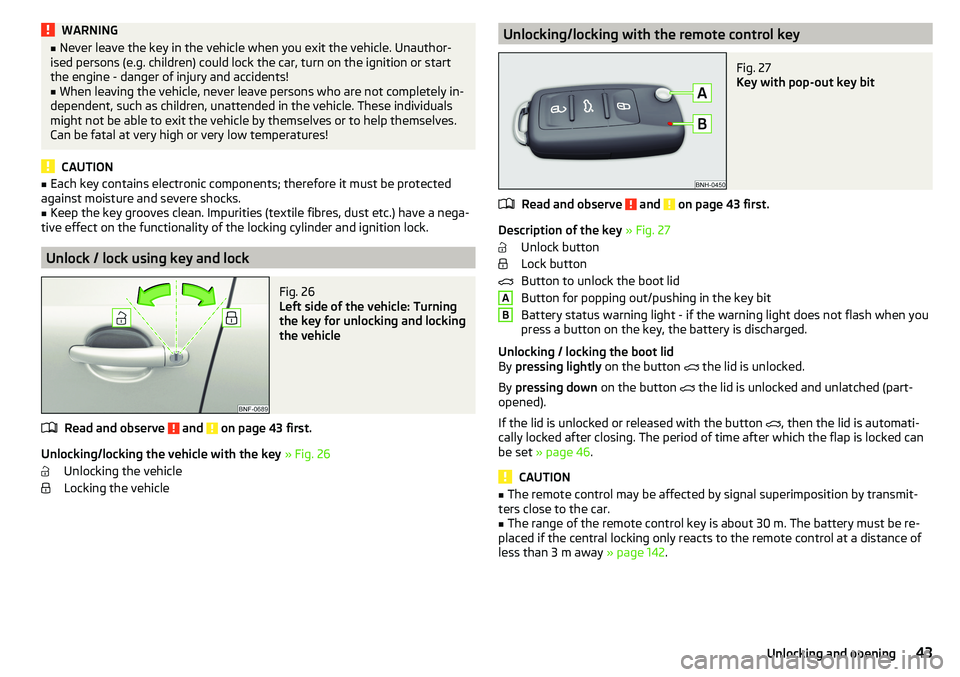
Unlocking/locking with the remote control keyFig. 27
Key with pop-out key bit
Read and observe and on page 43 first.
Description of the key » Fig. 27
Unlock button
Lock button
Button to unlock the boot lid
Button for popping out/pushing in the key bit
Battery status warning light - if the warning light does not flash when you
press a button on the key, the battery is discharged.
Unlocking / locking the boot lid
By pressing lightly on the button
the lid is unlocked.
By pressing down on the button
the lid is unlocked and unlatched (part-
opened).
If the lid is unlocked or released with the button , then the lid is automati-
cally locked after closing. The period of time after which the flap is locked can
be set » page 46 .
CAUTION
■
The remote control may be affected by signal superimposition by transmit-
ters close to the car.■
The range of the remote control key is about 30 m. The battery must be re-
placed if the central locking only reacts to the remote control at a distance of
less than 3 m away » page 142.
AB43Unlocking and opening
Page 46 of 172
Vehicle unlocking / locking with the door opening leverFig. 28
Door opening lever
Read and observe
and on page 43 first.
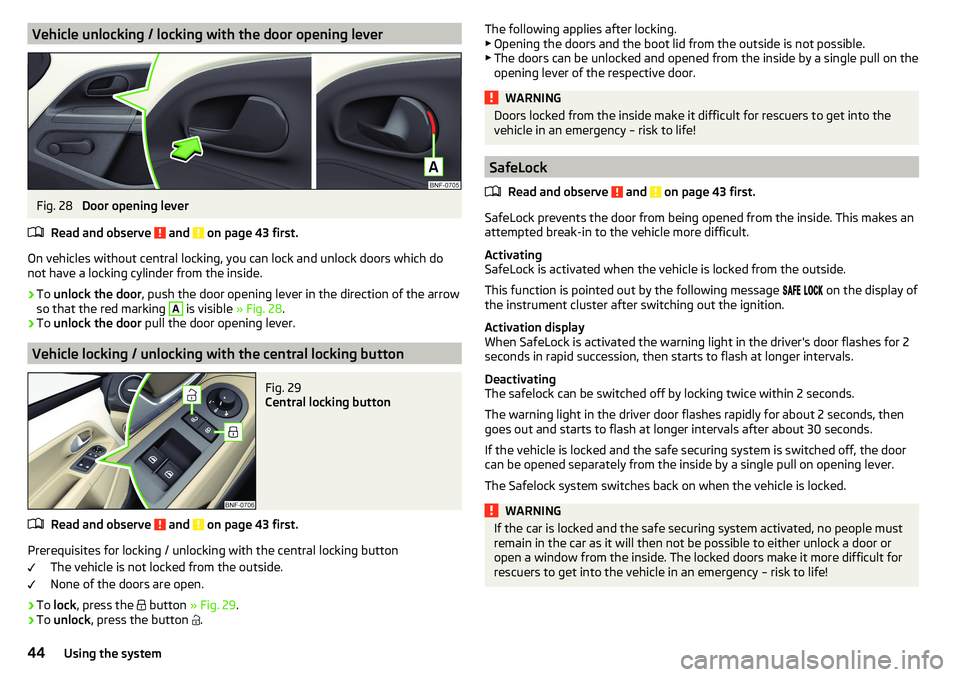
On vehicles without central locking, you can lock and unlock doors which do
not have a locking cylinder from the inside.
›
To unlock the door , push the door opening lever in the direction of the arrow
so that the red marking
A
is visible » Fig. 28.
›
To unlock the door pull the door opening lever.
Vehicle locking / unlocking with the central locking button
Fig. 29
Central locking button
Read and observe and on page 43 first.
Prerequisites for locking / unlocking with the central locking button
The vehicle is not locked from the outside.
None of the doors are open.
›
To lock , press the
button » Fig. 29 .
›
To unlock , press the button
.
The following applies after locking.
▶ Opening the doors and the boot lid from the outside is not possible.
▶ The doors can be unlocked and opened from the inside by a single pull on the
opening lever of the respective door.WARNINGDoors locked from the inside make it difficult for rescuers to get into the
vehicle in an emergency – risk to life!
SafeLock
Read and observe
and on page 43 first.
SafeLock prevents the door from being opened from the inside. This makes an
attempted break-in to the vehicle more difficult.
Activating
SafeLock is activated when the vehicle is locked from the outside.
This function is pointed out by the following message
on the display of
the instrument cluster after switching out the ignition.
Activation display
When SafeLock is activated the warning light in the driver's door flashes for 2
seconds in rapid succession, then starts to flash at longer intervals.
Deactivating
The safelock can be switched off by locking twice within 2 seconds.
The warning light in the driver door flashes rapidly for about 2 seconds, then
goes out and starts to flash at longer intervals after about 30 seconds.
If the vehicle is locked and the safe securing system is switched off, the door
can be opened separately from the inside by a single pull on opening lever.
The Safelock system switches back on when the vehicle is locked.
WARNINGIf the car is locked and the safe securing system activated, no people must
remain in the car as it will then not be possible to either unlock a door or
open a window from the inside. The locked doors make it more difficult for
rescuers to get into the vehicle in an emergency – risk to life!44Using the system
Page 47 of 172
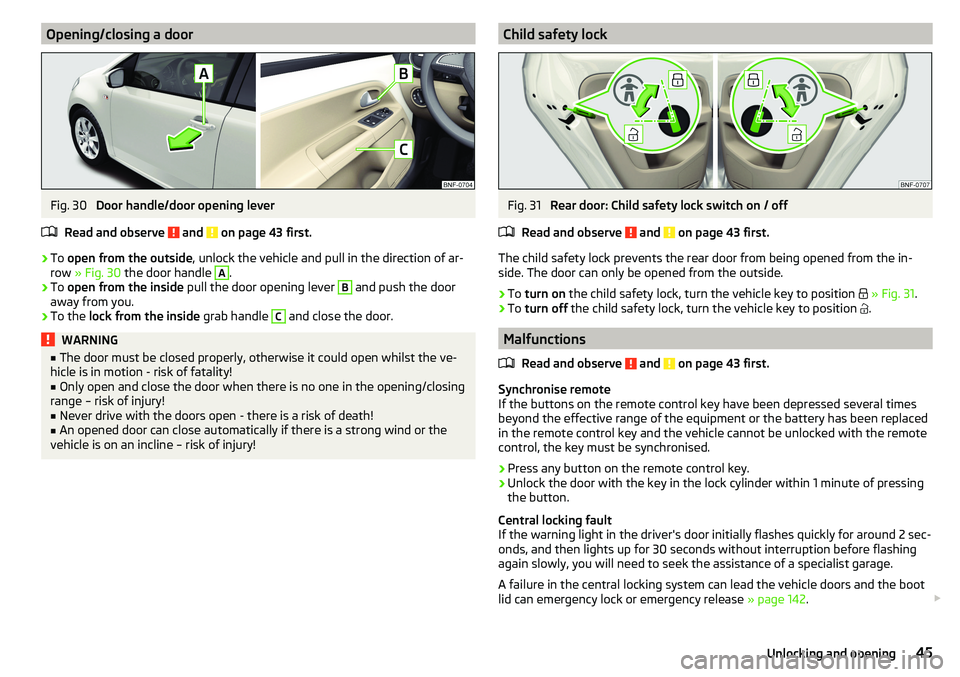
Opening/closing a doorFig. 30
Door handle/door opening lever
Read and observe
and on page 43 first.
›
To open from the outside , unlock the vehicle and pull in the direction of ar-
row » Fig. 30 the door handle
A
.
›
To open from the inside pull the door opening lever
B
and push the door
away from you.
›
To the lock from the inside grab handle
C
and close the door.
WARNING■
The door must be closed properly, otherwise it could open whilst the ve-
hicle is in motion - risk of fatality!■
Only open and close the door when there is no one in the opening/closing
range – risk of injury!
■
Never drive with the doors open - there is a risk of death!
■
An opened door can close automatically if there is a strong wind or the
vehicle is on an incline – risk of injury!
Child safety lockFig. 31
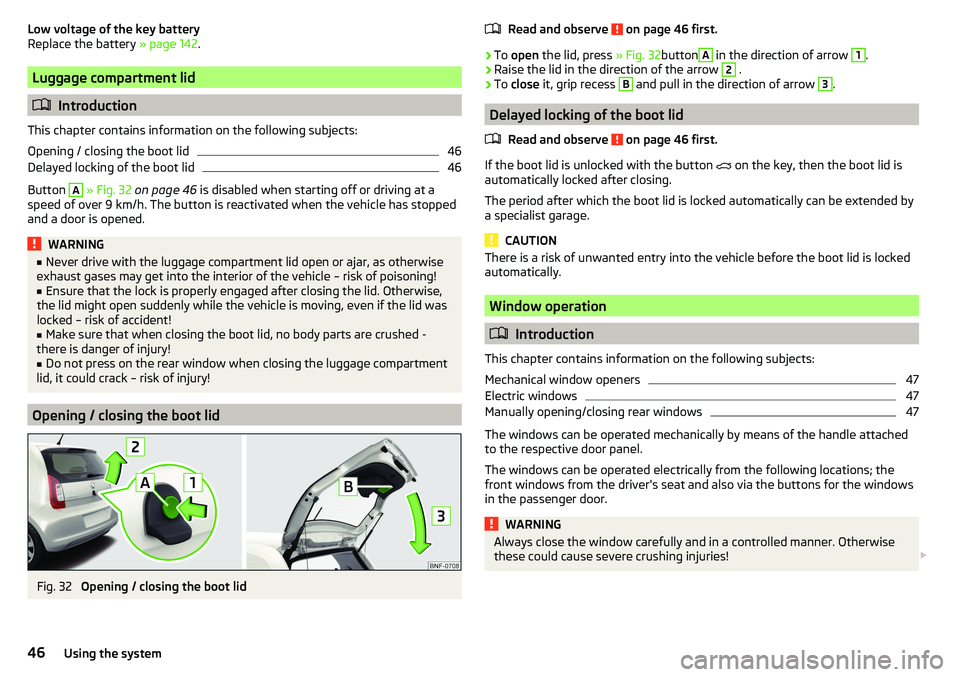
Rear door: Child safety lock switch on / off
Read and observe
and on page 43 first.
The child safety lock prevents the rear door from being opened from the in-
side. The door can only be opened from the outside.
›
To turn on the child safety lock, turn the vehicle key to position
» Fig. 31 .
›
To turn off the child safety lock, turn the vehicle key to position
.
Malfunctions
Read and observe
and on page 43 first.
Synchronise remote
If the buttons on the remote control key have been depressed several times
beyond the effective range of the equipment or the battery has been replaced
in the remote control key and the vehicle cannot be unlocked with the remote
control, the key must be synchronised.
›
Press any button on the remote control key.
›
Unlock the door with the key in the lock cylinder within 1 minute of pressing the button.
Central locking fault
If the warning light in the driver's door initially flashes quickly for around 2 sec-
onds, and then lights up for 30 seconds without interruption before flashing
again slowly, you will need to seek the assistance of a specialist garage.
A failure in the central locking system can lead the vehicle doors and the boot
lid can emergency lock or emergency release » page 142.
45Unlocking and opening
Page 48 of 172
Low voltage of the key battery
Replace the battery » page 142.
Luggage compartment lid
Introduction
This chapter contains information on the following subjects:
Opening / closing the boot lid
46
Delayed locking of the boot lid
46
Button
A
» Fig. 32 on page 46 is disabled when starting off or driving at a
speed of over 9 km/h. The button is reactivated when the vehicle has stopped
and a door is opened.
WARNING■ Never drive with the luggage compartment lid open or ajar, as otherwise
exhaust gases may get into the interior of the vehicle – risk of poisoning!■
Ensure that the lock is properly engaged after closing the lid. Otherwise,
the lid might open suddenly while the vehicle is moving, even if the lid was
locked – risk of accident!
■
Make sure that when closing the boot lid, no body parts are crushed -
there is danger of injury!
■
Do not press on the rear window when closing the luggage compartment
lid, it could crack – risk of injury!
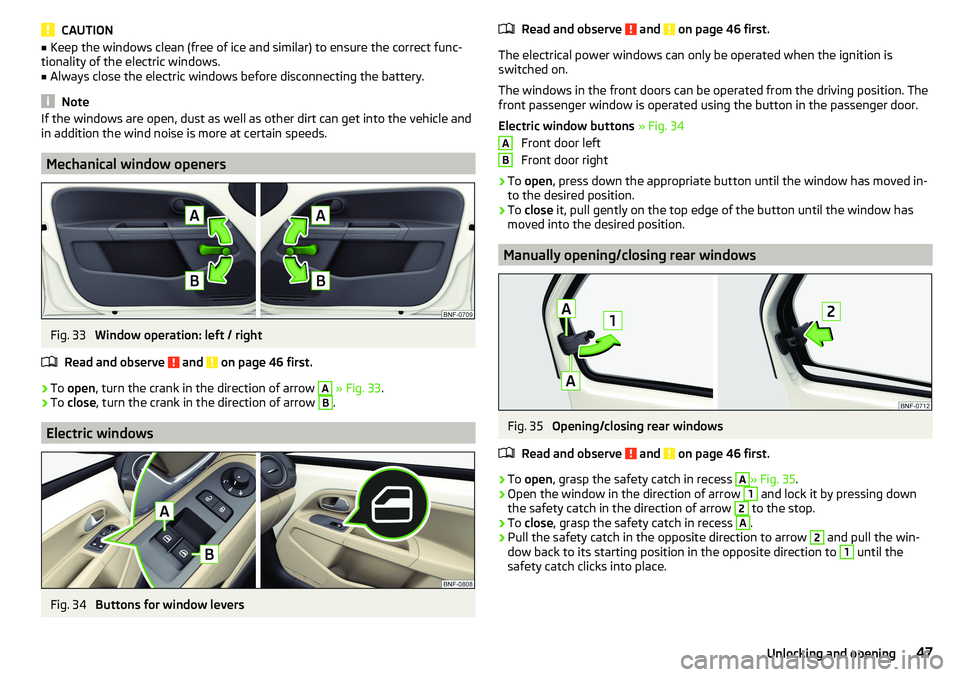
Opening / closing the boot lid
Fig. 32
Opening / closing the boot lid
Read and observe on page 46 first.›
To open the lid, press » Fig. 32button
A
in the direction of arrow
1
.
›
Raise the lid in the direction of the arrow
2
.
›
To close it, grip recess
B
and pull in the direction of arrow
3
.
Delayed locking of the boot lid
Read and observe
on page 46 first.
If the boot lid is unlocked with the button
on the key, then the boot lid is
automatically locked after closing.
The period after which the boot lid is locked automatically can be extended by
a specialist garage.
CAUTION
There is a risk of unwanted entry into the vehicle before the boot lid is locked
automatically.
Window operation
Introduction
This chapter contains information on the following subjects:
Mechanical window openers
47
Electric windows
47
Manually opening/closing rear windows
47
The windows can be operated mechanically by means of the handle attached
to the respective door panel.
The windows can be operated electrically from the following locations; the
front windows from the driver's seat and also via the buttons for the windows
in the passenger door.
WARNINGAlways close the window carefully and in a controlled manner. Otherwise
these could cause severe crushing injuries! 46Using the system
Page 49 of 172
CAUTION■Keep the windows clean (free of ice and similar) to ensure the correct func-
tionality of the electric windows.■
Always close the electric windows before disconnecting the battery.
Note
If the windows are open, dust as well as other dirt can get into the vehicle and
in addition the wind noise is more at certain speeds.
Mechanical window openers
Fig. 33
Window operation: left / right
Read and observe
and on page 46 first.
›
To open , turn the crank in the direction of arrow
A
» Fig. 33 .
›
To close , turn the crank in the direction of arrow
B
.
Electric windows
Fig. 34
Buttons for window levers
Read and observe and on page 46 first.
The electrical power windows can only be operated when the ignition is
switched on.
The windows in the front doors can be operated from the driving position. The
front passenger window is operated using the button in the passenger door.
Electric window buttons » Fig. 34
Front door left
Front door right
›
To open , press down the appropriate button until the window has moved in-
to the desired position.
›
To close it, pull gently on the top edge of the button until the window has
moved into the desired position.
Manually opening/closing rear windows
Fig. 35
Opening/closing rear windows
Read and observe
and on page 46 first.
›
To open , grasp the safety catch in recess
A
» Fig. 35 .
›
Open the window in the direction of arrow
1
and lock it by pressing down
the safety catch in the direction of arrow
2
to the stop.
›
To close , grasp the safety catch in recess
A
.
›
Pull the safety catch in the opposite direction to arrow
2
and pull the win-
dow back to its starting position in the opposite direction to
1
until the
safety catch clicks into place.
AB47Unlocking and opening
Page 52 of 172
To switch the light function on / off, switch A » Fig. 38 should be turned to
one of the following positions.
Switching off lights (except daytime running lights)Switching lights on/off automatically » page 51
Switch on daytime running lights and side lights or parking lights
» page 52
Turn on the low beam
To adjust the headlight range control , turn dial B
» Fig. 38 in line with the
vehicle load » .
Front seats occupied, boot empty
All seats occupied, boot empty
All seats occupied, boot loaded
Driver seat occupied, boot loaded
WARNINGAlways adjust the headlight beam to meet the following conditions - other-
wise risk of accident.■
The vehicle does not dazzle other road users, especially oncoming vehi-
cles.
■
The beam range is sufficient for safe driving.
Note
If the light switch is in the position , the ignition key is removed and the
driver's door is open, an audible warning signal will sound. After a few seconds
or after closing the driver's door, the audible alarm switches off, but the park-
ing lights will remain switched on.
Daylight running lights (DAY LIGHT)
The daytime running lights light up the area in front of and to the rear of the
vehicle (only applicable for some countries).
The daytime running lights are switched on automatically if the following
conditions are met.
The ignition is switched on.
The lights switch is in position
,
or
.
The light switch is in position
and the fog lights are turned on, the daytime
running lights will turn off.
WARNINGAlways switch on the low beam when visibility is poor.
Turn signal and main beam
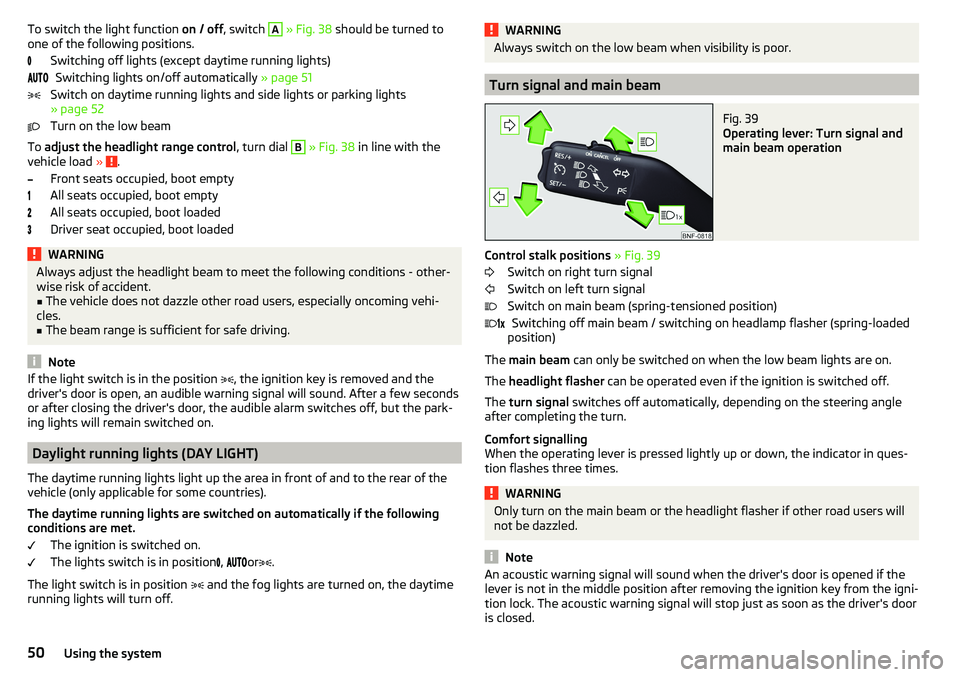
Fig. 39
Operating lever: Turn signal and
main beam operation
Control stalk positions » Fig. 39
Switch on right turn signal
Switch on left turn signal
Switch on main beam (spring-tensioned position) Switching off main beam / switching on headlamp flasher (spring-loaded
position)
The main beam can only be switched on when the low beam lights are on.
The headlight flasher can be operated even if the ignition is switched off.
The turn signal switches off automatically, depending on the steering angle
after completing the turn.
Comfort signalling
When the operating lever is pressed lightly up or down, the indicator in ques-
tion flashes three times.
WARNINGOnly turn on the main beam or the headlight flasher if other road users will
not be dazzled.
Note
An acoustic warning signal will sound when the driver's door is opened if the
lever is not in the middle position after removing the ignition key from the igni-
tion lock. The acoustic warning signal will stop just as soon as the driver's door
is closed. 50Using the system
Page 53 of 172
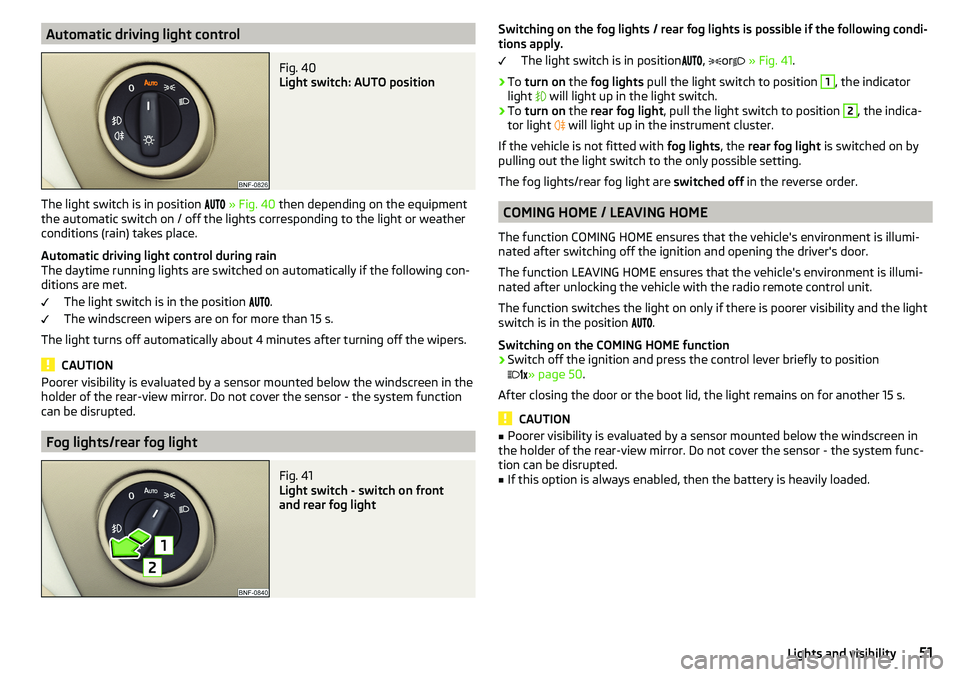
Automatic driving light controlFig. 40
Light switch: AUTO position
The light switch is in position
» Fig. 40 then depending on the equipment
the automatic switch on / off the lights corresponding to the light or weather
conditions (rain) takes place.
Automatic driving light control during rain
The daytime running lights are switched on automatically if the following con-
ditions are met.
The light switch is in the position .
The windscreen wipers are on for more than 15 s.
The light turns off automatically about 4 minutes after turning off the wipers.
CAUTION
Poorer visibility is evaluated by a sensor mounted below the windscreen in the
holder of the rear-view mirror. Do not cover the sensor - the system function
can be disrupted.
Fog lights/rear fog light
Fig. 41
Light switch - switch on front
and rear fog light
Switching on the fog lights / rear fog lights is possible if the following condi-
tions apply.
The light switch is in position
,
or
» Fig. 41 .›
To turn on the fog lights pull the light switch to position
1
, the indicator
light
will light up in the light switch.
›
To turn on the rear fog light , pull the light switch to position
2
, the indica-
tor light
will light up in the instrument cluster.
If the vehicle is not fitted with fog lights, the rear fog light is switched on by
pulling out the light switch to the only possible setting.
The fog lights/rear fog light are switched off in the reverse order.
COMING HOME / LEAVING HOME
The function COMING HOME ensures that the vehicle's environment is illumi-
nated after switching off the ignition and opening the driver's door.
The function LEAVING HOME ensures that the vehicle's environment is illumi-
nated after unlocking the vehicle with the radio remote control unit.
The function switches the light on only if there is poorer visibility and the light
switch is in the position .
Switching on the COMING HOME function
›
Switch off the ignition and press the control lever briefly to position
» page 50
.
After closing the door or the boot lid, the light remains on for another 15 s.
CAUTION
■ Poorer visibility is evaluated by a sensor mounted below the windscreen in
the holder of the rear-view mirror. Do not cover the sensor - the system func-
tion can be disrupted.■
If this option is always enabled, then the battery is heavily loaded.
51Lights and visibility