lock SKODA CITIGO 2017 Owner's Manual
[x] Cancel search | Manufacturer: SKODA, Model Year: 2017, Model line: CITIGO, Model: SKODA CITIGO 2017Pages: 172, PDF Size: 24.54 MB
Page 54 of 172
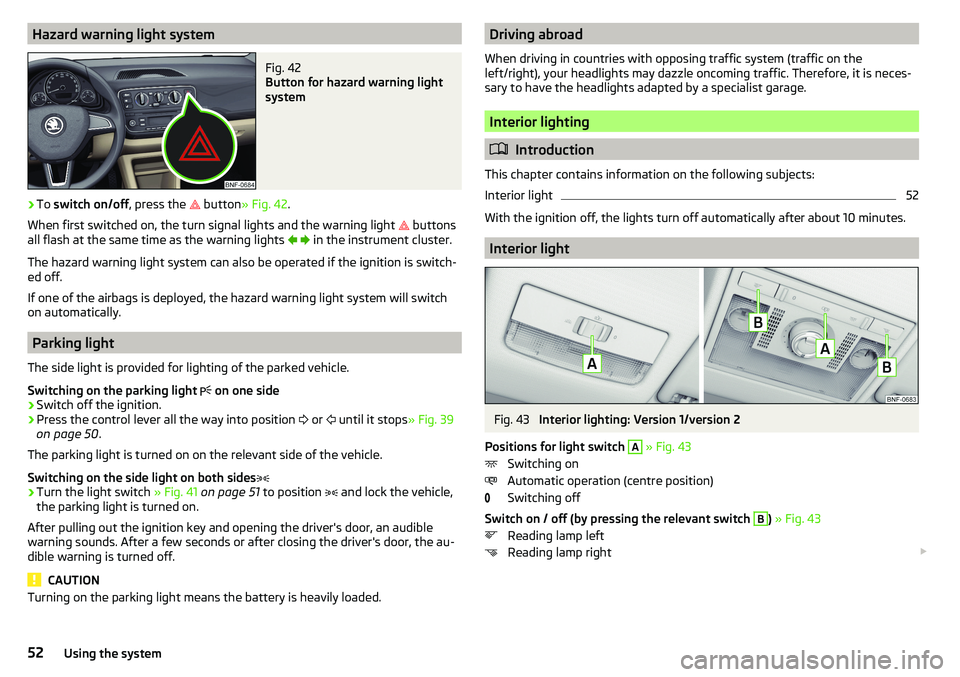
Hazard warning light systemFig. 42
Button for hazard warning light
system
›
To switch on/off , press the
button
» Fig. 42 .
When first switched on, the turn signal lights and the warning light buttons
all flash at the same time as the warning lights
in the instrument cluster.
The hazard warning light system can also be operated if the ignition is switch-
ed off.
If one of the airbags is deployed, the hazard warning light system will switch
on automatically.
Parking light
The side light is provided for lighting of the parked vehicle.
Switching on the parking light on one side
›
Switch off the ignition.
›
Press the control lever all the way into position
or
until it stops
» Fig. 39
on page 50 .
The parking light is turned on on the relevant side of the vehicle.
Switching on the side light on both sides
›
Turn the light switch » Fig. 41 on page 51 to position
and lock the vehicle,
the parking light is turned on.
After pulling out the ignition key and opening the driver's door, an audible
warning sounds. After a few seconds or after closing the driver's door, the au-
dible warning is turned off.
CAUTION
Turning on the parking light means the battery is heavily loaded.Driving abroad
When driving in countries with opposing traffic system (traffic on the
left/right), your headlights may dazzle oncoming traffic. Therefore, it is neces-
sary to have the headlights adapted by a specialist garage.
Interior lighting
Introduction
This chapter contains information on the following subjects:
Interior light
52
With the ignition off, the lights turn off automatically after about 10 minutes.
Interior light
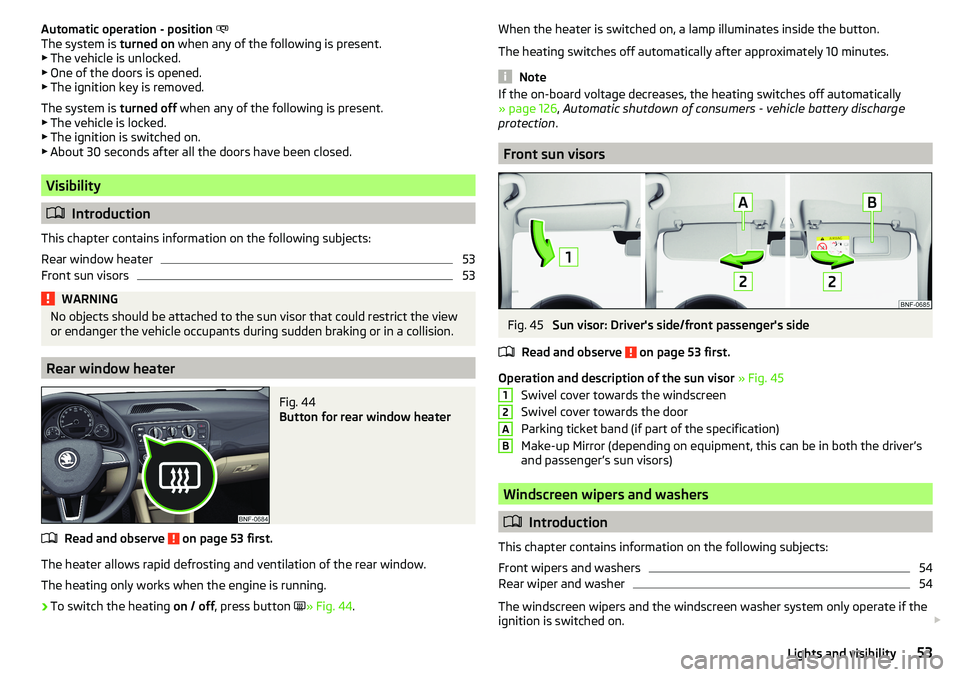
Fig. 43
Interior lighting: Version 1/version 2
Positions for light switch
A
» Fig. 43
Switching on
Automatic operation (centre position)
Switching off
Switch on / off (by pressing the relevant switch
B
) » Fig. 43
Reading lamp left
Reading lamp right
52Using the system
Page 55 of 172
Automatic operation - position
The system is turned on when any of the following is present.
▶ The vehicle is unlocked.
▶ One of the doors is opened.
▶ The ignition key is removed.
The system is turned off when any of the following is present.
▶ The vehicle is locked.
▶ The ignition is switched on.
▶ About 30 seconds after all the doors have been closed.
Visibility
Introduction
This chapter contains information on the following subjects:
Rear window heater
53
Front sun visors
53WARNINGNo objects should be attached to the sun visor that could restrict the view
or endanger the vehicle occupants during sudden braking or in a collision.
Rear window heater
Fig. 44
Button for rear window heater
Read and observe on page 53 first.
The heater allows rapid defrosting and ventilation of the rear window.
The heating only works when the engine is running.
›
To switch the heating on / off, press button
» Fig. 44 .
When the heater is switched on, a lamp illuminates inside the button.
The heating switches off automatically after approximately 10 minutes.
Note
If the on-board voltage decreases, the heating switches off automatically
» page 126 , Automatic shutdown of consumers - vehicle battery discharge
protection .
Front sun visors
Fig. 45
Sun visor: Driver's side/front passenger's side
Read and observe
on page 53 first.
Operation and description of the sun visor » Fig. 45
Swivel cover towards the windscreen
Swivel cover towards the door
Parking ticket band (if part of the specification)
Make-up Mirror (depending on equipment, this can be in both the driver’s
and passenger’s sun visors)
Windscreen wipers and washers
Introduction
This chapter contains information on the following subjects:
Front wipers and washers
54
Rear wiper and washer
54
The windscreen wipers and the windscreen washer system only operate if the
ignition is switched on.
12AB53Lights and visibility
Page 58 of 172
Seats and head restraints
Front seats
Introduction
This chapter contains information on the following subjects:
Adjusting the front seats
56
Folding front passenger seat
56WARNING■ Only adjust the driver's seat when the vehicle is stationary – otherwise
risk of accident!■
Caution when adjusting the seat! You may suffer injuries or bruises as a
result of adjusting the seat without paying proper attention.
Adjusting the front seats
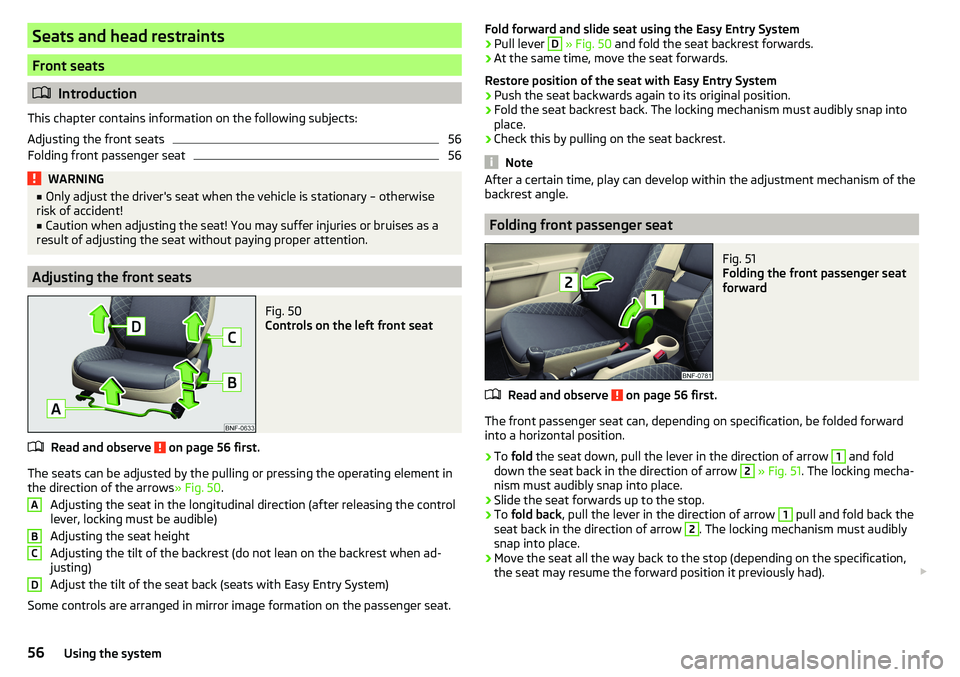
Fig. 50
Controls on the left front seat
Read and observe on page 56 first.
The seats can be adjusted by the pulling or pressing the operating element in the direction of the arrows » Fig. 50.
Adjusting the seat in the longitudinal direction (after releasing the control
lever, locking must be audible)
Adjusting the seat height
Adjusting the tilt of the backrest (do not lean on the backrest when ad-
justing)
Adjust the tilt of the seat back (seats with Easy Entry System)
Some controls are arranged in mirror image formation on the passenger seat.
ABCDFold forward and slide seat using the Easy Entry System›Pull lever D » Fig. 50 and fold the seat backrest forwards.›
At the same time, move the seat forwards.
Restore position of the seat with Easy Entry System
›
Push the seat backwards again to its original position.
›
Fold the seat backrest back. The locking mechanism must audibly snap into
place.
›
Check this by pulling on the seat backrest.
Note
After a certain time, play can develop within the adjustment mechanism of the
backrest angle.
Folding front passenger seat
Fig. 51
Folding the front passenger seat
forward
Read and observe on page 56 first.
The front passenger seat can, depending on specification, be folded forward into a horizontal position.
›
To fold the seat down, pull the lever in the direction of arrow
1
and fold
down the seat back in the direction of arrow
2
» Fig. 51 . The locking mecha-
nism must audibly snap into place.
›
Slide the seat forwards up to the stop.
›
To fold back , pull the lever in the direction of arrow
1
pull and fold back the
seat back in the direction of arrow
2
. The locking mechanism must audibly
snap into place.
›
Move the seat all the way back to the stop (depending on the specification,
the seat may resume the forward position it previously had).
56Using the system
Page 59 of 172
WARNING■If the seat backrest is folded, passengers may only be transported on the
outer seat behind the driver.■
The front passenger airbag should be switched off when transporting ob-
jects on the seat backrest that has been folded forwards » page 20.
■
Do not adjust the seat back while driving - danger of injury and accidents!
■
When moving the seat backrest, keep limbs out of the area between the
seat and seat backrest – risk of injury!
■
Never transport the following items on the seat backrest when folded
forwards. ■Objects that could restrict the driver's view.
■ Objects which make it impossible for the driver to control the vehicle
(e.g. if they roll under the pedals, or protrude into the driver's zone).
■ Objects which could lead to injury to passengers (e.g. if accelerating
sharply, braking or changing direction).
Rear seat backrests
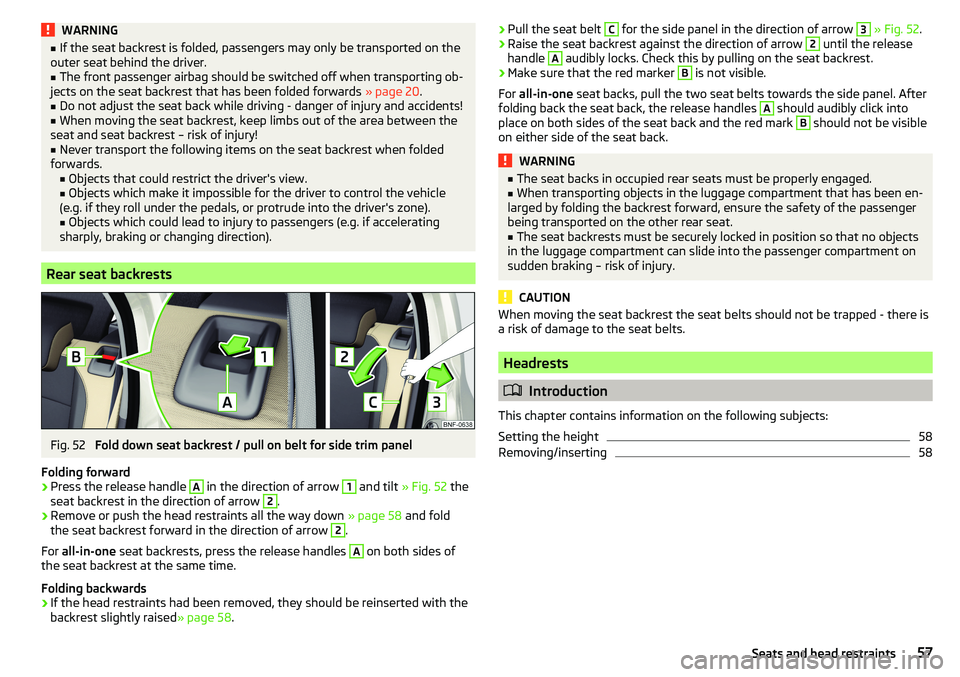
Fig. 52
Fold down seat backrest / pull on belt for side trim panel
Folding forward
›
Press the release handle
A
in the direction of arrow
1
and tilt » Fig. 52 the
seat backrest in the direction of arrow
2
.
›
Remove or push the head restraints all the way down » page 58 and fold
the seat backrest forward in the direction of arrow
2
.
For all-in-one seat backrests, press the release handles
A
on both sides of
the seat backrest at the same time.
Folding backwards
›
If the head restraints had been removed, they should be reinserted with the
backrest slightly raised » page 58.
›Pull the seat belt C for the side panel in the direction of arrow 3
» Fig. 52 .›Raise the seat backrest against the direction of arrow 2 until the release
handle A
audibly locks. Check this by pulling on the seat backrest.
›
Make sure that the red marker
B
is not visible.
For all-in-one seat backs, pull the two seat belts towards the side panel. After
folding back the seat back, the release handles
A
should audibly click into
place on both sides of the seat back and the red mark
B
should not be visible
on either side of the seat back.
WARNING■ The seat backs in occupied rear seats must be properly engaged.■When transporting objects in the luggage compartment that has been en-
larged by folding the backrest forward, ensure the safety of the passenger
being transported on the other rear seat.■
The seat backrests must be securely locked in position so that no objects
in the luggage compartment can slide into the passenger compartment on
sudden braking – risk of injury.
CAUTION
When moving the seat backrest the seat belts should not be trapped - there is
a risk of damage to the seat belts.
Headrests
Introduction
This chapter contains information on the following subjects:
Setting the height
58
Removing/inserting
5857Seats and head restraints
Page 60 of 172
Setting the heightFig. 53
Setting the height of the back headrest
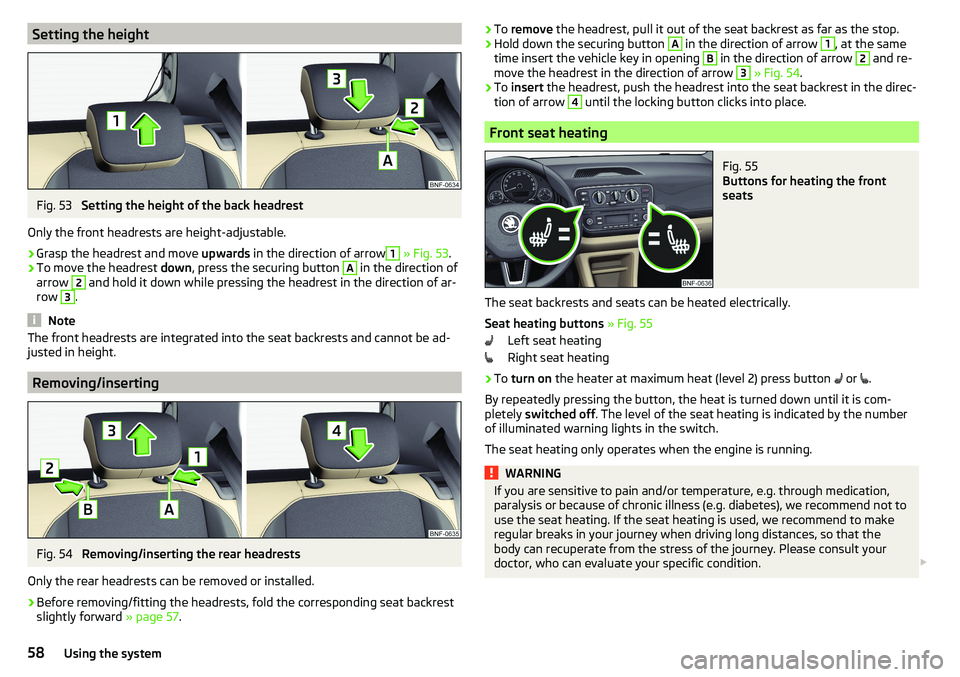
Only the front headrests are height-adjustable.
›
Grasp the headrest and move upwards in the direction of arrow
1
» Fig. 53 .
›
To move the headrest down, press the securing button
A
in the direction of
arrow
2
and hold it down while pressing the headrest in the direction of ar-
row
3
.
Note
The front headrests are integrated into the seat backrests and cannot be ad-
justed in height.
Removing/inserting
Fig. 54
Removing/inserting the rear headrests
Only the rear headrests can be removed or installed.
›
Before removing/fitting the headrests, fold the corresponding seat backrest slightly forward » page 57.
›To
remove the headrest, pull it out of the seat backrest as far as the stop.›Hold down the securing button A in the direction of arrow 1, at the same
time insert the vehicle key in opening B
in the direction of arrow
2
and re-
move the headrest in the direction of arrow
3
» Fig. 54 .
›
To insert the headrest, push the headrest into the seat backrest in the direc-
tion of arrow
4
until the locking button clicks into place.
Front seat heating
Fig. 55
Buttons for heating the front
seats
The seat backrests and seats can be heated electrically.
Seat heating buttons » Fig. 55
Left seat heating
Right seat heating
›
To turn on the heater at maximum heat (level 2) press button
or
.
By repeatedly pressing the button, the heat is turned down until it is com-
pletely switched off . The level of the seat heating is indicated by the number
of illuminated warning lights in the switch.
The seat heating only operates when the engine is running.
WARNINGIf you are sensitive to pain and/or temperature, e.g. through medication,
paralysis or because of chronic illness (e.g. diabetes), we recommend not to
use the seat heating. If the seat heating is used, we recommend to make
regular breaks in your journey when driving long distances, so that the
body can recuperate from the stress of the journey. Please consult your
doctor, who can evaluate your specific condition. 58Using the system
Page 62 of 172
WARNING (Continued)■For safety reasons, lockable storage compartments should be closed
while driving - there is a risk of injury from the opened lid or through the
loose objects in the compartment.■
Make sure no objects protrude from the storage compartments - danger
of injury!
■
Do not exceed the permissible loads for the storage compartments and
pockets - risk of injury and risk of damage to the compartments and pock-
ets!
■
Ash, cigarettes, cigars and the like should only be stored in the ashtray -
danger of fire/burns!
■
The storage compartments, multimedia holder and waste container are
not a substitute for the ashtray and must not be used for such purposes –
risk of fire!
CAUTION
Do not place any large or sharp objects in the storage compartments and pock-
ets - there is a risk of damage to the compartments and pockets.
Ticket holder
Fig. 56
Ticket holder
Read and observe and on page 59 first.
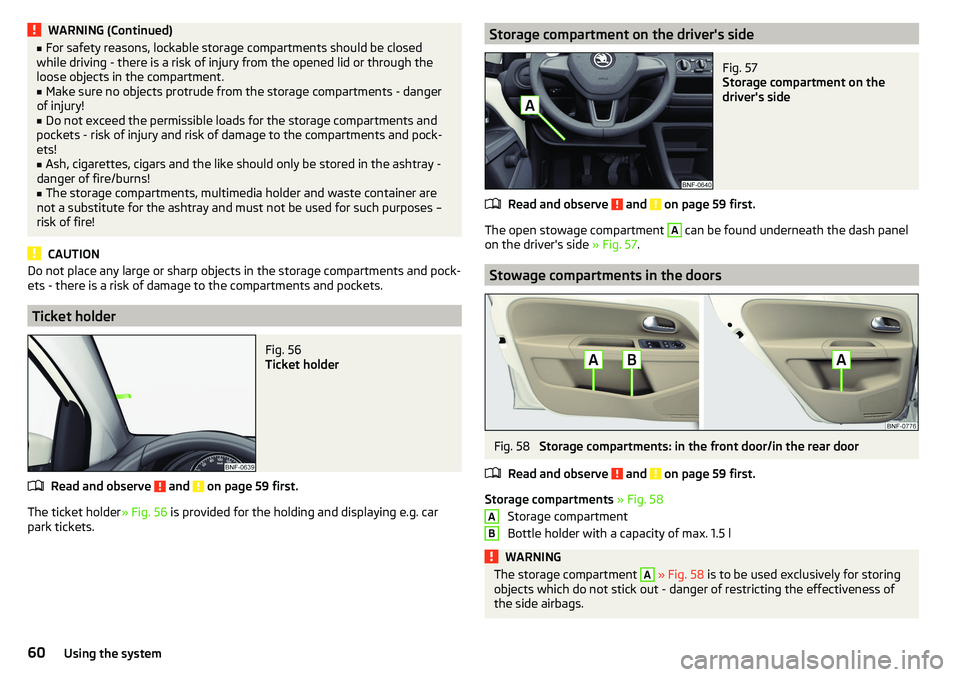
The ticket holder » Fig. 56 is provided for the holding and displaying e.g. car
park tickets.
Storage compartment on the driver's sideFig. 57
Storage compartment on the
driver's side
Read and observe and on page 59 first.
The open stowage compartment
A
can be found underneath the dash panel
on the driver's side » Fig. 57.
Stowage compartments in the doors
Fig. 58
Storage compartments: in the front door/in the rear door
Read and observe
and on page 59 first.
Storage compartments » Fig. 58
Storage compartment
Bottle holder with a capacity of max. 1.5 l
WARNINGThe storage compartment A » Fig. 58 is to be used exclusively for storing
objects which do not stick out - danger of restricting the effectiveness of
the side airbags.AB60Using the system
Page 64 of 172
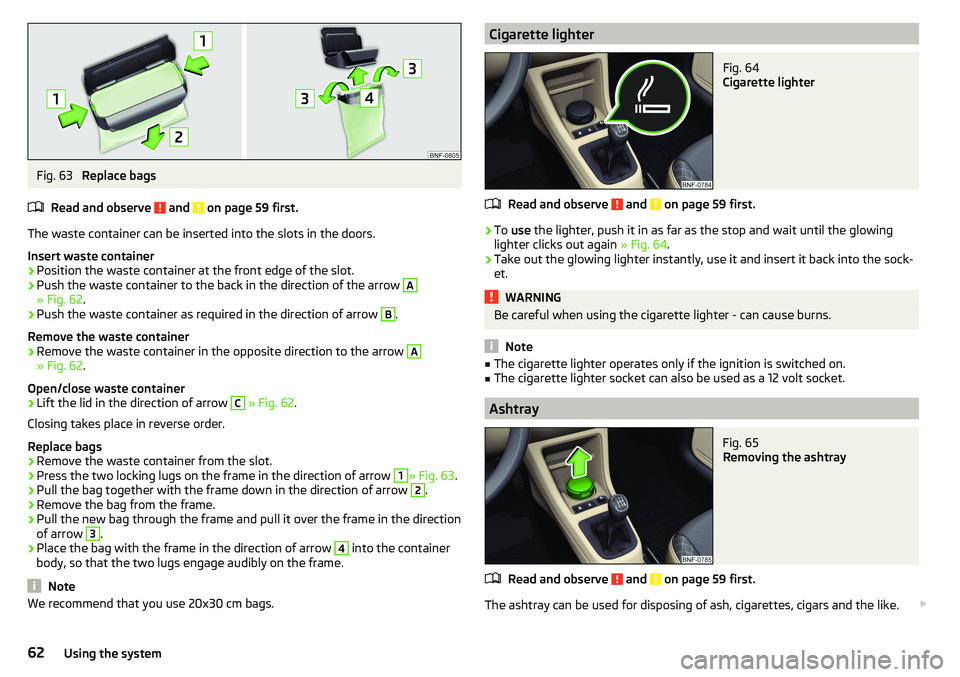
Fig. 63
Replace bags
Read and observe
and on page 59 first.
The waste container can be inserted into the slots in the doors.
Insert waste container
›
Position the waste container at the front edge of the slot.
›
Push the waste container to the back in the direction of the arrow
A
» Fig. 62 .
›
Push the waste container as required in the direction of arrow
B
.
Remove the waste container
›
Remove the waste container in the opposite direction to the arrow
A
» Fig. 62 .
Open/close waste container
›
Lift the lid in the direction of arrow
C
» Fig. 62 .
Closing takes place in reverse order.
Replace bags
›
Remove the waste container from the slot.
›
Press the two locking lugs on the frame in the direction of arrow
1
» Fig. 63 .
›
Pull the bag together with the frame down in the direction of arrow
2
.
›
Remove the bag from the frame.
›
Pull the new bag through the frame and pull it over the frame in the direction
of arrow
3
.
›
Place the bag with the frame in the direction of arrow
4
into the container
body, so that the two lugs engage audibly on the frame.
Note
We recommend that you use 20x30 cm bags.Cigarette lighterFig. 64
Cigarette lighter
Read and observe and on page 59 first.
›
To use the lighter, push it in as far as the stop and wait until the glowing
lighter clicks out again » Fig. 64.
›
Take out the glowing lighter instantly, use it and insert it back into the sock-
et.
WARNINGBe careful when using the cigarette lighter - can cause burns.
Note
■ The cigarette lighter operates only if the ignition is switched on.■The cigarette lighter socket can also be used as a 12 volt socket.
Ashtray
Fig. 65
Removing the ashtray
Read and observe and on page 59 first.
The ashtray can be used for disposing of ash, cigarettes, cigars and the like.
62Using the system
Page 71 of 172
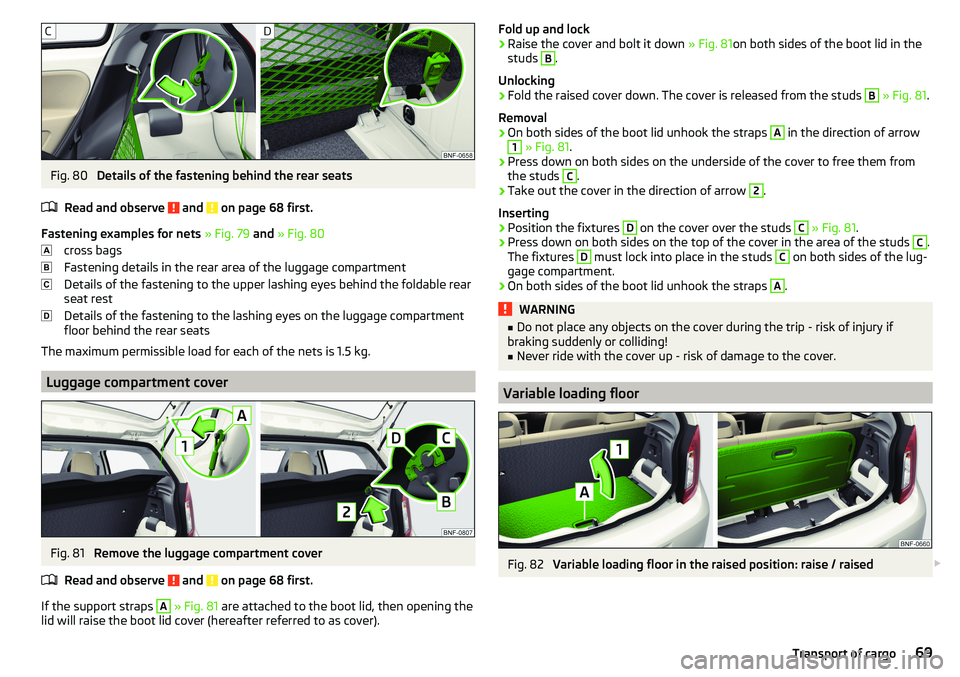
Fig. 80
Details of the fastening behind the rear seats
Read and observe
and on page 68 first.
Fastening examples for nets » Fig. 79 and » Fig. 80
cross bags
Fastening details in the rear area of the luggage compartment
Details of the fastening to the upper lashing eyes behind the foldable rear
seat rest
Details of the fastening to the lashing eyes on the luggage compartment
floor behind the rear seats
The maximum permissible load for each of the nets is 1.5 kg.
Luggage compartment cover
Fig. 81
Remove the luggage compartment cover
Read and observe
and on page 68 first.
If the support straps
A
» Fig. 81 are attached to the boot lid, then opening the
lid will raise the boot lid cover (hereafter referred to as cover).
Fold up and lock›Raise the cover and bolt it down » Fig. 81on both sides of the boot lid in the
studs B
.
Unlocking
›
Fold the raised cover down. The cover is released from the studs
B
» Fig. 81 .
Removal
›
On both sides of the boot lid unhook the straps
A
in the direction of arrow
1
» Fig. 81 .
›
Press down on both sides on the underside of the cover to free them from
the studs
C
.
›
Take out the cover in the direction of arrow
2
.
Inserting
›
Position the fixtures
D
on the cover over the studs
C
» Fig. 81 .
›
Press down on both sides on the top of the cover in the area of the studs
C
.
The fixtures
D
must lock into place in the studs
C
on both sides of the lug-
gage compartment.
›
On both sides of the boot lid unhook the straps
A
.
WARNING■ Do not place any objects on the cover during the trip - risk of injury if
braking suddenly or colliding!■
Never ride with the cover up - risk of damage to the cover.
Variable loading floor
Fig. 82
Variable loading floor in the raised position: raise / raised
69Transport of cargo
Page 79 of 172
OperationAction
Returning to higher-level menu
Applies to swing: By pressing the function
button Applies to
blues: By pressing
Select the menu item / function
value
- Selected menu item / function value - Deselected menu item / function val-
ue - Selected menu item / function valueSet valueTurning the knob .Pressing the function key or
Display areas
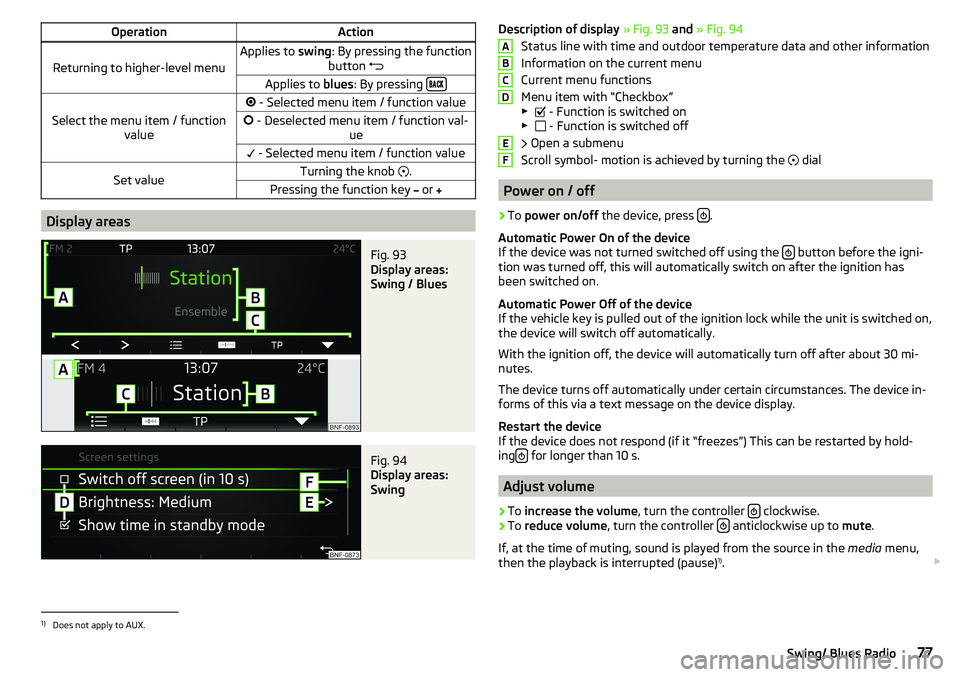
Fig. 93
Display areas:
Swing / Blues
Fig. 94
Display areas:
Swing
Description of display » Fig. 93 and » Fig. 94
Status line with time and outdoor temperature data and other information
Information on the current menu
Current menu functions
Menu item with “Checkbox”
▶ - Function is switched on
▶ - Function is switched off
Open a submenu
Scroll symbol- motion is achieved by turning the
dial
Power on / off
›
To power on/off the device, press .
Automatic Power On of the device
If the device was not turned switched off using the
button before the igni-
tion was turned off, this will automatically switch on after the ignition has
been switched on.
Automatic Power Off of the device
If the vehicle key is pulled out of the ignition lock while the unit is switched on,
the device will switch off automatically.
With the ignition off, the device will automatically turn off after about 30 mi-
nutes.
The device turns off automatically under certain circumstances. The device in-
forms of this via a text message on the device display.
Restart the device
If the device does not respond (if it “freezes”) This can be restarted by hold-
ing
for longer than 10 s.
Adjust volume
›
To
increase the volume , turn the controller clockwise.
›
To
reduce volume , turn the controller anticlockwise up to
mute.
If, at the time of muting, sound is played from the source in the media menu,
then the playback is interrupted (pause) 1)
.
ABCDEF1)
Does not apply to AUX.
77Swing/ Blues Radio
Page 81 of 172
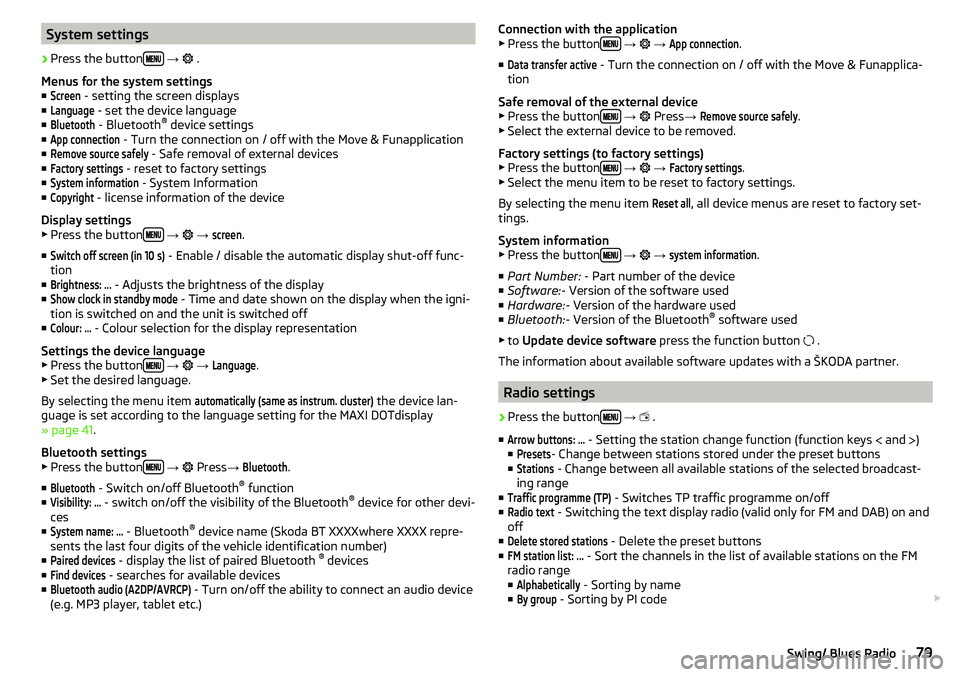
System settings›
Press the button
→
.
Menus for the system settings ■
Screen
- setting the screen displays
■
Language
- set the device language
■
Bluetooth
- Bluetooth ®
device settings
■
App connection
- Turn the connection on / off with the Move & Funapplication
■
Remove source safely
- Safe removal of external devices
■
Factory settings
- reset to factory settings
■
System information
- System Information
■
Copyright
- license information of the device
Display settings ▶ Press the button
→
→
screen
.
■
Switch off screen (in 10 s)
- Enable / disable the automatic display shut-off func-
tion
■
Brightness: ...
- Adjusts the brightness of the display
■
Show clock in standby mode
- Time and date shown on the display when the igni-
tion is switched on and the unit is switched off
■
Colour: ...
- Colour selection for the display representation
Settings the device language
▶ Press the button
→
→
Language
.
▶ Set the desired language.
By selecting the menu item
automatically (same as instrum. cluster)
the device lan-
guage is set according to the language setting for the MAXI DOTdisplay
» page 41 .
Bluetooth settings ▶ Press the button
→
Press
→
Bluetooth
.
■
Bluetooth
- Switch on/off Bluetooth ®
function
■
Visibility: ...
- switch on/off the visibility of the Bluetooth ®
device for other devi-
ces
■
System name: ...
- Bluetooth ®
device name (Skoda BT XXXXwhere XXXX repre-
sents the last four digits of the vehicle identification number)
■
Paired devices
- display the list of paired Bluetooth ®
devices
■
Find devices
- searches for available devices
■
Bluetooth audio (A2DP/AVRCP)
- Turn on/off the ability to connect an audio device
(e.g. MP3 player, tablet etc.)
Connection with the application
▶ Press the button
→ →
App connection
.
■
Data transfer active
- Turn the connection on / off with the Move & Funapplica-
tion
Safe removal of the external device ▶ Press the button
→
Press →
Remove source safely
.
▶ Select the external device to be removed.
Factory settings (to factory settings) ▶ Press the button
→
→
Factory settings
.
▶ Select the menu item to be reset to factory settings.
By selecting the menu item
Reset all
, all device menus are reset to factory set-
tings.
System information
▶ Press the button
→
→
system information
.
■ Part Number: - Part number of the device
■ Software: - Version of the software used
■ Hardware: - Version of the hardware used
■ Bluetooth: - Version of the Bluetooth ®
software used
▶ to Update device software press the function button
.
The information about available software updates with a ŠKODA partner.
Radio settings
›
Press the button
→
.
■
Arrow buttons: ...
- Setting the station change function (function keys and
)
■
Presets
- Change between stations stored under the preset buttons
■
Stations
- Change between all available stations of the selected broadcast-
ing range
■
Traffic programme (TP)
- Switches TP traffic programme on/off
■
Radio text
- Switching the text display radio (valid only for FM and DAB) on and
off
■
Delete stored stations
- Delete the preset buttons
■
FM station list: ...
- Sort the channels in the list of available stations on the FM
radio range
■
Alphabetically
- Sorting by name
■
By group
- Sorting by PI code
79Swing/ Blues Radio