lock SKODA CITIGO 2017 Workshop Manual
[x] Cancel search | Manufacturer: SKODA, Model Year: 2017, Model line: CITIGO, Model: SKODA CITIGO 2017Pages: 172, PDF Size: 24.54 MB
Page 147 of 172
Note■We recommend always carrying replacement fuses in the vehicle.■There can be several power consuming devices for one fuse. Multiple fuses
may exist for a single power consuming device.
Fuses in the dash panel
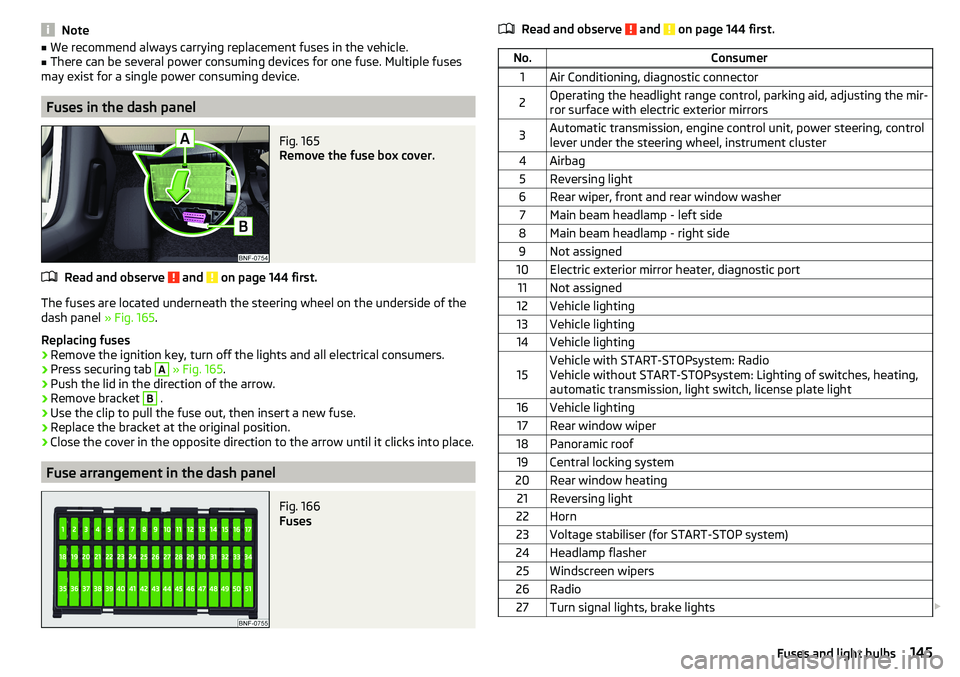
Fig. 165
Remove the fuse box cover.
Read and observe and on page 144 first.
The fuses are located underneath the steering wheel on the underside of the
dash panel » Fig. 165.
Replacing fuses
›
Remove the ignition key, turn off the lights and all electrical consumers.
›
Press securing tab
A
» Fig. 165 .
›
Push the lid in the direction of the arrow.
›
Remove bracket
B
.
›
Use the clip to pull the fuse out, then insert a new fuse.
›
Replace the bracket at the original position.
›
Close the cover in the opposite direction to the arrow until it clicks into place.
Fuse arrangement in the dash panel
Fig. 166
Fuses
Read and observe and on page 144 first.No.Consumer1Air Conditioning, diagnostic connector2Operating the headlight range control, parking aid, adjusting the mir-
ror surface with electric exterior mirrors3Automatic transmission, engine control unit, power steering, control
lever under the steering wheel, instrument cluster4Airbag5Reversing light6Rear wiper, front and rear window washer7Main beam headlamp - left side8Main beam headlamp - right side9Not assigned10Electric exterior mirror heater, diagnostic port11Not assigned12Vehicle lighting13Vehicle lighting14Vehicle lighting15Vehicle with START-STOPsystem: Radio
Vehicle without START-STOPsystem: Lighting of switches, heating,
automatic transmission, light switch, license plate light16Vehicle lighting17Rear window wiper18Panoramic roof19Central locking system20Rear window heating21Reversing light22Horn23Voltage stabiliser (for START-STOP system)24Headlamp flasher25Windscreen wipers26Radio27Turn signal lights, brake lights 145Fuses and light bulbs
Page 149 of 172
No.Consumer3Radio4DC-DC voltage converter, motor starter, bar with buttons5Air conditioning system6Not assigned7Not assigned8Not assigned9Vehicle lighting - right side10Vehicle lighting - left side11Starter12DC-DC voltage converter, ABS, instrument cluster, radio
Fuses in the engine compartment
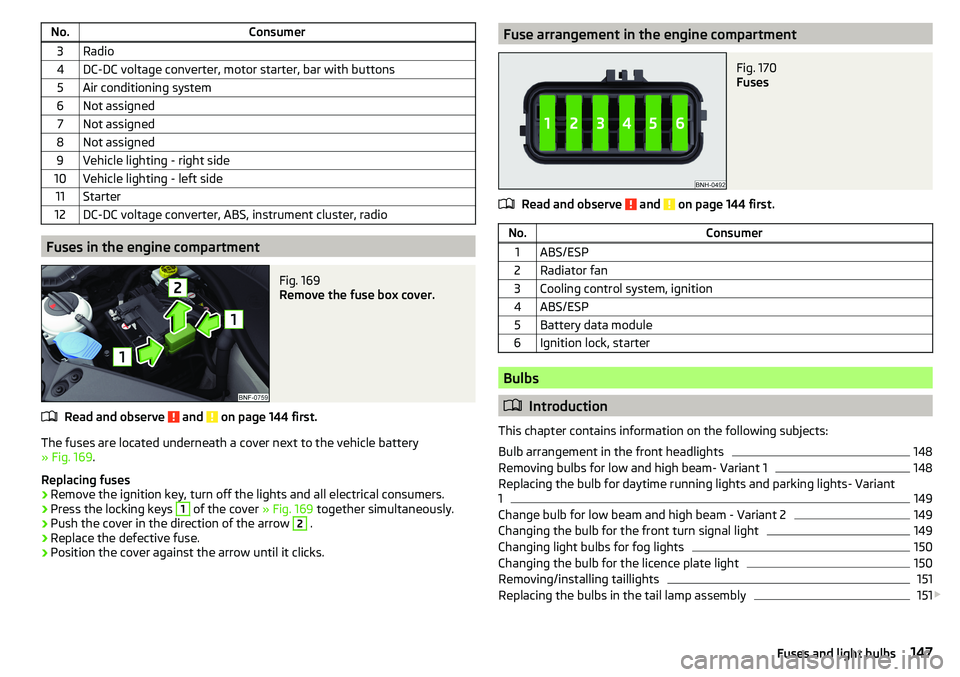
Fig. 169
Remove the fuse box cover.
Read and observe and on page 144 first.
The fuses are located underneath a cover next to the vehicle battery
» Fig. 169 .
Replacing fuses
›
Remove the ignition key, turn off the lights and all electrical consumers.
›
Press the locking keys
1
of the cover » Fig. 169 together simultaneously.
›
Push the cover in the direction of the arrow
2
.
›
Replace the defective fuse.
›
Position the cover against the arrow until it clicks.
Fuse arrangement in the engine compartmentFig. 170
Fuses
Read and observe and on page 144 first.
No.Consumer1ABS/ESP2Radiator fan3Cooling control system, ignition4ABS/ESP5Battery data module6Ignition lock, starter
Bulbs
Introduction
This chapter contains information on the following subjects:
Bulb arrangement in the front headlights
148
Removing bulbs for low and high beam- Variant 1
148
Replacing the bulb for daytime running lights and parking lights- Variant
1
149
Change bulb for low beam and high beam - Variant 2
149
Changing the bulb for the front turn signal light
149
Changing light bulbs for fog lights
150
Changing the bulb for the licence plate light
150
Removing/installing taillights
151
Replacing the bulbs in the tail lamp assembly
151
147Fuses and light bulbs
Page 152 of 172
›Unscrew the defective bulb in its housing in an
anti-clockwise direction and
remove it.›
Place a new bulb in the housing and turn it in a clockwise direction as far as
it will go.
›
Insert the housing containing the light bulb in the lamp housing in the oppo-
site direction to arrow
2
.
›
Screw the housing in the opposite direction to arrow
1
until it clicks into
place.
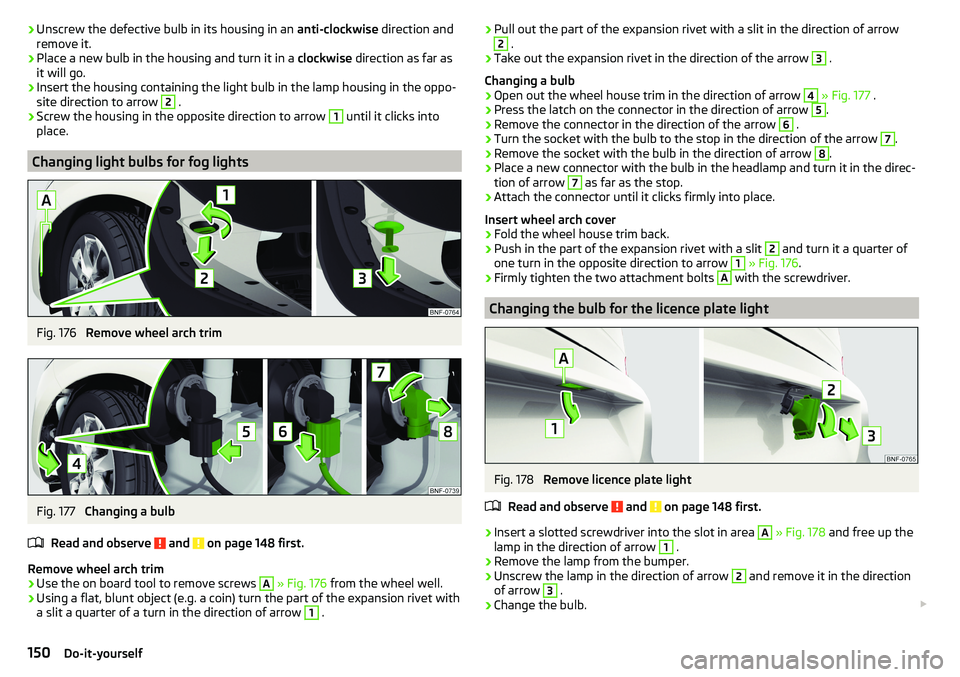
Changing light bulbs for fog lights
Fig. 176
Remove wheel arch trim
Fig. 177
Changing a bulb
Read and observe
and on page 148 first.
Remove wheel arch trim
›
Use the on board tool to remove screws
A
» Fig. 176 from the wheel well.
›
Using a flat, blunt object (e.g. a coin) turn the part of the expansion rivet with
a slit a quarter of a turn in the direction of arrow
1
.
› Pull out the part of the expansion rivet with a slit in the direction of arrow2 .›
Take out the expansion rivet in the direction of the arrow
3
.
Changing a bulb
›
Open out the wheel house trim in the direction of arrow
4
» Fig. 177 .
›
Press the latch on the connector in the direction of arrow
5
.
›
Remove the connector in the direction of the arrow
6
.
›
Turn the socket with the bulb to the stop in the direction of the arrow
7
.
›
Remove the socket with the bulb in the direction of arrow
8
.
›
Place a new connector with the bulb in the headlamp and turn it in the direc-
tion of arrow
7
as far as the stop.
›
Attach the connector until it clicks firmly into place.
Insert wheel arch cover
›
Fold the wheel house trim back.
›
Push in the part of the expansion rivet with a slit
2
and turn it a quarter of
one turn in the opposite direction to arrow
1
» Fig. 176 .
›
Firmly tighten the two attachment bolts
A
with the screwdriver.
Changing the bulb for the licence plate light
Fig. 178
Remove licence plate light
Read and observe
and on page 148 first.
›
Insert a slotted screwdriver into the slot in area
A
» Fig. 178 and free up the
lamp in the direction of arrow
1
.
›
Remove the lamp from the bumper.
›
Unscrew the lamp in the direction of arrow
2
and remove it in the direction
of arrow
3
.
›
Change the bulb.
150Do-it-yourself
Page 153 of 172
›Insert the housing with the bulb in the lamp and turn it in the opposite direc-
tion to arrow 2 as far as the stop.›
Insert the lamp in the left side of the hole and press gently until the spring
snaps into place.
CAUTION
Ensure that the vehicle paintwork and the tail lamp are not damaged when re-
moving and installing the licence plate lamp.
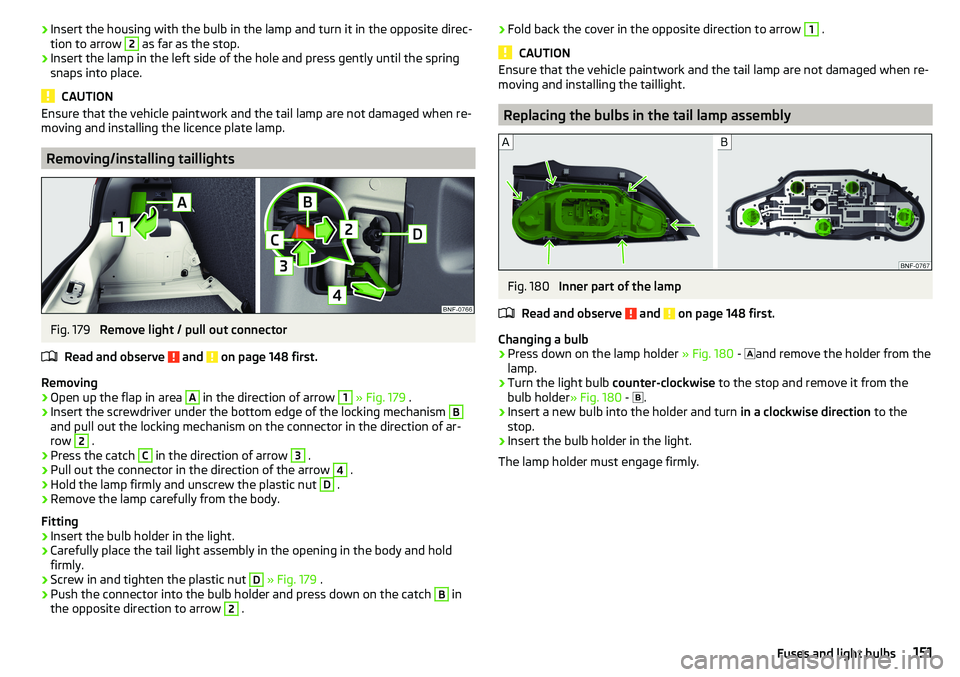
Removing/installing taillights
Fig. 179
Remove light / pull out connector
Read and observe
and on page 148 first.
Removing
›
Open up the flap in area
A
in the direction of arrow
1
» Fig. 179 .
›
Insert the screwdriver under the bottom edge of the locking mechanism
B
and pull out the locking mechanism on the connector in the direction of ar-
row
2
.
›
Press the catch
C
in the direction of arrow
3
.
›
Pull out the connector in the direction of the arrow
4
.
›
Hold the lamp firmly and unscrew the plastic nut
D
.
›
Remove the lamp carefully from the body.
Fitting
›
Insert the bulb holder in the light.
›
Carefully place the tail light assembly in the opening in the body and hold
firmly.
›
Screw in and tighten the plastic nut
D
» Fig. 179 .
›
Push the connector into the bulb holder and press down on the catch
B
in
the opposite direction to arrow
2
.
› Fold back the cover in the opposite direction to arrow 1 .
CAUTION
Ensure that the vehicle paintwork and the tail lamp are not damaged when re-
moving and installing the taillight.
Replacing the bulbs in the tail lamp assembly
Fig. 180
Inner part of the lamp
Read and observe
and on page 148 first.
Changing a bulb
›
Press down on the lamp holder » Fig. 180 -
and remove the holder from the
lamp.
›
Turn the light bulb counter-clockwise to the stop and remove it from the
bulb holder » Fig. 180 -
.
›
Insert a new bulb into the holder and turn in a clockwise direction to the
stop.
›
Insert the bulb holder in the light.
The lamp holder must engage firmly.
151Fuses and light bulbs
Page 154 of 172
Technical data
Technical data
Basic vehicle data
Introduction
This chapter contains information on the following subjects:
Vehicle data
152
Operating weight
153
Payload
153
Measurement of fuel consumption and CO 2 emissions according to ECE
Regulations and EU Directives
153
Dimensions
154
Departure angle
155
The details given in the vehicle's technical documentation always take prece-
dence over the details in the Owner's Manual.
The performance values listed were determined without performance-reduc- ing equipment, e.g. air conditioning system.
The values given have been determined in accordance with regulations and in
conditions prescribed by legal or technical provisions for determining the oper-
ating and technical data of vehicles.
The listed values are for the basic model without optional equipment.
Vehicle data
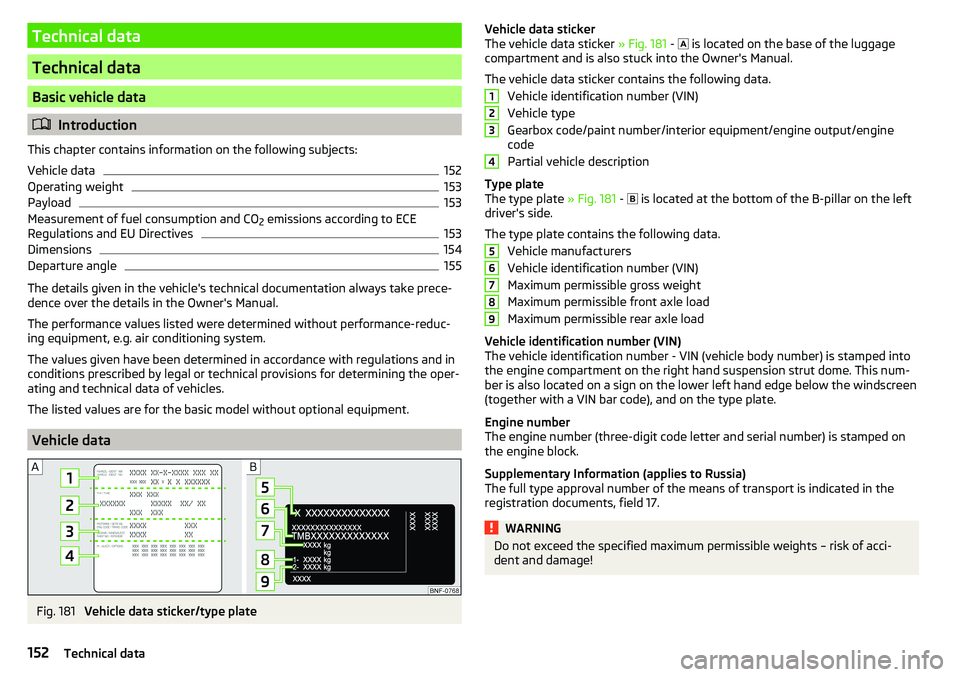
Fig. 181
Vehicle data sticker/type plate
Vehicle data sticker
The vehicle data sticker » Fig. 181 - is located on the base of the luggage
compartment and is also stuck into the Owner's Manual.
The vehicle data sticker contains the following data. Vehicle identification number (VIN)
Vehicle type
Gearbox code/paint number/interior equipment/engine output/engine code
Partial vehicle description
Type plate
The type plate » Fig. 181 -
is located at the bottom of the B-pillar on the left
driver's side.
The type plate contains the following data. Vehicle manufacturers
Vehicle identification number (VIN)
Maximum permissible gross weight
Maximum permissible front axle load
Maximum permissible rear axle load
Vehicle identification number (VIN)
The vehicle identification number - VIN (vehicle body number) is stamped into
the engine compartment on the right hand suspension strut dome. This num-
ber is also located on a sign on the lower left hand edge below the windscreen
(together with a VIN bar code), and on the type plate.
Engine number
The engine number (three-digit code letter and serial number) is stamped on the engine block.
Supplementary Information (applies to Russia)
The full type approval number of the means of transport is indicated in the
registration documents, field 17.WARNINGDo not exceed the specified maximum permissible weights – risk of acci-
dent and damage!123456789152Technical data
Page 159 of 172
Index
A
ABS Operation
104
Warning light34
Acceptance and recycling of used vehicles
112
Accessories110
Adjusting Steering wheel
13
Adjusting the seats12
Adjustment Light range
49
Adjust radio volume77
Advice on tyre/wheel usage128
Air-conditioning system Air outlet vents
74
air bag17
Airbag Adjustments and impairments to the airbagsystem
111
Deactivation20
Deployment18
Warning light35
Airbag system17
air conditioning recirculation
73
Air conditioning71
Climatronic73
Manual air conditioning72
Air outlet vents74
All-year tyres131
Alternator Warning light
32
AM82
Anti-lock braking system (ABS)104
Anti-theft wheel bolts136
Application management93
Connection93
Main menu94
Ashtray62
Assist systems103
Audio source85
Auto check control41
Automated manual transmission Kick-down
101
Tiptronic101
Automated transmission100
Automatically turn off the radio77
Automatic driving light control51
Automatic shutdown of consumers126
Automatic transmission Defect
33
Selector lever100
Starting-off and driving101
Warning light33
Automatic transmission modes100
AUX87
Avoiding damage to your vehicle102
B
Battery Change in key
142
Belts14
Belt tensioners16
Blues radio Device language settings
81
Display settings81
Factory settings81
Media menu84
Media menu settings81
menu settings80
Radio menu81
Radio menu settings80
safe removal of the data source81
Settings80
Sound settings80
Status line77
Blues Radio75
Device description76
Information on the device system81
Blues radio display76
Bluetooth profile93
Bluetooth® player87
Bonnet Closing
122
Opening122
Boot Class N1 vehicles
70
see boot lid46
Boot lid Automatic locking
46
Open/Close46
Brake Assist (HBA)104
Brake booster98
Brake fluid125
Check125
specification125
Brake pads new
98
Brake pedal - automatic transmission warning light
36
Brakes Brake booster
98
Brake fluid125
Braking and stabilisation systems103
Handbrake98
Information on braking98
Warning lights32
Brake system103
Braking Running in
102
Breakdown kit137
Breakdown service90
see Help in an emergency10
157Index
Page 160 of 172
Broadcasting range82
buttons Swing Radio
76
Buttons Blues radio
76
C
Call list Call list
92
Car battery Disconnecting and reconnecting
127
Replacing127
Car care113
Exterior115
Interior116
Car computer see Multifunction display
39
Care and maintenance110
Carrier70
Car wash113
Car washing114
Exterior115
Interior116
washing114
CD86
Central locking42
problems45
Central locking button44
Change battery
142
Changing Windscreen wiper blades
143
Changing a wheel134
Changing134
Changing gear Selector lever
100
Tiptronic101
Changing wheels Wheels
134
Charging a vehicle battery127
Check Brake fluid
125
Engine oil124
Oil level124
Checking Battery condition
127
Coolant125
Checks Statutory checks
110
Children and safety21
Child safety lock45
Child seat21
Classification23
Installation location24, 25
in the passenger seat23
ISOFIX24, 25
on the front passenger seat22
on the passenger seat23
TOP TETHER26
Cigarette lighter62
City Safe Drive107
Disable/Enable108
Warning light36
Climatronic Automatic operation
73
Operating elements73
Clothes hook65
CNG120
Gas gauge31
Gas leaks120
In an accident120
Refuelling119
Regular checks120
Sticker120
cockpit29
Cockpit Lighting
52
Comfort signalling50
COMING HOME51
Compartments59
Compressed natural gas see CNG
120
Computer see Multifunction display
39
Conditions for pairing89
Coolant124
Checking125
Refilling125
Warning light33
Correct routing of seat belt
15
Correct seated position12
Correct seating position14
Cruise control system Warning light
36
Cruise Control System106
Cup holders61
D
DAB
82
DAY LIGHT see Daylight running lights
50
Daylight running lights50
Deactivation Airbag
20
Defrosting rear window53
Delayed locking of the boot lid See boot lid
46
Departure angle155
Digital Clock37
Digital Service Plan113
Dimmed headlights49
Dipstick124
Disclaimer75
Display Cardinal points
37
Fuel31
Fuel level31
158Index
Page 161 of 172
Gear changing38
In the instrument cluster37
Natural gas supply31
Service intervals42
Display MAXI DOT41
Disposal Acceptance and recycling of used vehicles
112
Door Child safety lock
45
Emergency locking142
Opening/Closing45
Door alarm37
Door opening lever Unlock / lock
44
Drive Driving through water
102
Driving Emissions
153
Fuel consumption153
through water102
Top speed156
Trailer operation112
E
Economical driving
102
EDL104
Electric windows46
Buttons in the driver door47
Electronic Differential Lock (EDL)104
Electronic immobiliser95
Emergency Hazard warning light system
52
Jump-starting139, 140
Towing the vehicle140
Tyre repair137
Unlocking / locking the door142
Emergency call90
Emergency equipment Jack133
Reflective vest133
Vehicle tool kit133
Warning triangle133
Emergency spare Removing / stowing
135
Emission control system35
Emissions153
Engine Running in
102
Engine compartment120
Brake fluid125
Coolant124
Engine oil123
Overview122
Vehicle battery126
Windscreen washer fluid123
Engine drag torque control (MSR)104
Engine number152
engine oil specification
123
Engine oil123
Check124
Oil changing123
Refilling124
Warning light33
EPC35
ESC Operation
104
Warning light34
Extended warranty6
External devices75
F
Fasteners
68
file formats media
88
Requirements and Restrictions88
Films115
Flashing50
FM82
Fog lights/rear fog light51
Foldable hook65
Footmats100
see footmats100
Force limiter Sliding/tilting roof
48
Front seats56
fuel Refuelling - natural gas
119
Fuel117
Fuel gauge31
Gas gauge31
refer to Fuel117
Refuelling118
Unleaded petrol118
Warning light35
Fuel consumption153
Fuel reserve35
Fuses144
Assignment of fuses on the side of the dash panel
146
in the dash panel145
in the engine compartment147
G
Gear changing Gear stick
99
Information on the selected gear38
Recommended gear38
Genuine parts111
H
Handbrake
98
Warning light32
Handbrake - automatic transmission Warning light
36
159Index
Page 162 of 172
Hazard warning light system52
HBA104
Headrests57
Heating71, 72
Mirrors55
Rear window53
Seats58
Help in an emergency10
HHC104
Hill Start Assist (HHC)104
Hook68
horn29
I
Ignition lock
96
immobiliser95
Important notes75
Importing phonebook91
In an emergency Changing a wheel
134
Inertia reels16
Information about the towing process140
Information service90
Information system37
Door alarm37
MAXI DOT display41
Service interval display42
Instrument cluster30
See instrument cluster30
Warning lights31
Interior light52
ISOFIX24, 25
J
Jack
133
- fit136
Jump-starting139, 140
K
Key Change battery
142
Lock43
Starting/Stopping the engine95
Unlock43
L
LEAVING HOME
51
lever Turn signal/main beam
50
Lever Cruise control
106
Operating the information system39
Windscreen wipers54
Lever operation100
light Flash
50
Fog lights/rear fog light51
Light Automatic driving light control
51
Cockpit52
COMING HOME / LEAVING HOME51
Dimmed headlights49
Headlight range control49
on and off49
Parking light52
Replacing bulbs147
Sidelights49
Turn signal/main beam50
Light bulbs Replacing
147
Lighting Interior lighting
52
Luggage compartment67
Light on and off49
Lights49
Abroad52
Daylight running50
Hazard warning light system52
Warning lights31
List of available stations
83
of telephone contacts91
With folder / track list84
List of paired Bluetooth devices93
Load153
Loading floor69
Lock Key
43
Locking Central locking button
44
in case of emergency142
Remote control43
locking the steering lock95
Low tyre pressure warning refer to the tyre pressure monitoring
108
Luggage compartment67
Cover69
Fasteners68
Fixing nets68
Hook68
Lighting67
unlock manually142
Unlock the boot lid142
Variable loading floor69
Luggage compartment cover69
Luggage compartment lid46
M
Main beam
50
Warning light36
Main menu Application management
94
Media84
Radio82
Managing paired Bluetooth devices93
160Index
Page 164 of 172
Power steering33
Practical equipment Pocket holder
65
Practical features Storage compartment for umbrella
64
Waste container61
Preferred contacts91
Principles of Radio Operation76
R
Radio
81
List of available stations83
Main menu82
Preset buttons83
Save channel83
Scan82
Search for stations82
Select station82
Radio operation76
Radio volume77
Raising the vehicle136
Rear fog light51
Warning light35
Rear seats57
Rear view mirror55
Rear window heating53
Rear windows Opening/closing
47
Recirculation73
Refilling Coolant
125
Engine oil124
Windscreen washer fluid123
Reflective vest133
Refuelling118
Fuel118
remote Synchronization process
45
RemoteChange battery142
Remote control Unlocking/locking the vehicle
43
Repairs and technical alterations110
Replacing Bulbs
147
Fuses144
Fuses on the side of the dash panel146
Windscreen wiper blades143
Reproduction Media
85
Restart the radio77
Rev counter30
Rims128
Roof Load
70
Roof rack70
Running in Brake pads
98
Engine102
Tyres128
S
SafeLock
44
SAFE LOCK see SafeLock
44
safety air bag
17
ISOFIX25
Safety12
Child safety21
Child safety seats21
Correct seated position12
Headrests57
ISOFIX24
TOP TETHER26
Saving electrical energy102
Saving fuel102
SD-card86
Seat belt height adjustment
15
Warning light36
Seat belts14
Belt tensioners16
fastening and unfastening16
Inertia reels16
Warning light32
Seats Adjusting the front seats
56
Folding front passenger seat56
front56
Headrests57
Heating58
Rear57
Rear seat backrests57
Setting56
Seats and head restraint56
Select broadcasting range82
Selector lever100
service110
Service Service interval display
42
Service intervals112, 113
Service Plan113
Setting Headrests
57
Mirror55
Seats56
settings Blues Radio System Information
81
Swing radio display79
Swing Radio menu settings78
Settings Blues radio
80
Blues Radio Display81
Blues radio language81
Blues radio menu media81
Blues radio menu settings80
162Index