phone SKODA FABIA 2010 2.G / 5J Owner's Manual
[x] Cancel search | Manufacturer: SKODA, Model Year: 2010, Model line: FABIA, Model: SKODA FABIA 2010 2.G / 5JPages: 244, PDF Size: 29.53 MB
Page 3 of 244
Introduction 2
On-board literature
The on-board literature for your vehicle consists of this “Owner's Manual”
as well as a “Service schedule” and a “Help on the road”. There can also be
a variety of other additional operating manuals and instructions on-board
(e.g. an operating manual for the radio) depending on the vehicle model and
equipment.
If one of the publications listed above is missing, please contact a specialist
garage immediately, where one will be glad to assist you in such matters.
One should note that the details given in the vehicle's papers always
take precedence over those in the Owner's Manual.
Owner's Manual
This Owner's Manual describes the current scope of equipment. Certain
items of equipment listed are only installed later on and only envisaged for
particular markets. The illustrations can differ in minor details from your
vehicle; they are only intended for general information.
In addition to information regarding all the controls and equipment, the
Owner's Manual also contains important information regarding care and
operation for your safety and also to retain the value of your vehicle. To
provide you with valuable tips and aids. You will learn how you can operate
your vehicle safely, economically and in an environmentally conscious
way.
For safety reasons, please also pay attention to the information on
accessories, modifications and replacement of parts page 184.
The other chapters of the Owner's Manual are also important, however, for
proper treatment of your car - in addition to regular care and maintenance -
helps to retain its value and in many cases is also one of the conditions for
possible warranty claims.
The Service schedule
contains:
Vehicle data;
Service intervals;
Overview of the service work;
Service proof;
Confirmation of mobility warranty (only valid in certain countries);
important information on the warranty.
The confirmations of the carried out service work are one of the conditions
for possible warranty claims.
Please always present the Service schedule when you take your car to a
specialist garage.
If the Service schedule is missing or worn, please contact the specialist
garage where your car is serviced regularly. You will receive a duplicate, in
which the previously carried out service work are confirmed.
Help on the road
Contains the most important telephone numbers in individual countries as
well as the addresses and telephone numbers of Škoda importers.
s3j8.a.book Page 2 Tuesday, April 20, 2010 1:10 PM
Page 4 of 244
Contents3
Using the system
Safety
Driving Tips
General Maintenance
Breakdown assistance
Technical Data
ContentsLayout of this Owner's Manual
(explanations)
. . . . . . . . . . . . . . . . . . . . . . . . . .
Using the system
. . . . . . . . . . . . . . . . . . . . . .
Cockpit
. . . . . . . . . . . . . . . . . . . . . . . . . . . . . . . . . . . . . . . .
General view . . . . . . . . . . . . . . . . . . . . . . . . . . . . . . . . .
Quick Reference Guide
. . . . . . . . . . . . . . . . . . . . . . .
Basic functions and important information . . . . .
Instruments and warning lights
. . . . . . . . . . . . . . .
Overview of the instrument cluster . . . . . . . . . . . . .
Engine revolutions counter . . . . . . . . . . . . . . . . . . . .
Speedometer . . . . . . . . . . . . . . . . . . . . . . . . . . . . . . . .
Coolant temperature gauge* . . . . . . . . . . . . . . . . . .
Fuel gauge* . . . . . . . . . . . . . . . . . . . . . . . . . . . . . . . . . .
Counter for distance driven . . . . . . . . . . . . . . . . . . .
Service Interval Display . . . . . . . . . . . . . . . . . . . . . . .
Digital clock . . . . . . . . . . . . . . . . . . . . . . . . . . . . . . . . . .
Shift recommendation for changing gears* . . . . .
Multi-functional indicator (onboard computer)*
MAXI DOT display (information display)* . . . . . . .
Auto Check Control . . . . . . . . . . . . . . . . . . . . . . . . . . .
Warning lights . . . . . . . . . . . . . . . . . . . . . . . . . . . . . . . .
Unlocking and locking
. . . . . . . . . . . . . . . . . . . . . . . .
Key . . . . . . . . . . . . . . . . . . . . . . . . . . . . . . . . . . . . . . . . . .
Locking / Unlocking . . . . . . . . . . . . . . . . . . . . . . . . . . .
Child safety lock . . . . . . . . . . . . . . . . . . . . . . . . . . . . . .
Central locking system* . . . . . . . . . . . . . . . . . . . . . . .
Remote control* . . . . . . . . . . . . . . . . . . . . . . . . . . . . . .
Anti-theft alarm system* . . . . . . . . . . . . . . . . . . . . . .
Interior monitor* and Towing protection monitoring*
Electrical power windows* . . . . . . . . . . . . . . . . . . . .
Electric sliding/tilting roof* . . . . . . . . . . . . . . . . . . . .
Lights and Visibility
. . . . . . . . . . . . . . . . . . . . . . . . . . . .
Lights . . . . . . . . . . . . . . . . . . . . . . . . . . . . . . . . . . . . . . . .
Interior lighting . . . . . . . . . . . . . . . . . . . . . . . . . . . . . . .
Visibility . . . . . . . . . . . . . . . . . . . . . . . . . . . . . . . . . . . . . .
Windshield wiper and wash system . . . . . . . . . . . . .
Rear mirror . . . . . . . . . . . . . . . . . . . . . . . . . . . . . . . . . . .
Seats and Storage
. . . . . . . . . . . . . . . . . . . . . . . . . . . . . .
Front seats . . . . . . . . . . . . . . . . . . . . . . . . . . . . . . . . . . . .
Head restraints . . . . . . . . . . . . . . . . . . . . . . . . . . . . . . . .
Heating the front seats* . . . . . . . . . . . . . . . . . . . . . . .
Rear seats . . . . . . . . . . . . . . . . . . . . . . . . . . . . . . . . . . . .
Pedals . . . . . . . . . . . . . . . . . . . . . . . . . . . . . . . . . . . . . . . .
luggage compartment . . . . . . . . . . . . . . . . . . . . . . . . .
Variable loading floor in the luggage compartment*
(Combi) . . . . . . . . . . . . . . . . . . . . . . . . . . . . . . . . . . . . . .
Net partition* (Combi) . . . . . . . . . . . . . . . . . . . . . . . .
Bicycle holder in the luggage compartment* . . . .
The roof rack* . . . . . . . . . . . . . . . . . . . . . . . . . . . . . . . .
Front cup holder . . . . . . . . . . . . . . . . . . . . . . . . . . . . . .
Rear cup holder* . . . . . . . . . . . . . . . . . . . . . . . . . . . . . .
Parking ticket holder . . . . . . . . . . . . . . . . . . . . . . . . . . .
Ashtray* . . . . . . . . . . . . . . . . . . . . . . . . . . . . . . . . . . . . . .
Cigarette lighter* and power sockets* . . . . . . . . . .
Storage compartments . . . . . . . . . . . . . . . . . . . . . . . .
Heating and air conditioning system
. . . . . . . . . .
Air outlet vents . . . . . . . . . . . . . . . . . . . . . . . . . . . . . . . .
Recirculated air mode . . . . . . . . . . . . . . . . . . . . . . . . .
Heating . . . . . . . . . . . . . . . . . . . . . . . . . . . . . . . . . . . . . .
Climatic (semi-automatic air conditioning system)*
Climatronic* (automatic air conditioning) . . . . . . .
Starting-off and Driving
. . . . . . . . . . . . . . . . . . . . . . .
Setting steering wheel position . . . . . . . . . . . . . . . . .
Ignition lock . . . . . . . . . . . . . . . . . . . . . . . . . . . . . . . . . .
Starting the engine . . . . . . . . . . . . . . . . . . . . . . . . . . . .
Switching off the engine . . . . . . . . . . . . . . . . . . . . . . .Shifting (manual gearbox) . . . . . . . . . . . . . . . . . . . . .
Handbrake . . . . . . . . . . . . . . . . . . . . . . . . . . . . . . . . . . .
Parking aid* . . . . . . . . . . . . . . . . . . . . . . . . . . . . . . . . . .
Cruise control system (CCS)* . . . . . . . . . . . . . . . . . .
“START-STOP”* . . . . . . . . . . . . . . . . . . . . . . . . . . . . . . .
Automatic gearbox
. . . . . . . . . . . . . . . . . . . . . . . . . . . .
Automatic gearbox* . . . . . . . . . . . . . . . . . . . . . . . . . .
Communication
. . . . . . . . . . . . . . . . . . . . . . . . . . . . . . .
Multifunction steering wheel* . . . . . . . . . . . . . . . . .
Universal telephone preinstallation GSM II* . . . . .
Voice control . . . . . . . . . . . . . . . . . . . . . . . . . . . . . . . . .
Music playback via Bluetooth® . . . . . . . . . . . . . . . .
Inputs AUX-IN* and MDI* . . . . . . . . . . . . . . . . . . . . .
Safety
. . . . . . . . . . . . . . . . . . . . . . . . . . . . . . . . . . . . . . .
Passive Safety
. . . . . . . . . . . . . . . . . . . . . . . . . . . . . . . . .
Basic information . . . . . . . . . . . . . . . . . . . . . . . . . . . . .
Correct seated position . . . . . . . . . . . . . . . . . . . . . . .
Seat belts
. . . . . . . . . . . . . . . . . . . . . . . . . . . . . . . . . . . . . .
Why seat belts? . . . . . . . . . . . . . . . . . . . . . . . . . . . . . . .
The physical principle of a frontal collision . . . . . .
Important safety information regarding the use of seat
belts . . . . . . . . . . . . . . . . . . . . . . . . . . . . . . . . . . . . . . . . .
How are seat belts correctly fastened? . . . . . . . . . .
Belt tensioner . . . . . . . . . . . . . . . . . . . . . . . . . . . . . . . .
Airbag system
. . . . . . . . . . . . . . . . . . . . . . . . . . . . . . . . .
Description of the airbag system . . . . . . . . . . . . . . .
Front airbags . . . . . . . . . . . . . . . . . . . . . . . . . . . . . . . . .
Side airbags* . . . . . . . . . . . . . . . . . . . . . . . . . . . . . . . . .
Head airbags* . . . . . . . . . . . . . . . . . . . . . . . . . . . . . . . .
Deactivating airbags . . . . . . . . . . . . . . . . . . . . . . . . . .
67991010151515161616171718181922232635353636374142434446
48485354555759596061616363676870727373747474758080808183868989899091
92929394959898104104105110111111113113113114117117117118119120122122123125127128
s3j8.a.book Page 3 Tuesday, April 20, 2010 1:10 PM
Page 10 of 244
Cockpit
9
Using the system
Safety
Driving Tips
General Maintenance
Breakdown assistance
Technical Data
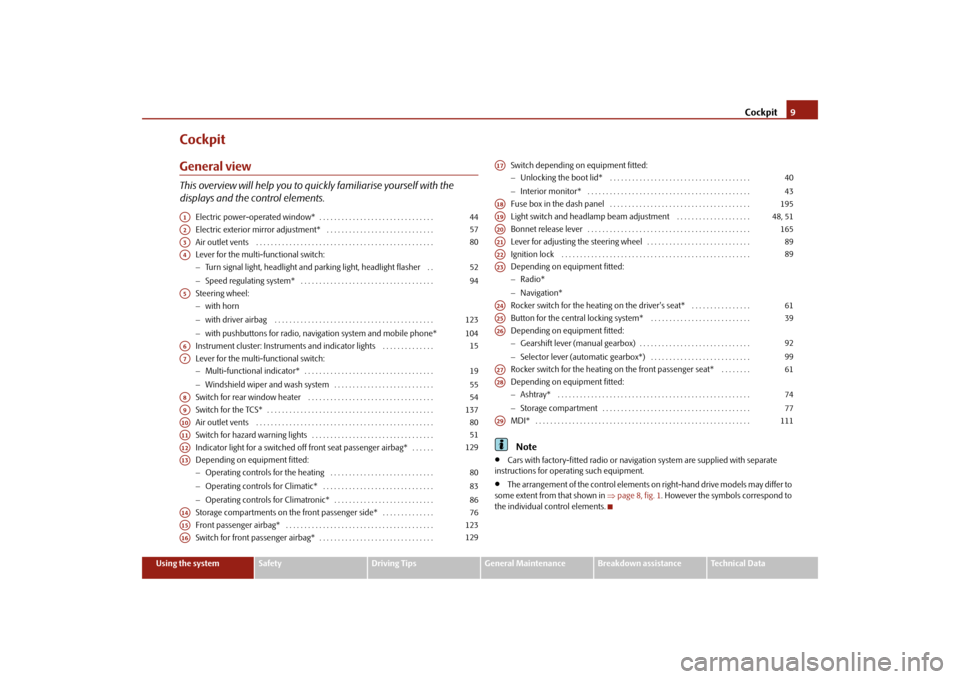
CockpitGeneral viewThis overview will help you to quic
kly familiarise yourself with the
displays and the control elements.
Electric power-operated window* . . . . . . . . . . . . . . . . . . . . . . . . . . . . . . . Electric exterior mirror adjustment* . . . . . . . . . . . . . . . . . . . . . . . . . . . . . Air outlet vents . . . . . . . . . . . . . . . . . . . . . . . . . . . . . . . . . . . . . . . . . . . . . . . . Lever for the multi-functional switch: Turn signal light, headlight and parking light, headlight flasher . . Speed regulating system* . . . . . . . . . . . . . . . . . . . . . . . . . . . . . . . . . . . . Steering wheel: with horn with driver airbag . . . . . . . . . . . . . . . . . . . . . . . . . . . . . . . . . . . . . . . . . . . with pushbuttons for radio, navi
gation system and mobile phone*
Instrument cluster: Instruments and indicator lights . . . . . . . . . . . . . . Lever for the multi-functional switch: Multi-functional indicator* . . . . . . . . . . . . . . . . . . . . . . . . . . . . . . . . . . . Windshield wiper and wash system . . . . . . . . . . . . . . . . . . . . . . . . . . . Switch for rear window heater . . . . . . . . . . . . . . . . . . . . . . . . . . . . . . . . . . Switch for the TCS* . . . . . . . . . . . . . . . . . . . . . . . . . . . . . . . . . . . . . . . . . . . . . Air outlet vents . . . . . . . . . . . . . . . . . . . . . . . . . . . . . . . . . . . . . . . . . . . . . . . .Switch for hazard warning lights . . . . . . . . . . . . . . . . . . . . . . . . . . . . . . . . . Indicator light for a switched off front seat passenger airbag* . . . . . . Depending on equipment fitted: Operating controls for the heating . . . . . . . . . . . . . . . . . . . . . . . . . . . . Operating controls for Climatic* . . . . . . . . . . . . . . . . . . . . . . . . . . . . . . Operating controls for Climatronic* . . . . . . . . . . . . . . . . . . . . . . . . . . . Storage compartments on the front passenger side* . . . . . . . . . . . . . .Front passenger airbag* . . . . . . . . . . . . . . . . . . . . . . . . . . . . . . . . . . . . . . . . Switch for front passenger airbag* . . . . . . . . . . . . . . . . . . . . . . . . . . . . . . .
Switch depending on equipment fitted: Unlocking the boot lid* . . . . . . . . . . . . . . . . . . . . . . . . . . . . . . . . . . . . . . Interior monitor* . . . . . . . . . . . . . . . . . . . . . . . . . . . . . . . . . . . . . . . . . . . . Fuse box in the dash panel . . . . . . . . . . . . . . . . . . . . . . . . . . . . . . . . . . . . . . Light switch and headlamp beam adjustment . . . . . . . . . . . . . . . . . . . .Bonnet release lever . . . . . . . . . . . . . . . . . . . . . . . . . . . . . . . . . . . . . . . . . . . . Lever for adjusting the steering wheel . . . . . . . . . . . . . . . . . . . . . . . . . . . . Ignition lock . . . . . . . . . . . . . . . . . . . . . . . . . . . . . . . . . . . . . . . . . . . . . . . . . . .Depending on equipment fitted: Radio* Navigation* Rocker switch for the heating on the driver's seat* . . . . . . . . . . . . . . . .Button for the central locking system* . . . . . . . . . . . . . . . . . . . . . . . . . . . Depending on equipment fitted: Gearshift lever (manual gearbox) . . . . . . . . . . . . . . . . . . . . . . . . . . . . . . Selector lever (automatic gearbox*) . . . . . . . . . . . . . . . . . . . . . . . . . . . Rocker switch for the heating on the front passenger seat* . . . . . . . . Depending on equipment fitted: Ashtray* . . . . . . . . . . . . . . . . . . . . . . . . . . . . . . . . . . . . . . . . . . . . . . . . . . . . Storage compartment . . . . . . . . . . . . . . . . . . . . . . . . . . . . . . . . . . . . . . . . MDI* . . . . . . . . . . . . . . . . . . . . . . . . . . . . . . . . . . . . . . . . . . . . . . . . . . . . . . . . . .Note
Cars with factory-fitted radio or naviga
tion system are supplied with separate
instructions for operating such equipment.
The arrangement of the control elements on right-hand drive models may differ to
some extent from that shown in
page 8, fig. 1
. However the symbols correspond to
the individual control elements.
A1
44
A2
57
A3
80
A4
5294
A5
123104
A6
15
A7
1955
A8
54
A9
137
A10
80
A11
51
A12
129
A13
808386
A14
76
A15
123
A16
129
A17
4043
A18
195
A19
48, 51
A20
165
A21
89
A22
89
A23A24
61
A25
39
A26
9299
A27
61
A28
7477
A29
111
s3j8.a.book Page 9 Tuesday, April 20, 2010 1:10 PM
Page 23 of 244
Instruments and warning lights
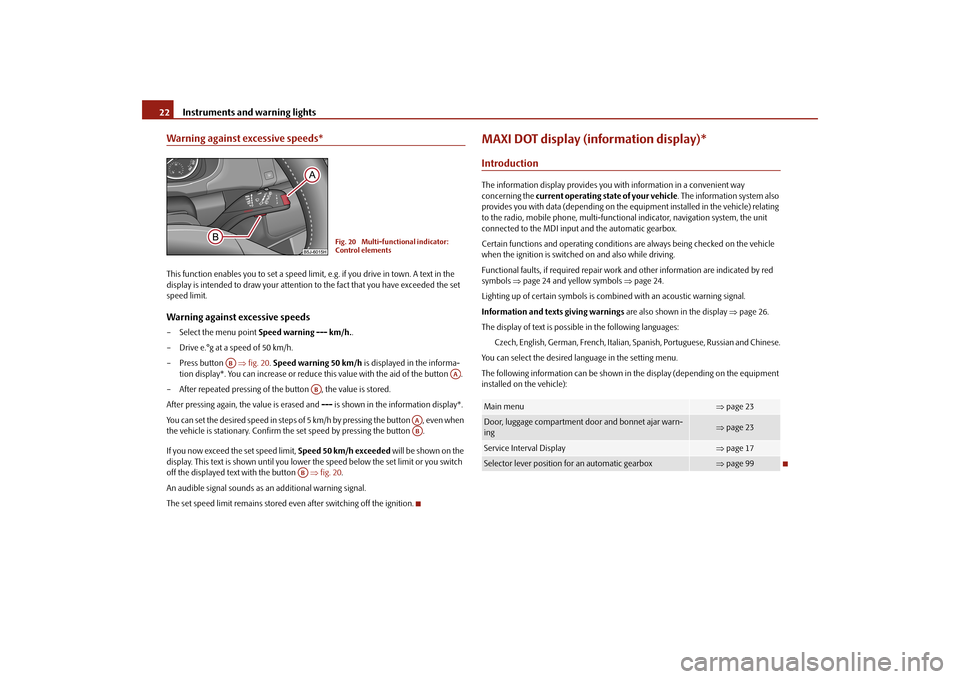
22Warning against excessive speeds*This function enables you to set a speed limit, e.g. if you drive in town. A text in the display is intended to draw your attention
to the fact that you have exceeded the set
speed limit.Warning against excessive speeds– Select the menu point
Speed warning --- km/h.
.
– Drive e.°g at a speed of 50 km/h.– Press button
fig. 20
. Speed warning 50 km/h
is displayed in the informa-
tion display*. You can increase or reduce
this value with the aid of the button .
– After repeated pressing of the button , the value is stored.After pressing again, the value is erased and
--- is shown in the information display*.
You can set the desired speed in steps of 5 km/h by pressing the button , even when the vehicle is stationary. Confirm the
set speed by pressing the button .
If you now exceed the set speed limit,
Speed 50 km/h exceeded
will be shown on the
display. This text is shown until you lower the speed below the set limit or you switch off the displayed text with the button
fig. 20
.
An audible signal sounds as an additional warning signal.The set speed limit remains stored even after switching off the ignition.
MAXI DOT display (information display)*IntroductionThe information display provides you with information in a convenient way concerning the
current operating state of your vehicle
. The information system also
provides you with data (depending on the equipment installed in the vehicle) relating to the radio, mobile phone,
multi-functional indicator, navigation system, the unit
connected to the MDI input and the automatic gearbox. Certain functions and operatin
g conditions are always being checked on the vehicle
when the ignition is switched on and also while driving. Functional faults, if required repair work
and other information are indicated by red
symbols
page 24 and yellow symbols
page 24.
Lighting up of certain symbols is comb
ined with an acoustic warning signal.
Information and text
s giving warnings
are also shown in the display
page 26.
The display of text is possible in the following languages:
Czech, English, German, French, Italian,
Spanish, Portuguese, Russian and Chinese.
You can select the desired language in the setting menu.The following information can be shown in
the display (depending on the equipment
installed on the vehicle):
Fig. 20 Multi-functional indicator: Control elements
AB
AA
AB
AAAB
AB
Main menu
page 23
Door, luggage compartment door and bonnet ajar warn- ing
page 23
Service Interval Display
page 17
Selector lever position for an automatic gearbox
page 99
s3j8.a.book Page 22 Tuesday, April 20, 2010 1:10 PM
Page 24 of 244
Instruments and warning lights
23
Using the system
Safety
Driving Tips
General Maintenance
Breakdown assistance
Technical Data
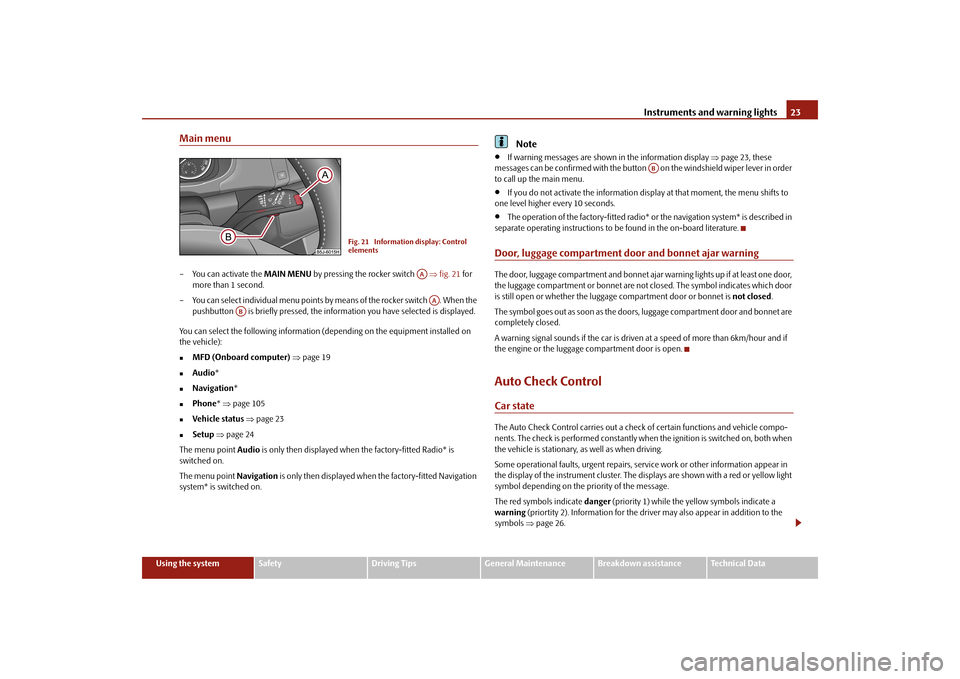
Main menu– You can activate the
MAIN MENU
by pressing the rocker switch
fig. 21
for
more than 1 second.
– You can select individual menu points by means of the rocker switch . When the
pushbutton is briefly pressed, the info
rmation you have sele
cted is displayed.
You can select the following information (d
epending on the equipment installed on
the vehicle):
MFD (Onboard computer)
page 19
Audio
*
Navigation
*
Phone
* page 105
Vehicle status
page 23
Setup
page 24
The menu point
Audio
is only then displayed when
the factory-fitted Radio* is
switched on. The menu point
Navigation
is only then displayed when the factory-fitted Navigation
system* is switched on.
Note
If warning messages are shown in the information display
page 23, these
messages can be confirmed with the button on the windshield wiper lever in order to call up the main menu.
If you do not activate the information disp
lay at that moment, the menu shifts to
one level higher every 10 seconds.
The operation of the factory-fitted radio*
or the navigation system* is described in
separate operating instructions to be
found in the on-board literature.
Door, luggage compartment door and bonnet ajar warningThe door, luggage compartment and bonnet ajar
warning lights up if at least one door,
the luggage compartment or bonnet are not closed. The symbol indicates which door is still open or whether the luggage
compartment door or bonnet is
not closed
.
The symbol goes out as soon as the doors,
luggage compartment door and bonnet are
completely closed. A warning signal sounds if the car is driven at a speed of more than 6km/hour and if the engine or the luggage compartment door is open.Auto Check ControlCar stateThe Auto Check Control carries out a chec
k of certain functions and vehicle compo-
nents. The check is performed constantly when
the ignition is switched on, both when
the vehicle is stationary, as well as when driving. Some operational faults, urgent repairs, se
rvice work or other information appear in
the display of the instrument cluster. The di
splays are shown with a red or yellow light
symbol depending on the priority of the message. The red symbols indicate
danger
(priority 1) while the yellow symbols indicate a
warning
(priortity 2). Information for the driver
may also appear in addition to the
symbols
page 26.
Fig. 21 Information display: Control elements
AAAA
AB
AB
s3j8.a.book Page 23 Tuesday, April 20, 2010 1:10 PM
Page 42 of 244
Unlocking and locking
41
Using the system
Safety
Driving Tips
General Maintenance
Breakdown assistance
Technical Data
– Fold one of the outer rear seats forwards. – Move the operating lever with the aid of a
narrow object, e.g. a screwdriver, up to
the stop in the direction of arrow
page 40, fig. 30
and then unlock in the
direction of arrow .
– Open the boot lid from the outside.Remote control*DescriptionYou can use the remote control:
to unlock and lock the vehicle;
unlocking boot lid.
The transmitter with the battery is incorporat
ed in the handle of the master key. The
receiver is located in the interior of the car. The operating range of the remote control key is approx. 10 m. But this range can be reduced if the batteries are weak. The master key has a fold-open key bit which can be used for unlocking and locking the car manually and also for starting the engine. If a lost key is replaced or if the receiver unit has been repaired or a new unit installed, it is then necessary for a specialist garage to adapt the system. Only after this is it possible to again use the remote control.
Note
The remote control is automatically deactivated when the ignition is switched on.
The operation of the remote control may temporarily be affected by interference
from transmitters close to th
e car and which operate in the same frequency range (e.g.
mobile phone, TV transmitter).
The battery must be replaced if the centra
l locking or anti-theft alarm system does
not react to the remote control at less th
an 3 metres away. We recommend having the
battery replaced by
a specialist garage.
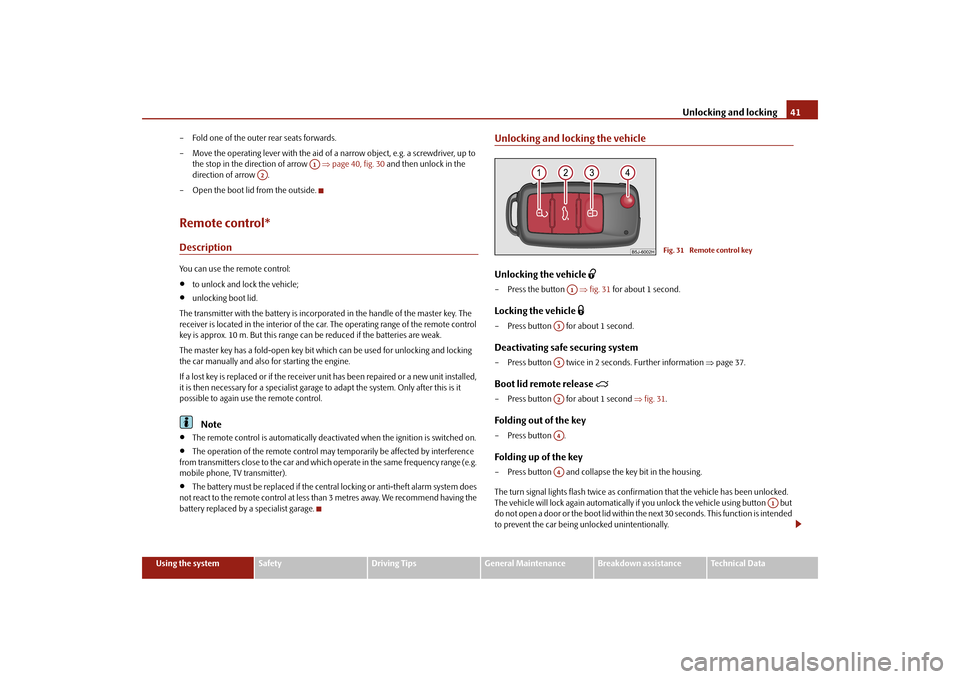
Unlocking and locking the vehicleUnlocking the vehicle
– Press the button
fig. 31
for about 1 second.
Locking the vehicle
– Press button for about 1 second.Deactivating safe securing system– Press button twice in 2 seconds. Further information
page 37.
Boot lid remote release
– Press button for about 1 second
fig. 31
.
Folding out of the key– Press button .Folding up of the key– Press button and collapse the key bit in the housing. The turn signal lights flash twice as confir
mation that the vehicl
e has been unlocked.
The vehicle will lock again automatically if
you unlock the vehicle using button but
do not open a door or the boot lid within th
e next 30 seconds. This
function is intended
to prevent the car being unlocked unintentionally.
A1
A2
Fig. 31 Remote control key
A1
A3A3A2A4A4
A1
s3j8.a.book Page 41 Tuesday, April 20, 2010 1:10 PM
Page 106 of 244
Communication
105
Using the system
Safety
Driving Tips
General Maintenance
Breakdown assistance
Technical Data
The buttons apply for the respective operating mode of the current radio or navigation system.
Note
The loudspeakers in the vehicle are matched to a power output of the radio and
navigation system of 4x 20°W.
For the equipment sound system*, the loudspeakers are matched to a power
output of the amplifier of 4x40°W + 6x20 W.Mobile phones and tw
o-way radio systems
The installation of a mobile phone and two-way radio system in a vehicle should be carried out by a specialist garage. Mobile phones send and receive radio wave
s during a conversation as well as in
standby mode. Radio waves can be harmful
to the human body if their frequency
exceeds certain limit values. Škoda Auto permits the operation of mobile
phones and two-way radio systems with
a professionally installed external aerial and a maximum transmission power of up to 10 watts. It is essential that you inform a specialist garage about the possibilites to assemble and operate mobile phones and two-way radio sets which have a power output of more than 10 W. They will inform you which technical possibilities exist for retrofitting mobile phones. When using a mobille phone inside the vehicl
e, which is not inserted into the phone
adapter, and thus has no connection to the
external aerial, the electromagnetic radia-
tion can exceed the current limit value. We therefore recommend to operate a mobile phone in the vehicle only when it is conne
cted to an external aerial via the phone
adapter. This improves the quality of the connection. Operation of mobile phones or two-way ra
dio systems may interfere with functioning
of the electronic systems of your vehicle. The reasons for this may be:
no external aerial,
external aerial incorrectly installed,
transmission power gr
eater than 10 watts.
WARNING
If a mobile phone or a two-way radio
system is operated in the vehicle
without using a special external aerial
or an external aerial which has been
incorrectly installed, this can increase
the strength of the electromagnetic field
in the interior of the vehicle.
Please concentrate fully at
all times on your driving!
You must not install two-way radio systems, mobile phones or mounts on
the covers of the airbags or within the immediate deployment range of airbags. This might result in injuries to the
occupants in the event of an accident.
Never leave a mobile phone on a seat, on
the dash panel or in another area,
from which it can be thrown during a sudden braking manoeuver, an accident or a collision. In this case, the occupants of the vehicle might be injured.
Note
Observe the country-specific regulations for the use of mobile phones in vehicles.Universal telephone preinstallation GSM II*IntroductionThe universal telephone preinstallation GSM
II is a built-in “hands-free system”, it
provides a voice operated convenience mode via the multifunction steering wheel* or the navigation system*. All communication between a telephone and
the hands-free system of your vehicle
can only be established with the help of the Bluetooth
® technology. The adapter*
serves only for charging the telephone and fo
r transmitting the signal to the external
aerial of the vehicle.
a)On vehicles which are equipped with the universal telephone prei
nstallation GSM II, pressing the button only allows to operate
the telephone.
A1
s3j8.a.book Page 105 Tuesday, April 20, 2010 1:10 PM
Page 107 of 244
Communication
106
To ensure an optimum signal transmission, always leave the telephone with the adapter* in the telephone mount. Furthermore the volume can be changed indivi
dually during the call at any time with
the button for setting the radio* or navigation system* or with the buttons on the multifunction steering wheel*.
WARNING
Pay attention primarily to the traffic situation! As the driver you are fully responsible for road safety. Use the teleph
one system only to such an extent, so
that you are in full control of your vehicle at any time.
Note
Please refer to the following guidelines
page 105.
Should you have any questions, please
contact an authorised Škoda Service
Par tner.Phone PhonebookA phone phonebook is part of the mobile ph
one preinstallation with voice control. In
the phone phonebook there are 2 500 free memory locations available. This phone phonebook can be used in line
with the mobile telephone.
After the first connection of the telephone, the system begins to load the phone book from the phone and the SIM card into the memory of the control unit. Each time the telephone has establishe
d a new connection with the hands-free
system, an update of the relevant phone b
ook is performed. The updating can take a
few minutes. During this time the phone book, which was stored after the last update was completed, is available. Newly stored telephone numbers are only shown after the updating has ended. If the number of contacts loaded exceed
s 2 500, the phone book is not complete.
If a telephone event (e.g. incoming or outgoing call, dialogue of the voice control) occurs during the updating pr
ocedure, the updating is interrupted. After the telephone
event has ended, the updating starts anew.
Connection of the mobile phone with the hands-free systemIn order to connect a mobile phone with th
e hands-free system, it is necessary to
connect the telephone to the hands-free sy
stem. Detailed information on this is
provided in the operating instructions of your mobile phone. The following steps must be carried out for the connection: – Activate the Bluetooth
® in your telephone and the visibility of the mobile phone.
– Switch on the ignition.– Select the menu
Phone
- Phone search
in the information display and wait until
the control unit has ended the search.
– Select your mobile phone in the menu of the units found.–Confirm the PIN (as standard
1234
).
– If the hands-free system
announces (as standard
Skoda UHV
) on the display of the
mobile phone, enter the PIN (as standard
1234
) within 30 seconds and wait until
the connection is established.
10)
– After ending the connection, confirm in the information display that a new user
profile was created.
If no more free space is available for creating a new user profile, delete an existing user profile. If you have not managed to
connect your mobile phone with the hands-free system
within 3 minutes after switching on the ignition, switch the ignition off and then again on. The visibility of the hands-free system is established again for 3 minutes. The visi- bility of the Bluetooth
® device is automatically switched
off if the vehicle starts off or
if the mobile phone connects to the device. During the connecting procedure, no other
mobile phone may be connected with the
hands-free system. Up to four mobile phones ca
n be paired to the hands-fr
ee system, whereby only one
mobile phone can communicate
with the hands-free system.
10)Some mobile phones have a menu, in which the authorization for establishing a Bluetooth
®
connection is performed via the input of a code. If the input for the authorization is necessary, it must always be performed when re-e
stablishing the Bluetooth connection.
s3j8.a.book Page 106 Tuesday, April 20, 2010 1:10 PM
Page 108 of 244
Communication
107
Using the system
Safety
Driving Tips
General Maintenance
Breakdown assistance
Technical Data
Connection with an already paired mobile phone After switching on the ignition, the connect
ion is automatically established for the
already paired mobile phone
10). Check on the mobile unit if the automatic connection
was established. Disconnecting the connection
By withdrawing the ignition key.
By disconnecting the device in the information display.
By disconnecting the device in the mobile phone.
Solving connection problems If the system announces
No paired phone found
, check the operating state of the
telephone:
Is the telephone switched on?
Is the PIN code entered?
Is Bluetooth
® active?
Is the visibility of the mobile phone active?
Was the telephone already paired with the hands-free system?
WARNING
In the event of air transport, the Bluetooth
® function of the hands-free system
must be switched off by a specialist garage!
Note
Not valid for all mobile phones which enable a communication via Bluetooth
®.
You can ask at an authorised Škoda Service Partner if your telephone is compatible with the universal telephone preinstallation GSM II.
Please operate your mobile phone exclusiv
ely with a suitable adapter in order to
keep a low radiation in the vehicle.
Inserting the mobile phone into the adapter ensures an optimal sending and
receiving power and offers at the same ti
me the advantage of the battery charging.
The range of the Bluetooth
® connection to the hands-free system is restricted to
the vehicle interior. The range is dependent on local factors, e.g. obstacles between the
devices and mutual interferences with other de
vices. If your mobile phone is e.g. in a
jacket pocket, this can lead to diffic
ulties when establishing the Bluetooth
® connection
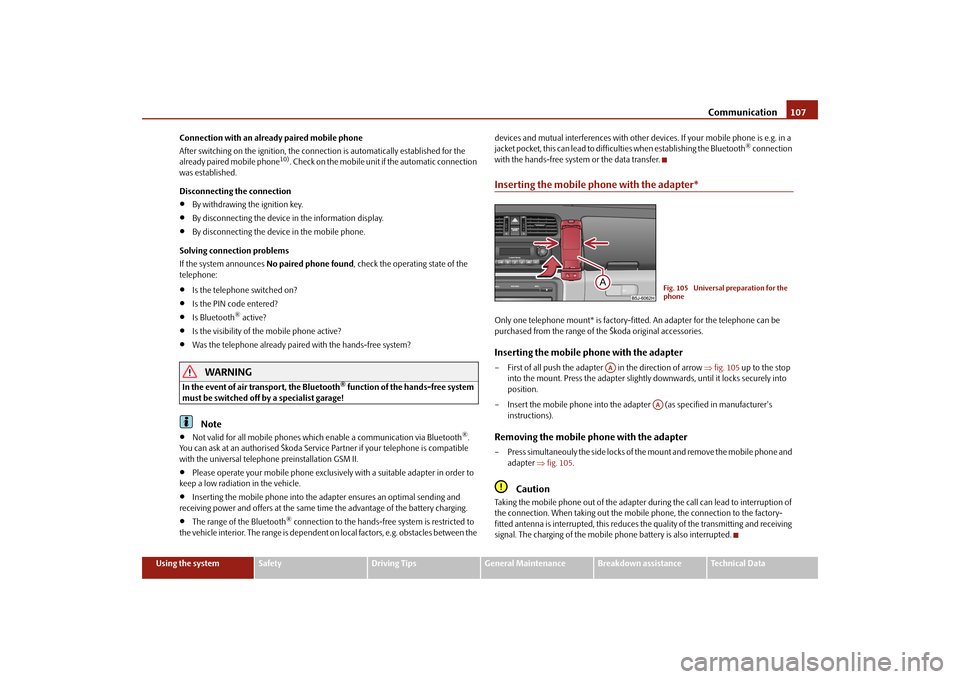
with the hands-free system or the data transfer.Inserting the mobile phone with the adapter*Only one telephone mount* is factory-fitted. An adapter for the telephone can be purchased from the range of the Škoda original accessories.Inserting the mobile phone with the adapter– First of all push the adapter in the direction of arrow
fig. 105
up to the stop
into the mount. Press the adapter slightly downwards, until it locks securely into position.
– Insert the mobile phone into the adap
ter (as specified in manufacturer's
instructions).
Removing the mobile phone with the adapter– Press simultaneouly the side locks of the mount and remove the mobile phone and
adapter
fig. 105
.
Caution
Taking the mobile phone out of the adapter du
ring the call can lead to interruption of
the connection. When taking out the mobi
le phone, the connection to the factory-
fitted antenna is interrupted, this reduces the quality of the transmitting and receiving signal. The charging of the mobile
phone battery is also interrupted.
Fig. 105 Universal preparation for the phone
AA
AA
s3j8.a.book Page 107 Tuesday, April 20, 2010 1:10 PM
Page 109 of 244
Communication
108
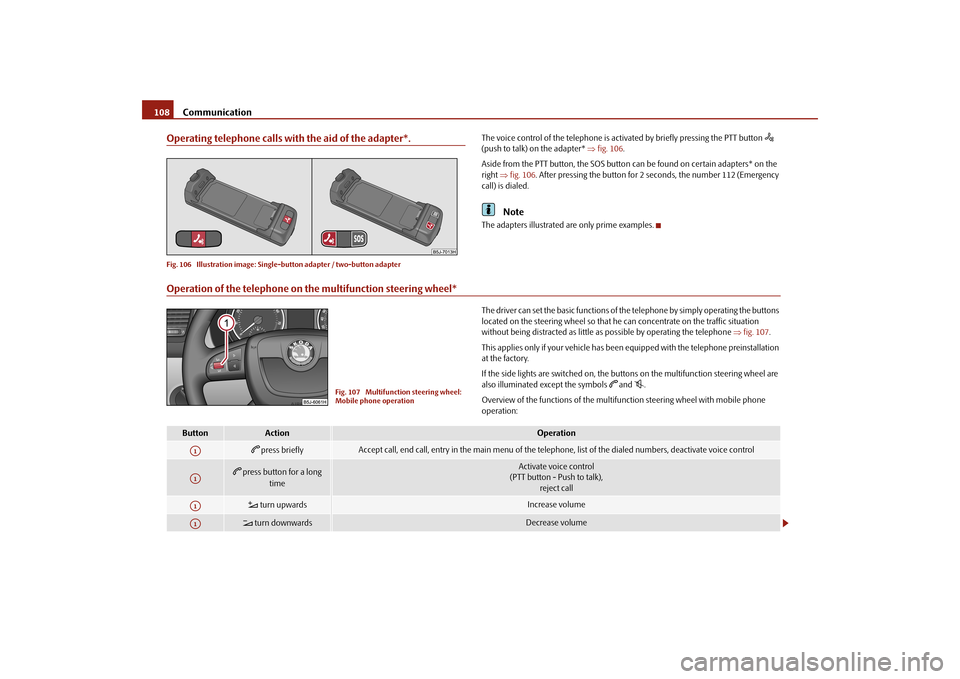
Operating telephone calls with the aid of the adapter*.Fig. 106 Illustration image: Single
-button adapter / two-button adapter
The voice control of the telephone is acti
vated by briefly pressing the PTT button
(push to talk) on the adapter*
fig. 106
.
Aside from the PTT button, the SOS button
can be found on certain adapters* on the
right
fig. 106
. After pressing the button for 2 seconds, the number 112 (Emergency
call) is dialed.
Note
The adapters illustrated
are only prime examples.
Operation of the telephone on the multifunction steering wheel*
The driver can set the basic functions of th
e telephone by simply operating the buttons
located on the steering wheel so that he can concentrate on the traffic situation without being distracted as little as
possible by operating the telephone
fig. 107
.
This applies only if your vehicle has been equipped with the telephone preinstallation at the factory. If the side lights are switched on, the buttons on the multifunction steering wheel are also illuminated except the symbols
and
.
Overview of the functions of the multifunction steering wheel with mobile phone operation:
Fig. 107 Multifunction steering wheel: Mobile phone operation
Button
Action
Operation
press briefly
Accept call, end call, entry in
the main menu of the telephone, list of
the dialed numbers, deactivate voice control
press button for a long
time
Activate voice control (PTT button - Push to talk),
reject call
turn upwards
Increase volume
turn downwards
Decrease volume
A1A1A1A1
s3j8.a.book Page 108 Tuesday, April 20, 2010 1:10 PM