lock SKODA FABIA 2012 2.G / 5J User Guide
[x] Cancel search | Manufacturer: SKODA, Model Year: 2012, Model line: FABIA, Model: SKODA FABIA 2012 2.G / 5JPages: 196, PDF Size: 4.83 MB
Page 28 of 196
CAUTION
■ Pay attention to the correct polarity when changing the battery.
■ The replacement battery must have the same specification as the original bat-
tery. For the sake of the environment
Dispose of the used battery in accordance with national legal provisions. Note
■ Please contact a ŠKODA Service Partner if you lose a key as they can obtain a
new one for you. ■ The system has to be synchronised, if the vehicle cannot be unlocked or locked
with the remote control key after replacing the battery » page 30.ÐChild safety lock
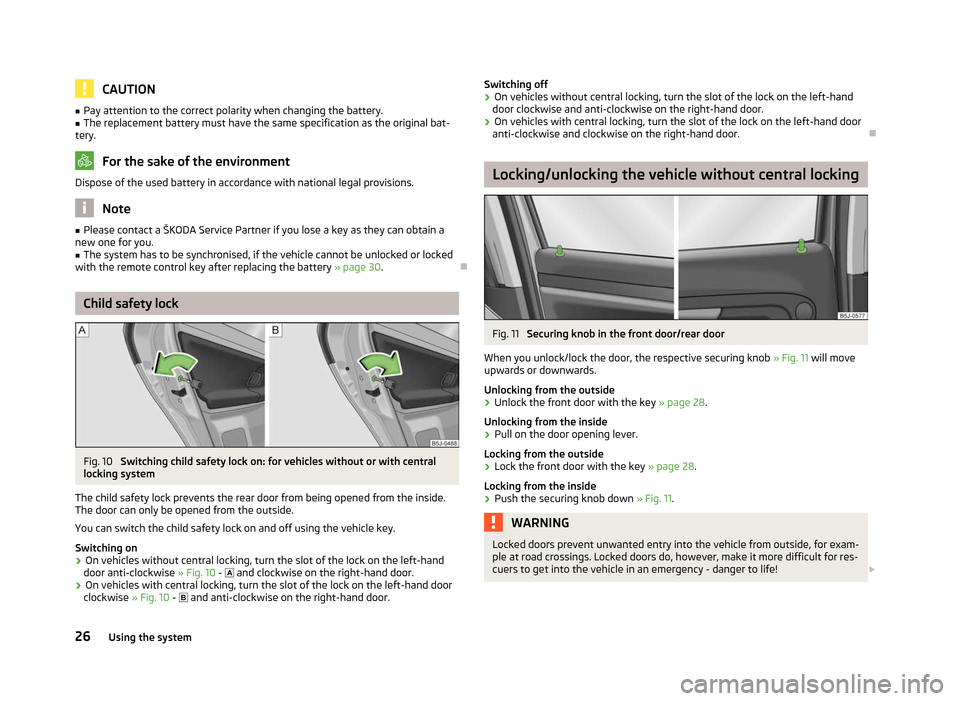
Fig. 10
Switching child safety lock on: for vehicles without or with central
locking system
The child safety lock prevents the rear door from being opened from the inside.
The door can only be opened from the outside.
You can switch the child safety lock on and off using the vehicle key.
Switching on › On vehicles without central locking, turn the slot of the lock on the left-hand
door anti-clockwise » Fig. 10 - and clockwise on the right-hand door.
› On vehicles with central locking, turn the slot of the lock on the left-hand door
clockwise » Fig. 10 - and anti-clockwise on the right-hand door. Switching off
›
On vehicles without central locking, turn the slot of the lock on the left-hand
door clockwise and anti-clockwise on the right-hand door.
› On vehicles with central locking, turn the slot of the lock on the left-hand door
anti-clockwise and clockwise on the right-hand door. Ð Locking/unlocking the vehicle without central locking
Fig. 11
Securing knob in the front door/rear door
When you unlock/lock the door, the respective securing knob » Fig. 11 will move
upwards or downwards.
Unlocking from the outside › Unlock the front door with the key
» page 28.
Unlocking from the inside
› Pull on the door opening lever.
Locking from the outside
› Lock the front door with the key
» page 28.
Locking from the inside
› Push the securing knob down
» Fig. 11. WARNING
Locked doors prevent unwanted entry into the vehicle from outside, for exam-
ple at road crossings. Locked doors do, however, make it more difficult for res-
cuers to get into the vehicle in an emergency - danger to life! £
26 Using the system
Page 29 of 196
Note
■ Lock the opened rear doors and front passenger door by closing them and
pressing the securing knob. ■ It is not possible to lock the opened driver's door using the securing knob. This
prevents against inadvertently locking the key in the vehicle. ÐCentral locking system
Introductory information
When using central locking or unlocking, all doors are locked or unlocked simulta-
neously. The boot lid is unlocked when opening. It can be opened by pressing the
handle above the licence plate » page 33, Opening/closing .
Warning light in the driver's door
After locking the vehicle, the warning light flashes for around 2 seconds in quick
succession, afterwards it begins to flash evenly at longer intervals.
If the vehicle is locked and the safe securing system » page 27 is not operating,
the warning light in the driver door flashes for about 2
seconds fast, goes out and
starts to flash evenly at longer intervals after about 30 seconds.
If the indicator light first flashes fast for about 2 seconds, then lights up for about
30 seconds continuously and then flashes slowly, there is a fault in the central
locking system or in the interior monitor and in the towing protection » page 31.
Seek help from a ŠKODA specialist garage.
Convenience operation of windows
The windows can be opened and closed when unlocking and locking the vehi-
cle » page 35. ÐIndividual settings
Opening a single door
This selection function makes it possible to only unlock the driver's door. The oth-
er doors remain locked and are only unlocked when the command is repeated.
Automatic locking and unlocking
All the doors and the boot lid are locked automatically once the car reaches a
speed of about 15 km/h. If the ignition key is withdrawn, the car is then automatically unlocked again. In
addition, it is possible for the driver or front passenger to unlock the car by press-
ing the central locking button » page 29.
The doors can be unlocked and opened from the inside by a single pull on the
opening lever of the respective door. WARNING
Locked doors prevent unwanted entry into the vehicle from outside, for exam-
ple at road crossings. Locked doors do, however, make it more difficult for res-
cuers to get into the vehicle in an emergency - danger to life! Note
■ Upon request you can have custom settings activated by a
ŠKODA Service Part-
ner. ■ In the event of an accident in which the airbags are deployed, the locked doors
are automatically unlocked in order to enable rescuers to gain access to the vehi-
cle. ■ Only the driver's door can be unlocked or locked using the key if the central
locking system fails » page 28. The other doors and the boot lid can be manually
locked or unlocked. ■ Emergency locking of the door »
page 32.
■ Emergency unlocking of the boot lid » page 33. Ð Safe securing system
The central locking system is equipped with a safe securing system. The door
locks are blocked automatically if the vehicle is locked from the outside. The
warning light flashes for around 2 seconds in quick succession, afterwards it be-
gins to flash evenly at longer intervals. It is not possible to open the doors with
the door handle either from the inside or from the outside. This acts as an effec-
tive deterrent for attempts to break into your vehicle.
The safe securing system can be deactivated within 2
seconds by double locking
the vehicle.
If the safe securing system is not operating, the warning light in the driver door
flashes for about 2 seconds fast, goes out and starts to flash evenly at longer in-
tervals after about 30 seconds. £
27
Unlocking and locking
Page 30 of 196
The safe securing system is activated again the next time the vehicle is unlocked
and locked.
If the vehicle is locked and the safe securing system is deactivated, the door can
be opened from the inside by a single pull on opening lever of the respective
door.
WARNING
If the vehicle is locked from the outside and the safe securing system is acti-
vated, there must not be any person in the vehicle as it is then no longer pos-
sible to open either a door or a window from the inside. The locked doors
make it more difficult for rescuers to get into the vehicle in an emergency -
hazard! Note
■ The anti-theft alarm system is activated when the vehicle is locked even if the
safe securing system is deactivated. The interior monitor is however not activa-
ted. ■ After locking the vehicle, you will be informed that the safe securing system is
activated by means of the message CHECK DEADLOCK on the instrument cluster
display. On vehicles that are equipped with an information display, the following
message will appear Check deadlock! Owner's manual! appears.ÐUnlocking the vehicle using the key
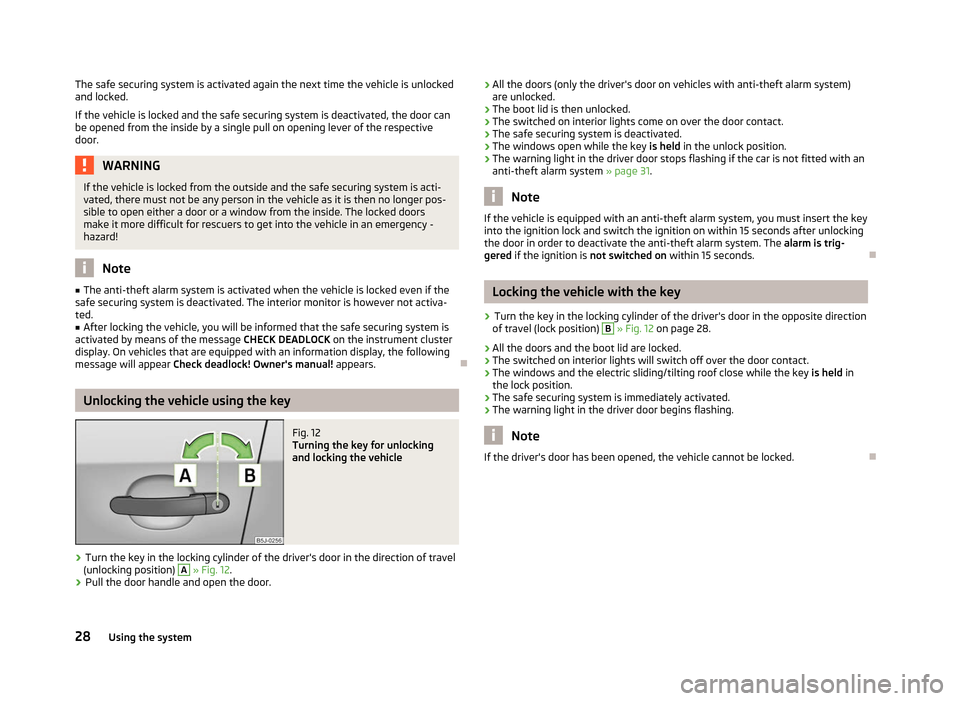
Fig. 12
Turning the key for unlocking
and locking the vehicle
› Turn the key in the locking cylinder of the driver's door in the direction of travel
(unlocking position) A
» Fig. 12.
› Pull the door handle and open the door. ›
All the doors (only the driver's door on vehicles with anti-theft alarm system)
are unlocked.
› The boot lid is then unlocked.
› The switched on interior lights come on over the door contact.
› The safe securing system is deactivated.
› The windows open while the key
is held in the unlock position.
› The warning light in the driver door stops flashing if the car is not fitted with an
anti-theft alarm system » page 31. Note
If the vehicle is equipped with an anti-theft alarm system, you must insert the key
into the ignition lock and switch the ignition on within 15 seconds after unlocking
the door in order to deactivate the anti-theft alarm system. The alarm is trig-
gered if the ignition is not switched on within 15 seconds. Ð Locking the vehicle with the key
› Turn the key in the locking cylinder of the driver's door in the opposite direction
of travel (lock position) B
» Fig. 12 on page 28.
› All the doors and the boot lid are locked.
› The switched on interior lights will switch off over the door contact.
› The windows and the electric sliding/tilting roof close while the key
is held in
the lock position.
› The safe securing system is immediately activated.
› The warning light in the driver door begins flashing. Note
If the driver's door has been opened, the vehicle cannot be locked. Ð
28 Using the system
Page 31 of 196
Vehicle locking/unlocking from the inside
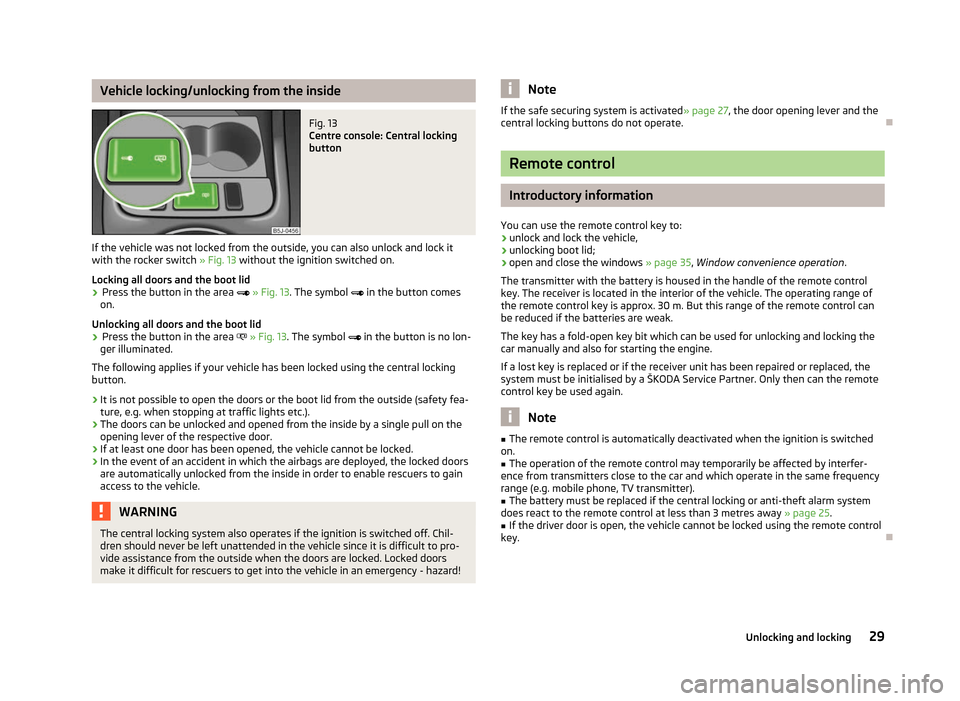
Fig. 13
Centre console: Central locking
button
If the vehicle was not locked from the outside, you can also unlock and lock it
with the rocker switch » Fig. 13 without the ignition switched on.
Locking all doors and the boot lid › Press the button in the area
» Fig. 13. The symbol in the button comes
on.
Unlocking all doors and the boot lid
› Press the button in the area
» Fig. 13. The symbol in the button is no lon-
ger illuminated.
The following applies if your vehicle has been locked using the central locking
button.
› It is not possible to open the doors or the boot lid from the outside (safety fea-
ture, e.g. when stopping at traffic lights etc.).
› The doors can be unlocked and opened from the inside by a single pull on the
opening lever of the respective door.
› If at least one door has been opened, the vehicle cannot be locked.
› In the event of an accident in which the airbags are deployed, the locked doors
are automatically unlocked from the inside in order to enable rescuers to gain
access to the vehicle. WARNING
The central locking system also operates if the ignition is switched off. Chil-
dren should never be left unattended in the vehicle since it is difficult to pro-
vide assistance from the outside when the doors are locked. Locked doors
make it difficult for rescuers to get into the vehicle in an emergency - hazard! Note
If the safe securing system is activated » page 27, the door opening lever and the
central locking buttons do not operate. Ð Remote control
Introductory information
You can use the remote control key to:
› unlock and lock the vehicle,
› unlocking boot lid;
› open and close the windows
» page 35, Window convenience operation .
The transmitter with the battery is housed in the handle of the remote control
key. The receiver is located in the interior of the vehicle. The operating range of
the remote control key is approx. 30 m. But this range of the remote control can
be reduced if the batteries are weak.
The key has a fold-open key bit which can be used for unlocking and locking the
car manually and also for starting the engine.
If a lost key is replaced or if the receiver unit has been repaired or replaced, the
system must be initialised by a ŠKODA Service Partner. Only then can the remote
control key be used again. Note
■ The remote control is automatically deactivated when the ignition is switched
on. ■ The operation of the remote control may temporarily be affected by interfer-
ence from transmitters close to the car and which operate in the same frequency
range (e.g. mobile phone, TV transmitter).
■ The battery must be replaced if the central locking or anti-theft alarm system
does react to the remote control at less than 3 metres away » page 25.
■ If the driver door is open, the vehicle cannot be locked using the remote control
key. Ð
29
Unlocking and locking
Page 32 of 196
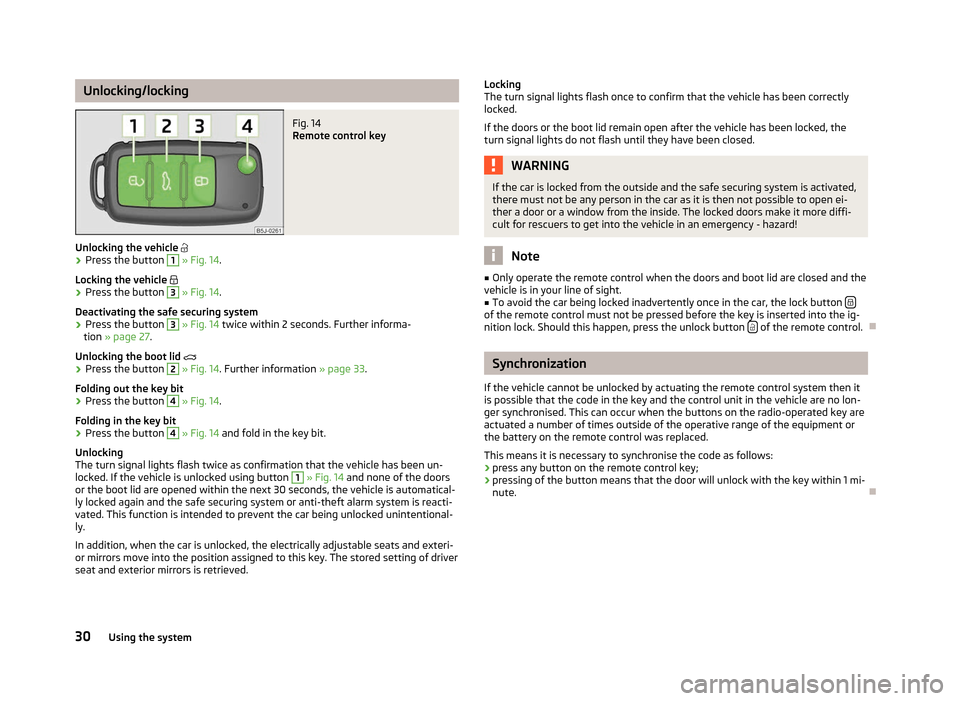
Unlocking/locking
Fig. 14
Remote control key
Unlocking the vehicle
› Press the button 1
» Fig. 14.
Locking the vehicle
› Press the button 3
» Fig. 14.
Deactivating the safe securing system
› Press the button 3
» Fig. 14 twice within 2
seconds. Further informa-
tion » page 27.
Unlocking the boot lid
› Press the button 2
» Fig. 14. Further information
» page 33.
Folding out the key bit
› Press the button 4
» Fig. 14.
Folding in the key bit
› Press the button 4
» Fig. 14 and fold in the key bit.
Unlocking
The turn signal lights flash twice as confirmation that the vehicle has been un-
locked. If the vehicle is unlocked using button 1
» Fig. 14 and none of the doors
or the boot lid are opened within the next 30 seconds, the vehicle is automatical-
ly locked again and the safe securing system or anti-theft alarm system is reacti-
vated. This function is intended to prevent the car being unlocked unintentional-
ly.
In addition, when the car is unlocked, the electrically adjustable seats and exteri-
or mirrors move into the position assigned to this key. The stored setting of driver
seat and exterior mirrors is retrieved. Locking
The turn signal lights flash once to confirm that the vehicle has been correctly
locked.
If the doors or the boot lid remain open after the vehicle has been locked, the
turn signal lights do not flash until they have been closed. WARNING
If the car is locked from the outside and the safe securing system is activated,
there must not be any person in the car as it is then not possible to open ei-
ther a door or a window from the inside. The locked doors make it more diffi-
cult for rescuers to get into the vehicle in an emergency - hazard! Note
■ Only operate the remote control when the doors and boot lid are closed and the
vehicle is in your line of sight. ■ To avoid the car being locked inadvertently once in the car, the lock button of the remote control must not be pressed before the key is inserted into the ig-
nition lock. Should this happen, press the unlock button
of the remote control.
Ð Synchronization
If the vehicle cannot be unlocked by actuating the remote control system then it
is possible that the code in the key and the control unit in the vehicle are no lon-
ger synchronised. This can occur when the buttons on the radio-operated key are
actuated a number of times outside of the operative range of the equipment or
the battery on the remote control was replaced.
This means it is necessary to synchronise the code as follows:
› press any button on the remote control key;
› pressing of the button means that the door will unlock with the key within 1 mi-
nute. Ð
30 Using the system
Page 33 of 196
Anti-theft alarm system
Introductory information
The anti-theft alarm system increases the level of protection against people
seeking to break into the vehicle. The system triggers audible and visual warning
signals if an attempt is made to break into the vehicle.
How is the alarm system activated?
The anti-theft alarm system is activated when the vehicle is locked with the radio
remote control or the key in the driver's door . It is activated 30 seconds after
locking the door.
How is the alarm system deactivated?
The alarm system is deactivated by pressing the unlock button on the radio re-
mote control. The anti-theft alarm system is reactivated if the vehicle is not
opened within 30 seconds after transmitting the radio signal.
If the vehicle is unlocked by inserting the key into the driver door, the key must
be inserted into the ignition lock and the ignition switched on within 15
seconds
of unlocking the door to deactivate the alarm system. The alarm is triggered if
the ignition is not switched on within 15 seconds.
When is the alarm triggered?
The following security areas of the locked vehicle are monitored: › bonnet;
› boot lid;
› doors;
› ignition lock;
› Vehicle inclination
» page 31;
› Interior of the vehicle
» page 31;
› A drop in voltage of the on-board power supply;
› Socket of the factory-fitted towing device.
An alarm is immediately triggered if either of the two battery terminals is discon-
nected while the anti-theft alarm system is activated.
How is the alarm switched off?
The alarm is switched off by unlocking the vehicle with the radio remote control
or switching on the ignition. Note
■ The working life of the alarm siren is 5 years.
■ Before leaving the car, it must be checked that all of the windows, doors and
the electric sliding/tilting roof are properly closed to ensure the full functionality
of the anti-theft alarm system. ■ Coding of the radio remote control and the receiver unit precludes the use of
the radio remote control from other vehicles. Ð Interior monitor and towing protection
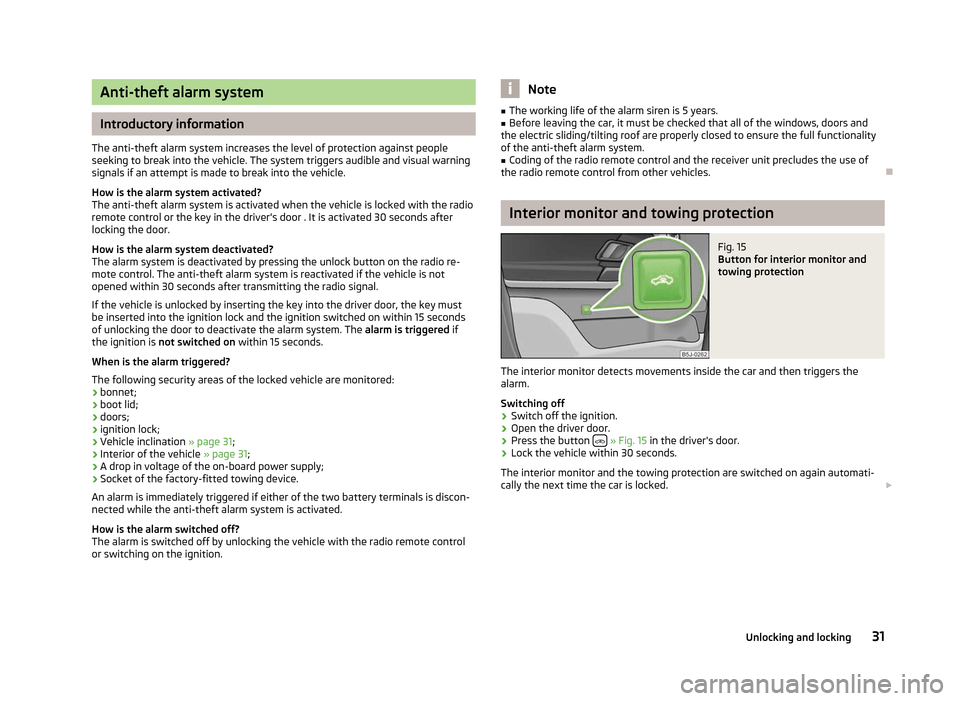
Fig. 15
Button for interior monitor and
towing protection
The interior monitor detects movements inside the car and then triggers the
alarm.
Switching off
› Switch off the ignition.
› Open the driver door.
› Press the button
» Fig. 15 in the driver's door.
› Lock the vehicle within 30 seconds.
The interior monitor and the towing protection are switched on again automati-
cally the next time the car is locked. £
31
Unlocking and locking
Page 34 of 196
Note
■ Switch off the interior monitor and the towing protection if there is a possibility
of the alarm being triggered by movements from (e.g. children or animals) within
the vehicle interior or if the vehicle has to be transported (e.g. by train or ship) or
towed. ■ The opened glasses storage compartment reduces the effectiveness of the in-
terior monitor. To ensure the full functionality of the interior monitor, the glasses
storage compartment must always be closed before locking the vehicle. ÐEmergency locking of the doors
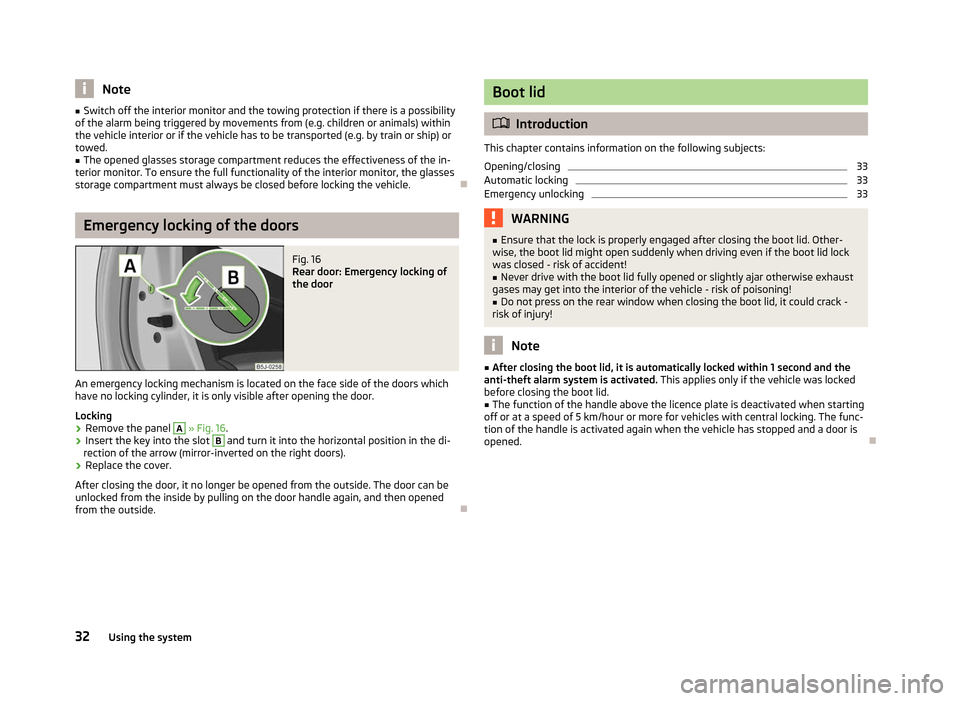
Fig. 16
Rear door: Emergency locking of
the door
An emergency locking mechanism is located on the face side of the doors which
have no locking cylinder, it is only visible after opening the door.
Locking › Remove the panel A
» Fig. 16
.
› Insert the key into the slot B
and turn it into the horizontal position in the di-
rection of the arrow (mirror-inverted on the right doors).
› Replace the cover.
After closing the door, it no longer be opened from the outside. The door can be
unlocked from the inside by pulling on the door handle again, and then opened
from the outside. Ð Boot lid
ä
Introduction
This chapter contains information on the following subjects:
Opening/closing 33
Automatic locking 33
Emergency unlocking 33
WARNING
■ Ensure that the lock is properly engaged after closing the boot lid. Other-
wise, the boot lid might open suddenly when driving even if the boot lid lock
was closed - risk of accident!
■ Never drive with the boot lid fully opened or slightly ajar otherwise exhaust
gases may get into the interior of the vehicle - risk of poisoning!
■ Do not press on the rear window when closing the boot lid, it could crack -
risk of injury! Note
■ After closing the boot lid, it is automatically locked within 1 second and the
anti-theft alarm system is activated. This applies only if the vehicle was locked
before closing the boot lid. ■ The function of the handle above the licence plate is deactivated when starting
off or at a speed of 5
km/hour or more for vehicles with central locking. The func-
tion of the handle is activated again when the vehicle has stopped and a door is
opened. Ð
32 Using the system
Page 35 of 196
Opening/closing
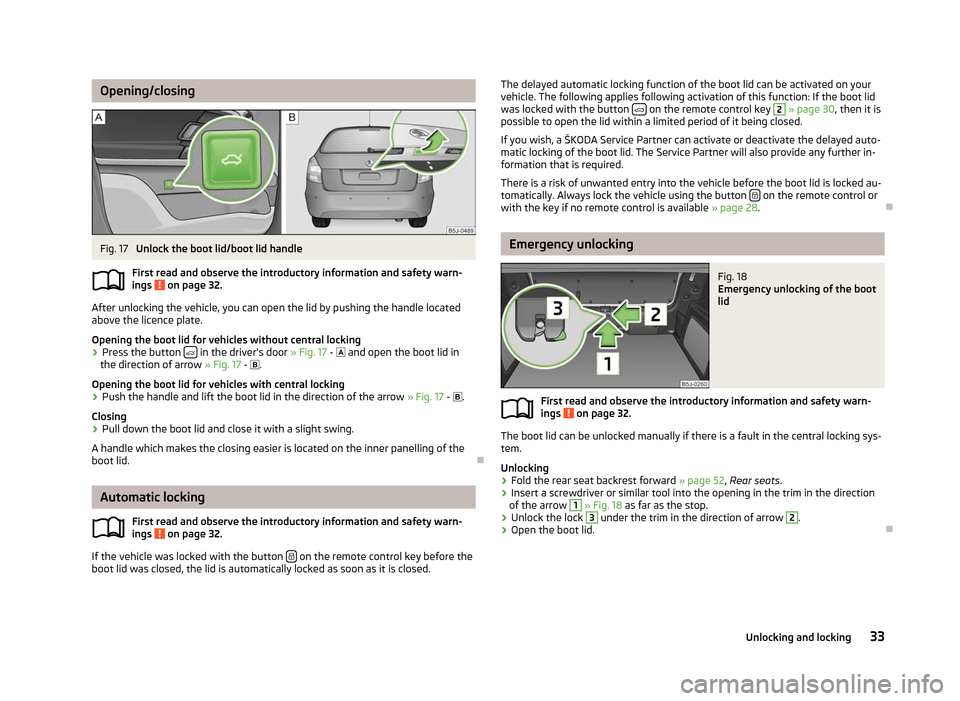
Fig. 17
Unlock the boot lid/boot lid handle
First read and observe the introductory information and safety warn-
ings on page 32.
After unlocking the vehicle, you can open the lid by pushing the handle located
above the licence plate.
Opening the boot lid for vehicles without central locking
›
Press the button
in the driver's door
» Fig. 17 - and open the boot lid in
the direction of arrow » Fig. 17 - .
Opening the boot lid for vehicles with central locking › Push the handle and lift the boot lid in the direction of the arrow
» Fig. 17 - .
Closing
› Pull down the boot lid and close it with a slight swing.
A handle which makes the closing easier is located on the inner panelling of the
boot lid. ÐAutomatic locking
First read and observe the introductory information and safety warn-
ings on page 32.
If the vehicle was locked with the button
on the remote control key before the
boot lid was closed, the lid is automatically locked as soon as it is closed.
ä
ä The delayed automatic locking function of the boot lid can be activated on your
vehicle. The following applies following activation of this function: If the boot lid
was locked with the button on the remote control key 2
» page 30, then it is
possible to open the lid within a limited period of it being closed.
If you wish, a
ŠKODA Service Partner can activate or deactivate the delayed auto-
matic locking of the boot lid. The Service Partner will also provide any further in-
formation that is required.
There is a risk of unwanted entry into the vehicle before the boot lid is locked au-
tomatically. Always lock the vehicle using the button on the remote control or
with the key if no remote control is available » page 28 .Ð Emergency unlocking
Fig. 18
Emergency unlocking of the boot
lid
First read and observe the introductory information and safety warn-
ings on page 32.
The boot lid can be unlocked manually if there is a fault in the central locking sys-
tem.
Unlocking
›
Fold the rear seat backrest forward
» page 52, Rear seats.
› Insert a screwdriver or similar tool into the opening in the trim in the direction
of the arrow 1
» Fig. 18 as far as the stop.
› Unlock the lock 3
under the trim in the direction of arrow 2
.
› Open the boot lid. Ð
ä
33
Unlocking and locking
Page 36 of 196
Electrical power windows
ä
Introduction
This chapter contains information on the following subjects:
Opening/closing the windows 34
Force limiter of the electrical power windows 35
Window convenience operation 35
Operational faults 35
WARNING
■ If the vehicle is locked from the outside, do not leave anybody in the vehicle
as it is not possible to open the windows from the inside in the event of an
emergency.
■ The system is fitted with a force limiter » page 35. If there is an obstacle,
the closing process is stopped and the window goes down by several centi-
metres. The windows should nevertheless be closed carefully! Otherwise
these can cause severe crushing injuries!
■ It is recommended to deactivate the electrical power windows in the rear
doors (safety pushbutton) S
» Fig. 19 on page 34 when children are being
transported on the rear seats. CAUTION
■ Keep the windows clean to ensure the correct functionality of the electric win-
dows. ■ In the event that the windows are frozen, first of all eliminate the
ice » page 132 , De-icing windows and exterior mirrors and only then operate the
electrical power windows. Otherwise, the electrical power window mechanism
could be damaged. ■ When leaving the locked vehicle make sure that the windows are closed at all
times. Note
■ After switching the ignition off, it is still possible to open or close the windows
for approx. 10
minutes. The electrical power windows are only switched off com-
pletely once the driver's door or front passenger door are opened. ■ When driving always use the existing heating, air conditioning and ventilation
system for ventilating the interior of the vehicle. If the windows are opened, dust
as well as other dirt can get into the vehicle and in addition the wind noise is
more at certain speeds.
■ At high speeds, you should keep the windows closed to prevent unnecessarily
high fuel consumption. Ð Opening/closing the windows
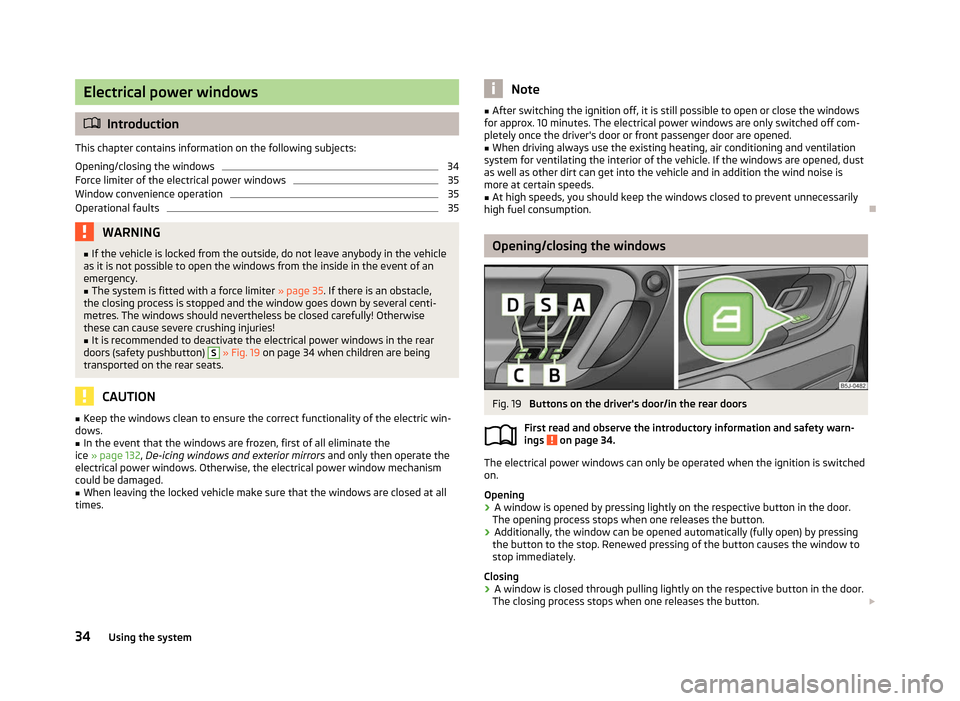
Fig. 19
Buttons on the driver's door/in the rear doors
First read and observe the introductory information and safety warn-
ings on page 34.
The electrical power windows can only be operated when the ignition is switched
on.
Opening
›
A window is opened by pressing lightly on the respective button in the door.
The opening process stops when one releases the button.
› Additionally, the window can be opened automatically (fully open) by pressing
the button to the stop. Renewed pressing of the button causes the window to
stop immediately.
Closing
› A window is closed through pulling lightly on the respective button in the door.
The closing process stops when one releases the button. £
ä
34 Using the system
Page 37 of 196
›
Additionally, the window can be closed automatically (fully closed) by pulling
the button to the stop. Renewed pulling of the button causes the window to
stop immediately.
Buttons for the electrical power windows
Button for electrical power window of the driver's door
Button for electrical power window of the front passenger door
Button for electrical power window of the rear right door
Button for electrical power window of the rear left door
Safety pushbutton
Safety pushbutton
The buttons for electrical power windows in the rear doors can be deactivated by
pressing the safety pushbutton S
» Fig. 19
. The buttons for the electrical power
windows in rear doors are activated again by pressing the safety pushbutton S
again.
If the buttons for the rear doors are deactivated, the warning light
in the safe-
ty switch S
lights up.
Note
The window lift mechanism is equipped with protection against overheating. Re-
peated opening and closing of the window can cause this mechanism to over-
heat. If this happens, it will not be possible to operate the window for a short
time. You will be able to operate the window again as soon as the overheating
protection has cooled down. ÐForce limiter of the electrical power windows
First read and observe the introductory information and safety warn-
ings on page 34.
The electrical power windows are fitted with a force limiter. It reduces the risk of
bruises or injuries when closing the windows.
If there is an obstacle, the closing process is stopped and the window goes down
by several centimetres.
If the obstacle prevents the window from being closed during the next 10 sec-
onds, the closing process is interrupted once again and the window goes down by
several centimetres. A
B
C
D
S
ä If you attempt to close the window again within 10 seconds of the window being
moved down for the second time, even though the obstacle was not yet been re-
moved, the closing process is only stopped. During this time it is not possible to
automatically close the window. The force limiter is still switched on.
The force limiter is only switched off if you attempt to close the window again
within the next 10
seconds - the window will now close with full force!
If you wait longer than 10 seconds, the force limiter is switched on again. Ð Window convenience operation
First read and observe the introductory information and safety warn-
ings on page 34.
The electrical power windows can be opened and closed as follows when unlock-
ing and locking the vehicle.
Opening
› Press and hold the unlock button
on the remote control key.
› Hold the key in the driver's lock in the unlock position.
Closing
› Press and hold the lock button
on the remote control key.
› Hold the key in the driver's lock in the lock position.
You can interrupt the opening or closing process for the windows immediately by
releasing the key or the lock button. Ð Operational faults
First read and observe the introductory information and safety warn-
ings on page 34.
Electrical power windows do not operate
If the battery has been disconnected and then reconnected while the window
was opened, the electrical power windows will not operate. The system must be
activated. Proceed as follows in order to re-establish the function:
›
switch on the ignition;
› pull the top edge of the button in the driver's door to close the window;
› release the button;
› pull the relevant button upwards again for approx. 3
seconds.£
ä
ä
35
Unlocking and locking