bonnet SKODA FABIA 2014 3.G / NJ Owner's Manual
[x] Cancel search | Manufacturer: SKODA, Model Year: 2014, Model line: FABIA, Model: SKODA FABIA 2014 3.G / NJPages: 216, PDF Size: 30.7 MB
Page 31 of 216
Operation
Cockpit
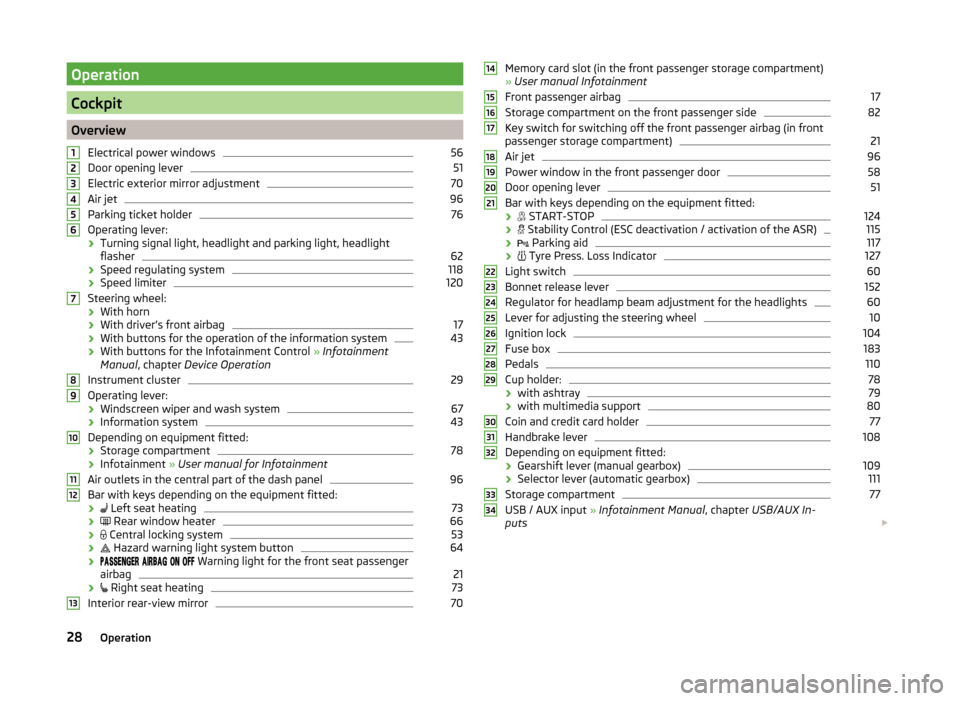
OverviewElectrical power windows
56
Door opening lever
51
Electric exterior mirror adjustment
70
Air jet
96
Parking ticket holder
76
Operating lever:
› Turning signal light, headlight and parking light, headlight
flasher
62
› Speed regulating system
118
›Speed limiter
120
Steering wheel:
› With horn
› With driver’s front airbag
17
›With buttons for the operation of the information system
43
›With buttons for the Infotainment Control
» Infotainment
Manual , chapter Device Operation
Instrument cluster
29
Operating lever: › Windscreen wiper and wash system
67
›Information system
43
Depending on equipment fitted:
› Storage compartment
78
›Infotainment
» User manual for Infotainment
Air outlets in the central part of the dash panel
96
Bar with keys depending on the equipment fitted: ›
Left seat heating
73
›
Rear window heater
66
›
Central locking system
53
›
Hazard warning light system button
64
›
Warning light for the front seat passenger
airbag
21
›
Right seat heating
73
Interior rear-view mirror
7012345678910111213Memory card slot (in the front passenger storage compartment)
» User manual Infotainment
Front passenger airbag17
Storage compartment on the front passenger side
82
Key switch for switching off the front passenger airbag (in front
passenger storage compartment)
21
Air jet
96
Power window in the front passenger door
58
Door opening lever
51
Bar with keys depending on the equipment fitted:
›
START-STOP
124
›
Stability Control (ESC deactivation / activation of the ASR)
115
›
Parking aid
117
›
Tyre Press. Loss Indicator
127
Light switch
60
Bonnet release lever
152
Regulator for headlamp beam adjustment for the headlights
60
Lever for adjusting the steering wheel
10
Ignition lock
104
Fuse box
183
Pedals
110
Cup holder:
78
› with ashtray
79
›with multimedia support
80
Coin and credit card holder
77
Handbrake lever
108
Depending on equipment fitted:
› Gearshift lever (manual gearbox)
109
›Selector lever (automatic gearbox)
111
Storage compartment
77
USB / AUX input
» Infotainment Manual , chapter USB/AUX In-
puts
14151617181920212223242526272829303132333428Operation
Page 44 of 216
The following message is shown in the information cluster display.Oil level: top up oil!
ADD OIL
› Stop the vehicle, switch off the engine, and check the engine oil level
» page 154 .
The warning icon will go out if the bonnet is left open for more than 30 sec-
onds. If no engine oil has been replenished, the warning icon will come on
again after driving about 100 km.
Engine oil level too high
If the warning icons
and
are lit in conjunction with the following message
on the display, the engine oil level is too high.
Reduce oil level!
OIL LEVEL TOO HIGH
› Stop the vehicle, switch off the engine, and check the engine oil level
» page 154 .
Engine oil level sensor
If the warning icons and
are
lit in conjunction with the following message
on the display, the engine oil level sensor is defective.
Oil sensor: Workshop!
OIL SENSOR WORKSHOP
Seek assistance from a specialist garage immediately.
CAUTION
Stop driving if for some reason it is not possible to top up the engine oil un-
der the current conditions. Switch off the engine and seek assistance from a
specialist garage.
Lamp failure
Read and observe
on page 39 first.
The warning icon
comes on if a bulb is faulty.
The following message is shown in the information cluster display, for exam-
ple.
Check right dipped headlight beam!
DIPPED HEADLIGHT CHECK RIGHT
Diesel particulate filter (diesel engine)
Read and observe
on page 39 first.
The diesel particulate filter separates the soot particles from the exhaust. The soot particles collect in the diesel particulate filter where they are burnt on a
regular basis.
If the warning icon
illuminates , soot has accumulated in the diesel particu-
late filter.
To clean the filter, and where traffic conditions permit »
, drive for at least
15 minutes or until the warning icon
goes out as follows.
4th or 5th gear engaged (automatic transmission: Position D/S).
Vehicle speed at least 70 km/h.
Engine speed between 1,800-2,500 rpm.
If the filter is properly cleaned, the warning icon
goes out .
If the filter is not properly cleaned, illumination of the warning icon
does
not take place and the warning light
begins to
flash.
The following message is shown in the information cluster display. Diesel particulate filter: Owner's Manual!
DIESEL PM FILTER OWNER MANUAL
Seek assistance from a specialist garage immediately.
WARNING■ The diesel particulate filter reaches very high temperatures - there is a
fire hazard and serious injury could be caused. Therefore, never stop the
vehicle at places where the underside of your vehicle can come into contact
with flammable materials such as dry grass, undergrowth, leaves, spilled
fuel or such like.■
Always adjust the speed and driving style to the actual weather, road, ter-
rain and traffic conditions. The recommendations indicated by the warning
light must not tempt you to disregard the national regulations for road traf-
fic.
41Instruments and warning lights
Page 46 of 216
Information system
Driver information system
Introduction
This chapter contains information on the following subjects:
Using the information system
43
Outside temperature
44
Gear recommendation
44
Door, luggage compartment or bonnet warning
44
Auto-check control
44
MAXI DOT display
45
The information system provides the driver with alerts and messages about in-
dividual vehicle systems.
These alerts and messages appear in display
2
of the instrument cluster
» Fig. 20 on page 30 or » Fig. 21 on page 30 (hereafter only in the display).
The information system provides the following information and instructions
(depending on vehicle equipment).
› Driving data (multifunction display)
» page 45.
› Data relating to the Maxi DOT display
» page 45.
› Service interval display
» page 48.
› Fatigue detection
» page 126.
› Selector lever positions for an automatic transmission
» page 111.
› Information and alerts in the Assist systems
» page 115.
WARNINGConcentrate fully at all times on your driving! As the driver you are fully re-
sponsible for the operation of your vehicle.Using the information systemFig. 26
Buttons/dial: the operating lever/the multifunction steering
wheel
Read and observe
on page 43 first.
Some functions of the information system can be operated using the buttons
on the multifunction steering wheel » Fig. 26.
Description of the operation
Button/ adjust- ment
wheel
ActionOperation
ABriefly press at the top or bottomSelect data / set data valuesPress top
or bottomDisplay main menu of the MAXI DOT displayBPress brieflyView information / confirm specifica- tionCPress brieflyTo go up one level in the menu of theMAXI DOT displayPress and hold buttonDisplay main menu of theMAXI DOT displayDTurn upwards or down- wardsSelect data / set data valuesPress brieflyView information / confirm specifica- tion43Information system
Page 47 of 216
Outside temperatureRead and observe
on page 43 first.
The current outside temperature is shown in the display.
If the outside temperature drops below +4 °C while driving, the following sym-
bol
(low temperature warning) is displayed and an audible signal will sound.
If the outside temperature when the ignition is switched on is below +4 ° C,
the following icon appears in the display
.
WARNINGEven at temperatures of around +4 °C, there may still be black ice on the
road surface. You should therefore not rely solely on the outside tempera-
ture display for accurate information as to whether there is ice on the road.
Gear recommendation
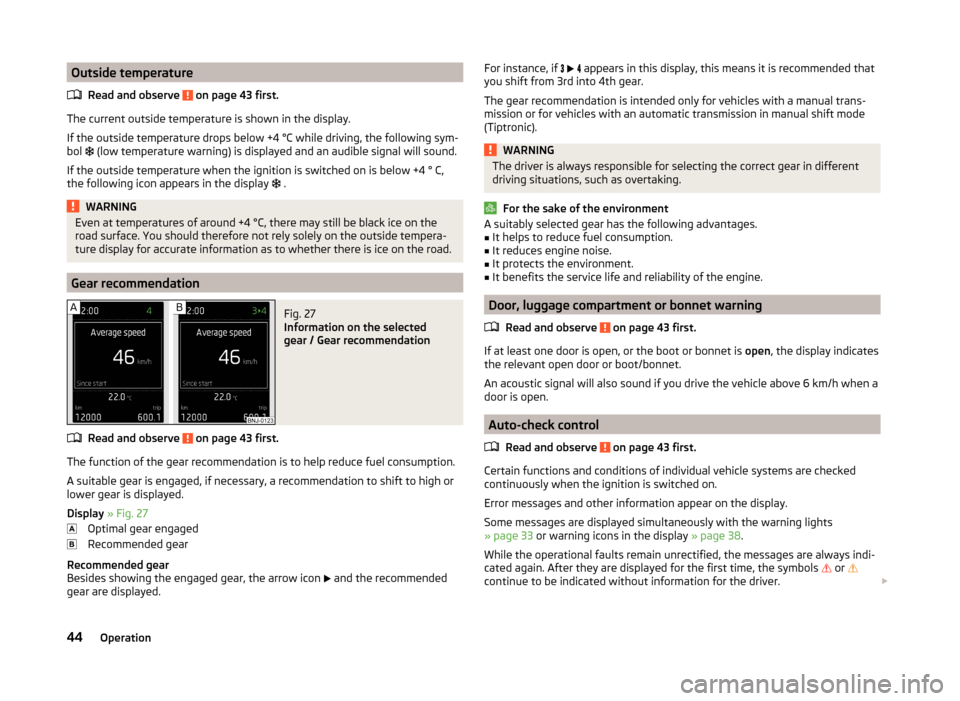
Fig. 27
Information on the selected
gear / Gear recommendation
Read and observe on page 43 first.
The function of the gear recommendation is to help reduce fuel consumption.
A suitable gear is engaged, if necessary, a recommendation to shift to high or
lower gear is displayed.
Display » Fig. 27
Optimal gear engaged
Recommended gear
Recommended gear
Besides showing the engaged gear, the arrow icon
and the recommended
gear are displayed.
For instance, if appears in this display, this means it is recommended that
you shift from 3rd into 4th gear.
The gear recommendation is intended only for vehicles with a manual trans-
mission or for vehicles with an automatic transmission in manual shift mode
(Tiptronic).WARNINGThe driver is always responsible for selecting the correct gear in different
driving situations, such as overtaking.
For the sake of the environment
A suitably selected gear has the following advantages.■It helps to reduce fuel consumption.■
It reduces engine noise.
■
It protects the environment.
■
It benefits the service life and reliability of the engine.
Door, luggage compartment or bonnet warning
Read and observe
on page 43 first.
If at least one door is open, or the boot or bonnet is open, the display indicates
the relevant open door or boot/bonnet.
An acoustic signal will also sound if you drive the vehicle above 6 km/h when a
door is open.
Auto-check control
Read and observe
on page 43 first.
Certain functions and conditions of individual vehicle systems are checked
continuously when the ignition is switched on.
Error messages and other information appear on the display.
Some messages are displayed simultaneously with the warning lights
» page 33 or warning icons in the display » page 38.
While the operational faults remain unrectified, the messages are always indi-
cated again. After they are displayed for the first time, the symbols
or
continue to be indicated without information for the driver.
44Operation
Page 57 of 216
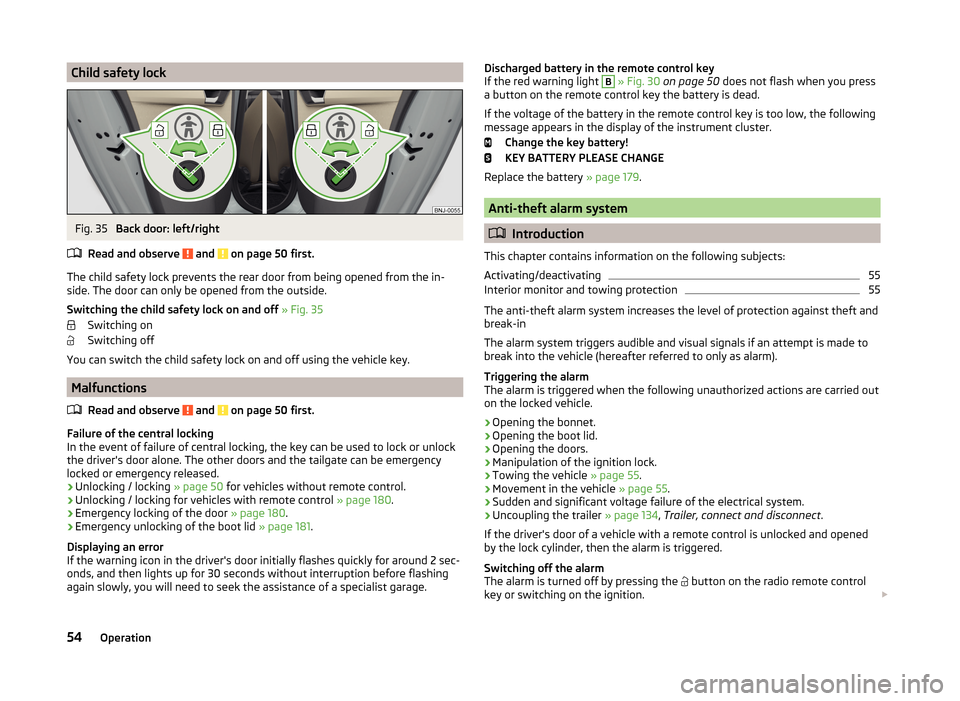
Child safety lockFig. 35
Back door: left/right
Read and observe
and on page 50 first.
The child safety lock prevents the rear door from being opened from the in- side. The door can only be opened from the outside.
Switching the child safety lock on and off » Fig. 35
Switching on
Switching off
You can switch the child safety lock on and off using the vehicle key.
Malfunctions
Read and observe
and on page 50 first.
Failure of the central locking
In the event of failure of central locking, the key can be used to lock or unlock
the driver's door alone. The other doors and the tailgate can be emergency
locked or emergency released.
› Unlocking / locking
» page 50 for vehicles without remote control.
› Unlocking / locking for vehicles with remote control
» page 180.
› Emergency locking of the door
» page 180.
› Emergency unlocking of the boot lid
» page 181.
Displaying an error
If the warning icon in the driver's door initially flashes quickly for around 2 sec-
onds, and then lights up for 30 seconds without interruption before flashing
again slowly, you will need to seek the assistance of a specialist garage.
Discharged battery in the remote control key
If the red warning light B » Fig. 30 on page 50 does not flash when you press
a button on the remote control key the battery is dead.
If the voltage of the battery in the remote control key is too low, the following
message appears in the display of the instrument cluster.
Change the key battery!
KEY BATTERY PLEASE CHANGE
Replace the battery » page 179.
Anti-theft alarm system
Introduction
This chapter contains information on the following subjects:
Activating/deactivating
55
Interior monitor and towing protection
55
The anti-theft alarm system increases the level of protection against theft and
break-in
The alarm system triggers audible and visual signals if an attempt is made to
break into the vehicle (hereafter referred to only as alarm).
Triggering the alarm
The alarm is triggered when the following unauthorized actions are carried out
on the locked vehicle.
› Opening the bonnet.
› Opening the boot lid.
› Opening the doors.
› Manipulation of the ignition lock.
› Towing the vehicle
» page 55.
› Movement in the vehicle
» page 55.
› Sudden and significant voltage failure of the electrical system.
› Uncoupling the trailer
» page 134, Trailer, connect and disconnect .
If the driver's door of a vehicle with a remote control is unlocked and opened by the lock cylinder, then the alarm is triggered.
Switching off the alarm
The alarm is turned off by pressing the button on the radio remote control
key or switching on the ignition.
54Operation
Page 70 of 216
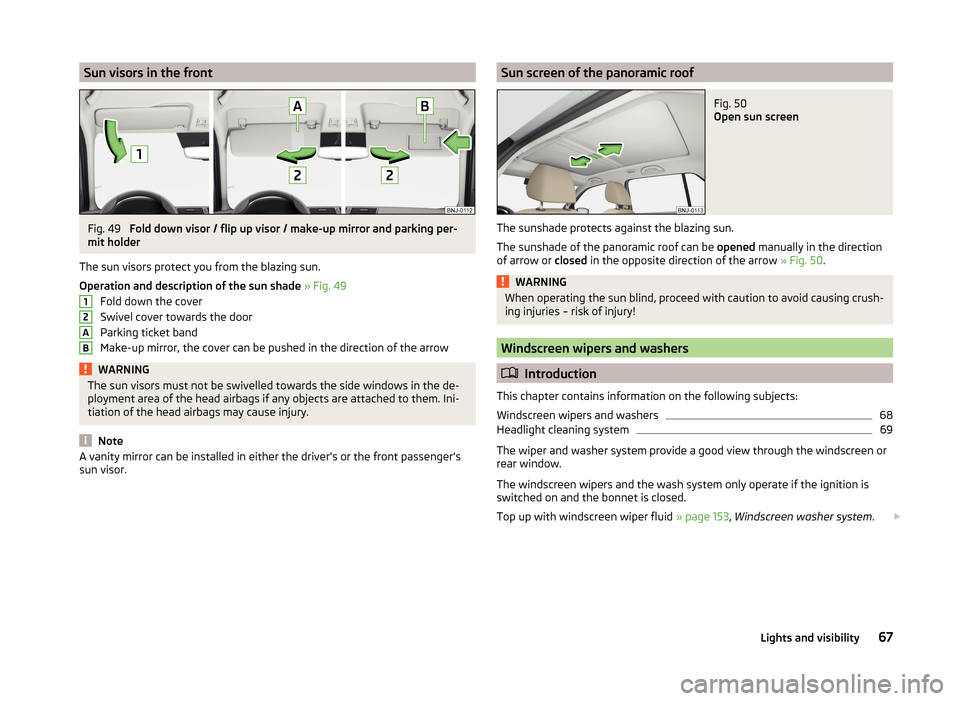
Sun visors in the frontFig. 49
Fold down visor / flip up visor / make-up mirror and parking per-
mit holder
The sun visors protect you from the blazing sun.
Operation and description of the sun shade » Fig. 49
Fold down the cover
Swivel cover towards the door
Parking ticket band
Make-up mirror, the cover can be pushed in the direction of the arrow
WARNINGThe sun visors must not be swivelled towards the side windows in the de-
ployment area of the head airbags if any objects are attached to them. Ini-
tiation of the head airbags may cause injury.
Note
A vanity mirror can be installed in either the driver's or the front passenger's
sun visor.12ABSun screen of the panoramic roofFig. 50
Open sun screen
The sunshade protects against the blazing sun.
The sunshade of the panoramic roof can be opened manually in the direction
of arrow or closed in the opposite direction of the arrow » Fig. 50.
WARNINGWhen operating the sun blind, proceed with caution to avoid causing crush-
ing injuries – risk of injury!
Windscreen wipers and washers
Introduction
This chapter contains information on the following subjects:
Windscreen wipers and washers
68
Headlight cleaning system
69
The wiper and washer system provide a good view through the windscreen or
rear window.
The windscreen wipers and the wash system only operate if the ignition is
switched on and the bonnet is closed.
Top up with windscreen wiper fluid » page 153, Windscreen washer system .
67Lights and visibility
Page 71 of 216
WARNING■Properly maintained windscreen wiper blades are essential for clear visi-
bility and safe driving » page 181, Replacing windscreen wiper blades .■
Replace the windscreen wiper blades once or twice a year for safety pur-
poses. These can be purchased from a ŠKODA Partner.
■
Do not use the windscreen washer system at low temperatures without
heating the windscreen beforehand. The window washer fluid could other-
wise freeze on the windscreen and restrict the view to the front.
■
Automatic wiping during rain is only a support. The driver is still responsi-
ble for setting the function of the windscreen wipers manually depending
on the visibility conditions.
CAUTION
■ If the ignition is switched off while the windscreen wipers are switched on,
the windscreen wipers will continue wiping in the same mode after the igni-
tion is turned back on. The windscreen wipers could freeze up in cold tempera-
tures between the time the ignition was turned off and when it was turned
back on again.■
In cold temperatures and during the winter, check before the journey or be-
fore switching on the ignition that the wiper blades are not frozen to the
windscreen. If the windscreen wipers are switched on when the blades are fro-
zen to the windscreen, this may damage both the blades and windscreen wip-
er motor!
■
Carefully release frozen wiper blades off the windscreen.
■
Remove snow and ice from the windscreen wipers before driving.
■
If the windscreen wipers are handled carelessly, there is a risk of damage to
the windscreen.
■
Do not switch on the ignition if the front wiper arms are retracted. The wiper
arms could damage the paint of the bonnet.
Note
■ To avoid streaking, the wiper blades must be kept clean » page 145.■The windscreen washer nozzles for the windscreen are heated when the en-
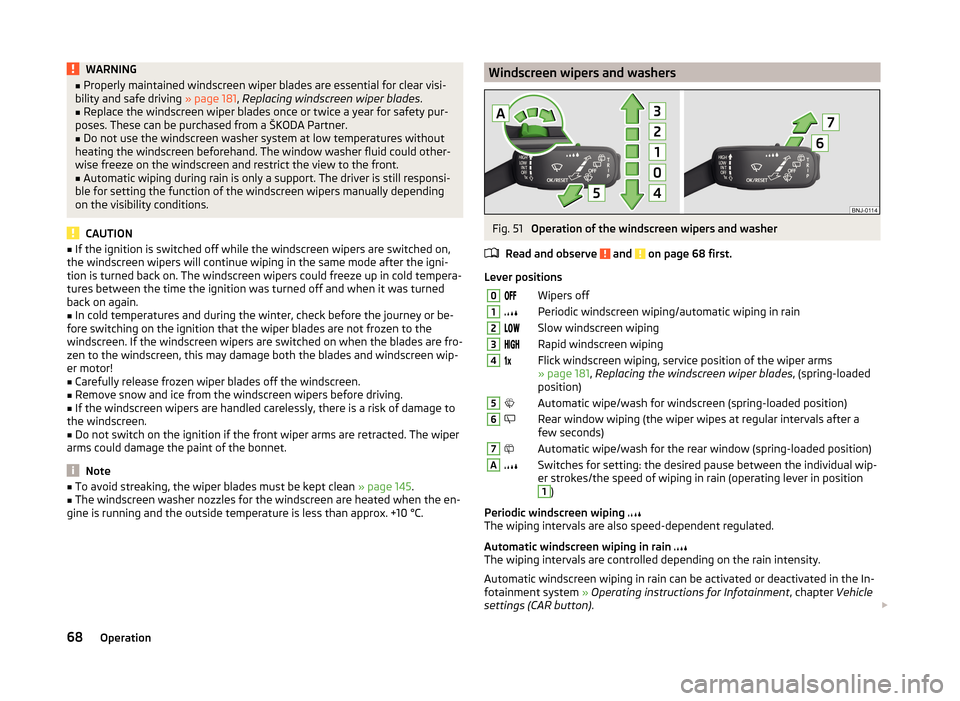
gine is running and the outside temperature is less than approx. +10 °C.Windscreen wipers and washersFig. 51
Operation of the windscreen wipers and washer
Read and observe
and on page 68 first.
Lever positions
0Wipers off1Periodic windscreen wiping/automatic wiping in rain2Slow windscreen wiping3Rapid windscreen wiping4 Flick windscreen wiping, service position of the wiper arms
» page 181 , Replacing the windscreen wiper blades , (spring-loaded
position)5Automatic wipe/wash for windscreen (spring-loaded position)6Rear window wiping (the wiper wipes at regular intervals after a
few seconds)7Automatic wipe/wash for the rear window (spring-loaded position)ASwitches for setting: the desired pause between the individual wip-
er strokes/the speed of wiping in rain (operating lever in position1
)
Periodic windscreen wiping
The wiping intervals are also speed-dependent regulated.
Automatic windscreen wiping in rain
The wiping intervals are controlled depending on the rain intensity.
Automatic windscreen wiping in rain can be activated or deactivated in the In-
fotainment system » Operating instructions for Infotainment , chapter Vehicle
settings (CAR button) .
68Operation
Page 127 of 216
WARNINGIn the following situations, Front Assistant should be switched off for safe-
ty reasons.■
When the vehicle is being towed away.
■
When the vehicle is on a rolling test bench.
■
If an unfounded warning or a system action was taken.
■
When on a truck, or a car ferry service or similar.
Information messages
Read and observe
and on page 122 first.
The warning symbols are shown in the instrument cluster display. Front Assist: No sensor view.
The sensor is soiled or covered.
Stop the car, switch off the engine and clean the sensor or eliminate the dis-
turbance causing the lack of visibility » Fig. 123 on page 122 .
If the message appears again after starting the engine, the system should be disabled » page 123 . Seek help from a specialist garage.
Front Assist not available.
The system is not available for an unknown reason.
Stop the vehicle, switch off the engine and then start it again.
If the message appears again after starting the engine, the system should be disabled » page 123 . Seek help from a specialist garage.
START-STOP
Introduction
This chapter contains information on the following subjects:
Operating conditions for the system
124
Operation in vehicles with manual gearbox
125
Operation in vehicles with automatic gearbox
125
System conditioned automatic start-up
126
Manually deactivating/activating
126
Information messages
126The START-STOP system (hereinafter referred to just as the system) reduces
fuel consumption and polluting emissions and CO 2 emissions by turning the
engine off, e.g. when stopping at traffic lights, and starting the engine again
when moving off.WARNING■ Never let the vehicle roll with the engine switched off.■The brake servo unit and power steering only operate if the engine is run-
ning.
Operating conditions for the system
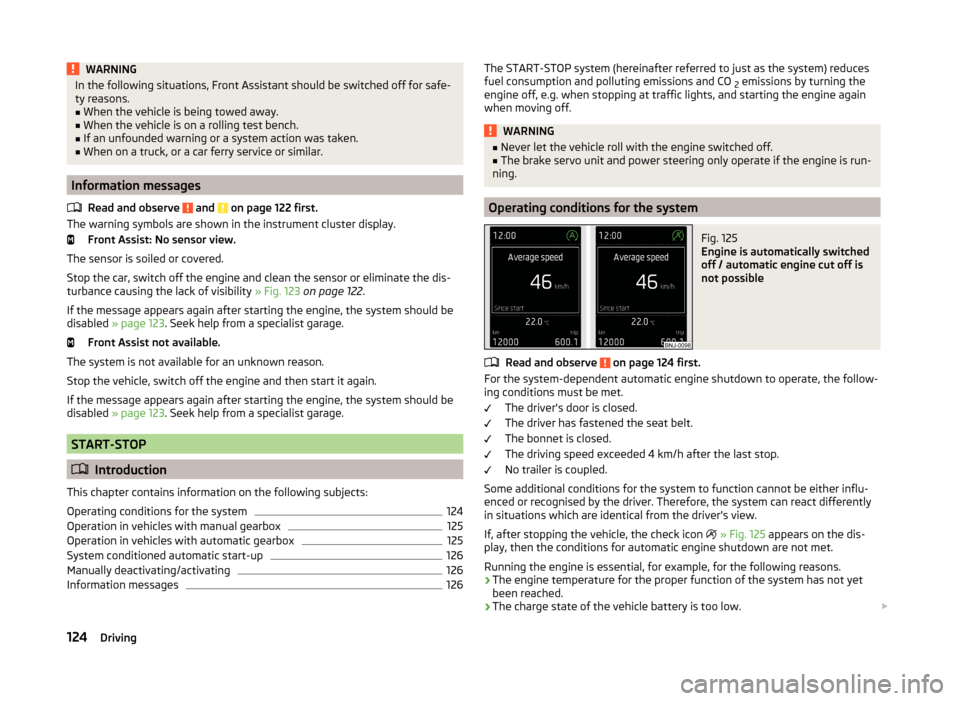
Fig. 125
Engine is automatically switched
off / automatic engine cut off is
not possible
Read and observe on page 124 first.
For the system-dependent automatic engine shutdown to operate, the follow-
ing conditions must be met.
The driver's door is closed.
The driver has fastened the seat belt.
The bonnet is closed.
The driving speed exceeded 4 km/h after the last stop.
No trailer is coupled.
Some additional conditions for the system to function cannot be either influ-
enced or recognised by the driver. Therefore, the system can react differently
in situations which are identical from the driver's view.
If, after stopping the vehicle, the check icon
» Fig. 125 appears on the dis-
play, then the conditions for automatic engine shutdown are not met.
Running the engine is essential, for example, for the following reasons.
› The engine temperature for the proper function of the system has not yet
been reached.
› The charge state of the vehicle battery is too low.
124Driving
Page 153 of 216
Note■Unleaded petrol that has a higher octane number than that required by the
engine can be used without limitations.■
The use of petrol with an octane rating higher than 95 RON in does not re-
sult in either a noticeable increase in power nor lower fuel consumption in ve-
hicles for which unleaded petrol 95/91, 92 or 93 RON is specified.
■
On vehicles using prescribed unleaded petrol of min. 95 RON, the use of pet-
rol with a higher octane number than 95 RON can increase the power and re-
duce fuel consumption.
Diesel fuel
Read and observe
on page 148 first.
The vehicle can only be operated with diesel fuel that meets the EN 5901)
standard.
All diesel engines can be operated using diesel fuel with a maximum of 7% bi-
odiesel (B7)2)
.
On the Indian market, your vehicle will only be able to run on diesel fuel com-
pliant with standard IS 1460/Bharat IV. If diesel fuel which complies with this
standard is not available, you can refuel with diesel fuel according to standard
IS 1460/Bharat III in case of emergency.
Operation in winter - Winter-grade diesel fuel
In the cold season, only use “winter-grade diesel fuel” which will still operate
properly even at a temperature of -20 °C.
It is often the case in countries with different climatic conditions that diesel
fuels available have a different temperature characteristic. ŠKODA Partners
and filling stations in the relevant country will be able to provide you with in-
formation regarding the diesel fuels available.
Preheating fuel
The vehicle is fitted with a fuel filter preheating system. This secures opera-
tion of a vehicle using diesel fuel down to an environmental temperature of
-24 °C.
Diesel fuel additives
The diesel fuel in accordance with the prescribed standards meets all the con-
ditions for a smooth running engine. We therefore recommend that no diesel
fuel additives are used. This can result in considerable damage to parts of the
engine or the exhaust system.
CAUTION
■ Just filling the tank once with diesel fuel that does not comply with the
standard, can cause severe damage to parts of the engine, the fuel and ex-
haust system!■
If a different fuel other than diesel fuel, which complies to the above men-
tioned standards (e.g. petrol) is used, do not start the engine or switch on the
ignition! Engine parts could be significantly damaged.
■
Water which has collected in the fuel filter can cause engine faults.
CAUTION
■ The vehicle cannot be operated with biofuel RME, therefore this fuel must
not be filled in the tank and used for driving the vehicle. The use of biofuel
RME can cause considerable damage to parts of the engine or fuel system.■
Do not mix any fuel additives, so-called “flow improvers” (petrol and similar
agents), into the diesel. This can result in considerable damage to parts of the
engine or the exhaust system!
Engine compartment
Introduction
This chapter contains information on the following subjects:
Opening and closing the bonnet
152
Engine compartment overview
152
Radiator fan
153
Windscreen washer system
153
1)
In Germany also DIN 51628, in Austria ÖNORM C 1590, in Russia GOST R 52368-2005 / EN 590:2004.
2)
In Germany complying with standard DIN 52638, in Austria ÖNORM C 1590, in France EN 590.
150General Maintenance
Page 154 of 216
WARNINGWhen working in the engine compartment, injuries, scalding, accident or
fire hazards may arise. For this reason, it is essential to comply with the
warning instructions stated below and with the generally applicable rules
of safety. The engine compartment of your car is a hazardous area.WARNINGInstructions before beginning work in the engine compartment■Turn off the engine and remove the ignition key.■
Firmly apply the handbrake.
■
For vehicles with manual transmission the lever into the neutral position.
■
On vehicles with automatic transmission, shift the selector lever into the
P position.
■
Allow the engine to cool.
■
Never open the bonnet if you can see steam or coolant flowing out of the
engine compartment – there is a risk of scalding. Wait until the steam or
coolant has stopped escaping.
WARNINGInformation for working in the engine room■Keep all people, especially children, away from the engine compartment.■
Never touch the radiator fan while the engine is still warm. The fan might
suddenly start running!
■
Do not touch any hot engine parts – there is a risk of burns.
WARNINGInformation for working in the engine compartment with the engine run-
ning■
Pay particular attention to moving engine parts, e.g. V-ribbed belt, gener-
ator, radiator fan - danger to life!
■
Never touch the electric wiring on the ignition system.
■
Avoid short circuits in the electrical system - particularly on the vehicle's
battery.
■
Always make sure that no jewellery, loose clothing or long hair can get
caught in rotating engine parts – there is a risk of death. Always remove
any jewellery, tie back long hair and wear tight fitting clothing before com-
pleting any work.
WARNINGInformation for working on the fuel system or the electrical system■Always disconnect the vehicle battery from the electrical system.■
Do not smoke.
■
Never work near open flames.
■
Always have a functioning fire extinguisher nearby.
WARNING■ Read the information and warning instructions on the fluid containers.■Keep the working fluids in sealed original containers and safe from peo-
ple who are not completely independent, e.g. children.■
Never spill operating fluids over the hot engine - risk of fire.
■
If you wish to work under the vehicle, you must secure the vehicle against
rolling away and support it with suitable axle stands: the car jack is not suf-
ficient for this – there is a risk of injury.
CAUTION
Always top up using the correct specification of fluids. This may result in major
operating problems and also vehicle damage!
For the sake of the environment
In view of the requirements for the environmentally friendly disposal of fluids and the special tools and knowledge required for such work, we recommend
that fluids be changed by a specialist garage.
Note
■ If there is anything you are not sure about concerning fluids, please consult a
specialist garage.■
Fluids with the proper specifications can be purchased from the ŠKODA Origi-
nal Accessories or from the ŠKODA Genuine Parts ranges.
151Inspecting and replenishing