fuel SKODA FABIA 2014 3.G / NJ Owner's Manual
[x] Cancel search | Manufacturer: SKODA, Model Year: 2014, Model line: FABIA, Model: SKODA FABIA 2014 3.G / NJPages: 216, PDF Size: 30.7 MB
Page 5 of 216
Table of Contents
Board literature4
Notes
5
Structure and more information about the
Operating Instructions
6
Abbreviations
Safety
Passive Safety
8
General information
8
Correct and safe seated position
9
Seat belts
12
Wearing seat belts
12
Inertia reel and belt pre-tensioners
15
Airbag system
16
Description of the airbag system
16
Airbag overview
17
Deactivating airbags
20
Transporting children safely
22
Child seat
22
Fastening systems
25
Operation
Cockpit
28
Overview
27
Instruments and warning lights
29
Instrument cluster
29
Warning lights
33
Warning icons in the display
38Information system43Driver information system43
Driving data (Multifunction display)
45
Service interval display
48
Unlocking and opening
49
Unlocking and locking
49
Anti-theft alarm system
54
Tailgate
55
Power windows
56
Mechanical windows
59
Lights and visibility
60
Lights
60
Interior lights
65
Visibility
66
Windscreen wipers and washers
67
Rear mirror
69
Seats and headrests
71
Seats and headrests
71
Seat features
73
Transporting and practical equipment
76
Useful equipment
76
Luggage compartment
84
Variable loading floor in the luggage
compartment
89
Bicycle carrier in the luggage compartment
91
Roof rack
93
Heating and air conditioning
95
Heating, ventilation, cooling
95
Communication
100
SmartGate
100Driving
Starting-off and driving103
Starting and stopping the engine using the
key
103
Start or stop the engine by pressing button
105
Brakes and parking
107
Manual gear shifting and pedals
109
Automatic transmission
110
Retraction and economical driving
112
Driving through water and driving off made-
up roads
113
Assist systems
115
Braking and stabilisation systems
115
Parking aid
117
Cruise control system
118
Speed Limiter
120
Front Assistant
121
START-STOP
124
Fatigue detection (break recommendation)
126
Tyre pressure monitoring
127
Hitch and trailer
129
Hitch
129
Trailer
134
General Maintenance
Care and maintenance
137
Services, modifications and technical
alterations
137
Washing vehicle
140
Cleaning vehicle exterior
141
Interior care
145
Inspecting and replenishing
148
Fuel
148
Engine compartment
150
Engine oil
1532Table of Contents
Page 10 of 216
AbbreviationsAbbreviationDefinitionrpmEngine revolutions per minuteABSAnti-lock brake systemAGMVehicle battery typeTCSTraction controlCO2Carbon dioxideDSGAutomatic double clutch gearboxEDLElectronic differential lockECEEconomic Commission for EuropeEPCEPC fault lightESCElectronic Stability ControlDRim depthEUEuropean UnionHBAHydraulic brake assistHHCUphill start assistKESSYKeyless unlocking, starting and lockingkWKilowatt, measuring unit for the engine outputMCBMulti-collision brakeMGManual gearboxMPIGasoline engine with a multi-point fuel injectionN1Panel van intended exclusively or mainly for the transporta-
tion of goodsNmNewton meter, measuring unit for the engine torqueTDI CRDiesel engine with turbocharger and common rail injection
systemTSIPetrol engine with turbocharging and direct injectionVINVehicle identification numberWi-Fiwireless data networkXDSFunctional extension of the electronic differential lock7Abbreviations
Page 20 of 216
Deployment factors
It is not possible to generally determine which deployment conditions apply to
the airbag system in every situation. An important role is played by factors
such as the type of object that the vehicle hits (hard/soft), the impact angle,
vehicle speed, etc.
A decisive factor for the deployment of the airbags is the deceleration which
occurs. The control unit analyses the nature of the collision and activates the
relevant restraint system.
If the vehicle deceleration which occurs and is measured during the collision
remains below the prescribed reference values specified in the control unit,
the airbags are not deployed although the vehicle may well suffer severe dam-
age to the bodywork as a consequence of the accident.
The following airbags will be deployed in the event of a severe frontal
collision.
› Driver’s front airbag.
› Front passenger airbag.
The following airbags will be deployed in the event of a severe side collision.
› Front side airbag on the side of the accident.
› Head airbags on the side of the accident.
When an airbag is deployed, the following events occur.
› The interior lighting comes on (if the switch for the interior light is in the door
contact position).
› The ignition is switched on.
› All the doors are unlocked.
› The fuel supply to the engine is interrupted.
Airbag overview
Introduction
This chapter contains information on the following subjects:
Front airbags
17
Side airbags
18
Head airbags
19Front airbagsFig. 8
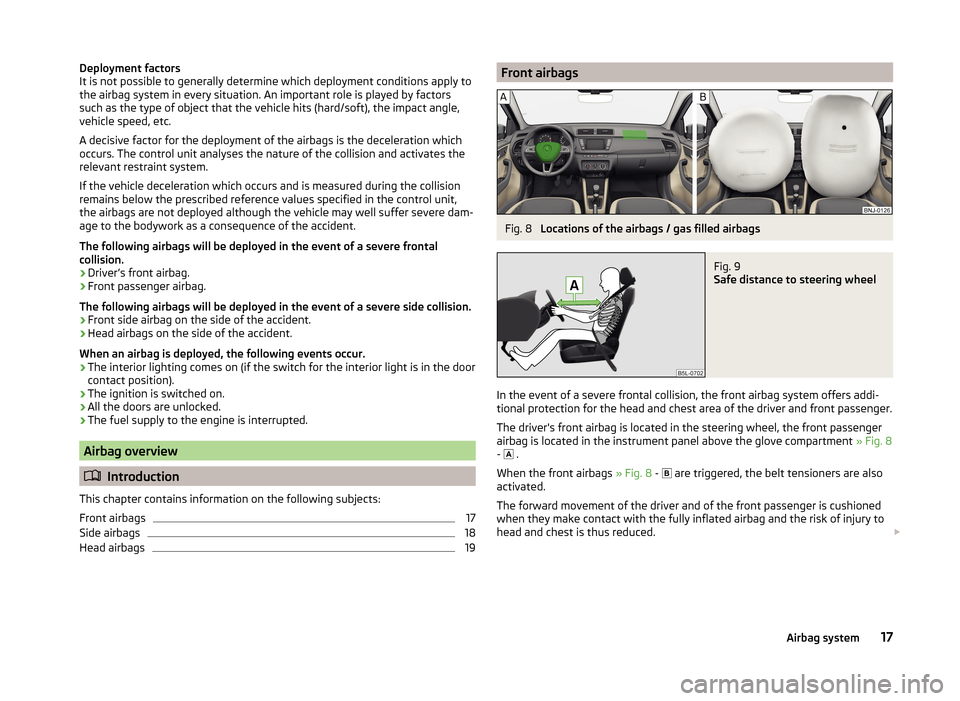
Locations of the airbags / gas filled airbags
Fig. 9
Safe distance to steering wheel
In the event of a severe frontal collision, the front airbag system offers addi-
tional protection for the head and chest area of the driver and front passenger.
The driver's front airbag is located in the steering wheel, the front passenger
airbag is located in the instrument panel above the glove compartment » Fig. 8
- .
When the front airbags » Fig. 8 -
are triggered, the belt tensioners are also
activated.
The forward movement of the driver and of the front passenger is cushioned
when they make contact with the fully inflated airbag and the risk of injury to
head and chest is thus reduced.
17Airbag system
Page 32 of 216
Depending on equipment fitted:› 12-Volt power socket79
›
Cigarette lighter
78
Depending on equipment fitted:
› Operating controls for the heating
97
›Operating controls for the air conditioning system
98
›Operating controls for Climatronic
98
Note
The layout of the controls on right-hand drive vehicles differs partially from
that shown in » Fig. 19 . The symbols on the controls and switches are the
same as for left-hand drive models.3536Instruments and warning lights
Instrument cluster
Introduction
This chapter contains information on the following subjects:
Overview
30
Revolution counter
30
Display
31
Speedometer
31
Coolant temperature gauge
31
Fuel gauge
32
Counter for distance driven
32
33
Viewing the charge level of the vehicle battery
33
The instrument cluster gives the driver basic information such as the current
speed, engine speed, the state of some vehicle systems and the like.
Fault display
If there is a fault in the instrument cluster, the following message will appear
in the display.
Error: instrument cluster. Workshop!
COMBINED INSTRUM_WORKSHOP
Seek help from a specialist garage.
WARNINGConcentrate fully at all times on your driving! As the driver, you are fully re-
sponsible for road safety.
Note
If the message SAFE CP appears in the instrument cluster display, the compo-
nent protection for the instrument cluster is active. Further information
» page 139 , Component protection .29Instruments and warning lights
Page 33 of 216
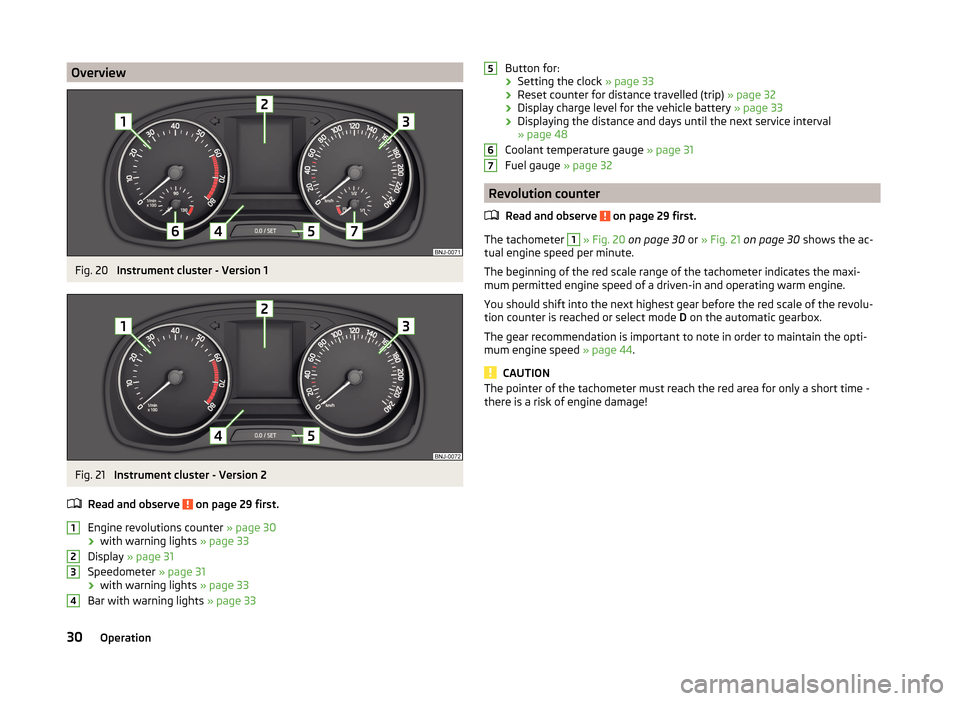
OverviewFig. 20
Instrument cluster - Version 1
Fig. 21
Instrument cluster - Version 2
Read and observe
on page 29 first.
Engine revolutions counter » page 30
› with warning lights
» page 33
Display » page 31
Speedometer » page 31
› with warning lights
» page 33
Bar with warning lights » page 33
1234Button for:
› Setting the clock
» page 33
› Reset counter for distance travelled (trip)
» page 32
› Display charge level for the vehicle battery
» page 33
› Displaying the distance and days until the next service interval
» page 48
Coolant temperature gauge » page 31
Fuel gauge » page 32
Revolution counter
Read and observe
on page 29 first.
The tachometer
1
» Fig. 20 on page 30 or » Fig. 21 on page 30 shows the ac-
tual engine speed per minute.
The beginning of the red scale range of the tachometer indicates the maxi-
mum permitted engine speed of a driven-in and operating warm engine.
You should shift into the next highest gear before the red scale of the revolu- tion counter is reached or select mode D on the automatic gearbox.
The gear recommendation is important to note in order to maintain the opti-
mum engine speed » page 44.
CAUTION
The pointer of the tachometer must reach the red area for only a short time -
there is a risk of engine damage!56730Operation
Page 34 of 216
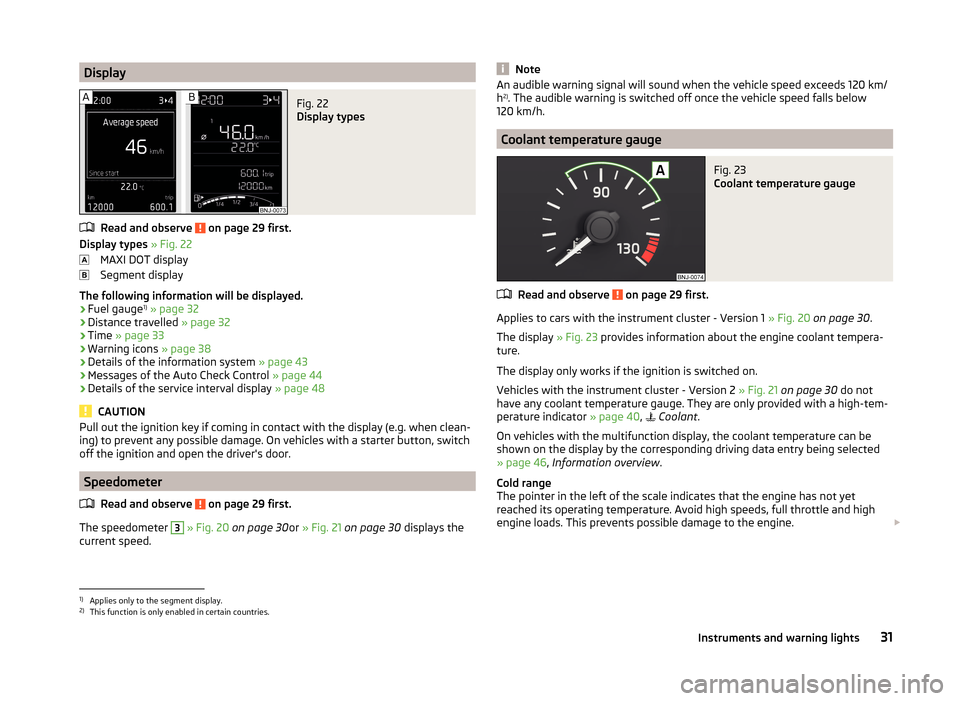
DisplayFig. 22
Display types
Read and observe on page 29 first.
Display types » Fig. 22
MAXI DOT display
Segment display
The following information will be displayed.
› Fuel gauge 1)
» page 32
› Distance travelled
» page 32
› Time
» page 33
› Warning icons
» page 38
› Details of the information system
» page 43
› Messages of the Auto Check Control
» page 44
› Details of the service interval display
» page 48
CAUTION
Pull out the ignition key if coming in contact with the display (e.g. when clean-
ing) to prevent any possible damage. On vehicles with a starter button, switch
off the ignition and open the driver's door.
Speedometer
Read and observe
on page 29 first.
The speedometer
3
» Fig. 20 on page 30 or » Fig. 21 on page 30 displays the
current speed.
NoteAn audible warning signal will sound when the vehicle speed exceeds 120 km/
h 2)
. The audible warning is switched off once the vehicle speed falls below
120 km/h.
Coolant temperature gauge
Fig. 23
Coolant temperature gauge
Read and observe on page 29 first.
Applies to cars with the instrument cluster - Version 1 » Fig. 20 on page 30 .
The display » Fig. 23 provides information about the engine coolant tempera-
ture.
The display only works if the ignition is switched on.
Vehicles with the instrument cluster - Version 2 » Fig. 21 on page 30 do not
have any coolant temperature gauge. They are only provided with a high-tem-
perature indicator » page 40,
Coolant .
On vehicles with the multifunction display, the coolant temperature can be
shown on the display by the corresponding driving data entry being selected
» page 46 , Information overview .
Cold range
The pointer in the left of the scale indicates that the engine has not yet
reached its operating temperature. Avoid high speeds, full throttle and high engine loads. This prevents possible damage to the engine.
1)
Applies only to the segment display.
2)
This function is only enabled in certain countries.
31Instruments and warning lights
Page 35 of 216
The operating range
The engine has reached its operating temperature as soon as the pointer
moves into the middle of the scale A
» Fig. 23 . At very high ambient tempera-
tures or under heavy engine loads, the pointer may move even further to the
right.
High temperature range
The coolant temperature is too high if the pointer reaches the red area of the
scale.
Further information » page 40.
CAUTION
■
Additional headlights and other attached components in front of the air inlet
impair the cooling efficiency of the coolant.■
Never cover the radiator - there is a risk of the engine overheating.
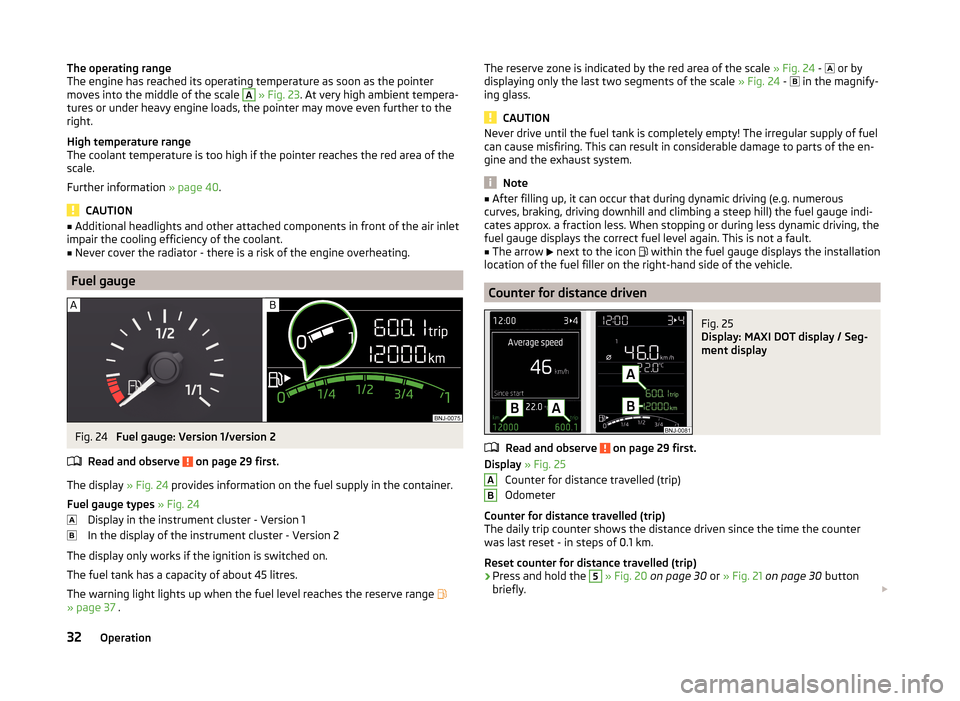
Fuel gauge
Fig. 24
Fuel gauge: Version 1/version 2
Read and observe
on page 29 first.
The display » Fig. 24 provides information on the fuel supply in the container.
Fuel gauge types » Fig. 24
Display in the instrument cluster - Version 1
In the display of the instrument cluster - Version 2
The display only works if the ignition is switched on.
The fuel tank has a capacity of about 45 litres.
The warning light lights up when the fuel level reaches the reserve range
» page 37 .
The reserve zone is indicated by the red area of the scale » Fig. 24 - or by
displaying only the last two segments of the scale » Fig. 24 - in the magnify-
ing glass.
CAUTION
Never drive until the fuel tank is completely empty! The irregular supply of fuel
can cause misfiring. This can result in considerable damage to parts of the en-
gine and the exhaust system.
Note
■ After filling up, it can occur that during dynamic driving (e.g. numerous
curves, braking, driving downhill and climbing a steep hill) the fuel gauge indi-
cates approx. a fraction less. When stopping or during less dynamic driving, the
fuel gauge displays the correct fuel level again. This is not a fault.■
The arrow
next to the icon
within the fuel gauge displays the installation
location of the fuel filler on the right-hand side of the vehicle.
Counter for distance driven
Fig. 25
Display: MAXI DOT display / Seg-
ment display
Read and observe on page 29 first.
Display » Fig. 25
Counter for distance travelled (trip)
Odometer
Counter for distance travelled (trip)
The daily trip counter shows the distance driven since the time the counter
was last reset - in steps of 0.1 km.
Reset counter for distance travelled (trip)
›
Press and hold the
5
» Fig. 20 on page 30 or » Fig. 21 on page 30 button
briefly.
AB32Operation
Page 36 of 216

Odometer
The odometer indicates the total distance which the vehicle has been driven.
Read and observe on page 29 first.
›
Switch on the ignition.
›
Press and hold the button
5
» Fig. 20 on page 30 or » Fig. 21 on page 30
until the time is shown.
›
Release the button
5
and the system switches to the time setting function.
›
Press the button
5
again and set the hours.
›
Wait around 4 seconds - the system switches to the minutes setting.
›
Press the button
5
again and set the minutes.
›
Wait around 4 seconds - the system switches to the minutes setting.
The time can also be set in the Infotainment » operating instructions for Info-
tainment , chapter Device settings .
Viewing the charge level of the vehicle battery
Read and observe
on page 29 first.
›
Switch off the ignition.
›
Press and hold the button
5
» Fig. 20 on page 30 or » Fig. 21 on page 30
until Battery status or BATTERY SOC is shown in the Display.
›
Release the button
5
- the current charge level 1)
of the vehicle battery is
displayed in %.
›
Wait about 4 seconds or press the
5
key and the system will return to the
home setting.
Warning lights
Introduction
This chapter contains information on the following subjects:
Handbrake
34
Brake system
34
Seat belt warning light
34
Central warning light
34
Power Steering / steering lock (engine start push-button)34Stability Control (ESC) / Traction Control (ASR)35
Traction control system (TCS) off
35
Anti brake system (ABS)
36
Rear fog light
36
Exhaust inspection system
36
Glow plug system (diesel engine)
36
Engine performance check (petrol engine)
36
Airbag system
36
Tyre pressure
37
Fuel reserve
37
Turning signal system
37
Trailer turn signal lights
37
Fog lights
38
Cruise control / speed limiter
38
Brake pedal (automatic transmission)
38
Main beam
38
The warning lights indicate certain functions or faults.
Some warning lights can be accompanied by acoustic signals and messages in
the display of the instrument cluster.
After switching on the ignition, some warning lights light up briefly as a func-
tion test.
If the tested systems are OK, the corresponding warning lights go out a few
seconds after switching on the ignition or after starting the engine.
The condition of some features and systems is shown by the warning icons on
the display » page 38.
The warning lights are at the following locations in the instrument cluster
» Fig. 20 on page 30 or » Fig. 21 on page 30 .
› Revolutions counter
1
›Speedometer
3
›Bar with warning lights
4
1)
Applies to vehicles with START-STOP system.
33Instruments and warning lights
Page 40 of 216
Tyre pressureRead and observe
on page 34 first.
The warning light
is illuminated
If the warning light
comes on while driving, it means one of the tyres has
undergone a pressure change.
An audible signal sounds as a warning signal.
›
Immediately reduce speed and avoid sudden steering and braking manoeu-
vres.
›
Stop the vehicle, turn the ignition off and check the tyres and their inflation
pressure » page 162 .
›
Correct the tyre pressure, if necessary or replace the affected wheel
» page 170 or use the repair kit » page 173.
›
Store the tyre pressure values in the system
» page 127.
The indicator light flashes for about 1 min. and remains lit
If the warning light flashes for approximately 1 min. and stays on, there may
be a fault in the system of tyre pressure monitoring.
›
Stop the vehicle, turn the ignition off and start the engine again.
If the warning light flashes again after the engine has started, there is a
system error.
Seek help from a specialist garage.
The following reasons can also apply if the warning light is illuminated.
› The vehicle is loaded on one side. Distribute loads as evenly as possible.
› The wheels of one axle are loaded more heavily (e.g. when towing a trailer or
when driving uphill or downhill).
› Snow chains are fitted.
› A wheel has been changed.
Store the tyre pressure values in the system » page 127.
CAUTION
Under certain circumstances (e.g. sporty style of driving, wintry or unpaved
roads) the warning light in the instrument cluster can be delayed or does
not light up at all.NoteThe warning light comes on after the ignition is switched on if the vehicle's
battery has been disconnected and reconnected. If the indicator light does not
go out after moving a short distance, this means that there is an error in the
system. Seek help from a specialist garage.
Fuel reserve
Read and observe
on page 34 first.
When the warning light
is illuminated , this means there is a fuel reserve of
under around 7 litres left.
The following message is shown in the information cluster display. Please refuel. Range: ... km
PLEASE REFUEL RANGE …
An audible signal sounds as a warning signal.
CAUTION
Never drive until the fuel tank is completely empty! The irregular supply of fuel
can cause misfiring. This can result in considerable damage to parts of the en-
gine and the exhaust system.
Note
The text in the display goes out after refuelling and driving a short distance.
Turning signal system
Read and observe
on page 34 first.
Either the left or the right
warning light
flashes depending on the position
of the turn signal lever.
If there is a fault in the turn signal system, the warning light flashes at twice
its normal rate. This does not apply when towing a trailer.
When the hazard warning light system is switched on, this will cause all of the
turn signal lights as well as both warning lights to flash.
Trailer turn signal lights
Read and observe
on page 34 first.
If the warning light
flashes , the trailer turn signal lights are turned on.
37Instruments and warning lights
Page 44 of 216
The following message is shown in the information cluster display.Oil level: top up oil!
ADD OIL
› Stop the vehicle, switch off the engine, and check the engine oil level
» page 154 .
The warning icon will go out if the bonnet is left open for more than 30 sec-
onds. If no engine oil has been replenished, the warning icon will come on
again after driving about 100 km.
Engine oil level too high
If the warning icons
and
are lit in conjunction with the following message
on the display, the engine oil level is too high.
Reduce oil level!
OIL LEVEL TOO HIGH
› Stop the vehicle, switch off the engine, and check the engine oil level
» page 154 .
Engine oil level sensor
If the warning icons and
are
lit in conjunction with the following message
on the display, the engine oil level sensor is defective.
Oil sensor: Workshop!
OIL SENSOR WORKSHOP
Seek assistance from a specialist garage immediately.
CAUTION
Stop driving if for some reason it is not possible to top up the engine oil un-
der the current conditions. Switch off the engine and seek assistance from a
specialist garage.
Lamp failure
Read and observe
on page 39 first.
The warning icon
comes on if a bulb is faulty.
The following message is shown in the information cluster display, for exam-
ple.
Check right dipped headlight beam!
DIPPED HEADLIGHT CHECK RIGHT
Diesel particulate filter (diesel engine)
Read and observe
on page 39 first.
The diesel particulate filter separates the soot particles from the exhaust. The soot particles collect in the diesel particulate filter where they are burnt on a
regular basis.
If the warning icon
illuminates , soot has accumulated in the diesel particu-
late filter.
To clean the filter, and where traffic conditions permit »
, drive for at least
15 minutes or until the warning icon
goes out as follows.
4th or 5th gear engaged (automatic transmission: Position D/S).
Vehicle speed at least 70 km/h.
Engine speed between 1,800-2,500 rpm.
If the filter is properly cleaned, the warning icon
goes out .
If the filter is not properly cleaned, illumination of the warning icon
does
not take place and the warning light
begins to
flash.
The following message is shown in the information cluster display. Diesel particulate filter: Owner's Manual!
DIESEL PM FILTER OWNER MANUAL
Seek assistance from a specialist garage immediately.
WARNING■ The diesel particulate filter reaches very high temperatures - there is a
fire hazard and serious injury could be caused. Therefore, never stop the
vehicle at places where the underside of your vehicle can come into contact
with flammable materials such as dry grass, undergrowth, leaves, spilled
fuel or such like.■
Always adjust the speed and driving style to the actual weather, road, ter-
rain and traffic conditions. The recommendations indicated by the warning
light must not tempt you to disregard the national regulations for road traf-
fic.
41Instruments and warning lights