door lock SKODA FABIA 2014 3.G / NJ Owner's Manual
[x] Cancel search | Manufacturer: SKODA, Model Year: 2014, Model line: FABIA, Model: SKODA FABIA 2014 3.G / NJPages: 216, PDF Size: 30.7 MB
Page 15 of 216
Seat belts
Wearing seat belts
Introduction
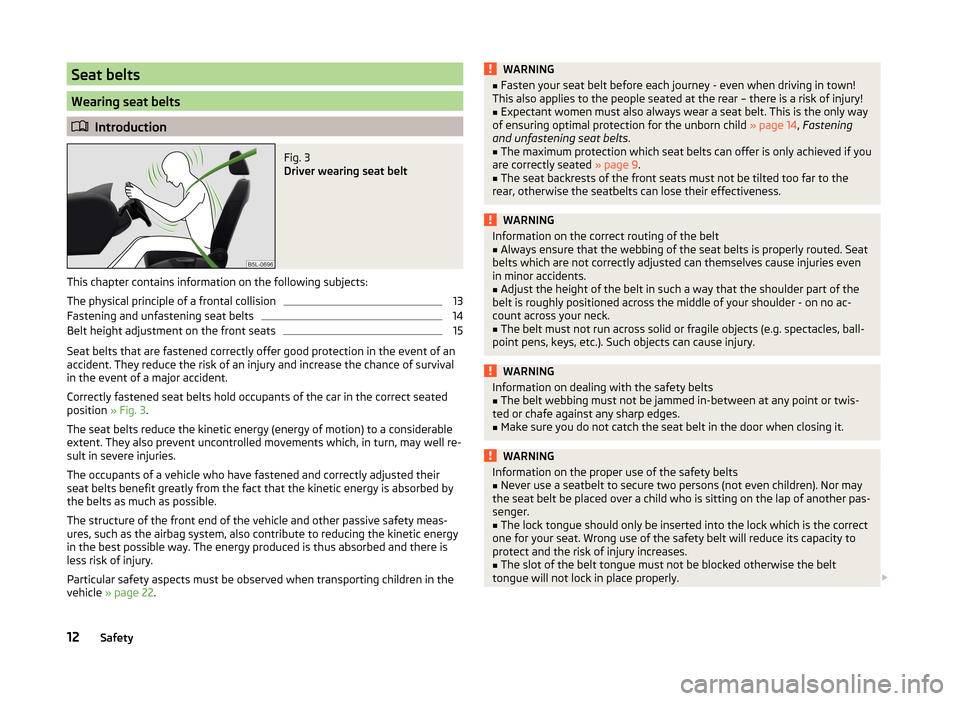
Fig. 3
Driver wearing seat belt
This chapter contains information on the following subjects:
The physical principle of a frontal collision
13
Fastening and unfastening seat belts
14
Belt height adjustment on the front seats
15
Seat belts that are fastened correctly offer good protection in the event of an
accident. They reduce the risk of an injury and increase the chance of survival
in the event of a major accident.
Correctly fastened seat belts hold occupants of the car in the correct seated
position » Fig. 3.
The seat belts reduce the kinetic energy (energy of motion) to a considerable
extent. They also prevent uncontrolled movements which, in turn, may well re-
sult in severe injuries.
The occupants of a vehicle who have fastened and correctly adjusted their
seat belts benefit greatly from the fact that the kinetic energy is absorbed by
the belts as much as possible.
The structure of the front end of the vehicle and other passive safety meas-
ures, such as the airbag system, also contribute to reducing the kinetic energy
in the best possible way. The energy produced is thus absorbed and there is
less risk of injury.
Particular safety aspects must be observed when transporting children in the
vehicle » page 22 .
WARNING■
Fasten your seat belt before each journey - even when driving in town!
This also applies to the people seated at the rear – there is a risk of injury!■
Expectant women must also always wear a seat belt. This is the only way
of ensuring optimal protection for the unborn child » page 14, Fastening
and unfastening seat belts .
■
The maximum protection which seat belts can offer is only achieved if you
are correctly seated » page 9.
■
The seat backrests of the front seats must not be tilted too far to the
rear, otherwise the seatbelts can lose their effectiveness.
WARNINGInformation on the correct routing of the belt■Always ensure that the webbing of the seat belts is properly routed. Seat
belts which are not correctly adjusted can themselves cause injuries even
in minor accidents.■
Adjust the height of the belt in such a way that the shoulder part of the
belt is roughly positioned across the middle of your shoulder - on no ac-
count across your neck.
■
The belt must not run across solid or fragile objects (e.g. spectacles, ball-
point pens, keys, etc.). Such objects can cause injury.
WARNINGInformation on dealing with the safety belts■The belt webbing must not be jammed in-between at any point or twis-
ted or chafe against any sharp edges.■
Make sure you do not catch the seat belt in the door when closing it.
WARNINGInformation on the proper use of the safety belts■Never use a seatbelt to secure two persons (not even children). Nor may
the seat belt be placed over a child who is sitting on the lap of another pas-
senger.■
The lock tongue should only be inserted into the lock which is the correct
one for your seat. Wrong use of the safety belt will reduce its capacity to
protect and the risk of injury increases.
■
The slot of the belt tongue must not be blocked otherwise the belt
tongue will not lock in place properly.
12Safety
Page 17 of 216
It is also important that rear passengers fasten their seat belts, as they could
otherwise be thrown through the vehicle in an uncontrolled manner in the
event of an accident.
A rear seat passenger who has not fastened their seat belt is a danger not on-
ly to himself or herself but also to those seated in the front » Fig. 4 -
.
Fastening and unfastening seat belts
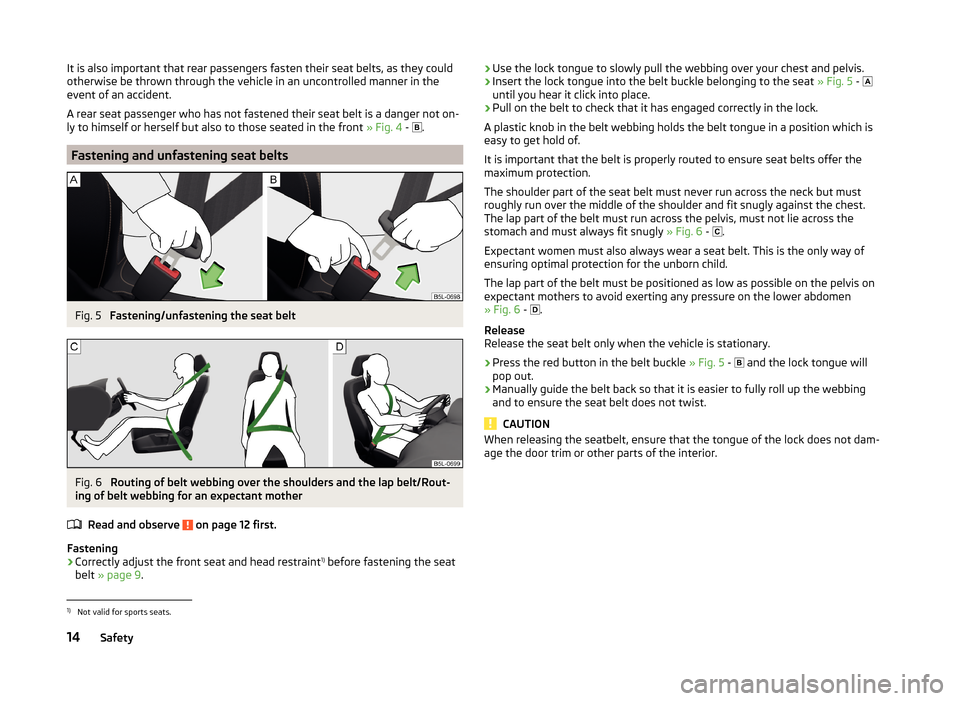
Fig. 5
Fastening/unfastening the seat belt
Fig. 6
Routing of belt webbing over the shoulders and the lap belt/Rout-
ing of belt webbing for an expectant mother
Read and observe
on page 12 first.
Fastening
›
Correctly adjust the front seat and head restraint 1)
before fastening the seat
belt » page 9 .
›Use the lock tongue to slowly pull the webbing over your chest and pelvis.›Insert the lock tongue into the belt buckle belonging to the seat
» Fig. 5 -
until you hear it click into place.›
Pull on the belt to check that it has engaged correctly in the lock.
A plastic knob in the belt webbing holds the belt tongue in a position which is
easy to get hold of.
It is important that the belt is properly routed to ensure seat belts offer the
maximum protection.
The shoulder part of the seat belt must never run across the neck but must
roughly run over the middle of the shoulder and fit snugly against the chest.
The lap part of the belt must run across the pelvis, must not lie across the
stomach and must always fit snugly » Fig. 6 -
.
Expectant women must also always wear a seat belt. This is the only way of ensuring optimal protection for the unborn child.
The lap part of the belt must be positioned as low as possible on the pelvis on expectant mothers to avoid exerting any pressure on the lower abdomen
» Fig. 6 -
.
Release
Release the seat belt only when the vehicle is stationary.
›
Press the red button in the belt buckle » Fig. 5 -
and the lock tongue will
pop out.
›
Manually guide the belt back so that it is easier to fully roll up the webbing
and to ensure the seat belt does not twist.
CAUTION
When releasing the seatbelt, ensure that the tongue of the lock does not dam-
age the door trim or other parts of the interior.1)
Not valid for sports seats.
14Safety
Page 20 of 216
Deployment factors
It is not possible to generally determine which deployment conditions apply to
the airbag system in every situation. An important role is played by factors
such as the type of object that the vehicle hits (hard/soft), the impact angle,
vehicle speed, etc.
A decisive factor for the deployment of the airbags is the deceleration which
occurs. The control unit analyses the nature of the collision and activates the
relevant restraint system.
If the vehicle deceleration which occurs and is measured during the collision
remains below the prescribed reference values specified in the control unit,
the airbags are not deployed although the vehicle may well suffer severe dam-
age to the bodywork as a consequence of the accident.
The following airbags will be deployed in the event of a severe frontal
collision.
› Driver’s front airbag.
› Front passenger airbag.
The following airbags will be deployed in the event of a severe side collision.
› Front side airbag on the side of the accident.
› Head airbags on the side of the accident.
When an airbag is deployed, the following events occur.
› The interior lighting comes on (if the switch for the interior light is in the door
contact position).
› The ignition is switched on.
› All the doors are unlocked.
› The fuel supply to the engine is interrupted.
Airbag overview
Introduction
This chapter contains information on the following subjects:
Front airbags
17
Side airbags
18
Head airbags
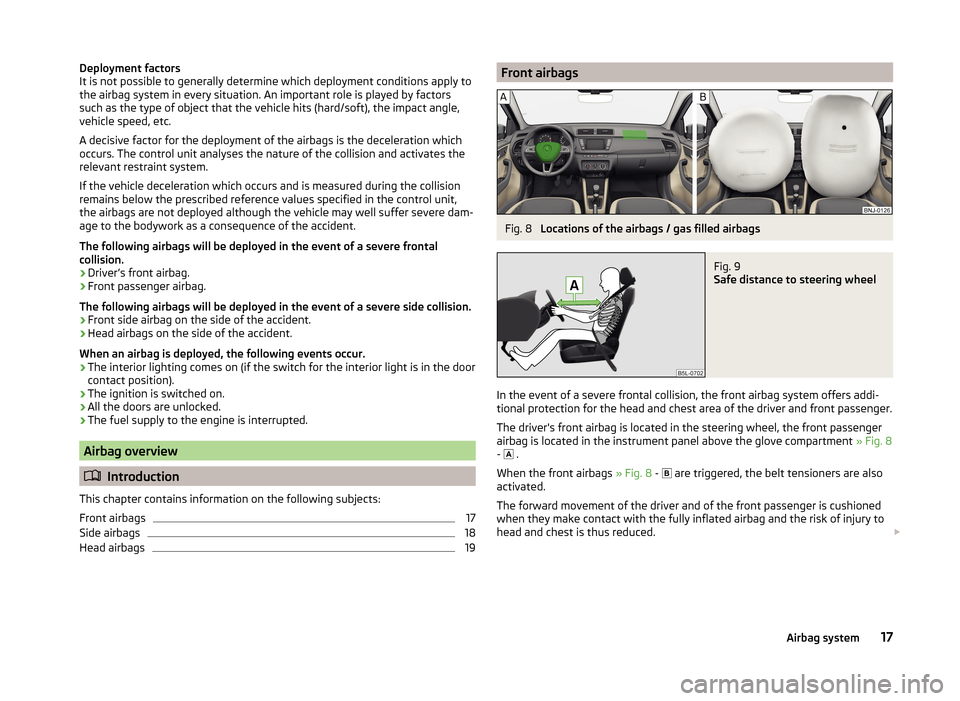
19Front airbagsFig. 8
Locations of the airbags / gas filled airbags
Fig. 9
Safe distance to steering wheel
In the event of a severe frontal collision, the front airbag system offers addi-
tional protection for the head and chest area of the driver and front passenger.
The driver's front airbag is located in the steering wheel, the front passenger
airbag is located in the instrument panel above the glove compartment » Fig. 8
- .
When the front airbags » Fig. 8 -
are triggered, the belt tensioners are also
activated.
The forward movement of the driver and of the front passenger is cushioned
when they make contact with the fully inflated airbag and the risk of injury to
head and chest is thus reduced.
17Airbag system
Page 31 of 216
Operation
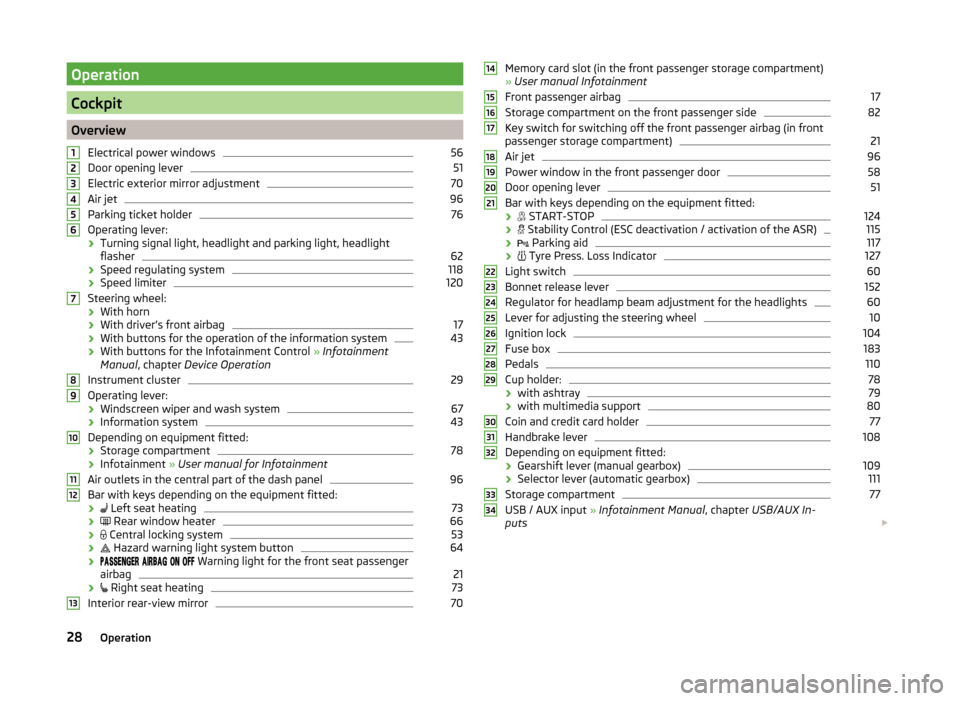
Cockpit
OverviewElectrical power windows
56
Door opening lever
51
Electric exterior mirror adjustment
70
Air jet
96
Parking ticket holder
76
Operating lever:
› Turning signal light, headlight and parking light, headlight
flasher
62
› Speed regulating system
118
›Speed limiter
120
Steering wheel:
› With horn
› With driver’s front airbag
17
›With buttons for the operation of the information system
43
›With buttons for the Infotainment Control
» Infotainment
Manual , chapter Device Operation
Instrument cluster
29
Operating lever: › Windscreen wiper and wash system
67
›Information system
43
Depending on equipment fitted:
› Storage compartment
78
›Infotainment
» User manual for Infotainment
Air outlets in the central part of the dash panel
96
Bar with keys depending on the equipment fitted: ›
Left seat heating
73
›
Rear window heater
66
›
Central locking system
53
›
Hazard warning light system button
64
›
Warning light for the front seat passenger
airbag
21
›
Right seat heating
73
Interior rear-view mirror
7012345678910111213Memory card slot (in the front passenger storage compartment)
» User manual Infotainment
Front passenger airbag17
Storage compartment on the front passenger side
82
Key switch for switching off the front passenger airbag (in front
passenger storage compartment)
21
Air jet
96
Power window in the front passenger door
58
Door opening lever
51
Bar with keys depending on the equipment fitted:
›
START-STOP
124
›
Stability Control (ESC deactivation / activation of the ASR)
115
›
Parking aid
117
›
Tyre Press. Loss Indicator
127
Light switch
60
Bonnet release lever
152
Regulator for headlamp beam adjustment for the headlights
60
Lever for adjusting the steering wheel
10
Ignition lock
104
Fuse box
183
Pedals
110
Cup holder:
78
› with ashtray
79
›with multimedia support
80
Coin and credit card holder
77
Handbrake lever
108
Depending on equipment fitted:
› Gearshift lever (manual gearbox)
109
›Selector lever (automatic gearbox)
111
Storage compartment
77
USB / AUX input
» Infotainment Manual , chapter USB/AUX In-
puts
14151617181920212223242526272829303132333428Operation
Page 52 of 216
Resetting the service interval display
We recommend that the display be reset by a specialist garage.
We recommend that you do not reset the service interval display yourself. In-
correctly setting the service interval display could cause problems to the vehi-
cle.
Variable service interval
For vehicles with variable service intervals, after resetting the oil change serv-
ice display in a specialist garage, the values of the new service interval are dis-
played, which are based on the previous operating conditions of the vehicle.
These values are then continuously matched according to the actual operating
conditions of the vehicle.Unlocking and opening
Unlocking and locking
Introduction
This chapter contains information on the following subjects:
Locking/unlocking using the key via the lock cylinder
50
Unlocking/locking with the remote control key
50
Opening/closing the door
51
Unlocking / locking - KESSY
52
SafeLock
52
Individual settings
53
Locking/unlocking the vehicle with the central locking button
53
Child safety lock
54
Malfunctions
54
Your car is equipped with a central locking system.
The central locking system allows you to lock and unlock all doors, the fuel fill-
er flap and boot lid at the same time.
Depending on the equipment configuration, the following is true after
unlocking
› The turn signal lights flash twice as confirmation that the vehicle has been
unlocked.
› The doors, the boot lid and the fuel filler flap are unlocked.
› The interior light, which is switched by the door contact, comes on.
› The SafeLock system is switched off.
› The warning icon in the driver door stops flashing.
› The anti-theft alarm system is deactivated.
If you unlock the vehicle and do not open a door or the boot lid within the next
45 seconds, the vehicle will lock again automatically and the SafeLock system
or anti-theft alarm system will be switched on. This function is intended to
prevent the car being unlocked unintentionally.
Depending on the equipment configuration, the following is true after
locking
› The turn signal lights flash once as confirmation that the vehicle has been
locked.
› The doors, the boot lid and the fuel filler flap are locked.
49Unlocking and opening
Page 53 of 216
›The interior light switched by the door contact goes off.
› The SafeLock system is switched on.
› The warning light in the driver door begins flashing.
› The anti-theft alarm system is activated.
If the doors or the boot lid remain open after the vehicle doors have been
locked, the turn signal lights do not flash until they have been closed.WARNING■ Never leave the key in the vehicle when you exit the vehicle. Unauthor-
ized persons, such as children, for example, could lock the car, turn on the
ignition or start the engine - danger of injury and accidents!■
When leaving the vehicle, never leave people who are not completely in-
dependent, such as children, unattended in the vehicle. The children might,
for example, release the handbrake or take the vehicle out of gear. The ve-
hicle could then start to move – risk of accident! These individuals would
possibly not be able to leave the vehicle on their own or to help them-
selves. At very high or very low temperatures can be fatal!
CAUTION
■ Each key contains electronic components; therefore it must be protected
against moisture and severe shocks.■
Keep the groove of the keys absolutely clean. Impurities (textile fibres, dust,
etc.) impair the function of the locking cylinder and ignition lock.
■
The battery must be replaced if the central locking or anti-theft alarm system
does react to the remote control at less than approx. 3 metres away
» page 179 .
■
Always check that the vehicle is locked before leaving it.
■
If the driver's door has been opened, the vehicle cannot be locked.
Note
In the event of an accident in which the airbags are deployed, the locked doors
are automatically unlocked in order to enable rescuers to gain access to the
vehicle.Locking/unlocking using the key via the lock cylinderFig. 29
Left side of the vehicle: Turning
the key for unlocking and locking
the vehicle
Read and observe and on page 50 first.
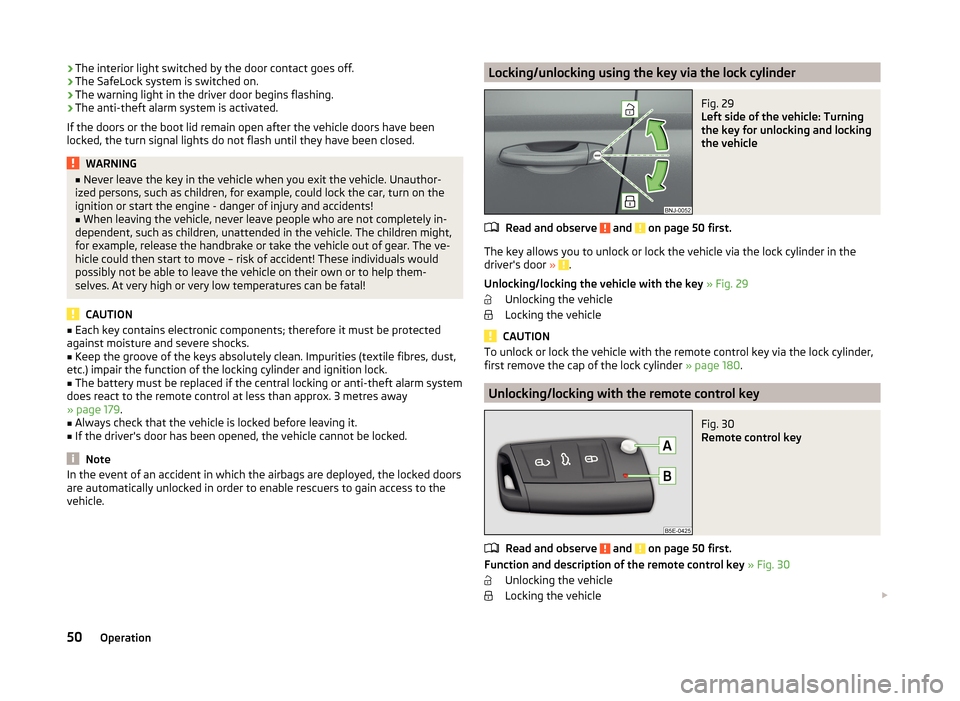
The key allows you to unlock or lock the vehicle via the lock cylinder in the
driver's door » .
Unlocking/locking the vehicle with the key » Fig. 29
Unlocking the vehicle
Locking the vehicle
CAUTION
To unlock or lock the vehicle with the remote control key via the lock cylinder,
first remove the cap of the lock cylinder » page 180.
Unlocking/locking with the remote control key
Fig. 30
Remote control key
Read and observe and on page 50 first.
Function and description of the remote control key » Fig. 30
Unlocking the vehicle
Locking the vehicle
50Operation
Page 54 of 216
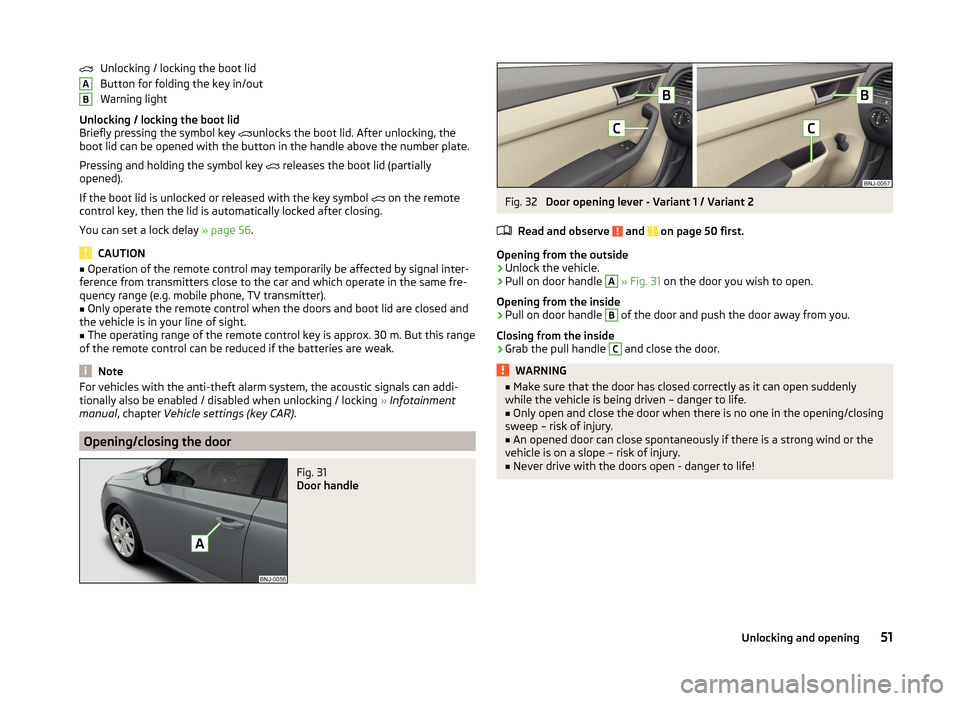
Unlocking / locking the boot lid
Button for folding the key in/out
Warning light
Unlocking / locking the boot lid
Briefly pressing the symbol key
unlocks the boot lid. After unlocking, the
boot lid can be opened with the button in the handle above the number plate.
Pressing and holding the symbol key
releases the boot lid (partially
opened).
If the boot lid is unlocked or released with the key symbol
on the remote
control key, then the lid is automatically locked after closing.
You can set a lock delay » page 56.
CAUTION
■
Operation of the remote control may temporarily be affected by signal inter-
ference from transmitters close to the car and which operate in the same fre-
quency range (e.g. mobile phone, TV transmitter).■
Only operate the remote control when the doors and boot lid are closed and
the vehicle is in your line of sight.
■
The operating range of the remote control key is approx. 30 m. But this range
of the remote control can be reduced if the batteries are weak.
Note
For vehicles with the anti-theft alarm system, the acoustic signals can addi-
tionally also be enabled / disabled when unlocking / locking » Infotainment
manual , chapter Vehicle settings (key CAR) .
Opening/closing the door
Fig. 31
Door handle
ABFig. 32
Door opening lever - Variant 1 / Variant 2
Read and observe
and on page 50 first.
Opening from the outside
›
Unlock the vehicle.
›
Pull on door handle
A
» Fig. 31 on the door you wish to open.
Opening from the inside
›
Pull on door handle
B
of the door and push the door away from you.
Closing from the inside
›
Grab the pull handle
C
and close the door.
WARNING■ Make sure that the door has closed correctly as it can open suddenly
while the vehicle is being driven – danger to life.■
Only open and close the door when there is no one in the opening/closing
sweep – risk of injury.
■
An opened door can close spontaneously if there is a strong wind or the
vehicle is on a slope – risk of injury.
■
Never drive with the doors open - danger to life!
51Unlocking and opening
Page 55 of 216
Unlocking / locking - KESSYFig. 33
Sensors in the handle of the
front door
Read and observe and on page 50 first.
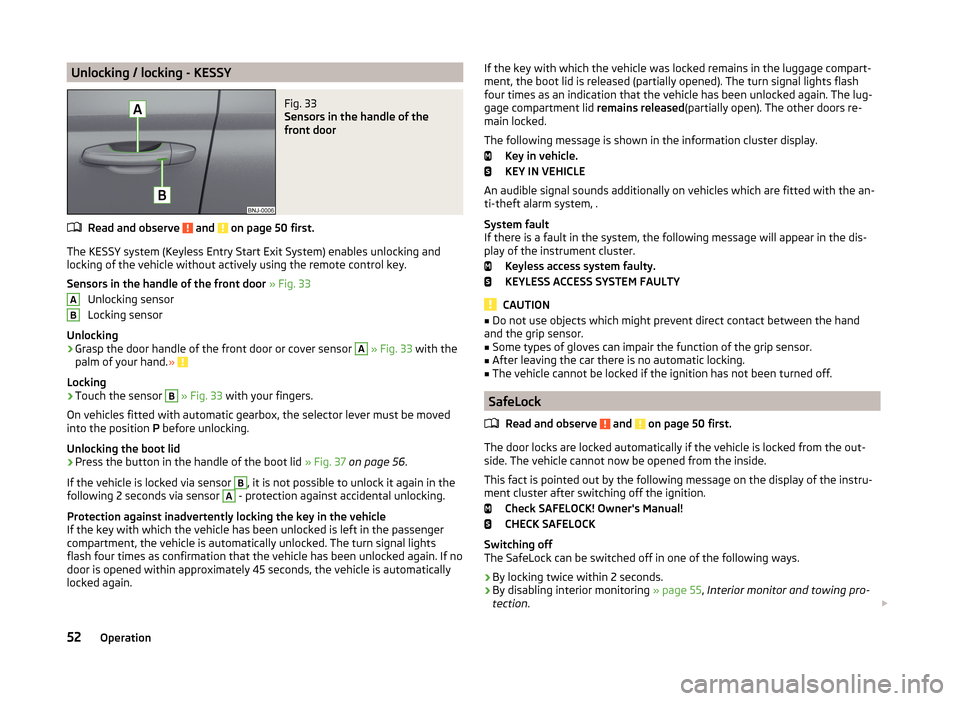
The KESSY system (Keyless Entry Start Exit System) enables unlocking and
locking of the vehicle without actively using the remote control key.
Sensors in the handle of the front door » Fig. 33
Unlocking sensor
Locking sensor
Unlocking
›
Grasp the door handle of the front door or cover sensor
A
» Fig. 33 with the
palm of your hand. »
Locking
›
Touch the sensor
B
» Fig. 33 with your fingers.
On vehicles fitted with automatic gearbox, the selector lever must be moved
into the position P before unlocking.
Unlocking the boot lid
›
Press the button in the handle of the boot lid » Fig. 37 on page 56 .
If the vehicle is locked via sensor
B
, it is not possible to unlock it again in the
following 2 seconds via sensor
A
- protection against accidental unlocking.
Protection against inadvertently locking the key in the vehicle
If the key with which the vehicle has been unlocked is left in the passenger
compartment, the vehicle is automatically unlocked. The turn signal lights
flash four times as confirmation that the vehicle has been unlocked again. If no
door is opened within approximately 45 seconds, the vehicle is automatically
locked again.
ABIf the key with which the vehicle was locked remains in the luggage compart-
ment, the boot lid is released (partially opened). The turn signal lights flash
four times as an indication that the vehicle has been unlocked again. The lug-
gage compartment lid remains released(partially open). The other doors re-
main locked.
The following message is shown in the information cluster display. Key in vehicle.
KEY IN VEHICLE
An audible signal sounds additionally on vehicles which are fitted with the an-
ti-theft alarm system, .
System fault
If there is a fault in the system, the following message will appear in the dis- play of the instrument cluster.
Keyless access system faulty.
KEYLESS ACCESS SYSTEM FAULTY
CAUTION
■ Do not use objects which might prevent direct contact between the hand
and the grip sensor.■
Some types of gloves can impair the function of the grip sensor.
■
After leaving the car there is no automatic locking.
■
The vehicle cannot be locked if the ignition has not been turned off.
SafeLock
Read and observe
and on page 50 first.
The door locks are locked automatically if the vehicle is locked from the out-side. The vehicle cannot now be opened from the inside.
This fact is pointed out by the following message on the display of the instru- ment cluster after switching off the ignition.
Check SAFELOCK! Owner's Manual!
CHECK SAFELOCK
Switching off
The SafeLock can be switched off in one of the following ways.
›
By locking twice within 2 seconds.
›
By disabling interior monitoring » page 55, Interior monitor and towing pro-
tection .
52Operation
Page 56 of 216
If the vehicle is locked and the SafeLock system is switched off, the door can
be opened separately from the inside by a single pull on the opening lever.
Switching on
The safelock switches on automatically the next time the vehicle is locked and
unlocked.
Switch-off display
The warning icon in the driver door flashes for about 2 seconds fast, goes out
and starts to flash regularly at longer intervals after about 30 seconds.
Switch-on display
The warning light flashes for around 2 seconds in quick succession, afterwards it begins to flash evenly at longer intervals.WARNINGIf the car is locked and the SafeLock system activated, no-one may remain
in the car as it will then not be possible to either unlock a door or open a
window from the inside. The locked doors make it more difficult for rescu-
ers to get into the vehicle in an emergency – risk to life!
Individual settings
Read and observe
and on page 50 first.
The following functions of the central locking system can be set individually
» Infotainment user manual , chapter Vehicle settings (button CAR) .
Opening a single door
The function allows you to unlock only the driver's door and the fuel filler flap.
The other doors and the boot lid remain locked and are only unlocked after be-
ing opened again.
Unlocking a vehicle side door
This function enables you to unlock both doors on the driver's side and the
fuel filler flap. The other doors and the boot lid remain locked and are only un-
locked after being opened again.
Unlock all doors
The function allows you to unlock all doors, the boot lid and the fuel filler flap.
Automatic locking/unlocking
All doors are locked from a speed of around 15 km/h. The button in the handle
of the boot lid is deactivated.
If the ignition key is withdrawn, the car is then automatically unlocked again. It
is also possible to unlock the vehicle by pressing the central locking button .
Locking/unlocking the vehicle with the central locking button
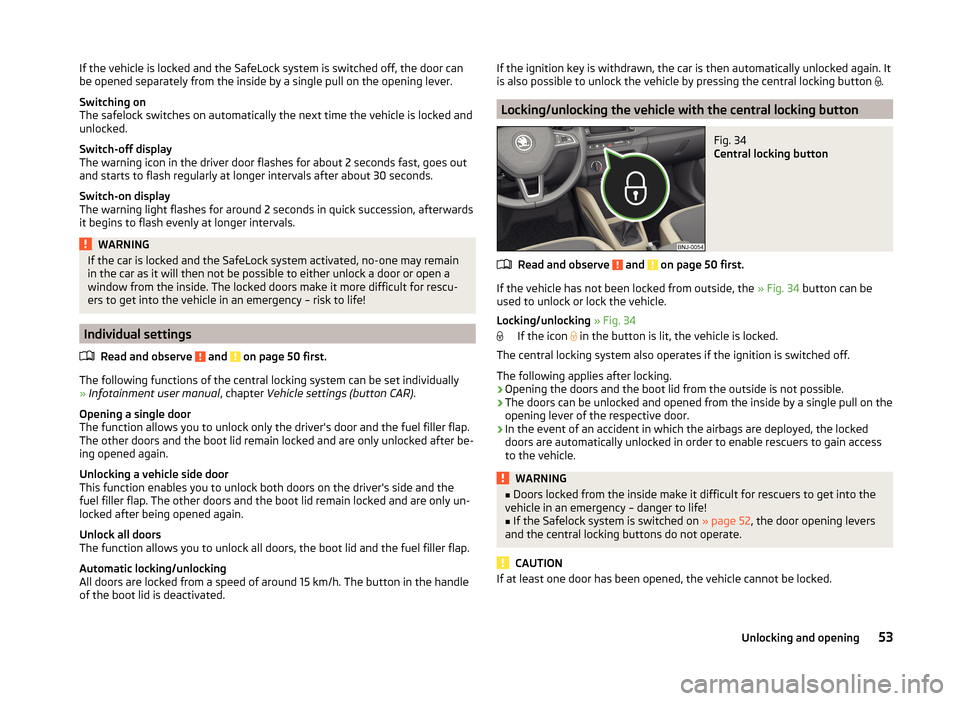
Fig. 34
Central locking button
Read and observe and on page 50 first.
If the vehicle has not been locked from outside, the » Fig. 34 button can be
used to unlock or lock the vehicle.
Locking/unlocking » Fig. 34
If the icon in the button is lit, the vehicle is locked.
The central locking system also operates if the ignition is switched off.
The following applies after locking.
› Opening the doors and the boot lid from the outside is not possible.
› The doors can be unlocked and opened from the inside by a single pull on the
opening lever of the respective door.
› In the event of an accident in which the airbags are deployed, the locked
doors are automatically unlocked in order to enable rescuers to gain access
to the vehicle.
WARNING■ Doors locked from the inside make it difficult for rescuers to get into the
vehicle in an emergency – danger to life!■
If the Safelock system is switched on » page 52, the door opening levers
and the central locking buttons do not operate.
CAUTION
If at least one door has been opened, the vehicle cannot be locked.53Unlocking and opening
Page 57 of 216
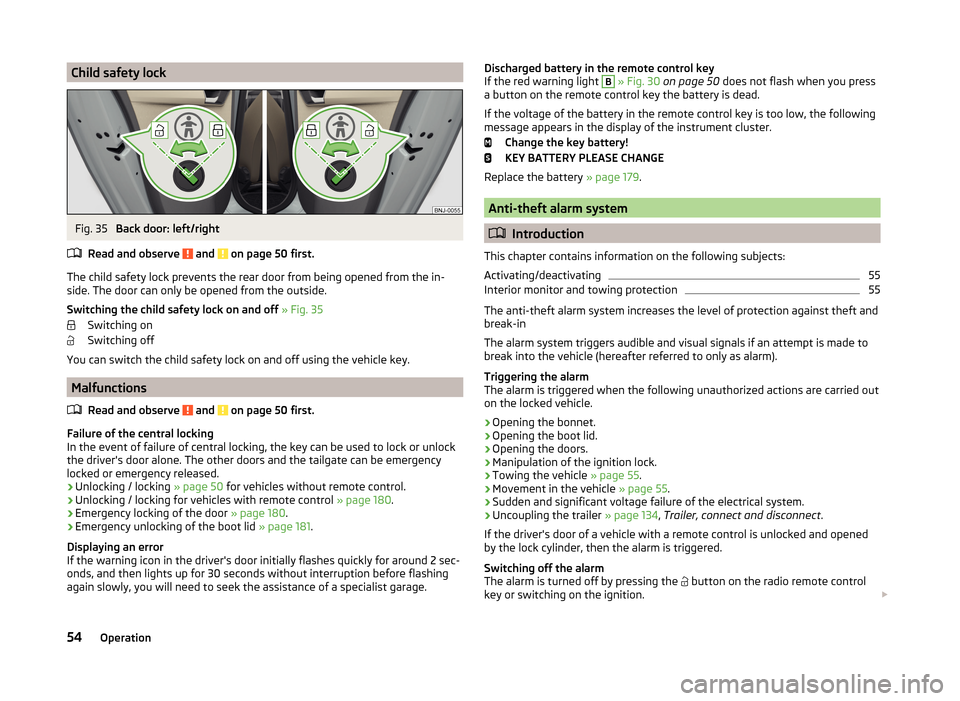
Child safety lockFig. 35
Back door: left/right
Read and observe
and on page 50 first.
The child safety lock prevents the rear door from being opened from the in- side. The door can only be opened from the outside.
Switching the child safety lock on and off » Fig. 35
Switching on
Switching off
You can switch the child safety lock on and off using the vehicle key.
Malfunctions
Read and observe
and on page 50 first.
Failure of the central locking
In the event of failure of central locking, the key can be used to lock or unlock
the driver's door alone. The other doors and the tailgate can be emergency
locked or emergency released.
› Unlocking / locking
» page 50 for vehicles without remote control.
› Unlocking / locking for vehicles with remote control
» page 180.
› Emergency locking of the door
» page 180.
› Emergency unlocking of the boot lid
» page 181.
Displaying an error
If the warning icon in the driver's door initially flashes quickly for around 2 sec-
onds, and then lights up for 30 seconds without interruption before flashing
again slowly, you will need to seek the assistance of a specialist garage.
Discharged battery in the remote control key
If the red warning light B » Fig. 30 on page 50 does not flash when you press
a button on the remote control key the battery is dead.
If the voltage of the battery in the remote control key is too low, the following
message appears in the display of the instrument cluster.
Change the key battery!
KEY BATTERY PLEASE CHANGE
Replace the battery » page 179.
Anti-theft alarm system
Introduction
This chapter contains information on the following subjects:
Activating/deactivating
55
Interior monitor and towing protection
55
The anti-theft alarm system increases the level of protection against theft and
break-in
The alarm system triggers audible and visual signals if an attempt is made to
break into the vehicle (hereafter referred to only as alarm).
Triggering the alarm
The alarm is triggered when the following unauthorized actions are carried out
on the locked vehicle.
› Opening the bonnet.
› Opening the boot lid.
› Opening the doors.
› Manipulation of the ignition lock.
› Towing the vehicle
» page 55.
› Movement in the vehicle
» page 55.
› Sudden and significant voltage failure of the electrical system.
› Uncoupling the trailer
» page 134, Trailer, connect and disconnect .
If the driver's door of a vehicle with a remote control is unlocked and opened by the lock cylinder, then the alarm is triggered.
Switching off the alarm
The alarm is turned off by pressing the button on the radio remote control
key or switching on the ignition.
54Operation