tyre pressure SKODA FABIA 2014 3.G / NJ Owner's Manual
[x] Cancel search | Manufacturer: SKODA, Model Year: 2014, Model line: FABIA, Model: SKODA FABIA 2014 3.G / NJPages: 216, PDF Size: 30.7 MB
Page 5 of 216
Table of Contents
Board literature4
Notes
5
Structure and more information about the
Operating Instructions
6
Abbreviations
Safety
Passive Safety
8
General information
8
Correct and safe seated position
9
Seat belts
12
Wearing seat belts
12
Inertia reel and belt pre-tensioners
15
Airbag system
16
Description of the airbag system
16
Airbag overview
17
Deactivating airbags
20
Transporting children safely
22
Child seat
22
Fastening systems
25
Operation
Cockpit
28
Overview
27
Instruments and warning lights
29
Instrument cluster
29
Warning lights
33
Warning icons in the display
38Information system43Driver information system43
Driving data (Multifunction display)
45
Service interval display
48
Unlocking and opening
49
Unlocking and locking
49
Anti-theft alarm system
54
Tailgate
55
Power windows
56
Mechanical windows
59
Lights and visibility
60
Lights
60
Interior lights
65
Visibility
66
Windscreen wipers and washers
67
Rear mirror
69
Seats and headrests
71
Seats and headrests
71
Seat features
73
Transporting and practical equipment
76
Useful equipment
76
Luggage compartment
84
Variable loading floor in the luggage
compartment
89
Bicycle carrier in the luggage compartment
91
Roof rack
93
Heating and air conditioning
95
Heating, ventilation, cooling
95
Communication
100
SmartGate
100Driving
Starting-off and driving103
Starting and stopping the engine using the
key
103
Start or stop the engine by pressing button
105
Brakes and parking
107
Manual gear shifting and pedals
109
Automatic transmission
110
Retraction and economical driving
112
Driving through water and driving off made-
up roads
113
Assist systems
115
Braking and stabilisation systems
115
Parking aid
117
Cruise control system
118
Speed Limiter
120
Front Assistant
121
START-STOP
124
Fatigue detection (break recommendation)
126
Tyre pressure monitoring
127
Hitch and trailer
129
Hitch
129
Trailer
134
General Maintenance
Care and maintenance
137
Services, modifications and technical
alterations
137
Washing vehicle
140
Cleaning vehicle exterior
141
Interior care
145
Inspecting and replenishing
148
Fuel
148
Engine compartment
150
Engine oil
1532Table of Contents
Page 11 of 216
Safety
Passive Safety
General information
Introduction
This chapter contains information on the following subjects:
Before every journey
8
Driving safety
8
Safety equipment
8
In this section, you will find important information, tips and notes on the sub-
ject of passive safety in your vehicle.
We have combined everything here which you should be familiar with, for ex-
ample, regarding seat belts, airbags, child seats and the safety of children.
WARNING■ This chapter contains important information on how to use the vehicle for
the driver and their occupants.■
You will find further information on safety, which concerns you and those
travelling with you, in the following chapters of this Owner's Manual.
■
The complete on-board literature should always be in the vehicle. This
particularly applies, if you rent out or sell the vehicle.
Before every journey
Read and observe
on page 8 first.
For your own safety and the safety of passengers, the following points must
be observed before every ride.
Ensure that the lighting and the turn signal system are functioning proper-
ly.
Make sure that the function of the wiper and the condition of the wiper
blades are free of any defects.
Ensure that all of the windows offer good visibility to the outside.
Adjust the rear-view mirror so that vision to the rear is guaranteed.
Ensure that the mirrors are not covered.
Check the tyre inflation pressure.
Check the engine oil, brake fluid and coolant levels.
Secure all items of luggage.
Do not exceed the permissible axle loads and permissible gross weight of
the vehicle – risk of accident.
Close all doors and the engine compartment and luggage compartment lid.
Ensure that no objects can obstruct the pedals.
Protect children in suitable child seats with correctly fastened seat belts
» page 22 , Transporting children safely .
Adopt the correct seated position » page 9, Correct and safe seated
position . Tell your passengers to assume the correct seated position.
Driving safety
Read and observe
on page 8 first.
The driver is fully responsible for himself/herself and his/her occupants. If your
driving safety is affected, you place yourself and oncoming traffic at risk.
The following guidelines must be observed. Do not get distracted from concentrating on the traffic situation, e.g. by
your passengers or mobile phone calls.
Never drive when your driving ability is impaired, e.g. through medication,
alcohol or drugs.
Keep to the traffic regulations and the permissible speed limit.
Always adjust the driving speed to the road, traffic and weather condi-
tions.
Take regular breaks on long journeys – at least every two hours.
Safety equipment
Read and observe
on page 8 first.
The following list contains only part of the safety equipment in your vehicle.
› Three-point seat belts for all the seats.
› Belt force limiters for the front seats.
› Belt tensioners for the front seats.
› Seat belt height adjusters for the front seats.
› Front airbag for the driver and the front passenger.
› Front side airbags.
› Head airbags.
› Anchoring points for child seats using the ISOFIX system.
8Safety
Page 36 of 216

Odometer
The odometer indicates the total distance which the vehicle has been driven.
Read and observe on page 29 first.
›
Switch on the ignition.
›
Press and hold the button
5
» Fig. 20 on page 30 or » Fig. 21 on page 30
until the time is shown.
›
Release the button
5
and the system switches to the time setting function.
›
Press the button
5
again and set the hours.
›
Wait around 4 seconds - the system switches to the minutes setting.
›
Press the button
5
again and set the minutes.
›
Wait around 4 seconds - the system switches to the minutes setting.
The time can also be set in the Infotainment » operating instructions for Info-
tainment , chapter Device settings .
Viewing the charge level of the vehicle battery
Read and observe
on page 29 first.
›
Switch off the ignition.
›
Press and hold the button
5
» Fig. 20 on page 30 or » Fig. 21 on page 30
until Battery status or BATTERY SOC is shown in the Display.
›
Release the button
5
- the current charge level 1)
of the vehicle battery is
displayed in %.
›
Wait about 4 seconds or press the
5
key and the system will return to the
home setting.
Warning lights
Introduction
This chapter contains information on the following subjects:
Handbrake
34
Brake system
34
Seat belt warning light
34
Central warning light
34
Power Steering / steering lock (engine start push-button)34Stability Control (ESC) / Traction Control (ASR)35
Traction control system (TCS) off
35
Anti brake system (ABS)
36
Rear fog light
36
Exhaust inspection system
36
Glow plug system (diesel engine)
36
Engine performance check (petrol engine)
36
Airbag system
36
Tyre pressure
37
Fuel reserve
37
Turning signal system
37
Trailer turn signal lights
37
Fog lights
38
Cruise control / speed limiter
38
Brake pedal (automatic transmission)
38
Main beam
38
The warning lights indicate certain functions or faults.
Some warning lights can be accompanied by acoustic signals and messages in
the display of the instrument cluster.
After switching on the ignition, some warning lights light up briefly as a func-
tion test.
If the tested systems are OK, the corresponding warning lights go out a few
seconds after switching on the ignition or after starting the engine.
The condition of some features and systems is shown by the warning icons on
the display » page 38.
The warning lights are at the following locations in the instrument cluster
» Fig. 20 on page 30 or » Fig. 21 on page 30 .
› Revolutions counter
1
›Speedometer
3
›Bar with warning lights
4
1)
Applies to vehicles with START-STOP system.
33Instruments and warning lights
Page 40 of 216
Tyre pressureRead and observe
on page 34 first.
The warning light
is illuminated
If the warning light
comes on while driving, it means one of the tyres has
undergone a pressure change.
An audible signal sounds as a warning signal.
›
Immediately reduce speed and avoid sudden steering and braking manoeu-
vres.
›
Stop the vehicle, turn the ignition off and check the tyres and their inflation
pressure » page 162 .
›
Correct the tyre pressure, if necessary or replace the affected wheel
» page 170 or use the repair kit » page 173.
›
Store the tyre pressure values in the system
» page 127.
The indicator light flashes for about 1 min. and remains lit
If the warning light flashes for approximately 1 min. and stays on, there may
be a fault in the system of tyre pressure monitoring.
›
Stop the vehicle, turn the ignition off and start the engine again.
If the warning light flashes again after the engine has started, there is a
system error.
Seek help from a specialist garage.
The following reasons can also apply if the warning light is illuminated.
› The vehicle is loaded on one side. Distribute loads as evenly as possible.
› The wheels of one axle are loaded more heavily (e.g. when towing a trailer or
when driving uphill or downhill).
› Snow chains are fitted.
› A wheel has been changed.
Store the tyre pressure values in the system » page 127.
CAUTION
Under certain circumstances (e.g. sporty style of driving, wintry or unpaved
roads) the warning light in the instrument cluster can be delayed or does
not light up at all.NoteThe warning light comes on after the ignition is switched on if the vehicle's
battery has been disconnected and reconnected. If the indicator light does not
go out after moving a short distance, this means that there is an error in the
system. Seek help from a specialist garage.
Fuel reserve
Read and observe
on page 34 first.
When the warning light
is illuminated , this means there is a fuel reserve of
under around 7 litres left.
The following message is shown in the information cluster display. Please refuel. Range: ... km
PLEASE REFUEL RANGE …
An audible signal sounds as a warning signal.
CAUTION
Never drive until the fuel tank is completely empty! The irregular supply of fuel
can cause misfiring. This can result in considerable damage to parts of the en-
gine and the exhaust system.
Note
The text in the display goes out after refuelling and driving a short distance.
Turning signal system
Read and observe
on page 34 first.
Either the left or the right
warning light
flashes depending on the position
of the turn signal lever.
If there is a fault in the turn signal system, the warning light flashes at twice
its normal rate. This does not apply when towing a trailer.
When the hazard warning light system is switched on, this will cause all of the
turn signal lights as well as both warning lights to flash.
Trailer turn signal lights
Read and observe
on page 34 first.
If the warning light
flashes , the trailer turn signal lights are turned on.
37Instruments and warning lights
Page 88 of 216
WARNING (Continued)■Do not drive with the luggage compartment lid open or unlatched, other-
wise exhaust gases may get into the interior of the vehicle – risk of poison-
ing!■
Do not exceed the permissible axle loads and permissible gross weight of
the vehicle – risk of accident!
■
Do not transport people in the boot!
CAUTION
■ Please ensure that the heating elements for the rear window heater are not
damaged as a result of abrasive objects.■
Tyre pressure must be adjusted to the load » page 162.
Fastening elements
Fig. 81
Fasteners
Read and observe and on page 84 first.
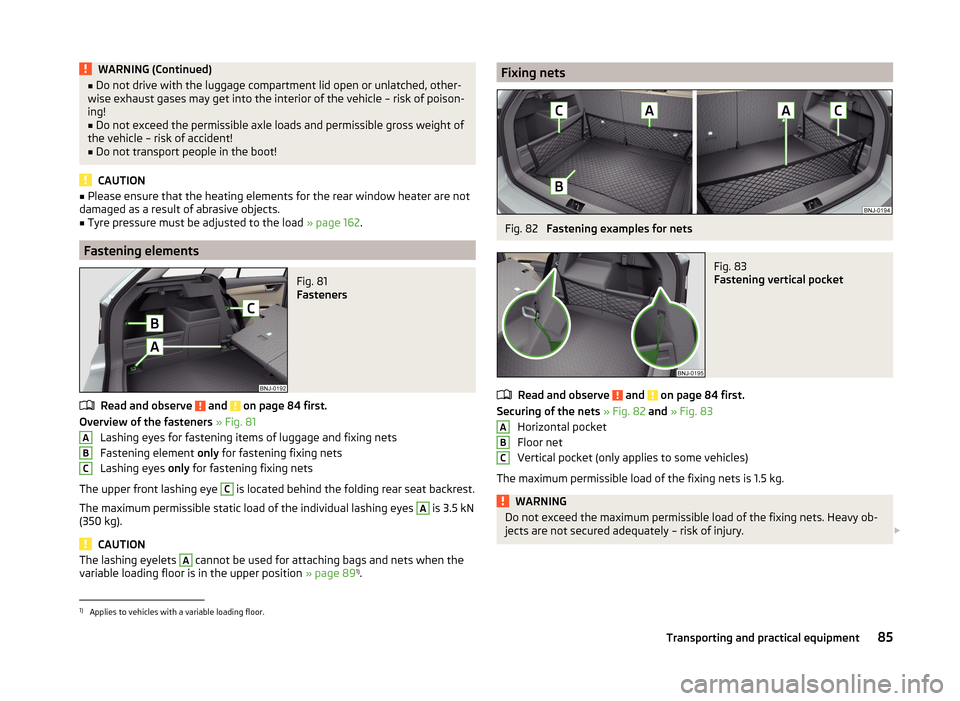
Overview of the fasteners » Fig. 81
Lashing eyes for fastening items of luggage and fixing nets
Fastening element only for fastening fixing nets
Lashing eyes only for fastening fixing nets
The upper front lashing eye
C
is located behind the folding rear seat backrest.
The maximum permissible static load of the individual lashing eyes
A
is 3.5 kN
(350 kg).
CAUTION
The lashing eyelets A cannot be used for attaching bags and nets when the
variable loading floor is in the upper position » page 891)
.ABCFixing netsFig. 82
Fastening examples for nets
Fig. 83
Fastening vertical pocket
Read and observe and on page 84 first.
Securing of the nets » Fig. 82 and » Fig. 83
Horizontal pocket
Floor net
Vertical pocket (only applies to some vehicles)
The maximum permissible load of the fixing nets is 1.5 kg.
WARNINGDo not exceed the maximum permissible load of the fixing nets. Heavy ob-
jects are not secured adequately – risk of injury. ABC1)
Applies to vehicles with a variable loading floor.
85Transporting and practical equipment
Page 116 of 216
The fuel consumption, degree of pollution and vehicle wear depend on driving
style, road condition, weather conditions and the like.
Driving in
Driving in the engine
The engine has to be run in during the first 1 500 kilometres. During this peri-
od, the driving style decides on the quality of the driving-in process.
During the first 1,000 km ,we recommend not driving faster than 3/4 of the
maximum permissible engine speed, not to drive at full throttle and not to use
a trailer.
In the range of 1,000 to 1,500 kilometres, the engine load can be increased up
to the maximum permitted engine speed.
New tyres
New tyres have to be “run in” since they do not offer optimal grip at first.
Drive especially carefully for the first 500 km or so.
New brake pads
New brake pads have to first “grind in” because these do not initially have the
best possible braking effect.
Drive especially carefully for the first 200 km or so.
Tips for economical driving
To achieve the lowest possible fuel consumption, the following instructions
must be observed.
Looking ahead when driving
Avoid unnecessary acceleration and braking.
Change gear in an energy saving and timely manner
Observe the recommended gear » page 44.
Avoid full throttle and high speeds
Fuel consumption will be halved if you drive at only three-quarters of the pos-
sible top speed of your vehicle.
Reducing idling
When the engine is switched off, such as when waiting in a traffic jam, the fuel
economy is already greater after 30 - 40 s than the fuel quantity which is re-
quired for engine re-start.
Avoid short distances
When driving a short distance of less than about 4 km, the engine cannot
reach its operating temperature. As long as the engine has not reached oper-
ating temperature, the fuel consumption is significantly higher than with the
engine hot.
Pay attention to the correct tyre inflation pressure being maintained
Further information » page 162.
Avoid unnecessary ballast
Per 100 kg of weight, consumption increases by about 1 l/100 km. At a speed of
100 - 120 km/h, a vehicle fitted with a roof rack cross member without a load
will use about 10 % more fuel than normal due to the increased aerodynamic
drag.
Saving electricity
Electrical consumers (e.g. seat heating, air conditioning and the like) should
only be turned on for as long as necessary.
Driving through water and driving off made-up roads
Introduction
This chapter contains information on the following subjects:
Driving through water
114
Driving off paved roads
114WARNINGImmediately after driving through water, mud, slush and the like, braking
effectiveness will be temporarily impaired » page 107, Information for brak-
ing . For this reason, sudden and violent braking manoeuvres are to be avoi-
ded - there is a risk of accident!113Starting-off and driving
Page 130 of 216
The system evaluates steering behaviour and recommends a break at speeds
of 65 - 200 km/h.
The system detects a break from driving when one of the following condi-
tions is met.
› The vehicle is stopped and the ignition switched off.
› The vehicle is stopped, the seat belt removed and the driver's door opened.
› The vehicle is stopped for more than 15 minutes.
If none of these conditions are met or if the driving style is not changed, the
system recommends a driving break again after 15 minutes.
The system can be activated/deactivated in the Infotainment » operating in-
structions for Infotainment , chapter Vehicle settings (CAR button) .
Information messages
Read and observe
on page 126 first.
The icon appears and the following message for a few seconds in the display
of the instrument cluster .
Fatigue detected. Take a break!
DRIVER ALERT TAKE A BREAK
An audible signal is also emitted.
Tyre pressure monitoring
Introduction
This chapter contains information on the following subjects:
Save tyre pressure values
127
Save tyre pressure values and infotainment display
128
Save tyre pressure values by pressing a button
128
The tyre pressure monitoring function monitors (hereinafter referred to only as
a system) the tyre pressure while driving.
When changing the tyre inflation pressure, the warning light illuminates in
the instrument cluster and an audible signal is heard.
Information on the procedure for the indication of change in tyre pressure val- ues » page 37 .
The system can only function properly if the tyres have the prescribed tyre
pressure and this pressure values are stored in the system.
WARNING■ The correct tyre pressure values is always the driver's responsibility. The
tyre pressure should be checked regularly » page 162.■
The system cannot warn in case of very rapid loss of tyre pressure, e.g. in
the event of a sudden puncture.
Save tyre pressure values
Read and observe
on page 127 first.
The tyre pressure valuesare always stored in the system, if one of the follow-
ing events is present.
› Change of tyre pressure values.
› Change one or more wheels.
› Change in position of a wheel on the vehicle.
› The warning light
in the instrument cluster.
The storage of the tyre pressure values depends on equipment, either in the
infotainment or by pressing a button.
WARNINGBefore storing the tyre pressures they must be inflated to the specified in-
flation pressure » page 162. If incorrect pressure values are storedthe sys-
tem may not warn even with a tyre pressure that is too low.
CAUTION
The tyre pressure values should be stored every 10 000 km or once a year to
ensure proper system function.127Assist systems
Page 131 of 216
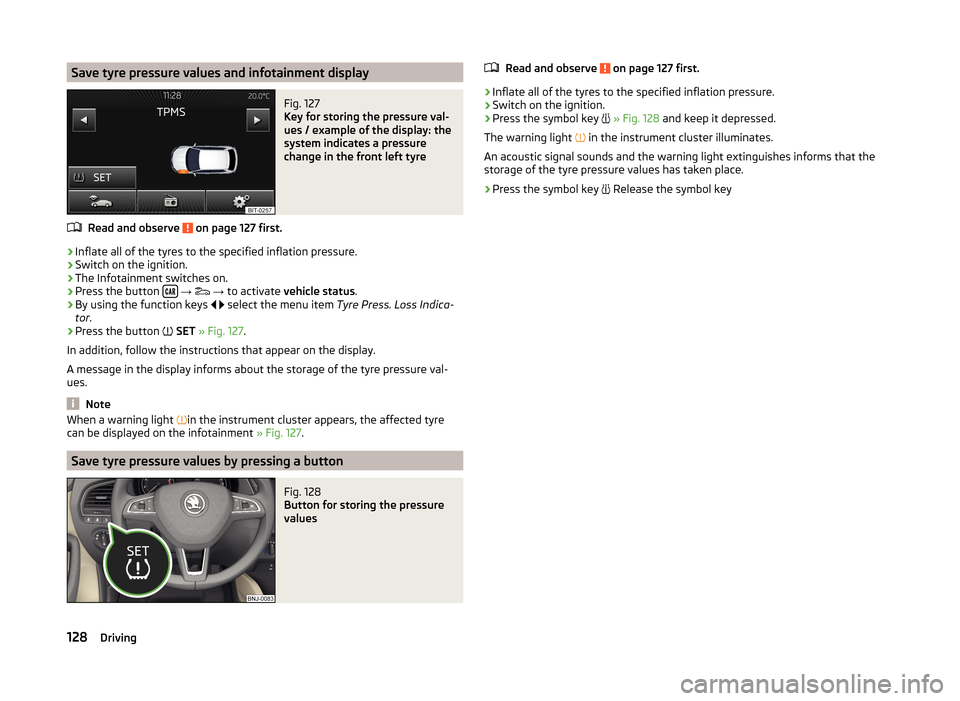
Save tyre pressure values and infotainment displayFig. 127
Key for storing the pressure val-
ues / example of the display: the
system indicates a pressure
change in the front left tyre
Read and observe on page 127 first.
›
Inflate all of the tyres to the specified inflation pressure.
›
Switch on the ignition.
›
The Infotainment switches on.
›
Press the button
→
→ to activate vehicle status .
›
By using the function keys
select the menu item
Tyre Press. Loss Indica-
tor .
›
Press the button
SET » Fig. 127 .
In addition, follow the instructions that appear on the display.
A message in the display informs about the storage of the tyre pressure val-
ues.
Note
When a warning light in the instrument cluster appears, the affected tyre
can be displayed on the infotainment » Fig. 127.
Save tyre pressure values by pressing a button
Fig. 128
Button for storing the pressure
values
Read and observe on page 127 first.›
Inflate all of the tyres to the specified inflation pressure.
›
Switch on the ignition.
›
Press the symbol key
» Fig. 128 and keep it depressed.
The warning light
in the instrument cluster illuminates.
An acoustic signal sounds and the warning light extinguishes informs that the
storage of the tyre pressure values has taken place.
›
Press the symbol key
Release the symbol key
128Driving
Page 138 of 216
Power to the trailer power grid
For the electrical connection between the vehicle and trailer, the power for the
trailer power grid is supplied by the vehicle.
The power supply works with ignition on or off.WARNING■ Incorrect or improperly connected electrical installation can cause acci-
dents and serious injury due to electric shock.■
Work on the electrical system must only be carried out by specialist ga-
rages.
■
Never directly connect the trailer's electrical system with the electrical
connections for the tail lights or other current sources.
■
After coupling the trailer and connecting up the power socket, check the
rear lights on the trailer to ensure they work correctly.
■
The handbrake on the vehicle must be applied when coupling and uncou-
pling the trailer.
■
Never use the safety eyelet for towing!
CAUTION
Incorrect or improperly connected electrical installations may cause malfunc-
tion of the entire vehicle electronics.
Loading a trailer
The vehicle/trailer combination must be balanced, whereby the maximum per-
missible drawbar load must be utilised. If the drawbar load is too low, it jeop-
ardises the performance of the vehicle/trailer combination.
Distribution of the load
Distribute the load in the trailer in such a way that heavy items are located as
close to the trailer axle as possible. Secure the items from slipping.
The distribution of the weight is very poor if your vehicle is unladen and the
trailer is laden. Maintain a particularly low speed if you cannot avoid driving
with this combination.
Tyre pressure
Correct the tyre inflation pressure on your vehicle for a “full load” » page 162.
Towing capacity and trailer weight
The permissible trailer load must not be exceeded under any circumstances
» page 194 , Technical data .
The details given in the vehicle's technical documentation always take prece-
dence over the details in the Owner's Manual.
The trailer loads specified apply only to altitudes up to 1,000 metres above
mean sea level.
The engine output falls as altitude increases, as does the ability to climb.
Therefore, for every additional 1,000 m in height (or part), the maximum per-
missible towed weight must be reduced by 10 %.
The towed weight comprises the actual weights of the (loaded) towing vehicle
and the (loaded) trailer.
The trailer and drawbar load information on the type plate of the towing
equipment are merely test data for the towing equipment. The vehicle-specific
values are detailed in the vehicle documents.WARNING■ Do not exceed the maximum permissible axle and drawbar load and
weight of the trailer - risk of accident and serious injuries!■
An unsecured load can adversely affect stability and driving safety signifi-
cantly - there is a risk of accident!
Towing a trailer
Driving speed
For safety reasons, do not drive faster than 80 km/h when towing a trailer.
Immediately reduce your speed as soon as even the slightest swaying of the
trailer is detected. Never attempt to stop the trailer from “swaying” by acceler-
ating.
Brakes
Apply the brakes in good time! If the trailer is fitted with a trailer brake, apply
the brakes gently at first, then brake firmly. This will avoid brake jolts resulting
from the trailer wheels locking.
On downhill sections shift down a gear in good time to also use the engine as
a brake.
Engine overheating
If the pointer of the coolant temperature gauge reaches the red scale range,
the speed should be reduced immediately.
Stop and switch off the engine if the warning light illuminates in the instru-
ment cluster display.
135Hitch and trailer
Page 143 of 216
WARNING (Continued)■Never install any airbag parts into the vehicle that have been removed
from old cars or have been recycled.■
Never fit damaged airbag parts to a vehicle. The airbags may then not be
triggered properly or not at all in the event of an accident.
■
No modifications of any kind must be made to parts of the airbag system.
WARNING■ A change in the suspension of the vehicle including the use of non-ap-
proved wheels and tyre combinations can alter the functioning of the air-
bag system - there is a risk of accident and fatal injury.■
Never make any changes to the front bumper or bodywork.
WARNINGThe airbag control unit operates using pressure sensors located in the front
doors. For this reason, no adjustments may be carried out to the doors or
door panels (e.g. installation of additional loudspeakers). Resulting damage
can have a negative impact on the function of the airbag system. Any work
on the front doors and door panels must be carried out by a specialist ga-
rage. The following guidelines must be observed.■
Never drive with inner door panels removed.
■
Never drive if parts of the inner door panel have been removed and the
resulting openings have not been properly sealed.
■
Never drive if the loudspeakers in the doors have been removed, unless
the loudspeaker openings have been properly sealed.
■
Always make sure that the openings are covered or filled if additional
loudspeakers or other equipment parts have been installed in the inner
door panels.
Acceptance and recycling of used vehicles
Read and observe
on page 137 first.
ŠKODA meets the requirements of the brand and its products with regard to
protecting the environment and the preserving resources. All new ŠKODAvehi-
cles can be recycled by up to 95 % and can always 1)
be returned free of charge.
In a lot of countries sufficient trade-in networks have been created, where you
can trade-in your vehicle. After you trade-in your vehicle, you will receive a
confirmation stating the recycling in accordance with environmental regula-
tions.
Note
Detailed information about the trade-in and recycling of end-of-life cars is
available from a specialist garage.
Washing vehicle
Introduction
This chapter contains information on the following subjects:
Washing by hand
141
Automatic car wash systems
141
Washing with a high-pressure cleaner
141
The best protection for your vehicle against harmful environmental influences
is frequent washing.
The longer insect residues, bird droppings, tree sap, road and industrial dust,
tar, soot particles, road salt and other aggressive deposits remain adhering to
the paintwork of your vehicle, the more detrimental their destructive effect
can be. High temperatures, such as those caused by intensive sun's rays, ac-
centuate this caustic effect.
It is essential to also thoroughly clean the underside of the vehicle at the end
of the winter.
WARNINGWashing your vehicle in the winter: water and ice in the brake system can
affect the braking efficiency – there is the risk of an accident.
CAUTION
The temperature of the water used for cleaning must not exceed 60 °C – there
is a risk of damaging the vehicle.
For the sake of the environment
Only wash the vehicle at washing bays intended for this purpose.1)
Subject to fulfilment of the national legal requirements.
140General Maintenance