warning lights SKODA FABIA 2016 3.G / NJ Owner's Guide
[x] Cancel search | Manufacturer: SKODA, Model Year: 2016, Model line: FABIA, Model: SKODA FABIA 2016 3.G / NJPages: 196, PDF Size: 31.86 MB
Page 57 of 196
WARNINGOnly turn on the main beam or the headlight flasher if other road users will
not be dazzled.
Automatic driving light control
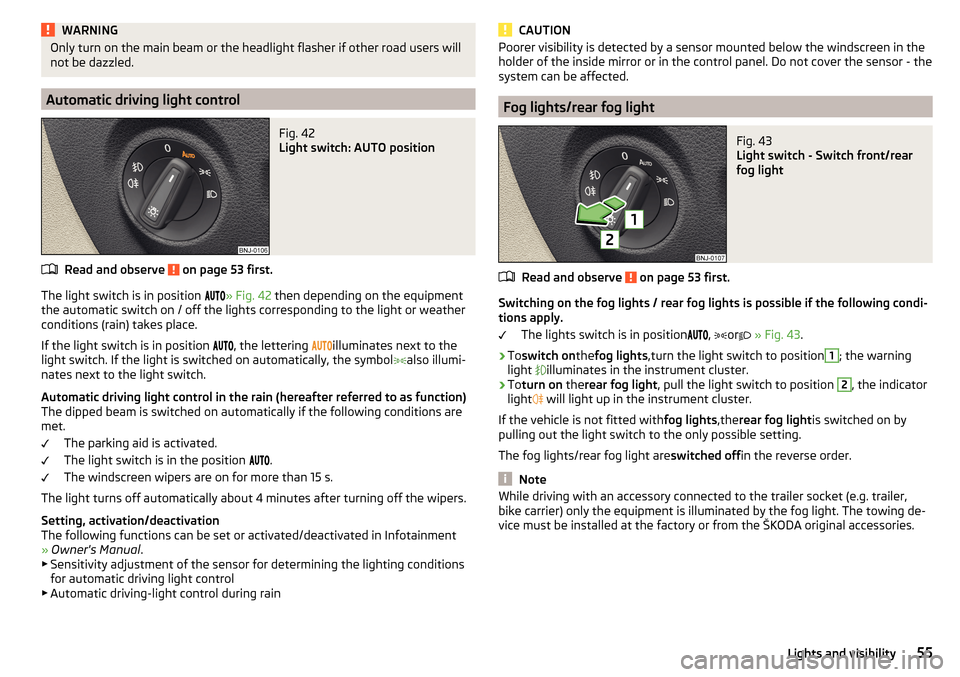
Fig. 42
Light switch: AUTO position
Read and observe on page 53 first.
The light switch is in position
» Fig. 42 then depending on the equipment
the automatic switch on / off the lights corresponding to the light or weather
conditions (rain) takes place.
If the light switch is in position
, the lettering
illuminates next to the
light switch. If the light is switched on automatically, the symbol
also illumi-
nates next to the light switch.
Automatic driving light control in the rain (hereafter referred to as function)
The dipped beam is switched on automatically if the following conditions are
met.
The parking aid is activated.
The light switch is in the position
.
The windscreen wipers are on for more than 15 s.
The light turns off automatically about 4 minutes after turning off the wipers.
Setting, activation/deactivation
The following functions can be set or activated/deactivated in Infotainment
» Owner's Manual .
▶ Sensitivity adjustment of the sensor for determining the lighting conditions
for automatic driving light control
▶ Automatic driving-light control during rain
CAUTIONPoorer visibility is detected by a sensor mounted below the windscreen in the
holder of the inside mirror or in the control panel. Do not cover the sensor - the
system can be affected.
Fog lights/rear fog light
Fig. 43
Light switch - Switch front/rear
fog light
Read and observe on page 53 first.
Switching on the fog lights / rear fog lights is possible if the following condi-
tions apply.
The lights switch is in position
,
or
» Fig. 43 .
›
Toswitch on thefog lights ,turn the light switch to position
1
; the warning
light
illuminates in the instrument cluster.
›
To turn on therear fog light , pull the light switch to position
2
, the indicator
light
will light up in the instrument cluster.
If the vehicle is not fitted with fog lights,therear fog light is switched on by
pulling out the light switch to the only possible setting.
The fog lights/rear fog light are switched offin the reverse order.
Note
While driving with an accessory connected to the trailer socket (e.g. trailer,
bike carrier) only the equipment is illuminated by the fog light. The towing de-
vice must be installed at the factory or from the ŠKODA original accessories.55Lights and visibility
Page 58 of 196
Fog lights with the CORNER functionRead and observe
on page 53 first.
The CORNER function automatically switches on the fog lights on the respec-tive side of the vehicle (e.g. when cornering), if the following conditions are
met.
The turn signal is switched on or the front wheels are turned sharply 1)
.
The vehicle speed is below 40 km/h.
The low beam is switched on.
The fog lights are not switched on.
The two fog lights are switched on when you shift into the reverse gear.
COMING HOME / LEAVING HOME
Read and observe
on page 53 first.
The function COMING HOME ensures that the vehicle's environment is illumi-
nated after switching off the ignition and opening the driver's door.
The function LEAVING HOME ensures that the vehicle's environment is illumi-
nated after unlocking the vehicle with the radio remote control unit.
The function switches the light on only if there is poorer visibility and the light
switch is in the position .
The two functions can be activated/deactivated and set in Infotainment
» Owner's Manual Infotainment .
CAUTION
■
Poorer visibility is detected by a sensor mounted below the windscreen in
the holder of the inside mirror or in the control panel. Do not cover the sensor -
the system can be affected.■
If this option is always enabled, then the battery is heavily loaded.
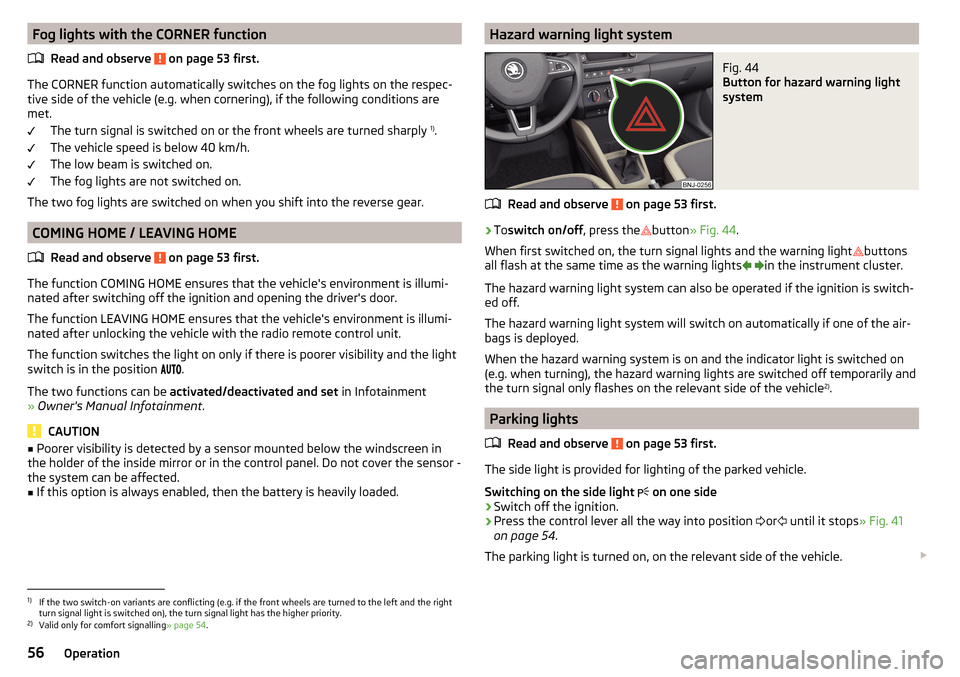
Hazard warning light systemFig. 44
Button for hazard warning light
system
Read and observe on page 53 first.
›
To switch on/off , press the
button
» Fig. 44 .
When first switched on, the turn signal lights and the warning light buttons
all flash at the same time as the warning lights
in the instrument cluster.
The hazard warning light system can also be operated if the ignition is switch-
ed off.
The hazard warning light system will switch on automatically if one of the air-
bags is deployed.
When the hazard warning system is on and the indicator light is switched on
(e.g. when turning), the hazard warning lights are switched off temporarily and
the turn signal only flashes on the relevant side of the vehicle 2)
.
Parking lights
Read and observe
on page 53 first.
The side light is provided for lighting of the parked vehicle.
Switching on the side light on one side
›
Switch off the ignition.
›
Press the control lever all the way into position
or
until it stops
» Fig. 41
on page 54 .
The parking light is turned on, on the relevant side of the vehicle.
1)
If the two switch-on variants are conflicting (e.g. if the front wheels are turned to the left and the right
turn signal light is switched on), the turn signal light has the higher priority.
2)
Valid only for comfort signalling » page 54.
56Operation
Page 59 of 196
Switching on the parking lights on both sides ›Switch on the ignition and turn the light switch into position » page 53 ,
the parking lights are turned on.›
Switch off the ignition and lock the vehicle.
After pulling out the ignition key and opening the driver's door, an audible
warning sounds. After a few seconds or after closing the driver's door, the au-
dible warning is turned off.
CAUTION
■ Turning on the parking light means the battery is heavily loaded.■The parking lights may switch off automatically due to a low battery charge.
If the two-sided parking lights are switched on when the ignition is off, the
parking lights will not switch on automatically!
Driving abroad
Read and observe
on page 53 first.
When driving in countries with opposing traffic system (traffic on the
left/right), your headlights may dazzle oncoming traffic. Therefore, it is neces-
sary to have the headlights adapted by a specialist garage.
Interior lighting
Introduction
This chapter contains information on the following subjects:
Front interior lights
57
Interior lighting, rear
58
The inner lighting also works if the ignition is switched off. With the ignition
off (or after a door is opened),the lights will automatically switch off after ap-
proximately 10 minutes.
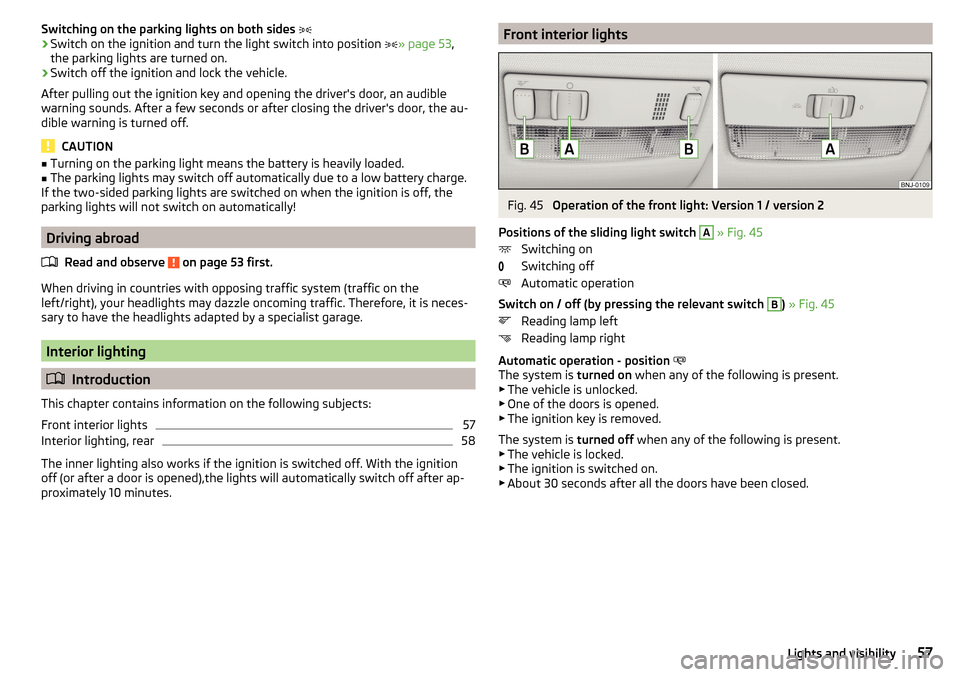
Front interior lightsFig. 45
Operation of the front light: Version 1 / version 2
Positions of the sliding light switch
A
» Fig. 45
Switching on
Switching off
Automatic operation
Switch on / off (by pressing the relevant switch
B
) » Fig. 45
Reading lamp left
Reading lamp right
Automatic operation - position
The system is turned on when any of the following is present.
▶ The vehicle is unlocked.
▶ One of the doors is opened.
▶ The ignition key is removed.
The system is turned off when any of the following is present.
▶ The vehicle is locked.
▶ The ignition is switched on.
▶ About 30 seconds after all the doors have been closed.
57Lights and visibility
Page 60 of 196
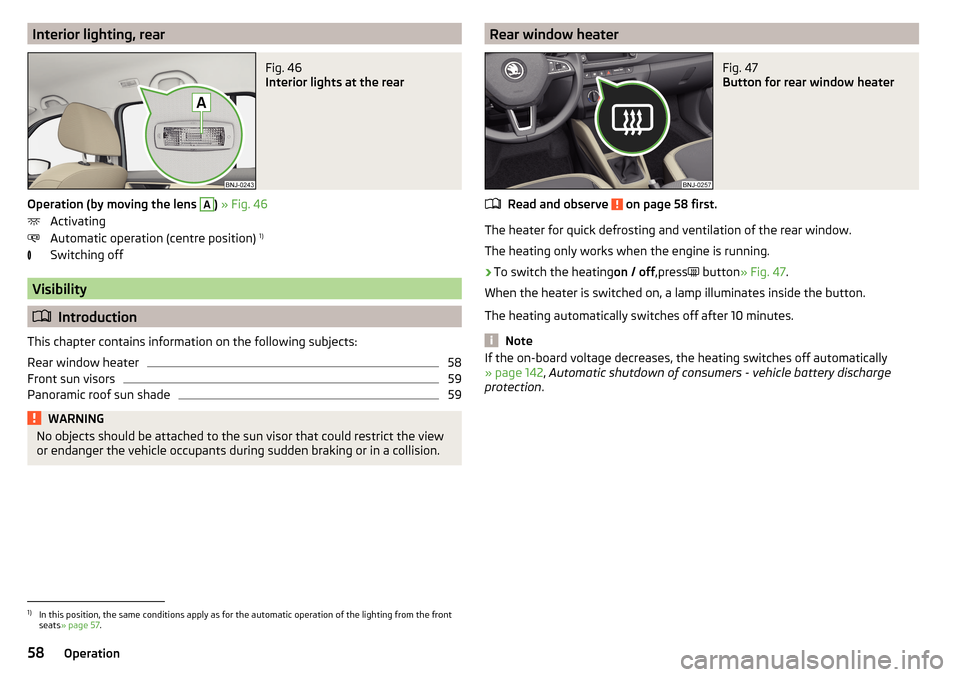
Interior lighting, rearFig. 46
Interior lights at the rear
Operation (by moving the lens
A
) » Fig. 46
Activating
Automatic operation (centre position) 1)
Switching off
Visibility
Introduction
This chapter contains information on the following subjects:
Rear window heater
58
Front sun visors
59
Panoramic roof sun shade
59WARNINGNo objects should be attached to the sun visor that could restrict the view
or endanger the vehicle occupants during sudden braking or in a collision.Rear window heaterFig. 47
Button for rear window heater
Read and observe on page 58 first.
The heater for quick defrosting and ventilation of the rear window.
The heating only works when the engine is running.
›
To switch the heating on / off,press
button
» Fig. 47 .
When the heater is switched on, a lamp illuminates inside the button.
The heating automatically switches off after 10 minutes.
Note
If the on-board voltage decreases, the heating switches off automatically
» page 142 , Automatic shutdown of consumers - vehicle battery discharge
protection .1)
In this position, the same conditions apply as for the automatic operation of the lighting from the front
seats » page 57 .
58Operation
Page 61 of 196
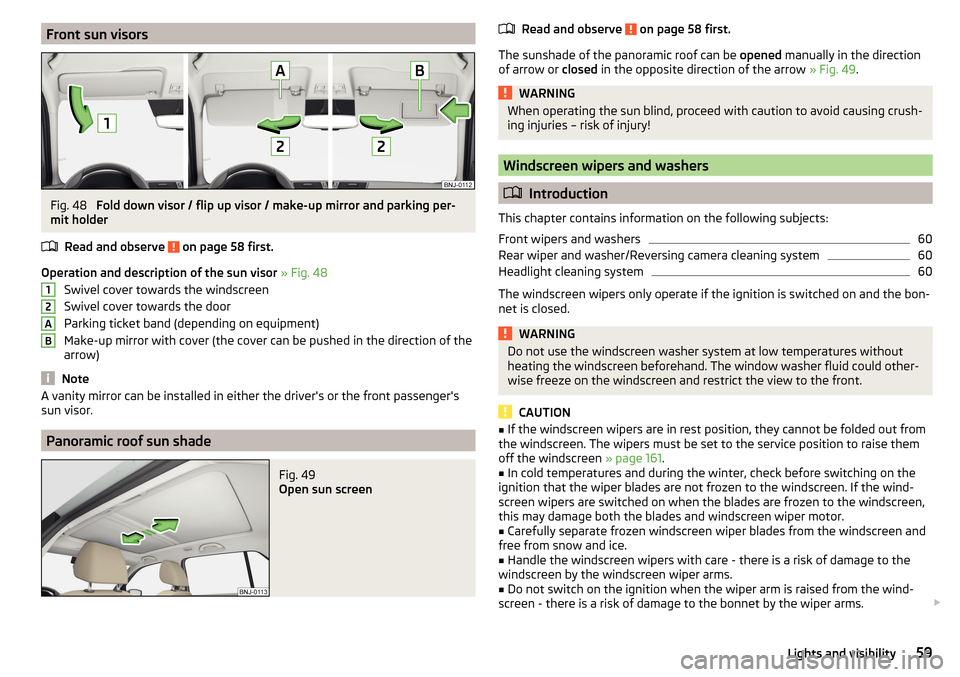
Front sun visorsFig. 48
Fold down visor / flip up visor / make-up mirror and parking per-
mit holder
Read and observe
on page 58 first.
Operation and description of the sun visor » Fig. 48
Swivel cover towards the windscreen
Swivel cover towards the door
Parking ticket band (depending on equipment)
Make-up mirror with cover (the cover can be pushed in the direction of the
arrow)
Note
A vanity mirror can be installed in either the driver's or the front passenger's
sun visor.
Panoramic roof sun shade
Fig. 49
Open sun screen
12ABRead and observe on page 58 first.
The sunshade of the panoramic roof can be opened manually in the direction
of arrow or closed in the opposite direction of the arrow » Fig. 49.
WARNINGWhen operating the sun blind, proceed with caution to avoid causing crush-
ing injuries – risk of injury!
Windscreen wipers and washers
Introduction
This chapter contains information on the following subjects:
Front wipers and washers
60
Rear wiper and washer/Reversing camera cleaning system
60
Headlight cleaning system
60
The windscreen wipers only operate if the ignition is switched on and the bon-
net is closed.
WARNINGDo not use the windscreen washer system at low temperatures without
heating the windscreen beforehand. The window washer fluid could other-
wise freeze on the windscreen and restrict the view to the front.
CAUTION
■ If the windscreen wipers are in rest position, they cannot be folded out from
the windscreen. The wipers must be set to the service position to raise them
off the windscreen » page 161.■
In cold temperatures and during the winter, check before switching on the
ignition that the wiper blades are not frozen to the windscreen. If the wind-
screen wipers are switched on when the blades are frozen to the windscreen,
this may damage both the blades and windscreen wiper motor.
■
Carefully separate frozen windscreen wiper blades from the windscreen and
free from snow and ice.
■
Handle the windscreen wipers with care - there is a risk of damage to the
windscreen by the windscreen wiper arms.
■
Do not switch on the ignition when the wiper arm is raised from the wind-
screen - there is a risk of damage to the bonnet by the wiper arms.
59Lights and visibility
Page 62 of 196
NoteDepending on vehicle equipment, the windscreen washer jets can be heated
automatically after starting the engine.
Front wipers and washers
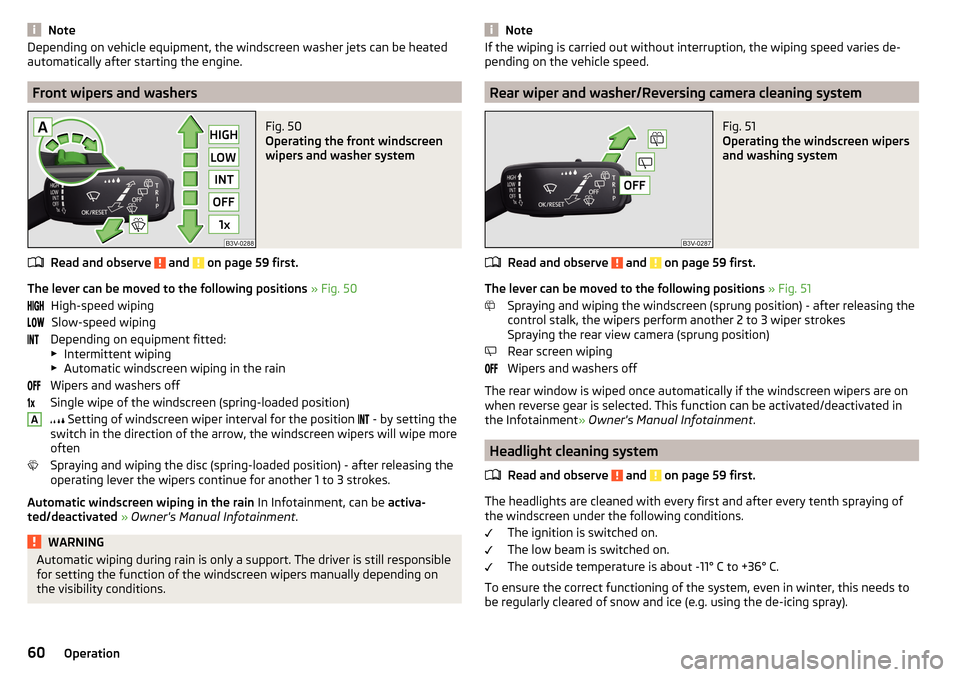
Fig. 50
Operating the front windscreen
wipers and washer system
Read and observe and on page 59 first.
The lever can be moved to the following positions » Fig. 50
High-speed wiping Slow-speed wiping
Depending on equipment fitted:
▶ Intermittent wiping
▶ Automatic windscreen wiping in the rain
Wipers and washers off
Single wipe of the windscreen (spring-loaded position)
Setting of windscreen wiper interval for the position
- by setting the
switch in the direction of the arrow, the windscreen wipers will wipe more
often
Spraying and wiping the disc (spring-loaded position) - after releasing the
operating lever the wipers continue for another 1 to 3 strokes.
Automatic windscreen wiping in the rain In Infotainment, can be activa-
ted/deactivated » Owner's Manual Infotainment .
WARNINGAutomatic wiping during rain is only a support. The driver is still responsible
for setting the function of the windscreen wipers manually depending on
the visibility conditions. ANoteIf the wiping is carried out without interruption, the wiping speed varies de-
pending on the vehicle speed.
Rear wiper and washer/Reversing camera cleaning system
Fig. 51
Operating the windscreen wipers
and washing system
Read and observe and on page 59 first.
The lever can be moved to the following positions » Fig. 51
Spraying and wiping the windscreen (sprung position) - after releasing the
control stalk, the wipers perform another 2 to 3 wiper strokes
Spraying the rear view camera (sprung position)
Rear screen wiping
Wipers and washers off
The rear window is wiped once automatically if the windscreen wipers are on when reverse gear is selected. This function can be activated/deactivated in
the Infotainment » Owner's Manual Infotainment .
Headlight cleaning system
Read and observe
and on page 59 first.
The headlights are cleaned with every first and after every tenth spraying of
the windscreen under the following conditions.
The ignition is switched on.
The low beam is switched on.
The outside temperature is about -11° C to +36° C.
To ensure the correct functioning of the system, even in winter, this needs to be regularly cleared of snow and ice (e.g. using the de-icing spray).
60Operation
Page 63 of 196
Rear view mirror
Introduction
This chapter contains information on the following subjects:
Interior mirror dimming
61
Mirrors
61WARNINGExterior mirrors increase the field of view, however, they make objects ap-
pear smaller and further away. Therefore, use the interior mirror whenever
possible for assessing the distances to the vehicles following behind.
Interior mirror dimming
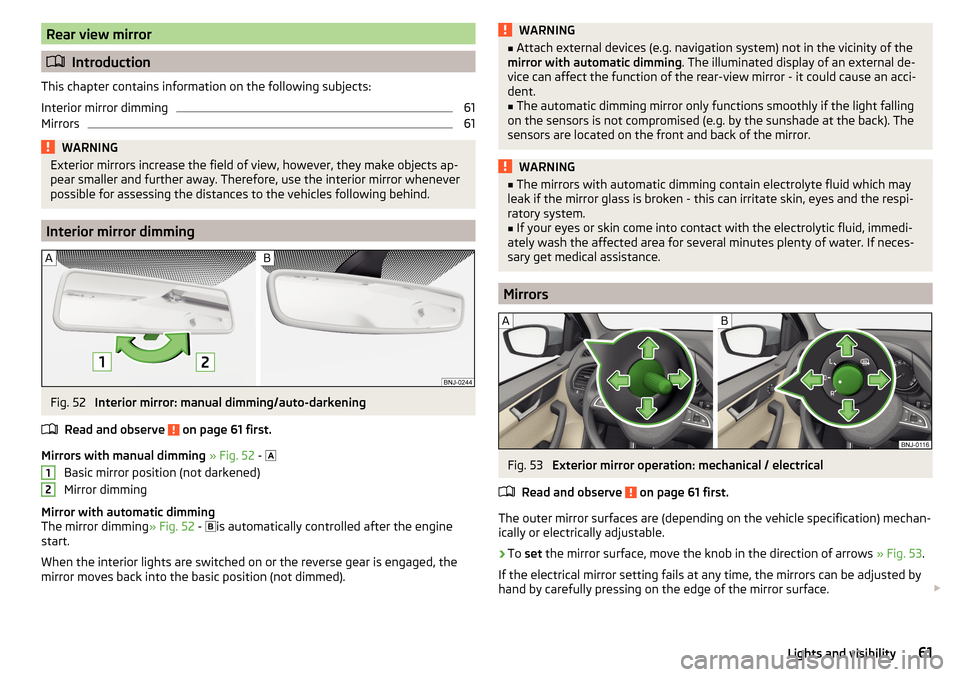
Fig. 52
Interior mirror: manual dimming/auto-darkening
Read and observe
on page 61 first.
Mirrors with manual dimming » Fig. 52 -
Basic mirror position (not darkened)
Mirror dimming
Mirror with automatic dimming
The mirror dimming » Fig. 52 -
is automatically controlled after the engine
start.
When the interior lights are switched on or the reverse gear is engaged, the
mirror moves back into the basic position (not dimmed).
12WARNING■ Attach external devices (e.g. navigation system) not in the vicinity of the
mirror with automatic dimming . The illuminated display of an external de-
vice can affect the function of the rear-view mirror - it could cause an acci-
dent.■
The automatic dimming mirror only functions smoothly if the light falling
on the sensors is not compromised (e.g. by the sunshade at the back). The
sensors are located on the front and back of the mirror.
WARNING■ The mirrors with automatic dimming contain electrolyte fluid which may
leak if the mirror glass is broken - this can irritate skin, eyes and the respi-
ratory system.■
If your eyes or skin come into contact with the electrolytic fluid, immedi-
ately wash the affected area for several minutes plenty of water. If neces-
sary get medical assistance.
Mirrors
Fig. 53
Exterior mirror operation: mechanical / electrical
Read and observe
on page 61 first.
The outer mirror surfaces are (depending on the vehicle specification) mechan-
ically or electrically adjustable.
›
To set the mirror surface, move the knob in the direction of arrows » Fig. 53.
If the electrical mirror setting fails at any time, the mirrors can be adjusted by
hand by carefully pressing on the edge of the mirror surface.
61Lights and visibility
Page 67 of 196
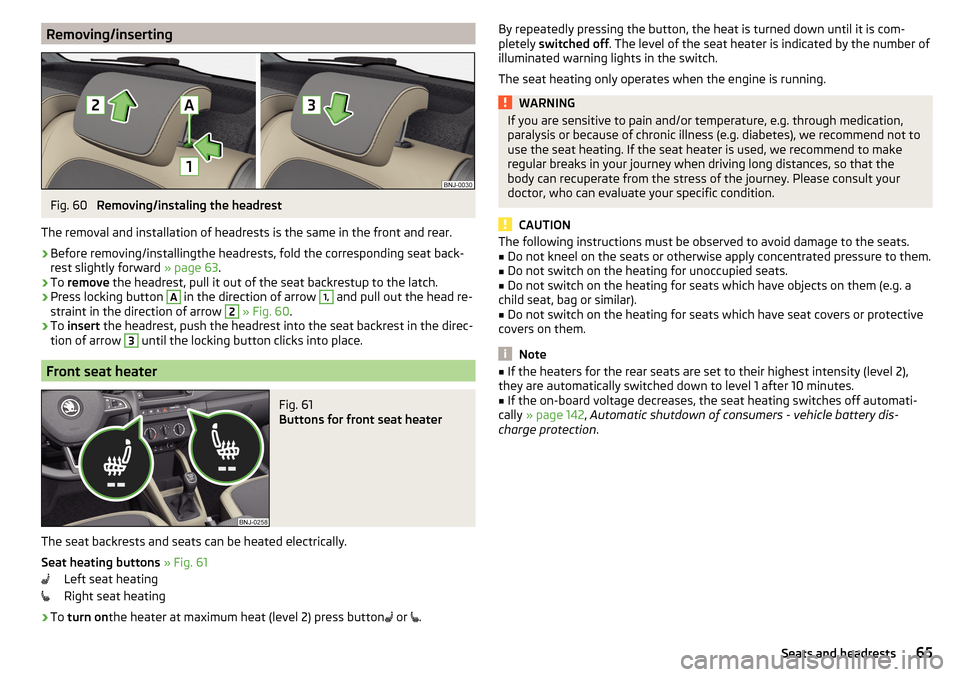
Removing/insertingFig. 60
Removing/instaling the headrest
The removal and installation of headrests is the same in the front and rear.
›
Before removing/installingthe headrests, fold the corresponding seat back-
rest slightly forward » page 63.
›
To remove the headrest, pull it out of the seat backrestup to the latch.
›
Press locking button
A
in the direction of arrow
1,
and pull out the head re-
straint in the direction of arrow
2
» Fig. 60 .
›
To insert the headrest, push the headrest into the seat backrest in the direc-
tion of arrow
3
until the locking button clicks into place.
Front seat heater
Fig. 61
Buttons for front seat heater
The seat backrests and seats can be heated electrically.
Seat heating buttons » Fig. 61
Left seat heating
Right seat heating
›
To turn on the heater at maximum heat (level 2) press button
or
.
By repeatedly pressing the button, the heat is turned down until it is com-
pletely switched off . The level of the seat heater is indicated by the number of
illuminated warning lights in the switch.
The seat heating only operates when the engine is running.WARNINGIf you are sensitive to pain and/or temperature, e.g. through medication,
paralysis or because of chronic illness (e.g. diabetes), we recommend not to
use the seat heating. If the seat heater is used, we recommend to make
regular breaks in your journey when driving long distances, so that the
body can recuperate from the stress of the journey. Please consult your
doctor, who can evaluate your specific condition.
CAUTION
The following instructions must be observed to avoid damage to the seats.■Do not kneel on the seats or otherwise apply concentrated pressure to them.■
Do not switch on the heating for unoccupied seats.
■
Do not switch on the heating for seats which have objects on them (e.g. a
child seat, bag or similar).
■
Do not switch on the heating for seats which have seat covers or protective
covers on them.
Note
■ If the heaters for the rear seats are set to their highest intensity (level 2),
they are automatically switched down to level 1 after 10 minutes.■
If the on-board voltage decreases, the seat heating switches off automati-
cally » page 142 , Automatic shutdown of consumers - vehicle battery dis-
charge protection .
65Seats and headrests
Page 88 of 196
WARNING■The blower should always be on to prevent the windows from misting.
Otherwise there is a risk of accident.■
Under certain circumstances, air at a temperature of about 5 °C can flow
out of the vents when the cooling system is switched on.
Note
■ The air inlet in front of the windscreen must be free of e.g. ice, snow or
leaves to ensure that the heating and cooling system operates properly.■
After switching on the cooling system condensation from the evaporator of
the air conditioning may drip down and form a puddle below the vehicle. This is
not a leak!
■
If the coolant temperature is too high, the cooling system is switched off to
ensure that the engine cools down.
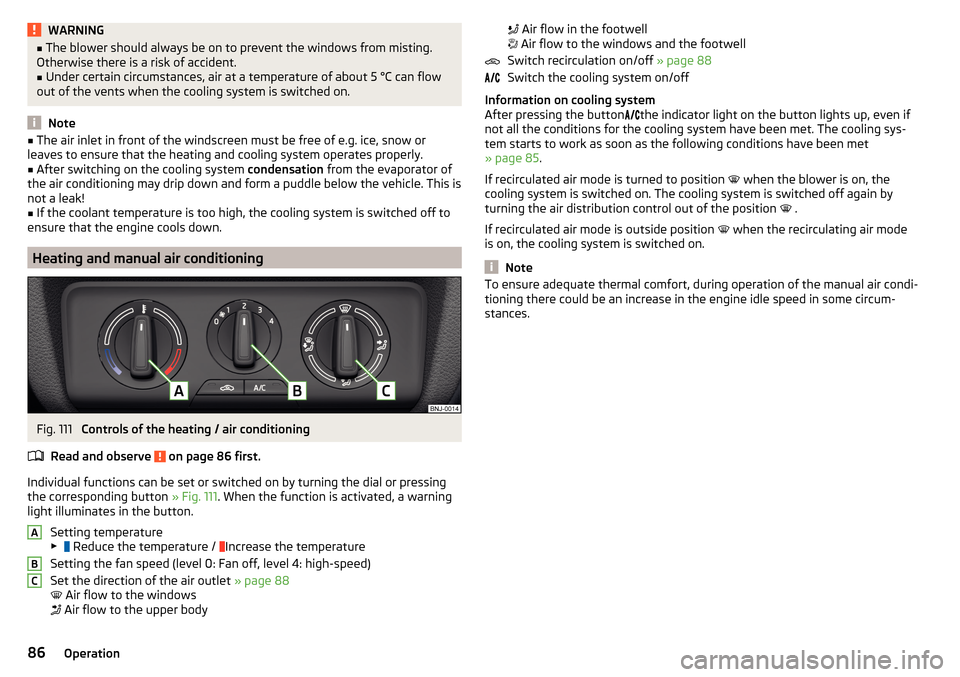
Heating and manual air conditioning
Fig. 111
Controls of the heating / air conditioning
Read and observe
on page 86 first.
Individual functions can be set or switched on by turning the dial or pressing the corresponding button » Fig. 111. When the function is activated, a warning
light illuminates in the button.
Setting temperature
▶ Reduce the temperature /
Increase the temperature
Setting the fan speed (level 0: Fan off, level 4: high-speed)
Set the direction of the air outlet » page 88
Air flow to the windows
Air flow to the upper body
ABC
Air flow in the footwell
Air flow to the windows and the footwell
Switch recirculation on/off » page 88
Switch the cooling system on/off
Information on cooling system
After pressing the button
the indicator light on the button lights up, even if
not all the conditions for the cooling system have been met. The cooling sys-
tem starts to work as soon as the following conditions have been met
» page 85 .
If recirculated air mode is turned to position
when the blower is on, the
cooling system is switched on. The cooling system is switched off again by
turning the air distribution control out of the position .
If recirculated air mode is outside position when the recirculating air mode
is on, the cooling system is switched on.
Note
To ensure adequate thermal comfort, during operation of the manual air condi-
tioning there could be an increase in the engine idle speed in some circum-
stances.86Operation
Page 89 of 196
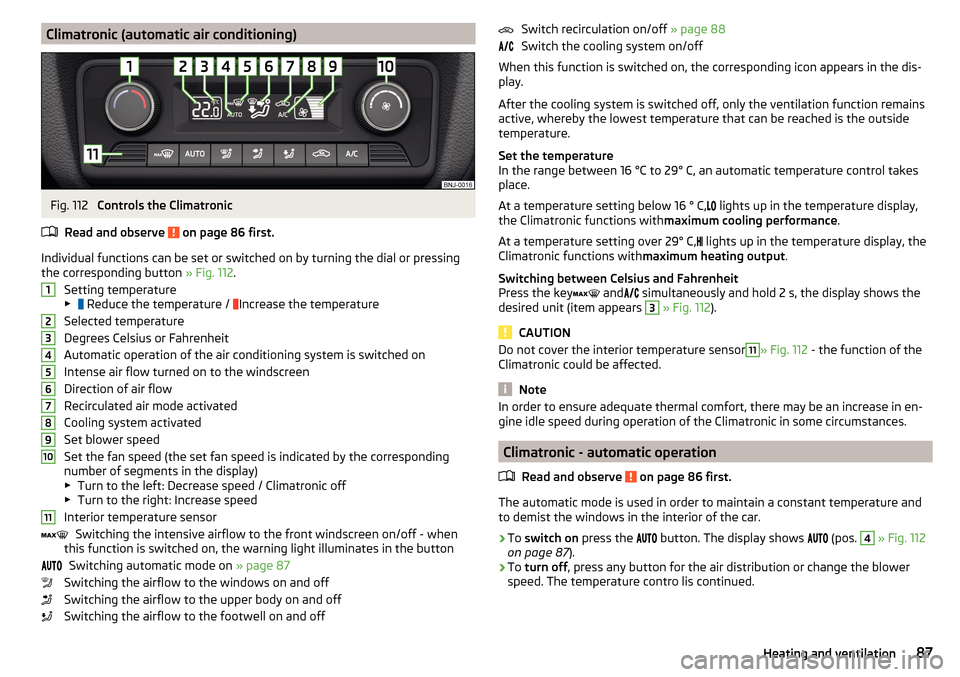
Climatronic (automatic air conditioning)Fig. 112
Controls the Climatronic
Read and observe
on page 86 first.
Individual functions can be set or switched on by turning the dial or pressing the corresponding button » Fig. 112.
Setting temperature
▶ Reduce the temperature /
Increase the temperature
Selected temperature
Degrees Celsius or Fahrenheit
Automatic operation of the air conditioning system is switched on
Intense air flow turned on to the windscreen
Direction of air flow
Recirculated air mode activated
Cooling system activated
Set blower speed
Set the fan speed (the set fan speed is indicated by the corresponding
number of segments in the display)
▶ Turn to the left: Decrease speed / Climatronic off
▶ Turn to the right: Increase speed
Interior temperature sensor Switching the intensive airflow to the front windscreen on/off - when
this function is switched on, the warning light illuminates in the button
Switching automatic mode on » page 87
Switching the airflow to the windows on and off
Switching the airflow to the upper body on and off
Switching the airflow to the footwell on and off
1234567891011Switch recirculation on/off » page 88
Switch the cooling system on/off
When this function is switched on, the corresponding icon appears in the dis-
play.
After the cooling system is switched off, only the ventilation function remains
active, whereby the lowest temperature that can be reached is the outside
temperature.
Set the temperature
In the range between 16 °C to 29° C, an automatic temperature control takes
place.
At a temperature setting below 16 ° C, lights up in the temperature display,
the Climatronic functions with maximum cooling performance .
At a temperature setting over 29° C, lights up in the temperature display, the
Climatronic functions with maximum heating output.
Switching between Celsius and Fahrenheit
Press the key and
simultaneously and hold 2 s, the display shows the
desired unit (item appears 3
» Fig. 112 ).
CAUTION
Do not cover the interior temperature sensor11» Fig. 112 - the function of the
Climatronic could be affected.
Note
In order to ensure adequate thermal comfort, there may be an increase in en-
gine idle speed during operation of the Climatronic in some circumstances.
Climatronic - automatic operation
Read and observe
on page 86 first.
The automatic mode is used in order to maintain a constant temperature andto demist the windows in the interior of the car.
›
To switch on press the
button. The display shows
(pos.
4
» Fig. 112
on page 87 ).
›
To turn off , press any button for the air distribution or change the blower
speed. The temperature contro lis continued.
87Heating and ventilation