battery SKODA OCTAVIA 2006 Owner´s Manual
[x] Cancel search | Manufacturer: SKODA, Model Year: 2006, Model line: OCTAVIA, Model: SKODA OCTAVIA 2006Pages: 218, PDF Size: 5.48 MB
Page 33 of 218
Locking
The turn signal lights flash once to confirm that the vehicle has been correctly
locked.
If the doors or the boot lid remain open after the vehicle has been locked, the
turn signal lights do not flash until they have been closed.
WARNING
If the car is locked from the outside and the safe securing system is activated,
there must not be any person in the car as it is then not possible to open ei-
ther a door or a window from the inside. The locked doors make it more diffi-
cult for rescuers to get into the vehicle in an emergency - hazard! Note
■ Only operate the remote control when the doors and boot lid are closed and the
vehicle is in your line of sight. ■ To avoid the car being locked inadvertently once in the car, the lock button of the remote control must not be pressed before the key is inserted into the ig-
nition lock. Should this happen, press the unlock button
of the remote control.
ÐSynchronisation
If the vehicle cannot be unlocked by actuating the remote control system then it
is possible that the code in the key and the control unit in the vehicle are no lon-
ger synchronised. This can occur when the buttons on the radio-operated key are
actuated a number of times outside of the operative range of the equipment or
the battery on the remote control was replaced.
This means it is necessary to synchronise the code as follows:
› press any button on the remote control key;
› pressing of the button means that the door will unlock with the key within 1 mi-
nute. Ð Anti-theft alarm system
Introductory information
The anti-theft alarm system increases the level of protection against people
seeking to break into the vehicle. The system triggers audible and visual warning
signals if an attempt is made to break into the vehicle.
How is the alarm system activated?
The anti-theft alarm system is activated when the vehicle is locked with the radio
remote control or the key in the driver's door . It is activated 30 seconds after
locking the door.
How is the alarm system deactivated?
The alarm system is deactivated by pressing the unlock button on the radio re-
mote control. The anti-theft alarm system is reactivated if the vehicle is not
opened within 30 seconds after transmitting the radio signal.
The alarm system is also deactivated if you unlock the driver door using the key
within 45 seconds of locking the vehicle.
If the vehicle is unlocked by inserting the key into the driver door, the key must
be inserted into the ignition lock and the ignition switched on within 15
seconds
of unlocking the door to deactivate the alarm system. The alarm is triggered if
the ignition is not switched on within 15 seconds.
When is the alarm triggered?
The following security areas of the locked vehicle are monitored: › bonnet;
› boot lid;
› doors;
› ignition lock;
› Vehicle inclination
» page 32;
› Interior of the vehicle
» page 32;
› A drop in voltage of the on-board power supply;
› Socket of the factory-fitted towing device.
An alarm is immediately triggered if either of the two battery terminals is discon-
nected while the anti-theft alarm system is activated.
How is the alarm switched off?
The alarm is switched off by unlocking the vehicle with the radio remote control
or switching on the ignition. £
31
Unlocking and locking
Page 39 of 218
Operational faults
First read and observe the introductory information and safety warn-
ings on page 34.
Electrically operated power windows do not operate
If the battery has been disconnected and then reconnected while the window
was opened, the electrically operated power windows do not operate. The system
must be activated. Proceed as follows in order to re-establish the function:
› switch on the ignition;
› pull the top edge of the button in the driver's door to close the window;
› release the button;
› pull the relevant button upwards again for approx. 3
seconds.
Operation in winter
In the winter, ice accumulating on the surface of the window may cause there to
be more resistance when closing the window. The window will stop and move
back several centimetres.
It is necessary to deactivate the force limiter to close the window » page 36.ÐElectric sliding/tilting roof
Introductory information
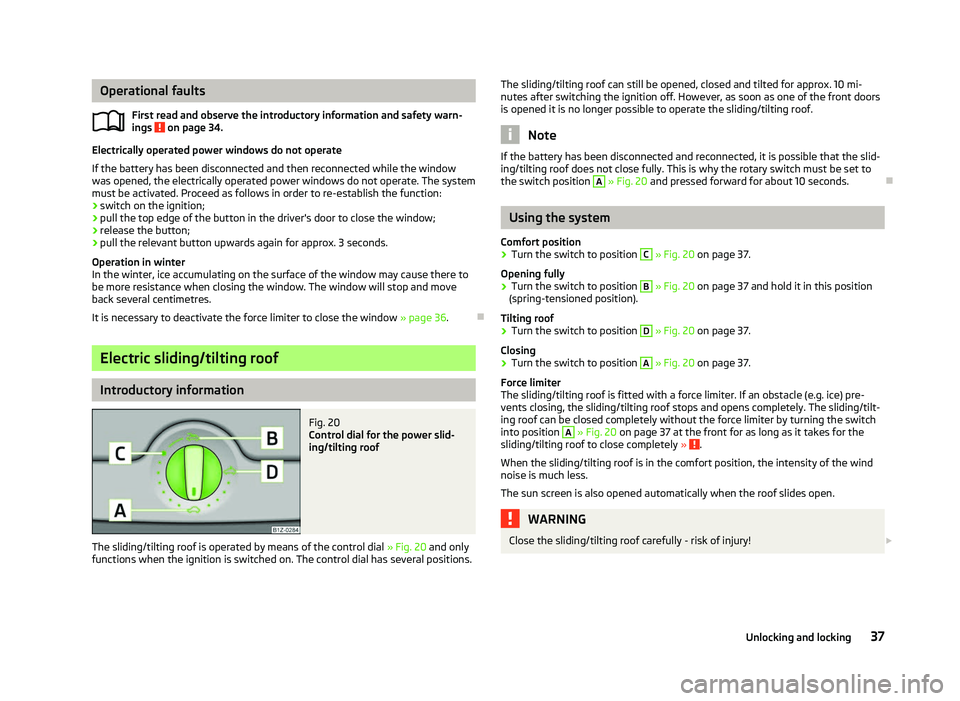
Fig. 20
Control dial for the power slid-
ing/tilting roof
The sliding/tilting roof is operated by means of the control dial » Fig. 20
and only
functions when the ignition is switched on. The control dial has several positions.
ä
The sliding/tilting roof can still be opened, closed and tilted for approx. 10
mi-
nutes after switching the ignition off. However, as soon as one of the front doors
is opened it is no longer possible to operate the sliding/tilting roof. Note
If the battery has been disconnected and reconnected, it is possible that the slid-
ing/tilting roof does not close fully. This is why the rotary switch must be set to
the switch position A
» Fig. 20 and pressed forward for about 10
seconds.Ð Using the system
Comfort position
› Turn the switch to position C
» Fig. 20 on page 37
.
Opening fully
› Turn the switch to position B
» Fig. 20 on page 37
and hold it in this position
(spring-tensioned position).
Tilting roof
› Turn the switch to position D
» Fig. 20 on page 37
.
Closing
› Turn the switch to position A
» Fig. 20 on page 37
.
Force limiter
The sliding/tilting roof is fitted with a force limiter. If an obstacle (e.g. ice) pre-
vents closing, the sliding/tilting roof stops and opens completely. The sliding/tilt-
ing roof can be closed completely without the force limiter by turning the switch
into position A
» Fig. 20 on page 37 at the front for as long as it takes for the
sliding/tilting roof to close completely » .
When the sliding/tilting roof is in the comfort position, the intensity of the wind
noise is much less.
The sun screen is also opened automatically when the roof slides open. WARNING
Close the sliding/tilting roof carefully - risk of injury! £
37
Unlocking and locking
Page 44 of 218
›
Unlock the vehicle with the radio remote control and the light is switched on.
Depending on the equipment fitted the COMING HOME/LEAVING HOME function
switches on the following lights:
› Parking lights;
› Low beam;
› Entry lighting in the exterior mirrors;
› Licence plate light.
The COMING HOME/LEAVING HOME function is controlled with the light sensor in
the mount of the interior rear mirror. If the light intensity is higher than the set
value of the light sensor, the light is not switched on after opening the driver's
door or unlocking the vehicle with the radio remote control.
Switching off the COMING HOME function
The light goes out 10 seconds after closing all of the doors and the boot lid.
If a door or the boot lid remains open, the light goes out after 60 seconds.
Switching off the LEAVING HOME function
The light goes out 10 seconds after unlocking the vehicle with the radio remote
control, switching on the ignition or locking the vehicle.
If no door is opened, the vehicle is locked automatically after 30 seconds.Note
■ If the
COMING HOME/LEAVING HOME function is switched on constantly, the
battery will be heavily discharged particularly over short distances. ■ The illumination period for the COMING HOME/LEAVING HOME function can be
changed by means of the information display. ÐTourist light
First read and observe the introductory information and safety warn-
ings on page 39.
This mode makes it possible to drive in countries with opposing traffic system,
driving on the left/right, without dazzling the oncoming vehicles. When the mode
tourist light is active, the side to side swivel of the headlights is deactivated. ä The mode tourist light is activated/deactivated via the information display in the
menu:
■ Settings
■ Lights & Vision
■ Travel mode
■ Off
■ Switched on Ð Fog lights
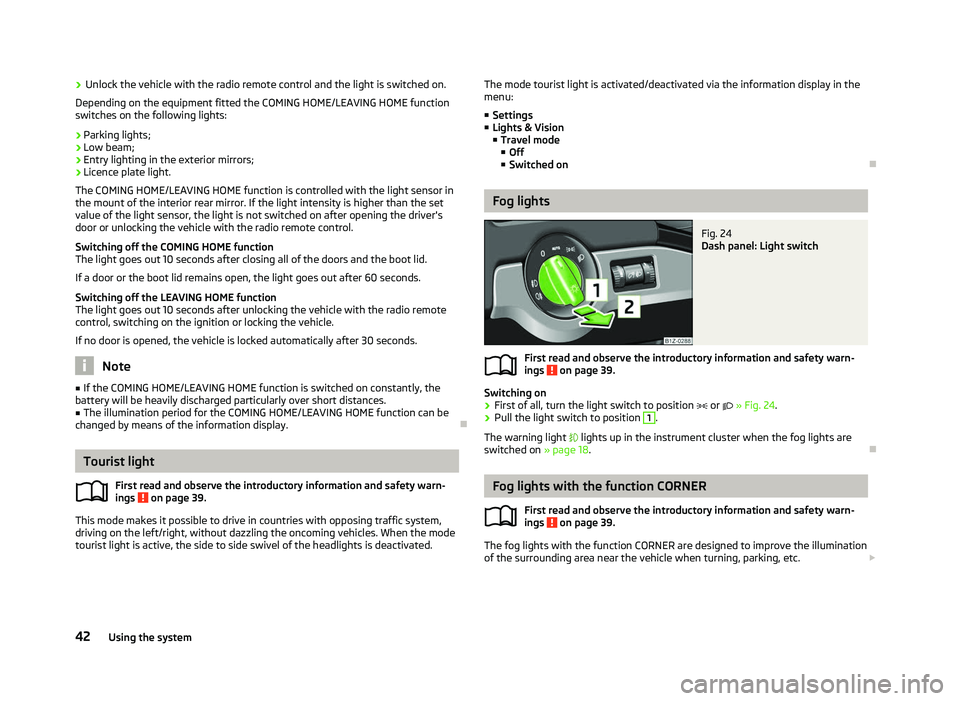
Fig. 24
Dash panel: Light switch
First read and observe the introductory information and safety warn-
ings on page 39.
Switching on
› First of all, turn the light switch to position
or » Fig. 24.
› Pull the light switch to position 1
.
The warning light lights up in the instrument cluster when the fog lights are
switched on » page 18. Ð Fog lights with the function CORNER
First read and observe the introductory information and safety warn-
ings on page 39.
The fog lights with the function CORNER are designed to improve the illumination
of the surrounding area near the vehicle when turning, parking, etc. £
ä
ä
42 Using the system
Page 48 of 218
If operating lights with the door contact switch is enabled (switch A
is in position
), the light will come on when:
› the vehicle is unlocked;
› one of the doors is opened;
› or the ignition key is removed.
If operating lights with the door contact switch is enabled (switch A
is in position
), the light will turn off when:
› the vehicle is locked;
› the ignition is switched on;
› about 30 seconds after all the doors have been closed.
If a door remains open, or if the switch A
is in the position
, the interior light
goes out after 10
minutes to prevent the battery from discharging. Note
We recommend having these bulbs replaced by a ŠKODA specialist garage. ÐInterior lighting - version 2
Fig. 30
Interior lighting - version 2
Switching on
› Press the switch into position
» Fig. 30.
Switching off
› Press the switch into position
O » Fig. 30.
Operating with the door contact switch
› Press the switch into position
» Fig. 30.
The same principles apply for interior lighting version 2 as for » page 45, Interior
lighting - version 1 . Ð Illuminated storage compartment on front passenger side
› When opening the flap of the storage compartment on the front passenger
side the lighting in the storage compartment comes on.
› The light switches on automatically when the parking light is switched on and
goes out when the flap is closed. Ð Front door warning light
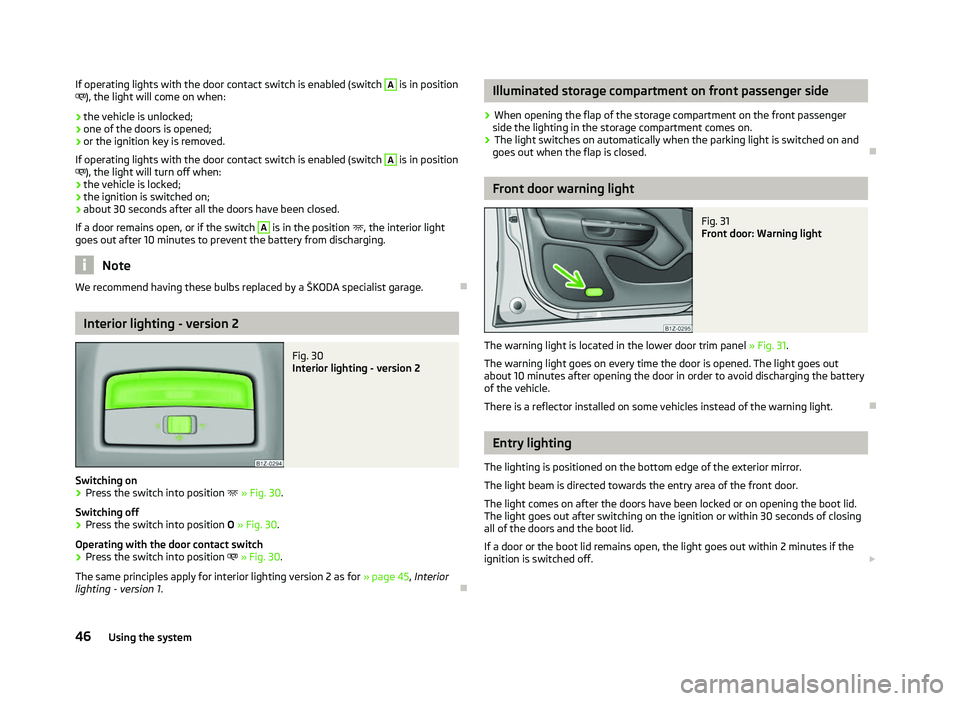
Fig. 31
Front door: Warning light
The warning light is located in the lower door trim panel » Fig. 31.
The warning light goes on every time the door is opened. The light goes out
about 10 minutes after opening the door in order to avoid discharging the battery
of the vehicle.
There is a reflector installed on some vehicles instead of the warning light. Ð Entry lighting
The lighting is positioned on the bottom edge of the exterior mirror.
The light beam is directed towards the entry area of the front door.
The light comes on after the doors have been locked or on opening the boot lid.
The light goes out after switching on the ignition or within 30
seconds of closing
all of the doors and the boot lid.
If a door or the boot lid remains open, the light goes out within 2 minutes if the
ignition is switched off. £
46 Using the system
Page 59 of 218
Retrieving settings via the remote control key
›
If the driver's door is closed and the ignition is switched off, briefly press the
button on the remote control key and open the driver's door.
The seat and exterior mirrors now move automatically into the stored positions.
Retrieving setting of exterior mirror for reversing
› Turn the rotary knob for the exterior mirror setting into the position
» page 52
before engaging the reverse gear.
› Engage reverse gear.
The mirror returns into its initial position, after the rotary knob is moved out of
the position and put into another position or if the speed is more than 15 km/h.
Emergency Off
The setting process for the seats and exterior mirrors can be interrupted if neces-
sary, by pressing any button on the driver's seat. ÐSeat heaters
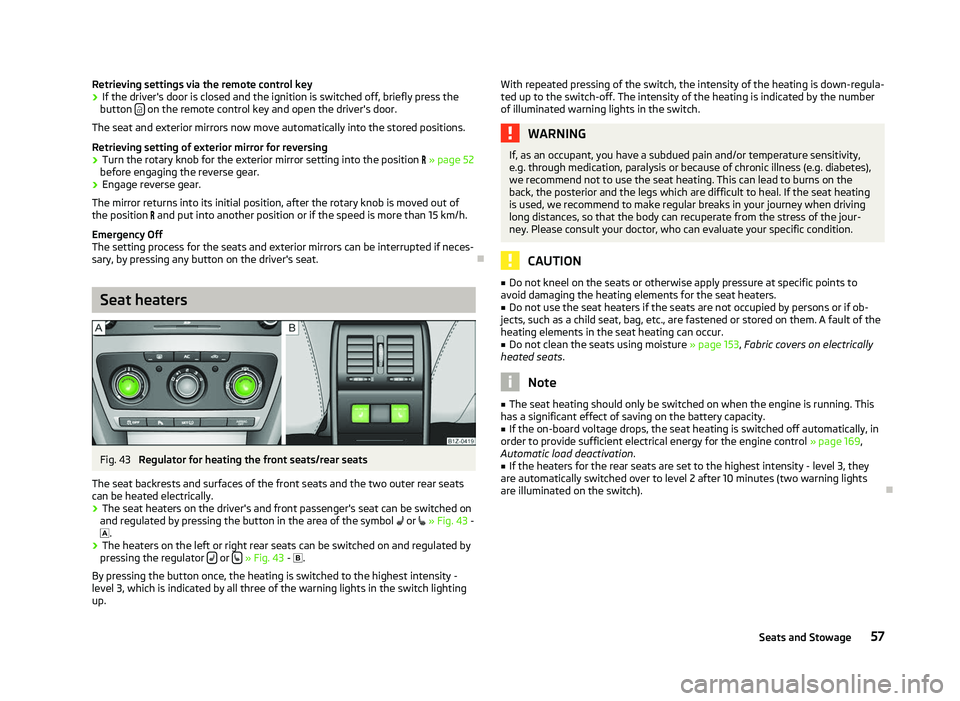
Fig. 43
Regulator for heating the front seats/rear seats
The seat backrests and surfaces of the front seats and the two outer rear seats
can be heated electrically. › The seat heaters on the driver's and front passenger's seat can be switched on
and regulated by pressing the button in the area of the symbol or
»
Fig. 43 -
.
› The heaters on the left or right rear seats can be switched on and regulated by
pressing the regulator or
» Fig. 43 -
.
By pressing the button once, the heating is switched to the highest intensity -
level 3, which is indicated by all three of the warning lights in the switch lighting
up. With repeated pressing of the switch, the intensity of the heating is down-regula-
ted up to the switch-off. The intensity of the heating is indicated by the number
of illuminated warning lights in the switch. WARNING
If, as an occupant, you have a subdued pain and/or temperature sensitivity,
e.g. through medication, paralysis or because of chronic illness (e.g. diabetes),
we recommend not to use the seat heating. This can lead to burns on the
back, the posterior and the legs which are difficult to heal. If the seat heating
is used, we recommend to make regular breaks in your journey when driving
long distances, so that the body can recuperate from the stress of the jour-
ney. Please consult your doctor, who can evaluate your specific condition. CAUTION
■ Do not kneel on the seats or otherwise apply pressure at specific points to
avoid damaging the heating elements for the seat heaters.
■ Do not use the seat heaters if the seats are not occupied by persons or if ob-
jects, such as a child seat, bag, etc., are fastened or stored on them. A fault of the
heating elements in the seat heating can occur.
■ Do not clean the seats using moisture » page 153, Fabric covers on electrically
heated seats. Note
■ The seat heating should only be switched on when the engine is running. This
has a significant effect of saving on the battery capacity. ■ If the on-board voltage drops, the seat heating is switched off automatically, in
order to provide sufficient electrical energy for the engine control » page 169,
Automatic load deactivation .
■ If the heaters for the rear seats are set to the highest intensity - level 3, they
are automatically switched over to level
2 after 10 minutes (two warning lights
are illuminated on the switch). Ð
57
Seats and Stowage
Page 72 of 218
12-volt power socket
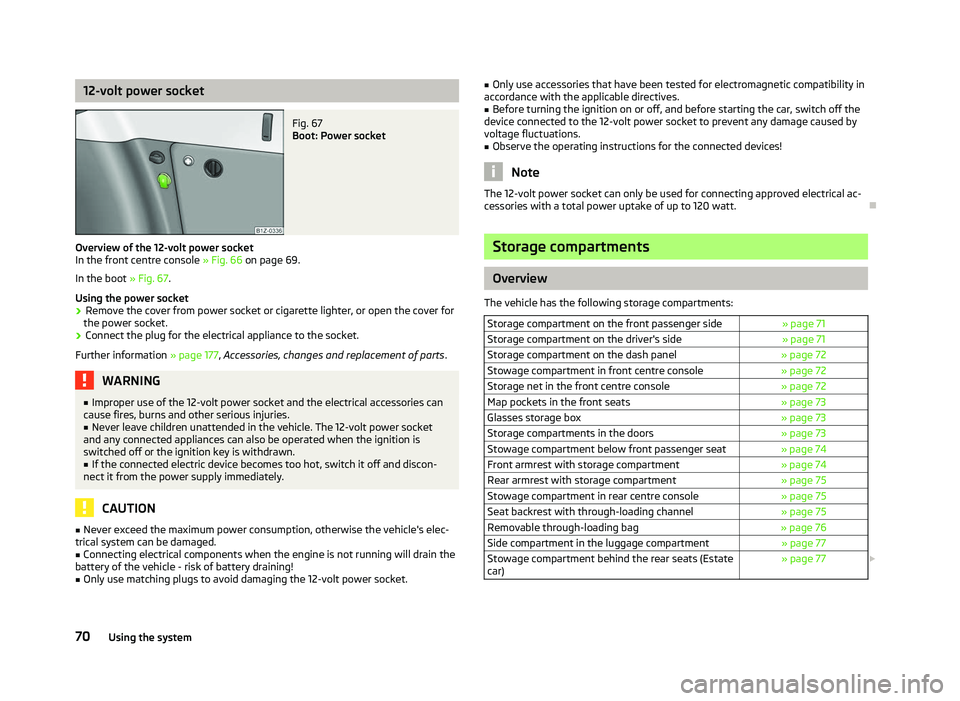
Fig. 67
Boot: Power socket
Overview of the 12-volt power socket
In the front centre console » Fig. 66 on page 69
.
In the boot » Fig. 67.
Using the power socket
› Remove the cover from power socket or cigarette lighter, or open the cover for
the power socket.
› Connect the plug for the electrical appliance to the socket.
Further information » page 177, Accessories, changes and replacement of parts .WARNING
■ Improper use of the 12-volt power socket and the electrical accessories can
cause fires, burns and other serious injuries. ■ Never leave children unattended in the vehicle. The 12-volt power socket
and any connected appliances can also be operated when the ignition is
switched off or the ignition key is withdrawn. ■ If the connected electric device becomes too hot, switch it off and discon-
nect it from the power supply immediately. CAUTION
■ Never exceed the maximum power consumption, otherwise the vehicle's elec-
trical system can be damaged.
■ Connecting electrical components when the engine is not running will drain the
battery of the vehicle - risk of battery draining!
■ Only use matching plugs to avoid damaging the 12-volt power socket. ■
Only use accessories that have been tested for electromagnetic compatibility in
accordance with the applicable directives.
■ Before turning the ignition on or off, and before starting the car, switch off the
device connected to the 12-volt power socket to prevent any damage caused by
voltage fluctuations.
■ Observe the operating instructions for the connected devices! Note
The 12-volt power socket can only be used for connecting approved electrical ac-
cessories with a total power uptake of up to 120
watt.Ð Storage compartments
Overview
The vehicle has the following storage compartments: Storage compartment on the front passenger side » page 71
Storage compartment on the driver's side » page 71
Storage compartment on the dash panel » page 72
Stowage compartment in front centre console » page 72
Storage net in the front centre console » page 72
Map pockets in the front seats » page 73
Glasses storage box » page 73
Storage compartments in the doors » page 73
Stowage compartment below front passenger seat » page 74
Front armrest with storage compartment » page 74
Rear armrest with storage compartment » page 75
Stowage compartment in rear centre console » page 75
Seat backrest with through-loading channel » page 75
Removable through-loading bag » page 76
Side compartment in the luggage compartment » page 77
Stowage compartment behind the rear seats (Estate
car) » page 77
£70
Using the system
Page 89 of 218

Switching recirculated air mode on
›
Repeatedly press the button
5
» Fig. 90
on page 85 until the warning
light on the left side of the button is illuminated.
Switch on automatic air distribution control
› Repeatedly press the button
5
» Fig. 90
on page 85 until the warning
light on the right side of the button is illuminated.
Switch off automatic air distribution control temporarily
› If the air quality sensor does not automatically switch on the air distribution
control in the event of an unpleasant odour, you can switch it on yourself by
pressing the button 5
» Fig. 90
on page 85. The warning light lights up in
the button on the left side.
Switching recirculated air mode off
› Press the button
AUTO 8
» Fig. 90
on page
85 or repeatedly press the button
5
» Fig. 90 on page 85
until the warning lights in the button go out.WARNING
Do not leave recirculated air mode on over a longer period of time, as “stale”
air can cause fatigue of the driver and passengers, reduce attention levels and
also cause the windows to mist up. The risk of having an accident increases.
Switch off recirculated air mode as soon as the windows start to mist up. Note
■ If the windscreen mists up, press the button 1
» Fig. 90 on page 85
. Press
the button AUTO 8
» Fig. 90
on page 85 when the windshield is demisted.
■ The automatic air distribution control operates only if the outside temperature
is higher than approx. 2 °C. ÐControlling blower
The Climatronic system controls the blower stages automatically in line with the
interior temperature. However, the blower stages can be manually adapted to
suit your particular needs.
› Repeatedly press the button
10
» Fig. 90
on page 85 on the left side (reduce
blower speed) or on the right side (increase blower speed).
If the blower is switched off, the Climatronic system is switched off.
The set blower speed is displayed above the button 10
» Fig. 90 on page 85
when the respective number of warning lights come on. WARNING
■ “
Stale air” may result in fatigue in the driver and occupants, reduce attention
levels and also cause the windows to mist up. The risk of having an accident
increases.
■ Do not switch off the Climatronic system for longer than necessary.
■ Switch on the Climatronic system as soon as the windows mist up. Ð Defrosting windscreen
Switching on › Press the button
1
» Fig. 90
on page 85.
Switching off
› Once again press the button
1
» Fig. 90 on page 85
or the button AUTO .
The temperature control is controlled automatically. More air flows out of the air
outlet vents 1 » Fig. 86 on page 80
. Ð Auxiliary heating (auxiliary heating and ventilation)
ä
Introduction
This chapter contains information on the following subjects:
Direct switching on/off 88
System settings 89
Radio remote control 89
Changing the battery of the radio remote control 90
Auxiliary heating (parking heating)
The auxiliary heater (parking heater) functions in connection with the air-condi-
tioning system or Climatronic.
It can be used when stationary, when the engine is switched off to preheat the
vehicle and while driving (e.g. during the heating phase of the engine).
The engine is also preheated, if the auxiliary heating is switched on when the ve-
hicle is stationary and the engine is switched off. £
87
Heating and air conditioning system
Page 90 of 218
The auxiliary heating (parking heating) warms up the coolant by combusting fuel
from the vehicle tank. The coolant warms up the air, which (if the blower speed is
not set to zero) flows into the passenger compartment.
Auxiliary ventilation
The auxiliary ventilation enables fresh air to flow into the vehicle interior by
switching off the engine, whereby the interior temperature is effectively de-
creased (e.g. with the vehicle parked in the sun).
WARNING
■ The auxiliary heating must never be operated in closed rooms - risk of poi-
soning! ■ The auxiliary heating must not be running during refuelling - risk of fire.
■ The exhaust pipe of the auxiliary heating is located on the underside of the
vehicle. Therefore, if you wish to operate the auxiliary heating, do not park the
vehicle in such a way that the exhaust gases from the auxiliary heating can
come into contact with highly flammable materials (e.g. dry grass) or easily in-
flammable substances (e.g. spilt fuel). Note
■ If the auxiliary heating runs, the fuel consumption comes from the vehicle tank.
The auxiliary heating automatically controls the filling level in the fuel tank. If only
a low quantity of fuel is present in the fuel tank, the function of the auxiliary
heating is blocked. ■ The exhaust pipe of the auxiliary heating, which is located on the underside of
the vehicle, must not be clogged and the exhaust flow must not be blocked.
■ If the auxiliary heating and ventilation is running, the vehicle battery discharges.
If the auxiliary heating and ventilation has been operated several times over a
longer period, the vehicle must be driven a few kilometres in order to recharge
the vehicle battery.
■ The auxiliary heating only switches the blower on, if it has achieved a coolant
temperature of approx. 50 °C.
■ At low outside temperatures, this can result in a formation of water vapour in
the area of the engine compartment. This is quite normal and is not an operating
problem.
■ After switching off the auxiliary heating, the coolant pump runs for a short peri-
od.
■ The auxiliary heating and ventilation does not switch on or comes on, if the ve-
hicle battery indicates a low loading state » page 169, Automatic load deactiva-
tion . ■
The auxiliary heating (parking heating) does not switch on, if the following was
shown in the information display or before switching off the ignition: Please re-
fuel! ■ The air inlet in front of the windscreen must be free of ice, snow or leaves in
order to ensure that the auxiliary heating operates properly.
■ So that warm air can flow into the vehicle interior after switching on the auxili-
ary heating, you must maintain the comfort temperature normally selected by
you, leave the fan switched on and leave the air outlet vents in an open position.
It is recommended to put the air flow in the position or .Ð Direct switching on/off
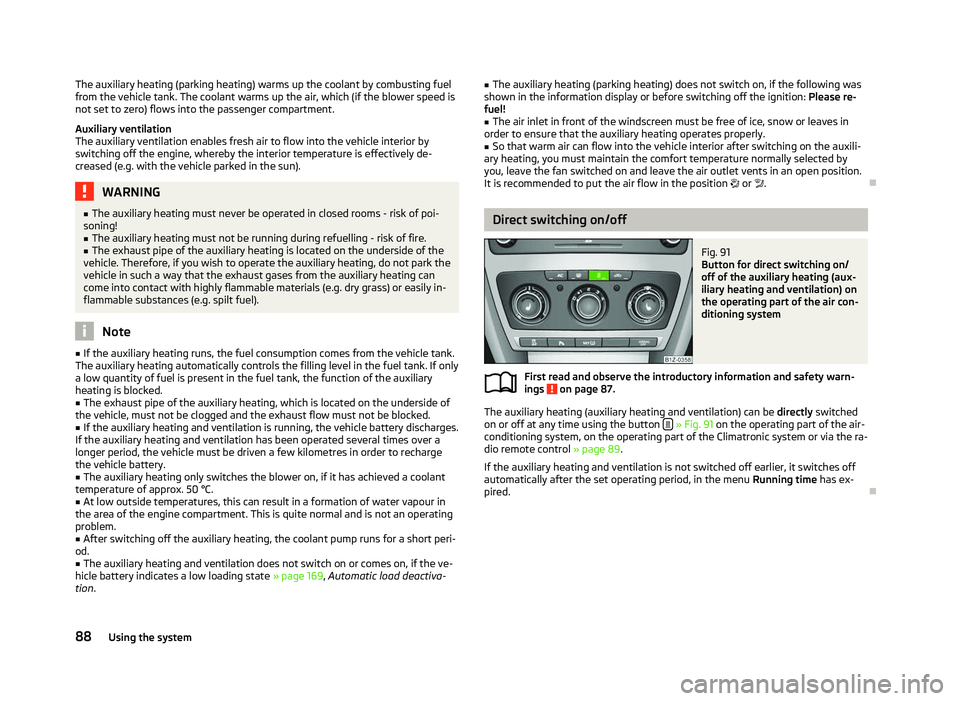
Fig. 91
Button for direct switching on/
off of the auxiliary heating (aux-
iliary heating and ventilation) on
the operating part of the air con-
ditioning system
First read and observe the introductory information and safety warn-
ings on page 87.
The auxiliary heating (auxiliary heating and ventilation) can be
directly switched
on or off at any time using the button » Fig. 91 on the operating part of the air-
conditioning system, on the operating part of the Climatronic system or via the ra-
dio remote control » page 89.
If the auxiliary heating and ventilation is not switched off earlier, it switches off
automatically after the set operating period, in the menu Running time has ex-
pired. Ð
ä
88 Using the system
Page 91 of 218
System settings
First read and observe the introductory information and safety warn-
ings on page 87.
The following menu items can be selected in the menu
Aux. heating in the infor-
mation display (depending on the equipment fitted in the vehicle):
■ Day of the wk. - Set the current weekday.
■ Time- Set the desired running time in 5
minute increments. The running time
can be 10 to 60 minutes.
■ Mode - Set the desired heating/ventilation mode.
■ Starting time 1-3 - In each pre-set time, the day and the time (hour and minute)
can be set for switching on the auxiliary heating and/or ventilation. An empty
position can be found between Sunday and Monday when selecting the day. If
this empty position is selected, the activation is performed without taking into
account the day.
■ Activate - Enable pre-set mode.
■ Dectivate - Disable pre-set mode.
■ Factory setting - Restore factory setting.
■ Back - Return to main menu.
Only one programmed pre-set time can be active.
The last programmed pre-set time remains active.
After the auxiliary heating activates at the set time, it is necessary to pre-set a
time again.
If the pre-set menu is closed by selecting the menu item Back or if no changes
are made on the display for more than 10 seconds, the set values are stored, but
the pre-set time is not activated.
An warning light on the button »
Fig. 91
on page 88 is illuminated when the
system is running.
The running system deactivates after expiration of the operating period or can be
deactivated earlier by pressing the button to directly switch on/off the auxiliary
heating » Fig. 91 on page 88
or by using the radio remote control. Ð
ä Radio remote control
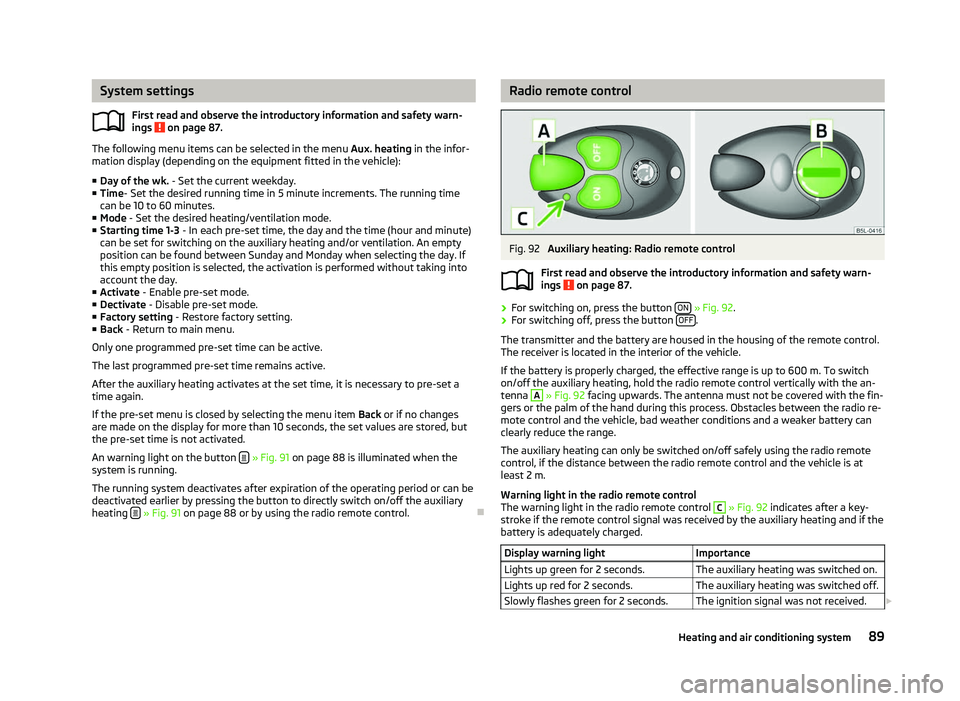
Fig. 92
Auxiliary heating: Radio remote control
First read and observe the introductory information and safety warn-
ings on page 87.
›
For switching on, press the button
ON » Fig. 92.
› For switching off, press the button
OFF .
The transmitter and the battery are housed in the housing of the remote control.
The receiver is located in the interior of the vehicle.
If the battery is properly charged, the effective range is up to 600
m. To switch
on/off the auxiliary heating, hold the radio remote control vertically with the an-
tenna A
» Fig. 92 facing upwards. The antenna must not be covered with the fin-
gers or the palm of the hand during this process. Obstacles between the radio re-
mote control and the vehicle, bad weather conditions and a weaker battery can
clearly reduce the range.
The auxiliary heating can only be switched on/off safely using the radio remote
control, if the distance between the radio remote control and the vehicle is at
least 2
m.
Warning light in the radio remote control
The warning light in the radio remote control C
» Fig. 92 indicates after a key-
stroke if the remote control signal was received by the auxiliary heating and if the
battery is adequately charged.
Display warning light Importance
Lights up green for 2 seconds. The auxiliary heating was switched on.
Lights up red for 2 seconds. The auxiliary heating was switched off.
Slowly flashes green for 2 seconds. The ignition signal was not received. £ ä
89
Heating and air conditioning system
Page 92 of 218
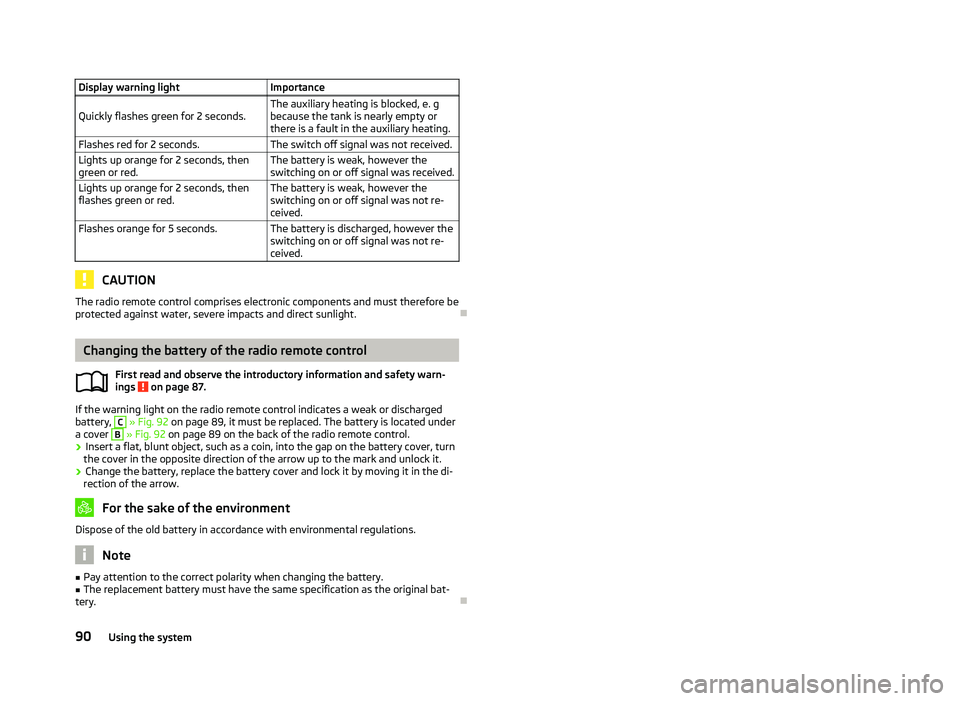
Display warning light
Importance
Quickly flashes green for 2 seconds. The auxiliary heating is blocked, e. g
because the tank is nearly empty or
there is a fault in the auxiliary heating.
Flashes red for 2 seconds. The switch off signal was not received.
Lights up orange for 2 seconds, then
green or red. The battery is weak, however the
switching on or off signal was received.
Lights up orange for 2 seconds, then
flashes green or red. The battery is weak, however the
switching on or off signal was not re-
ceived.
Flashes orange for 5 seconds. The battery is discharged, however the
switching on or off signal was not re-
ceived.CAUTION
The radio remote control comprises electronic components and must therefore be
protected against water, severe impacts and direct sunlight. ÐChanging the battery of the radio remote control
First read and observe the introductory information and safety warn-
ings on page 87.
If the warning light on the radio remote control indicates a weak or discharged
battery, C
» Fig. 92 on page 89
, it must be replaced. The battery is located under
a cover B
» Fig. 92
on page 89 on the back of the radio remote control.
› Insert a flat, blunt object, such as a coin, into the gap on the battery cover, turn
the cover in the opposite direction of the arrow up to the mark and unlock it.
› Change the battery, replace the battery cover and lock it by moving it in the di-
rection of the arrow. For the sake of the environment
Dispose of the old battery in accordance with environmental regulations. Note
■ Pay attention to the correct polarity when changing the battery.
■ The replacement battery must have the same specification as the original bat-
tery. Ð
ä
90
Using the system